Installation & Programming Instructions for Profile Series with RF Technology
Open the original PDF document
View PDFInstallation And Programming Instructions For Profile Series With RF Technology
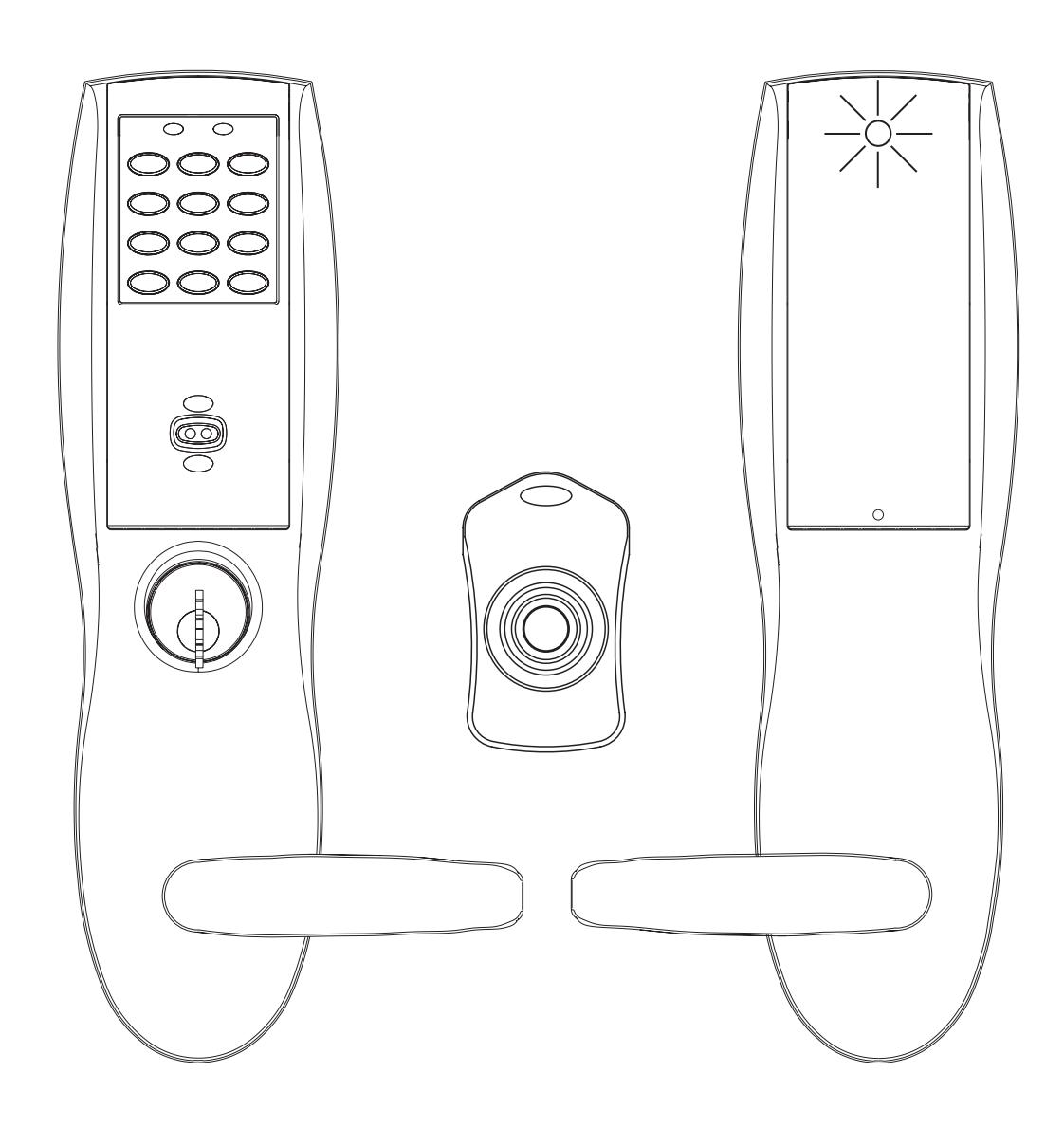

Table of Contents
| Page | ||
|---|---|---|
| 1 | General Description | |
| 2 |
Installation of RF Technology Lock
1 |
|
| 3 |
How to Enter Preamble and RF
User Codes2 |
|
| 4 |
Keypad Programming
3 |
|
| 5 | Additional Keypad Programming4 | |
| 6 |
Appendix
5 |
|
| 7 |
Supplemental RF Technology Door Log Sheet
6 |
|
1 General Description
The RF Technology lock (TU & TP Prefixes) operates similar to other Profile Series locks with the added option of remote wireless actuation. These Users are specified through the application software (SofLink Plus™) or keypad programming of the lock. To activate the RF Technology lock remotely requires the use of a hand held RF transmitter called an RF Fob.
To use an RF Fob for remote activation of the lock, the RF receiver must be configured with a 3-digit (100-999) preamble code . This (user selectable) preamble code ensures that an RF Fob from another facility cannot actuate the RF lock.
Note: The preamble code can only be entered directly into the RF receiver via the keypad.
A RF Technology lock is shipped with the default preamble code of 649 from the factory. It is strongly recommended that the default preamble code be changed in the field.
For additional default settings, see the Supplemental RF Technology Door Log Sheet, table 1, page 6.
After the RF receiver is configured with the selected preamble code, the controller board must be programmed with the complete RF User Code. The RF User Code is 6-digits and can be entered through the application software (SofLink Plus) or the keypad. The first 3-digits of the RF User Code are the preamble code, while the second 3-digits are the RF Fob code. The RF Fob code is marked on the printed label of the RF Fob.
Panic user codes can only be entered into the lock via the keypad and must be re-entered after any SofLink Plus download. They cannot be entered using SofLink Plus application software.
2 Installation of the RF Technology Lock
Refer to the appropriate Profile Series Instruction Manual and templates for the door prep and installation of the RF Technology Lock with exception of the following :
- Installation of the top thru-bolt screw
- Removal process for the battery keeper
A. Installation of the top thru-bolt screw:
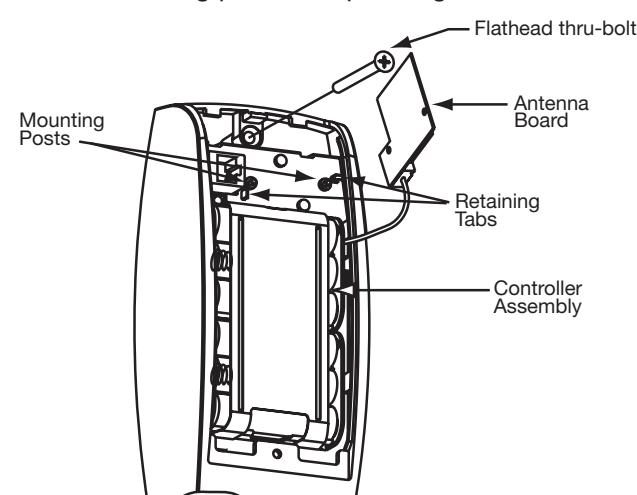
The antenna board must be carefully moved to access the upper thru-bolt screw. Care should be taken to prevent damage to the antenna retaining tabs during this process.
Press the two tabs away from the antenna board and lift the board off the mounting posts. Insert the flat head thru-bolt and secure the escutcheon in place. After tightening the top thru-bolt, replace the antenna board by placing it on the mounting posts and pressing into the retaining tabs.
| Replacement Parts Description | |||
|---|---|---|---|
| RF Technology Component | Part Number | ||
| RF Keypad Assembly | 52-2546 | ||
| RF Controller Assembly (TU) | 52-2527 | ||
| RF Controller Assembly (TP) | 52-2534 | ||
B. Removal procedure for the Battery Keeper:
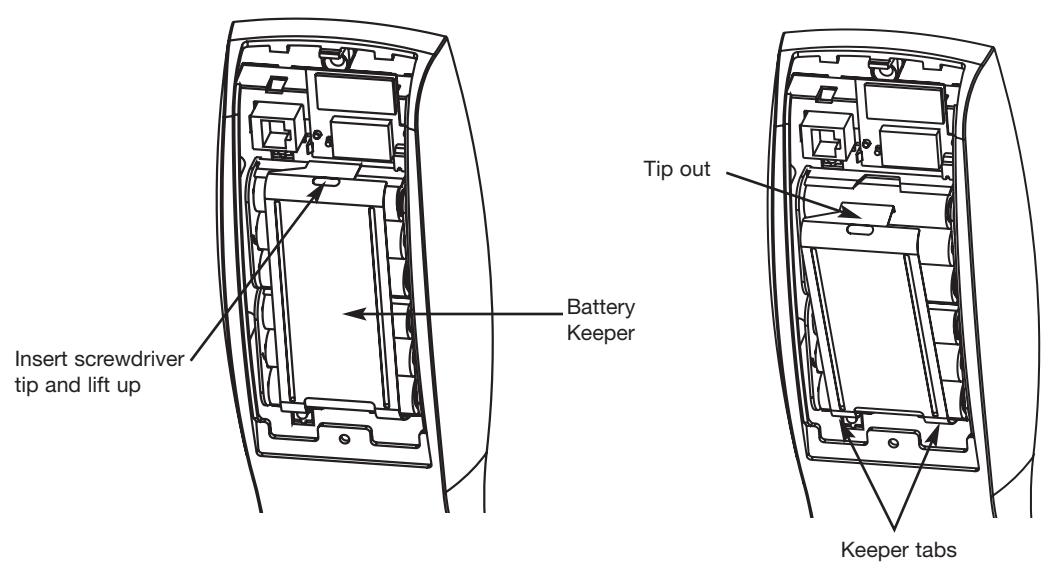
To remove the battery keeper, a flat bladed screwdriver or similar tool must be used.
Insert the screwdriver into the slot at the top of the battery keeper, lift up and pull the top of the keeper away from the batteries.
To install, insert the tabs on the bottom of the keeper into the battery compartment slots and press the keeper tightly against batteries.
3 How to Enter Preamble & RF User Codes
A. ENTERING PREAMBLE CODE
To enter the 3-digit Preamble Code into the RF receiver and the RF User Code into the controller board, use the following steps:
Step 1: Select a 3-digit preamble code. In this example the preamble code will be 758.
Step 2: Press (for up to 3 seconds) the # sign on the keypad until you hear 3 beeps and the yellow LED
double blinks continually. (The RF receiver is now in program mode).
Step 3: Enter 6798# Default RF Program Code
Step 4: Enter 975# Command Number for entering preamble code
Step 5: Enter 758# New preamble code
Step 6: Enter 758# Repeat preamble code. Yellow LED stops blinking
Step 7: Enter # Exit RF receiver program mode. 5 beeps
B. ENTERING RF USER CODES
The RF receiver now contains the preamble code of 758 . The controller board may now need to be programmed with any of the Profile Series User types. Some of the common User types are listed as follows:
Passage: An RF Fob assigned as this type of "User" will remotely toggle (lock and unlock) the lock.
Standard: An RF Fob assigned as this type of "User" will remotely unlock the lock for a defined period of
time (1-99 seconds). After which, the lock will relock itself.
Panic: An RF Fob assigned as this type of "User" will remotely lock the outside handle of the lock.
A "Master" or "Emergency" level code entered at the keypad is required to remove the lock from
this condition.
Note: Panic user codes can only be entered into the lock via the keypad. They cannot be entered using SofLink Plus application software. Panic user codes and any keypad entered user code will be erased by a SofLink Plus download and must be re-entered via the keypad.
Continuing the example , the RF Fob number is 345 , making the complete RF User Code: 758345
RF User Code = Preamble Code + RF Fob Code
To program (via the keypad only) the RF Technology lock as a Panic User, the following keypad entries are made:
| Step 1: 99#1234* | Controller program mode | Yellow LED flashes |
|---|---|---|
| Step 2: 50#9# | Panic User number | Yellow LED flashes |
| Step 3: User Number (04-500)# | User number | Yellow LED flashes |
Step 4: 758345 * RF User Code Yellow LED flashes quickly Step 5: 758345 * RF User Code Yellow LED flashes slowly Step 6: * Yellow LED goes out
Pressing (up to 3 seconds) RF Fob #345 will now remotely actuate the lock placing it into the Panic mode. A Red LED on the inside escutcheon will flash rapidly indicating communication between the RF Fob and the lock. Following actuation, the LED will flash once per second for 1-99 seconds (Default = 10 Sec).
Advisory 1: There is a time delay period between initially pressing the RF Fob button and the actuation of the lock. In some cases the RF Fob will have to be pressed (and held for 3 seconds) multiple times to successfully actuate the lock.
Advisory 2: In the event that there are co-located RF Technology locks using different RF Fobs that are pressed simultaneously, the locks may not actuate due to cross interference between the locks and the RF Fobs. The User should repeatedly press (and hold for 3 seconds) the RF Fob button until actuation of the lock occurs.
Note: When programming the controller board with SofLink Plus software specify the User Type and enter the 6-digit RF User Code in the Code section of the User Data screen, then download information to the lock. Panic user codes can only be entered into the lock via the keypad and must be re-entered after any SofLink Plus download. They cannot be entered using SofLink Plus application software.
4 Keypad Programming
To Change the RF Program Code:
Press (up to 3 seconds) the # sign on the keypad until you hear 3 beeps and the yellow LED blinks continually. (RF Receiver is now in program mode)
Note: The factory default RF Program Code is 6798 . It is recommended that this code be changed in the field.
RF Program Code# 901# Yellow LED double blinks Yellow LED double blinks Yellow LED double blinks Yellow LED double blinks Yellow LED double blinks Yellow LED double blinks Yellow LED double blinks Yellow LED double blinks Yellow LED double blinks Yellow LED double blinks
To Change the 3 digit (100-999) Preamble Code:
Press (up to 3 seconds) the # sign on the keypad until you hear 3 beeps and the yellow LED blinks continually. (RF Receiver is now in program mode)
Note: The RF Technology lock is provided with a factory default preamble code of 649 . It is recommended that this default preamble code be changed in the field.
RF Program Code # Yellow LED double blinks 975 # Yellow LED double blinks (New 3 digit preamble code) # Yellow LED double blinks
(New 3 digit preamble code) # 3 Beeps & Yellow LED double blinks 5 Beeps & Yellow LED goes out
To Program a Panic User:
99#1234* Yellow LED blinks 50#9# Yellow LED blinks User Number (04-500)# Yellow LED blinks Yellow LED blinks Yellow LED blinks faster Yellow LED blinks slower Yellow LED goes out
To Program a Standard User:
99#1234* Yellow LED blinks 50#1# Yellow LED blinks Yellow LED blinks Yellow LED blinks Yellow LED blinks Yellow LED blinks faster Yellow LED blinks slower Yellow LED blinks slower Yellow LED goes out
To Program a Passage User:
99#1234* 50#0# User Number (04-500)# RF User Code* RF User Code* Yellow LED blinks Yellow LED blinks Yellow LED blinks faster Yellow LED blinks slower Yellow LED blinks slower Yellow LED goes out
Note: When programming the controller board with SofLink Plus software specify the User Type and enter the 6-digit RF User Code in the Code section of the User Data screen; then download information to the lock. Panic user codes can only be entered into the lock via the keypad and must be re-entered after any SofLink Plus download. They cannot be entered using SofLink Plus application software.
5 Additional Keypad Programming
To Disable the RF Receiver:
Depress (up to 3 seconds) the # sign on the keypad until you hear 3 beeps and the yellow LED blinks continually. RF Receiver is now in program mode.
RF Program Code # Yellow LED double blinks 903 # Yellow LED double blinks 00000 # Yellow LED double blinks
00000 # 3 Beeps & Yellow LED double blinks # 5 Beeps & Yellow LED goes out
Note: When the RF Receiver has been disabled and an RF signal is detected from an RF FOB, the lock will beep 5 times (rapidly) to indicate that it is in disabled mode.
To Enable the RF Receiver:
Depress (up to 3 seconds) the # sign on the keypad until you hear 3 beeps and the yellow LED blinks continually. RF Receiver is now in program mode.
RF Program Code # Yellow LED double blinks 913 # Yellow LED double blinks 00000 # Yellow LED double blinks
00000 # 3 Beeps & Yellow LED double blinks # 5 Beeps & Yellow LED goes out
To Change the Red LED Actuation Indicator Duration:
Press (up to 3 seconds) the # sign on the keypad until you hear 3 beeps and the yellow LED blinks continually. RF Receiver is now in program mode.
Note: The Red LED (located on the inside escutcheon) default duration is 10 seconds.
RF Program Code # Yellow LED double blinks 971 # Yellow LED double blinks Duration (1-99 Seconds) # Yellow LED double blinks Duration (1-99 Seconds) # 3 Beeps & Yellow LED blinks # 5 Beeps & Yellow LED goes out
To Delete an RF Technology User:
99 # Master Code * Yellow LED blinks 50 # 1 # User Number (04-500) # Yellow LED blinks
* Yellow LED blinks quickly * Yellow LED blinks slowly * Yellow LED goes out
6 Appendix
RF Technology Lock Notes:
- Low battery indication via 6 beeps after a valid RF Fob is depressed
- Passage mode indication via 6 beeps upon unlocking
- Passage mode unlocked condition has precedence over other users
- Panic indication via 1 long beep followed by 5 short beeps
- Panic mode reset by entering Master or Emergency code ( at keypad only )
- Disabled RF Receiver provides 5 beeps after valid RF Fob is depressed
- If lock does not actuate after 3 seconds depress RF Fob again
Glossary of Terms
RF Technology: A Profile Series option to remotely actuate a lock using a wireless hand held transmitter
referred to as the RF Fob.
RF Receiver: A circuit board (located under battery cover) that recognizes the signal emitted from
an RF Fob.
RF Program Code : The equivalent of a master code for the RF Receiver. The RF Program code is
necessary to make program changes such as the preamble code and the red LED
indicator light time duration.
Preamble Code: A 3-digit number (field selectable) required for enhancing the security of the RF Technology
lock. This code must be entered through the keypad. The preamble code represents
the first 3-digits of the RF User Code.
Controller Board: The circuit board located behind the battery compartment in the inside escutcheon. The
RF User Codes are programmed and stored in this board with the keypad or
SofLink Plus™ software.
RF Fob Code: A 3-digit number that is labeled on the RF Fob representing the last 3 digits of the RF
User Code.
RF User Code: A 6-digit number that operates the RF Technology lock.
RF User Code = Preamble Code + RF Fob Code
Command Number: A 3-digit number that the RF Receiver recognizes to perform specific programming
functions. For example, the command number to program the preamble code into the
receiver is 975.
User Types: The RF Technology lock can be programmed to remotely actuate in different ways.
These are referred to as User Types: Panic, Passage and Standard.
Panic User: An RF Fob specified as this type of User will remotely lock the outside lever. Must be
programmed via the keypad and re-enter after any SofLink Plus user download. A Master or Emergency level User code is required to remove the lock from
this condition.
Passage User: An RF Fob configured as this type of User will remotely toggle (lock and unlock) the lock.
Standard User: An RF Fob configured as this type of User will remotely unlock the lock for a defined
period of time (1-99 seconds). After which the lock will relock itself.
7 Supplemental - RF Technology Door Log Sheet
| Lock Model: | |
|---|---|
| Door Name: | |
| Location: |
| Table 1: RF Technology Receiver Log | |||||
|---|---|---|---|---|---|
| Function | Default | User Selected | |||
| RF Program Code | 6798 | ||||
| RF Receiver Status | Enabled | ||||
| Preamble Code | 649 | ||||
| Red LED Indicator | 10 Seconds | ||||
| Table 2: RF Technology User Log | |||||
|---|---|---|---|---|---|
| User Name | User Type | User Number | RF Fob Code | Notes | |