Installation Instructions for Keypad Rim and Mortise Type Exit Device
Open the original PDF document
View PDF


KP Series Keypad Rim/Mortise Exit Devices Installation & Programming Instructions
A7137E
02/21
Copyright © 2014. 2021, Sargent Manufacturing Company, an ASSA ABLOY Group company. All rights reserved. Reproductions in whole or in part without express written permission of Sargent Manufacturing Company is prohibited. 02/28/21
Instructions for Installation of Keypad Rim & Mortise Exit Devices KP8877 / KP8878 KP8977 / KP8978

Table of Contents
|
Regulatory Compliance
3 1 |
|
|---|---|
|
Warning3
2 |
|
|
General Description4
3 |
|
|
Specifications
4 4 |
|
|
Features
4 5 |
|
|
Parts Breakdown
5 6 |
|
|
Rim Installation Instructions for KP8800 Series
7 |
7 |
|
Mortise Installation Instructions for KP8900 Series
8 |
14 |
|
Programming Instructions15
9 |
|
|
Troubleshooting27
10 |

Regulatory Compliance
Changes or modifications to this unit not expressly approved by the party responsible for compliance could void the user's authority to operate the equipment.
FCC:
This equipment has been tested and found to comply with the limits for a Class B digital device, pursuant to Part 15 of the FCC Rules. These limits are designed to provide reasonable protection against harmful interference in a residential installation. This equipment generates, uses, and can radiate radio frequency energy and, if not installed and used in accordance with the instructions, may cause harmful interference to radio communications. However, there is no guarantee that interference will not occur in a particular installation. If this equipment does cause harmful interference to radio or television reception, which can be determined by turning the equipment off and on, the user is encouraged to try to correct the interference by one or more of the following measures:
- Reorient or relocate the receiving antenna.
- Increase the separation between the equipment and receiver.
- Connect the equipment into an outlet on a circuit different from that to which the receiver is connected.
- Consult the dealer or an experienced radio/TV technician for help.
Industry Canada:
This Class B digital apparatus meets all requirements of the Canadian Interference Causing Equipment Regulations. Operation is subject to the following two conditions: (1) this device may not cause harmful interference, and (2) this device must accept any interference received, including interference that may cause undesired operation.
Cet appareillage numérique de la classe B répond à toutes les exigences de l'interférence canadienne causant des règlements d'équipement. L'opération est sujette aux deux conditions suivantes: (1) ce dispositif peut ne pas causer l'interférence nocive, et (2) ce dispositif doit accepter n'importe quelle interférence reçue, y compris l'interférence qui peut causer l'opération peu désirée.
This equipment complies with FCC radiation exposure limits set forth for an uncontrolled environment. This equipment should be installed and operated with minimum distance 20cm between the radiator and your body. This transmitter must not be co-located or operating in conjunction with any other antenna or transmitter.
Cet équipement est conforme aux limites d'exposition aux radiations de la FCC définies pour un environnement non contrôlé. Cet équipement doit être installé et utilisé à une distance minimale de 20 cm entre le radiateur et votre corps. Cet émetteur ne doit pas être co-localisé ou fonctionner en conjonction avec une autre antenne ou un autre émetteur.
Under Industry Canada regulations, this radio transmitter may only operate using an antenna of a type and maximum (or lesser) gain approved for the transmitter by Industry Canada. To reduce potential radio interference to other users, the antenna type and its gain should be so chosen that the equivalent isotropically radiated power (e.i.r.p.) is not more than that necessary for successful communication.
Conformément à la réglementation d'Industrie Canada, le présent émetteur radio peut fonctionner avec une antenne d'un type et d'un gain maximal (ou inférieur) approuvé pour l'émetteur par Industrie Canada. Dans le but de réduire les risques de brouillage radioélectrique à l'intention des autres utilisateurs, il faut choisir le type d'antenne et son gain de sorte que la puissance isotrope rayonnée équivalente (p.i.r.e.) ne dépasse pas l'intensité nécessaire à l'établissement d'une communication satisfaisante.
Warning

This product can expose you to lead which is known to the state of California to cause cancer and birth defects or other reproductive harm. For more information go to: www.P65warnings.ca.gov.
Ce produit peut vous exposer au plomb qui, dans l'état de la Californie, est reconnu pour causer le cancer, des anomalies congénitales ou d'autres problèmes de reproduction.
Pour plus d'informations, visitez: www.P65warnings.ca.gov.

Any retrofit or other field modification to a fire rated opening can potentially impact the fire rating of the opening, and SARGENT Manufacturing makes no representations or warranties concerning what such impact may be in any specific situation. When retrofitting any portion of an existing fire rated opening, or specifying and installing a new fire-rated opening, please consult with a code specialist or local code official (Authority Having Jurisdiction) to ensure compliance with all applicable codes and ratings.

To avoid possible damage from electrostatic discharge (ESD), some basic precautions should be used when handling electronic components:
- Minimize build-up of static by touching and/or maintaining contact with unpainted metal surfaces such as door hinges, latches, and mounting plates especially when mounting electronic components such as readers and controllers onto the door.
- Leave components (reader and controller) protected in their respective anti-static bags until ready for installation
- Do not touch pins, leads or solder connections on the circuit boards

3 General Description
The SARGENT Keypad Operated Rim Exit Device is designed for areas which require standalone authorized entry. It is a self-contained microprocessor-controlled keypad with non-volatile memory.
The keypad will hold a total of 99 different User Codes. User Codes "01" and "03" are utilized for Master Code and Supervisory Code, respectively. All programming is done at the keypad, with over 1,100,000 possible user combinations.
This lock is operated by four (4) "C" batteries with a life span of approximately 40,000 cycles.
4 Specifications
- Latchbolt 3/4" (19mm) projection
- Cylinder override use 34 rim cylinder, 8877; 46 mortise cylinder, 8977
- Includes code to activate horn when keypad buttons are pushed
- Rim exit devices are non handed; mortise exits are handed
5 Features
- Non-volatile memory
- Motor driven, battery-operated ET lock
- Battery operated with (4) each "C" Alkaline
- Typical 40,000 operations per set of batteries
- Low battery alert 4 chirps after code entry
- Option Code available to sound horn every time keypad is pressed
- External remote "request to enter" connector requires wire harness (52-2071)
- All programming done at keypad
- Green LED indicates unlocked.Yellow LED indicates unit is in programming mode
- Flashing green and yellow LED's indicate deadbolt thrown or lock set in passage mode
- Infrared LED for transaction output Provides last 15 valid codes
- Operates utilizing any two to six digits per code. Digits may be repeated and codes may start with zero
- Adjustable unlock time
- Entry of three wrong User Codes disables all codes for ten seconds. Green LED flashes.
- Piezo horn can be heard with each keystroke or turned off by Master or Supervisory Code
- Last 15 transactions can be output to printer via Data Transfer Device (DTD)
- 99 users total: (1) Master Code, (1) Emergency Code, (1) Supervisory Code, with the rest being standard codes, passage codes, or one time only codes

Parts Breakdown 6
| ITEM # | PART # | DESCRIPTION | QTY |
|---|---|---|---|
| 1 | 52-2340 | *Outside Escutcheon Assembly (with keypad assy) | 1 |
| 52-0004 |
*Outside Escutcheon only
1 |
||
| 1a | 52-2299 | Keypad (with ribbon cable) less escutcheon | |
| 1b | 52-2303 | Screw Pack (Includes 1c, 1d, 2d, 2e) | |
| 1c | 52-0033 | Fire Stop Plate | |
| 1d | 01-1500 |
Fire Stop Plate screws
2 |
|
| 52-0254 |
Optional Keypad Weatherseal Gasket (exterior use), not shown
1 |
||
| 2 | 52-2302 | *Inside Escutcheon Assembly (with controller assy) | |
|
52-0087
*Inside Escutcheon only |
1 | ||
| 2a | 52-6085 |
Replacement Inside Controller Assembly Kit
(with battery housing) |
1 |
| 2b | 52-0069 | Housing Cover | 1 |
| 2c | 01-1212 | Security Screw | 1 |
| 2d | 01-0297 | Security Tool 1/8" (not provided) | 1 |
| 2e | 01-1119 | Top Escutcheon thru-bolt | 1 |
| *3 | Consult | *ET Assembly (with cylinder & motor assy) | 1 |
| Factory | *ET Assembly (without cylinder & motor assy) | 1 | |
| 3a | 68-7546 | Motor Actuator Assembly | 1 |
| 52-5654 | Ecoflex ET Harness | 2 | |
| 3b | 01-4451 | ET thru-bolts | 2 |
| 3c | 13-0074 | Cylinder Retaining screws | 1 |
| 52-0263 |
Optional ET Trim Weatherseal Gasket (exterior use),
not shown |
||
| 4 | 68-4261 | Center Case Assembly - LHRB & RHRB (standard) | 1 |
| 4a | 68-4263 | Center Case Assembly - LHRB (12-) & RHRB (12-) | 1 |
| 4b | 68-0406 | *Chassis Cover | 1 |
| 97-0052 | *Chassis Cover screws | 4 | |
* Specify finish


| ITEM # | PART # | DESCRIPTION | QTY |
|---|---|---|---|
| 1 | 52-2340 | *Outside Escutcheon Assembly (with keypad assy) | 1 |
| 52-0004 | *Outside Escutcheon only | 1 | |
| 1a | 52-2299 | Keypad (with ribbon cable) less escutcheon | 1 |
| 1b | 52-2303 | Screw Pack (Includes 1c, 1d, 2d, 2e) | 1 |
| 1c | 52-0033 | Fire Stop Plate | 1 |
| 1d | 01-1500 | Fire Stop Plate screws | 2 |
| - | 52-0254 |
Optional Keypad Weatherseal Gasket (exterior use),
not shown |
1 |
| 2 | 52-2302 | *Inside Escutcheon Assembly (with controller assy) | 1 |
| 52-0087 | *Inside Escutcheon only | 1 | |
| 2a | 52-6085 |
Replacement Inside Controller Assembly
(with battery housing) |
1 |
| 2b | 52-0069 | Housing Cover | 1 |
| 2c | 01-1212 | Security Screw | 1 |
| 2d | 01-0297 | Security Tool 1/8" (not provided) | 1 |
| 2e | 01-1119 | Top Escutcheon thru-bolt | 1 |
|
3
Consult Factory |
*ET Assembly (with cylinder) | 1 | |
| *ET Assembly (without cylinder) | 1 | ||
| 3a | 68-7546 | Motor Actuator Assembly | 1 |
| 3b | 52-5654 | Ecoflex ET Harness | 1 |
| - | 52-0263 |
Optional ET Trim Weatherseal Gasket for exterior use,
(not shown) |
1 |
| 4 | 68-2172 | Center Case Assembly - LHRB (standard and 12-) | 1 |
| 68-2173 | Center Case Assembly - RHRB (standard and 12-) | 1 | |
| 4a | 68-0407 | *Chassis Cover | 1 |
| 4b | 97-0052 | *Chassis Cover screws | 4 |
| 5 | 99-2401 | Mortise Lockbody - LHRB | 1 |
| 99-2402 | Mortise Lockbody - RHRB | 1 | |

3

Parts Breakdown (Continued)
Optional Equipment
- Data Transfer Device (DTD) used to download the user and transaction type.
- Remote Unlocking 52-2071 used for remote unlocking of motorized "ET" outside trim

Rim Installation Instructions for KP8800 Series 7
NOTE: BEFORE STARTING
- This device is non-handed
- Door should be fitted and hung
- Verify box label for size of exit device, function and hand
- Install mullion in frame, if used

Step #1 Exit Hardware & Door Prep
Prep door according to installation instruction sheet A6770.

Rim Installation Instructions for KP8800 Series (Continued) 7
Step #2 Install Outside & Inside Trim
1. Outside Trim
- For exterior applications "ET" gasket (52-0263) should be used to seal between "ET" escutcheon and outside door surface
- Route harness through under cut of cylinder hole and out to other side of door

2. Inside Trim
- Route "ET" harness along track cutout for wood doors and access hole for metal doors
- Mount exit chassis carefully. DO NOT PINCH HARNESS WIRES
- "ET" spindle will engage into the hub of exit device chassis
- Secure chassis with (2) 1/4-20 x 2-3/8" flat headmachine screws

3. Cylinder Installation (KP8877 & 12-KP8877)
- Insert cylinder into "ET" control
- Mate cylinder tailpiece into hub of exit device chassis
- Make sure "ET" harness is clear of cylinder and

4. Securing Cylinder
- Secure cylinder to exit chassis using (2) #12-24 x 1-7/8" connecting screws
- Fasten exit chassis to door using (4) #10 wood screws or #10-24 machine screws

Reproductions in whole or in part without express written permission of Sargent Manufacturing Company is prohibited. 02/28/21
KP8877/KP8878 x ET x Lever Design Keypad Operated RIM Exit Device

Rim Installation Instructions for KP8800 Series (Continued) 7
Step #3 - Exterior Door Options
A. Fire Stop Plate (P/N 53-0033)
Fire-rated doors require a fire stop plate on the outside of the door (Fig. 4A).
- 1. Drill (2) 1/8" x 1-1/4" deep holes in the door if not already present. Refer to template for fire-stop prep locations.
- 2. Attach with flap up and out using (2) #8 x 1/2" self-tapping screws for wood and metal doors.
NOTE: Fire stop plate is required on all fire-rated doors


7 Rim Installation Instructions for KP8800 Series (Continued)
B. Weather Conduit* (supplied with Weatherization Kit 52-6084)
Install weather conduit* on NON FIRE-RATED exterior doors only. Ensure larger conduit houses smaller conduit with attached O-ring (Fig.4B).
*Install conduit if exterior door is directly exposed to the weather, if it's a hollow metal (open core) type door. It's not required on solid core doors. If rain water enters open web at top of door, the conduit prevents water from inside of door entering onto controller or keypad.

Step #4 – Install Weatherseal Gasket (Exterior Doors*)
- 1. Carefully remove adhesive backing from the gasket (Fig. 5A).
-
2. Apply gasket to escutcheon:
- Starting in one place, press the adhesive side of the gasket firmly against the escutcheon.
- Work around the escutcheon, pressing the sticky side of the gasket firmly against the escutcheon edge.
- The gasket should be aligned so that all edges of the escutcheon are covered.
- 3. Attach escutcheon to the door.
Note: The 43 cylinder may be used with or without a gasket.
*For exterior doors and supplied with Weatherization Kit (p/n 52-6084). Additional supplied shroud (not shown) is required if outside keypad escutcheon is directly exposed to weather.


Rim Installation Instructions for KP8800 Series (Continued) 7
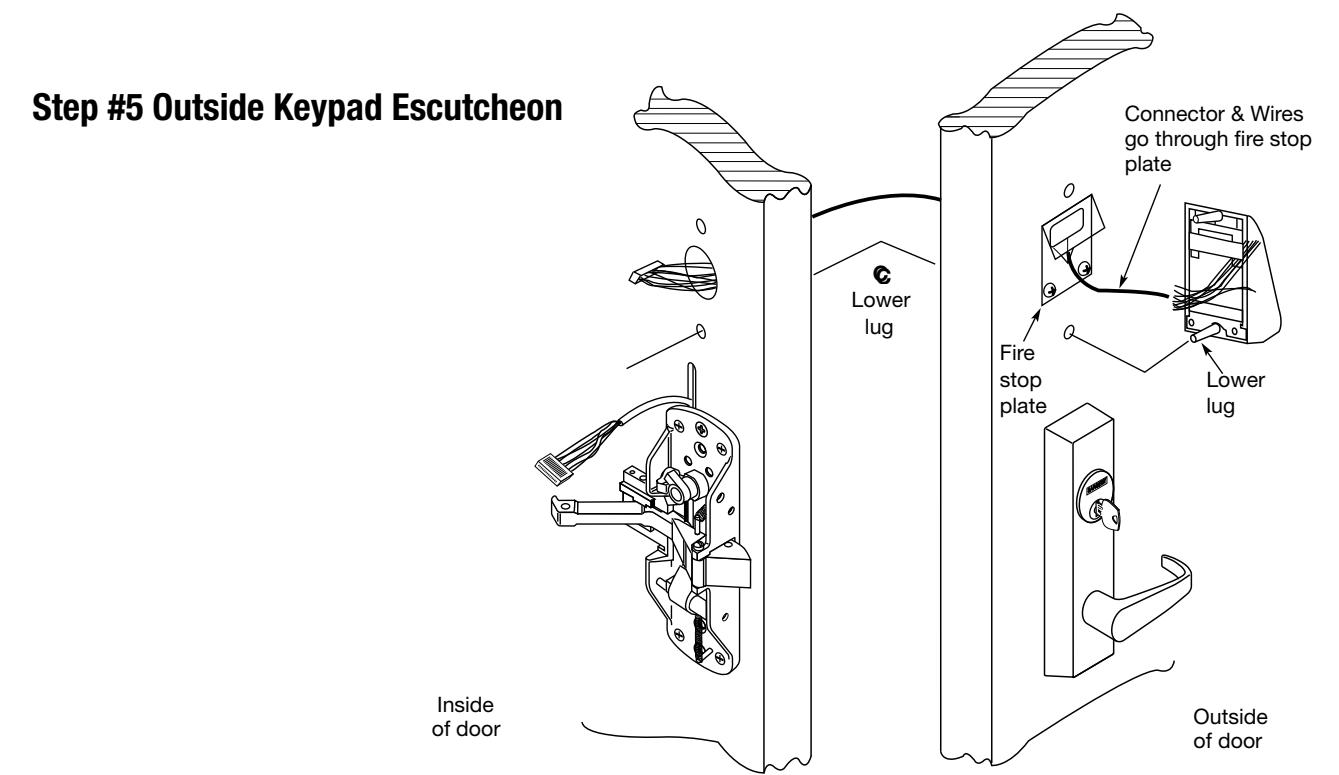
- From the inside of the door, use #8-32 x 1-1/4" pan head screw with the flat washer to attach the escutcheon using the lower lug
- Straighten keypad escutcheon and tighten #8-32 x 1-1/4" pan head screw

Rim Installation Instructions for KP8800 Series (Continued) 7
Step #5 Inside Controller Assembly
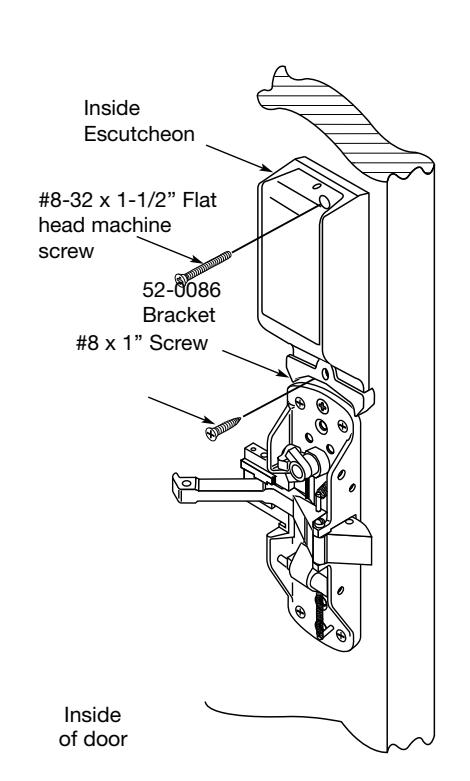
- Plug keypad connector into inside escutcheon as shown.The back plate can be removed to feed the large connector through slot into the circuit board to be assured of proper fit. If connector is not fully and properly seated on pins, unit will not function properly.
- Plug smaller connector as shown into inside escutcheon
NOTE: Both connectorsinstall only one way. Donot offset the connectors.Be sure connectors areseated completely.


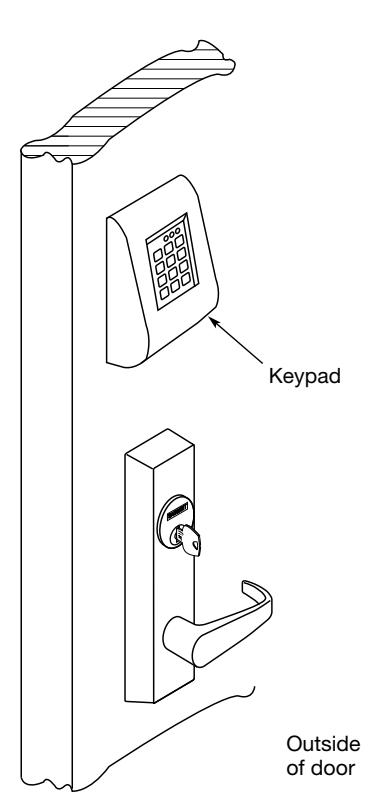
- Securely fasten top of inside escutcheon to top of keypad using a #8-32 x 1-1/2" machine screw
- Securely fasten bottom of escutcheon (52-0086) to door using #8 x 1" screw

Rim Installation Instructions for KP8800 Series (Continued) 7
Step #6 Rail Assembly
Install rail according to installation instruction sheet A6770
Step #7 Battery Installation
- Place (4) C size batteries into the compartment
- Attach battery cover to inside escutcheon and secure with #8-32 3/8" long flat head security screw


Mortise Installation Instructions for KP8900 Series 8
NOTE: BEFORE STARTING
- Check hand of door this device is not reversible
- Door should be fitted and hung
- Verify box label for size of exit device, function and hand

Step #1 Exit Hardware & Door Prep
Prep door according to installation instruction sheet A6705
Step #2 Install Outside & Inside Trim
1. Outside Trim
- For exterior applications "ET" gasket (52-0263) should be used to seal between "ET" escutcheon and outside door surface
- Route harness through under cut of cylinder hole and out to other side of door
- Mount "ET" control onto door
2. Inside Trim
- Route "ET" harness along track cutout for wood doors and access hole for metal doors.
- Mount exit chassis carefully. Do not pinch harness wires
- Secure chassis with (2) 1/4-20 x 2-3/8" flat head machine screws

Reproductions in whole or in part without express written permission of Sargent Manufacturing Company is prohibited. 02/28/21
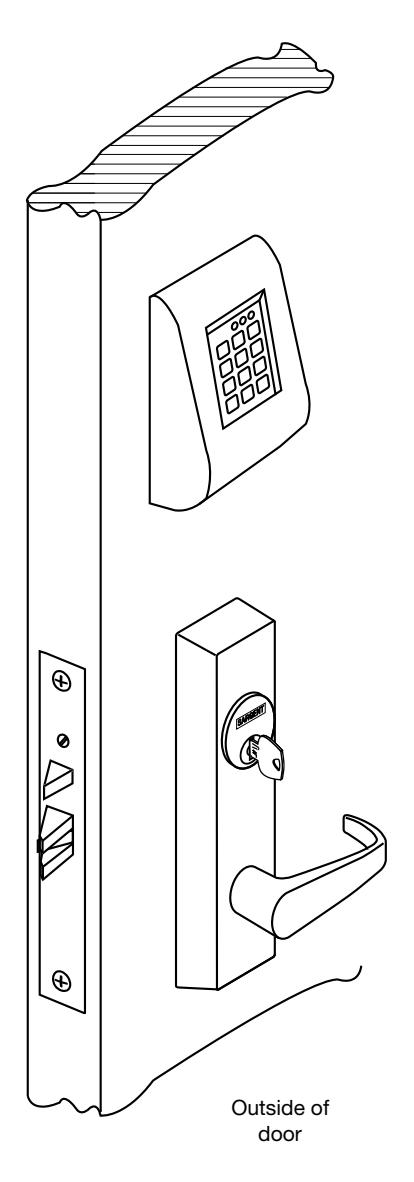
Installation Instructions Mortise Exit Device KP8977 / KP8978

Mortise Installation Instructions for KP8900 Series (Continued) 8
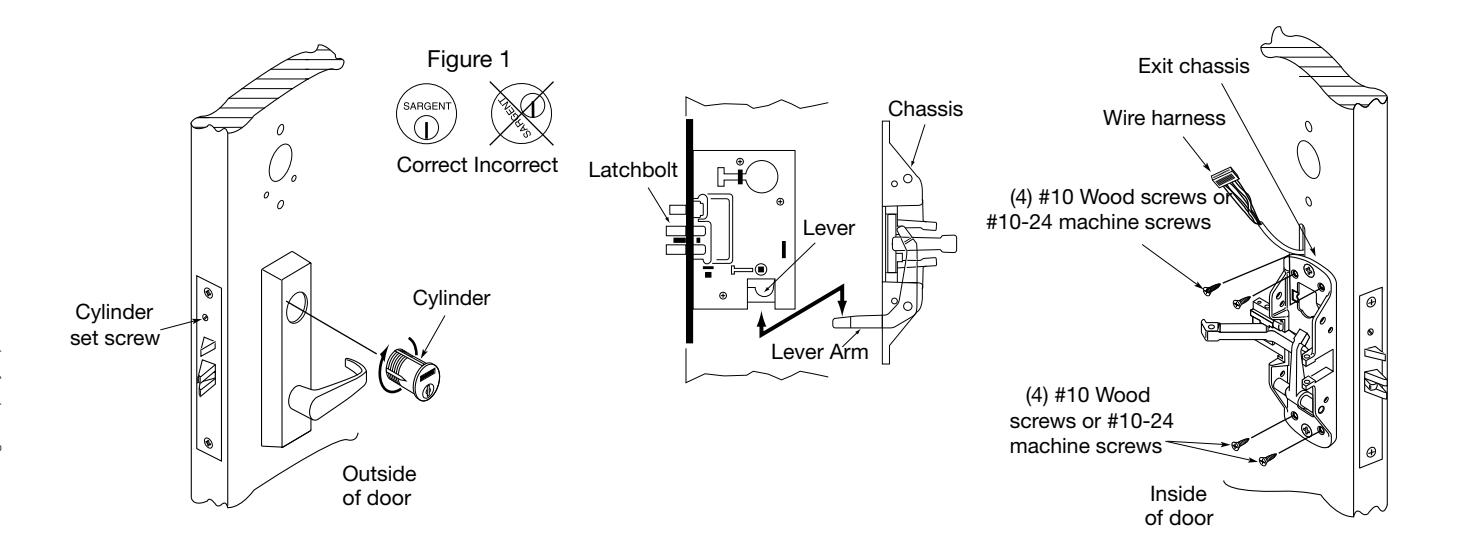
3. Cylinder Installation (KP8977 & 12-KP8977) 4. Securing Chassis to Door
- Insert cylinder into "ET" control. Back out the cylinder set screw in mortise lock.
- Thread cylinder clockwise into mortise lock until the cylinder sits flush and correct on "ET" control (see Figure 1)
- Tighten cylinder set screw
- Position exit chassis on door so that lever arm is under rear section of mortise lock lever. Then lift up until latchbolt is completely retracted.
- Fasten exit chassis to door using (4) #10 wood screws or #10-24 machine screws

Mortise Installation Instructions for KP8900 Series (Continued) 8
Step #3 Apply Fire Stop Plate (Required for 12-)
5. Fire Stop Plate for 12- Devices
- Fire stop plate required on all fire rated doors (12-)
- Drill (2) 1⁄8" diameter holes if the door is not supplied with them
- Secure fire stop plate to door with (2) #8 x 1/2" self tapping screws
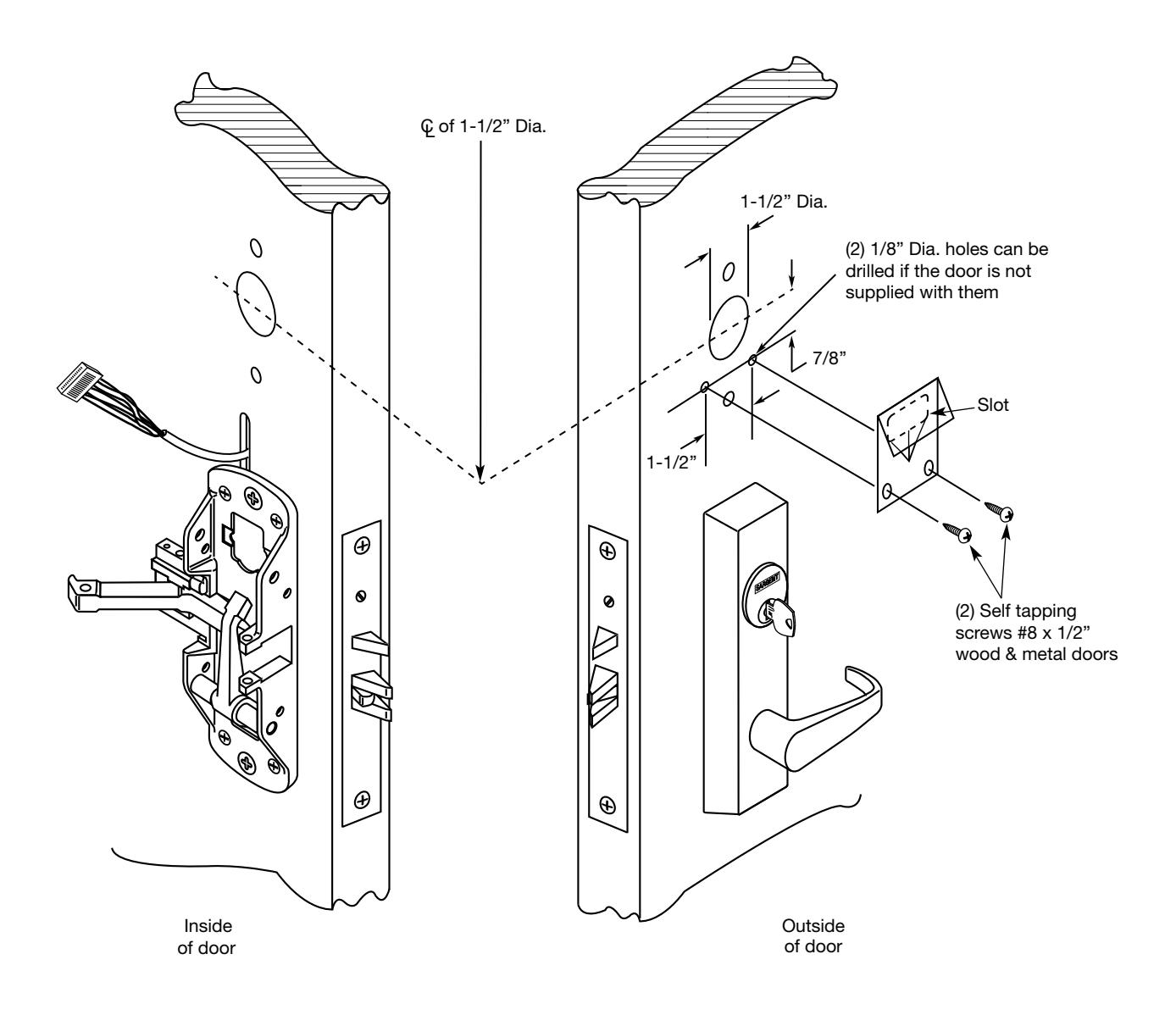
NOTE: Fire stop plate is required on all fire rated doors
Mortise Installation Instructions for KP8900 Series (Continued) 8
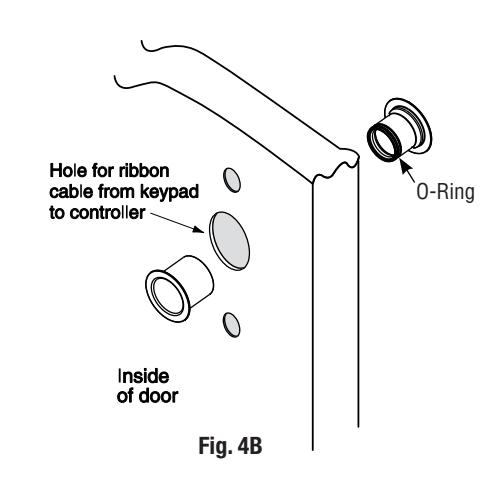
B. Weather Conduit (supplied with Weatherization Kit 52-6084)
Install weather conduit on NON FIRE-RATED exterior doors* only.
- 1. Carefully insert weather conduit into ribbon cable hole on inside of door (Fig. 4B).
- 2. Place O-ring around weather conduit on the outside and up against door (Fig. 4C).
*Install conduit if exterior door is directly exposed to the weather, if it's a hollow metal (open core) type door. It's not required on solid core doors. If rain water enters open web at top of door, the conduit prevents water from inside of door entering onto controller or keypad.
Step #4 – Install Weatherseal Gasket (Exterior Doors*)
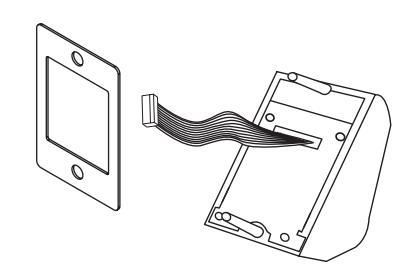
- 1. Carefully remove adhesive backing from the gasket (Fig. 5A).
-
2. Apply gasket to escutcheon:
- Starting in one place, press the adhesive side of the gasket firmly against the escutcheon.
- Work around the escutcheon, pressing the sticky side of the gasket firmly against the escutcheon edge.
- The gasket should be aligned so that all edges of the escutcheon are covered.
- 3. Attach escutcheon to the door.
Note: The 43 cylinder may be used with or without a gasket.
*For exterior doors and supplied with Weatherization Kit (p/n 52-6084). Additional supplied shroud (not shown) is required if outside keypad escutcheon is directly exposed to weather.

Fig. 5A
Mortise Installation Instructions for KP8900 Series (Continued) 8
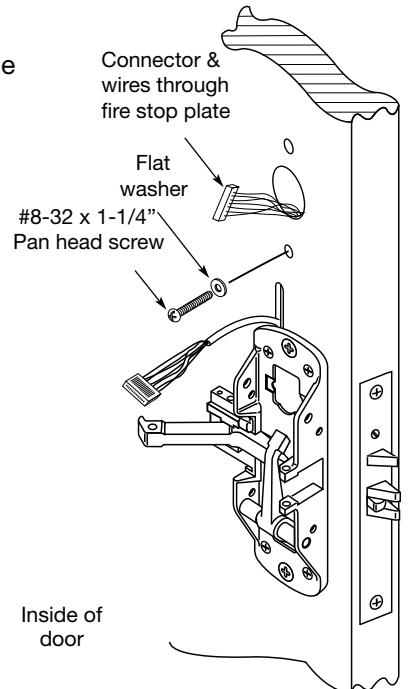
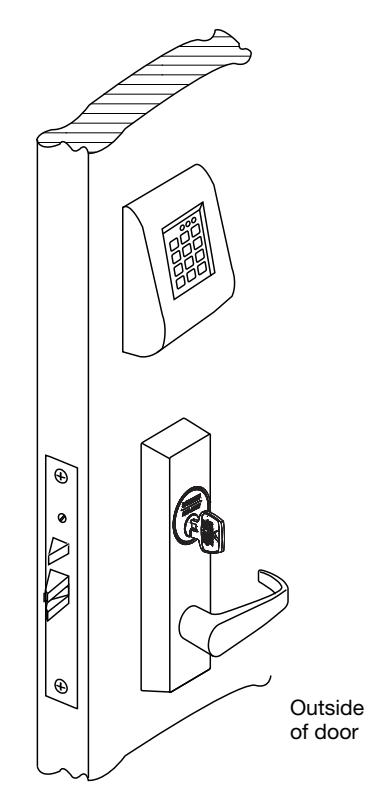
6. Insert Wires and Connector
• From the outside of the door through the Fire Stop Plate (if required)
• For non 12- exit devices feed wire harness from keypad assembly through hole in door

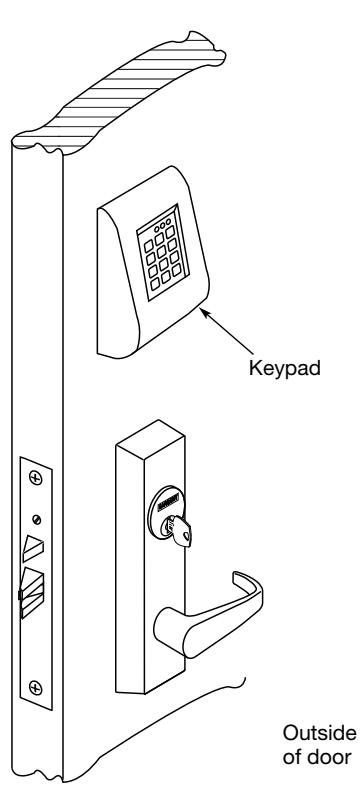
- From the inside of the door, use the #8-32 x 1-1/4" pan head screw with the flat washer to attach the escutcheon using the lower lug
- Straighten keypad escutcheon and tighten the #8-32 x 1-1/4" pan head screw
Mortise Installation Instructions for KP8900 Series (Continued) 8
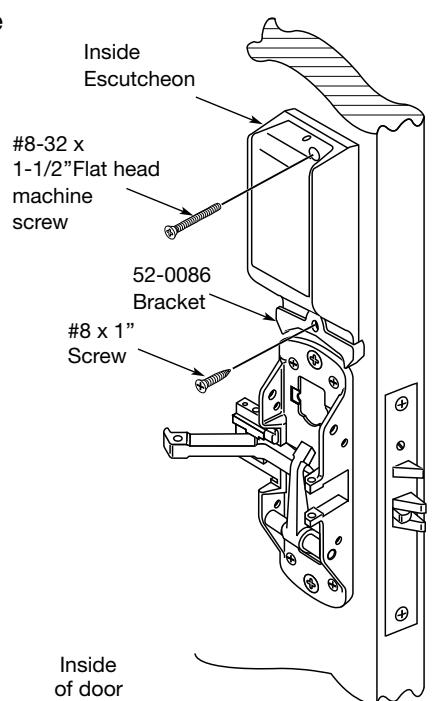
Step #5 Inside Controller Assembly
- Plug Keypad connector into inside escutcheon as shown.The back plate can be removed to feed the large connector through slot into the circuit board to be assured of proper fit. If connector is not fully and properly seated on pins, unit will not function properly.
- Plug smaller connector as shown into inside escutcheon
NOTE: Both connectorsgo on only one way. Donot offset the connectors.Be sure connectors areseated completely.


- Securely fasten top of inside Escutcheon to top of keypad using a #8-32 x 1-1/2" machine screw
- Securely fasten bottom of Escutcheon (52-0086) to door using #8 x 1" screw

Mortise Installation Instructions for KP8900 Series (Continued) 8
Installation Instructions for KP8900 Series (Continued) Step #6 Rail Assembly
Install Rail according to installation instruction A6705
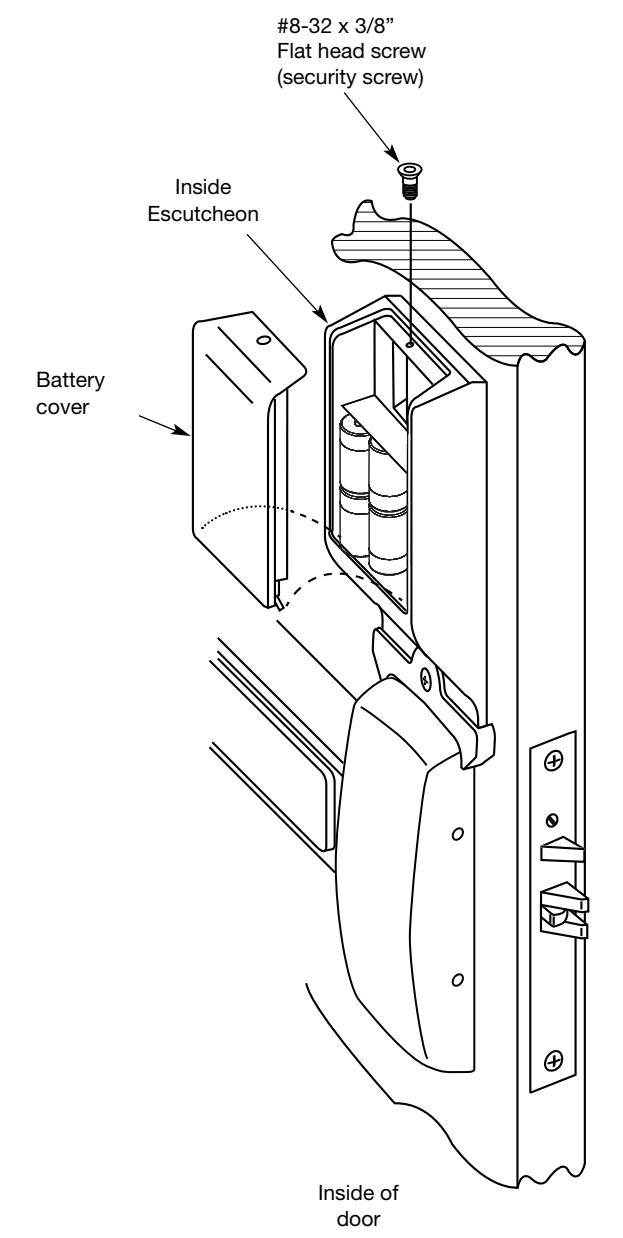
Step #7 Battery Installation
- Place (4) C size batteries into the compartment
- Attach battery cover to inside Escutcheon and secure with #8-32 3/8" head flat security screw.
Reproductions in whole or in part without express written permission of Sargent Manufacturing Company is prohibited. 02/28/21
Instructions for Installation of Keypad Rim & Mortise Exit Devices KP8877 / KP8878 KP8977 / KP8978

Programming Instructions 9
The KP Keypad Lock can support 99 users. Each user is assigned a User Number in addition to the code used for entry.
Example:
| USER TYPE | USER NUMBER |
USER CODE
(2-6 DIGITS) |
|---|---|---|
| Master | 01 | 1 2 3 4 |
| Emergency | 02 | 2 2 2 2 2 |
| Supervisor | 03 | 3 0 3 0 3 0 |
| Standard | 04-97 | 2 6 5 |
|
Special Factory
10 Sec. Time Preset |
98
99 |
1 3 6 8 |
This Keypad Exit Device has 99 User Codes available for programming purposes.
- The Master Code is always User "01". The Master Code assigns the Emergency and Supervisory Codes. It is also used for programming and will override the deadbolt * . Users are deleted through the Master Programming Code only.
- The Emergency Code is always User "02". The Emergency Code will override the deadbolt * in the mortise lock and has an unlock time of 10 seconds.
- The Supervisory Code is always User "03". The Supervisory Code allows temporary lockout of selected users, changes duration of unlock time, requests infrared interrogation output, and may add additional User Codes.
- The first User Code will be User "04" or higher. User numbers do not have to be used or entered sequentially.
- User codes "98" and "99" have a factory-set unlock time of ten seconds. This allows a handicapped person extra time which would not be required by other users.
Initial Set-Up Procedures:
The following are typical procedures** to follow when setting up your KP Series Keypad:
- If a mistake is made during any of procedures, depress the " * " several times until the yellow LED goes out.
- If no keystroke is made in a 30-sec time frame the programming up to that point will default and you will have to start over.
To Begin Programming:
The KP Keypad Lock is preset at the factory with Master Code "1234". Entering "1234 * " will unlock the lock allowing the lever handle to retract the latchbolt.

9 Programming Instructions (Continued)
All of the following procedures start with 99#.
If after the last " * " is depressed, the yellow LED does not go out, depress " * " once more.
Change Master Code:
- 1234 * (Yellow LED Begins to Blink Slowly) This example uses the Factory Default Master Code
- 50# 1# 01# New Master Code * (Yellow LED Blinks Quickly)
- New Master Code * (Yellow LED Blinks Slowly) * (Yellow LED Goes Out)
To Enter the Emergency Code: (Unlock Duration is Factory Set at 10 Sec)
- Master Code * (Yellow LED Begins to Blink Slowly)
- 50# 1# 02# Emergency Code * (Yellow LED Blinks Quickly)
- Emergency Code * (Yellow LED Blinks Slowly) * (Yellow LED Goes Out)
To Enter the Supervisory Code:
- Master Code * (Yellow LED Begins to Blink Slowly)
- 50# 1# 03# Supervisory Code * (Yellow LED Blinks Quickly)
- Supervisory Code * (Yellow LED Blinks Slowly) * (Yellow LED Goes Out)
To Enter a User Code:
- Supervisory or Master Code * (Yellow LED Begins to Blink Slowly)
- 50# 1# User Number (04-97)# User Code * (Yellow LED Blinks Quickly)
- User Code * (Yellow LED Blinks Slowly) * (Yellow LED Goes Out)
To Enter a Passage (Maintained Mode) Code:
- When Passage Mode is used, the same User Code must be used to re-lock the lock.
- Supervisory or Master Code * (Yellow LED Begins to Blink Slowly)
- 50# 2# User Number (04-97)# User Code * (Yellow LED Blinks Quickly)
- User Code * (Yellow LED Blinks Slowly) * (Yellow LED Goes Out)
To Enter a One Time User Code:
- Supervisory or Master Code * (Yellow LED Begins to Blink Slowly)
- 50# 3# User Number# User Code * (Yellow LED Blinks Quickly)
- User Code * (Yellow LED Blinks Slowly) * (Yellow LED Goes Out)
Reproductions in whole or in part without express written permission of Sargent Manufacturing Company is prohibited. 02/28/21
Instructions for Installation of Keypad Rim & Mortise Exit Devices KP8877 / KP8878 KP8977 / KP8978

9 Programming Instructions
All of the following procedures start with 99# (continued). If after the last " * " is depressed, the yellow LED does not go out, depress "*" once more.
To Deactivate "Beep" With the Depression of Each Key:
- Supervisory or Master Code * (Yellow LED Begins to Blink Slowly)
- 30# 0# 0# (Yellow LED Continues to Blink Slowly)
- • * (Yellow LED Blinks Quickly)
- • * (No Beep on Depression and Yellow LED Blinks Slowly)
- • * (No Beep on Depression and Yellow LED Goes Out)
To Reactivate "Beep" With the Depression of Each Key:
- Supervisory or Master Code * (Yellow LED Begins to Blink Slowly)
- 30# 0# 1# (Yellow LED Continues to Blink Slowly)
- • * (Yellow LED Blinks Quickly)
- • * (Beep on Depression and Yellow LED Blinks Slowly)
- • * (Beep on Depression and Yellow LED Goes Out)
To Clear the Entire Memory:
- Master Code * (Yellow LED Begins to Blink Slowly)
- 46# 00000# 00000# (Yellow LED Continues to Blink Slowly)
- • * (Yellow LED Blinks Quickly)
- • * (No Beep on Depression and Yellow LED Goes Out)
PAUSE, Yellow LED Begins to Blink Again
• * (Yellow LED Goes Out)
NOTE This Deletes ALL Codes, including Master, Emergency and Supervisory. The Master Code is set back to 1234, Door Number to 0001 and Unlock time to 5 Sec. If the Master Code is not known, Factory Assistance will be required to clear the memory. 1-800-810-WIRE.
To Program Door Numbers into Keypad:
- Master Code * (Yellow LED Begins to Blink Slowly)
- 43# 0# Door Number# (must be four digits) (Yellow LED Blinks Slowly)
- • * (Yellow LED Begins to Blink Quickly)
- • * (Yellow LED Blink Slowly)
- • * (Yellow LED Goes Out)

9 Programming Instructions
Chain Programming of the KP8800 and KP8900 Series Exit Device (including 12-)
When programming multiple User Numbers and Codes into the Keypad Exit Device, it is not necessary to leave and re-enter the programming Mode (50) for each entry. Multiple entries may be chained together and the three different types ofuser codes (Standard, Passage and One time) may be mixed.
The format to be used is as follows where:
"T" is the Type of user code with "1" Standard, "2" Passage and "3" One Time.
"UN_" is User Number (04-99).
"UC_" is User Code (2 to 6 digits) which correlates with user Number.
99# Master or Supervisor Code * 50# Type# User Number a# User Code a * User Code a * T# UNb# UCb * UCb * T# UNc# UCc * UCc * ……T# UN_# UC_ * UC_ **
An example with four user codes is shown below:
| Type | User Number | User Code |
|---|---|---|
| 1 | 05 | 875 |
| 3 | 12 | 2226 |
| 2 | 08 | 5444 |
| 1 | 50 | 3367 |
Using Master Code 4732 and above information, the keypad exit device would be programmed as follows:99# 4732 * 50# 1# 05# 875 * 875 * 3# 12# 2226 * 2226 * 2# 08# 5444 * 5444 * 1# 50# 3367 * 3367 **
If all user codes are the same type, it is not necessary to enter the type number with each entry. The type number only hasto be entered with the first user code. The format now simplifies to:
99# Master or Supervisor Code * 50# Type# User Number a# User Code a * User Code a * UNb# UCb * UCb * UNc# UCc * UCc * ……UN_# UC_ * UC_ **
An example with three user codes is shown below:
| Type | User Number | User Code |
|---|---|---|
| 1 | 07 | 77 |
| 1 | 15 | 67832 |
| 1 | 91 | 7568 |
Using Master Code 45988 and above information, the keypad exit device would be programmed as follows: 99# 45988 * 50# 1# 07# 77 * 77 * 15# 67832 * 67832 * 91# 7568 * 7568 **
To chain the User Number delete procedure: 99# Master Code * User Number a# ** UNb# ** UNc# ** ……UN_# ***
Using the information from the above example: 99# 45988 * 07# ** 15# ** 91# ***

All of the following procedures start with 99# (continued).
If after the last " * " is depressed, the yellow LED does not go out, depress " * " once more.
To Interrogate Transaction Log (to output last 15 entries):
- Supervisory or Master Code * (Yellow LED Begins to Blink Slowly)
- 70# 0# 0# (Yellow LED Blinks Slowly)
- • * (Yellow LED Begins to Blink Quickly)
- Set DTD to printer mode
- Select 'Infrared Capture'
- Press Enter key on DTD
- Hold DTD between 1 to 3 inches from the KP keypad infrared LED (top right side LED on keypad). Press Enter key on DTD.
- • * (Yellow LED Begins to Blink Slowly or alternately) IR LED will begin broadcasting data, and the DTD will retrieve door transaction log.
Note: Retrieving the transaction log takes approximately 20 seconds, after 20 seconds continue to next step
* (Yellow LED Goes Out)
For additional information, see "Transaction Log".
Note: Seq. # 1 is the programming request to output the entries. Sequence numbers 2-5 are the actual entries.
Transaction Log
To output the last 15 entries:
• enter 99 # Supervisory or Master Code * 70 # 0 # 0 # ** .
Door Number
- 4 Digits
- Up to 9999 different doors, assigned by user
Transaction Number
- Single digit 1-5
- Latest transaction 1
- Oldest transaction 5
User Number
- Three digits 001 through 099
- User numbers assigned at time of programming
Transaction Types
- 003 = Log transaction started
- 005 = Access granted with 5 second unlock time*
Once the unlock time is entered, it is the same for ALL users except 02, 98 and 99 which are factory set for 10 seconds.
Hold Data Transfer Device (DTD) up to the (top right side) infrared LED as shown. DTD can be used to download information from the keypad.


*Transaction Types
003 = Log transaction started 005 = 5 second unlock time**
* Note: The Unlock Time is Adjustable for Momentary Operation. A (5)-second unlock time is recommended to extend battery life.

9 Programming Instructions
All of the following procedures start with 99# (continued). If after the last " * " is depressed, the yellow LED does not go out, depress "*" once more.
To Delete a User Number:
- Master Code * (Yellow LED Begins to Blink Slowly)
- User Number# (Yellow LED Blinks Slowly)
- • * (Yellow LED Begins to Blink Quickly)
- • * (Yellow LED Blinks Slowly)
- • * (Yellow LED Goes Out)
To Disable / Enable a User Number:
- Supervisory or Master Code * (Yellow LED Begins to Blink Slowly)
- 56# 0# = Enable, 1# = Disable User Number# (04-99) (Yellow LED Blinks Slowly)
- • * (Yellow LED Begins to Blink Quickly)
- • * (Yellow LED Blinks Slowly)
- • * (Yellow LED Goes Out)
To Set Unlock Time:
- Master Code * (Yellow LED Begins to Blink Slowly)
- 85# Time Duration# (01-99 Sec) 0# (Yellow LED Blinks Slowly)
- • * (Yellow LED Begins to Blink Quickly)
- • * (Yellow LED Blinks Slowly)
- • * (Yellow LED Goes Out)
Optional Equipment
- Data Transfer Device (DTD) used to download the user and transaction type.
- Remote Unlocking 52-2071 (has a 2-pin connector with 2 wires). When wired to a remote normally open momentary switch, a momentary switch closure is used used for remote unlocking of keypad exit device.
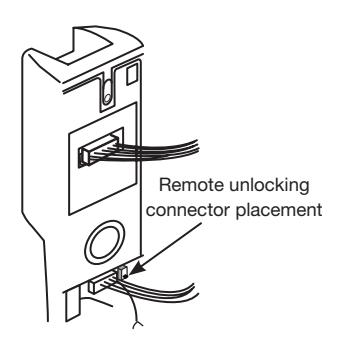
Inside Escutcheon
Reproductions in whole or in part without express written permission of Sargent Manufacturing Company is prohibited. 02/28/21
Instructions for Installation of Keypad Rim & Mortise Exit Devices KP8877 / KP8878 KP8977 / KP8978

10 Troubleshooting Instructions
Note: The following tests are used to check basic functionality of the keypad and inside controller.
Power On Self Test (POST) for new KP controllers only (released after 1/2021)
- Immediately after installing the batteries, verify the following keypad sequence:
- Green LED flashes quickly (5) times a second
- Yellow LED flashes quickly (5) times a second
- Beeps 3 times quickly (3) times a second
The following tests are for existing Legacy and New KP controllers and take approximately 1 to 2 seconds each:
- Enter '7890#123456 * ' each key beeps when pressed (if key beep is activated)
- Verify the following keypad sequence: Green LED flash, Yellow LED flash, 3 beeps
If you have the optional DTD
- Set DTD to printer mode, press (center) enter key on DTD once
- Align DTD Infrared port 1 3" from the top right side keypad Infrared transmitting LED
- Press enter key on DTD again just before the * key in the following step
- Enter '7890#123456 * ' each key beeps when pressed (if key beep is activated)
- Verify the following on keypad/DTD sequence: Green LED flash, Yellow LED flash, 3 quick beeps, "IR OK" is displayed on DTD

SARGENT Manufacturing Company 100 Sargent Drive New Haven, CT 06511 USA 800-810-WIRE (9473) • www.sargentlock.com
Founded in the early 1800s, SARGENT® is a market leader in locksets, cylinders, door closers, exit devices, electro-mechanical products and access control systems for new construction, renovation, and replacement applications. The company's customer base includes commercial construction, institutional, and industrial markets.
Copyright © 2014. 2021, Sargent Manufacturing Company, an ASSA ABLOY Group company. All rights reserved. Reproduction in whole or in part without the express written permission of Sargent Manufacturing Company is prohibited.