Installation Instructions 1490A
Open the original PDF document
View PDF

[t] 800.413.8783 805.494.0622 E-mail: service@sdcsecurity.com 801 Avenida Acaso, Camarillo, CA 93012 PO Box 3670, Camarillo, CA 93011
INSTALLATION INSTRUCTIONS
1490A
OVERHEAD INSTALLATION HORIZONTAL
- 1. Examine the top rail of the door for the most suitable location for the strike plate. Mark the door for the end of the strike closest to the lock stile, and make a corresponding mark on the header to line up with the first mark.
- 2. Locate center line of door thickness on the header and attach adhesive cut out template to header. Lining it up with marks, center punch the tab-mounting screw locations and counter-sink for #10 screw. Saw or rout out the cutout area. Continue to step 5.
SIDEJAMB INSTALLATION VERTICAL
- 3. Examine the lock stile jamb for the point nearest the center of the door height, with space available for the lock and strike. Mark the door stile horizontal for the top end of the strike plate and make a corresponding mark on the jamb.
- 4. Locate center line of door thickness on the jamb and attach adhesive cutout template to jamb, lining up the the top of the cutout with the horizontal mark on the jamb. Center punch the tab mounting screw locations and counter sink for #10 screw. Saw or rout the frame cutout.
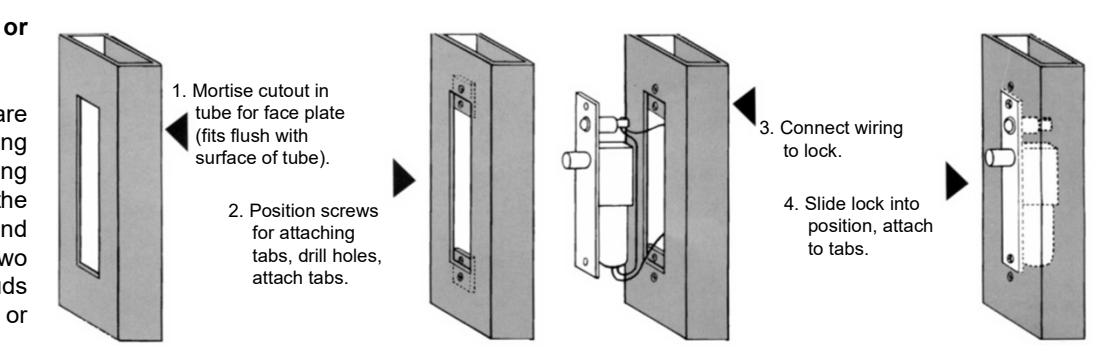
- Attach the mounting tabs inside.
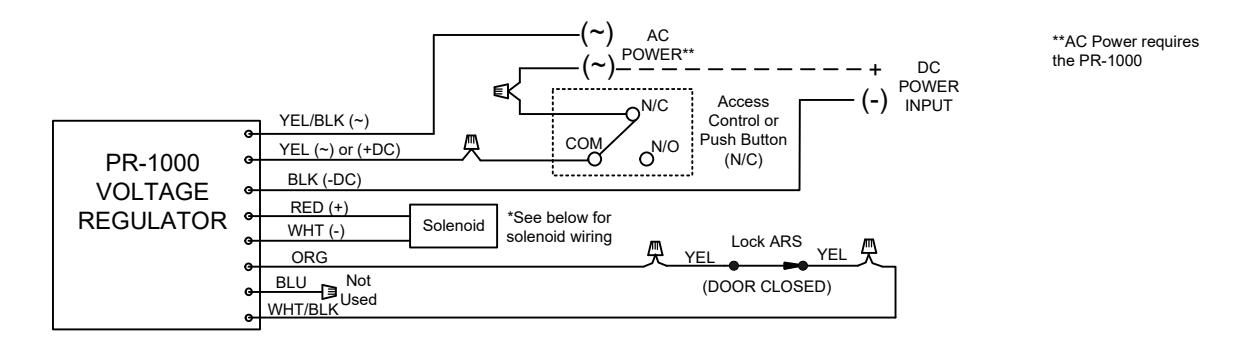
- 6. Attach power supply and access control leads to lock leads as shown on page 2. Handle the lock carefully; do not hang it by the wire leads. Insert wiring into the header cavity carefully so they do not interfere with proper locating of the lock in the cutout.
- 7. Insert lock. When installed overhead horizontally, the bolt end is nearest the lock stile. When installed vertically on the sidejamb, the bolt must be at the top end of the cutout. Secure with # 10-32 machine screw.
- 8. Using strike plate as a template, mark screw hole location and drill holes for screws supplied. Mortise as required. Attach strike.
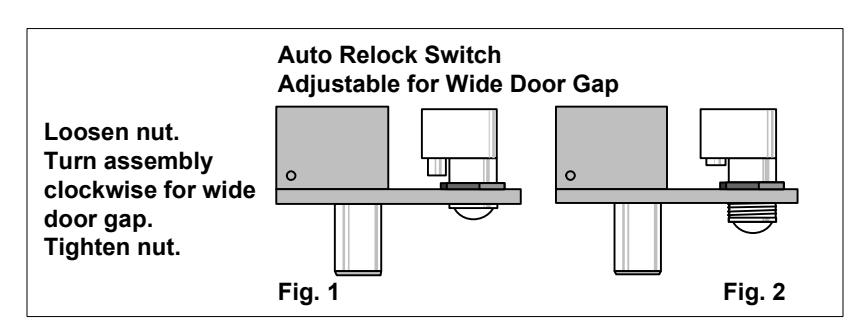
- 9. The automatic relock switch is set for 1/8" clearance between the top of the door and transom bar or head jamb. Any additional gap may be compensated for by loosening the lock nut and turning the switch assembly clockwise until proper adjustment is reached. Be sure to tighten lock nut when adjustment is satisfactory.
Easy Installation Servicing
All Space Saver locks are easily installed in any existing entrance merely by mortising out a cutout, attaching the wiring, inserting the lock, and bolting it into position with two attaching tabs. Cutting studs is no longer a problem or expense.
[t] 800.413.8783 8 805.494.0622 8 E-mail: service@sdcsecurity.com 8 801 Avenida Acaso, Camarillo, CA 93012 9 PO Box 3670, Camarillo, CA 93011
LOCK WIRING
NOTE: The SDC PR-1000 Power Regulator is included with the bolt lock. Although the solenoid is rated for continuous duty, continuously powering the solenoid will generate heat. Installing the PR-1000 reduces the power consumption of the bolt lock after activation of the lock, allowing for a heat reduction to the bolt lock, and increasing the life of the solenoid. DC voltage is recommended for improved heat reduction.
1490A (without PR-1000):

1490A (Wiring with PR-1000; recommended):
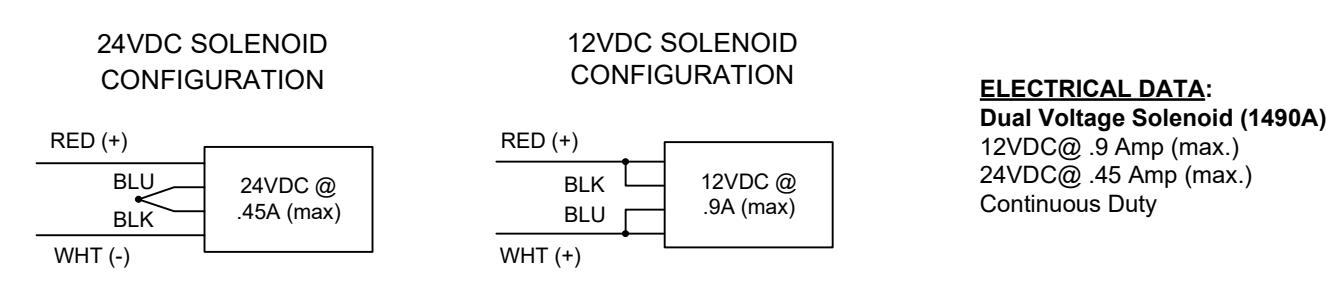
Solenoid Voltage Configuration:
PR1000 Input Voltage: 12/24 VDC/AC (+/-10%). DC voltage is recommended for optimal performance
TROUBLESHOOTING Solution
Bolt does not project Check voltage and alignment of
strike.
Bolt projects but chatters Voltage too low. Bolt will not retract Strike misaligned
Problem
В Indicates bolt locked or unlocked OPTIONAL DOOR POSITION SWITCH (DPS-MECHANICAL) Indicates door opened or closed 4A @ 30VDC (Resistive) RED=NC DPS polarity shown with door closed WHT= COM BPS polarity shown with bolt retracted BLU=N/O ARS RED = N/CWHT = COM BPS BLU = N/ODPS DPS/ BPS CONFIGURATION
OPTIONAL BOLT POSITION SENSOR (BPS-MAGNETIC)