HS4 Dual Output Power Distribution Installation Instructions – I-EA00279-PDS8
Open the original PDF document
View PDFHS4 DUAL OUTPUT POWER DISTRIBUTION Installation Instructions I-EA00279
2-679-1000
Overview:
Hager 2-679-1000 dual input power distribution module is designed to steer the power from either two (2) low voltage AC or DC power sources. This power is distributed over a total of eight (8) fused protected outputs.
Power Inputs:
Input 1 and Input 2 voltage range: 5VDC to 24VDC, up to 10A each, 20A total input.
Outputs:
-
Fuse protected outputs rated @ 3A per output, non power-limited. Total output 20A max.
- Do not exceed the individual power supply ratings. Total output current should not exceed max. curren rating of the power supplies employed on each input. See Maximum Output of Altronix Power Supplies below.
- Any of the eight (8) fuse/PTC protected power outputs are selectable to follow power Input 1 or Input 2. Output voltage of each output is the same as the input voltage of the input selected.
- Individual outputs may be set to OFF position for servicing.
- Surge suppression.
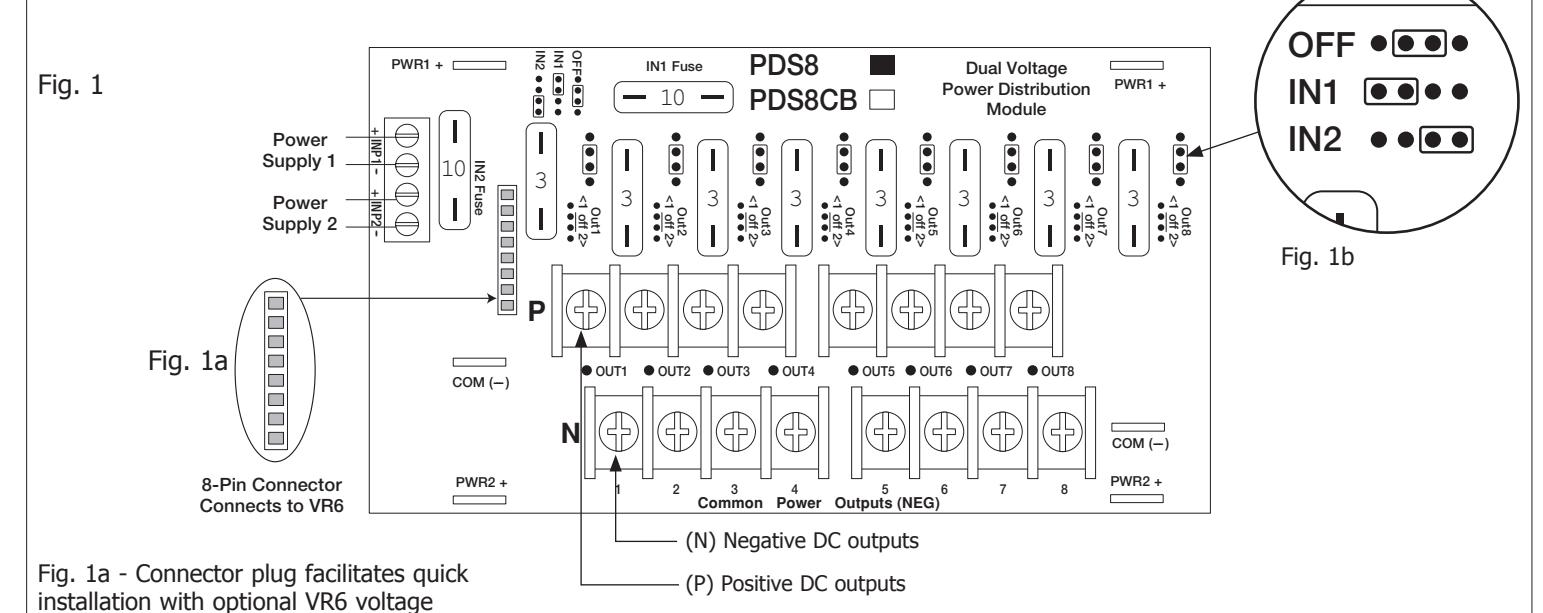
regulator module.
Rev - , Rev Date: 09/27/19
Specifications:
Outputs Ratings:
4.8 VDC - 24 VDC or 15.8 - 28 VAC
Fuse Ratings:
- Main input fuses rated @ 10A/32V each.
- individual output fuses rated @ 3A/32V each.
LED Indicators:
Individual voltage LEDs indicate 12VDC (Green) or 24VDC (Red/Green).
Environmental:
- Operating temperature: 0°C to 49°C ambient.
- Humidity: 20 to 85%, non-condensing.
Mechanical:
- Product weight (approx.): 0.4 lbs. (0.18 kg).
- Shipping weight (approx.): 0.5 lbs. (0.23 kg).
CAUTION: To avoid risk of electric shock or fire hazard, replace fuses with the same type and rating: Input fuses: 10A/32V, Output fuses: 3A/32V.
Installation Instructions:
Wiring methods shall be in accordance with the National Electrical Code/NFPA 70/NFPA 72/ANSI, with Canadian Electrical Code CSA C22.1, and with all local codes and authorities having jurisdiction. Product is intended for indoor use only and should be installed by qualified personnel.
- 1. Mount 2-679-1000 in the desired location/enclosure.
- 2. Ensure all output jumpers [OUT1 OUT8] are placed in the OFF (center) position marked [•].
- 3. Connect low voltage AC or DC power supplies to terminals marked [+ IN1 –], [+ IN2 –] (Fig. 1, pg. 2, Fig. 2 pg. 2). Note: You can not combine AC and DC power supplies.
- 4. Set each output [OUT1 OUT8] to route power from power supply 1 or 2 (jumper position 1 or 2) (Fig. 1, pg. 2, Fig. 2 pg. 2). Note: Measure output voltage before connecting devices. This helps avoiding potential damage.
- 5. Turn power off before connecting devices.
HS4 DUAL OUTPUT POWER DISTRIBUTION Installation Instructions I-EA00279
Installation Instructions (cont'd):
- 6. Connect devices to terminal pairs 1 to 8, marked [P (Positive) OUT1-OUT8, N (Negative)] (Fig. 1, pg. 2, Fig. 2 pg. 2). Note: For DC devices carefully observe polarity. For AC devices polarity is not observed.
- 7. Turn main power on after all devices have been connected.
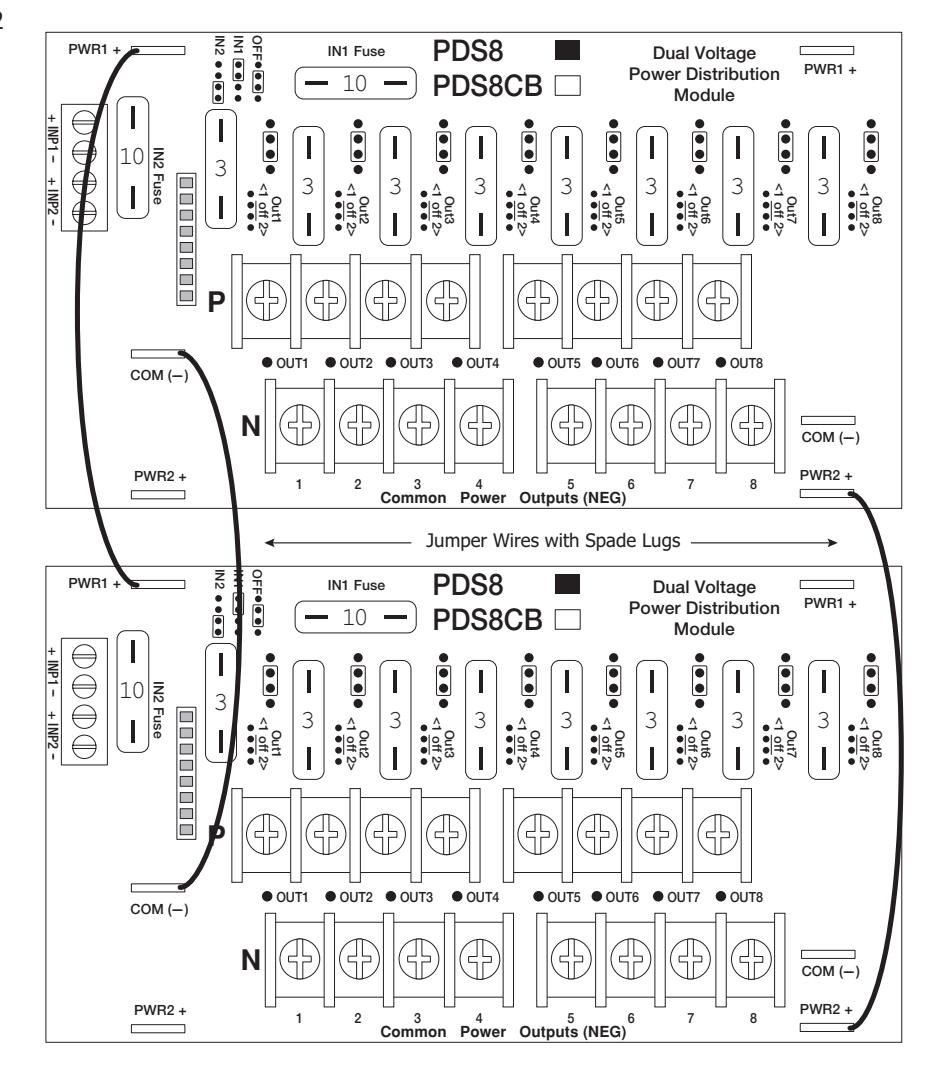
Daisy Chaining Two (2) 2-679-1000 Dual Output Power Distribution Modules:
Use 18 AWG or larger UL Listed wire equipped with 1/4" UL Recognized quick connect terminals rated for proper voltage/current for all jumper connections.
- 1. Connect first 2-679-1000 board's spade lug marked [PWR1 +] to the second 2-679-1000 board's spade lug marked [PWR1 +] (Fig. 2, pg. 2).
- 2. Connect first 2-679-1000 board's spade lug marked [Common (–)] to the second 2-679-1000 board's spade lug marked [Common (–)] (Fig. 2, pg. 2).
- 3. Connect first 2-679-1000 board's spade lug marked [PWR2 +] to the second 2-679-1000 board's spade lug marked [PWR2 +] (Fig. 2, pg. 2).
- 4. Complete steps 4-8 from page 1.
Rev - , Rev Date: 09/27/19
Fig. 2