HS4 BLUEnet Repeater Installation Instructions 225871-rev01
Open the original PDF document
View PDFSALTO BLUEnet Repeater
Installation guide
Guía de instalación
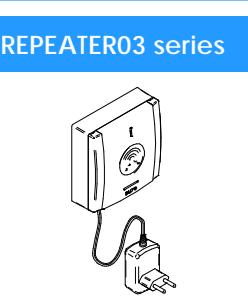
- Eng The SALTO BLUEnet Repeater is part of SALTO wireless system. It extends the BLUEnet network range and permits adding more connectivity acccesses. It works as a bridge between SALTO's BLUEnet elements.
- E El BLUEnet Repeater ies parte del sistema wireless de SALTO. Extiende el rango de la red BLUEnet y permite añadir más puntos de acceso. Trabaja como puente entre los dispositivos BLUEnet.
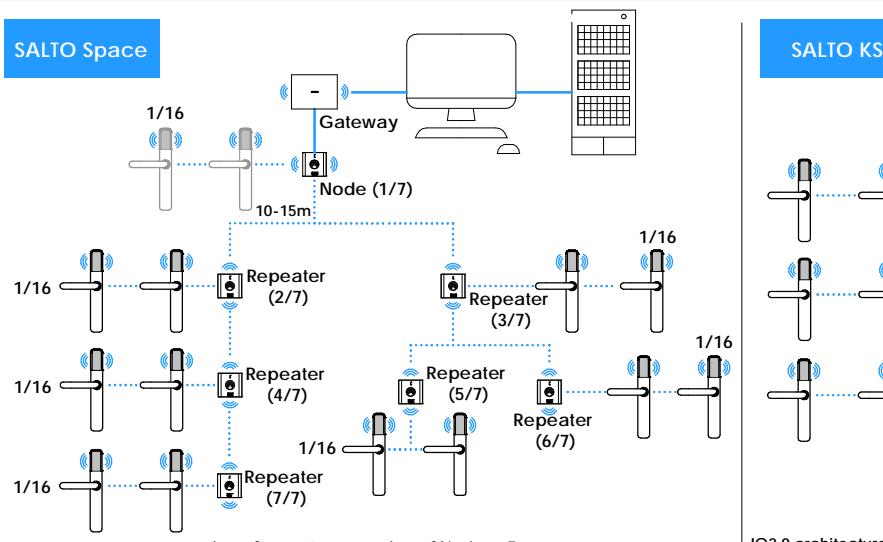
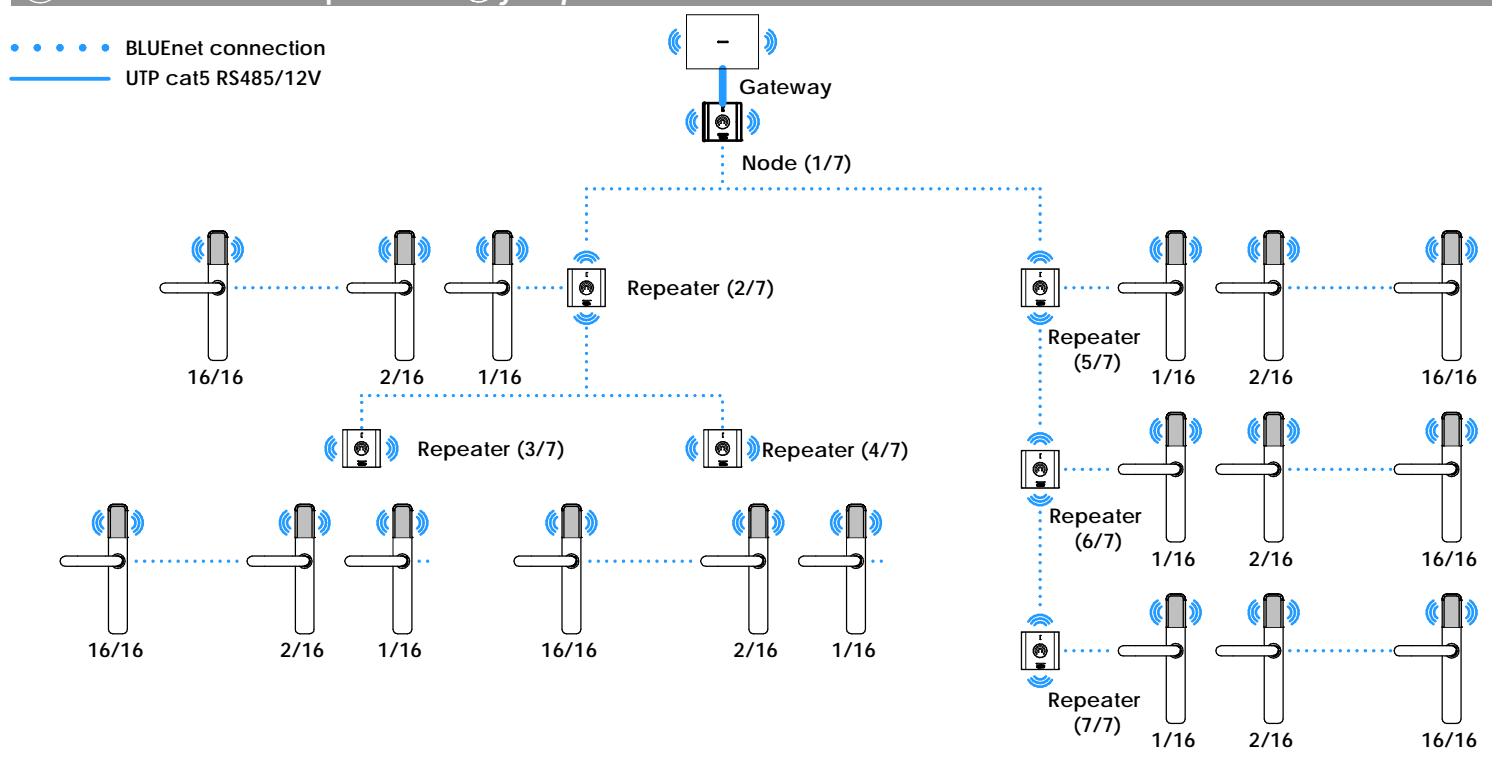
Gateway architecture: number of repeaters + number of Nodes = 7.
Maximum of 3 repeaters connected in a row.
Number of bifurcation in node/repeater = 2.Number of locks per repeater = 16.
- It is recommended to avoid adding access points to the Gateway´s Node (Node 1/7) when using BLUEnet Repeaters.
Arquitectura Gateway: número de repeaters + número de nodos = 7.
Máximo de 3 repeaters conectados en línea.
Número de bifurcaciones en nodo/repeater=2. - Número de cerraduras por repeater= 16. - Se recomienda no añadir puntos de acceso al Nodo del Gateway (Node 1/7) cuando se utilizan Repeater BLUEnet.
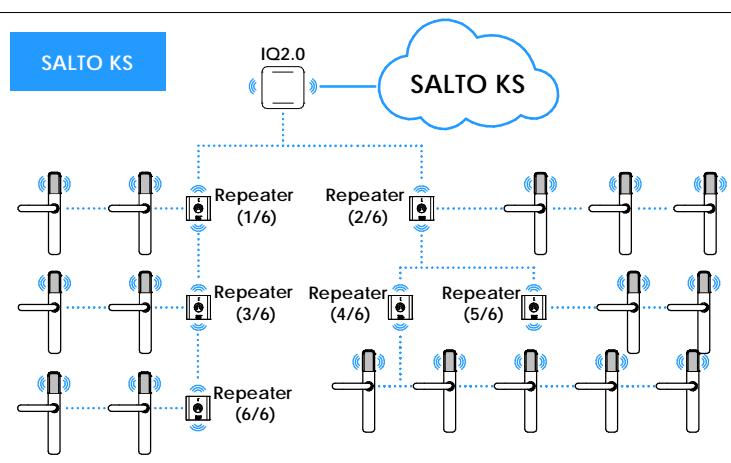
IQ2.0 architecture: number of repeaters + number of Nodes = 7.
Maximum of 3 repeaters connected in a row.
Number of bifurcation in node/repeater = 2.Number of locks per IQ2.0 = 16.
- It is not permitted to add BLUEnet locks to the IQ when using BLUEnet Repeaters.
Arquitectura IQ2.0: número de repeaters + número de nodos = 7. Máximo de 3 repeaters conectados en línea.
Número de bifurcaciones en nodo/repeater=2.Número de cerraduras por IQ2.0= 16.
- Prohibido añadir cerraduras BLUEnet al IQ cuando se utilizan Repeaters BLUEnet.
Electrical characteristic Características eléctricas Eng E

Operation conditions Eng E
| Min | Typ | Max | Unit | |
|---|---|---|---|---|
| Temperature | -20 | 25 | 70 | ºC |
| Humidity | 35 | 85 |
SALTO BLUEnet Characteristics
| Frequency Range | 2400-2483.5Mhz |
| RF Standard | Bluetooth Low Energy |
Power Supply
| Min | Typ | Max | Unit | |
|---|---|---|---|---|
| Imput Voltage | 7 | 12 | 28 | V |
| Current consumption | 100 | mA | ||
Condiciones ambientales
| Min | Tip | Max | Unidad | |
|---|---|---|---|---|
| Temperatura | -20 | 25 | 70 | ºC |
| Humedad | 35 | 85 |
Características SALTO BLUEnet
| Rango frecuencia | 2400-2483.5Mhz |
|---|---|
| RF Estándar | Bluetooth Low Energy |
| Rango interior radio | 10/15m |
Fuente de alimentación
| Min | Tip | Max | Unidad | |
|---|---|---|---|---|
| Tensión entrada | 7 | 12 | 28 | V |
| Consumo | 100 | mA |
Installation Instalación Eng E
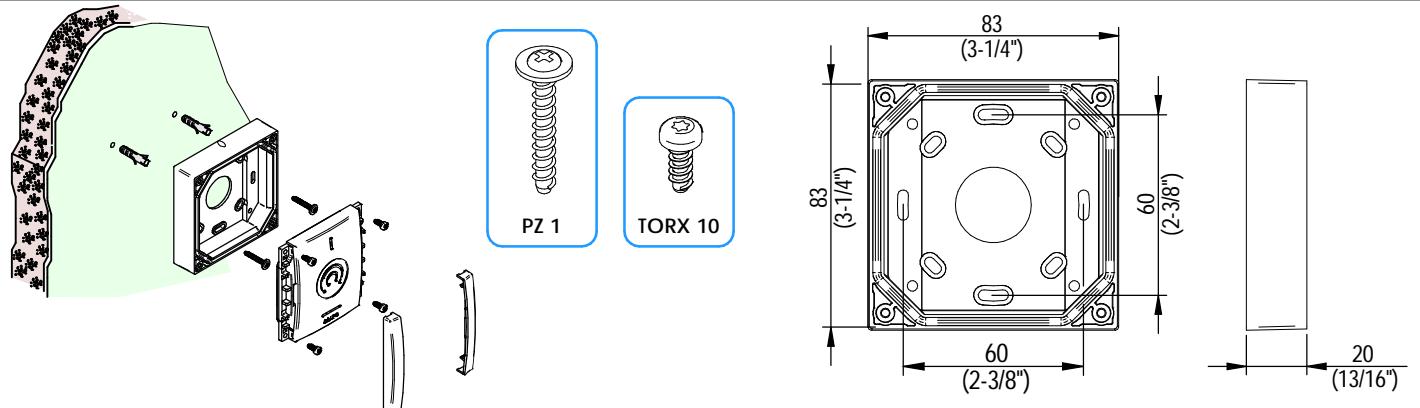

SALTO BLUEnet Repeater
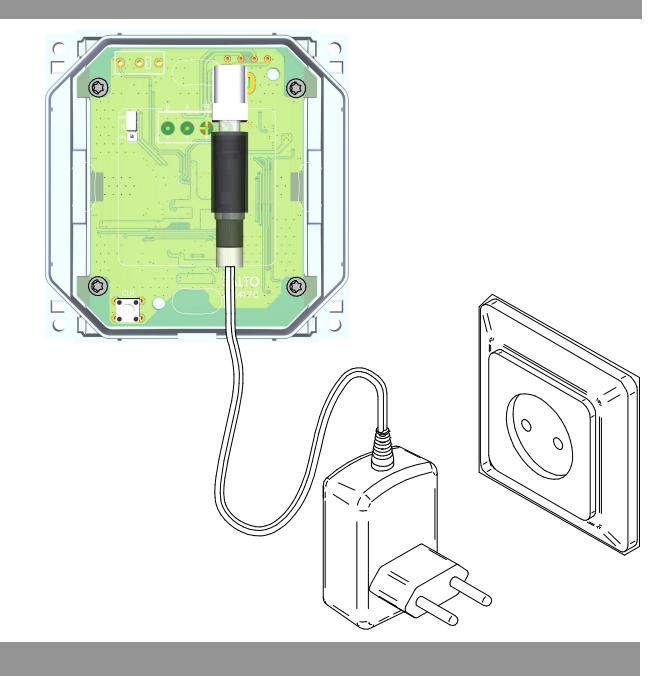
Electrical installation Eng Instalación eléctrica E
-
CLEAR Button (Detach process): Eng
- Press 3 seconds to change repeater to factory mode (Red LED).
- Delete the repeater from the software before the Detach process.
-
Botón CLEAR (proceso Detach):
E
- Pulsar 3 segundos para cambiar el repeater a modo fábrica (LED rojo).
- Borrar el repeater del software antes del proceso Detach.
Installation example Eng Ejemplo instalación E
Installation example Eng Ejemplo instalación E
RED - Factory mode: repeater is not configured. BLUE - Connected/Link: repeater is configured and connected to his parent device. ORANGE - Lost: repeater is configured and disconnected from the parent device. Eng
ROJO - Modo fábrica: el repeater no está configurado. AZUL - Conectado/Enlace: el repeater está configurado y conectado a su dispositivo padre. NARANJA - Perdido: el repeater está configurado y desconectado de su dispositivo padre. E
Operational test Test operacional Eng E
-
Once the product is installed, follow these steps to check the correct operation: Eng
- When SALTO Gateway and locks are installed, check that the repeater is active in SALTO's software.
- Una vez instalada la unidad de control, para comprobar el correcto funcionamiento de la instalación, siga los siguiemtes pasos: - Comprobar que al instalar el SALTO Gateway y las cerraduras, el repeater está activo en el software de SALTO. E