HID-Understanding-OSDP-Implementations-A-HID-Mercury-FAQ
Open the original PDF document
View PDF

UNDERSTANDING OSDP IMPLEMENTATIONS A HID/MERCURY FAQ
PLT-04025, Rev. A.0 October 2018

Copyright
© 2018 HID Global Corporation/ASSA ABLOY AB. All rights reserved.
This document may not be reproduced, disseminated or republished in any form without the prior written permission of HID Global Corporation.
Trademarks
HID GLOBAL, HID, the HID Brick logo, the Chain Design, iCLASS, multiCLASS, and pivCLASS are trademarks or registered trademarks of HID Global, ASSA ABLOY AB, or its affiliate(s) in the US and other countries and may not be used without permission. All other trademarks, service marks, and product or service names are trademarks or registered trademarks of their respective owners.
Revision history
| Date | Description | Revision | ||
|---|---|---|---|---|
| October 2018 | Initial release. | A.0 | ||
Contacts
For additional offices around the world, see www.hidglobal.com/contact/corporate-offices
| Americas and Corporate | Asia Pacific | ||
|---|---|---|---|
|
611 Center Ridge Drive
Austin, TX 78753 USA Phone:866 607 7339 Fax:949 732 2120 |
19/F 625 King's Road
North Point, Island East Hong Kong Phone:852 3160 9833 Fax:852 3160 4809 |
||
| Europe, Middle East and Africa (EMEA) | Brazil | ||
|
Haverhill Business Park Phoenix Road
Haverhill, Suffolk CB9 7AE England Phone:44 (0) 1440 711 822 Fax:44 (0) 1440 714 840 |
Condomínio Business Center
Av. Ermano Marchetti, 1435 Galpão A2 - CEP 05038-001 Lapa - São Paulo / SP Brazil Phone: +55 11 5514-7100 |
||
| HID Global Technical Support: www.hidglobal.com/support | |||
Contents
| Section 1: | Overview 5 | |
|---|---|---|
| Section 2: | Frequently asked questions 5 | |
| 2.1 Background and terminology 5 | ||
| 2.1.1 What is the history of OSDP and difference between OSDP V1 and OSDP V2?5 | ||
| 2.1.2 What is Secure Channel?5 | ||
| 2.1.3 What are some key OSDP value propositions?5 | ||
| 2.2 Versioning 6 | ||
| 2.2.1 Do Mercury controllers stipulate a difference between V1 and V2? 6 | ||
|
2.2.2 Which V2 features are supported by which Mercury Panels and how many
OSDP readers can each panel support? 6 |
||
| 2.2.3 Do HID readers stipulate a difference between V1 and V2? 6 | ||
| 2.2.4 Are OSDP V2 readers backward compatible with a V1 panel? 6 | ||
|
2.2.5 Can iCLASS SE, multiCLASS SE, and pivCLASS OSDP-enabled readers be
changed in the field between V1 and V2? 6 |
||
|
2.2.6 Will Mercury Series 2 Serial Input/Output Modules work with HID OSDP-enabled
iCLASS SE readers configured in V2 mode? 6 |
||
| 2.2.7 Will Mercury Series 3 Serial Input/Output Modules work with V2 readers? 6 | ||
| 2.3 Behavior 7 | ||
| 2.3.1 What is happening if the LED on a HID OSDP-enabled reader stays Magenta?7 | ||
| 2.4 Installation 7 | ||
|
2.4.1 Do iCLASS SE, multiCLASS SE, and pivCLASS OSDP-enabled readers draw
additional current vs HID Wiegand-enabled readers in the same family?7 |
||
|
2.4.2 Are there specific installation requirements when attaching Mercury panels
to HID OSDP-enabled readers?7 |
||
| 2.4.3 What is the recommended wire specification for OSDP?8 | ||
|
2.4.4 If upgrading a Wiegand reader to OSDP do you need to also change the
wiring as well?8 |
||
| 2.4.5 Do I need to install terminating resistors on an OSDP bus?8 | ||
| 2.5 Communications 8 | ||
|
2.5.1 What is the default baud rate of iCLASS SE, multiCLASS SE, and pivCLASS
OSDP- enabled readers? What additional baud rates are supported and how is this setting changed?8 |

|
2.5.2 If an iCLASS SE, multiCLASS SE, and pivCLASS OSDP-enabled reader has
already established an OSDP v2 secure channel session with the panel, what is the process to move that reader to a new location/panel? 8 |
|
|---|---|
|
2.5.3 Do Mercury panels and iCLASS SE, multiCLASS SE, and pivCLASS OSDP-enabled
readers support addressing? What addresses are supported, what is the default reader address and how is the address changed? 8 |
|
|
2.5.4 What is the best way to change the address on iCLASS SE, multiCLASS SE, and
pivCLASS OSDP-enabled readers? How can I obtain configuration cards or order a HID OSDP-enabled reader with a different address? 9 |
|
|
2.5.5 Do Mercury panels and iCLASS SE, multiCLASS SE, and pivCLASS OSDP-enabled
readers support multi-drop? 9 |
|
| 2.6 Part Numbers 9 | |
| 2.6.1 How do I find the correct OSDP reader part number? 9 |
PLT-04025, Rev. A.0 Overview

1 Overview
This FAQ document provides answers to frequent questions surrounding Open Supervised Device Protocol (OSDP). The document also includes some implementation notes specific to HID OSDP readers and Mercury panels.
2 Frequently asked questions
2.1 Background and terminology
2.1.1 What is the history of OSDP and difference between OSDP V1 and OSDP V2?
OSDP V1 was jointly created in 2008 between HID Global, Mercury Security and Lenel. In 2012, the Security Industry Association (SIA) took ownership of the OSDP specification and the SIA OSDP Working Group developed OSDP V2.
OSDP V2 is a superset of OSDP V1 and adds new functionality such as secure channel encryption, smart card communication, and biometric reader support. Additionally, compared to OSDP V1, OSDP V2 changed the device timeout to 200ms and introduced the OSDP busy reply.
2.1.2 What is Secure Channel?
Secure Channel is the encryption and authentication scheme used by OSDP V2 compliant devices to protect communication between controllers and readers. Secure Channel creates a secure session by using various initialization messages, which perform mutual authentication and establish a set of keys that are used control panel to peripheral device communication. If controllers and readers do not establish a secure session, the communication link is an attack vector.
2.1.3 What are some key OSDP value propositions?
- ႑ Security: Wiegand is not a secure technology. Wiegand readers could be pulled from the wall, wires removed, and Wiegand pulses injected onto the wires. The correct pulses (for example, card numbers) will open a door. OSDP with Secure Channel, on the other hand, will not allow for this man-in-the-middle attack. Additionally, smart card communication, powered by transparent mode, moves all card security logic off the reader and onto the panel on the secure side of the door.
- ႑ Simplicity: The reader user interface (for example, LED, beeper, display) are driven by the controller. This means that readers do not require special LED/beeper ordering parameters when attaching to OSDP panels. The same holds true for keypad configurations, for example 4-bit or 8-bit burst reader configurations are not needed. Rather, all PIN entries are transmitted via standardized ASCII messaging.
- ႑ Added Functionality: OSDP controllers drive display readers to provide messages to customers and support various readers to provide enhanced capabilities such as reader status, real-time tamper reporting, and biometric template validation.

2.2 Versioning
2.2.1 Do Mercury controllers stipulate a difference between V1 and V2?
No, since V2 is a superset of V1 all newer Mercury panels comply with V2. There exists a subset of V2 features that are not supported by older versions of Mercury panels.
2.2.2 Which V2 features are supported by which Mercury Panels and how many OSDP readers can each panel support?
The following table is an overview of OSDP V2 support on Mercury Panels:
| Capability |
LP1501
LP1502 |
LP4502 |
MR50-S3
MR52-S3 |
MR62e |
EP1501
EP1502 |
EP4502 |
MR50-S2
MR52-S2 |
MR51e |
|---|---|---|---|---|---|---|---|---|
| Secure Channel | X | X | X | X | X | X | X | |
| Biometric Reader Support | X | X | X | X | X | X | ||
|
OSDP Manufacturer
Specific Pass-Through Support |
X | X | X | X | X | X | ||
|
Max. number of OSDP
Readers (correlate with model in header of table) |
2
4 |
4 |
2
4 |
4 |
2
2 |
2 |
2
2 |
2 |
Note: The intelligent controllers listed in the above table references all on-board reader interfaces and not the reader interfaces of attached IO modules. Thus the EP/LP2500 is not listed as these models do not contain reader interfaces.
2.2.3 Do HID readers stipulate a difference between V1 and V2?
Yes, iCLASS SE®, multiCLASS SE®, and pivCLASS® OSDP-enabled readers stipulate between V1 and V2 compatibility. HID defines this difference mainly to set timing parameters that have changed between V1 and V2 of the specification.
2.2.4 Are OSDP V2 readers backward compatible with a V1 panel?
Mercury firmware is backward compatible. This is most likely true for other panels, but please check with your panel vendor to make sure.
2.2.5 Can iCLASS SE, multiCLASS SE, and pivCLASS OSDP-enabled readers be changed in the field between V1 and V2?
Yes, configuration cards or HID manufacturer specific commands can be sent through Mercury controllers to change the OSDP operating version. All iCLASS SE, multiCLASS SE, and pivCLASS OSDP ready readers ship with hardware and firmware required to support either version of the specification.
2.2.6 Will Mercury Series 2 Serial Input/Output Modules work with HID OSDP-enabled iCLASS SE readers configured in V2 mode?
Yes, however for functional limitations, see Section 2.2.1 Do Mercury controllers stipulate a difference between V1 and V2? .
2.2.7 Will Mercury Series 3 Serial Input/Output Modules work with V2 readers?
Yes.

2.3 Behavior
2.3.1 What is happening if the LED on a HID OSDP-enabled reader stays Magenta?
The reader is not online with the panel. Check the wiring. This typically occurs when moving between legacy iCLASS and newer iCLASS SE, multiCLASS SE, and pivCLASS readers which have the Half-Duplex RS-485 A & B lines swapped.
2.4 Installation
2.4.1 Do iCLASS SE, multiCLASS SE, and pivCLASS OSDP-enabled readers draw additional current vs HID Wiegand-enabled readers in the same family?
Yes, an OSDP-enabled reader will nominally draw 40 mA more power. Please verify your panel or power supply current providing capabilities.
2.4.2 Are there specific installation requirements when attaching Mercury panels to HID OSDP-enabled readers?
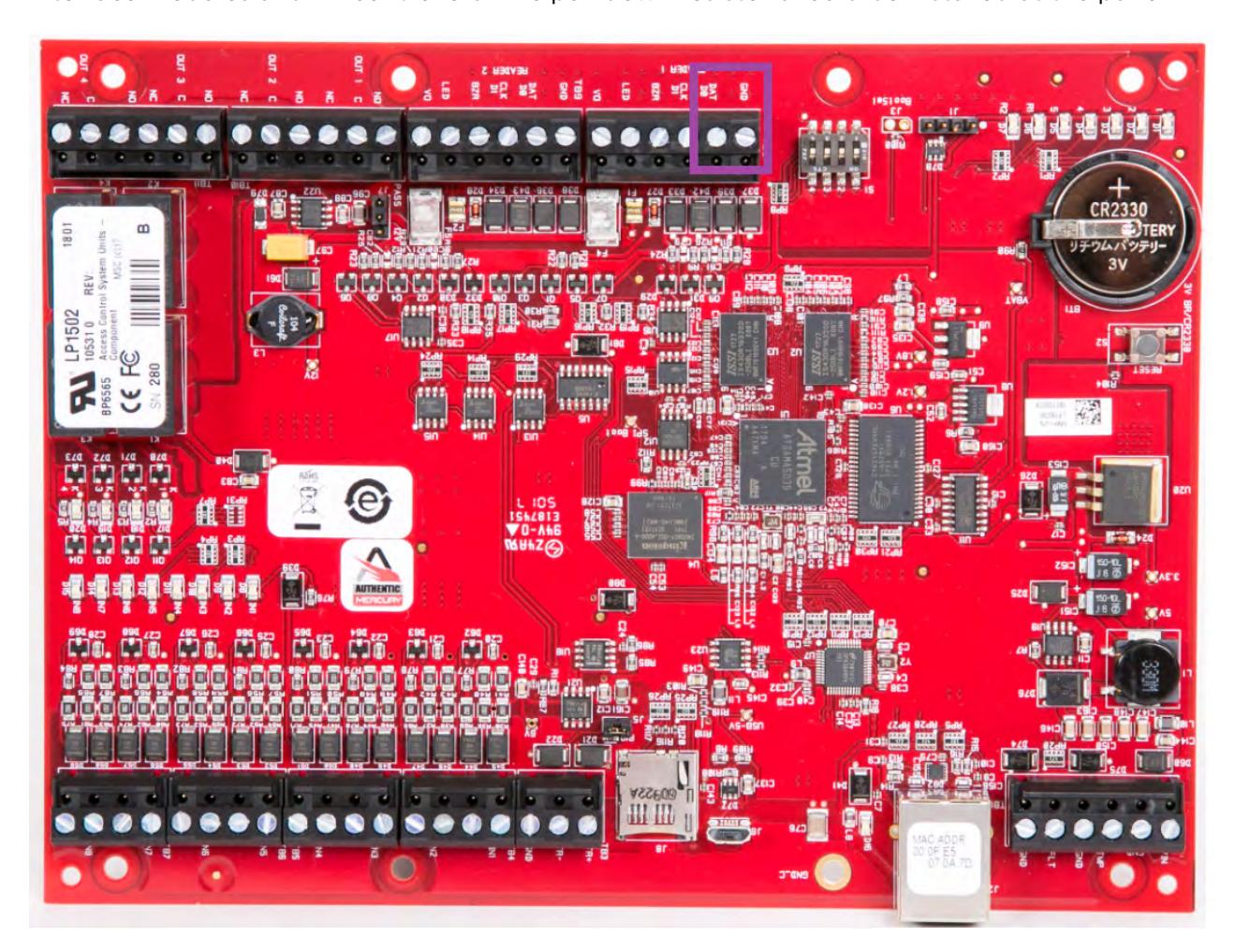
Yes, a 1K-ohm pull down resistor should be added between the Mercury DAT/TR- and GND lines on S3 interface modules and LP controllers. The pull down resistor should be installed at the panel.

2.4.3 What is the recommended wire specification for OSDP?
Four (4) conductor twisted pair overall shield such as UL approved, Belden 3107A or equivalent is recommended to remain fully TIA-485 compliant at maximum supported baud rates and cable distances. Belden 82842, Liberty Wire & Cable 24-29_P485-WHT, West Penn Wire D254852, and CAT6 cable have been found to be suitable in typical applications and installations, including lower baud rates and cabling distances.
2.4.4 If upgrading a Wiegand reader to OSDP do you need to also change the wiring as well?
It is possible to reuse existing Wiegand wiring for OSDP. However, using simple stranded cable typical of Wiegand access control readers does not typically meet the TIA485/EIA-RS485 specification for twisted pair recommendations.
2.4.5 Do I need to install terminating resistors on an OSDP bus?
Yes, terminating resistors should be installed in cases where there exists a long wire run between panel and reader(s). The resistors should be installed both at the panel and the furthest reader on the bus. When using recommended RS-485 cabling, 120 ohm resistors are suggested.
2.5 Communications
2.5.1 What is the default baud rate of iCLASS SE, multiCLASS SE, and pivCLASS OSDP- enabled readers? What additional baud rates are supported and how is this setting changed?
The default baud rate on HID OSDP-enabled readers is 9600 baud. OSDP supports baud rates between 9600 and 115200 baud. Both HID OSDP-enabled readers and Mercury control panels support these baud rates. The baud rate setting is changed via the OSDP Communications Setting command sent from the Mercury panel. Additionally, iCLASS SE, multiCLASS SE, and pivCLASS custom parts can be ordered to receive a reader at an alternate default baud rate. When attaching one reader onto a Mercury OSDP bus the panel automatically detects the reader baud rate and sets it according to the installation settings.
2.5.2 If an iCLASS SE, multiCLASS SE, and pivCLASS OSDP-enabled reader has already established an OSDP v2 secure channel session with the panel, what is the process to move that reader to a new location/panel?
The following process assumes panels/systems neither share SCBKs (secure channel master keys) nor have knowledge of SCBKs associated with other panels:
- 1. The access control panel/system must take the reader out of secure channel.
- 2. The reader must be placed into install mode using a configuration card or by sending HID manufacture specific commands to the reader.
- 3. Attach the reader to a new panel and commission it with a new SCBK.
2.5.3 Do Mercury panels and iCLASS SE, multiCLASS SE, and pivCLASS OSDP-enabled readers support addressing? What addresses are supported, what is the default reader address and how is the address changed?
Address changes are supported through either OSDP commands or through HID reader configuration cards. The default address allocated to a reader is address 0. Valid PD (reader) addresses are 0-126. However, many panels will only support the number of readers required to support the number of doors associated with a single OSDP bus. For example, a single Mercury MR52 OSDP bus will support a maximum of 2 readers, and hence 2 addresses. Valid addresses on a Mercury OSDP bus are 0-3.

2.5.4 What is the best way to change the address on iCLASS SE, multiCLASS SE, and pivCLASS OSDP-enabled readers? How can I obtain configuration cards or order a HID OSDP-enabled reader with a different address?
The best way to change a reader address is via the panel using OSDP commands. Individual readers must be attached to a single panel, have the address changed, then detach for the next reader. OSDP systems cannot have more than one address set to zero (0) on the bus at a time. Alternatively, configuration cards can be ordered as:
- ႑ OSDPv1 readers order: P/N SEC9X-CRD-A-00 through 10 and 0A-0F
- ႑ OSDPv2 readers order: P/N SEC9X-CRD-B-00 through 10 and 0A-0F
Preconfigured iCLASS SE, multiCLASS SE, and pivCLASS OSDP-enabled readers may be ordered from HID. This requires a custom reader part number and has additional lead-time associated with order fulfillment and delivery. Please contact your HID representative or distribution/integration partner for additional details.
2.5.5 Do Mercury panels and iCLASS SE, multiCLASS SE, and pivCLASS OSDP-enabled readers support multi-drop?
Yes. The LP4502, LP1502, and MR52 each have the potential for two RS-485 OSDP buses, each supporting up to two multi-dropped readers. Likewise, the LP1501 can support two multi-dropped RS-485 OSDP readers on its single OSDP reader bus. The MR62e can support up to four multi-dropped RS-485 OSDP readers on its single OSDP only reader bus. All devices on the OSDP bus must use the same baud rate.
2.6 Part Numbers
2.6.1 How do I find the correct OSDP reader part number?
iCLASS SE, multiCLASS SE, and pivCLASS OSDP capable readers may be specified using the online digital configurator located at:
www.hidglobal.com/configure
If you have already purchased an iCLASS SE, multiCLASS SE, and pivCLASS reader, you can inspect the reader or box label for the reader part number. Part numbers following: 9xxxxxPExxxxx have the requisite hardware and firmware capabilities. Please contact your HID Representative to determine if your specific reader part number is fully setup and compatible for OSDP V1 or V2.