HID-DigitalPersona-Data-Sheet
Open the original PDF document
View PDF


DigitalPersona's multi-factor authentication transforms the way IT executives protect the integrity of the digital organization by going beyond two-factor and multi-factor authentication. The DigitalPersona solution offers forward-thinking IT executives the ability to deploy the optimal set of authentication factors to provide users with a fast and secure Windows® Logon as well as VPN access, web, mobile and cloud applications.
COMPOSITE AUTHENTICATION: The Right Mix of Factors, Moment by Moment
Transform your Windows Logon authentication protocol with DigitalPersona and provide entirely new levels of protection utilizing one of the industry's largest offerings of authentication methods. Deliver the right level of security through the broadest possible selection of authentication factors — from a completely frictionless user experience to one that delivers the strongest protection available in the industry.

KEY BENEFITS
CLOSES EVERY GAP
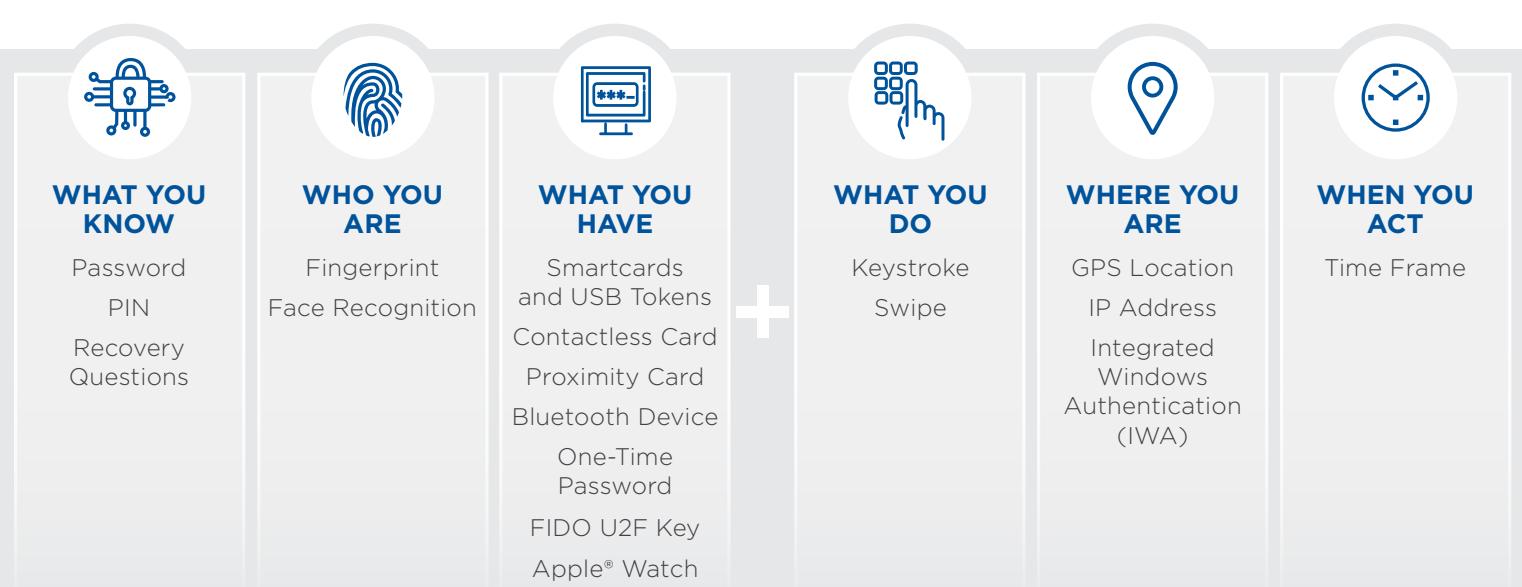
In addition to the traditional set of authentication factors — what you have, are and know — DigitalPersona offers authentication for the contextual risk factors of time, velocity, location and behavior. The latter cover what you do, where you are and when you act, allowing you to precisely match your risk exposure to the optimal security posture for your organization.
HUMAN-PROOFED
DigitalPersona's wide array of authentication factors eliminate both the reliance and burden on users enabling organizations to lead with strong authentication postures without fear of compromise due to lack of user compliance. The range of authentication options means you're never forced down a predetermined path. With this unprecedented freedom of choice, organizations can balance usability and protection based on
specific security goals.
RAPID ADAPTABILITY
With DigitalPersona, you can leverage your existing IT infrastructure and deploy more quickly than other solutions on the market today. Organizations are typically up and running in days — not weeks or months. DigitalPersona also provides native support for Active Directory®, Azure® AD and Office 365®, enabling you to leverage your existing Microsoft® expertise. Administration is simplified: no proprietary tools are needed to learn, manage or administer the system.
You can implement with minimal disruption, total staffing flexibility and both lower up-front and ongoing overhead costs. DigitalPersona's extensible architecture also provides peace of mind. DigitalPersona offers "future-proofing" and is designed to easily accommodate new authentication factors as they emerge.
SPECIFICATIONS
| KEY COMPONENTS | |
|---|---|
| CLIENT MODULES | |
| Product Name | DigitalPersona |
| Composite Windows Logon |
ƒ Provides fast and secure device logon
ƒ Includes behavioral and contextual risk-based policies |
|
DigitalPersona Client DigitalPersona Console with
Enrollment, Policy Engine and Core Components |
ƒ Connects to DigitalPersona server for enrollment, authentication and policy enforcement
ƒ Provides tools for user enrollment |
| DigitalPersona Mobile Enrollment Client | Offers strong attended enrollment on a Windows mobile platform to onboard users in disconnected mode |
| SERVER MODULES | |
|
DigitalPersona Server
Policy Engine and DB (AD or LDS) |
ƒ Creates, distributes and enforces MFA policies
ƒ Acts as a central repository for user credentials |
| DigitalPersona RADIUS VPN | ƒ Provides two-factor authentication for remote access |
| PRODUCT FEATURES AND SPECIFICATIONS | |
| Centralized Management | Active Directory – Set security policies for domain users and groups using Group Policy Objects (GPOs) |
| Web Administration Console | Administer DigitalPersona LDS and AD users with DigitalPersona LDS backend infrastructure |
| Multi-factor Authentication for Windows Logon |
Authentication Factors:
Know: Windows password, PIN, recovery questions Have: OTP, contactless cards (HID iCLASS memory cards, MIFARE Classic 1k, 4k and mini memory cards), smart cards (PKCS11 and CSP-compatible), proximity cards (HID 125 kHz) and Bluetooth devices. Tokens. FIDO U2F Key, Apple Watch Are: Fingerprint, face recognition Do: Keystroke, swipe Where: GPS location, IP address. Integrated Windows Authentication (IWA) When: Time frame |
| Fast Kiosk Access |
Shared-User Workstation ("Kiosk") Logon Control:
Enforce advanced authentication policies for shared workstations (such as walk-up kiosks) where people use their individual credentials to unlock Windows and log into applications. Support for multiple kiosk environments under Citrix/RDP |
| Self-Service Password Recovery |
If users forget their passwords, they can access their PC by answering a set of predefined questions (this can be customized
and centrally managed by IT) |
| Reports | Generate, view and schedule preconfigured activity and status reports for users and applications from a centralized location |
| Client Software Operating System |
Windows 10, Windows 8.1 (desktop mode), Windows 7 (32- and 64-bit), Windows Embedded Standard 2009 (requires .NET
4.5), Windows Server 2008 and 2012, and Linux (select thin clients) |
| Server Software Operating System | Windows Server 2012 and 2012 R2, Windows Server 2008 R2 (64-bit) |
| VDI (Virtual Desktop Infrastructure) |
XenApp (server) 6.5, XenDesktop 6.2 and 7, Receiver and Online
Plug-In 11 and 12, VMWare View and VMWare Horizon |

North America: +1 512 776 9000 • Toll Free: 1 800 237 7769 • Europe, Middle East, Africa: +44 1440 714 850 • Asia Pacific: +852 3160 9800 • Latin America: +52 55 5081 1650
© 2019 HID Global Corporation/ASSA ABLOY AB. All rights reserved. HID, HID Global, the HID Blue Brick logo, DigitalPersona, FingerJet and the Chain Design are trademarks or registered trademarks of HID Global or its licensor(s)/supplier(s) in the US and other countries and may not be used without permission. All other trademarks, service marks, and product or service names are trademarks or registered trademarks of their respective owners. 2019-06-13-iams-hid-digitalpersona-ds-en PLT-04479