HID Card Handling Guide
Open the original PDF document
View PDFHID Card Printing and Handling Guide
HID Global Offices:
Corporate
North America
15370 Barranca Parkway Irvine, CA 92618-2215 U.S.A.
Phone: 800 237 7769 Phone: 949 732 2000 Fax: 949 732 2120
Asia Pacific
19/F 625 King's Road North Point Island East Hong Kong
Phone: +852 3160 9800 Fax: +852 3160 4809
Latin America
Circunvalacion Ote. #201 B Despacho 3 Col. Jardines del Moral Leon 37160, Gto.
Mexico Phone: +52 477 779 1492 Fax: +52 477 779 1493
Europe, Middle East & Africa
Haverhill Business Park Phoenix Road Haverhill, Suffolk CB9 7AE England
Phone: +44 1440 714 850 Fax: +44 1440 714 840
hidglobal.com
MKT-000006 Rev A.3
© 2007 - 2010 HID Global Corporation. All rights reserved.
HID GLOBAL, HID, the HID logo, iCLASS are the trademarks or registered trademarks of HID Global Corporation, or its licensors, in the U.S. and other countries.
ACCESS experience.
General Information
HID Global® ISO cards are made with outer layers of PVC and finished with a glossy surface suitable for Photo ID printing. Proximity cards and contactless smart cards contain an antenna coil and integrated electronic chip. Wiegand cards contain magnetic wire code strips.
Care should be taken to follow HID Global's handling and printing recommendations. We hope these suggestions will help you successfully print your HID Global cards.
Print Design
Surface imperfections caused by the embedded chip and antenna may cause color variations or printing voids with direct to card printers. When designing card artwork, avoid large areas with solid or half-tone backgrounds. Use artwork with varied color or pattern. If the design
must print over the internal chip, we recommend the use of a reverse transfer printer. Do not place a photo portrait over the chip location or opposite the edge of a magnetic stripe.
Always print a few test cards, and be prepared to make minor adjustments to the artwork to create the best appearance.
Some printers are capable of edge-to-edge printing. Before running an edge-to-edge design, test several cards to check the printer's capability.
Card Handling
HID Global's printable cards are shipped shrink wrapped. Care should be taken not to scratch the cards when opening the wrapping, especially when using a sharp object.
Cards should be handled by the edges, not by the flat finished surface. Use lint free gloves or finger cots, since hand oils will transfer to the cards causing smudging, fingerprints or other distortions when printing.

Even with careful card handling, it is possible that the image quality may vary. This can be due to printer setup variations, lot to lot material variations, environmental changes, printer types, background color selections and other variables.
HID Global® is not responsible for image quality variations. These cards have been quality controlled and meet requirements for high quality images. Failure to achieve a desired image quality is not the fault of the card.
Card Printing Tips
Following these instructions will provide optimum printing results.
- Always check cards for noticeable debris. In some instances there may be small pieces of vinyl on the card. Carefully clean cards using 99% pure Isopropyl alcohol and a soft, lint free cloth. 1
- The office where you print the cards should be neat, clean and free of airborne particles. 2
- Check the printer's roller frequently. For best results, clean the printer according to the manufacturer's recommended intervals. 3
- Occasionally, fine scuff marks appear on the surface of cards. These marks will not affect the printer, or the outcome of the printed images. These scuff marks may occur during final inspection and testing. 4
- Printer manufacturers discourage printing cards which are pre-punched. The slot edge may tear the printer ribbon or interfere with card position sensors. 5
- Print your cards first, then slot punch them. For cards that are already punched, do not print in the area near the slot. If the card has an embedded contact chip, keep the printing at least .0625 in [1.5875 mm] away from its edges. 6
Card Slotting
HID Global cards have slot punch indicators, small dots visible on the card back which show the only allowable slot locations for the card.
It is strongly suggested to use badge grippers instead of slot punching the cards. HID Global has a full line of ID Accessories allowing you to display your badge without requiring a slot punch.
If you slot punch the card, carefully center the indicator marks to the punch, and punch only where the indicator marks appear. Any other position may damage the electronics. If there are no marks, the card cannot be safely punched.
Always test the first card after printing and slotting. Once satisfied with the quality, continue running the full card lot.
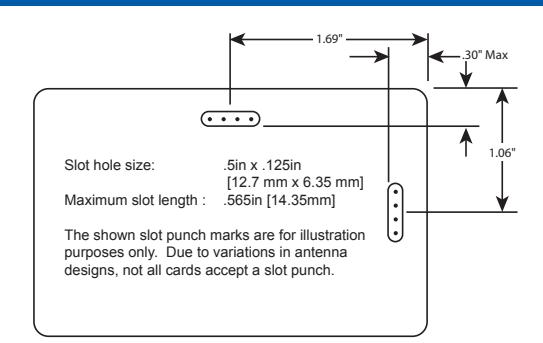
Card Slot Locations
CAUTION: Available slot punch locations are marked by 3 dots on the back of the card. If dots are not present, the card cannot be safely punched.
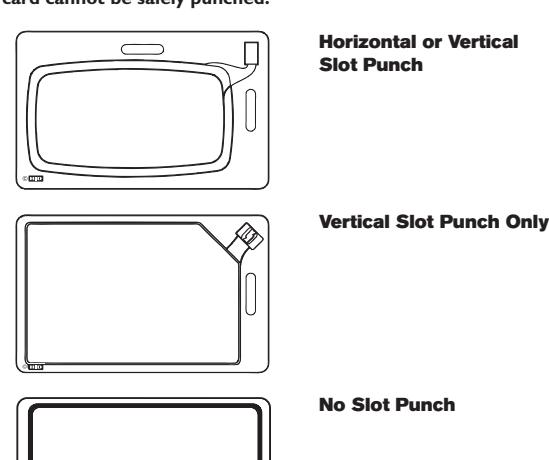
Shown are card backs