HES KS100 Series Server Cabinet Lock Installation Instructions
Open the original PDF document
View PDFHES KS100 Aperio Wireless Cabinet Lock
Installation and Operating Instructions

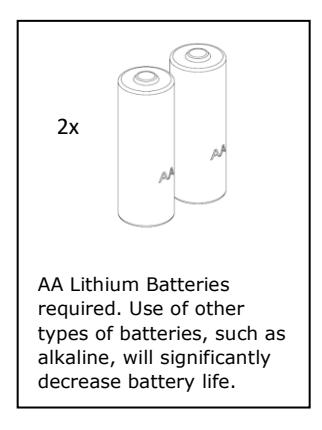
* All battery life claims are approximate and based on a set configuration profile. Battery performance is based on predefined system settings such as battery chemistry and battery model used, credential presentation settings (LED/buzzer), UHF polling period, UHF status intervals, and operations per day. Actual battery performance will vary and depends on the factors above.
Product Specifications
Wireless Frequency: 2.4GHz, IEEE 802.15.4, using AES 128-bit encryption
Lock Battery Type: AA Lithium, 1.5 Volts (V)
Battery Life: 50,000 cycles* Holding Force: 400 lbs
FCC Part 15 Compliant, Industry Canada Compliant
Operating Temperature: 32 to 122 F (0 to 50 C)
HID® multiCLASS SE® technology Credentials Supported: High Frequency (13.56 MHz) – HID iCLASS, HID iClass SE (SIO-enabled), HID iCLASS Seos, HID MIFARE SE, HID DESfire EV1 SE, MIFARE CLASSIC DESfire EV1. Low Frequency (125KHz) – HID Prox, AWID, EM4102, ioProx. NFC Enabled
Mobile Phones.
Recommended tools
Cutting Wheel
Phillips #2 Screwdriver
Hardware Specifications
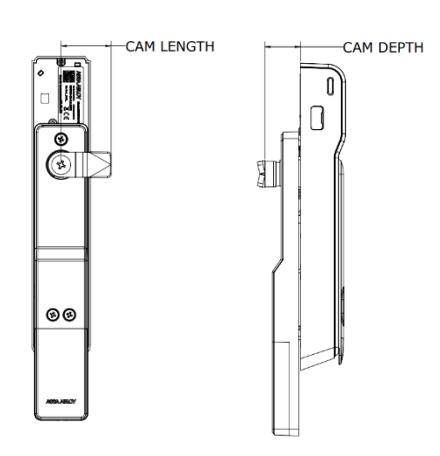
Table 1 - Cam
| CAM | CAM LENGTH |
CAM
DEPTH |
|---|---|---|
|
38mm - 4
(Standard) |
38mm [1-1/2"] | 26mm [1"] |
|
38mm - 5
(Optional) |
38mm [1-1/2"] |
28mm
[1-1/10"] |
|
45 mm - 1
(Optional) |
45mm
[1-3/4"] |
18mm
[7/10"] |
P/N: 3080006.017_1
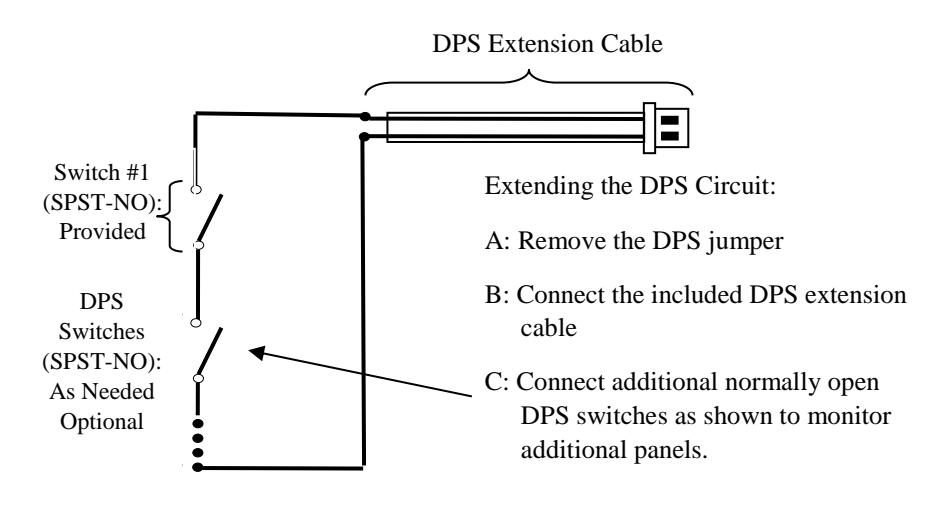
DPS Cable Extension
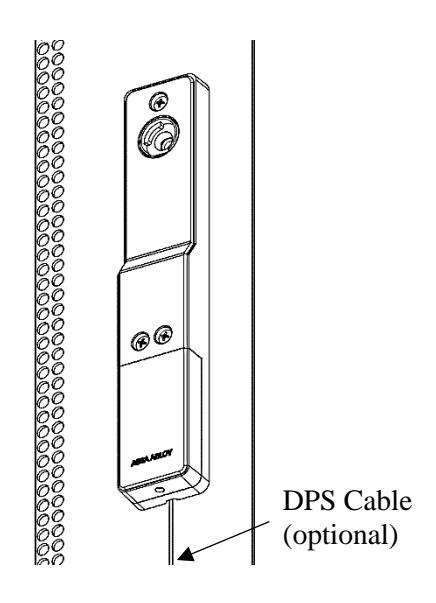
Optional – The DPS signal is closed when the handle is resting in its locked position. The DPS circuit can be extended to include normally open DPS switches arranged in a series to monitor additional doors and panels
For Technical Support Please call 1-800-810-WIRE
Package Contents
Lock Body Battery Bracket Handle Assembly Handing Selectors SFIC Cam and Spacer Cam 2x AA Lithium Batteries Screw A #1/4-20 x .50 Truss Head Phillips 3x Screw B 8/32 x 5/16" Pan Head Phillips 3x Dolphin Connector Note: SFIC mechanical key override/SFIC blank sold separately.
Installing the Lock
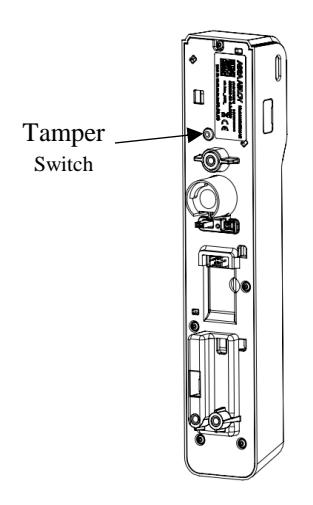
1. Locate the 150mm x 25mm lock cutout on the door. Connect battery cable and optional DPS cable to lock body. Secure battery bracket to lockbody using 3x screw B.
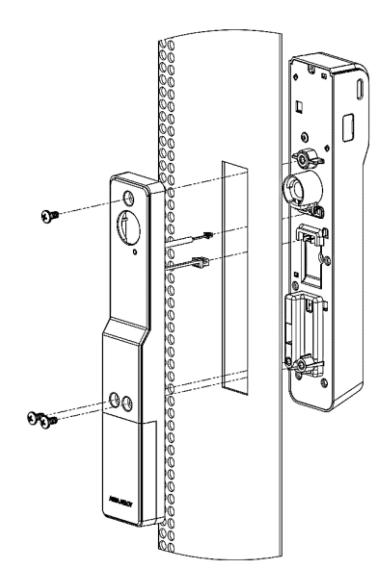
2. Ensure lock body is flush against the mounting surface to depress tamper switch.
3. Select appropriate handing selector.
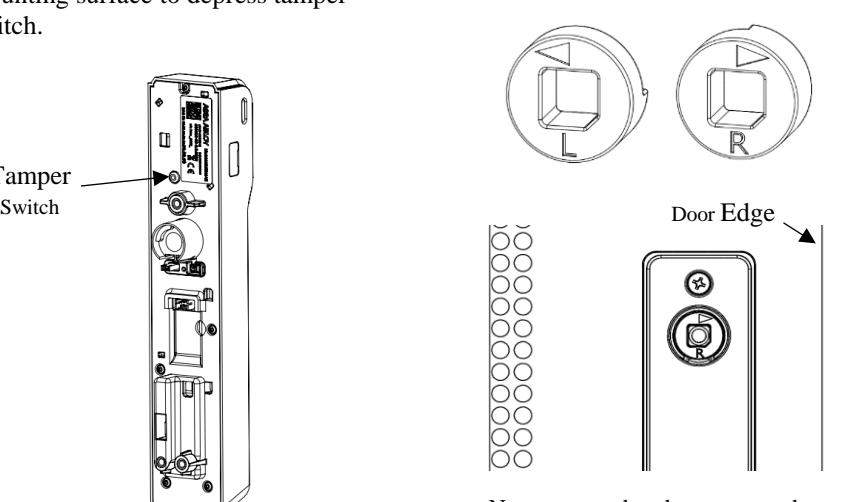
Note: ensure that the arrow on the handing selector is pointing towards the edge of the door.
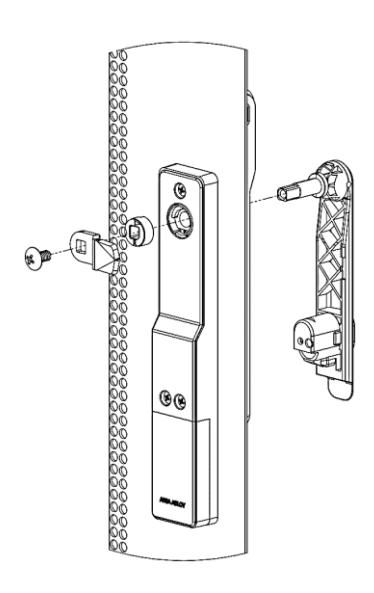
4. Install handle, handing selector, and cam. Secure with screw A.
Installing the SFIC Core (Optional)
1. Insert SFIC core and cam into handle. Use spacer for 6 pin SFIC core.
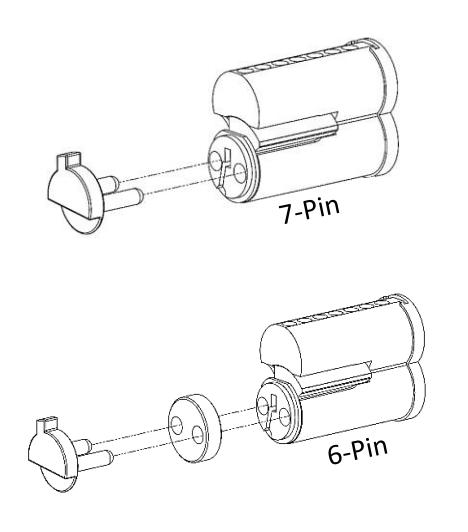
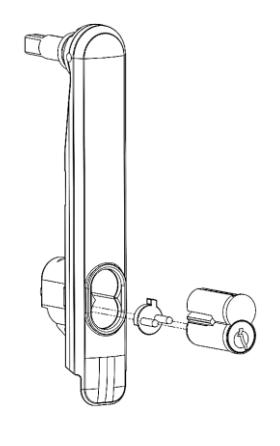
Note: SFIC blank plastic core (SFIC-BC) sold separately. SFIC Blank is required if no cylinder Is used.
Installing the Batteries
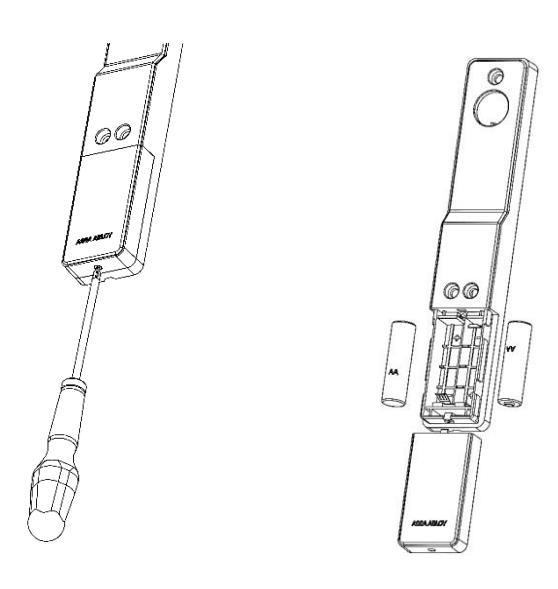
1. Loosen screw on battery cover, slide cover down, and install batteries in the appropriate orientation.
Micro USB Port
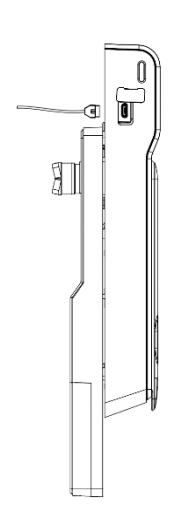
For emergency power & local (hard wired) firmware updates, use micro USB port located on the side of the KS100 reader.
Optional Accessories
| Part Number | Description | |
|---|---|---|
| SFIC |
MEDECO X4 7-pin SFIC cylinder & 2 keys
(1 Control,1 User) |
|
| SFIC-BC | KS SFIC blank, black plastic core | |
| KS-DPS | Surface mount DPS (external) | |
| KS-CAM38 |
CAM: 38MM -
5 (28mm Depth) |
|
| KS-CAM45 |
CAM: 45MM -
1 (18mm Depth) |
|
| AH20W14 | ASSA ABLOY Aperio™ AH20 1:1 Wiegand Hub | |
| EXT-10-ANT |
ASSA ABLOY Aperio™ Hub External Antenna -
3,9 dBi Omnidirectional |
|
| APA-10-PC | ASSA ABLOY Aperio™ Programming Kit | |
| APD-10-USB | ASSA ABLOY Aperio™ USB Radio Dongle | |
LED Codes
| ASSA ABLOY Aper | rio LED LOCK Cod | les: |
|---|---|---|
| One yellow flash | Card read aperio | |
| One green flash | Access granted | |
| Five yellow, one red flash | Force closed (in open mode) | |
| Continous yellow flashes (.25 sec every second) | Comhub busy | |
| One red flash | Access denied (AC online) | |
| Three red flashes | Access denied (AC offline) | |
| Continous red flashes (.125 sec every second) | Lock is blocked (when closing) | |
| Ten red flashes | Error in Lock | |
| Continous yellow flashes (.25 sec every 5 seconds) | Low Battery | |
| Continous red flashes (.25 sec every 5 seconds) | Dead Battery |
Aperio Hub
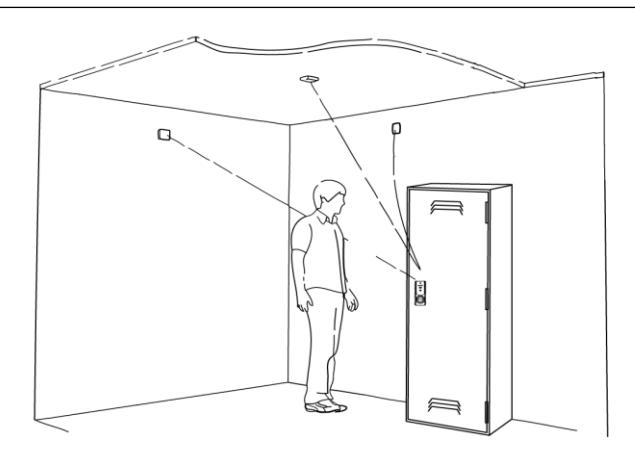
| Approvals | CE, ETL, FCC, IC, C-Tick |
|---|---|
| Safety and emissions |
FCC 47CFR Part 15 subpart
B and subpart C; IC RSS-210 EN ETSI 301 489-17 v2.1.1; ENETSI 300 328 v1.7.1; EN 60950-1 ed.2 2007 |
|
Dimensions
(mm) |
82x82x37 |
| Power Supply | 8-24 VDC |
| Current | 250 mA minimum |
| Internal Antenna | 2cross polarized dipoles |
|
External Antenna
(Part No. EXT-10-ANT) |
One reverse polarity SMA external
antenna connector. Optional antenna type dipole with max antenna gain of 3.9dBi |
| Radio Standard |
IEEE 802.15.4(2.4GHz) -
15 channels (11-25) |
|
Encryption (Radio
Communications) |
AES 128 bits |
|
Wireless Operating
Range |
Up to 50 ft |
| Receiver Sensitivity | 100dBm 20%PER |
|
Wireless Transmit
Power |
10 dBm/MHz |
| Class of Protection | IP 20 |
| Operating temperature | 5°C to 35°C |
| Humidity | < 95% non-condensing |
| Status | LED (red/green/orange) |
Connecting the Hub
The following applies only to Aperio factory paired kits with AH20 Hubs.
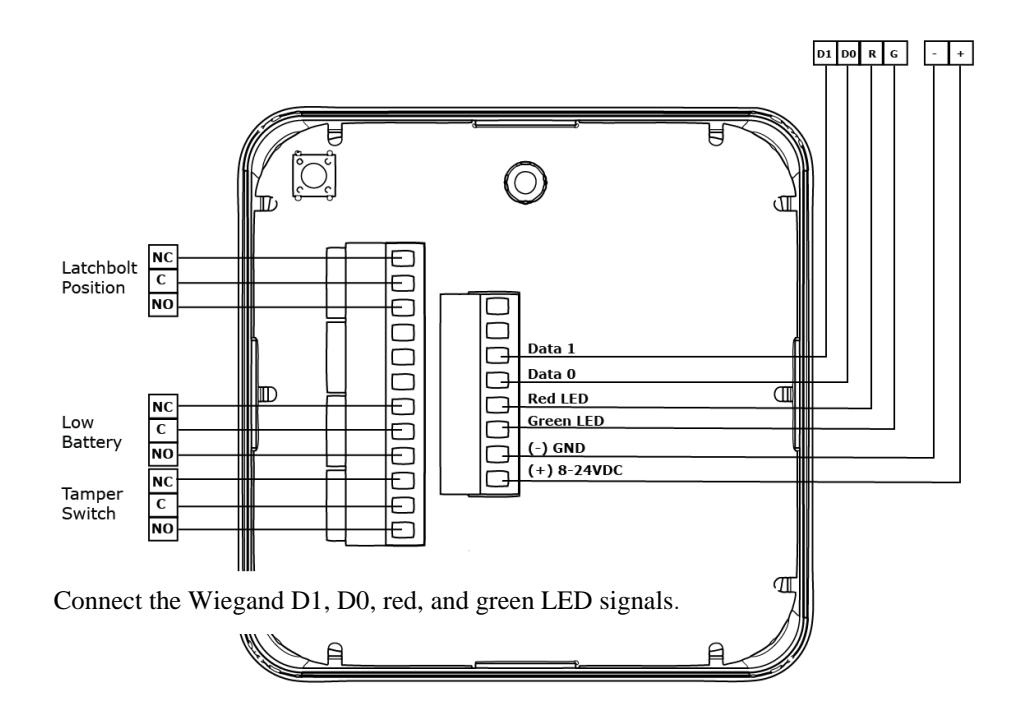
Note: The Green LED input is used to grant access to the cabinet lock. If the Green LED signal is not available to indicate approved access, the approval input can be activated by a relay with "NO" attached to Green LED and "C" to GND.
The Red LED input is used to indicate access denied. If the RED LED signal is not connected, the lock will flash RED three times when a non-approved card is presented indicating loss of connection to the hub rather than access denied. Any other codes may be reference on the LED reference card.
WARNING
FCC Statement
This equipment has been tested and found to comply with the limits for a class B digital device, pursuant to part 15 of the FCC Rules. These limits are designed to provide reasonable protection against harmful interference in a residential installation. This equipment generates, uses, and can radiate radio frequency energy and if not installed and used in accordance with the instructions, may cause harmful interference to radio communications. However, there is no guarantee that interference will not occur in a particular installation. If this equipment does cause harmful interference to radio or television reception, which can be determined by turning the equipment off and on, the user is encouraged to try to correct the interference by one or more of the following measures:
- 1. Reorient or relocate the receiving antenna.
- 2. Increase the separation between the equipment and receiver.
- 3. Connect the equipment into an outlet on a circuit different from that to which the receiver is connected.
- 4. Consult the dealer or an experienced radio/TV technician for help.
Operation with non-approved equipment is likely to result in interference to radio and TV reception. The user is cautioned that changes and modifications made to the equipment without the approval of manufacturer could void the user's authority to operate this equipment.
IC Statement
This device complies with Industry Canada license-exempt RSS standards(s). Operation is subject to the following two conditions:
- (1) this device may not cause interference, and
- (2) this device must accept any interference, including interference that may cause undesired operation.
Conformité aux normes FCC
Cet équipement a été testé et trouvé conforme aux limites pour un dispositif numérique de classe B, conformément à la Partie 15 des règlements de la FCC. Ces limites sont conçues pour fournir une protection raisonnable contre les interférences nuisibles dans une installation résidentielle. Cet équipement génère, utilise et peut émettre des fréquences radio et, s'il n'est pas installé et utilisé conformément ment aux instructions du fabricant, peut causer des interferences nuisibles aux communications radio. Rien ne garantit cependant que l'interférence ne se produira pas dans une installation particulière. Si cet équipement provoque des interférences nuisibles à la réception radio ou de télévision, qui peut être déterminé en comparant et en l'éteignant, l'utilisateur est encouragé à essayer de corriger les interférence par une ou plusieurs des mesures suivantes:
- 1. Réorienter ou déplacer l'antenne de réception.
- 2. Augmenter la distance entre l'équipement et le récepteur.
- 3. Branchez l'appareil dans une prise sur un circuit différent de celui auquel le récepteur est connecté.
- 4. Consultez votre revendeur ou un technicien radio / TV pour assistance.Avertissement
Les changements ou modififications à cet appareil sans expressément approuvée par la partie responsable de conformité pourraient annuler l'autorité de l'utilisateur de faire fonctionner cet équipement.
Conformité aux normes IC
Cet appareil est confrome avec Industrie Canada exempt de license RSS standard(s). Son fonctionnement est souimes aux deux conditions suivantes:
- (1) cet appareil ne peut causer d'interférences, et
- (2) cet appareil doit accepter toute interference, y compris des interférences qui peuvent provoquer un fonctionnement indésirable du périphérique.