Falcon_Re-Handing_LM-Series_Lock_Trim_Installation_Instructions_-_English_106821
Open the original PDF document
View PDFRE-HANDING INSTRUCTIONS FOR LM SERIES LOCK TRIM
Example shown is a right hand being changed to a left hand Reverse sequence to change from left to right hand
Note: Inside trim is always opposite the outside trim LH/LHR RH/RHR


VIEWED FROM OUTSIDE


1. Holding lever as shown, bend tab of lockwasher back flat. Remove nut.

2. Holding lever securely, rotate rose assembly clockwise slightly, and remove plate and lockwasher.
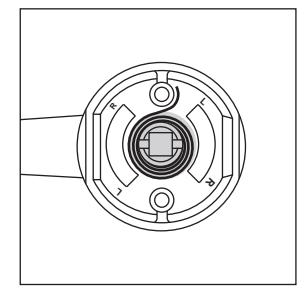
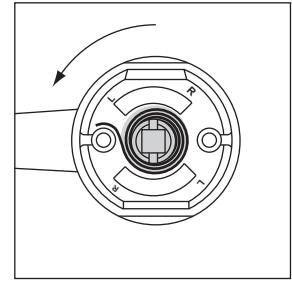
3. Using caution, allow rose assembly to rotate counterclockwise to relieve spring tension.
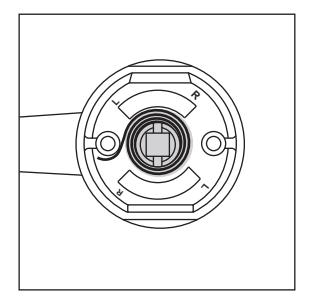
4. Remove spring and reinstall with spring hook on opposite side of post.
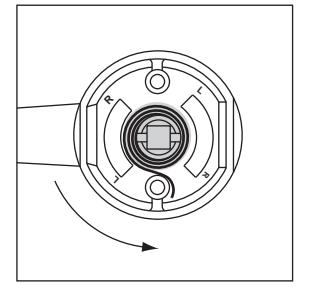
5. Holding lever securely, rotate rose assembly counterclockwise slightly past 90 deg.
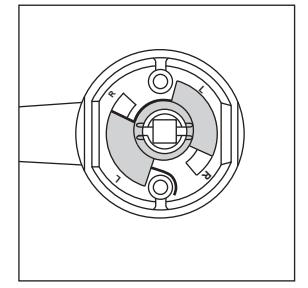
6. Reinstall plate with "L" side up and in line with "L" on rose assembly.
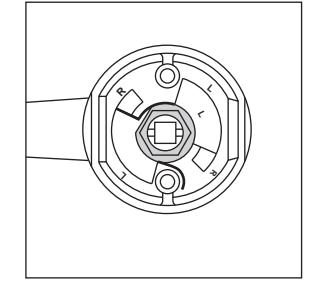
7. Reinstall lockwasher and nut. Tighten nut and then back off slightly until rose assembly rotates freely under plate. Bend up one tab of lockwasher against nut.


BEGINNING SHEET
| Additional Notes: | |
|---|---|
| 1. None | |
| Revision History | Revision Description: | ||||||||||
|---|---|---|---|---|---|---|---|---|---|---|---|
| А | В | С | D | E | F | D > Revised artwork | |||||
| 5440 | 0790 | 6683 | ] | ||||||||
| Material | Material White Paper | Edited By | Approved By | EC Number | Release Date | ||||||
| J. Ellis | M. Roberts | xxxxx | 10/14 | ||||||||
| Notes | Notes | Title | |||||||||
|
Rehanding Instructions, LM Series Lock Trim | ||||||||||
| 3. tolerance ± .13 | Creation Date | Number | Revision | ||||||||
| 4. printed | 4. printed in country may vary | 10-22-14 030253-000 | )-70 | D | |||||||
|
Created By
J. Ellis |
Activity
3899 Hancock Expwy |
||||||||||
| Software: InDesign CS6 | Security, CO 80911 | Allegion 2014 | |||||||||