Falcon_1401_IC_CAM_STAKING_FIXTURE_Installation_Instructions_-_English_106825
Open the original PDF document
View PDF

INSTRUCTIONS FOR USING THE 1401 I/C CAM STAKING FIXTURE
The Falcon 1401 I/C cam staking fixture is designed for attaching and removing cams.
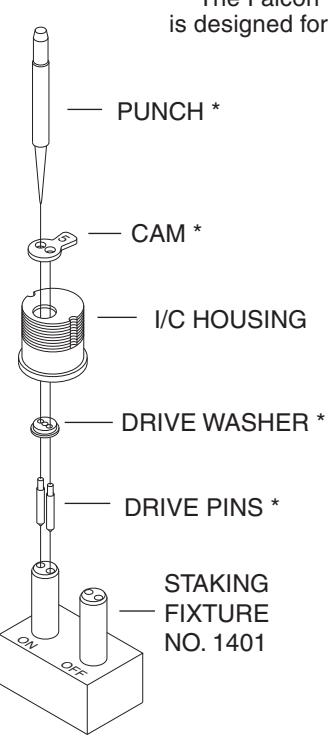
* Parts of Cam Kit No. 1397
ATTACHING CAMS
- 1. Insert (2) drive pins into post holes marked "on".
- 2. Place drive washer over pins with undercut facing up.
- 3. Slide I/C housing over post engaging drive washer.
- 4. Place cam over pins with countersinks and cam number facing up.
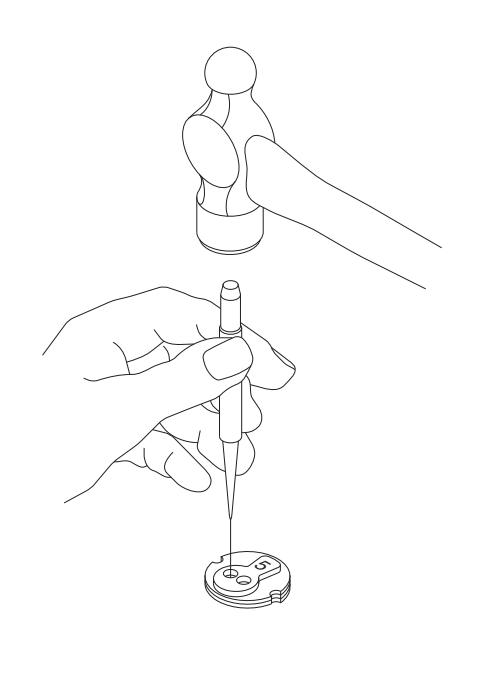
- 5. Using the Falcon punch, place punch point in the center of drive pin and hit with hammer. Pin must flare into countersink to be secure.
REMOVING CAMS
- 1. Slide IC housing over post marked "off".
- 2. Using a flat tip punch (not supplied), tap drive pins through cam and drive washer.
DO NOT REUSE DRIVE PINS.

© Allegion 2014 Printed in U.S.A. 030262-000-70 Rev. 10/14-d

4.250 FOLDED SHEET
─ 2.750 ─
BEGINNING SHEET
| Additional Notes: | |
|---|---|
| 1. None | |
| Revision History | Revision Description: | |||||||||
|---|---|---|---|---|---|---|---|---|---|---|
| Α | В | С | D | Е | F | D > Revised artwork | ||||
| 5598 | 0790 | 6683 | ||||||||
| Material | Edited By | Approved By | EC Number | Release Date | ||||||
| 50# Offset or Equivalent | J. Ellis | M. Roberts | xxxxx | 10/14 | ||||||
| Notes 1. printed one side 2. printed black 3. tolerance ± .13 4. printed in country may vary | Instruction, 1401 I/C Cam Staking Fixture | |||||||||
| 3. tolerar |
Creation Date
10-29-14 |
Number 030262-000-70 |
Revision
D |
|||||||
|
Created By
J. Ellis |
Activity
3899 Hancock Expwy |
|||||||||
| Software: InDesign CS6 | Security, CO 80911 © | Allegion 2014 | ||||||||