Emtek Powered™ Motorized SMART Lock Upgrade for Sideplates – Connected by August Installation & Programming Guide
Open the original PDF document
View PDF


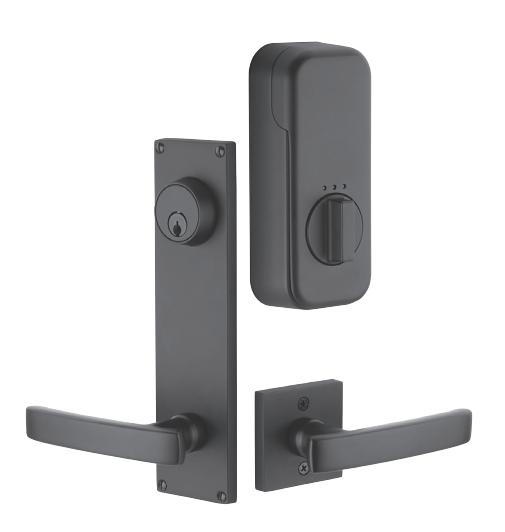
EMPowered™ Motorized Smart Lock Upgrade - Connected by August Keyed Sideplate
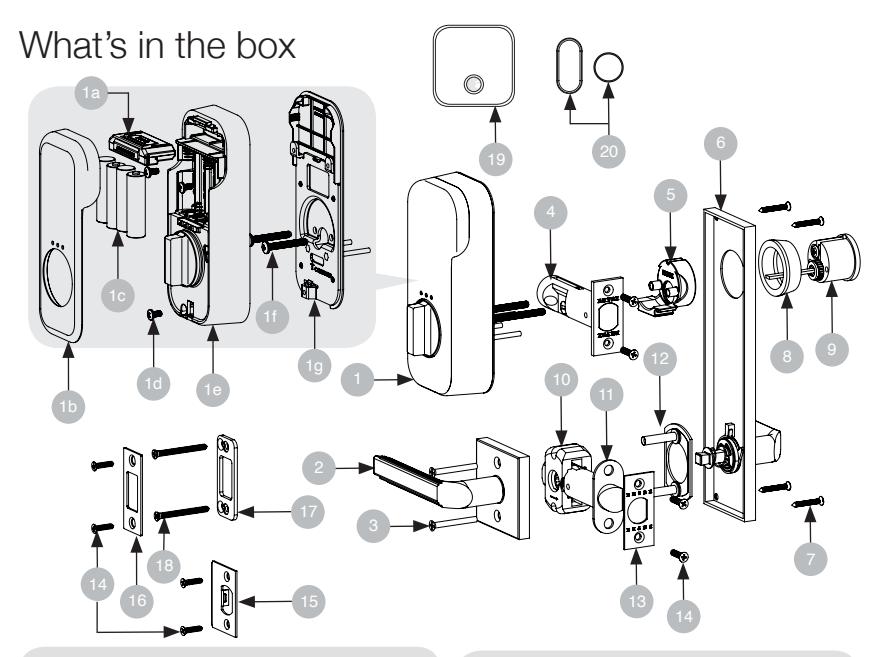
| ITEM NO. | DESCRIPTION | QTY. |
|---|---|---|
| 1 | EMPowered™ Unit | 1 |
| 1a | August Module | 1 |
| 1b | Battery Cover | 1 |
| 1c | AA Batteries | 4 |
| 1d | M4-0.7 x 8 mm Machine Screws | 3 |
| 1e | Interior Escutcheon | 1 |
| 1f | #10-32 x 2-1/8" Machine Screws | 2 |
| 1g | Mounting Plate | 1 |
| 2 | Interior Knob/Lever Assembly | 1 |
| 3 | #8-32 x 1-1/2" Machine Screws | 2 |
| 4 | Deadbolt Latch 2-3/4" Backset | 1 |
| 4 | Deadbolt Latch 2-3/8" Backset | 1 |
| 5 | Deadbolt Screw Guide | 1 |
| 6 | Sideplate Exterior Assembly | 1 |
| ITEM NO. | DESCRIPTION | QTY. |
|---|---|---|
| 7 | #6 x 1" Oval Head Wood Screw | 2 or 4 |
| 8 | Deadbolt Extension Collar | 1 |
| 9 | Deadbolt Cylinder | 1 |
| 10 | Alignment Tool | 1 |
| 11 | Passage Latch | 1 |
| 12 | Rosette Mounting Plate | 1 |
| 13 | Latch Face Plate | 1 |
| 14 | #8 x 3/4" Wood Screws | 8 |
| 15 | Latch Strike Plate | 1 |
| 16 | Deadbolt Strike Plate | 1 |
| 17 | Deadbolt Security Plate | 1 |
| 18 | #10 x 3" Wood Screws | 2 |
| 19 | August Connect | 1 |
| 20 | August DoorSenseTM | 1 |
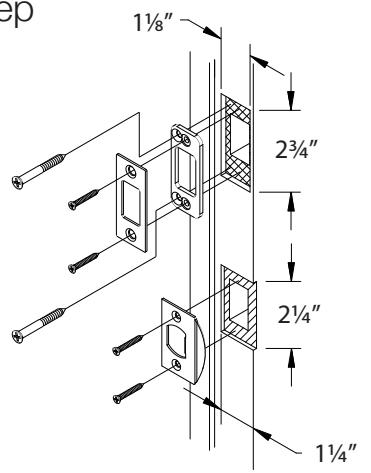
Door Prep
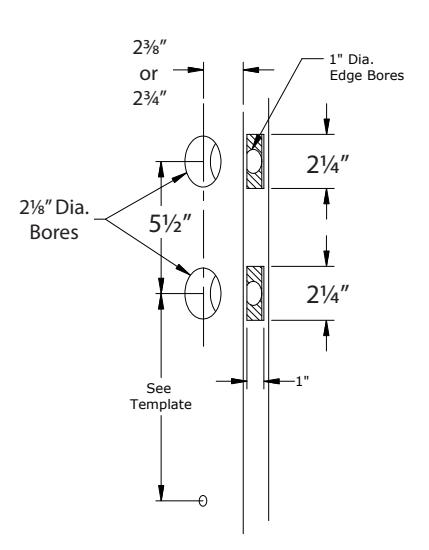
Door Jamb Prep
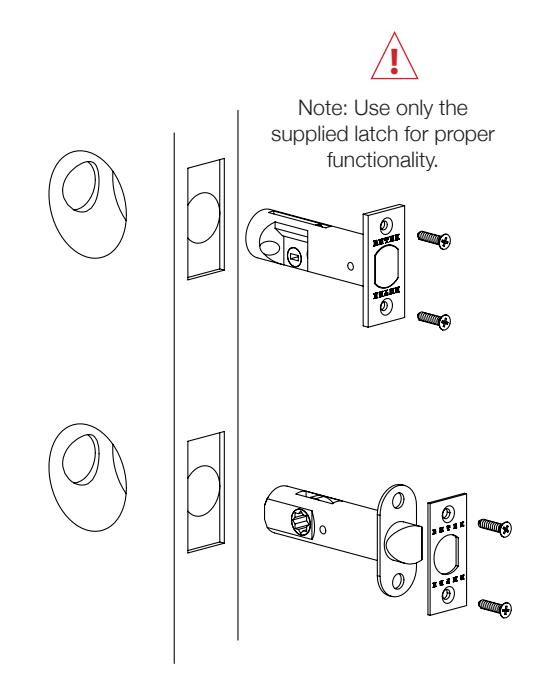
Install Latches 1
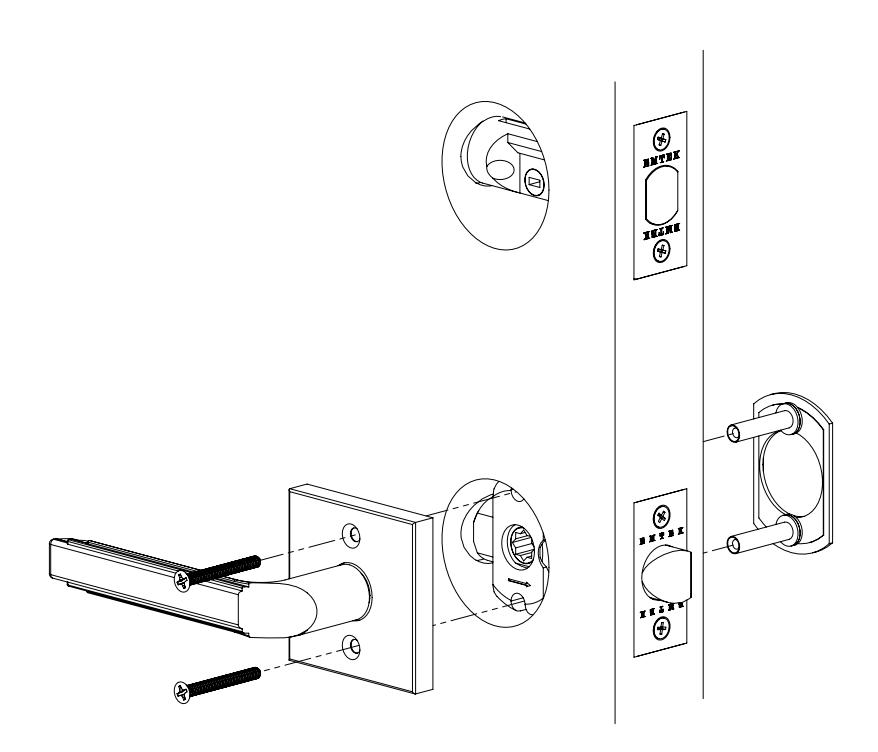
Install Interior Lever/Knob
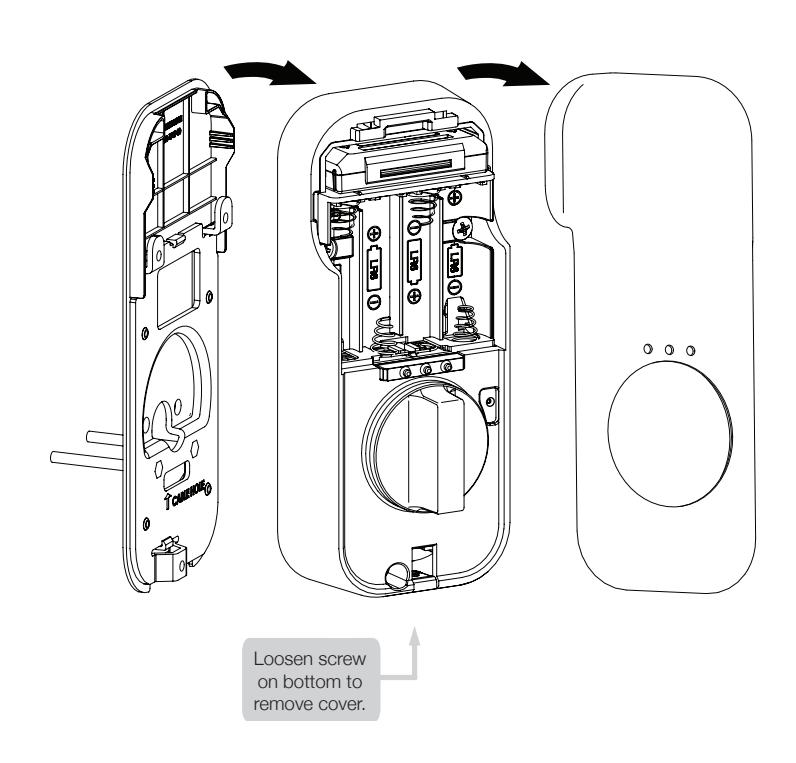
Remove Battery Cover 3
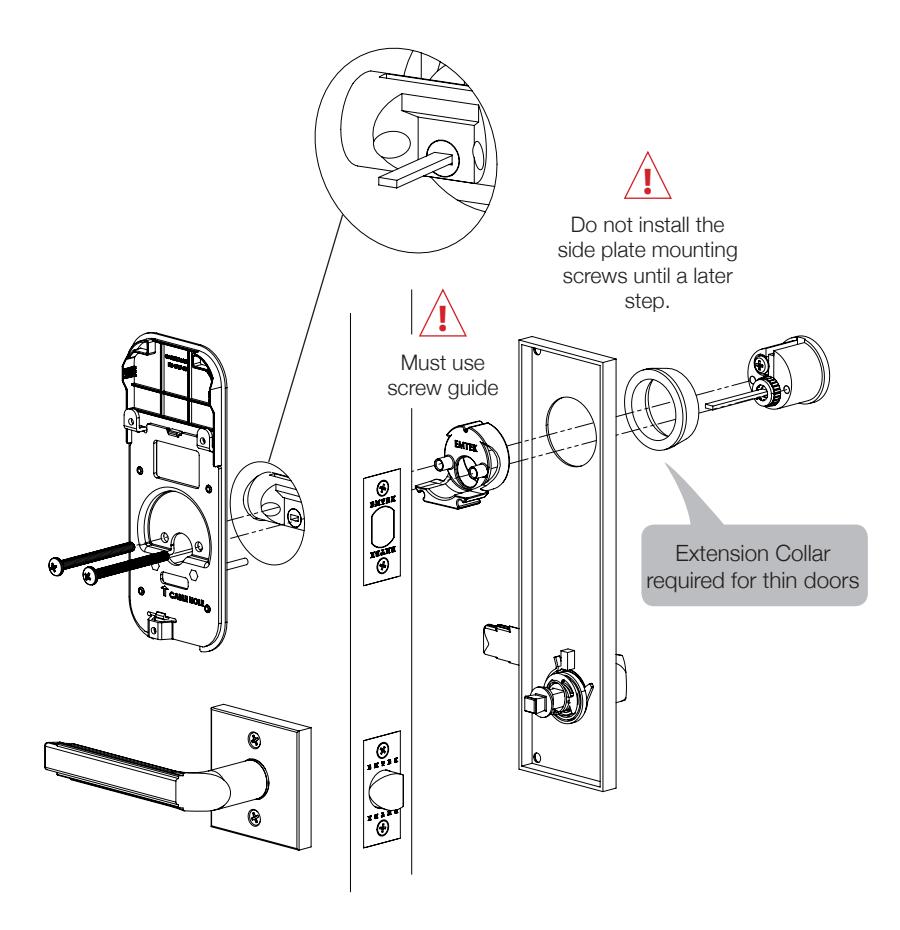
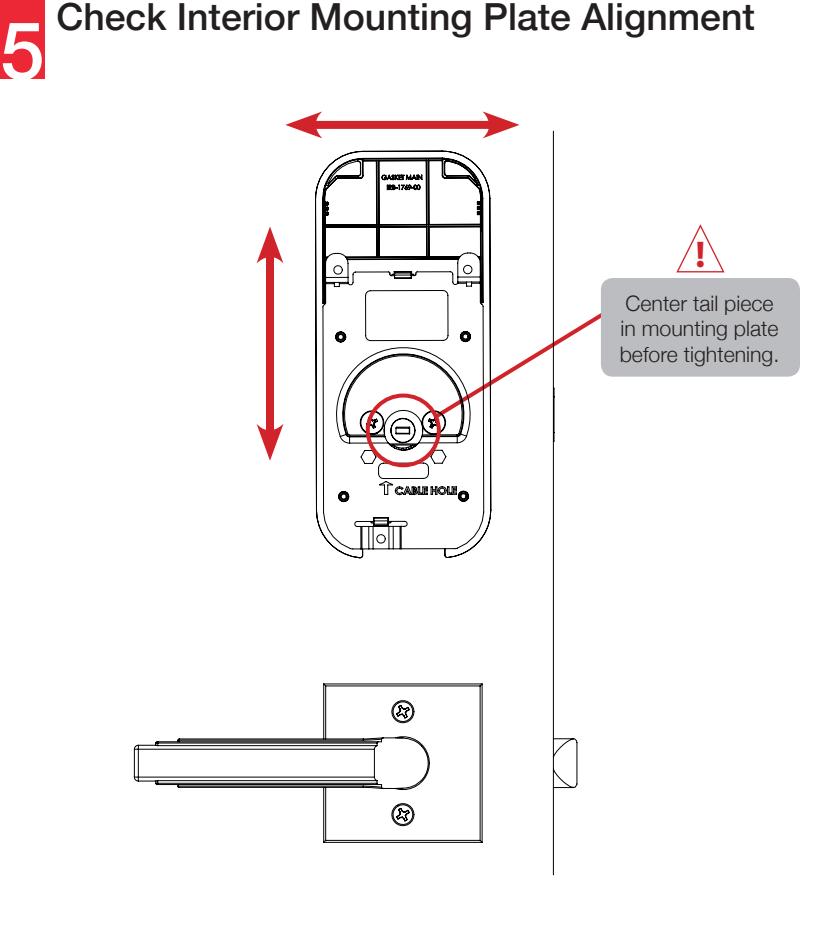
Install Lock Cylinder & 4 Interior Mounting Plate

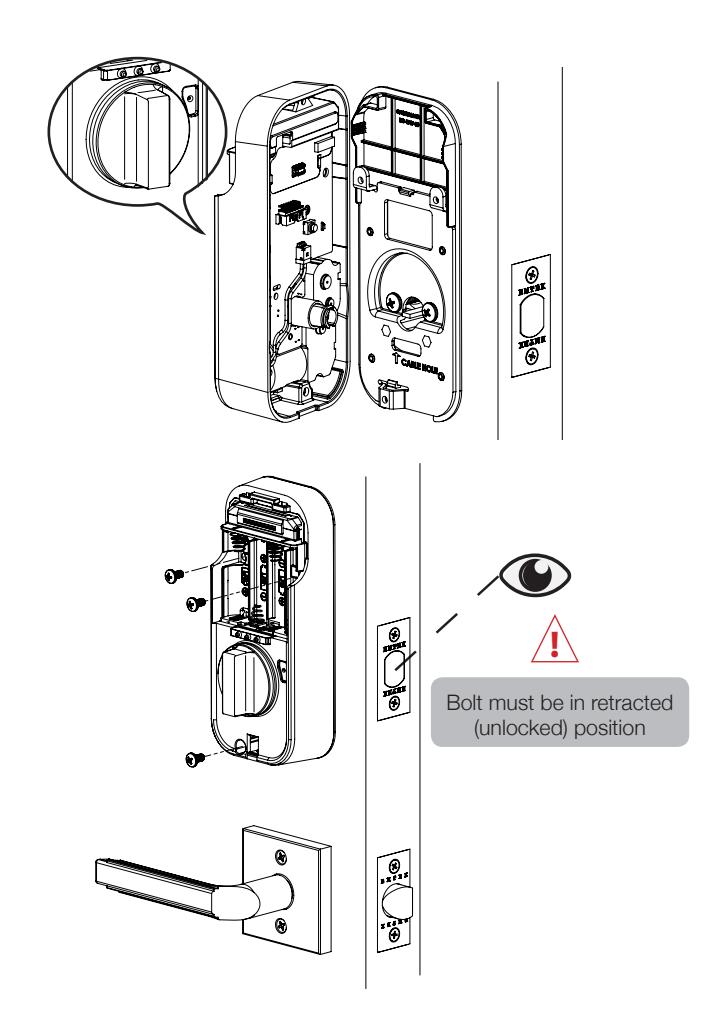
Install Interior Escutcheon
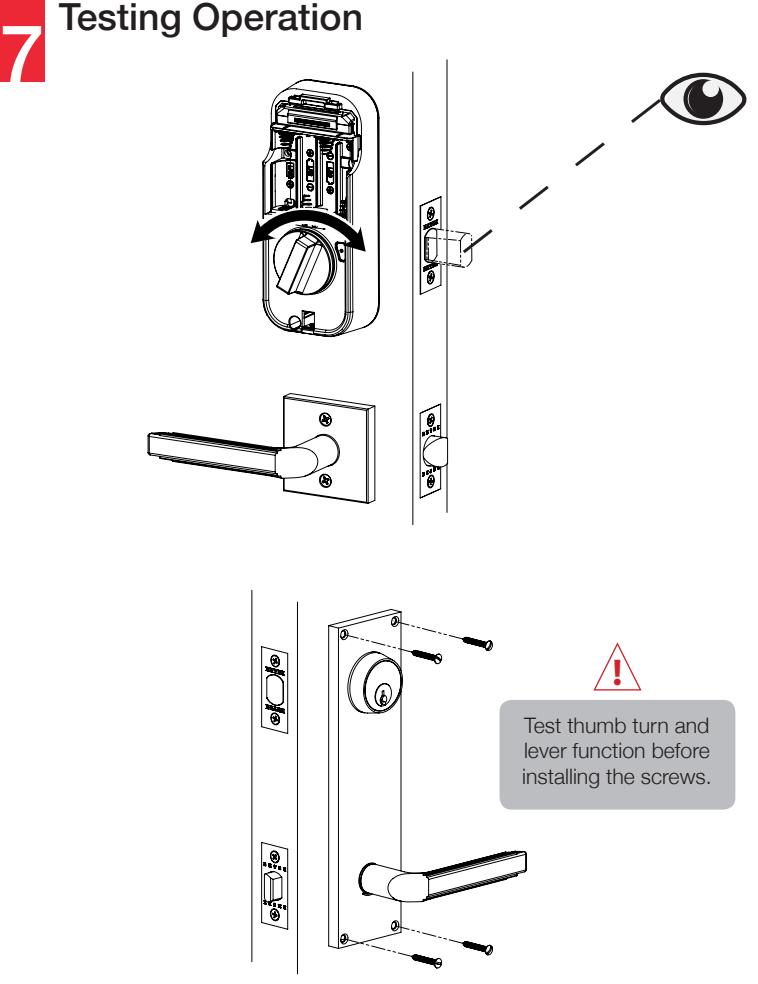
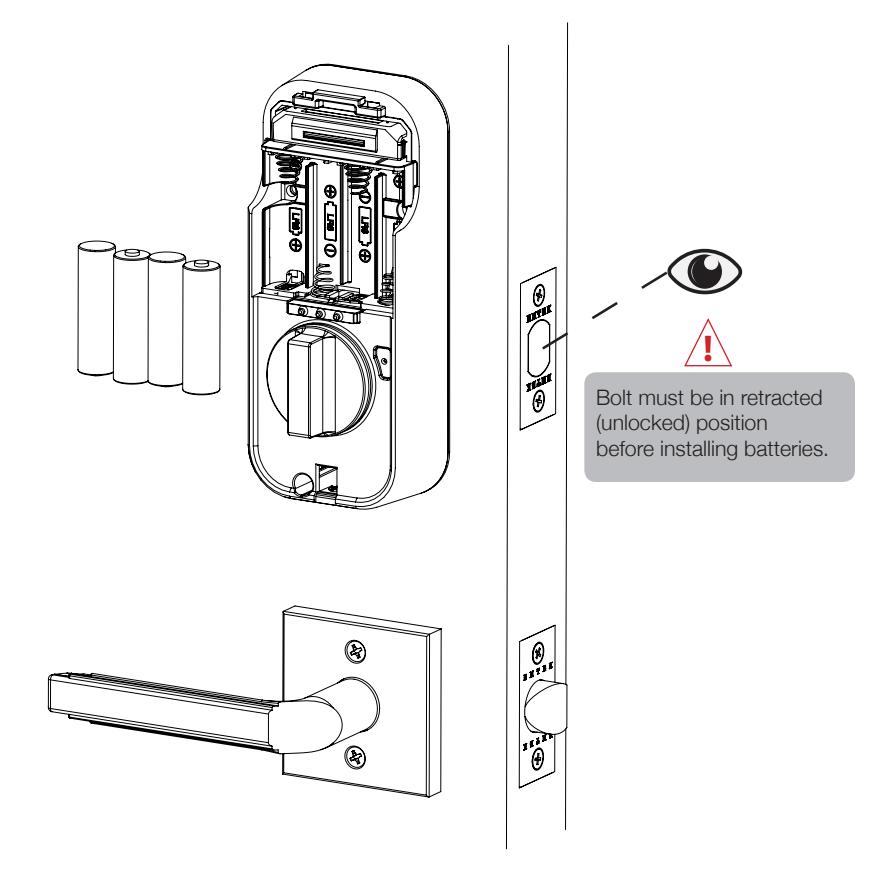
Install Batteries 8

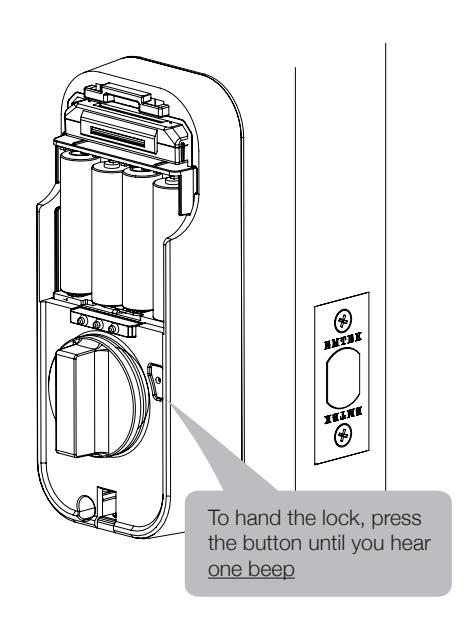
Handing the Lock 9

Set Up a Device - EMTEK SMART LOCK
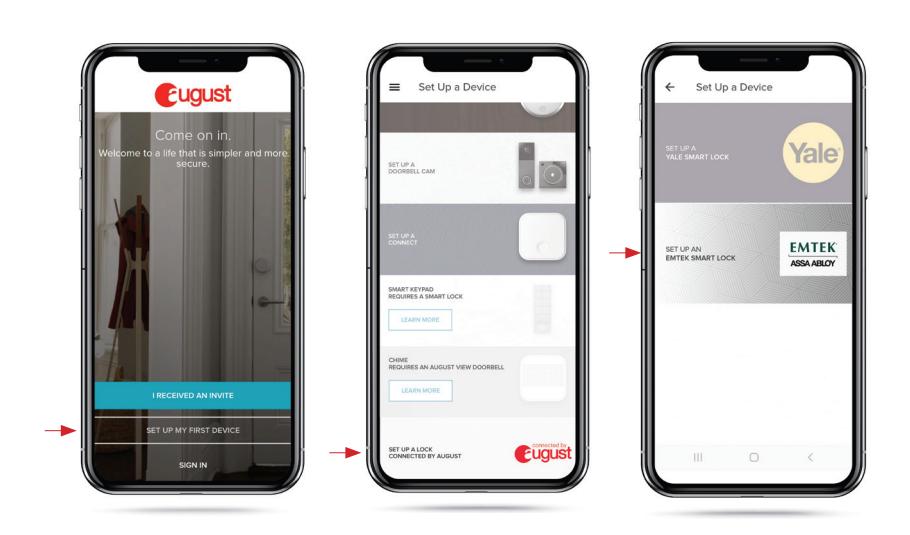
SET UP MY FIRST DEVICE SET UP A LOCK CONNECTED BY AUGUST
SET UP AN EMTEK SMART LOCK

Installing DoorSenseTM with Connected by August Locks - Surface Mount Option
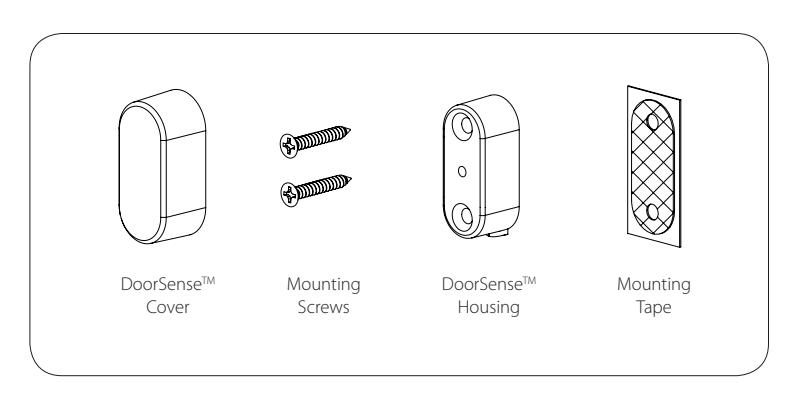
1. Determine mounting location 1-1/2"
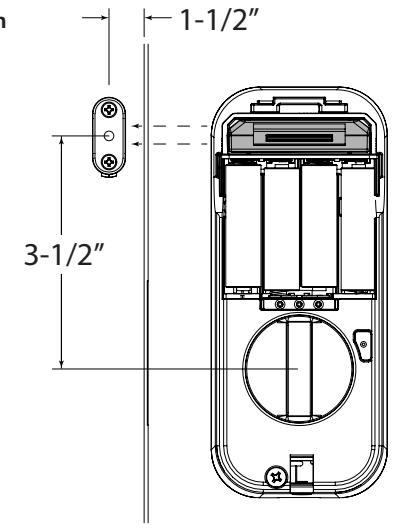

Installing DoorSenseTM with Connected by August Locks - Surface Mount Option
2. Attach mounting tape then screw into frame
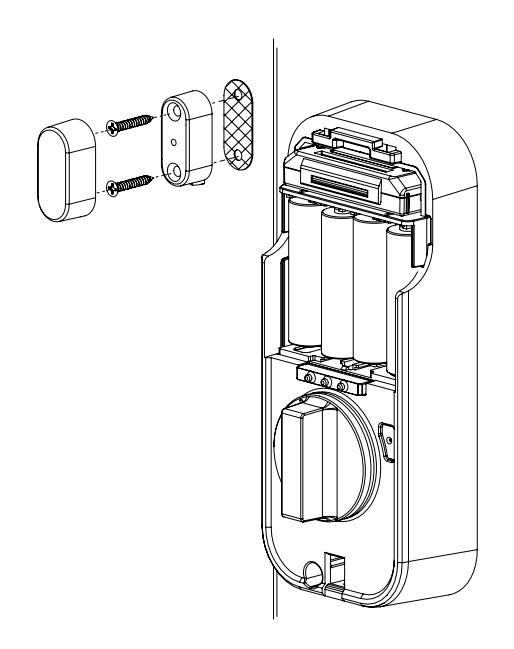
3. Go to the August app to calibrate your Lock

Installing DoorSenseTM with Connected by August Locks - Flush Mount Option
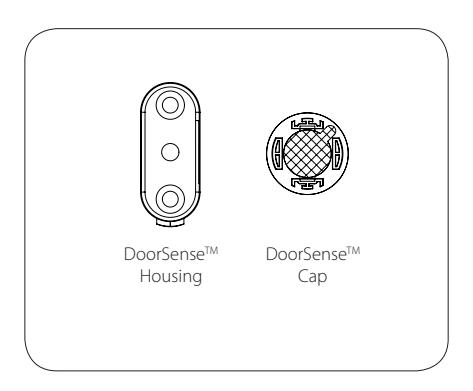
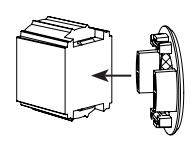
1. Remove magnet from housing and place DoorSenseTM Cap onto the magnet
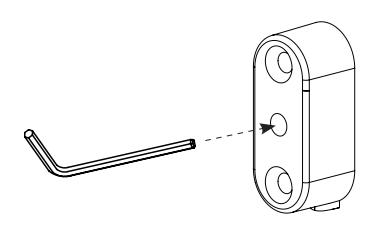

Installing DoorSenseTM with Connected by August Locks - Flush Mount Option
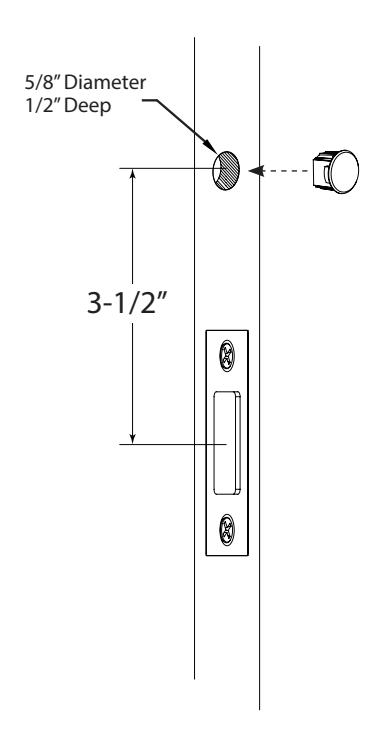
2. Drill hole and Insert DoorSenseTM
3. Go to the August app to calibrate your Lock

Go to the August App to Complete Installation
Set Up a Connect Hub
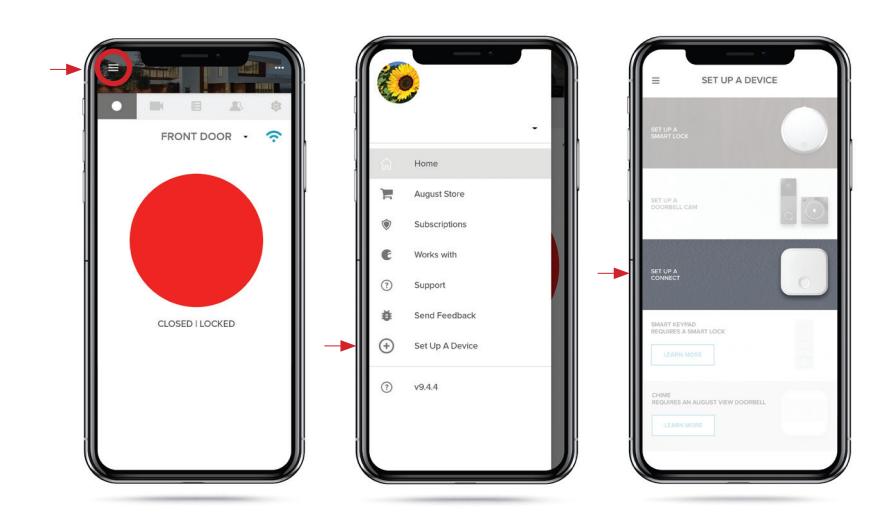
GO TO MENU SET UP A DEVICE SET UP A CONNECT

Hardware Troubleshooting
Cycle lock in both the locked and unlocked positions. If problems are found:
| Symptom | Suggested Action |
|---|---|
| Door is binding | • Check that door and frame are properly aligned and door is free swinging. |
|
• Check hinges: They should not be loose or have excessive wear on
knuckles. |
|
| Bolt will not deadlock |
• Check for sufficient clearance of the bolt within the strike-side jamb.
Correct this by increasing the depth of the pocket for the bolt. • Check for misalignment of bolt and/or strike which may be preventing bolt from properly entering the strike. With the door open, extend and retract the bolt; if it is smooth, check the strike alignment. |
|
Bolt does not extend
or retract smoothly |
• Bolt and strike are misaligned, see above.
• Check the backset of door relative to adjustments already made to bolt. • Verify proper door preparation and re-bore holes that are too small or misaligned. • Verify bolt is installed with correct side up (Step 1) |
Definitions
Automatic Re-lock Time: After a successful code entry and the unit unlocks, it will automatically re-lock after thirty (30) seconds.
Inside Indicator Light: Located on the interior escutcheon. Shows active status (Locked) of lock and can be enabled or disabled in the August Home App.
Low Battery: Battery state is shown on smartphone app.
Privacy Mode: Privacy mode is disabled by default. Privacy mode is enabled/disabled in the August Home App.
Shutdown Time: If the wrong code is entered five (5) times, the keypad will flash for 60 seconds. The lock will not allow operation for 60 seconds.
Volume Setting Mode: The volume setting is set to Low by default; otherwise it can be set to High or Silent in the August Home App.
Programming Troubleshooting
| Symptom | Suggested Action |
|---|---|
|
Lock does not respond
- door is open and accessible. |
• Check batteries are installed and oriented correctly
(polarity) in the battery case. • Check batteries are in good condition; replace batteries* if discharged. |
|
Lock does not respond
- door is locked and inaccessible. |
• Batteries may be completely discharged.
• Use your physical key to unlock the door. |
|
Unit is on for a while then
shows no reaction. |
• Batteries do not have enough power.
Replace batteries*. |
|
Unit Chimes when
unlocking with smartphone app, but the door will not open. |
• Check door gaps for any foreign objects between door and frame. |
|
Unit operates to allow
access, but will not automatically re-lock |
• Check to see if Auto Re-lock Mode is enabled.
• Disable Auto Re-lock Mode to lock the door (automatically). • If low battery indicator is indicated in the August Home App (see below), change batteries*. |
* When batteries are replaced. Network Module locks have a real time clock that will be set through the User Interface (UI); it is recommended to verify correct date and time particularly those locks operation under Daylight Saving Time (DST).
NOTE TO INSTALLER AND CONSUMER
While EMTEK has included several features to prevent lockout (low battery warnings), it is still possible for a lockout situation to occur. Because this product has a mechanical override (a key), EMTEK recommends you carry your keys with you to prevent lockout.
Resetting Lock to Factory Default
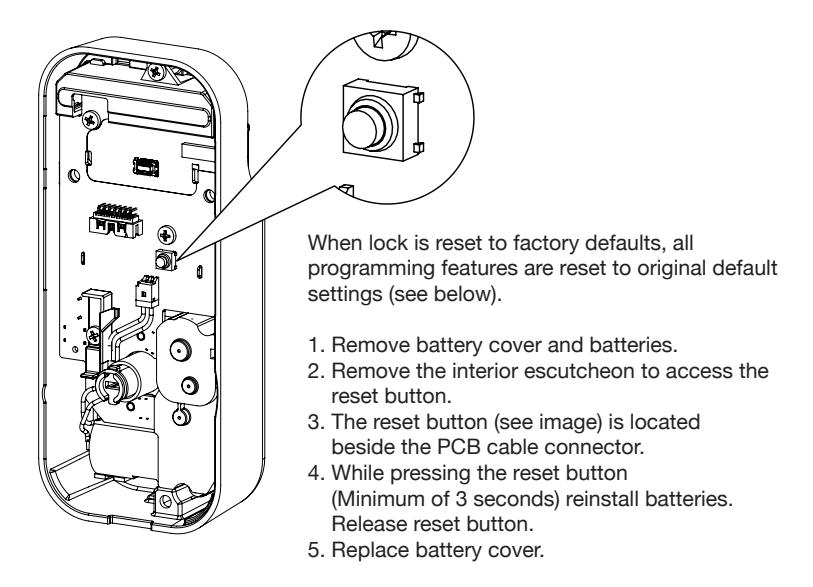
Factory Settings
| Settings | Factory Settings |
|---|---|
| Automatic Re-lock | Disabled |
| Inside Indicator Light | Disabled (Off) |
| Volume Setting | Enabled (Low) |
| Lockout Mode | Disabled |
| Automatic Re-lock Time | 30 Seconds |
Compliance
FCC INTERFERENCE STATEMENT
This device complies with Part 15 of the FCC Rules. Operation is subject to the following two conditions. (1) This device may not cause harmful interference, and (2) this device must accept any interference received, including interference that may cause undesired operation.
This equipment has been tested and found to comply with the limits for a Class B digital device, pursuant to Part 15 of the FCC Rules. These limits are designed to provide reasonable protection against harmful Interference in a residential installation.
This equipment generates, uses and can radiate radio frequency energy and, if not installed and used in accordance with the instructions, may cause harmful interference to radio communications.
However, there is no guarantee that interference will not occur in a particular installation If this equipment does cause harmful interference to radio or television reception, which can be determined by turning the equipment off and on, the user is encouraged to try to correct the interference by one of the following
- Reorient or relocate the receiving antenna.
- Increase the separation between the equipment and receiver
- Connect the equipment into an outlet on a circuit different from that to which the receiver is connected.
- Consult the dealer or an experienced radio/TV technician for help.
FCC Caution: Any changes or modifications not expressly approved by the party responsible for compliance could void the user's authority to operate this equipment.
This transmitter must not be co-located or operating in conjunction with any other antenna or transmitter.
Radiation Exposure Statement:
This equipment complies with FCC radiation exposure limits set forth for an uncontrolled environment. This equipment should be installed and operated with minimum distance 20cm between the radiator & your body.
INDUSTRY CANADA COMPLIANT
This device complies with RSS·210 of the Industry Canada Rules Operation Is subject to the following two conditions: (1) This device may not cause harmful interference, and (2) this device must accept any interference received, including interference that may cause undesired operation.
Radiation Exposure Statement:
This equipment compiles with IC radiation exposure limits set forth for an uncontrolled environment. This equipment should be installed and operated with minimum distance 20cm between the radiator & your body.
INDUSTRIE CANADA CONFORME
Ce dispositif est conforme à la norme CNR-210 d'industrie Canada applicable aux appareils radio exempts de licence. Son fonctionnement est sujet aux deux conditions suivantes: (1) le dispositif ne doit pas produire de brouillage préjudiciable, et (2) ce dispositif doit accepter tout brouillage reçu. y compris un brouillage susceptible de provoquer un fonctionnement indésirable.
Déclaration d'exposition aux radiations:
Cet équipement est conforme aux limites d'exposition aux rayonnements IC établies pour un environnement non contrôle. Cet équipement doit être installé et utilisé avec un minimum de 20 cm de distance entre la source de rayonnement et votre corps.

IN8-EMPCYLSIDE REV 19A 11-05-19
Copyright © 2019, EMTEK Products, Inc. an ASSA ABLOY Group company. All rights reserved. Reproduction in whole or in part without the express written permission of EMTEK Products, Inc. is prohibited.
WARNING: This product can expose you to chemicals including lead, which is known to the state of California to cause cancer and birth defects or other reproductive harm. For more information go to www.P65Warnings.ca.gov.