Edwards Signaling AE Bulletin E-FSA Panel Modem Connections
Open the original PDF document
View PDF

AEBN: 040710
Date: April 7, 2010
Subject: E-FSA Fire Alarm Panel Modem Connection
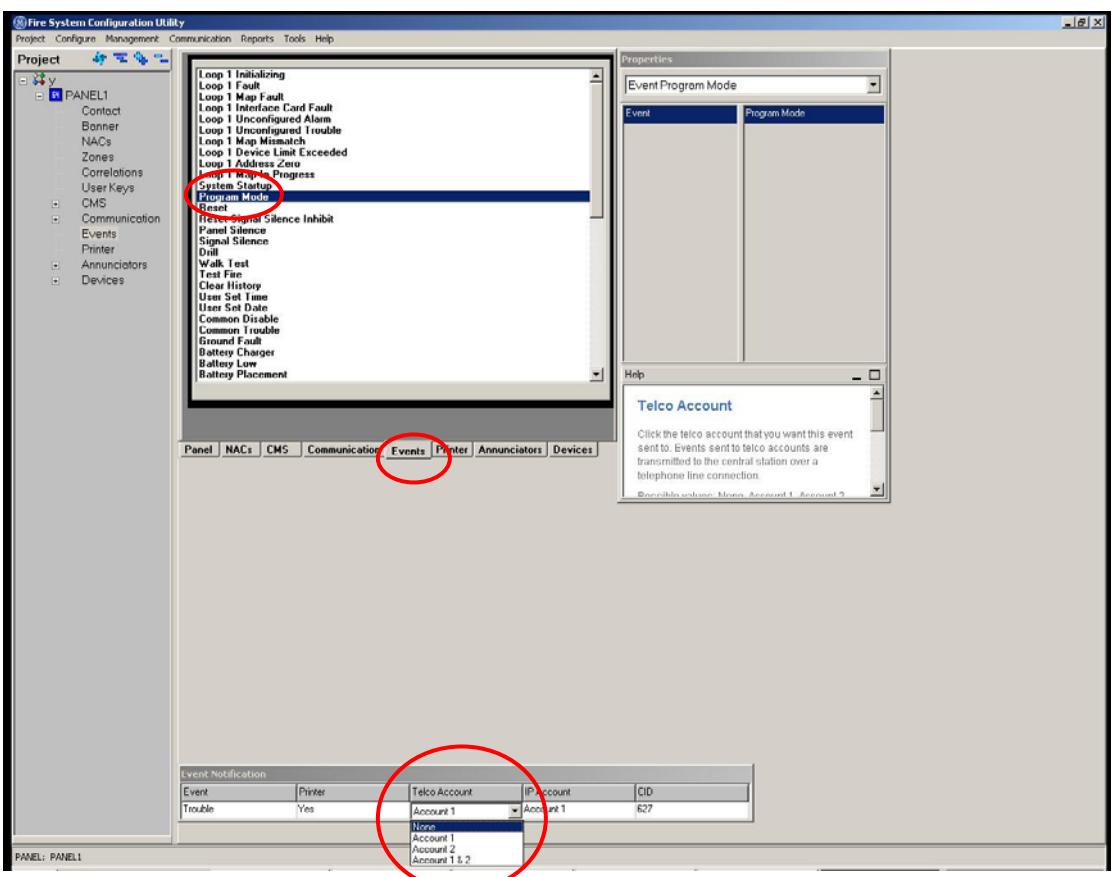
Issue : When calling into an E-FSA fire panel's SA-DACT dialer card remotely with the FSA-CU configuration utility program and a modem, it is possible for the connection to drop immediately after it was established. If the card is configured for Single or Dual Line dialer mode, under certain circumstances, once the connection is made, the panel will go into programming mode, which will then cause the panel to want to send a CID (contact ID) string to a central monitoring station. In order to do this, the panel will hang up on the incoming call to dial out.
Solution : To prevent the panel from sending the CID for program mode (and therefore possibly hanging up on an incoming call), you must go into the Event section of the CU and change the Program Mode Telco Account information to None. Note: You may have to download directly from laptop to panel (using SA-232 or SA-ETH) the first time in order to make these changes. From the panel's keypad you can also go to Program > Advance Program > Panel Events > Program Mode > Event Notification > Dialer – change to None.
Edwards Signaling, Part of ecurity – 41 Woodford Ave, Plainville, CT, 06062 Phone: 800-336-4206 – Web: www.edwardssignaling.com UTC Fire & S - E-mail: signaling.techsupport@ge.com