Edwards Signaling AE Bulletin E-FSA Loop Faults
Open the original PDF document
View PDF


AEBN: 041113
Date: April 11, 2013
Subject: E-FSA Addressable Panel Loop Faults
A Loop Fault/Line Fault on the E-FSA panel's loop controller can be caused by a couple things, depending on how the system is configured:
- A short on the loop (plus and minus data wires touch each other) will cause a Loop Fault. The short will also shut down the loop controller card and cause communication faults for every device on the loop that has been programmed. If the loop is configured for Class A wiring and has isolators, however, the card will not shut down, but you will still get a Loop Fault, and you will only get comm. faults for the devices between the isolators where the short occurred.
- Reverse polarity on the loop controller wiring that has devices which also require separate 24Vdc, such as the E-NAC and E-2WIRE modules, can also look like a short, causing the same symptoms.
- A break in the wiring of a Class A configured loop will cause a Loop Fault. On a Class B loop with a break in the wiring, you will not get a loop fault. You will only get communication faults for every device wired after the break.
There are 3 LEDs on the loop controller card itself that can help you figure out what's going on (see figure 1):
- The Comm LED indicates the card is communicating with the panel's motherboard. Under normal conditions, this LED should be flashing rapidly (almost steady on).
- The Primary LED indicates the communications on the Loop PRI terminals is working. This should also be flashing rapidly (almost steady on).
- The Secondary LED indicates the card is communicating on the Loop SEC terminals (Class A wiring return). This LED will only turn on when there is a break in the wiring and the loop is configured for Class A . Under normal conditions the card only communicates on the Loop PRI terminals, therefore the Secondary LED should not be on (if the loop is not configured in programming for Class A, the Loop SEC terminals and the Secondary LED will not function).

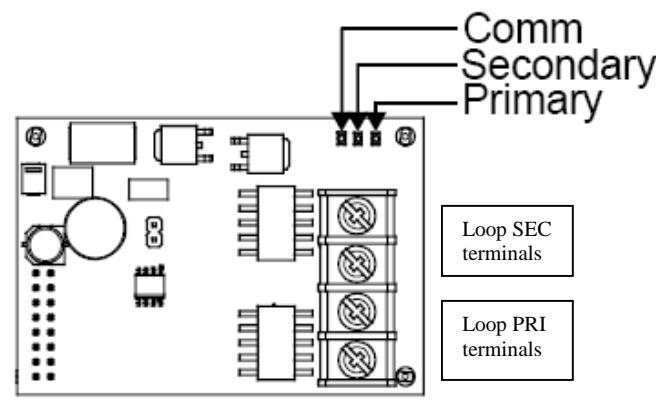
Figure 1 Loop Controller
If the system is powered up, and none of the LEDs on the loop controller card are on, that means the card has shut down. The first thing you should do is disconnect all field wiring from the card and wait a few moments (maybe up to a minute). If the Comm and Primary LEDs begin to flash again, then you'll know it's a wiring problem (short or backwards polarity). You will need to fix the wiring before you can continue. If the Comm and Primary LEDs do not turn back on after the field wiring is removed, then there is something wrong with the loop controller card itself. (A short on the loop wiring should not damage the card, and the card should restore itself after the short is removed.)
One other possibility for a Loop Fault is when the loop is wired for Class B, but is inadvertently programmed for Class A. If you intend for the system to be wired Class B, and you are only connecting to the Loop PRI terminals on the loop controller card, but the Secondary LED is on and the Panel shows a Loop Fault, check the Loop Configuration setting. To do this at the panel, go into Menu > Programming > Advance Programming > Loop Configuration > Loop Class, and make sure it is set for Class B.
*Note: A Loop Fault caused by a short on a Class A circuit with isolators, or a break in Class A wiring, is a latching type of fault, meaning the fault will not clear itself after the wiring has been fixed. You must do a Panel Reset (just push the Reset button) to clear the trouble (it may take up to 45 seconds after the Reset button is pushed).