Edwards Signaling AE Bulletin 091311 Sounder Base Wiring
Open the original PDF document
View PDF


AEBN: 091311
Date: September 13, 2011
Subject: SB4U Sounder Base Wiring & Supervision
This bulletin will help clarify the 24Vdc wiring connections for powering the SB4U sounder base, and how you can supervise that wiring.
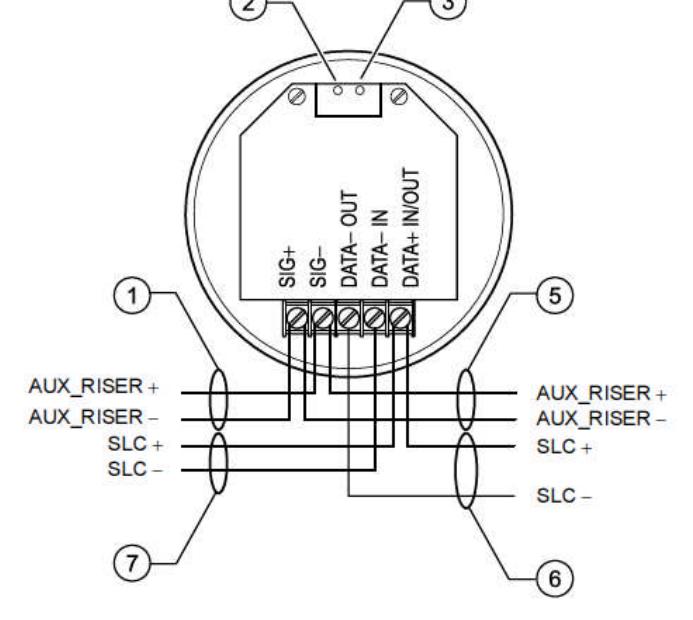
On early revisions of the installation sheet (3101077) it showed the polarity for the sounder wired plus (+) from the power supply to SIG+ terminal on sounder, and minus (-) on power supply to SIG- terminal on sounder. If wired this way, the sounder base will always be on.
The correct way to wire the power has been updated on the latest installation sheet and is shown below. When you install the sounder base, plus (+) from power supply should connect to SIG- on the base, and minus (-) from power supply should connect to SIG+. Through programming you can then select when the sounder base activates (refer to A.E. Bulletin AEBN #083110 for tips on programming sounder bases).
Sounder Base Wiring

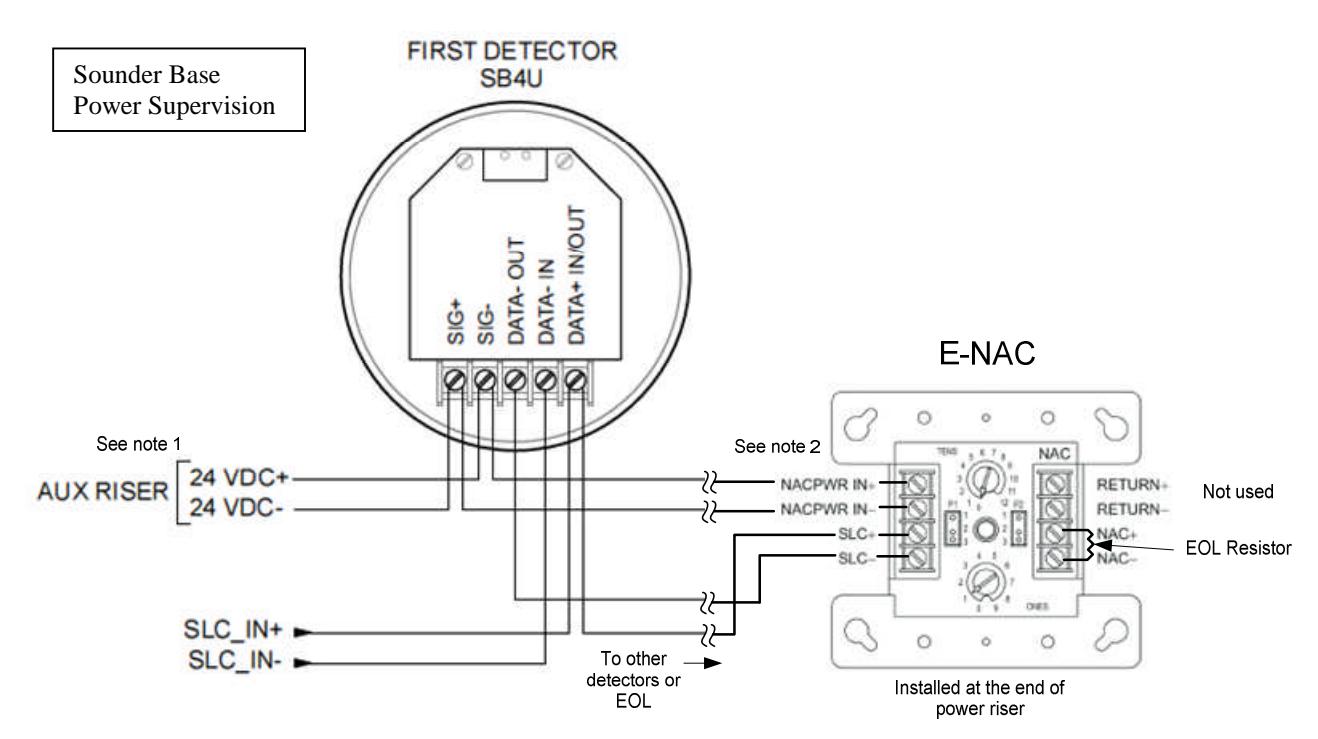
The aux power riser to the sounder bases must also be supervised. Note 5 above says to use an end of line relay to do so, which would mean the addition of an E-IDC1B input module to monitor the relay contacts. Another way to supervise the power riser using fewer parts and less wiring is with an E-NAC module as shown below. The NACPWR IN connection on the E-NAC module is supervised by the module itself. If the power riser is lost to the sounder bases, and therefore the E-NAC module, the E-NAC module will report a Riser Fault. ( Note: You cannot t-tap the power riser.)
Since the output side of the E-NAC module will not be used in this application, install the end of line resistor (47K ohm) directly across the NAC+ and NAC- terminals. It may also be helpful to create a custom message for the module, like "Sounder Base Power Supervision", to give a better description of what the module is used for. (Note: If riser power is lost, the panel's LCD will display a trouble event, with the first screen showing the E-NAC module's custom message. Pressing the Enter button on the front keypad will display a second screen showing what the trouble is. In this case it would say "Riser Fault".)
Edwards Signaling, Part of UTC Fire & Security – 9 Farm Springs Rd, Farmington, CT 06032 Phone: 800-336-4206 – Web: www.edwardssignaling.com - E-mail: signaling.techsupport@fs.utc.com