Edwards Signaling AE Bulletin 011513 Dialers Internet Cell
Open the original PDF document
View PDF


AEBN: 011513
Date: January 15, 2013
Subject: Fire Alarm Panel Dialers, The Internet, and Wireless Cellular
Background:
The F-DACT and SA-DACT dual line dialers used with the E-FSC and E-FSA panels respectively were designed to work with POTS ( P lain O ld T elephone S ystem) copper lines on a public switched network. Technical Bulletin (TECHBN 090811-2) gave some trouble shooting tips, and mentioned that you should avoid using anything but POTS lines. However, more and more installations these days are using other methods (when allowed by code) of transmitting fire alarm status to a central monitoring service.
Transmission Methods:
TCP/IP (/VoIP) and the internet is one of those methods being used. The Bosch Conettix C900V2* Dialer Capture Ethernet Module (not sold by Edwards) is an interface module that provides one solution for connecting an Edwards fire alarm panel to a central station over the internet. This particular model is now UL listed for use with the F-DACT and SA-DACT dialers.
The GSM communicator ( G lobal S ystem for M obil communications), or wireless cell phone service, is another method sometimes used.
For now, both TCP/IP and GSM devices still require a standard dialer (F-DACT or SA-DACT) in the panel, which would connect to the external TCP/IP or GSM device, converting the signal to be sent to the central station receiver. These interface devices should be transparent to the dialer, and the dialers themselves would be programmed as if connecting directly to a CMS on regular phone lines.
Issues:
As of this bulletin, Edwards has done very little testing of TCP/IP or GSM interface devices. However, customers have reported successful use of interfaces other than the Bosch C900V2 , but you may have to make minor adjustments to the dialer settings in the panel in order for it to work properly. Some of the symptoms customers have experienced include:
- The dialer will not attempt to dial out.
- The dialer will dial over dial tone (dial tone never breaks).
- The dialer gets through to receiver, but no data is transmitted.
- The dialer sends data to receiver, but does not get a proper sign off.


Possible Remedies:
If the panel is displaying dialer related troubles, there are a few things you can try to resolve the issues.
- 1. Check the connection where the supplied cables plug into the dialer. A loose or poorly fitting connector can cause phone line troubles.
- 2. Check that the Tip and Ring polarity is correct. With a meter's positive lead on the Ring terminal (terminal 4 of RJ31X), and the negative lead on the Tip terminal (terminal 5 of RJ31X), you should read approximately negative (-)48 volts DC. If polarity is reversed, swap the Tip and Ring connections.
- 3. Try changing the dialer configuration Line 1(2) Dialing Type from Tone to Pulse (see figure 1). This change can also be made using the panel's keypad and entering the dialer programming section.
- 4. Add a pause before the phone number is dialed. You can do this by inserting a "," (comma) at the beginning of the phone number (each comma = 2 seconds). Note: If you have to dial a prefix, such as 9, to dial out, add the comma after the prefix.
- 5. Two other adjustments you may have to make are the DTMF High Tone Level and/or the DTMF Twist Ratio (see figure 1). These settings can only be changed using the FSA-CU configuration utility program (not via the panel's keypad), and are not available with the conventional E-FSC panel's F-DACT. To access the DTMF settings in the FSA-CU, you will need to change the Advance Configuration setting in the Telco Dialer Properties box from No to Yes. This will then display the two options. You may have to try different settings until you get a successful connection and sign off with the central station. Some people have found adjusting both the DTMF High Tone Level and the Twist Ratio to 10 works best. You will have to determine what works with the GSM or TCP/IP interface you're using.

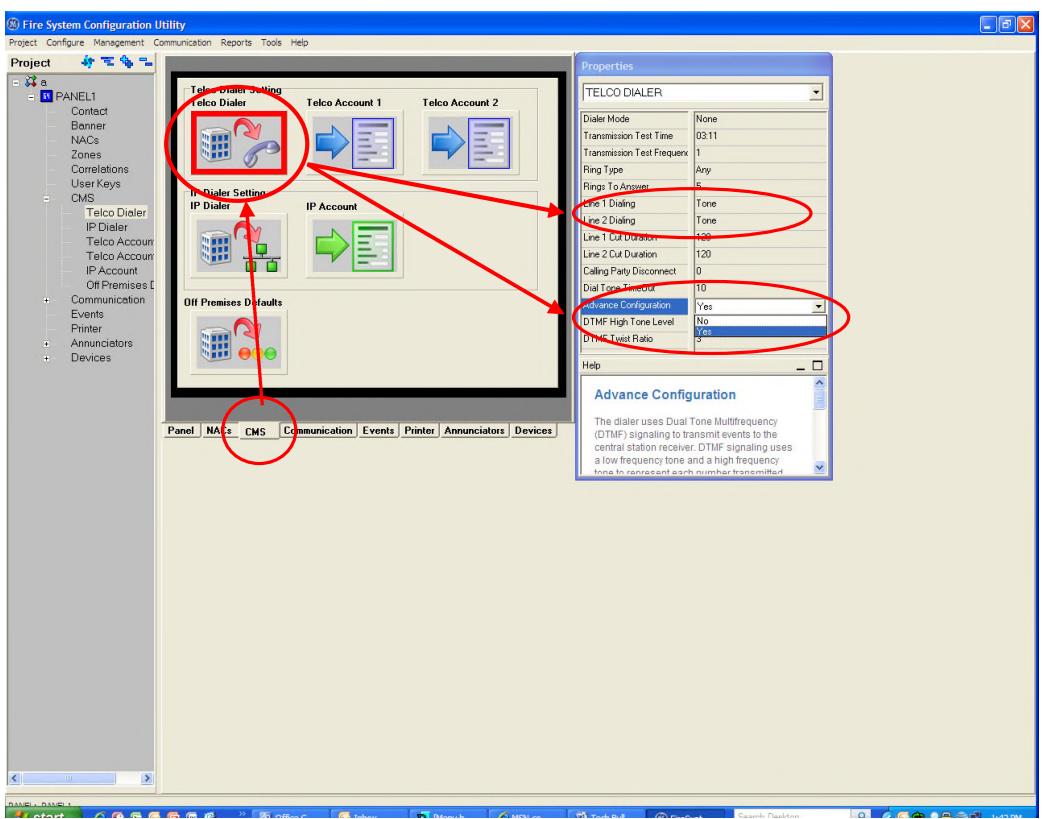
Figure 1: Adjusting Tone/Pulse Dialing, DTMF High Tone Level and Twist Ratio
As mentioned in the beginning of this bulletin, the Edwards dialers sold today were designed to work on POTS lines. While the adjustments described above may work with some interfaces, they may not with others. In the end, depending on the installation, copper, analog POTS lines may be the only way for the dialer to successfully communicate with a central station.
*For more information on the Bosch C900V2, please visit Bosch's web site: http://products.boschsecurity.us/en/TAMS/products/bxp/SKU26715907952975151371-P2