Edwards Signaling 970521 Technical Bulletin
Open the original PDF document
View PDF


Edwards Signaling Products 90 Fieldstone Court Cheshire, CT 06410 (203) 699-3300 FAX (203) 699-3108
Technical Bulletin # 970521 Date: July 19, 1999 Product: Message Centers Product Category: PLC Activation
Subject: Activating Preloaded Messages using a PLC
All Edwards Message Centers are capable of displaying messages using an ASCII Text string. This technical bulletin will demonstrate how to activate messages previously loaded into your Edwards Message Center. The PLC needs to be capable of sending an ASCII Text String to either an RS232 or RS485 output. The text string must be in the proper format; otherwise the message will not be displayed. Any Experienced Ladder Logic Programmer will understand these basic instructions and will be able to integrate these commands into more complex Ladder Logic Functions.
SECTION I: Hardware Connections
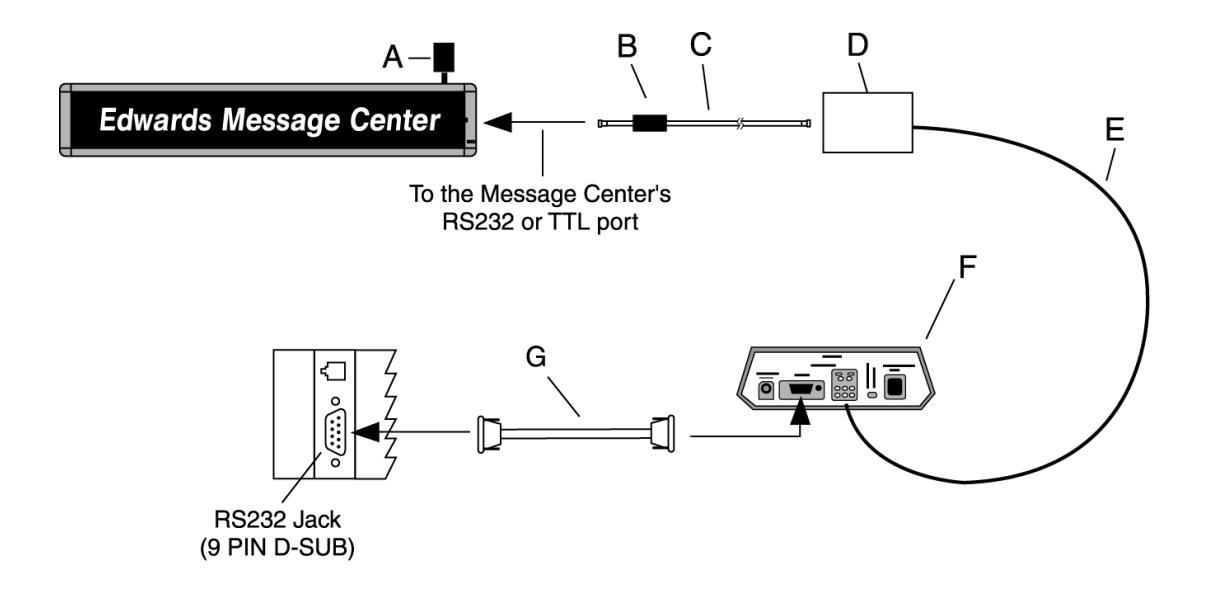
The PLC Software must be capable of sending an ASCII Text String to an RS232 Serial Port. For single Message Center operation use an adapter and straight through RS-232 cable as shown in diagram 1. For multiple Message Center or RS485 operation follow the wiring employed in diagram 2.

| Item | Cat. No. | Description | ||
|---|---|---|---|---|
| A | — | Ferrite (ferrite end towards Message Center) | ||
| B | MCN232-RJ11-25 | 25 foot, 6-conductor RS-232 cable | ||
| MCN232-RJ11-50 | 50 foot, 6-conductor RS-232 cable | |||
| C | MCN2329FRJ11 | 9 Pin D-Sub/to 6 pos RJ11 adapter | ||
| D | MCN485CB232A9 | 10 foot 9 pin-to-9pin type A9 RS232 cable | ||
NOTE: Set internal message center jumper to RS232
Diagram 1
| Item | Cat. No. | Description | |||
|---|---|---|---|---|---|
| A | MCN485EOLTCB | EOL Termination | |||
| B | — | Ferrite (ferrite end towards Message Center) | |||
| C |
MCN232-RJ11-8
8 foot, 4-conductor RS-485 cable |
||||
| MCN485-RJ11-1 | 1 foot, 4-conductor RS-485 cable | ||||
| D | MCNMNARJ11485 | Modular network adapter | |||
| E | MCN485-1000 | 1000 foot spool of RS485 cable | |||
| F | MCN485CB2EOLT | Converter box w/2 EOL terminators | |||
| G | MCN485CB232A9 | 10 foot 9 pin-to-9 pin type A9 RS232 cable | |||
| NOTE: Set internal message center jumper to RS485 | |||||
Diagram 2
SECTION II: Software Configuration
To configure any software for communications with the Message Center, the following parameters need to be established by the user:
Mode: ASCII Baud: 9600 Parity: None Stop Bits: 1 Start Bits: 8
SECTION III: Message Center Setup
Messages must be loaded using any of the 81 valid File labels. Refer to your Remote Control Programming Instructions or Technical Bulletin 970520 for information on loading messages into the Message Center.
SECTION IV: Text String Format
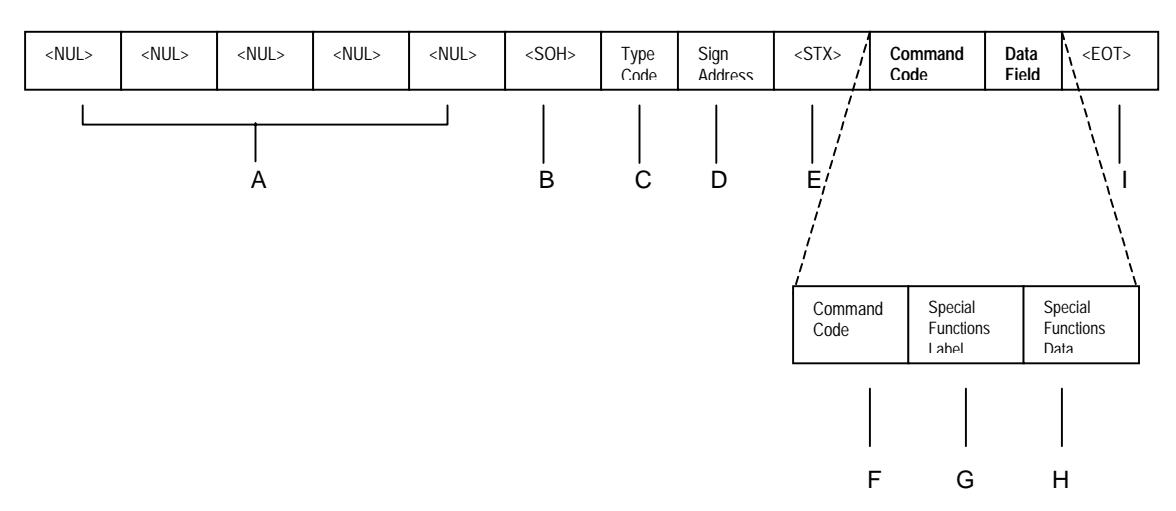
Sending an ASCII text string to a Message Center can easily activate a message. Listed below is a sample string that tells an Edward's Message Center to display a preloaded message : The Message Center's serial address in this example is 01.
Note - Each message string should begin with five NUL (00h) characters for auto-baud detect of serial data sent to the Message Center. Messages should follow the Special Function Text Format outlined below:
Message example 1:
<NUL><NUL><NUL><NUL><NUL><SOH>Z01<STX>E.SUA<EOT>
Where:
| Item | Name | ASCII | HEX Value | Description | ||
|---|---|---|---|---|---|---|
|
|
^@ | 00h |
Five consecutive
|
|||
| A | message. | |||||
| B |
|
^A | 01h |
|
||
| C | Type Code | Z | 5Ah | ASCII Type Code for All Signs in network | ||
| D | Sign Address | 01 | 30h | 31h | 2 Byte ASCII-Hex Sign Address (see note 1) | |
| E |
|
^B | 02h |
|
||
| F | Command Code | E | 45h | Command code E, Write Special Functions to the sign | ||
| G |
Special Functions Label
2Eh |
Set Run Sequence | ||||
|
Special
Functions Data |
Run Sequence Order | T or S | 54h or 53h |
"T" 54h = All subsequent Text File Labels in the run
sequence will run according to their associated times. "S" 53h = All subsequent Text File Labels in the Run Sequence will run in order regardless of each file's run time. |
||
| H |
Keyboard Protection
Status |
U or L | 55h or 4Ch |
"U" 55h = Unlocked. This allows the Run Sequence to be
changed from the Handheld Remote. "L" 4Ch = Locked. The Run Sequence is inaccessible from the Handheld Remote. |
||
| Text File Label | A, B, etc. | 41h, 42h, etc. | Text Files to be activated. More than one file can be | |||
|
|
specified. This also determines the run order. | |||||
| I | ^D | 04h |
The
|
|||
| end of every message string. | ||||||
Note: The serial address of the Message Center is represented by two ASCII digits as a number between "00" to "FF" (0 to 255). If 00 is the desired serial address, the two byte ASCII representation would be 30h for the first digit and 30h for the second digit. It is important to
remember to treat the serial address as a two-digit code. (All Message Center on the network will respond to the string when the serial address is 00.)
SECTION V: Sample Strings
| Message Action | String Required |
|---|---|
| Activate Text File A |
|
| Activate Text File B |
|
| Activate Text File C |
|
| Activate Text Files A, B & C |
|
Note: The Run Sequence Order is determined by the order of the File Labels as entered into the text string.
SECTION VI: Additional Support
For questions please call our Technical Support @ 203-699-3300 or visit our website www.edwardssignals.com. Additional codes are available for controlling message center text strings in our Communications Protocol available from your local Edwards Signaling representative.