DynaLock 7300 & 7350 Series – Miscellaneous
Open the original PDF document
View PDFREAD THIS FIRST
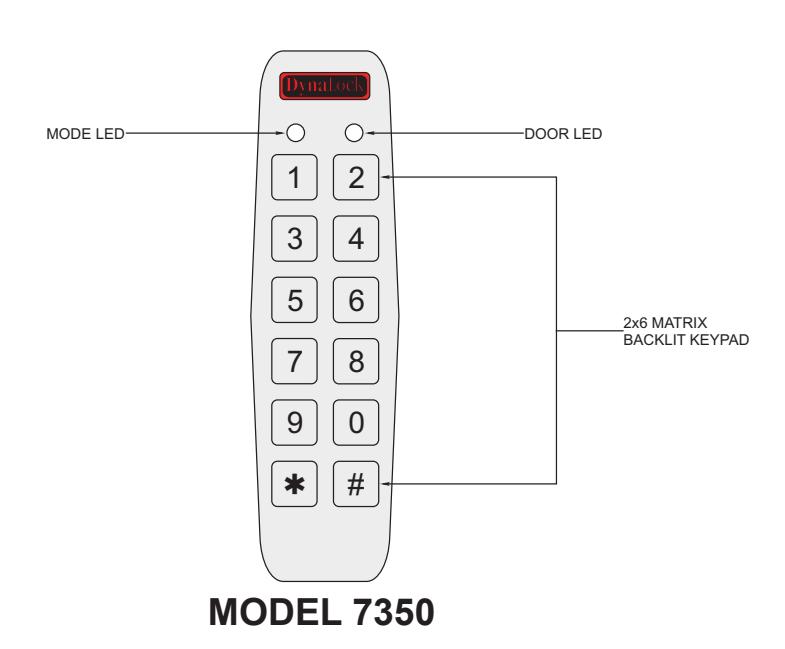
Quick Start Guide for 7300 & 7350 Keypads
This Quick Start Manual is designed to show you how to perform the following basic steps:
- • Basic front panel description & wiring color guide
- • How to use the Open Code Test
- • How to use & test the Programming Mode
- • How to enter & test User Codes.
For additional features and programming information refer to the 7300 & 7350 Instruction Manual.
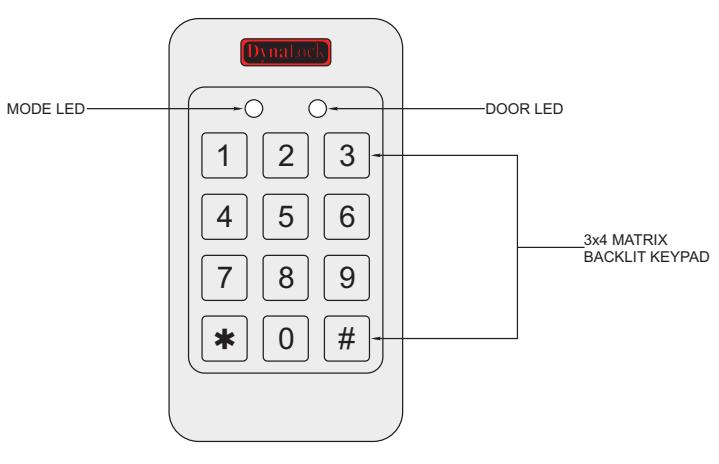
MODEL 7300

For product info or for technical assistance call 877-DYNALOCK (Toll Free) or email info@dynalock.com Emergency assistance M-F 5-8pm (EST) Glen@860-637-2599 Will@860-637-2394
|
WIRING
COLOR GUIDE |
|
|---|---|
| COLOR | DESCRIPTION |
| RED |
VOLTAGE
INPUT |
| BLACK | GROUND |
| GREEN | REX/BL |
| WHITE | IN/MONITOR |
| PURPLE |
LOCK
RELAY: COM |
| GRAY |
LOCK
RELAY: N.O. |
| BROWN |
LOCK
RELAY: N.C. |
| BLUE |
AUX
RELAY: COM |
| YELLOW |
AUX
RELAY: N.O. |
| ORANGE |
AUX
RELAY: N.C. |
|
SMALLER
GAUGE BLACK |
RF
SHIELDING WIRE |
Open Code Test:
The Open Code is used mainly as a way to test the Lock relay upon finishing the installation.
Once all the wires have been connected, and the keypad has been powered, the Mode Indicator LED will turn green. The Door Indicator LED will be off.
MODE ● O DOOR
Enter 2580 (Factory Preset) into the keypad.
Both Mode & Door Indicator LED's will turn green and the door will unlock.
MODE • DOOR
Once the Door Indicator LED turns off, the door will relock.
**This feature is applicable to 1st time installations only. Once any User Codes are programmed and/or any Auxiliary Codes changed, the default Open Code (2580) is erased**
Programming Mode:
You must enter Programming Mode to change, or delete any code, as well as change any setting.
To enter Programming Mode:
1) Depress the # key TWICE , within succession, within 0.5 seconds.
MODE INDICATOR LED TURNS OFF DOOR INDICATOR LED TURNS RED
MODE O DOOR
2) Enter the Programming Code 1234 (factory preset).
MODE INDICATOR LED REMAINS OFF DOOR INDICATOR TURNS GREEN
MODE O DOOR
You are now in Programming Mode.
Exiting Programming Mode
Depress the # key TWICE , in succession, within 0.5 seconds.
YOU WILL HEAR THREE BEEPS DOOR INDICATOR WILL TURN OFF MODE INDICATOR WILL TURN GREEN
MODE O DOOR
**For security reasons it is highly recommended to change the Programming Code. Refer to "Changing the Programming Code" in the instruction manual**
Programming & Testing Primary User Codes:
This explains how to program a primary , four digit User Code. The keypad is factory preset for four digit User Code's.
Refer to "Pin Code Length/Factory Default Setting" section of your instruction manual to change the PIN code length for your User Code's.
Refer to "Enrolling Codes-Primary & Secondary Codes Definitions" section of your instruction manual for a breakdown of Primary & Secondary Codes.
Programming User Codes:
1) Enter Programming Mode.
MODE INDICATOR LED TURNS OFF DOOR INDICATOR LED TURNS GREEN
MODE O ● DOOR GREEN
2) Depress -7- to enter menu 7.
MODE INDICATOR LED REMAINS OFF DOOR INDICATOR LED TURNS ORANGE
MODE O DOOR ORANGE
3) Enter the 3 digit User Slot number (from 001 to 500).
Example: User Slot 003 represents User Number 3.
MODE INDICATOR LED FLASHES GREEN DOOR INDICATOR LED REMAINS ORANGE MODE ☼ ● DOOR GREEN ORANGE
4) Enter a four digit User Code for that user. If the code is valid, the Mode Indicator LED will stop flashing, and the User Code has been programmed. Depress the # key TWICE , in succession, and the keypad will exit Programming Mode.
Testing User Codes:
1) Make sure the keypad is in Normal Mode.
MODE O DOOR
2) Enter the User Code.
MODE INDICATOR LED TURNS GREEN DOOR INDICATOR LED TURNS GREEN
MODE • DOOR
3) The lock relay will trigger for 5 seconds