DynaLock 3101BTJ Wiring Instructions
Open the original PDF document
View PDF

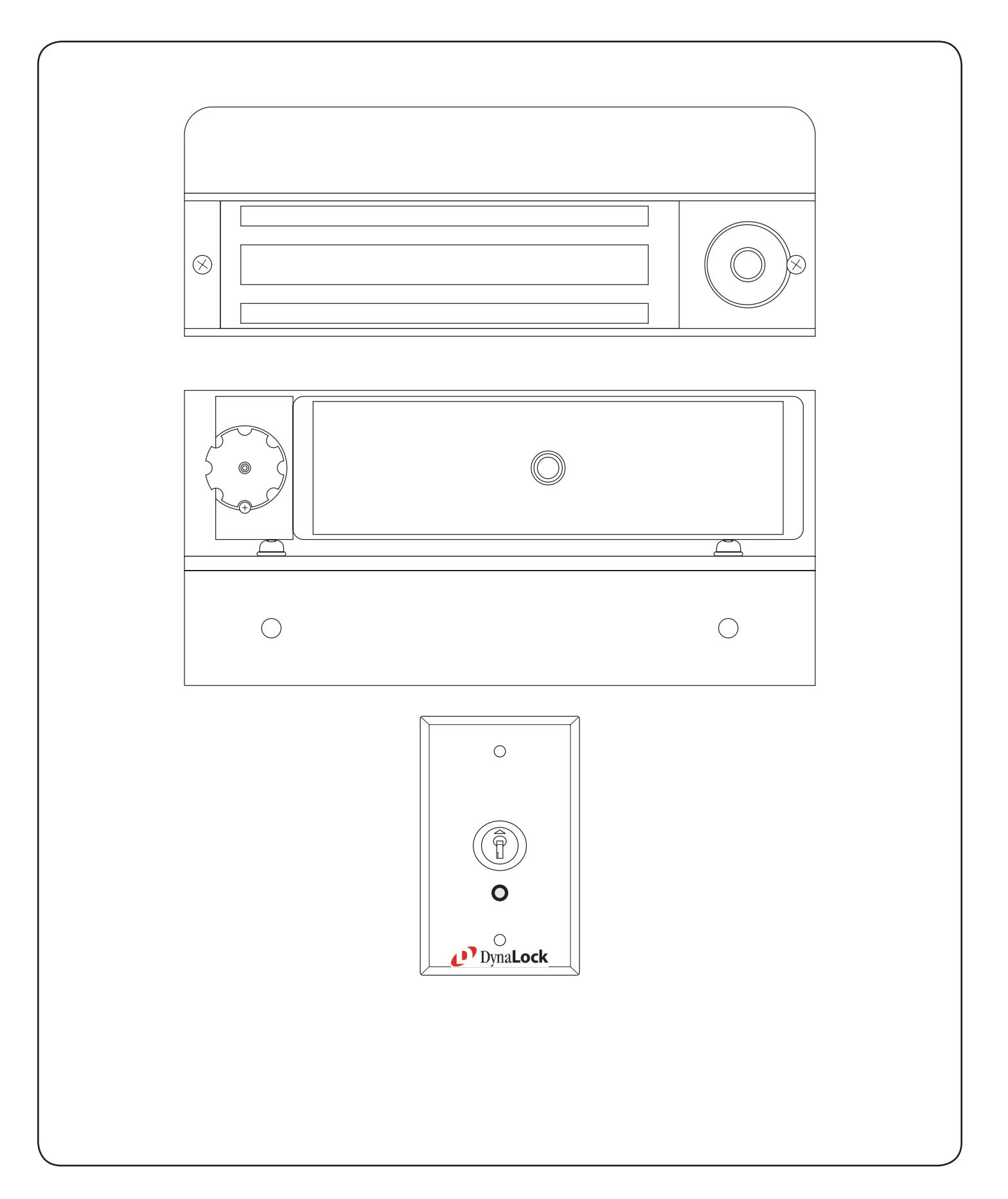

MODEL 3101B-TJ101 DELAY EGRESS SYSTEM WIRING INSTRUCTIONS
BASIC SET-UP
1. Remove the Electronics Cover to expose the circuit board assembly.
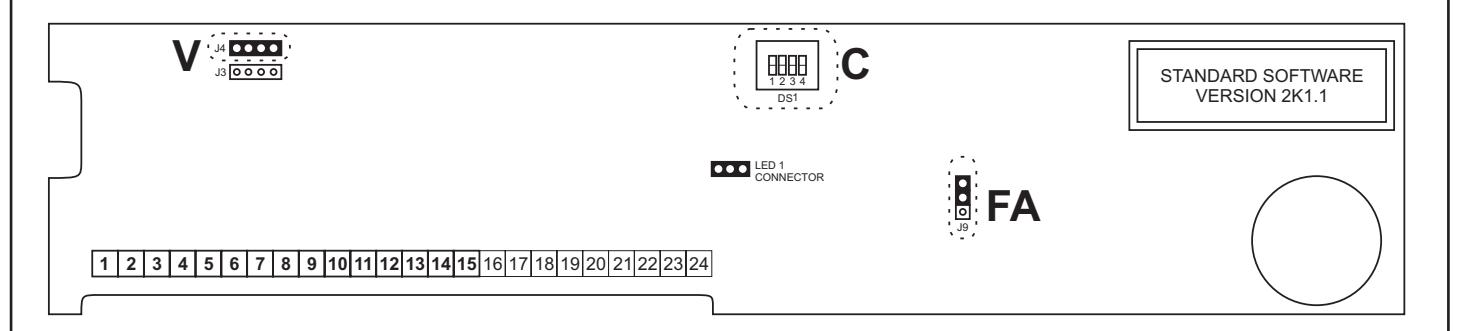
2. V - Voltage Selection
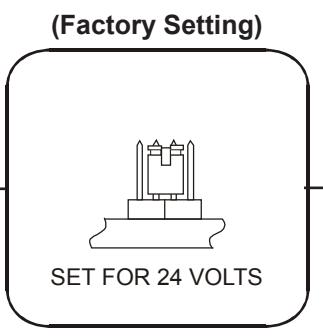
Check that the voltage selection jumper (J4) is properly set to match your input power. Note that all locks are factory set for 24 volts.
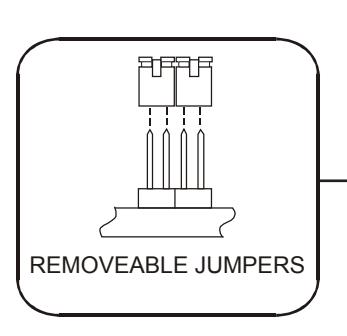
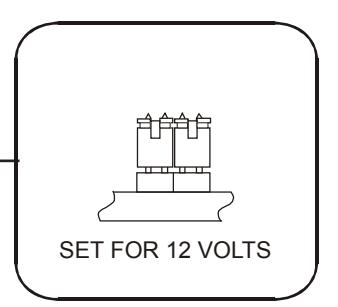
3. FA - Fire Alarm Control
Check that the fire alarm control jumper (J9) is properly set to match your fire panel input contacts. If fire panel tie-in is not required leave jumper at factory setting (N.O.).
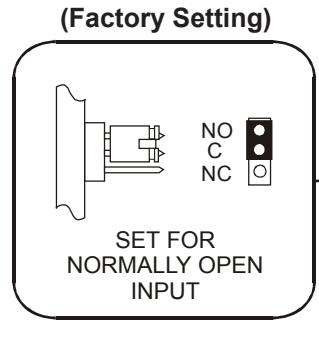
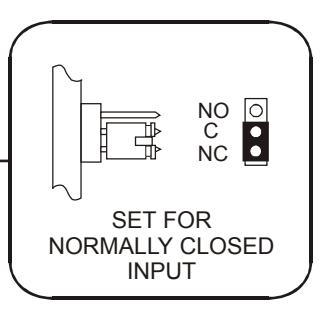
4. C - System Selector Switches
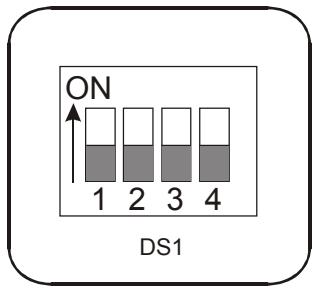
The selector switches (DS1) that control major system functions are factory set to the OFF position for basic lock operation. Switch 1 will be used during sensor adjustment (page 8). Switches 2, 3 and 4 are only used for options described on page 5.
(Factory Setting)

BASIC WIRING
Basic hook-up is shown below. For other system features hook-up see "Option Wiring" (page 7).
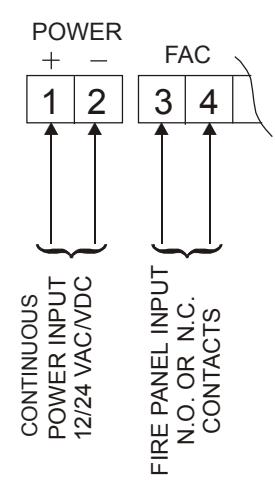
Terminals 1& 2 - Power Input. May be 12 or 24 Volts, AC or DC, uninterrupted. Current requirement is 0.75 Amps for 12 Volts and 0.5 Amps for 24 Volts (check voltage selection jumpers "V" - page 1).
DO NOT INTERRUPT INPUT POWER (TERMINALS 1 & 2) FOR AUTHORIZED ACCESS/EGRESS. EXTERNAL ACCESS/EGRESS CONTROLS (EX. KEYPAD, CARD READER, ETC.) SHOULD USE DEDICATED BYPASS TERMINALS 7 & 8 or 9 & 10 (SEE PAGE 11).
Terminals 3 & 4 - Fire Panel Input. May be normally-open (N.O.) or normally-closed (N.C.) dry contacts from fire panel (check fire alarm control jumper "FA" - page 1).
When the fire panel trips, the 3101B-TJ101 will release, the audible will sound a constant tone and the bi-color LED (LED1) will change to green. When the fire panel is reset, the 3101B-TJ101 will reset and lock.
NOTE: DO NOT APPLY POWER TO TERMINALS 3 & 4 OR DAMAGE WILL OCCUR.
PROPER OPERATION OF THE 3101B-TJ101 REQUIRES ADJUSTMENT OF THE EGRESS SENSOR PROCEED TO EGRESS SENSOR ADJUSTMENT

EGRESS SENSOR ADJUSTMENT
The sensor and armature assembly are designed for use on a door with existing mechanical latching hardware. If used on a door without a latch, false alarms are possible. In these cases, we suggest using an external trigger such as our 6451 Exit Sensor Bar - connect using terminals 11&12 and disable this internal sensor (see page 5).
SEE PAGE 5 FOR LOCATION OF ELECTRONIC PARTS MENTIONED IN THIS SECTION
- With the door closed and latched apply input power to terminals 1 & 2. Slide selector switch (DS1) #1 to the ON position to activate the Set-Up mode. Rotate the on-board keyswitch counter-clockwise. The 3101B-TJ101 should now be unlocked (LED1-OFF). 1.
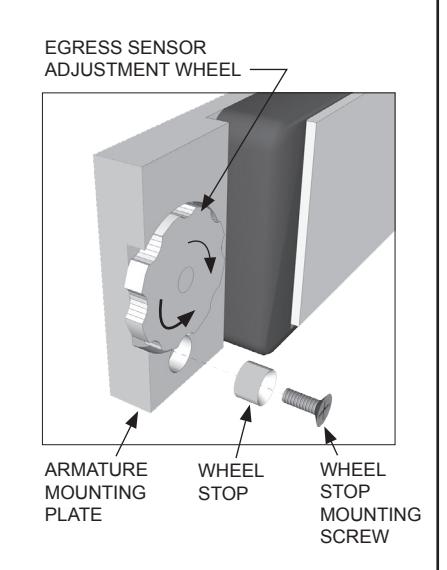
- Open the door. Temporarily remove the Adjustment Wheel Stop from the Armature Mounting Plate and close the door. Set aside for re-installation later. 2.
- With the door closed observe the bi-color LED (LED1) on the circuit board. It should be lit red. If it is not lit, rotate the adjustment wheel counter-clockwise as necessary to ensure that it will contact and fully depress the ball plunger on the lock. Rattle the door to ensure the LED remains lit. 3.
- With the door closed and LED1 lit red, unlatch and slowly open the door. The LED will shut off as soon as the door opens far enough for the ball plunger to fully project. 4.
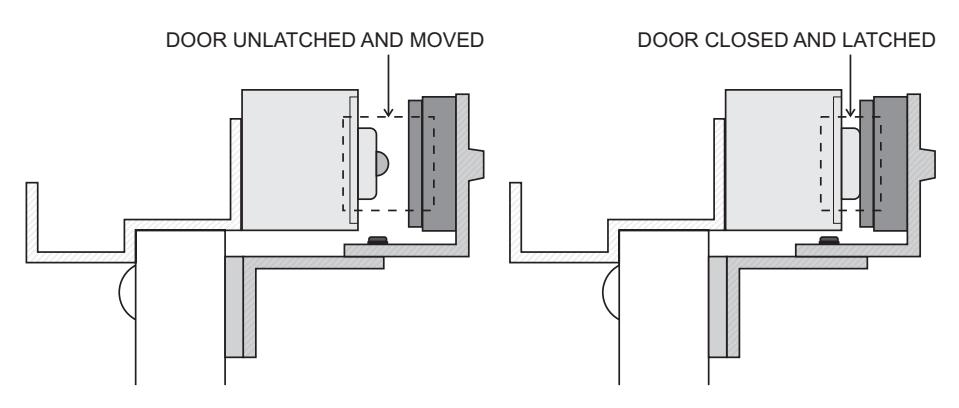
- With adjustment completed, re-install the adjustment wheel stop to lock-in the adjustment. Close the door, slide selector switch (DS1) #1 back to the OFF position and return the on-board keyswitch to the center position to re-lock the 3101B-TJ101. 5.
- Unlatch and push on the door until delay egress triggers (1-3 seconds). The audible will sound and LED1 will flash red. After 15 seconds the lock will release. Turn the on-board keyswitch clockwise to reset the lock. If delayed egress triggers too soon, or fails to trigger, re-adjust the sensor adjustment wheel for desired sensitivity. 6.
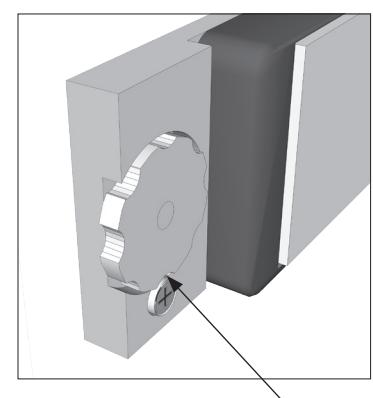
WHEEL STOP INSTALLED (LOCKS ADJUSTMENT)

SEPERATE 7050 KEYSWITCH OPERATION
|
POSITION
DESCRIPTION |
|
|---|---|
| CENTER | NORMAL / LOCKED |
| CLOCKWISE (SPRING LOADED) | RESET AFTER DELAY EGRESS ALARM |
| COUNTER-CLOCKWISE | BYPASS / UNLOCKED WITHOUT ALARM |
INDICATOR & AUDIBLE DESCRIPTIONS
LED1 - BI-COLOR LED INDICATOR
(Located on 7050 faceplate.) Indicates lock status and monitors door movement during egress sensor adjustment.
LED2 - WATCHDOG LED INDICATOR
(Located upper right corner of circuit board.) Troubleshooting indicator - monitors proper operation of the microprocessor.
| CONDITION | AUDIBLE SIGNAL | LOCK | LED 1 | LED 2 |
|---|---|---|---|---|
| DELAY EGRESS ALARM |
One second pulse rate during
delay cycle. |
ON | BLINK RED | RED |
| DELAY EGRESS ALARM |
Steady tone after delay until
reset. |
OFF | GREEN | RED |
|
FIRE ALARM
RELEASE |
Steady tone until fire alarm
contacts are reset. |
OFF | GREEN | RED |
|
OPTIONAL REMOTE
AUTHORIZED BYPASS (TERMINALS 7&8 / 9&10) |
None, unless bypass audible
is enabled (dip switch 2). If door is held open past relock time, goes into delay egress alarm & requires reset. |
OFF | GREEN | RED |
|
FACTORY SERVICE
REQUIRED |
Steady tone. | N/A | N/A |
BLINK RED
OR OFF |
| POOR MAGNETIC BOND |
Rapid pulse rate until problem
is corrected (only functional with Dynastat Force Sensor option). |
N/A | FAST BLINK RED | RED |

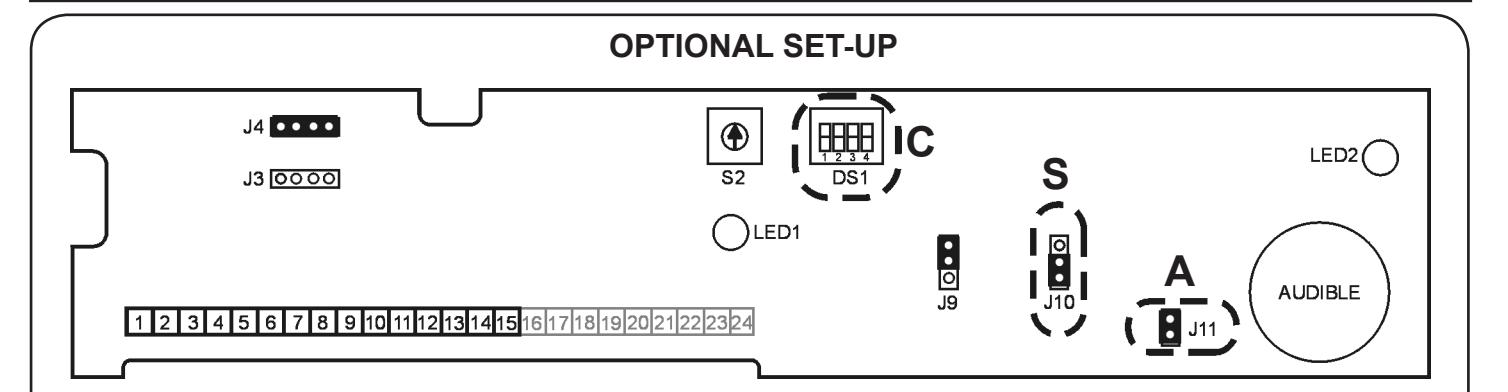
- System Selector Switches 1. C
Set the System Selector Switches (DS1) to address your specific system requirements. The normal factory setting is all switches off.
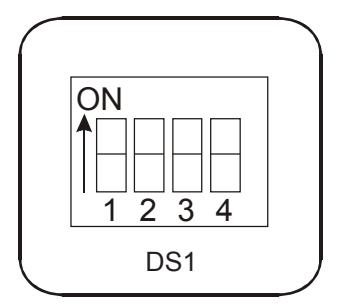
| MODE SETTINGS | ||||
|---|---|---|---|---|
|
SWITCH
FUNCTION |
OFF | ON | ||
| 1 | SYSTEM SET-UP | NORMAL | SET-UP MODE | |
| 2 |
*
BYPASS AUDIBLE |
DISABLED | ENABLED | |
| 3 | NUISANCE DELAY | 1 SEC. | 3 SEC. | |
| 4 | EGRESS DELAY | 15 SEC. | 30 SEC. | |
* Only applies to terminals 9&10 (see page 7)
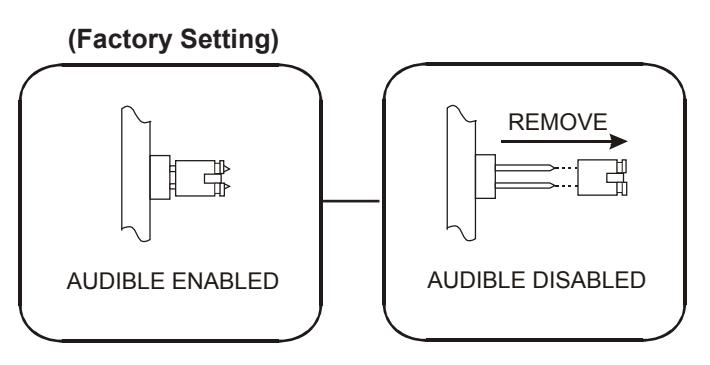
- Audible Selector 2. A
The on-board audible is normally enabled for local signaling of lock and alarm status. To completely disable the audible remove jumper (J11).
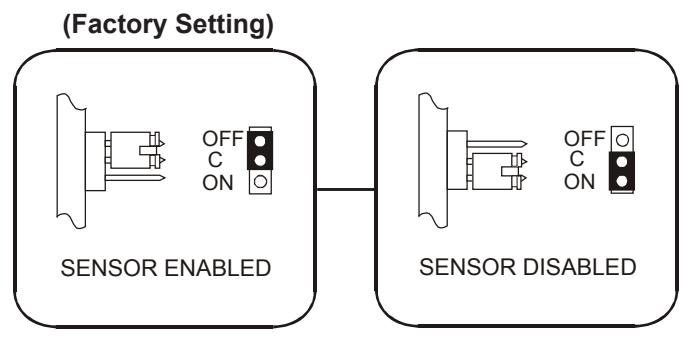
- Sensor Control 3. S
The egress sensor may be disabled if you wish to trigger the lock via external remote contacts on input terminals 11 & 12. Position jumper (J10) to disable the egress sensor as shown.

MODEL 3101B-TJ101 DELAY EGRESS SYSTEM WIRING INSTRUCTIONS
EXTERNAL MODEL 7050xLED KEY SWITCH CONNECTIONS
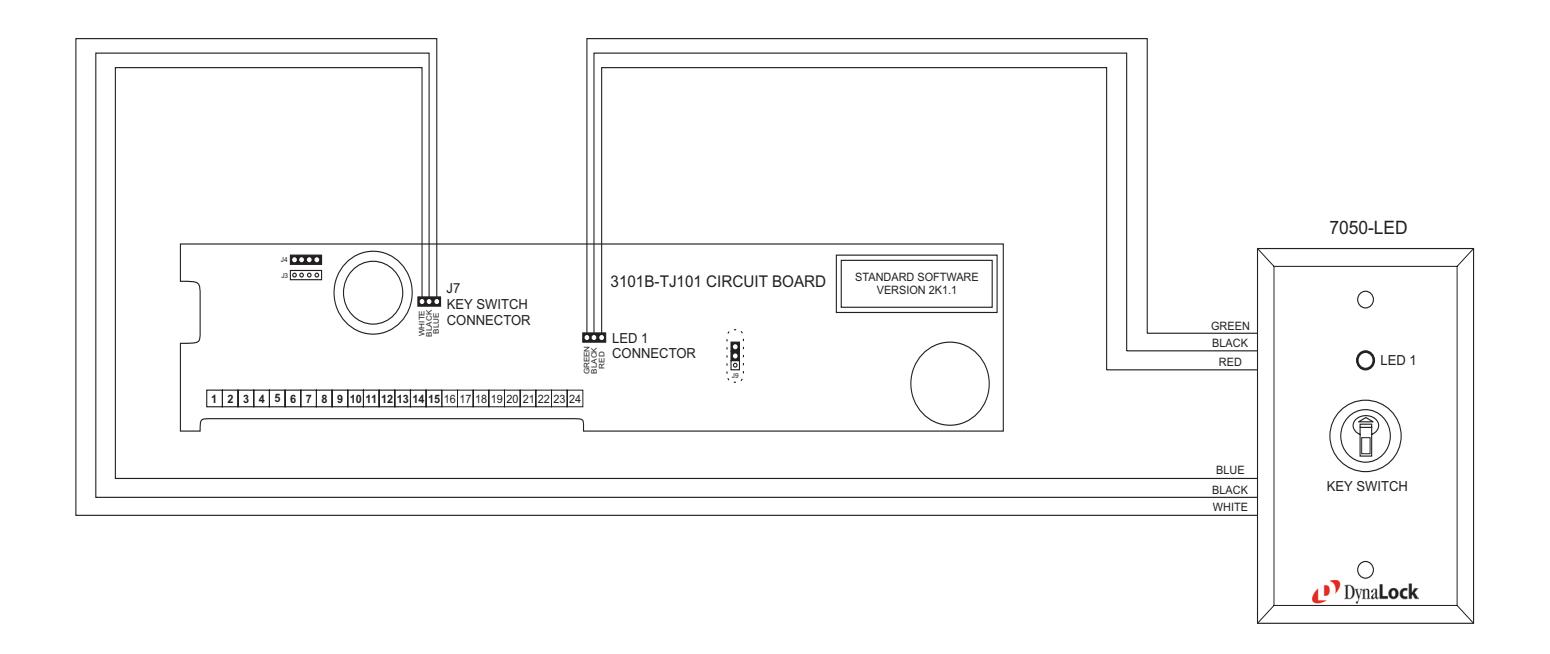
The external 7050 is included with the 3101B-TJ101 to provide reset and bypass functions to the maglock using the 7050's momentary / maintained key switch. The external 7050 also indicates lock status as well as door movement during egress sensor adjustment through LED 1 located on the 7050 faceplate.
The 3101B-TJ101 circuit board is supplied with flying lead connections for LED 1 and the 7050 key switch. These leads must be connected to match the same color flying leads coming from the 7050-LED. (See above illustration).
Remember to observe polarity for either the key switch or LED's three wire harness. The key switch must be connected with the blue wire facing the left (WHITE/BLACK/BLUE See above illustration). The LED 1 must be connected with the green wire facing the left (GREEN/BLACK/RED See above illustration).

MODEL 3101B-TJ101 DELAY EGRESS SYSTEM WIRING INSTRUCTIONS
OPTION WIRING
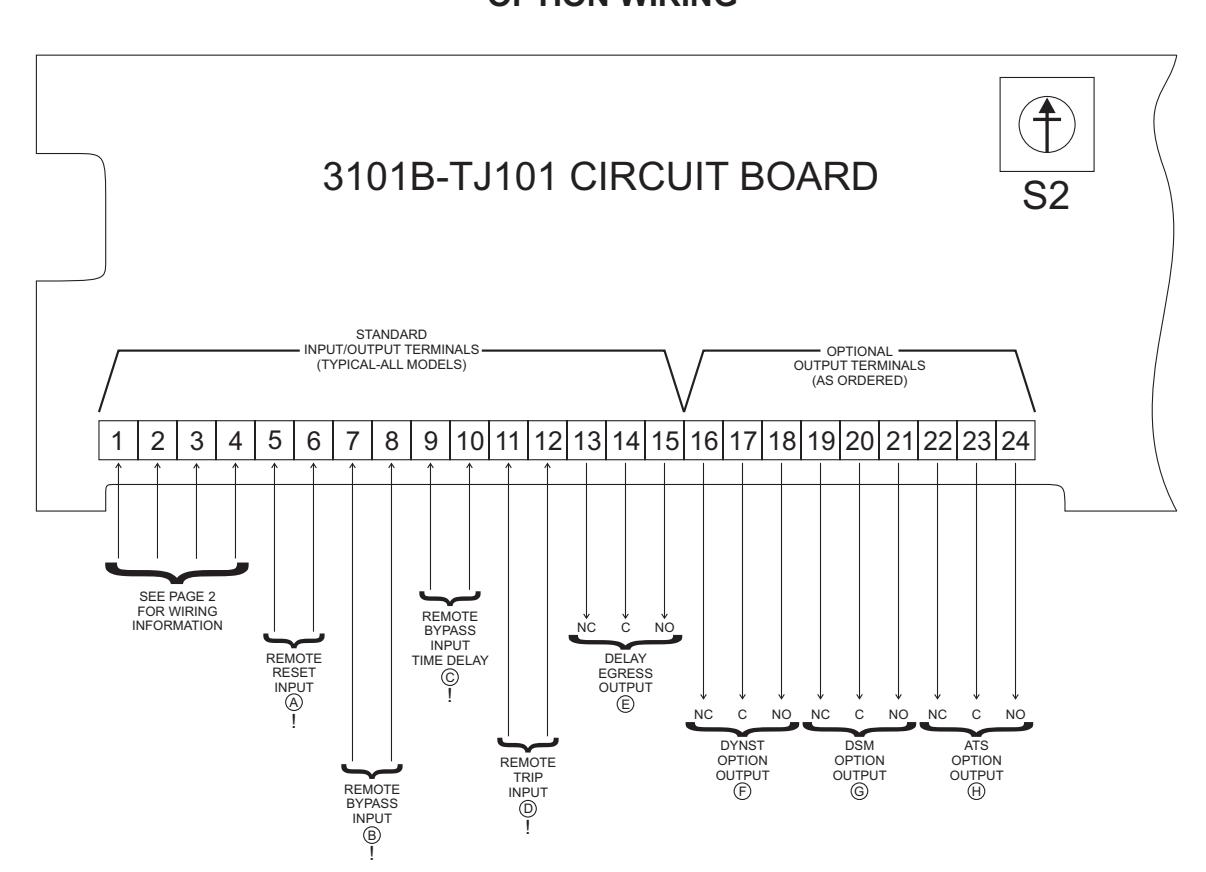
! WARNING: DO NOT APPLY POWER TO INPUTS MARKED "!" OR DAMAGE WILL OCCUR
INPUT DESCRIPTIONS
(A) REMOTE RESET INPUT
Momentarily closing a normally-open dry contact across terminals 5 & 6 will reset and re-lock the 3101B-TJ101 following delayed egress and reclosure of door.

(C) REMOTE BYPASS INPUT TIME DELAY
Momentarily closing a normally-open dry contact across terminals 9 & 10 will immediately release the lock without alarm. The door will remain unlocked for a period of time controlled by on-board adjustable timer S2. To increase the delay rotate timer S2 clockwise. Range is 1 to 75 seconds (~5 sec. per click).

(B) REMOTE BYPASS INPUT
Momentarily closing a normally-open dry contact across terminals 7 & 8 will immediately release the lock without alarm. The door will remain unlocked until the contact is opened. Connect authorized access/egress control(s) here (typical).

(D) ¶ REMOTE TRIP INPUT
Momentarily closing a normally-open dry contact across terminals 11 & 12 will initiate delayed egress. This input may be used as a redundant or substitute means of triggering delayed egress if built-in sensor initiation is not desired.

OPTION WIRING MONITORING OUTPUT DESCRIPTIONS DELAY EGRESS OUTPUT Delay egress alarm monitoring. SPDT dry relay contacts rated 1Amp @ 24 Volts Contacts change state upon initiation of delayed egress, after the nuisance delay has elapsed. They remain in that state until door is closed and reset. DYNST OPTION OUTPUT Dynastat bond sensor monitoring. SPDT dry relay contacts rated 1Amp @ 24 Volts Contacts change state to signal lock status as either secure or unsecure. Armature misalignment can also create an unsecure condition. DSM OPTION OUTPUT Door position sensor monitoring. SPDT dry relay contacts rated 0.5Amp @ 24 Volts Contacts change state to signal physical door position as either closed or open. DSM is an independent circuit that does not require lock power to operate. ATS OPTION OUTPUT Anti-Tamper Switch monitoring. SPDT dry relay contacts rated 0.5Amp @ 24 Volts Contacts change state to signal removal of the lock electronics cover. TYPICAL WIRING NOTE: INDICATORS ARE NOT INCLUDED NOTE: INDICATORS ARE NOT INCLUDED NOTE: INDICATORS ARE NOT INCLUDED 13 14 15 ALARM SECURE NC C NO TO INDICATOR POWER SUPPLY 16 17 18 UNSECURE SECURE NC C NO TO INDICATOR POWER SUPPLY 19 20 21 OPEN CLOSED NC C NO TO INDICATOR POWER SUPPLY 22 23 24 TAMPER NC C NO TO INDICATOR POWER SUPPLY E F G H
NOTE: INDICATORS ARE NOT INCLUDED
NORMAL

MODEL 3101B-TJ101 DELAY EGRESS SYSTEM WIRING INSTRUCTIONS 705 Emmett Street Bristol, CT 06010
NOTES:
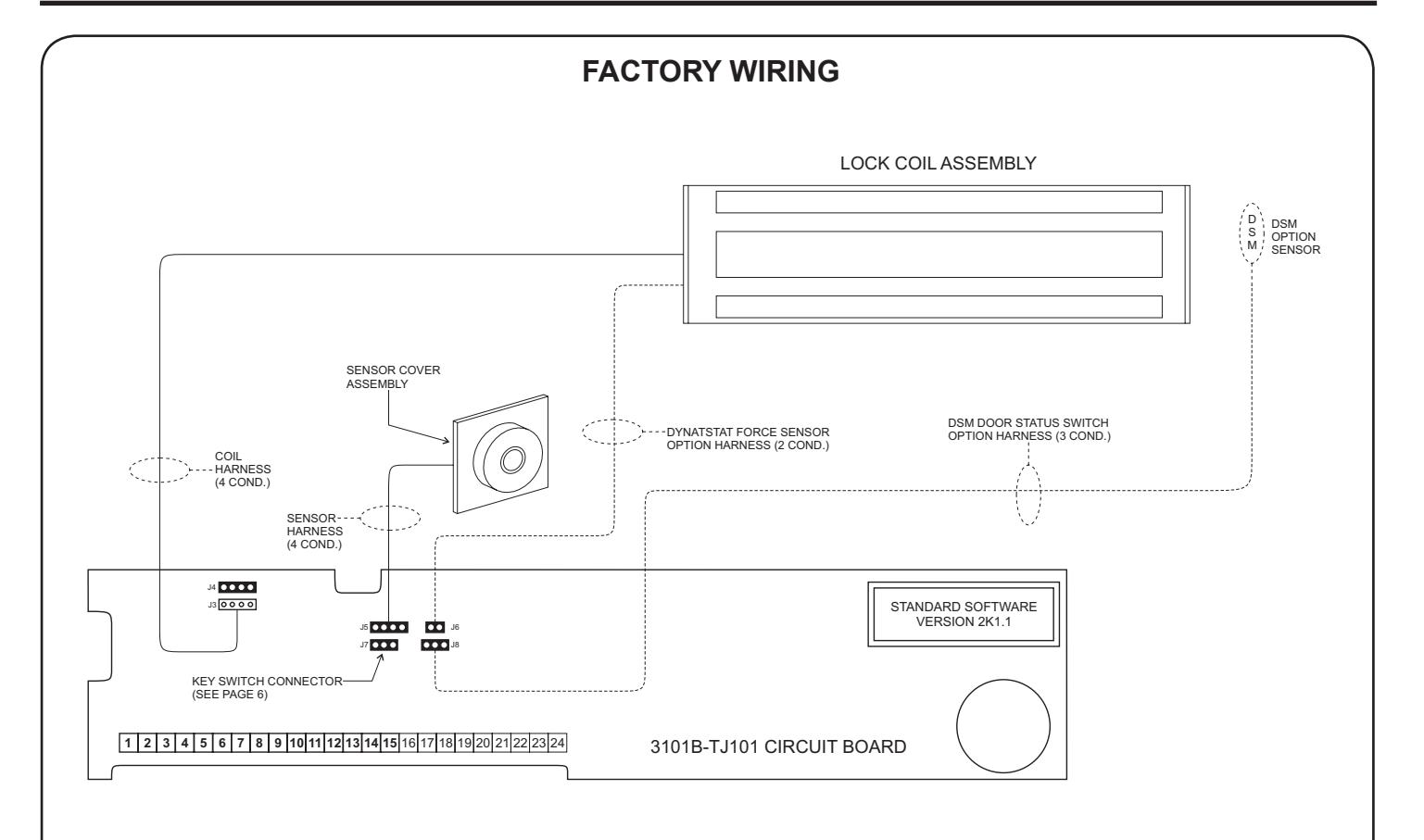
- Harnesses J6 and J8 are only present if the 3101B is equipped with the DYN Dynastat Force Sensor and/or DSM - Door Status Switch Options. 1.
- Observe polarity when re-connecting the J5 and J8 harness connectors. Orient these connectors with respect to harness wire colors as follows: 2.
J5 WHT GRN RED BLK J8 GRN WHT RED
- Harness connectors J3 and J6 are not polarity sensitive. 3.
- J3 & J4 are interchangeable jumpers can go on J3 and coil can go on J4. 4.

| INSTALLER NOTES |
|---|
PLEASE DELIVER THIS MANUAL AND THE KEYS TO THE END USER UPON COMPLETION OF THE 3101B-TJ101 INSTALLATION
FOR PRODUCT SUPPORT AND PARTS ORDERING INFORMATION CONTACT:
DynaLock Corp. 705 Emmett Street Bristol, CT 06010
Bus: (877) 396-2562 Toll-Free USA
(860) 582-4761 Fax: (860) 585-0338
DYNALOCK ON THE INTERNET:
E-mail: info@dynalock.com Website: www.dynalock.com

GWXT Auxiliary Lock
FWAX Special Locking Arrangements CSFM California State Fire Marshal