DynaLock 2280-TJ80 Series Installation Instructions
Open the original PDF document
View PDF

MODEL 2280-TJ80 SINGLE/INSWING ELECTROMAGNETIC LOCK INSTALLATION INSTRUCTIONS
INSTALLATION DESCRIPTION
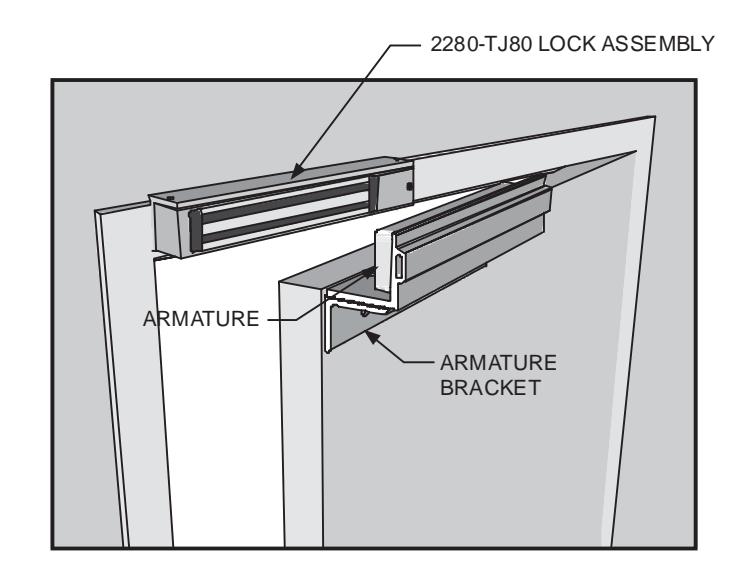
The Series 2280-TJ80 is a 1200 pound holding force top jamb mounted electromagnetic lock, designed to secure a single inswinging door. The lock requires installation procedures as described herein and in the separate wiring instructions included.
Typical installation of the lock on a LH single inswinging door:
HANDLING
Care must be taken that the lock face and armature face are kept free of dirt, rust, paint, or any other obstruction which may interfere with the lock and armature making good contact. These faces may be cleaned with a nonabrasive pad and wiped with an oil dampened cloth.
MECHANICAL INSTALLATION
Familiarize yourself with the door and frame conditions. The lock must mount rigidly to the face of the door frame header. The door mounted armature is supplied with hardware that allows it to pivot slightly to compensate for reasonable misalignment.
NOTE: If this lock is supplied with the DSM option be certain that magnets are present inside the armature housing.
ELECTRICAL INSTALLATION
After mechanical installation is complete the lock needs to be wired to a 12 or 24 VDC/VAC power source. Once low voltage power is supplied the unit is fully operational. All other wiring is for selected options. Refer to the separate wiring instructions included for further information.

INSTALLATION INSTRUCTIONS
| General Information 1 | |
|---|---|
| Bill Of Materials | 2 |
| Mounting Considerations 3 | |
| Install Lock Mounting Bracket 3 | |
| Assemble Armature Mtg. Bracket 4 | |
| Install Armature Mtg. Bracket 5 | |
| Armature Mtg. Bracket Adjustment 6 | |
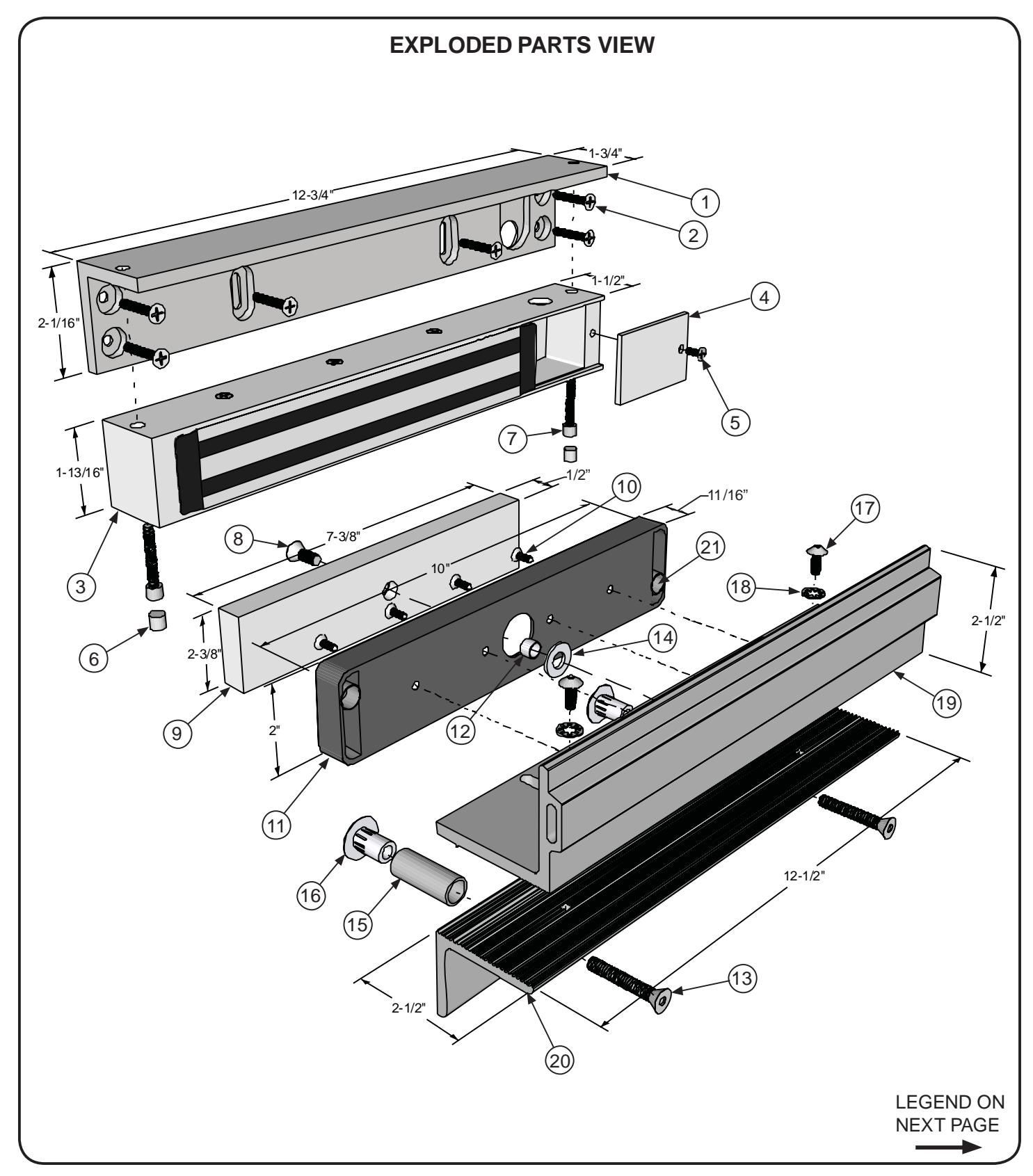
| Exploded Parts View 7 | |
| Exploded Parts Legend 8 | |
| Support 8 |
REQUIRED TOOLS
- (1) Electric Drill
- (1) #2 Phillips Screw Driver
- (1) Soft Faced Mallet
- (1) Hammer
- (1) Center Punch
- (1) Pencil & Tape
Drill Bits: 1/8", 17/64", 11/32", 1/2", 9/16", 21/32"
TABLE OF CONTENTS MODEL #2280-TJ80 BILL OF MATERIALS
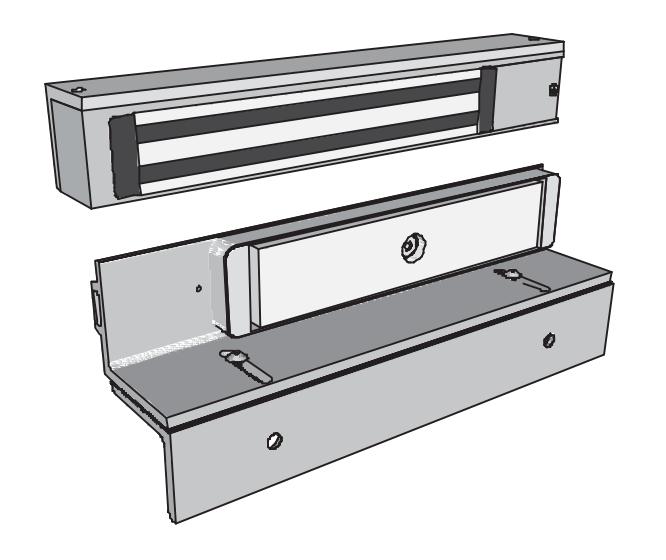
- (1) 2280-TJ80 LOCK ASSEMBLY
- (1) ARMATURE
- (1) ARMATURE HOUSING
- (1) ARMATURE MTG BRACKET SET
- (1) HARDWARE KIT
- (1) MOUNTING TEMPLATE DRAWING
- (1) INSTALLATION MANUAL
- (1) WIRING MANUAL
HARDWARE KIT CONTENTS (P/N 301307)
| QTY. | DESCRIPTION |
|---|---|
| 7 | #10x1" sheet metal screw |
| 7 | #10-24x1/2" machine screw |
| 2 | 5/16-18x1-3/4" TJ bracket bolt |
| 4 | 8-32x3/8" machine screw |
| 1 | 3/8"Dx0.360"L spacer |
| 1 |
1/4"
À at steel washer |
| 2 | 5/8"Dx1-11/16"L spacer |
| 2 | 5/16-18 sex nut |
| QTY. | DESCRIPTION |
|---|---|
| 1 | 5/16-18x3/4" armature bolt, turned |
| 2 | 1/4-20x1/2" button head screw |
| 2 | lock washer |
| 2 | anti-tamper plug |
| 1 | 3/16" Hex Wrench |
| 1 | 5/32 Hex Wrench |
4/07
NOTE: For further parts clari¿ cation refer to the Exploded Parts View on page 7 or consult factory.

INSTALLATION INSTRUCTIONS
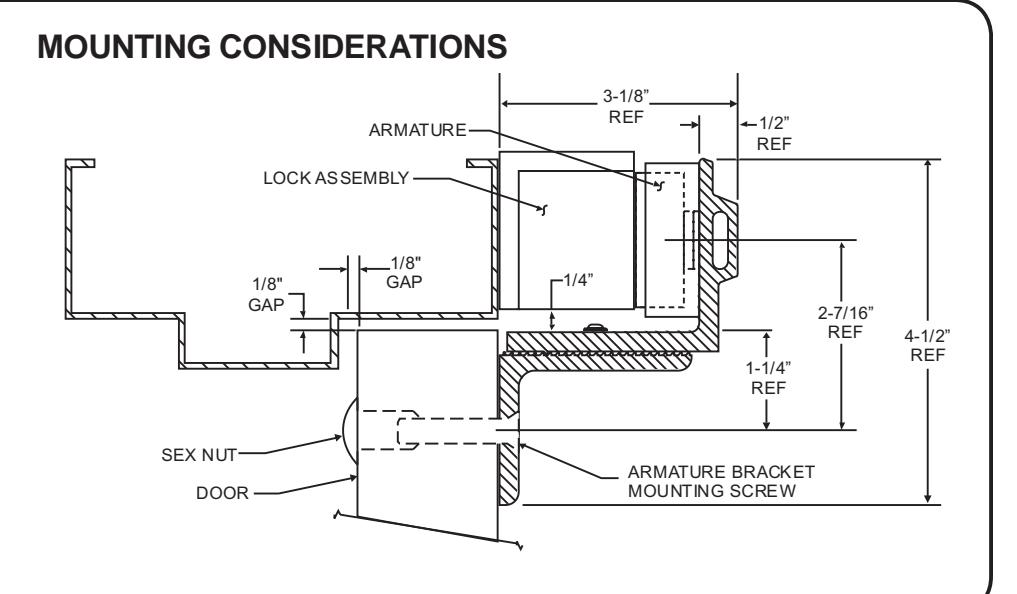
- Individual door and frame conditions may vary. Dimensions shown at right are for a typical hollow metal door and frame. 1.
- The Lock Assembly should be mounted closest to the strike jamb of the frame for maximum performance. Verify that there is proper clearance for the lock assembly at the planned mounting location. 2.
INSTALL THE LOCK MOUNTING BRACKET
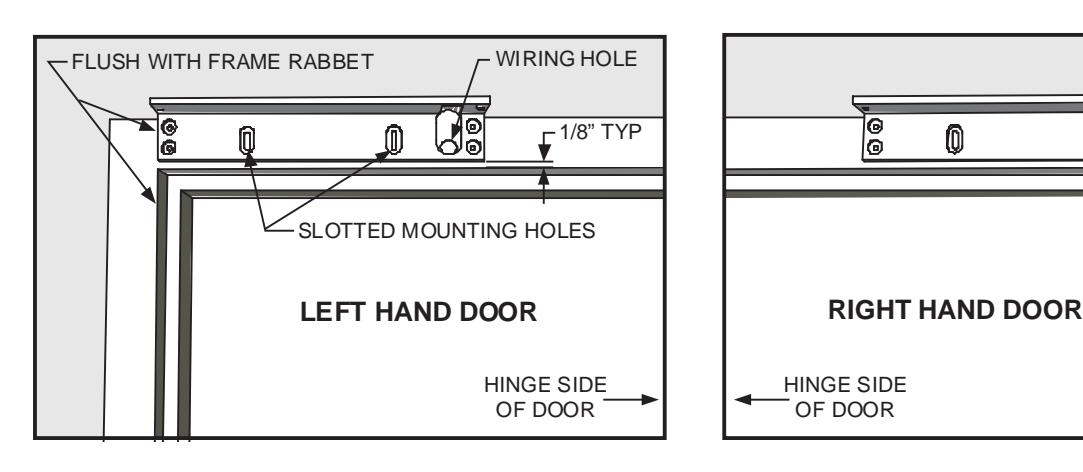
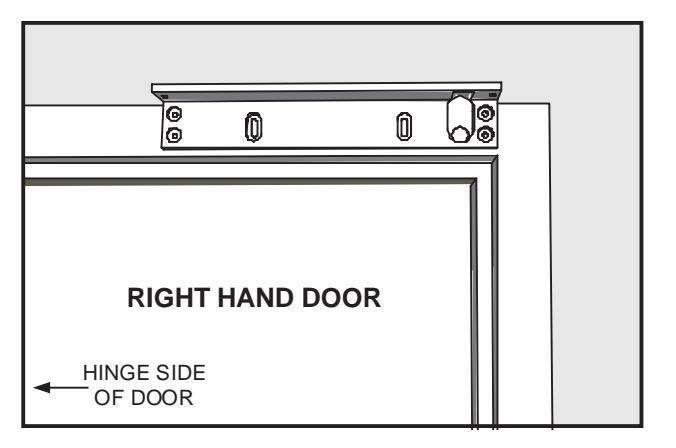
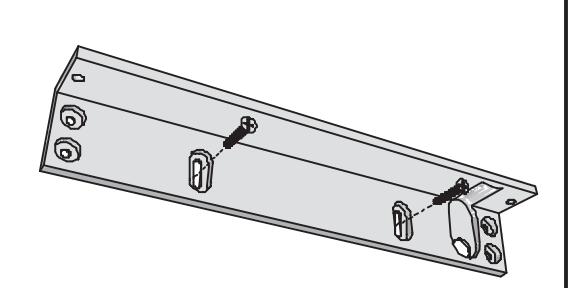
- Separate the Lock Mounting Bracket from the Lock Assembly (see page 6). Standing at the "pull" side of the door, place the Lock Mounting Bracket on the face of the frame header as shown below. Using the Template Drawing, locate and mark the centers of the two slotted mounting holes and the wiring hole. 1.
-
Drill the marked holes in the face of the frame header: 2.
- a. two 1/8" holes for #10x1" sheet metal screws or drill and tap for 10-24x1/2" machine screws
- b. one 5/8" hole for wiring


INSTALLATION INSTRUCTIONS
ASSEMBLE THE ARMATURE MOUNTING BRACKET
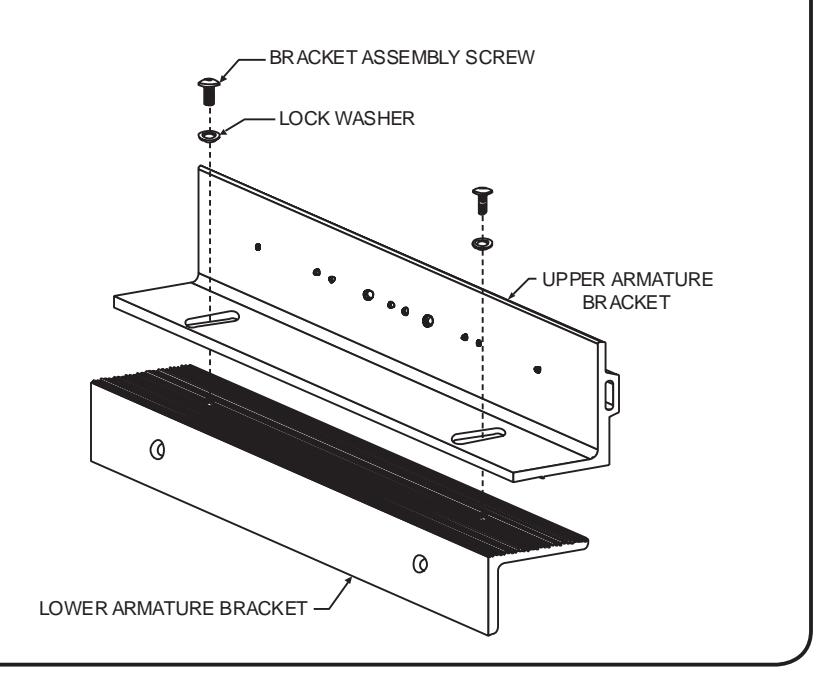
Locate the two 1/4-20x1/2" armature mounting bracket assembly screws and lock washers from the hardware kit and assemble the bracket as shown.
Firmly tighten the mounting screws with a 5/32" hex wrench. They may be loosened later for adjustment, as necessary.
ATTACH THE ARMATURE TO THE ARMATURE MOUNTING BRACKET
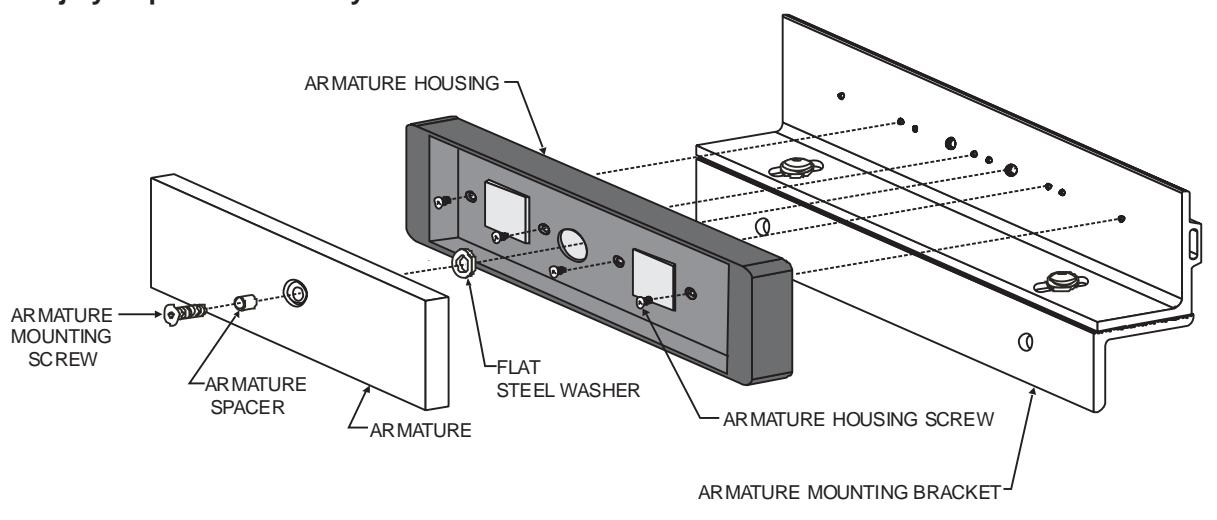
Attach the Armature Housing to the top Armature Mounting Bracket using four (4) 8-32x3/8" Armature Housing Screws.
Attach the armature to the armature mounting bracket as shown. Firmly tighten the Armature Mounting Screw using a 3/16" hex wrench.
Failure to properly secure the armature to the bracket could result in serious injury or possible security breach.
INSTALLATION INSTRUCTIONS
INSTALL THE ARMATURE MOUNTING BRACKET
Use the ¿ gures below to identify and mark the locations of the armature mounting bracket screw holes on the door. Refer to Template Drawing #301302 for further information. 1.
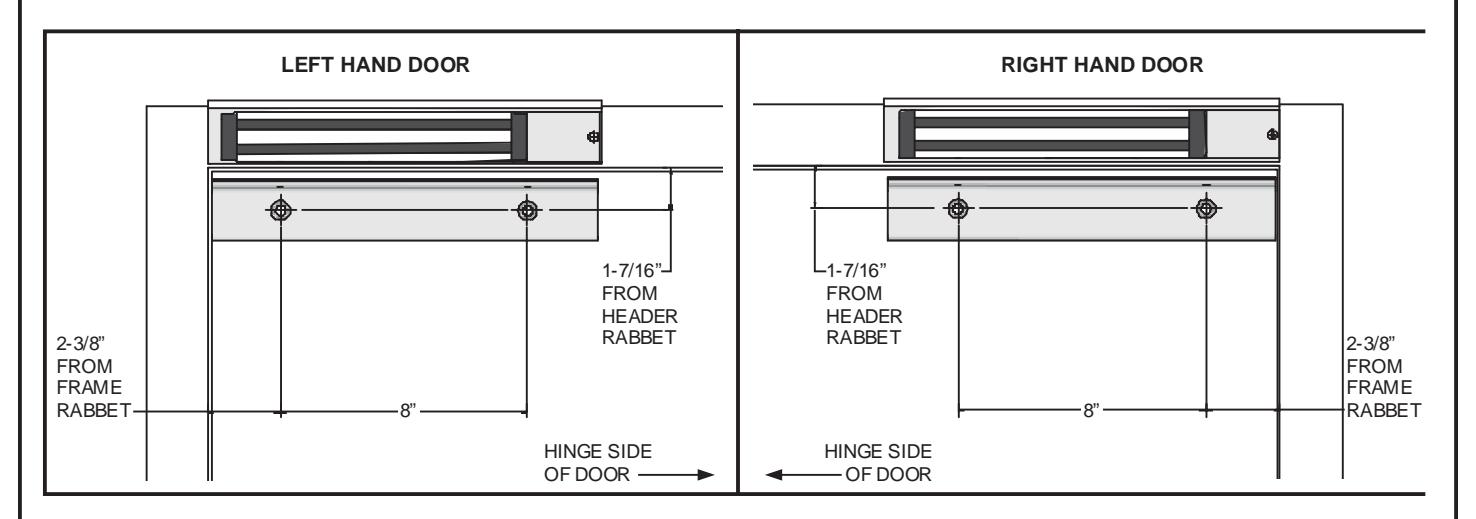
From the illustrations below select the one that resembles your door type and follow the instructions for drilling the two (2) armature mounting bracket screw holes. 2.
ARMATURE BRACKET MOUNTING SCREW LOWER ARMATURE MOUNTING BRACKET 21/32" SEX NUT DOOR SPACER ARMATURE BRACKET MOUNTING SCREW LOWER ARMATURE MOUNTING BRACKET 5/16"-18 THREAD Drill an 11/32" diameter hole through door. From sex nut side only enlarge the 11/32" hole to 21/32" diameter. Drill an 11/32" diameter hole through door. From sex nut side only drill 1/2" diameter hole to 1" depth. Drill an 17/64" diameter hole and tap for 5/16"-18 thread. GLASS & ALUMINUM OR HOLLOW METAL DOOR SOLID CORE DOOR REINFORCED DOOR ARMATURE BRACKET MOUNTING SCREW 1/2" 1" LOWER ARMATURE MOUNTING BRACKET SEX NUT 1/4" MIN
- Mount the armature and mounting bracket assembly to the door using the appropriate hardware for your door type. Firmly tighten the mounting screws with a 3/16" hex wrench. 3.
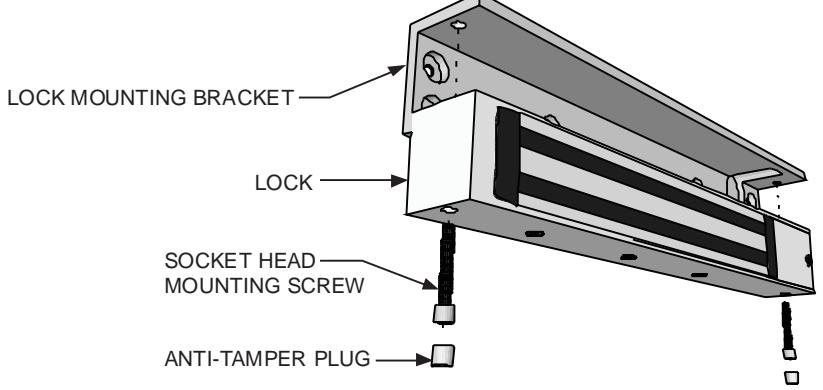
- 4. Temporarily mount the Lock Assembly to the Lock Mounting Bracket using (2) 1/4-20 x 1-1/4" socket head screws.

INSTALLATION INSTRUCTIONS
ARMATURE ADJUSTMENT
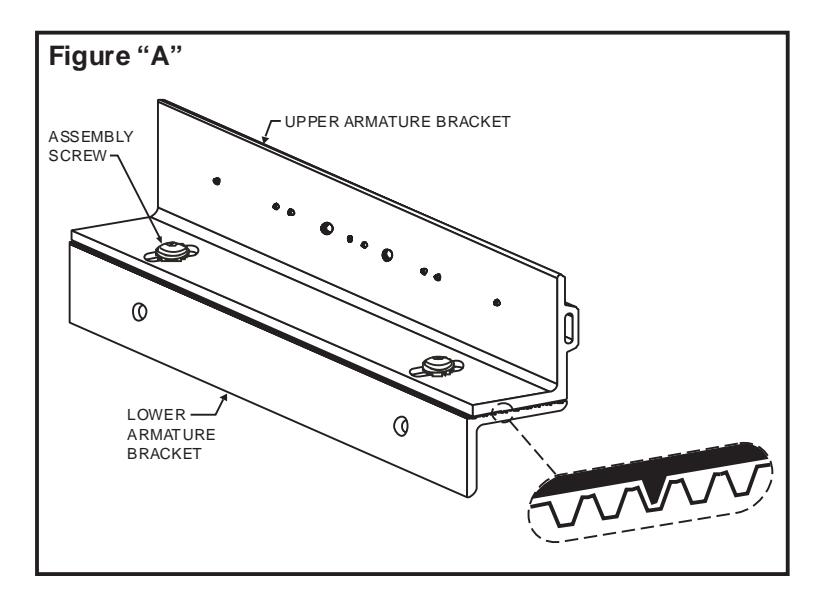
- Using a 5/32" hex wrench, temporarily loosen the armature bracket assembly screws roughly 1-1/2 turns to allow the upper armature bracket to move in and out freely (Ref. Figure "A"). 1.
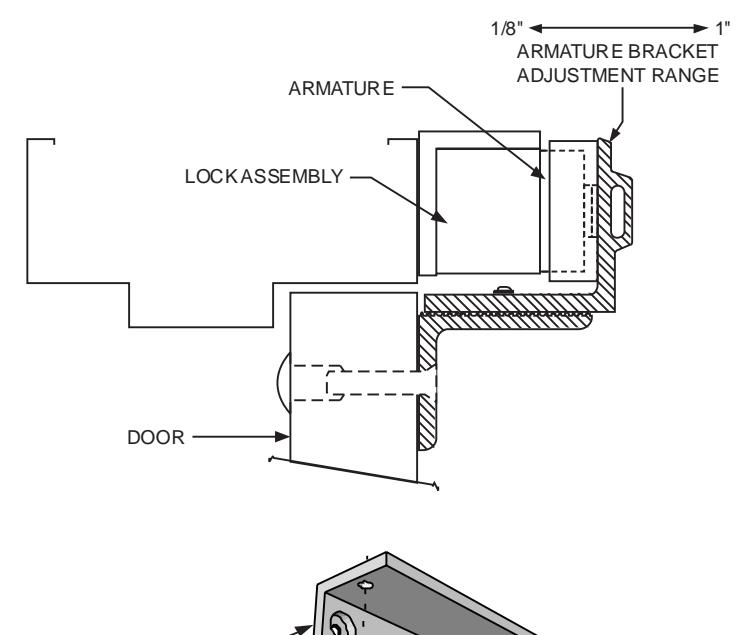
- Close and latch the door. The mating surfaces of the lock and armature should fully contact each other. If necessary, slide the armature in or out to ensure full contact is made with the lock while still allowing the door to properly close and latch. Move the lock assembly up or down to achieve proper vertical alignment. 2.
- When the desired adjustment is achieved, slowly open the door taking care to maintain the position of the armature. Firmly tighten the armature bracket assembly screws, making sure that the locking ribs on the upper and lower bracket halves properly mesh (Ref. Figure "A"). 3.
- Dismount the lock assembly from the lock mounting bracket and tighten the two slot mounting screws. Using the bracket as a template, drill and install the four remaining bracket mounting screws. Mount the lock and install the two aluminum anti-tamper plugs using a soft faced mallet. 4.
NOTE:
Make sure the door hits the frame just before the armature hits the maglock, to prevent loosening over time (armature not slamming against the lock).
4/07

INSTALLATION INSTRUCTIONS

INSTALLATION INSTRUCTIONS
PARTS LEGEND
| ITEM | DESCRIPTION | PART # |
|---|---|---|
| 1 | Lock Mounting Bracket | 301270 |
| 2 | #10x1" Self-Tapping Screw | * |
| 2 | 10-24x1/2" Machine Screw | * |
| 3 | Lock Housing | 301297 |
| 4 | Access Cover | 301296 |
| 5 | 8-32x3/8" Machine Screw | 300608 |
| 6 | Anti-Tamper Plug | * |
| 7 | 1/4-20x1-1/4" Socket Head Screw | 300603 |
| 8 | 5/16-18x3/4" Arm. Screw, Turned | * |
| 9 | Armature | 300968 |
Refer to Page 7 for parts locations.
| ITEM | DESCRIPTION | PART # |
| 10 | 8-32x3/8" Machine Screw | * |
| 11 | Armature Housing | 301245 |
| 12 | 0.360"L Armature Spacer | * |
| 13 | 5/16-18x1-3/4" TJ Bracket Bolt | * |
| 14 | Steel Washer | * |
| 15 | Door Spacer Tube | * |
| 16 | Sex Nut | * |
| 17 | 1/4-20x1/2" Button Head Screw | * |
| 18 | Lock Washer | * |
| 19 | Top Armature Mounting Bracket | 301262 |
| 20 | Bottom Armature Mtg. Bracket | 301274 |
| 21 | Disc Magnet (DSM only) | 301289 |
PLEASE DELIVER THIS MANUAL TO THE END-USER UPON COMPLETION OF THE INSTALLATION
THE FOLLOWING LISTINGS ARE PENDING

GWXT Auxiliary Lock NYC Mea #23-92-E
FOR PRODUCT SUPPORT AND PARTS ORDERING INFORMATION CONTACT:
DynaLock Corp. 705 Emmett Street Bristol, CT 06010
Bus: (877) DYNALOCK, Toll-Free USA
4/07
(860) 582-4761 Fax: (860) 585-0338
DYNALOCK ON THE INTERNET:
E-mail: info@dynalock.com Website: www.dynalock.com
* Part of Hardware Kit (301307)