DynaLock 2268 Series DSM Upgrade Installation Instructions
Open the original PDF document
View PDFDynaLock Corp.
705 Emmett Street Forestville, CT 06011-9470 Phone:(860)582-4761 Fax:(860)585-0338
2268 SERIES MAGLOCK DSM OPTION FIELD UPGRADE INSTALLATION INSTRUCTIONS
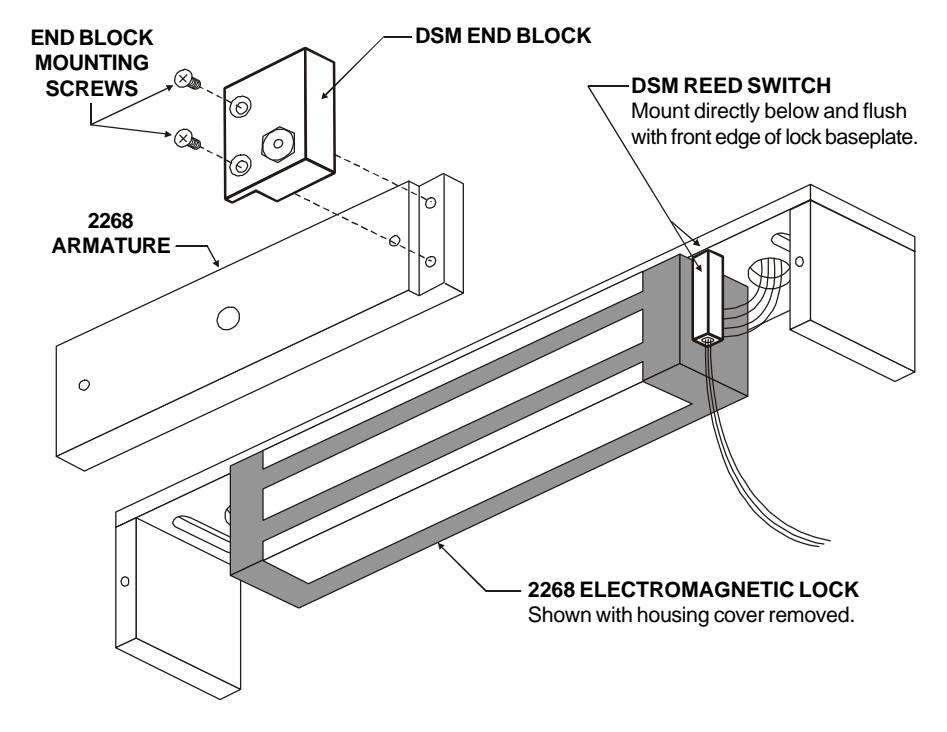
DynaLock part #301029 Field Upgrade Kit contains all components necessary to upgrade one Series 2268-10 single electromagnetic lock to include the DSM - Door Status Switch Option. These components are the DSM reed switch and the DSM End Block, which must be installed as described below for proper operation of the DSM Option.
To upgrade one Series 2268-20 double lock two (2) #301029 Kits are required. For further information on the wiring and operation of the DSM Option refer to the separate Series 2268 Wiring Instructions furnished with your lock.
INSTALLATION PROCEDURE
- Remove the housing cover from the 2268 lock. 1.
- Peel and discard the paper backing from the double-stick foam tape affixed to the DSM reed switch. 2.
- Making sure the surface is free of any dust or residue, carefully place the DSM reed switch on the wired end of the magnet as shown and press firmly to adhere. Note: The switch must not project beyond the front edge of the lock mounting baseplate otherwise it will interfere with the lock housing. 3.
- Mount the DSM End Block to the 2268 armature as shown, using the supplied screws and tighten firmly. 4.