Corbin Russwin IN120 and IN220 Series with ML2000 Series Mortise Locks Installation Instructions_FM427
Open the original PDF document
View PDFInstallation Instructions

IN120 WiFi IN220 PoE
Mortise Lockset
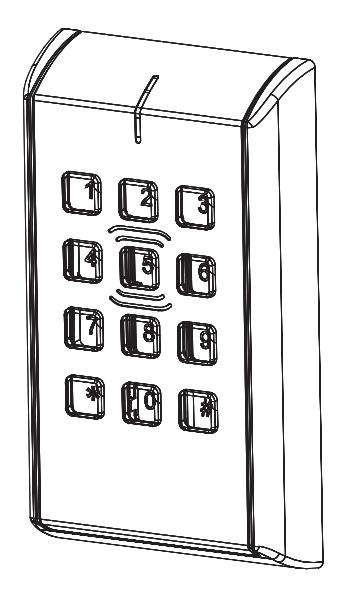


Attention Installer:
Please read these instructions carefully to prevent missing important steps.
Improper installations may result in damage to the lock and void the factory warranty.
The accuracy of the door preparation is critical for proper functioning and security of this lock.
Misalignment can cause premature wear and a lessening of security.

Mortise Lock
| Table of Contents | |
|---|---|
| 1 |
Warning
3 |
| 2 |
Regulatory & Power Specifications
4 |
| 3 |
General Description
5 |
| 4 |
Hardware Specifications
5 |
| 5 |
Electronic Specifications
5 |
| 6 |
Parts Breakdown
6 |
| 7 |
IN220 Wiring & Installation
8 |
| 8 |
Lock Installation
12 |
| 9 |
Operational Check
25 |

1 Warning
Changes or modifications to this device not expressly approved by ASSA ABLOY could void the user's authority to operate the equipment.
FCC:
This equipment has been tested and found to comply with the limits for a Class B digital device, pursuant to Part 15 of the FCC Rules. These limits are designed to provide reasonable protection against harmful interference in a residential installation. This equipment generates, uses, and can radiate radio frequency energy and, if not installed and used in accordance with the instructions, may cause harmful interference to radio communications. However, there is no guarantee that interference will not occur in a particular installation. If this equipment does cause harmful interference to radio or television reception, which can be determined by turning the equipment off and on, the user is encouraged to try to correct the interference by one or more of the following measures:
- Reorient or relocate the receiving antenna.
- Increase the separation between the equipment and receiver.
- Connect the equipment into an outlet on a circuit different from that to which the receiver is connected.
- Consult the dealer or an experienced radio/TV technician for help.
Industry Canada:
Under Industry Canada regulations, this radio transmitter may only operate using an antenna of a type and maximum (or lesser) gain approved for the transmitter by Industry Canada. To reduce potential radio interference to other users, the antenna type and its gain should be so chosen that the equivalent isotropically radiated power (e.i.r.p.) is not more than that necessary for successful communication.
Conformément à la réglementation d'Industrie Canada, le présent émetteur radio peut fonctionner avec une antenne d'un type et d'un gain maximal (ou inférieur) approuvé pour l'émetteur par Industrie Canada. Dans le but de réduire les risques de brouillage radioélectrique à l'intention des autres utilisateurs, il faut choisir le type d'antenne et son gain de sorte que la puissance isotrope rayonnée équivalente (p.i.r.e.) ne dépasse pas l'intensité nécessaire à l'établissement d'une communication satisfaisante.
General Regulatory Compliance:
This device contains license-exempt transmitter(s)/receiver(s) that comply with Innovation, Science and Economic Development Canada's licenseexempt RSS(s). This device complies with part 15 of the FCC Rules. Operation is subject to the following two conditions: (1) this device may not cause harmful interference, and (2) this device must accept any interference received, including interference that may cause undesired operation. Cet appareil contient des émetteurs/réceptuers exemptés de licence conformes aux RSS d'Innovation, Sciences et Développment économique Canada. Cet appareil est conforme à la section 15 de la réglementation de la FCC.
L'opération est sujette aux deux conditions suivantes: (1) ce dispositif peut ne pas causer l'interférence nocive, et (2) ce dispositif doit accepter n'importe quelle interférence reçue, y compris l'interférence qui peut causer l'opération peu désirée.
This equipment complies with FCC and IC radiation exposure limits set forth for general population (uncontrolled environment). This device must not be co-located or operating in conjunction with any other antenna or transmitter.
Cet équipement est conforme aux limites d'exposition aux radiations de la FCC et IC définies pour la population générale (environnement non contrôlé). Cet appareil ne doit pas être co-localisé ou fonctionner en conjonction avec une autre antenne ou un autre émetteur.

CAUTION: When using hard power, DO NOT install batteries.
AVERTIR: Ne pas installer de batteries si vous utilisez l'alimentation électrique.
CAUTION: Risk of Explosion if battery is replaced by an incorrect type. Dispose of used batteries according to the instructions. AVERTIR: Risque d'explosion si la batterie est remplacée par un type incorrect. Jetez le batteries usagées conformément aux instructions.

This product can expose you to lead which is known to the state of California to cause cancer and birth defects or other reproductive harm. For more information go to: www.P65warnings.ca.gov.
Ce produit peut vous exposer au plomb qui, dans l'état de la Californie, est reconnu pour causer le cancer, des anomalies congénitales ou d'autres problèmes de reproduction.
Pour plus d'informations, visitez: www.P65warnings.ca.gov.

Any retrofit or other field modification to a fire rated opening can potentially impact the fire rating of the opening, and SARGENT Manufacturing makes no representations or warranties concerning what such impact may be in any specific situation. When retrofitting any portion of an existing fire rated opening, or specifying and installing a new fire-rated opening, please consult with a code specialist or local code official (Authority Having Jurisdiction) to ensure compliance with all applicable codes and ratings.

To avoid possible damage from electrostatic discharge (ESD), some basic precautions should be used when handling electronic components:
- Minimize build-up of static by touching and/or maintaining contact with unpainted metal surfaces such as door hinges, latches, and mounting plates especially when mounting electronic components such as readers and controllers onto the door.
- Leave components (reader and controller) protected in their respective anti-static bags until ready for installation
- Do not touch pins, leads or solder connections on the circuit boards
Mortise Lock
2 Regulatory and Power Specifications
Electronic Authentication Specifications (Mobile Credentials)
For Mobile Credential-Enabled versions of this electronic lock
(Indicated by the credential code in the product order string):
- Mobile Credentials are transmitted to the lock via Bluetooth Smart or NFC ISO/IEC14443 and must use a mobile device enabled with these technologies.
- Credential and mobile device versions are specified by the credential provider.
- User must acquire the latest HID "Mobile Access" application available from Apple iStore or Android PlayStore.
This product is not intended for outside wiring as covered by Article 800 in the National Electrical Code, NFPA 70.
Compliance with IEEE 802.3 (at or af) specifications was not verified as part of UL 294/B.
The system shall not be installed in the fail-secure mode unless permitted by the local authority having jurisdiction and shall not interfere with the operation of Listed panic hardware.
- UL Listed UL 294 Indoor Use
- CUL Listed ULC-60839-11-1 Grade1
• UL 294 Access Control Ratings:
| Destructive Attack | Level 1 |
|---|---|
| Line Security | Level 1 |
| Endurance | Level 4 |
| Standby Power | Level 1 |
Power Supply Specifications
IN120 (Wi-Fi version):
• Battery Power:
Alkaline AA Batteries (6): 9V, 300mA

(To comply with "Fire Listed" doors, batteries must be replaced with alkaline batteries only)
• Optional Hard Power (UL 294 Listed Power Supply Required): 9-24VDC, 300mA
CAUTION: When using Hard Power, DO NOT install batteries.
CAUTION: Risk of explosion if battery is replaced by an incorrect type. Dispose of used batteries according to the instructions.
IN220 (PoE version):
- Power over Ethernet: Use UL 294 Listed, PoE Injector or Class 2 power limited power supply (55VDC, 90mA)
- UL testing was conducted on product powered by UL listed model POE20U-560(G) PoE Injector, manufactured by Phihong
Wiring methods shall be in accordance with the National Electrical Code (ANSI/NFPA70), CSA 22.1, Canadian Electrical Code (CEC), Part I, Safety Standard for Electrical Installations, local codes and the authorities having jurisdiction.
Mortise Lock

3 General Description
The Corbin Russwin IN120 (Wi-Fi) & IN220 (PoE) series locks offer HID® multiCLASS SE® technology in a streamlined design, setting a new standard for aesthetics and performance.
The IN120 cylindrical lock uses IEEE 802.11 Wi-Fi communication and a flexible feature set allowing facilities to leverage their IT infrastructure to expand access control coverage to more doors.
The IN220 mortise lock with the energy efficiency and streamlined architecture of Power-over-Ethernet (PoE) access control allows for for easier, more cost-effective installations,enhanced security and easier, more cost-effective installations.
Featuring HID® multiCLASS SE® technology, they support heightened identity security and multiple credentials, including mobile access.
4 Hardware Specifications
- Latch Stainless Steel (Easily field reversible without disassembling lock body)
- Deadbolt Stainless Steel
- Auxiliary Latch Stainless steel, non-handed
- Door Thickness 1-3/4" Standard; can be furnished for other door thicknesses upon request. Consult factory.
- Case 12 gauge heavy duty wrought steel
- Outside lever controlled by reader or key retracts latch
- Inside Lever produces REX (request to exit) signal and retracts latch and deadbolt
- UL fire listed
- May be used for both indoor and exterior applications
- A weather-protective gasket is required for exterior applications
5 Electronic Specifications
HID® multiCLASS SE® technology offers support for the following credentials:
High Frequency (13.56 MHz)
- HID iCLASS®
- HID iCLASS SE® (SIO-enabled)
- HID iCLASS Seos™
- HID MIFARE® SE
- HID DESFire EV1 SE
- HID MIFARE® Classic
- DESFire EV1
- PIV/PIV-I**
**(40-bit BCD, 64-bit BCD, 75 bit, 128-bit or 200-bit outputs)
Low Frequency (125 kHz):
• HID Prox®
NFC & BLE-enabled mobile phones
- HID Mobile Access® (BLE & NFC)
- Apple Wallet Seos or DESFire® (NFC)
-
Optional keypad:
- PIN-only usage or dual authentication*
- Multiple time zone and holiday access scheduling
- First-in unlock or automatic unlock configuration, based on specified time schedule
- 10,000 per lock; 10,000 event audit trail
- Privacy button
- Wi-Fi (IEEE 802.11 b/g/n)
- PoE (IEEE 802.3af)
Power requirements:
- Alkaline AA Batteries: 9V, 300mA
- PoE 55VDC, 90mA
- Optional Hard Power : 9-24VDC, 300mA
*For specific security information, please contact your local ASSA ABLOY Door Security Solutions sales consultant or call 800-810-WIRE.

Mortise Lock
6 Parts Breakdown

| ITEM No. | DESCRIPTION |
|---|---|
| 1* | Outside Escutcheon Assembly |
| 2 | Inside Mounting Plate Assembly (includes Gasket) |
| 3a | PoE Controller Assembly |
| 3b | Wi-Fi Controller Assembly* (batteries included) |
| 4 | Inside Escutcheon Assembly with Privacy Button |
| 5 | AA alkaline batteries (6) |
*Consult catalog for electronic replacement part numbers

6 Parts Breakdown (Continued)

| 1 | 783F938 [handing]* 26D | ML20133/ML20134 Lock Case - No Deadbolt | 1 |
|---|---|---|---|
| 783F948 [handing]* 26D | ML20135/ML20136 Lock Case - With Deadbolt | ||
| 816F048 [handing]* 26D | ML20233/ML20234 Lock Case - No Deadbolt (not shown) | ||
| 816F058 [handing]* 26D | ML20235/ML20236** Lock Case - With Deadbolt (not shown) | ||
| 2 | 783F619 | DPS (Door Position Switch) Kit*** | 1 |
* Replace with handing (L, LR, R, RR)
** Required for Escape Return functionality (a residential requirement in Canada)
*** Not required for ML202xx

Mortise Lock
Important Note: If you are installing IN220 (PoE)
Before installing IN220 (PoE) mortise lock, please read the following section: - IN220 (PoE) Wiring & Installation
7 IN220 (PoE) Wiring & Installation
Overview
Corbin Russwin IN220 PoE Typical Application


ASSA ABLOY
7
IN220 (PoE) Wiring & Installation (Contnued)

Mortise Lock
7 IN220 (PoE) Wiring & Installation (Continued)

Frame Harness Installation

| PIN | Wire |
Pair
Number |
|---|---|---|
| 1 | White/Orange | 2 |
| 2 | Orange | 2 |
| 3 | White/Green | 3 |
| 4 | Blue | 1 |
| 5 | White/Blue | 1 |
| 6 | Green | 3 |
| 7 | White/Brown | 4 |
| 8 | Brown | 4 |
Do not confuse pair numbers with pin numbers. A pair number is used for reference only (eg: 10BaseT Ethernet uses pairs 2 & 3). The pin numbers indicate actual physical locations on the plug and jack.
Hinge side of PoE harness:
- 1. Feed cut end of harness into hole on hinge-side through single access hole.
-
2. Push one connector back through the hole and feed into the other access hole. Each of the hinge-side harness connectors should end up threaded through a different access hole and matched to the same size pin connector from the door harness:
- 4-pin male molex connector
- 6-pin male molex connector with ground wire

Cable drain wire concealed in shrink tubing
Frame-Side Harness Assembly (15' length)
Earth Ground in 15' Frame Harness
PoE Data Hinge
Molex-M Cable : Cat5e or higher 24 AWG shielded, 100ohm

Hinge-side harness connectors:
- 4-pin female molex connector
- 6-pin female molex connector with ground wire Lock-side harness connectors:
- 4-pin female molex connector
- 6-pin female molex connector with ground wire
Mortise Lock

7 IN220 (PoE) Wiring & Installation (Continued)

PoE Door Harness
Order of installation may vary. Refer to appropriate sections for instructions.
Hinge-side harness connectors:
- 4-pin male Molex connector
- 6-pin male Molex connector with ground wire
Lock-side harness connectors:
- Ring terminal
- Male RJ45 connector (crimped after cable is fed through door)
Notes:
- Connectors go on only one way. They cannot be plugged to incorrect position.
- Do not force and do not offset connectors.
- Be sure they are completely seated (flush).

D PoE Lock
Order of installation may vary. Refer to appropriate sections for instructions.
- 1. Prop door open.
- 2. Using the ring terminal, carefully route the assembly through the door channel toward lock.
*Do not terminate PoE harness (with RJ45 M) until cable has been routed through door and inside mounting plate assembly. See Section 8, Step 10 - Installing the Connectors.

IN220 PoE Lock

Mortise Lock
ASSA ABLOY
8 Installation Instructions
1 Verify Hand and Bevel of Door
Illustrations shown are as viewed from the outside or secure side of opening.
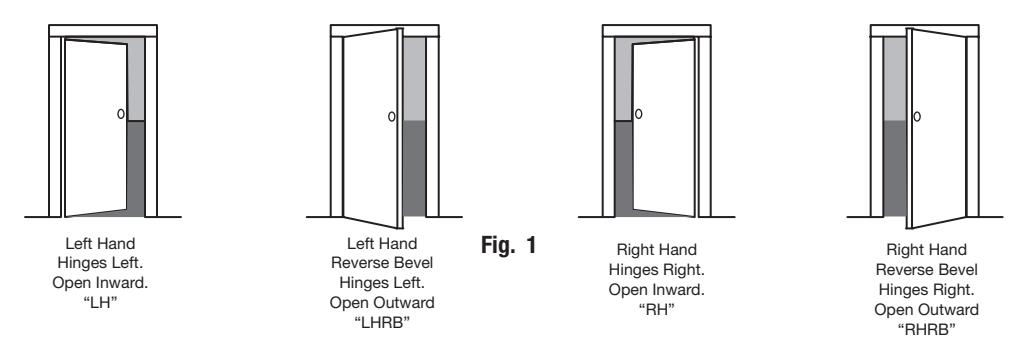
2 Door Preparation (Fig. 2)
Prep door according to supplied door marker (FM457). For door manufacturer templates visit www.corbinrusswin.com and reference template # T31202.

*See Section IN220 (PoE) Wiring and Installation

3 Install Door Position Switch (DPS)
- a. Push wires through raceway toward lock prep.
- b. Push DPS firmly into place by hand. NOTE: DO NOT TAP SWITCH WITH ANY TOOL.
- c. Install magnet into door frame. Push firmly into place by hand. See instruction A7983.


Catch Plate
Mortise Lock
8 Installation Instructions (Continued)
4 Lock Handing Instructions
Fig. 4b
- a. Move red locking screw to side of lockbody being locked. (Fig. 4a)
- b. Push in latch then depress catch plate with screw driver. (Fig. 4a)
- c. Pull latch out of lockbody and turn latch over. (Fig. 4b)

d. Push in latch while holding screw driver behind latch tail. (Fig. 4c)
NOTE: Push in latch until catch plate is no longer depressed. (Fig. 4d)
e. Rotate lock front to match bevel of door as shown. (Fig. 4e)


Fig. 4c

5 Install Lockbody in Door Outside
- a. Feed wires through 1-5/16" diameter hole on INSIDE of door while installing lockbody. (Fig. 5a)
- b. Pull wires through hole while inserting lockbody. DO NOT push wires back into cylinder hole. (Fig. 5b)
IMPORTANT: Door must remain open during installation. Use door stop.
c. Install, but do not tighten two (2) #12 x 1" combination screws through lockbody. (Fig. 5a)

6 Install Cylinder
a. Slide cylinder through collar. Thread cylinder into lockbody. (Fig. 6a)
NOTE: Position cylinder so that logo is right side up. (Fig. 6b)
- b. Tighten cylinder clamp using 7/64" allen wrench. (Fig. 6c)
- c. Turn key to make sure that lock functions correctly (latch, deadbolt, and key).


Mortise Lock
8 Installation Instructions (Continued)
7A Install Standard Lever Trim
Refer to Step 7B on following pages for Museo® Trim


Fig. 7a1 Fig. 7a2 Fig. 7a3


Fig. 7a4 Fig. 7a5 Fig. 7a6
f. Align adjustment bolt with threaded hole in lever.


Fig. 7a7 Fig. 7a8 Fig. 7a9
g. Install I/S lever with set screw:
NOTE:
- Unthread adjustment bolt approximately four (4) turns for a good starting point (after being fully tightened)
- Make sure O/S lever is fully inserted into adapter plate before aligning adjustment bolt

Fig. 7a10
7B Install Museo® Trim
a. Thread adapter plate hub into lever and fully tighten. (Fig. 7b1)
NOTE: Spindle can be used to help thread hub into lever.
- b. Align adapter plate hub with square hole in lever; keeping hub as tight as possible. (Fig. 7b2)
- c. Install outside trim assembly and inside adapter plate. (Fig. 7b3)


Mortise Lock
8 Installation Instructions (Continued)
- d. Install spindle and rose. (Fig. 28)
- Align studs on rose with bushings in adapter plate.
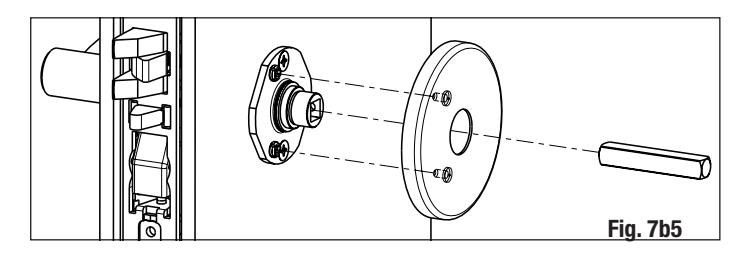
e. Install inside lever with set screw. (Fig. 29)

-
f. Install armored front.
- Tighten two (2) screws through lockbody.
- Attach armored front with two (2) #8 x 1/4" screws. (Fig. 30)

8 Install Turn Piece


9 Install Outside Reader and Inside Mounting Plate
- a. Orient reader so LED lens is at top. (Fig. 9a)
- b. Feed reader harness through door from outside to inside.
- c. Install reader to outside of door by aligning mounting posts with door preparation holes. Hold reader flush against door while ensuring proper alignment.

19
9 Install Outside Reader and Inside Mounting Plate (Continued)
- d. Next feed the cables/connectors through the inside mounting assembly (and gasket if required*).
- e. Secure the mounting assembly while ensuring proper alignment of outside reader and tighten the (2) through-bolts on the inside of the door to secure the reader (Fig. 9b).

**Only required on ML201xx lockbody (ML202xx has an integrated DPS)
10 Installation 0f Connectors
Important Note: Before you secure the connectors
CAUTION - Do not allow debris to enter connector contacts
Ensure connectors are covered with silicone dielectric compound (grease)*

- Snip end of packet to dispense grease
- Ensure all connector pins and contacts (Fig. 10a) are covered - do not overfill or over-apply**
*Supplied tube contains 5 grams of silicone dielectric compound (grease)
IMPORTANT: Do not run wires through bottom hole in plate (Fig. 10a, b) - it will damage wires and the controller connector. Route wires around flange, do not route wires through the flange hole (Fig. 10b). Reader

- A. Secure the 4-pin DPS connector.
- B. Secure the 10-pin lock body assembly connector.
Secure Mounting Plate
- Tuck excess cable into wire hole on inside of door
- Secure the mounting assembly while ensuring proper alignment of outside reader and fully tighten the (2) through-bolts on the inside of the door to secure the reader and plate to the door
- C. Secure the 24-pin card reader connector (Fig. 10b, c).
- D. Ensure all openings on back of secured reader connector are covered completely with grease (Fig. 10c).

Fig. 10a


** Evenly distribute grease; full application requires approximately 2.5 grams

RJ45-M Connector (PoE only)
Mortise Lock
8 Installation Instructions (Continued)
10 Installation 0f Connectors (Continued)
Important Note: If you are installing IN220 (PoE)*:
*For more detail, refer to section (7) 'Installation Wiring', "A - Frame Harness Installation". Crimp wires to RJ45-M Fig. 10d Feed wires thru ferrite bead (PoE only) E. Strip Ethernet cable jacket (3) inches. F. Separate (untwist) and straighten (8) Ethernet wires before carefully feeding through ferrite bead (Fig.10d). G. Crimp RJ45 (male) connector on end of wires.
11 Installation 0f Controller
Important Note: Before you install the controller
Apply dielectric grease to connector* located on back of Controller (FIG. 11b, c).
CAUTION - Do not allow debris to enter connector contacts.


8 Lock Installation (Continued)
11 Installation 0f Controller (Continued)
- a. Insert bottom tab of controller (ensure a clear path) into slot on mounting plate (Fig. 11d, e).
- b. Ensure proper alignment of board-to-board connectors (Fig. 11e) while pivoting controller toward door until two tabs on top click securely into place on mounting plate (Fig. 11d).
CAUTION: To avoid possible damage to board-to-board connectors, care should be taken when securing controller to mounting plate. If there is resistance when securing, detach controller to determine cause before re-attaching controller.


12 Supplying Power to the Controller
Important - before inserting PoE plug into PoE connector, apply dielectric grease to top of plug, covering the pin area (Fig. 12a).
A. IN220 (PoE)
- 1. Once controller is securely in place, connect RJ45 male connector to female RJ45 port on controller board (Fig. 12a).
- 2. If power is enabled, LED will flash and lock motor will cycle.


Mortise Lock
8 Lock Installation (Continued)
- B. IN120 (Wi-Fi)
- 1. Once controller is securely in place, place (6) "AA" alkaline batteries in the compartment, being careful to align polarity properly.
- 2. After batteries are installed, there is a slight delay; LED will flash and the lock motor will cycle.

13 Inside Cover Installation
- a. Assemble cover by hooking top edge on inside mounting plate taking care not to pinch gasket (top edge goes between plate and gasket).
- b. Carefully press bottom of cover toward door without pinching any wires.
- c. Secure the cover with a security allen wrench.

9 Operational Check
When lock is fully installed, perform the following steps:
- a. Insert key into cylinder and rotate (Fig. 14).
- b. There should be no friction against lock case, wire harness or any other obstructions.
- c. Check that the key retracts the latch.
- d. The key should rotate freely.
- e. Try the inside lever; ensure it retracts latch.
-
f. Use a valid credential* set up with the
Lock Configuration Tool (LCT)**
to unlock outside lever and retract latch.
- *Twenty (20) seconds after lock initialization (single beep with lock motor actuation).

In all cases, perform the following checks:
- For units without a keypad, add card using LCT software** and test.
- For units with a keypad, add pin and card using LCT software** and test.
LED signaling:
- After using a valid credential a green flash followed by motor unlock indicates normal operation (lock unlocks)
- After using a valid credential a green flash followed by (4) beeps and (4) fast purple flashes – indicates low power. Check the input voltage.
- If the input voltage is low, disconnect lock from power source and check power source voltage. If power source voltage is correct, inspect lock wiring for a possible short.
If the lock loses power, it will flash rapid blue for approximately one minute. Lock will default to programmed fail safe or fail secure.
After that, the lock will no longer be functional.
When you have completed the tests, close the door, ensuring latchbolt fully extends into strike plate without binding.
**Refer to Lock Configuration Tool user manual (WFMN1) for information on how to configure and program locks.

IN120 / IN220 Series Mortise Lock
| Notes | ||
|---|---|---|
Mortise Lock


Corbin Russwin 225 Episcopal Road Berlin, CT 06037 Phone: 800-543-3658 Fax: 800-447-6714
corbinrusswin.com
Copyright © 2021, ASSA ABLOY Access and Egress Hardware Group, Inc. All rights reserved. Reproduction in whole or in part without the express written permission of ASSA ABLOY Access and Egress Hardware Group, Inc. is prohibited.
HID, the HID logo, iCLASS SE, iCLASS, and Edge are trademarks or registered trademarks of HID Global in the U.S. and/or other countries. All other trademarks, service marks, and product or service names are trademarks or registered trademarks of their repsective owners.