Corbin Russwin ED5000 Series Motorized Electric Latch Retraction (MELR) Installation Instructions
Open the original PDF document
View PDF

Motorized Electric Latch Retraction (MELR)
With Optional M91 Bolt Monitor; M92 Touchbar Monitor; and M93 Trim Monitor Connection
Exit Devices
WARNING
This product can expose you to lead which is known to the state of California to cause cancer and birth defects or other reproductive harm. For more information go to www.P65warnings.ca.gov.
08/2018


SECTION I: OVERVIEW
1. Description
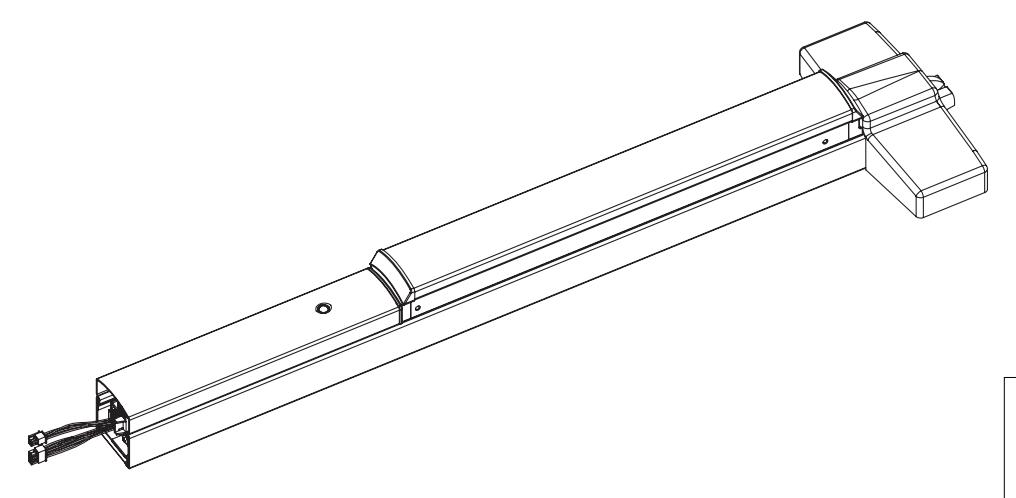
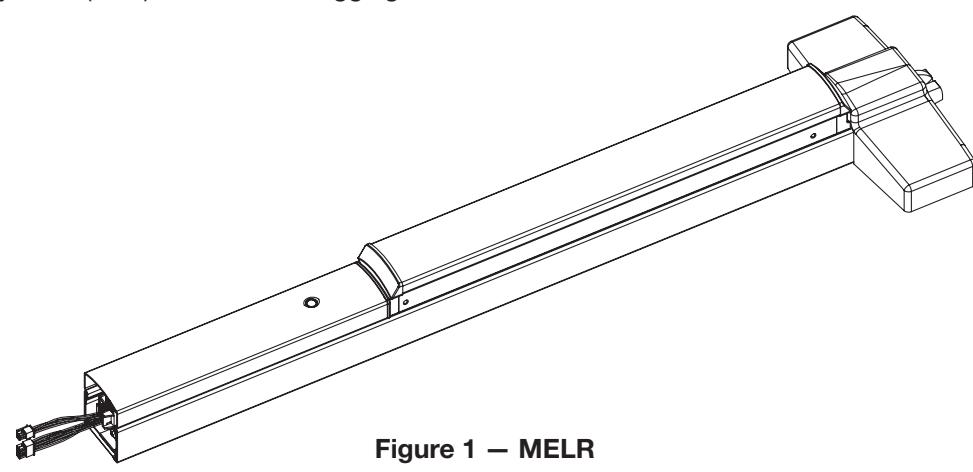
The Corbin Russwin Motorized Electric Latch Retraction (MELR), refer to Figure 1 , works with ED4000 and ED5000 Series exit devices to provide remote-controlled latch retraction option and is compatible with the following:
- M91 Bolt Monitor Switch: Provides indication of the position of the latch bolt. Used with security systems to monitor the latch bolt; also used to activate automatic door operators upon latch retraction.
- M92 Touchbar Monitor: Provides indication fo the pushbar being depressed. Used as a request to exit to shunt alarm systems, release electromagnetic locks or monitor egress.
- M93 Trim Monitor Switch: Provides indication of the device being operated from the outside. Used as a request to enter signal switch to shunt alarms; also used to monitor entry.
NOTE:
The MELR option is also compatible with hex key, cylinder key and fi re rated mechanical confi gurations.
2. Functions
MELR option can be confi gured to work in either of two (2) modes:
• Power Mode (as detailed in SECTION II)
The device is not energized when locked. When power is applied, the pushbar and latch(es) will retract and remain in the retracted position until power is removed. Power is typically applied through a relay triggered by an access contol device.
• Timer Mode (as detailed in SECTION III)
The device is always energized and retraction is triggered by a momentary or maintain switch.
In Timer Mode :
- When the timer circuit is closed using a momentary switch, the device retracts, remains retracted for a set duration, and releases. The duration of the retraction is set through an onboard timer setting.
- When the timer circuit is closed using a maintain switch, the device retracts. The device releases when the contact is opened.
3. Important
CAUTION :
Disconnect all input power before servicing.
- Installer must be a trained and experienced service person.
- Wiring must comply with applicable local electrical codes, ordinances and regulations.
- Hex key or cylinder (M52) mechanical dogging CANNOT be used on Fire Rated Doors.



4. Installation Notes
- MELR option pushbar works only with Corbin Russwin ED4000 and ED5000 Series exit devices.
- Always perform mechanical installation using the appropriate installation instructions, prior to electrical wiring.
- Earth Ground: Required for electrostatic discharge (ESD) protection, unless grounded through the metal door and frame.
5. Hinge Requirements
| Table 1 — Hinge Information | ||||||
|---|---|---|---|---|---|---|
| Without Timer | With Timer | |||||
| Application | Wires | Recommended Hinge | Wires | Recommended Hinge | ||
| MELR | 3 | QC8 | 5 | QC12 | ||
| M91 MELR | 5 | QC8 | 7 | QC12 | ||
| M92 MELR | 6 | QC8 | 8 | QC12 | ||
| M91 M92 MELR | 8 | QC8 | 10 | QC12 | ||
| M93 MELR | 5 | QC12 | 7 | QC12 | ||
| M91 M93 MELR | 7 | QC12 | 9 | QC12 | ||
| M92 M93 MELR | 8 | QC12 | 10 | QC12 | ||
| M91 M92 M93 MELR | 10 | QC12 | 12 | QC12 | ||
6. Wire Gauge Chart
| Table 2 — Wire Gauge Information | ||||||||
|---|---|---|---|---|---|---|---|---|
| Load Current @ 24VDC | ||||||||
|
Total One-Way Length of
Wire Run (ft.) |
1/4 A | 1/2A | 3/4A | *1A | 1-1/4A | 1-1/2A | 2A | 3A |
| 100 | 24 | 20 | 18 | 18 | 16 | 16 | 14 | 12 |
| 150 | 22 | 18 | 16 | 16 | 14 | 14 | 12 | 10 |
| 200 | 20 | 18 | 16 | 14 | 14 | 12 | 12 | 10 |
| 250 | 18 | 16 | 14 | 14 | 12 | 12 | 12 | 10 |
| 300 | 18 | 16 | 14 | 12 | 12 | 12 | 10 | — |
| 400 | 18 | 14 | 12 | 12 | 10 | 10 | — | — |
| 500 | 16 | 14 | 12 | 10 | 10 | — | — | — |
| 750 | 14 | 12 | 10 | 10 | — | — | — | — |
| 1,000 | 14 | 10 | 10 | — | — | — | — | — |
| 1,500 | 12 | 10 | — | — | — | — | — | — |
* When calculating voltage drop, use 1A as the recommended current draw for the MELR


7. Wire Cover Installation
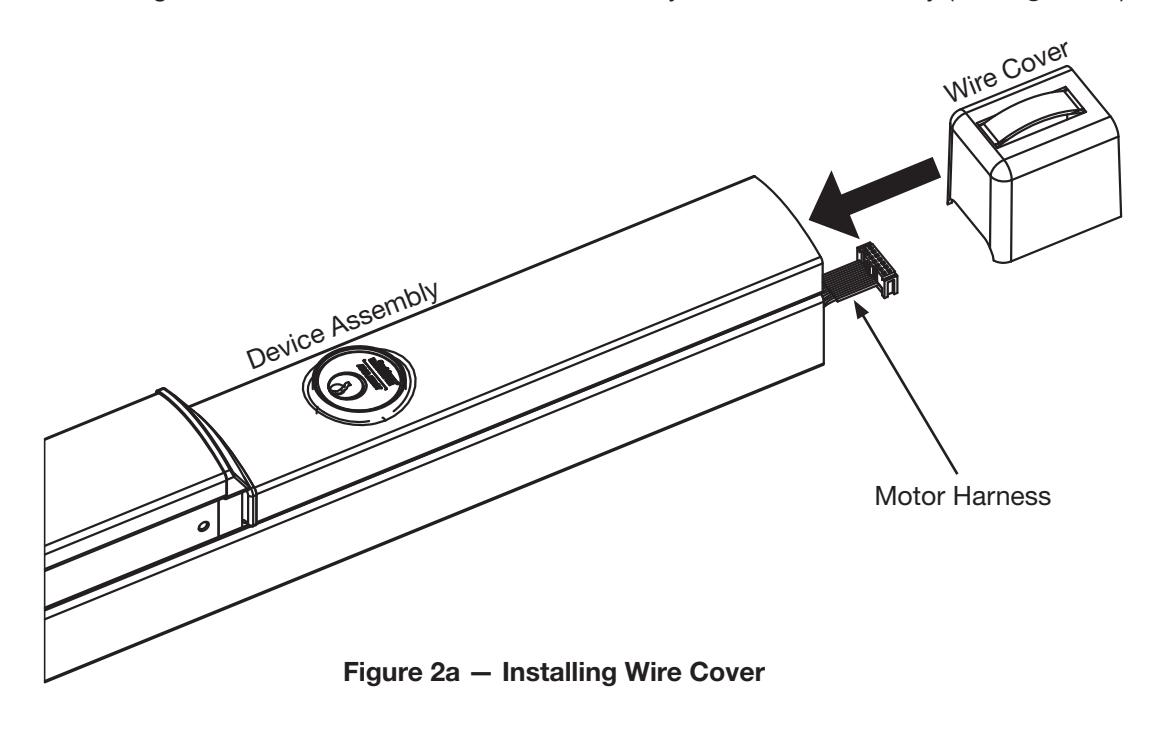
a. While holding motor harness, slide wire cover all the way into device assembly (see Figure 2a ).
b. Plug motor harness into controller (see Figure 2b ).
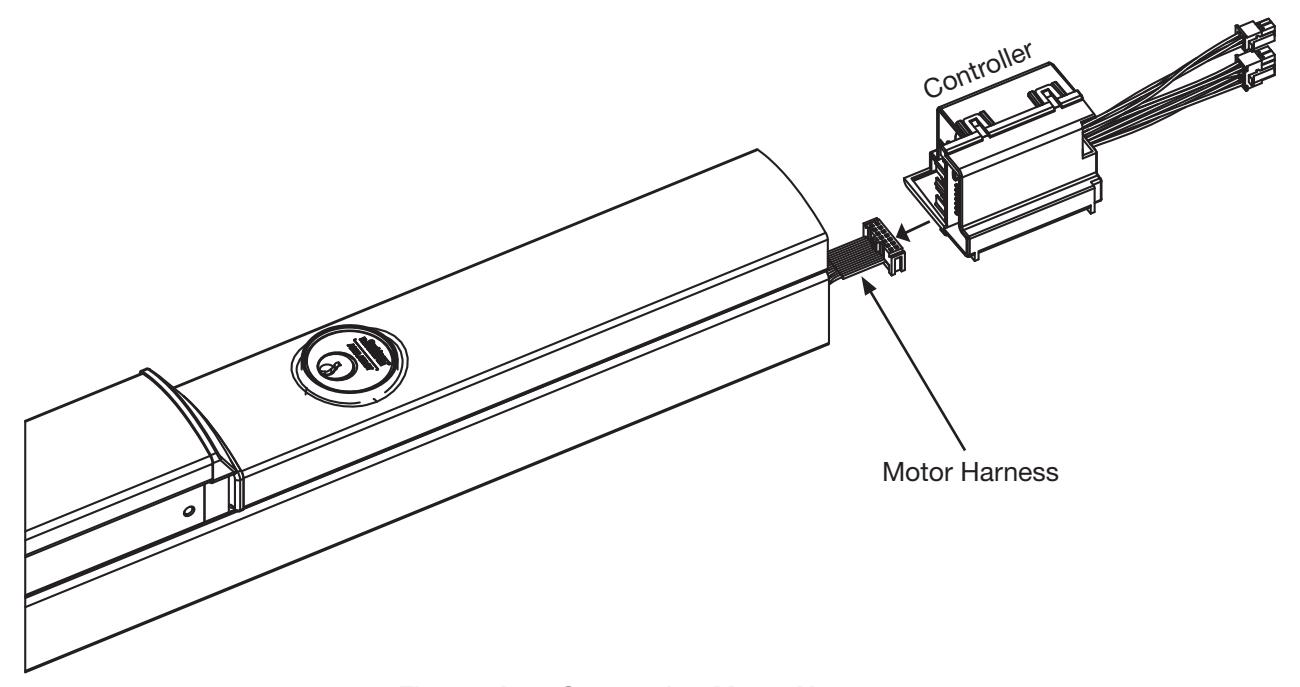
Figure 2b — Connecting Motor Harness



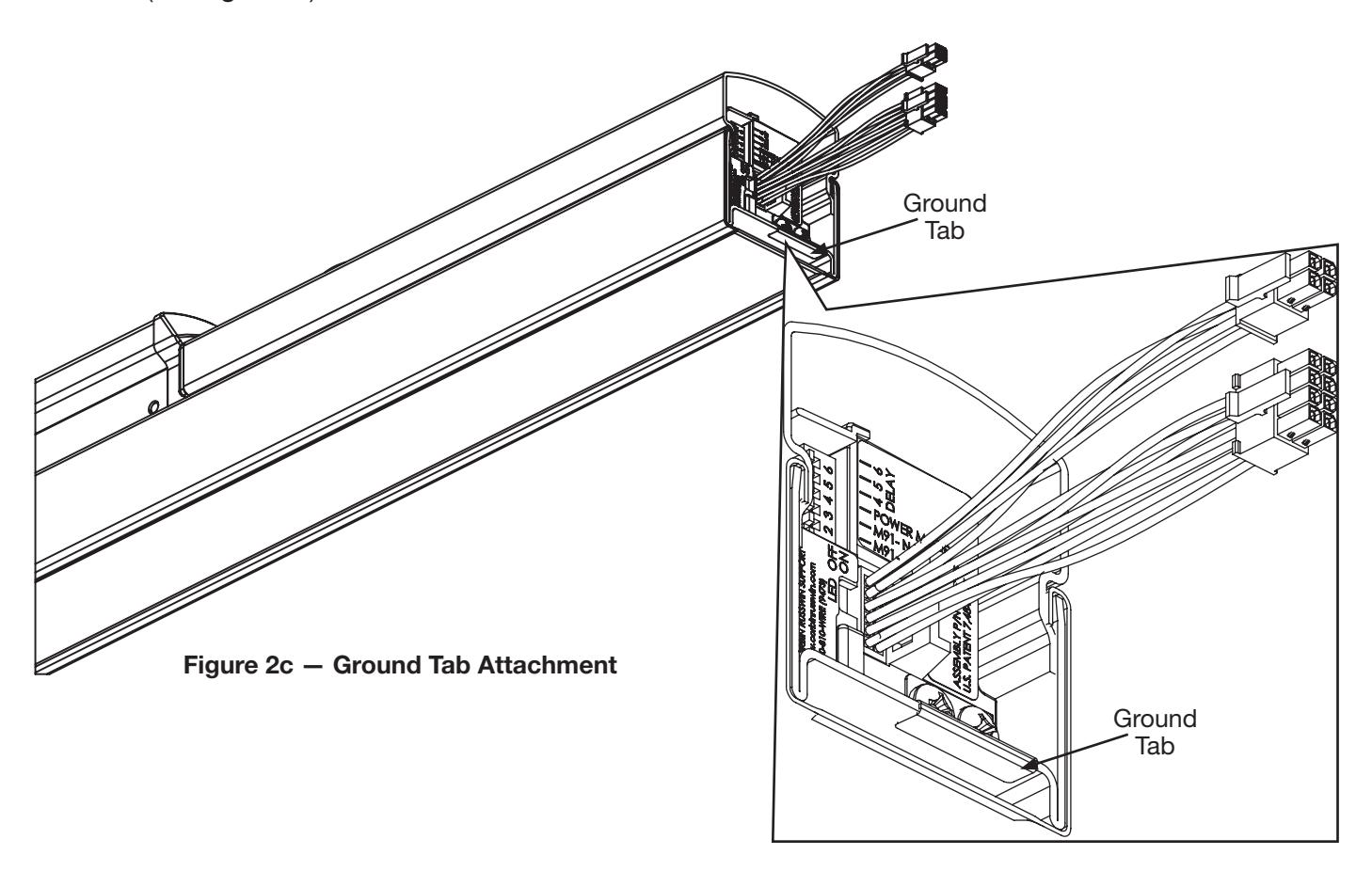
c. Slide controller into touch bar, making sure ground tab is securely attached over end of chassis (see Figure 2c ).


8. Wire Locations and Positions
MELR option devices are supplied with one (1) 4-pin and one (1) 8-pin Molex® connector ( Figure 3 ). Molex connectors allow simple installation using the ASSA ABLOY ElectroLynx® system.
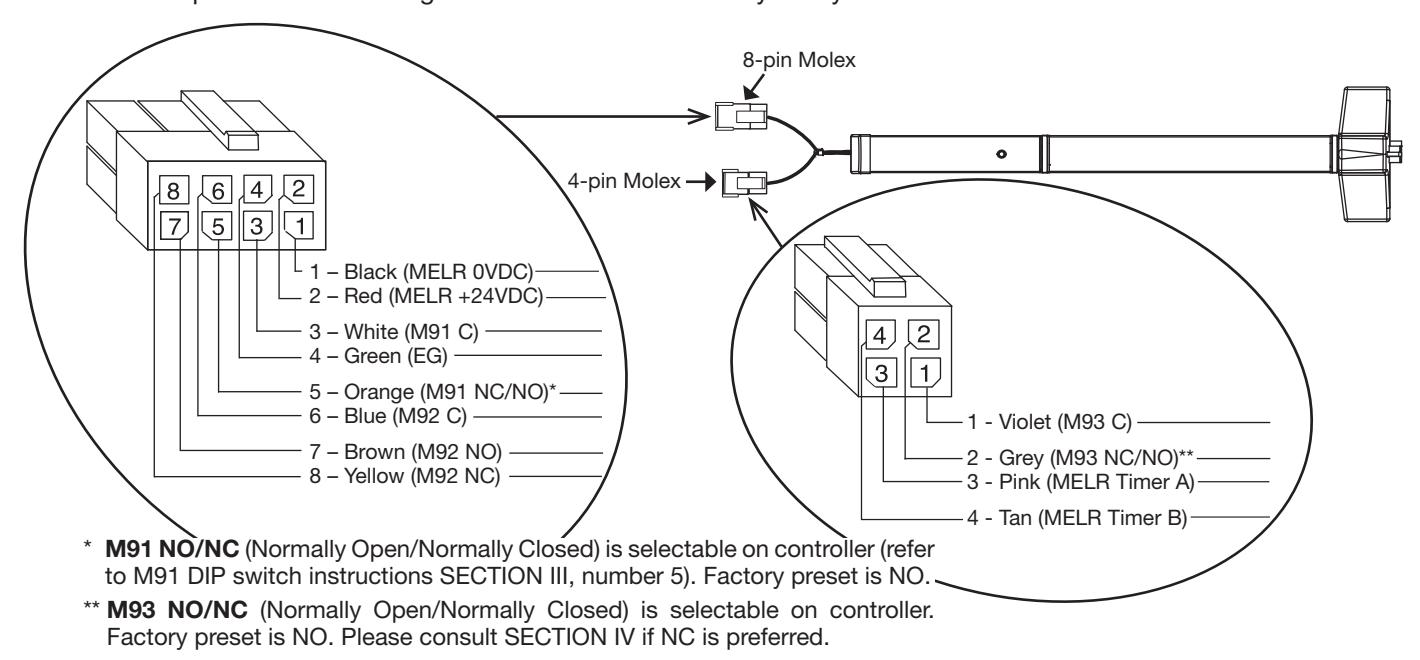
Figure 3 — Wire Color and Position
9. DIP (Dual Inline Package) Switch Settings
DIP Switch assignments are as follows, starting from left ( Figure 4 ):
- a. Closed (Switch set to ON ) when selecting M91 NC ( Normally Closed) contact.
- b. Closed (Switch set to ON ) when selecting M91 NO ( Normally Open) contact.
NOTE:
- Only 1 or 2 should be closed at one time, not both.
- 3: Closed when bypassing external trigger, i.e., Power Mode.
- 4, 5, 6: Select software options, allows up to 8 Time/Delay settings (SECTION III: TIMER MODE, number 5).
- Default Setting: M91 NO and Power Mode set to ON.
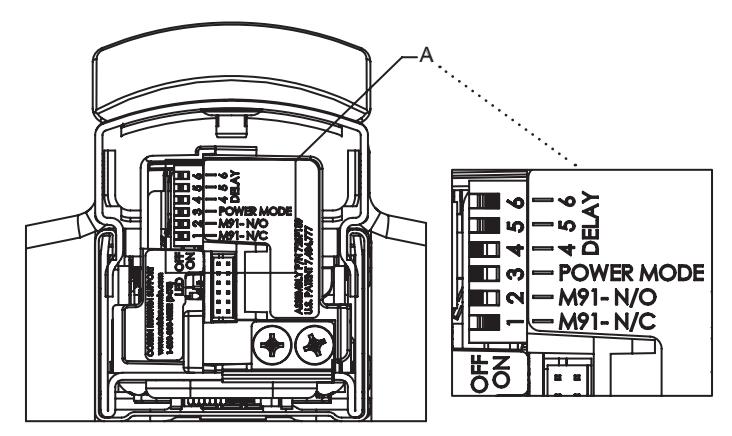
Figure 4 — DIP Switch Settings (Factory Default Shown)


10. ElectroLynx Wiring System
IMPORTANT:
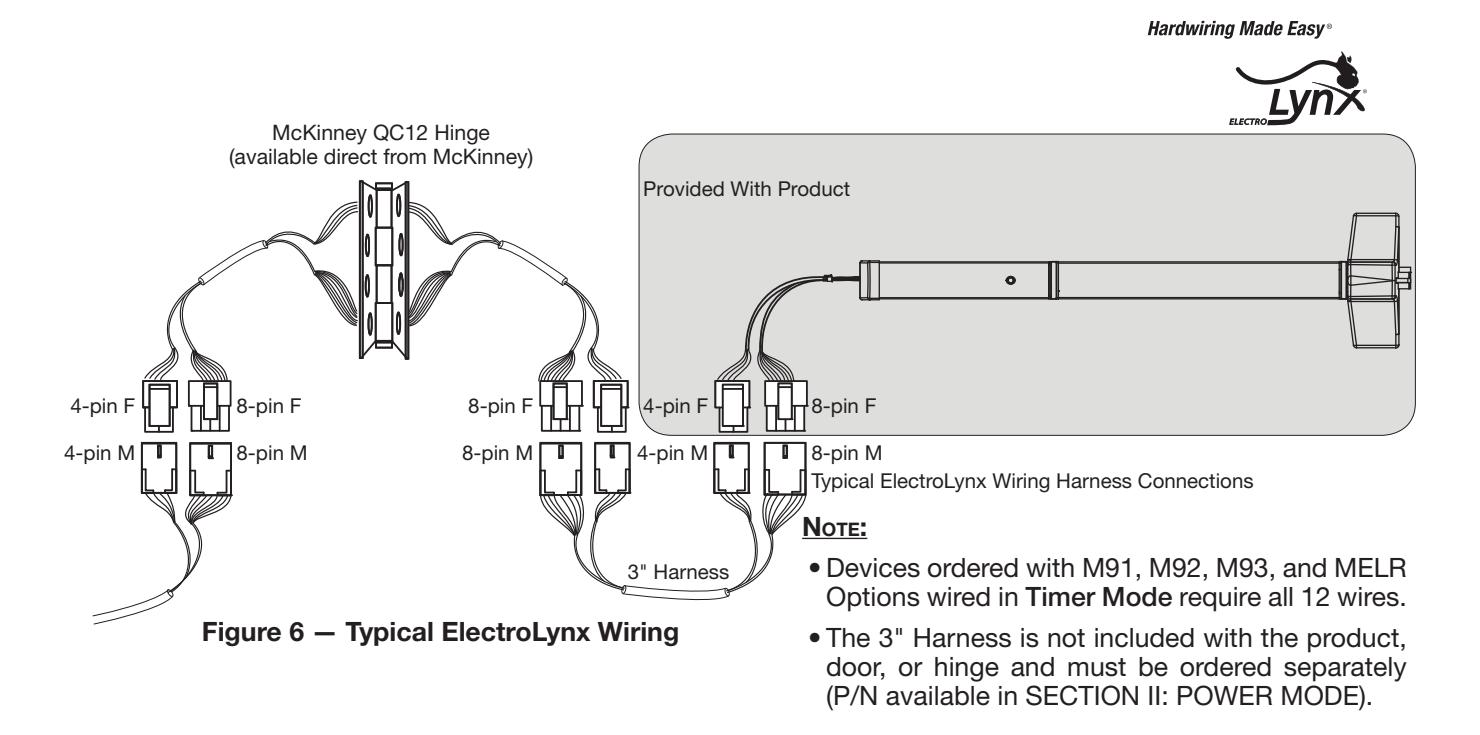
DO NOT FORCE — ElectroLynx connectors plug and lock together in only one way ( Figures 5 and 6 ).
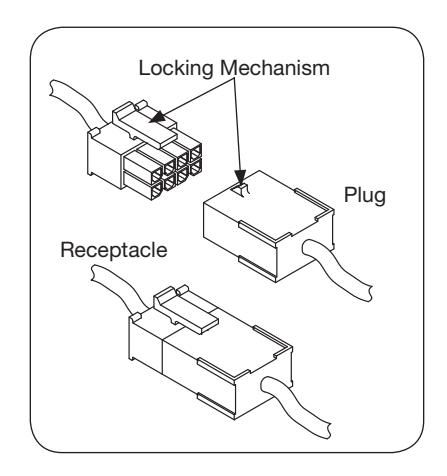
Figure 5 — ElectroLynx Connections


SECTION II: POWER MODE
In this confi guration, the device is not energized when locked. When energized with a 24 volt input, the pushbar and latch(es) will retract and remain in the retracted position until power is removed. Power is typically applied through a relay triggered by an access control device.
For installations using the onboard timer circuit, refer to SECTION III: TIMER MODE.
1. Power Mode Installation Instructions
How it works: Rail retracts when power is applied and releases when power is removed.
A. Mount ED4000 or ED5000 Series exit device using mechanical installation instruction sheet(s) provided.
NOTE:
Ensure proper mechanical function before attempting electrical retraction:
- Verify the pushbar can be fully depressed and the latch is fully retracted.
- On vertical rod exit devices, verify latch bolts do not enter hold-back position until pushbar is fully depressed.
- Adjust device mechanically, as required, before applying power.
- B. Connect the ElectroLynx harness in the door ( Figure 7 ):
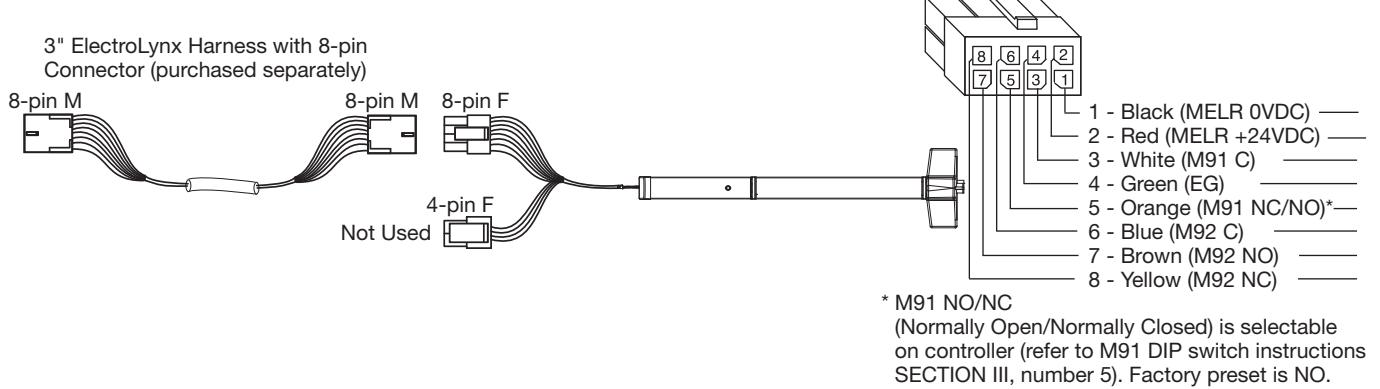
Figure 7 — ElectroLynx Power Mode Wiring
i. Plug the 8-pin ElectroLynx connector from the pushbar into the 3" ElectroLynx harness or splice into non-ElectroLynx harness ( Figure 8 ).
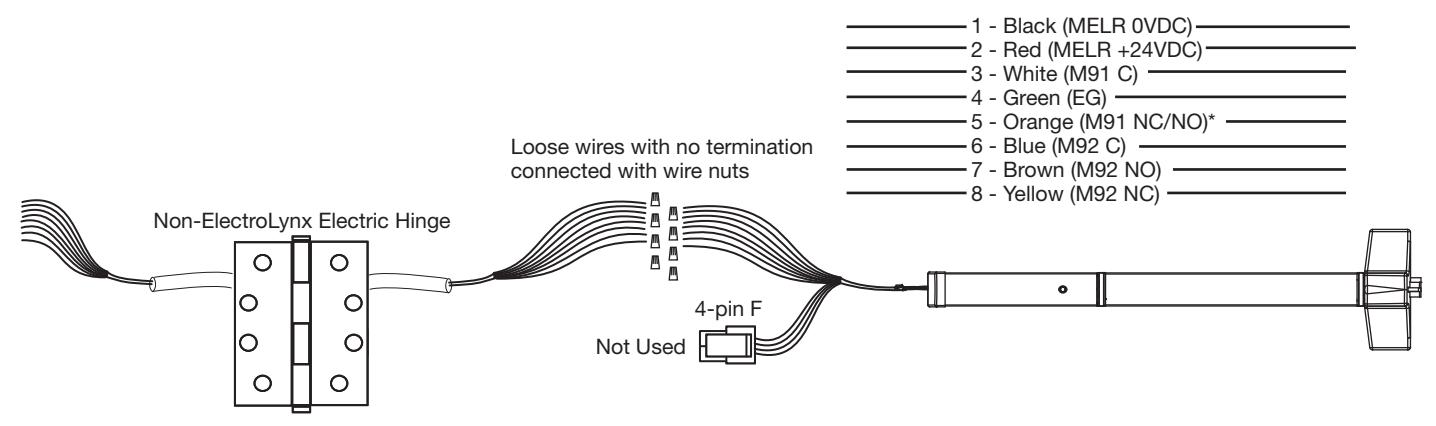
Figure 8 — Non-ElectroLynx Power Mode Wiring MELR Wires with ElectroLynx Connector Removed
- ASSA ABLO
ii. Feed the 3" harness through the 1" hole in the door and secure the pushbar to the door using the mounting bracket and two (2) supplied screws (Figure 9).
- Do not install the end cap until electrical operation is verified in order to confirm LED signaling.
- Do not discard the end cap and hardware.
- C. Ensure DIP switch (position 3) enables Power Mode (Figure 10).
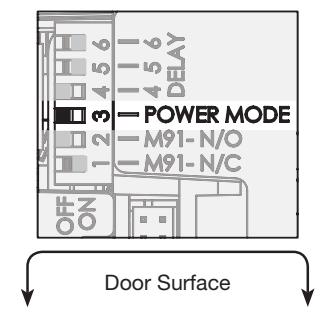
Figure 10 - DIP Switch Setting for Power Mode Installation
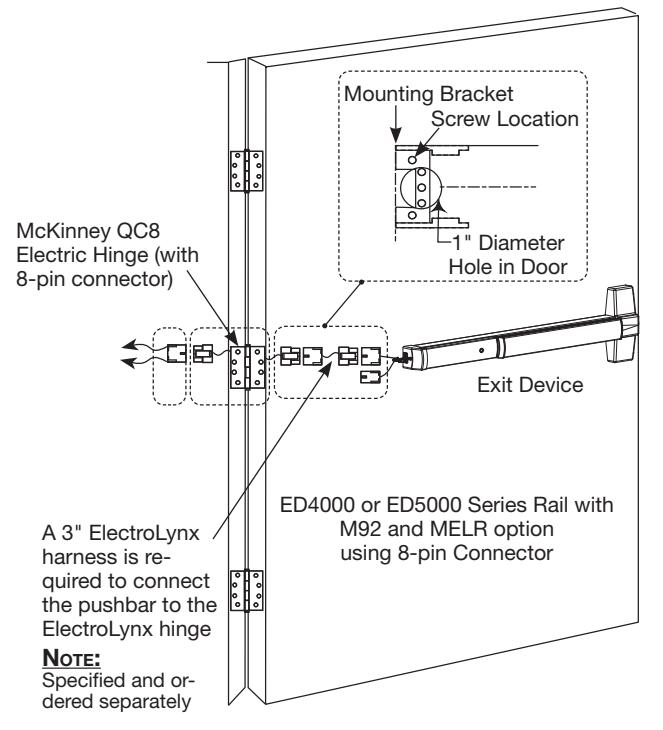
Figure 9 — Power Mode Installation
D. Connect the ElectroLynx harness to the hinge and secure the hinge to the door.
Note:
- Make sure no wires are pinched or damaged in the process.
- Refer to detaled wiring instructions under Power Mode wiring.
- E. Apply a 24V source which complies with the Table 3 MELR contact ratings: Confirm the LED is blinking, the system fully unlocks and all bolts clear the strikes. Troubleshoot the device if issues are observed using the steps outlined at the end of this section.
| Table 3 — Contact Ratings | ||||
|---|---|---|---|---|
|
M91 Latch
Bolt |
M92 Touch
Bar |
M93 Trim | ||
|
200mA @
28VDC |
1A @ 30VDC | 1A @ 28VDC | ||
F. Store excess wiring under end cap and assemble with provided screws. Avoid pinching wires.
MELR Contact Ratings
Voltage: 24VDC
Filtered and regulated power supply
Motor operating current: 600mA
• Motor hold current: 250mA
Note:
Earth Ground is required for Electrostatic Discharge (ESD) protection unless the metal door and frame are already earth grounded; otherwise, earth ground wiring is required at pin 4 (Figure 7).


2. Power Mode Wiring
ElectroLynx Opening Installation
This is the simplest installation method, requiring the installer to plug the ElectroLynx connectors from the exit device to the harness to the hinge and then to the pigtail, which is connected to the access control system.
Requirements
- MELR Exit Device
- 3" ElectroLynx connector harness (not supplied with MELR option)
- McKinney QC ElectroLynx hinge (type of hinge depends on the application)
- ElectroLynx door
Non-ElectroLynx Opening Installation
Standard door with standard electric hinge: Molex connectors with fl ying leads purchased separately ( Figure 11 and Table 4 ).
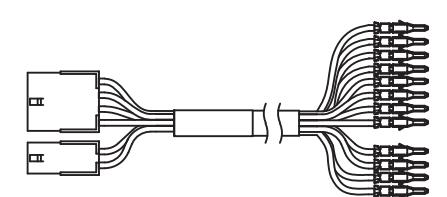
Figure 11 — Molex with 12 pin Connector Pinned
|
Table 4 — Molex
Connectors |
Both Ends | TO PINS |
|---|---|---|
| 3 Inch | QC-C003 | QC-C003P |
| 6 Inch | QC-C006 | QC-C006P |
| 12 Inch | QC-C012 | QC-C012P |
To identify part numbers and order harness(es), visit the McKinney website, www.mckinneyhinge.com, and search the catalog for ElectroLynx.
If Molex pinned connectors are not available, remove the ElectroLynx connector from the MELR Exit Device and wire nut the MELR wires to the wires from the electric hinge (color coordinating wire colors is recommended).
3. Power Mode Typical Wiring
Use when wiring in Power Mode ( Figure 12 ).
NOTE:
- Onboard timer will not function in Power Mode. Add external time delay if necessary.
- The switch is wired between the power supply and the load. Do not cycle the power supply.
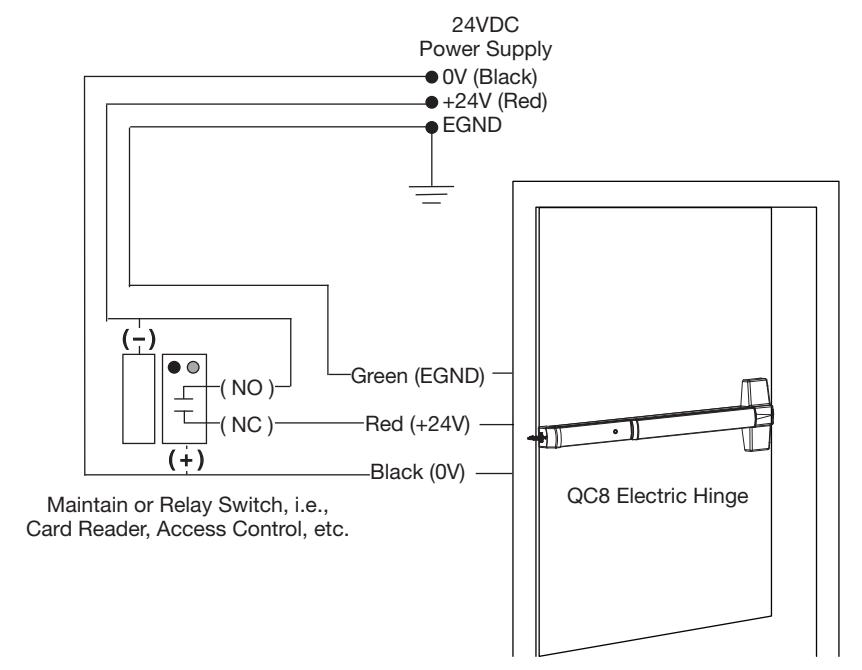
Figure 12 – MELR ED4000 and ED5000 Series Exit Device Typical Power Mode Wiring



4. Confi guration Instructions DIP Switch Settings (M91)
For MELR applications using the optional M91 latch bolt monitor switch, pin 5 of the 8-pin ElectroLynx connector will be either a NO contact or NC contact, depending on the position of the DIP switches on the motor controller faceplate ( Figure 13 ).
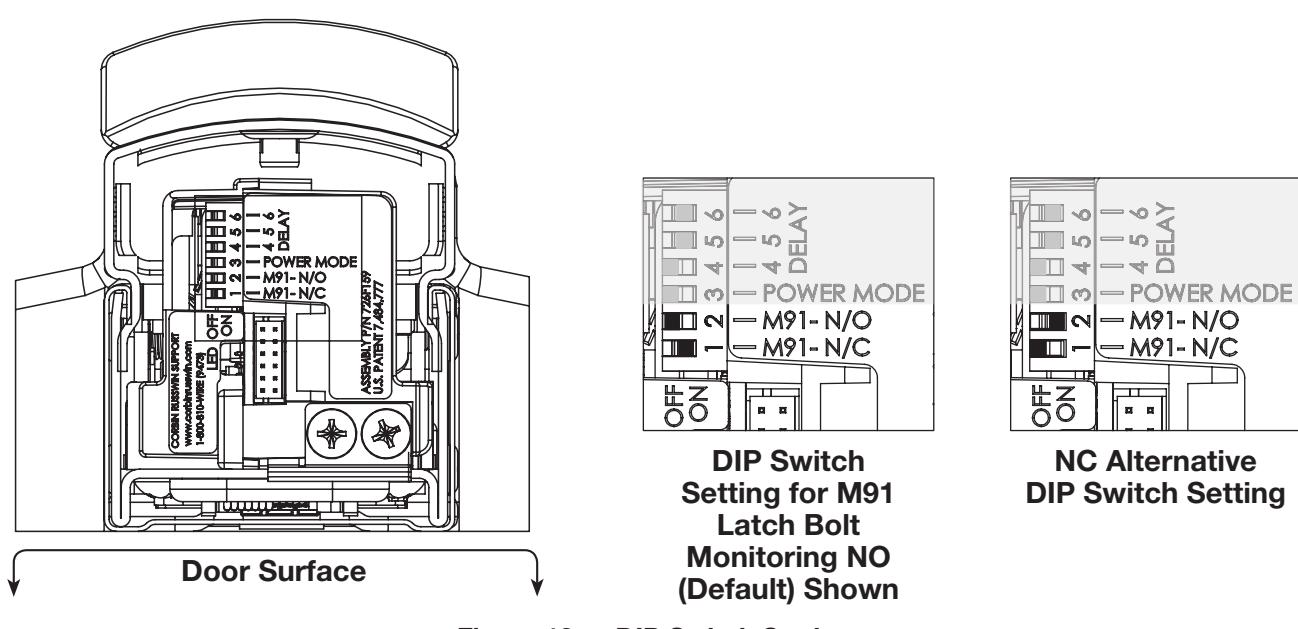
Figure 13 — DIP Switch Settings
5. LED Signaling
See Table 5 for LED signaling types.
| Table 5 — LED Signaling | |||||
|---|---|---|---|---|---|
| Signal | Cause | Troubleshooting | |||
| Dark / Unlit |
Controller microprocessor
is not active |
Confi rm connections and incoming power | |||
| Steady Flashing | Normal operation | Check that Power Mode switch is set | |||
| Solid Light |
Input voltage is dropping
out of operating range |
Check wire run and power supply output | |||
|
2 Flashes
Followed by Pause |
Retractor sensor problem | Call 1-800-810-WIRE (9473) for assistance | |||


6. Power Mode Troubleshooting
Prior to electrical troubleshooting, confi rm that the mechanical system properly functions; i.e., that the pushbar fully retracts all latches and the door opens freely ( Table 6 ). Refer to applicable Corbin Russwin ED4000 and ED5000 Series Exit Device product instruction sheet to correct mechanical installation issues.
IMPORTANT:
* ALWAYS disconnect power before making any mechanical adjustments to the system.
Table 6 — Power Mode Troubleshooting
The pushbar does not move when 24V input is applied:
- Check inputs to confi rm proper voltage and wiring orientation (Figure 6 ElectroLynx Power Mode Installation).
- Remove end cap from pushbar and confi rm that LED is blinking steadily when power is applied. If not, refer to LED signaling.
NOTE :
When confi gured in Power Mode , power is released to lock the device (LED will not blink when power is released).
• Confi rm DIP switch position 3 is set to ON.
The pushbar does not fully retract or pushbar retracts completely and holds but does not open door:
-
*
Verify mechanical installation and correct as necessary:
- Is excessive force required to depress the pushbar?
- Are latches fully clearing the strikes when mechanically cycled?
The pushbar retracts and unlocks electrically but does not relock:
- Physically disconnect power from pushbar and confi rm that input is off.
- * Check for mechanical interference (e.g., warped door, lack of shims, misalignment of pushbar, etc.).
Rail behaves abnormally (multiple cycles, clicking, delayed retraction, etc.):
• Remove end cap from pushbar and confi rm that LED is blinking steadily when power is applied. If not, refer to LED signaling.
NOTE :
When confi gured in Power Mode , power is released to lock the device (LED will not blink when power is released).
For applications using automatic operator(s): Door(s) fail to unlock before doors begin to open:
• Adjust timing of operator to allow 900ms for the pushbar to fully retract.
M91 switch wiring: The design requires normally open functionality and the circuit is normally closed (or vice versa),
There is only a two-wire input for the M91 circuit. Normally open or normally closed confi guration is set by toggling the DIP switches on the controller bracket to the required position ( Table 7 ).
For additional installation assistance, please contact 1-800-810-WIRE (9473). When calling, please provide the following information to improve our service (provide what you can):
- Your name and contact number.
- Corbin Russwin ED4000 or ED5000 Series Exit Device product type with options.
- Location and identifi cation of the affected opening (e.g., site, building, and door number).
- Corbin Russwin order number (located on product box), if available.
- Power supply manufacturer and rated output (i.e., voltage and current).
- Method of operation (e.g., Power Mode ).
- The number of devices connected to the power supply.
- Symptoms of problem (i.e., observed behavior).


SECTION III: TIMER MODE
In this confi guration, the device is always energized with a 24 volt input, and a timer circuit is opened or closed to control pushbar retraction. A momentary or maintain switch is typically used to perform this operation.
For installations where the power input is cycled to retract the device, refer to SECTION II: POWER MODE.
1. Timer Mode Installation Instructions
How it works: Rail retracts when timer input circuit is closed.
a. Mount ED4000 or ED5000 Series exit device using mechanical installation instruction sheet(s) provided.
NOTE:
Ensure proper mechanical function before attempting electrical retraction:
- Verify the pushbar can be fully depressed and the latch is fully retracted.
- On vertical rod exit devices, verify that the latch bolts do not enter hold-back position until the pushbar is fully depressed.
- Adjust device mechanically, as required, before applying power.
- b. Ensure DIP Switch (position 3) disables Power Mode ( Figure 14 ). Set to OFF to disable.
-
c. Connect the ElectroLynx harness in the door (
Figure 15
):
- i. Plug the 8-pin and 4-pin ElectroLynx connectors from the pushbar into the 3" ElectroLynx harness or splice into a non-ElectroLynx harness.
- ii. Feed the 3"harness through the 1" hole in the door and secure the pushbar to the door using the mounting bracket and two (2) supplied screws.
NOTE:
Do not install the end cap until electrical operation is verified in order to confirm LED signaling. Do not discard the end cap and hardware.
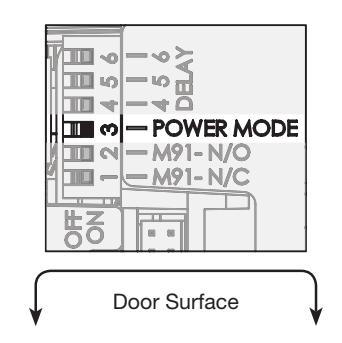
for Timer Mode Installation
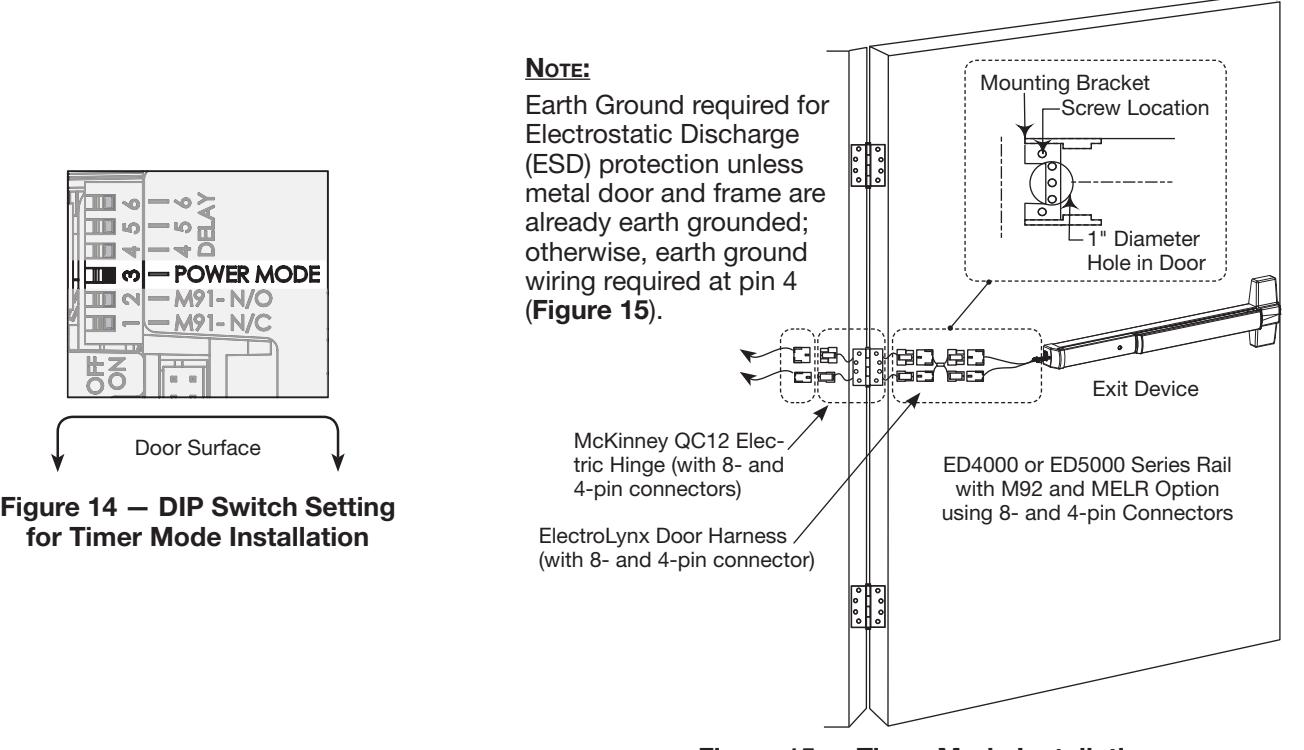
Figure 15 — Timer Mode Installation



MELR Contact Ratings ( Table 3 )
Voltage: 24VDC
- Filtered and regulated power supply
- Motor operating current: 600mA
-
Motor hold current: 250mA
-
d. Connect the ElectroLynx harness to the hinge:
- i. Plug the door harness's 8-pin and 4-pin connectors into the hinge's ElectroLynx connector.
- ii. Secure the electric hinge to door.
-
d. Connect the ElectroLynx harness to the hinge:
NOTE:
Make sure no wires are pinched or damaged in the process.
Refer to detailed wiring instructions under Timer Mode wiring.
- e. Apply 24V according to MELR contact ratings: Confi rm that the LED is blinking and close the timer input circuit to retract the device. When the system retracts electrically, confi rm that it fully unlocks and that all bolts clear the strikes. Troubleshoot the device if issues are observed using the steps outlined at the end of this section.
- f. Store excess wiring under end cap and assemble with provided screws. Avoid pinching wires.
2. Timer Mode Wiring
ElectroLynx Opening Installation
This is the simplest installation method, requiring the installer to plug the ElectroLynx connectors from the exit device to the harness to the hinge and then to the pigtail, which is connected to the access control system ( Figure 16 ).
Requirements
- MELR Exit Device
- 3" ElectroLynx connector harness (not supplied with MELR option)
- McKinney QC ElectroLynx hinge (type of hinge depends on the application)
- ElectroLynx door
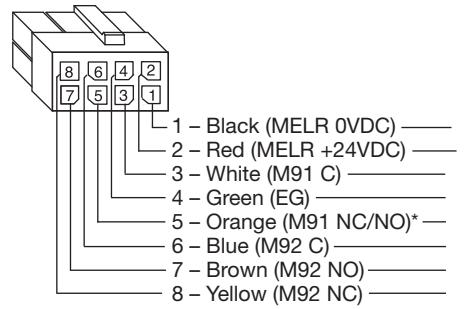
* M91 NO/NC (Normally Open/Normally Closed) is selectable on controller (M91 DIP switch instructions SECTION III, number 5). Factory preset is NO.
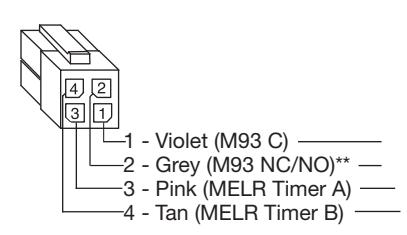
** M93 NO/NC (Normally Open/Normally Closed) is selectable on controller. Factory preset is NO. Please consult SECTION IV if NC is preferred.
3" ElectroLynx harness with 8-and 4-pin connectors (purchased separately)

Figure 16 — ElectroLynx Timer Mode Wiring
Non-ElectroLynx Opening Installation
Standard door with standard electric hinge: Remove the ElectroLynx connector from the MELR Exit Device and wire nut the MELR wires to the wires from the electric hinge (color coordinating wire colors is recommended) ( Table 7 and Figure 17 ).
| Table 7 — Molex | Both Ends | To Pin Out |
|---|---|---|
| 3 Inch | QC-C003 | QC-C003P |
| 6 Inch | QC-C006 | QC-C006P |
| 12 Inch | QC-C012 | QC-C012P |
To identify part numbers and order harness(es), visit the McKinney website, www.mckinneyhinge.com, and search the catalog for ElectroLynx.
| 1 - Black (MELR 0VDC) |
|---|
| 2 - Red (MELR +24VDC) |
| 3 - White (M91 C) |
| 4 - Green (EG) |
| 5 - Orange (M91 NC/NO)* |
| 6 - Blue (M92 C) |
| 7 - Brown (M92 NO) |
| 8 - Yellow (M92 NC) |
* M91 NO/NC (Normally Open/Normally Closed) is selectable on controller (refer to M91 DIP switch instructions SECTION III, number 5). Factory preset is NO.


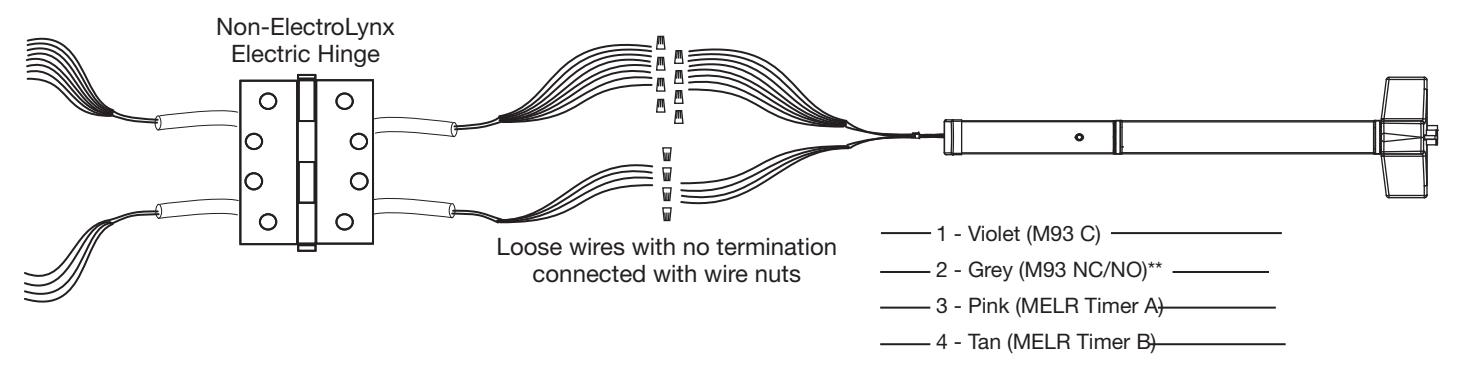
Figure 17 — Non-ElectroLynx Timer Mode Connection MELR Wires with ElectroLynx Connector Removed
3. Timer Mode Typical Wiring
For use when wiring in Timer Mode ( Figure 18 ) (using the onboard timer).
If more than 20 seconds timed delay is necessary, an external timer delay relay is required (not provided).
NOTE:
4V supply is constant in Timer Mode.
Refer to settings in SECTION III, number 5 (Configuration Instructions DIP Switch Settings).
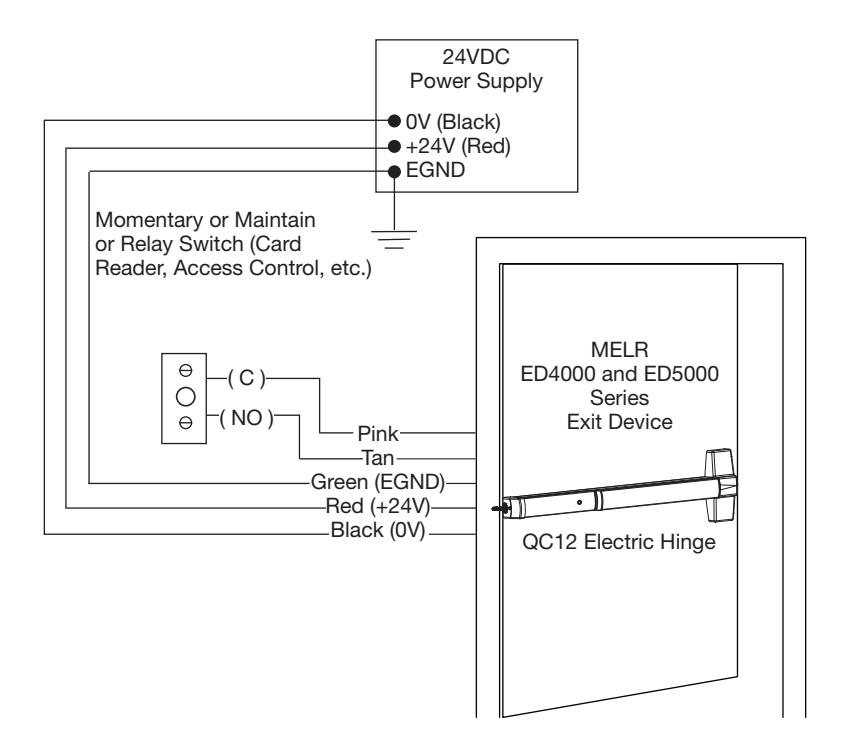
Figure 18 — Timer Mode Typical Wiring


4. Timer Mode Adjustment (Onboard Timer)
How it works: The 24 volt input is always energized and the system retracts when the timer input circuit is closed.
- When the timer circuit is closed utilizing a momentary switch, the device retracts, remains retracted for a set duration, and releases. The duration of retraction is set using an onboard timer setting (0 – 20 second timer adjustment). The countdown begins when the pushbar is fi rst retracted.
- The device retracts when timer circuit is closed using a maintain switch and releases when circuit is reopened.
NOTE:
- 24V supply is constant in Timer Mode. The duration of retraction is determined by whichever is longer: the maintain switch closure or the onboard timer delay.
- If more than a 20 second delay is necessary (exceeding the maximum setting), an external timer delay relay is required (not provided).
- Refer to settings in Figure 19 for DIP Switch timer delay settings.
5. Confi guration Instructions DIP Switch Settings (for M91 and timer duration)
For MELR applications using the optional M91 latch bolt monitor switch (M91MELR), pin 5 of 8-pin ElectroLynx connector will be either NO or NC contact depending on position of the DIP switches on motor controller faceplate.
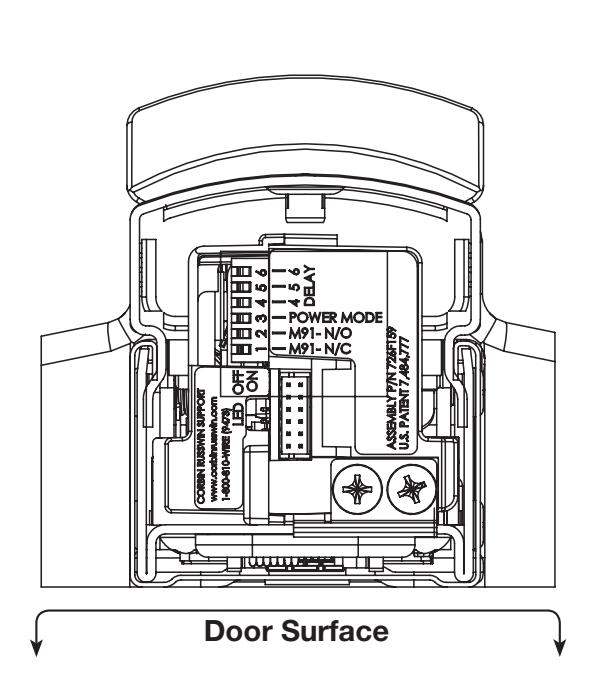
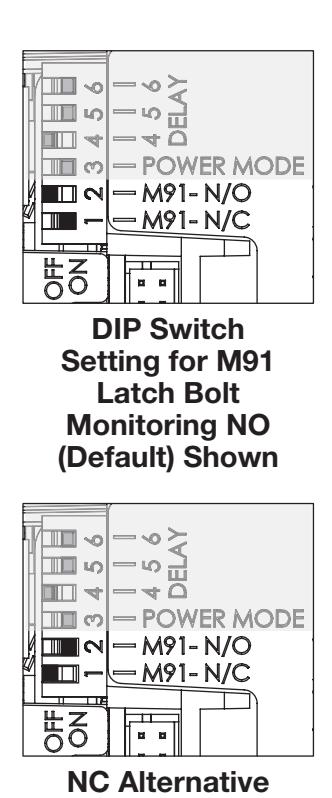
0 Sec 2 Sec 3 Sec 4 Sec 5 Sec 10 Sec 15 Sec 20 Sec
Timer Delay Settings (Default = 5 Seconds (Sec)
Figure 19 — DIP Switch Settings
DIP Switch Setting



6. LED Signaling Chart ( Table 8 )
| Table 8 — LED Signaling | |||||
|---|---|---|---|---|---|
| Signal | Cause | Troubleshooting | |||
| Dark / Unlit |
Controller microprocessor
is not active |
Confi rm connections and incoming power | |||
| Steady Flashing | Normal operation | Cycle device by closing the timer circuit | |||
| Solid Light |
Input voltage is dropping
out of operating range |
Check wire run and power supply output | |||
|
2 Flashes
Followed by Pause |
Retractor sensor problem | Call 1-800-810-WIRE (9473) for assistance | |||
7. Timer Mode Troubleshooting
Prior to electrical troubleshooting ( Table 9 ), confi rm that the mechanical system properly functions; i.e., that the pushbar fully retracts all latches and the door opens freely. Refer to applicable Corbin Russwin ED4000 or ED5000 Series Exit Device product instruction sheet to correct mechanical* installation issues.
IMPORTANT:
* ALWAYS disconnect power before making any mechanical adjustments to the system.
Table 9 — Troubleshooting Guide
The pushbar does not move when 24V input is applied:
- Check inputs to confi rm proper voltage and wiring orientation. When confi gured for Timer Mode, 24V must be constantly applied and the timer circuit must be closed to cycle the device.
- Remove end cap from pushbar and confi rm that LED is blinking steadily when power is applied. If not, refer to LED signaling.
The onboard timer duration adjustment is not working:
- Remove power when making adjustments to timer delay settings (DIP Switches).
- When a momentary signal is applied to timer circuit, circuit must be reopened for timer to function.
The pushbar does not fully retract or pushbar retracts completely and holds, but does not open door:
-
* Verify mechanical installation and correct as necessary:
- Is excessive force required to depress the pushbar?
- Are latches fully clearing the strikes when mechanically cycled?
The pushbar retracts electrically but does not release. System does not relock:
- Confi rm that Timer Mode contact is opened (the pushbar will remain depressed until contact is opened and delay has expired).
- Physically disconnect power from pushbar (while electrically retracted) to verify if issue is mechanical.
- * Check for mechanical interference (e.g., warped door, lack of shims, misalignment of pushbar, etc.).
Rail behaves abnormally (multiple cycles, clicking, delayed retraction, etc.):
- If a momentary contact is applied to timer circuit, adjust onboard timer to a longer duration.
- Remove end cap from pushbar and confi rm that LED is blinking steadily when power is applied. If not, refer to LED signaling.


Table 9 — Troubleshooting Guide (Continued)
For applications using automatic operator(s): Door(s) fail to unlock before doors begin to open:
- Adjust timing of operator to allow 900ms for the pushbar to fully retract.
- If a momentary contact is applied to the timer circuit, adjust the onboard timer to a longer duration to prevent the device from locking prior to operator actuation.
M91 switch wiring: The design requires normally open functionality and the circuit is normally closed (or vice versa):
• There is only a two-wire input for the M91 circuit. Normally open or normally closed confi guration is set by toggling the DIP switches on the controller racket to the required position (Figure 19).
If further assistance is required call 1-800-810-WIRE (9473) and for optimum support provide as much of the following information as possible:
- Your name and contact number.
- Corbin Russwin ED4000 and ED5000 Series Exit Device product type with options.
- Location and identifi cation of the affected opening (e.g., site, building and door number).
- Corbin Russwin order number (located on product box), if available.
- Power supply manufacturer and rated output (i.e., voltage and current).
- Method of operation (e.g., Timer Mode).
- The number of devices connected to the power supply.
- Symptoms of problem (i.e., observed behavior).

SECTION IV: OPTIONAL M93 TRIM MONITOR SWITCH
For MELR applications using the optional M93 trim monitor switch, the NO or NC output can be selected on the controller. Factory preset is NO, however to change to NC perform the following:
- 1. Remove the controller for the exit device.
- 2. Move the trim monitor switch wire harness to the desired confi guration as shown in Figure 20 .
- 3. Place the controller back into the Exit Device, ensuring that the grounding tab is fi rmly attached to the Exit Device chassis.
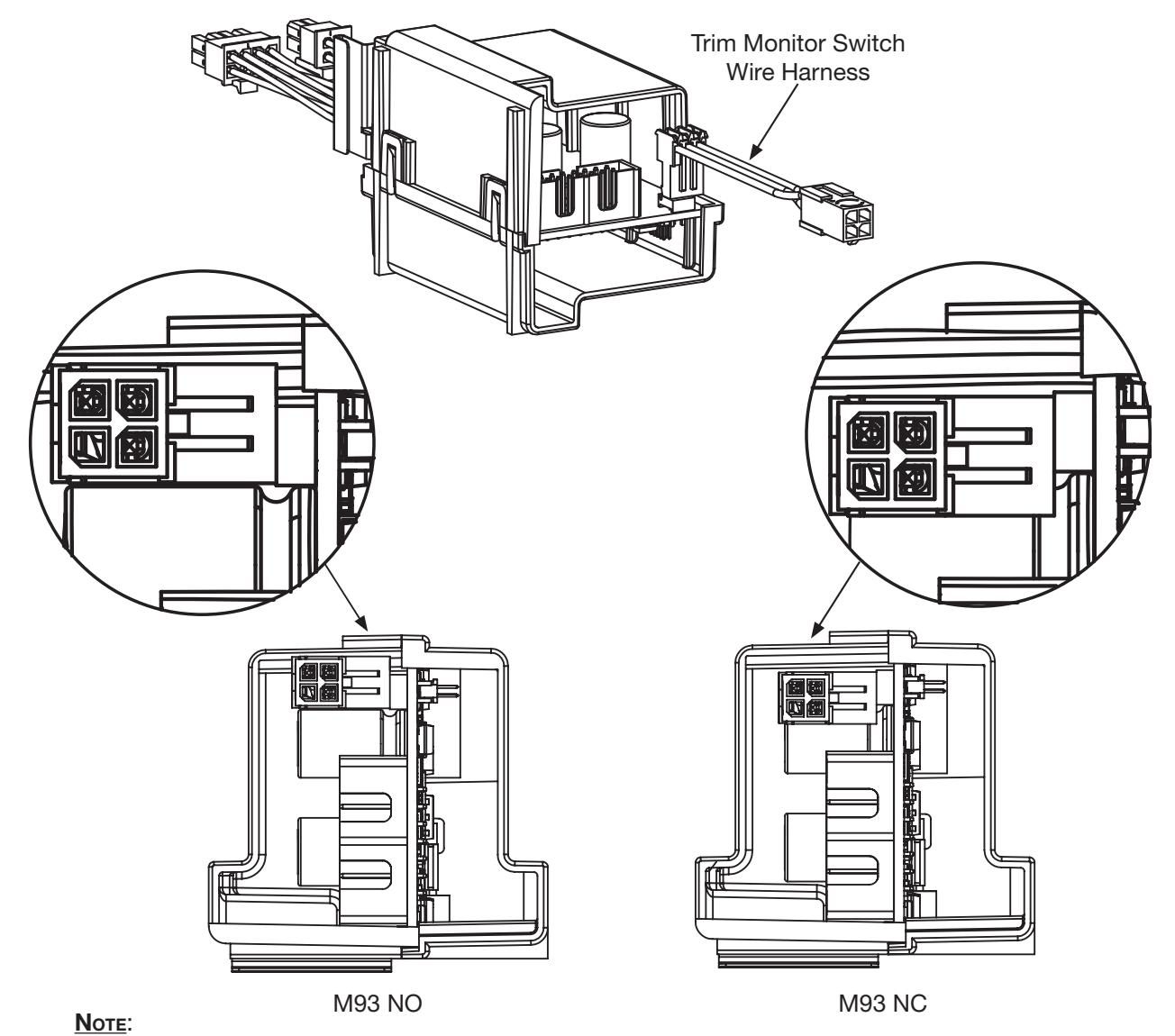
Connector Position is Relative to the Block.
Figure 20 — Changing M93 Preset







Corbin Russwin 225 Episcopal Road Berlin, CT 06037 Phone: 800-543-3658 Fax: 800-447-6714 www.corbinrusswin.com