Corbin Russwin ED4000 and ED5000 Series Delayed Egress Installation Instructions
Open the original PDF document
View PDF


This product can expose you to lead which is known to the state of California to cause cancer and birth defects or other reproductive harm. For more information go to www.P65warnings.ca.gov.
*Rod Guards Required (made by other manufacturers)
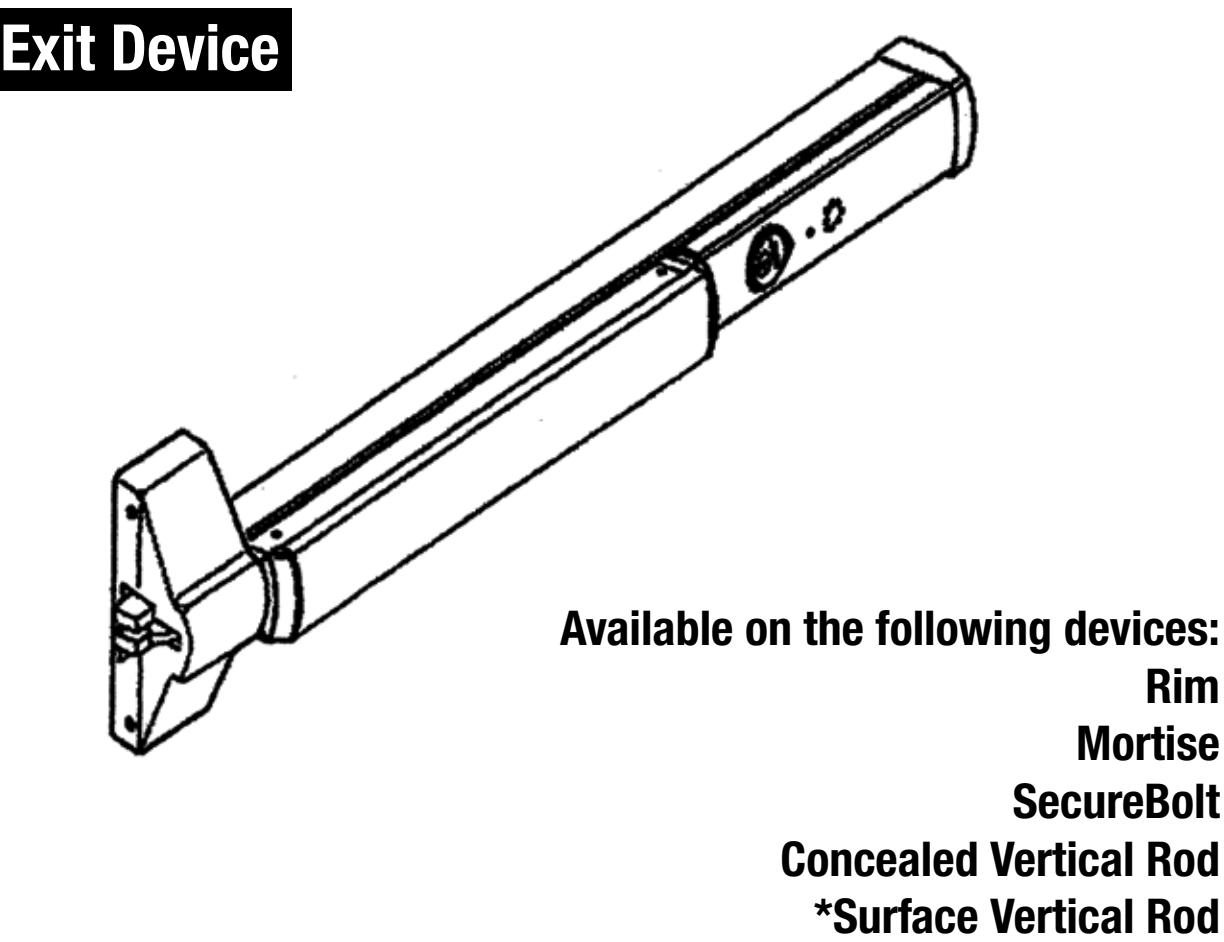
Exit Device
Installation Instructions

| TOC | Table of Contents |
|---|---|
| 1 |
Panic and Fire Rated Devices
3 |
| 2 |
End Cover and P.C. Board Assembly
4 |
| 3 |
Installation of End Cover Assembly to Device
5 |
| 4 |
Device Mounting
6 |
| 5 |
Wiring Layout: Input/Output Wiring Descriptions
7 |
| 6 |
ElectroLynx Connector System for All Electrical Installation
8 |
| 7 |
Installing Delayed Egress Exit Device
9 |
| 8 |
M93 Monitor - Trim Actuated Single Pole Double Throw (SPDT) Switch
10 |
| 9 |
Non-ElectroLynx Door Prep
11 |
| 10 |
Wiring Diagram - Single Door Exit Only
12 |
| 11 |
Wiring Diagram - Single Door With Remote Inputs & Monitoring Outputs
13 |
| 12 |
Wiring Diagram - Single Door Exit Only
14 |
| 13 |
Wiring Diagram - Single Door With Remote Inputs & Monitoring Outputs
15 |
| 14 |
Wiring Diagram - Mechanical Trim Entry with External Door Position Switch .
16 |
| 15 |
Operating Instructions
17 |
| 16 |
Additional Options
18 |
| 17 |
Troubleshooting
19 |

1 Panic and Fire Rated Devices
A. Checklist
- 1. Check device for shipping damage prior to installation and make sure all parts are on hand.
- 2. Identify options provided with device.
- 3. Identify model, type and hand of trim if applicable (see exit device and trim instructions for reversing hands).
- 4. Contact hardware supplier if device is damaged or missing parts.
B. Required Components (Numbered list correlates with numbers in Figure 1)
- 1. Delayed Egress Exit Device
- 2. 24VDC UL Listed Regulated and Filtered Power Supply with Fire Alarm Interface (recommend Securitron BPS 24-1 or 24-2 (UL294 Listed), depending on requirements). Power supply is NOT to be used in UL603 Burglar Alarm System.
- 3. Power transfer UL or Ulc listed (2-10 wire depending on system)-Securitron (EPT) or equivalent.
- 4. Sign (MUST BE INSTALLED ON DOOR ABOVE DEVICE).
NOTE: The delayed egress system is to be installed in accordance with NFPA 101.
C. Optional Components (Numbered list correlates with numbers in Figure 1)
- 5. Remote Annunciator
- 6. Door Position Switch (DPS)
- 7. Standard Trim
- 8. Electrified Trim
- 9. Device and Trim Cylinder
D. Electrical Specifications*
Input Voltage 24VDC (+/-10%)
Wire Size:
18 AWG Min (up to 100') Signal or Control 22AWG Min
Power Consumption:
Standard Device - 500mA
Device with Electric Trim - 883mA
NOTE: Components shown do not reflect all possible applications. Consult manufacturer for special applications.
Figure 1 6. 4. PUSH UNTIL ALARM SOUNDS. DOOR CAN BE OPENED IN 15 SECONDS. 3. 5. 1. 7. 8. 9. 115 VAC 800 mA 60 Hz Fire Alarm Circuit Req'd Or 2.
* Follow Local Electrical Codes for Wiring.

2
End Cover and P.C. Board Assembly
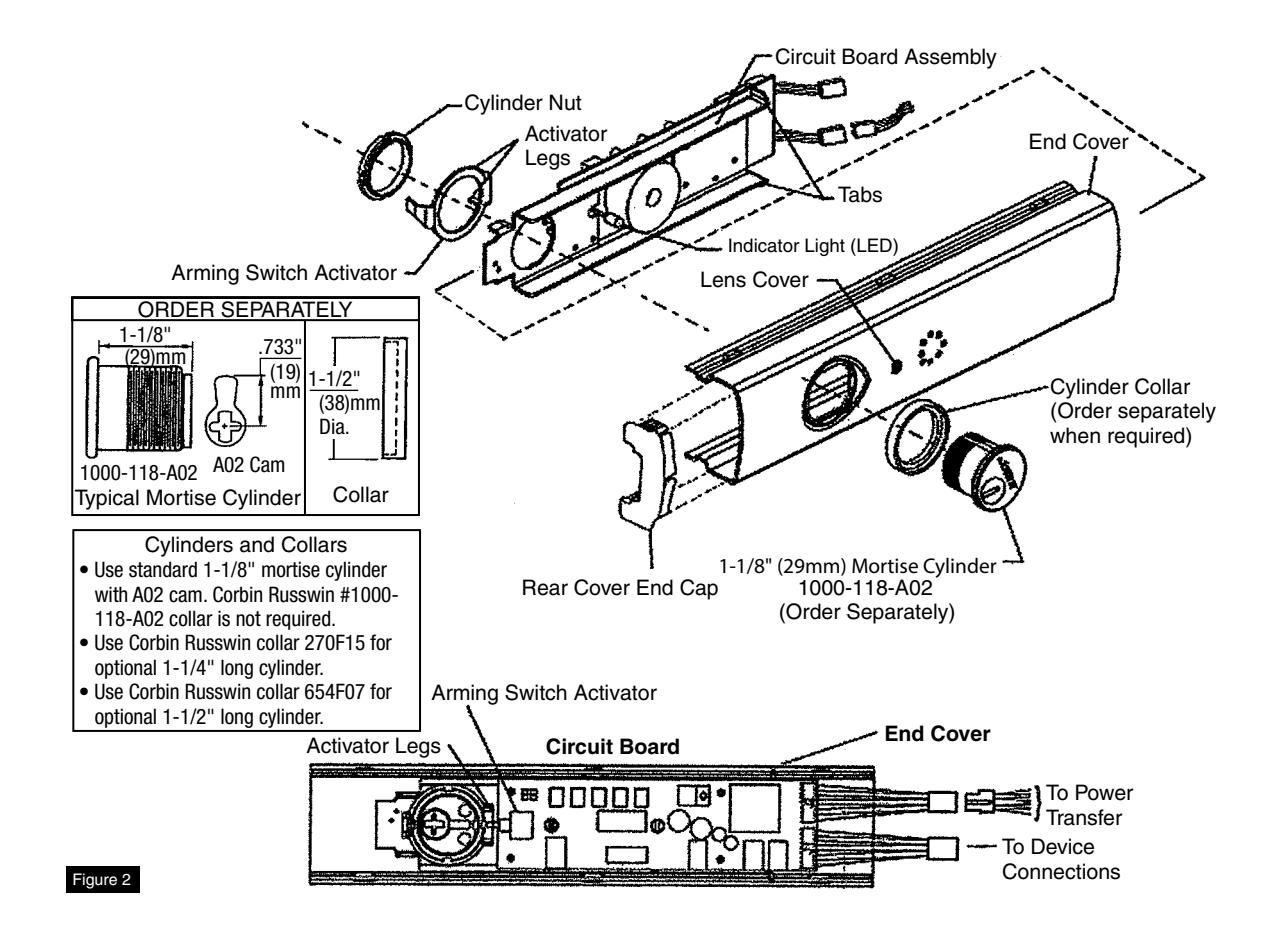
NOTES: • Factory keyed orders will be shipped assembled.
- Prior to end cover assembly, device must be cut to proper length to prevent damage to circuit board. 36" Device cannot be field cut. A maximum of 6" can be cut from a 48" device.
- Slide circuit board assembly into end cover. Front of assembly must be pulled away from cover to prevent damage to LED indicator light. Housing assembly is in correct position when LED can be inserted in lens cover on end cover. (Figure 2)
- Insert cylinder (mortise and collar) into end cover with keyway horizontal and toward closest end of end cover.
Copyright © 2018, ASSA ABLOY Access and Egress Hardware Group, Inc. All rights reserved. Reproduction in whole or
in part without the express written permission of ASSA ABLOY Access and Egress Hardware Group, Inc. is prohibited.
- Slide arming switch activator over cylinder so activator legs are on each side of switch.
- Secure parts in place with cylinder nut. Be certain flange on cylinder nut inserts into arming switch activator to allow rotation of activator.
- 5. Verify assembly by rotating key counterclockwise and clockwise. Key should move freely and arming switch should trip for both rotation directions. If key does not rotate freely, verify cylinder nut is in correct orientation. If arming switch does not trip, activator legs on arming switch activator can be bent to reduce or increase rotational travel.

3 Installation of End Cover Assembly to Device
- 1. Turn end cover assembly over to circuit board side.
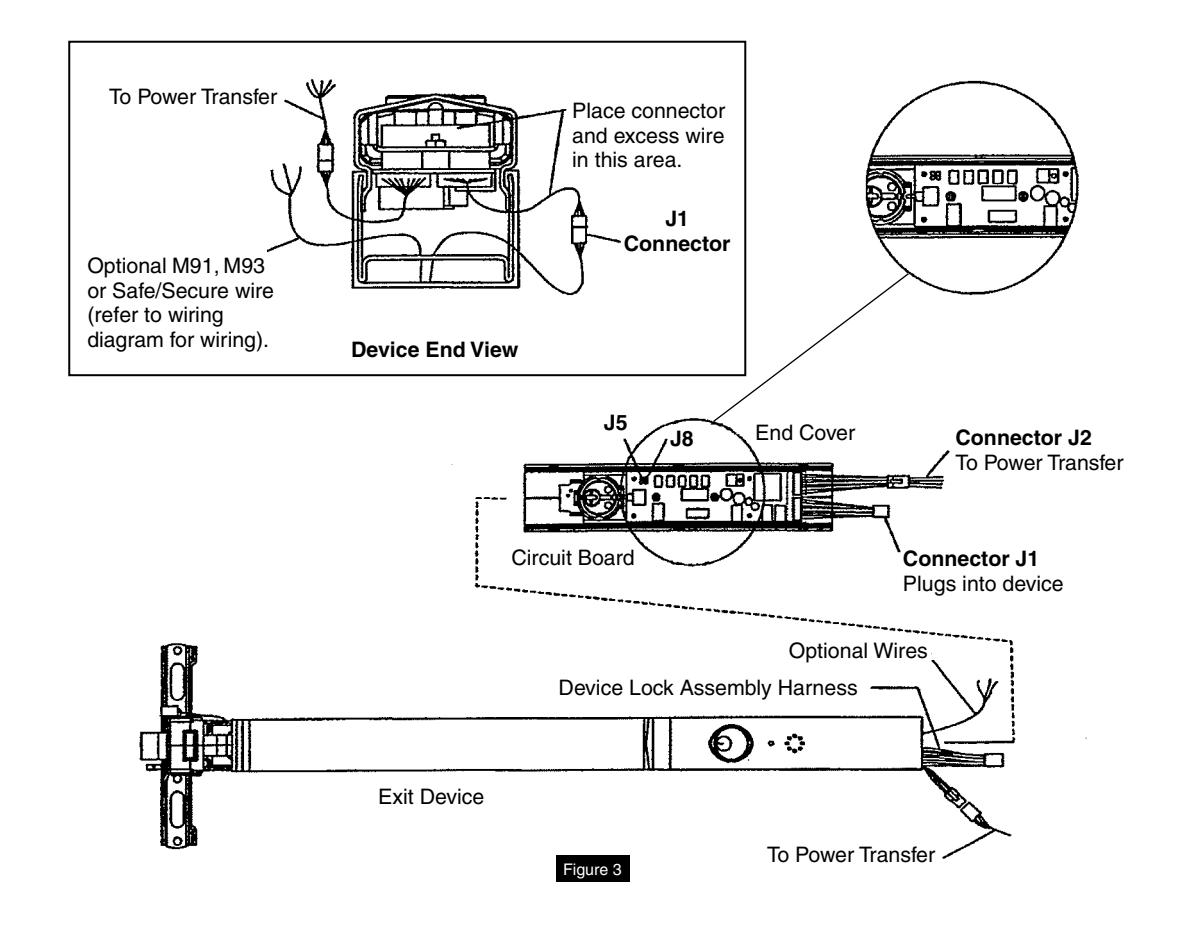
- 2. Nuisance delay setting is factory preset for three (3) seconds. If immediate initiation of alarm sequence is desired when pushpad is pressed, remove jumper J5. (Figure 3)
- 3. Reset delay setting is factory set for ten (10) seconds. Remove jumper J8 for 20-second reset.
- 4. Slide end cover assembly into device, making sure not to pinch or crimp wires.
- 5. Connect device lock assembly harness to connector J1. Place wire connectors and excess wire between end cover and P.C. board. (Figure 3, Device End View)
- 6. Check all connections before proceeding.
- 7. Proceed to device mounting (see packed instructions).

4 Device Mounting
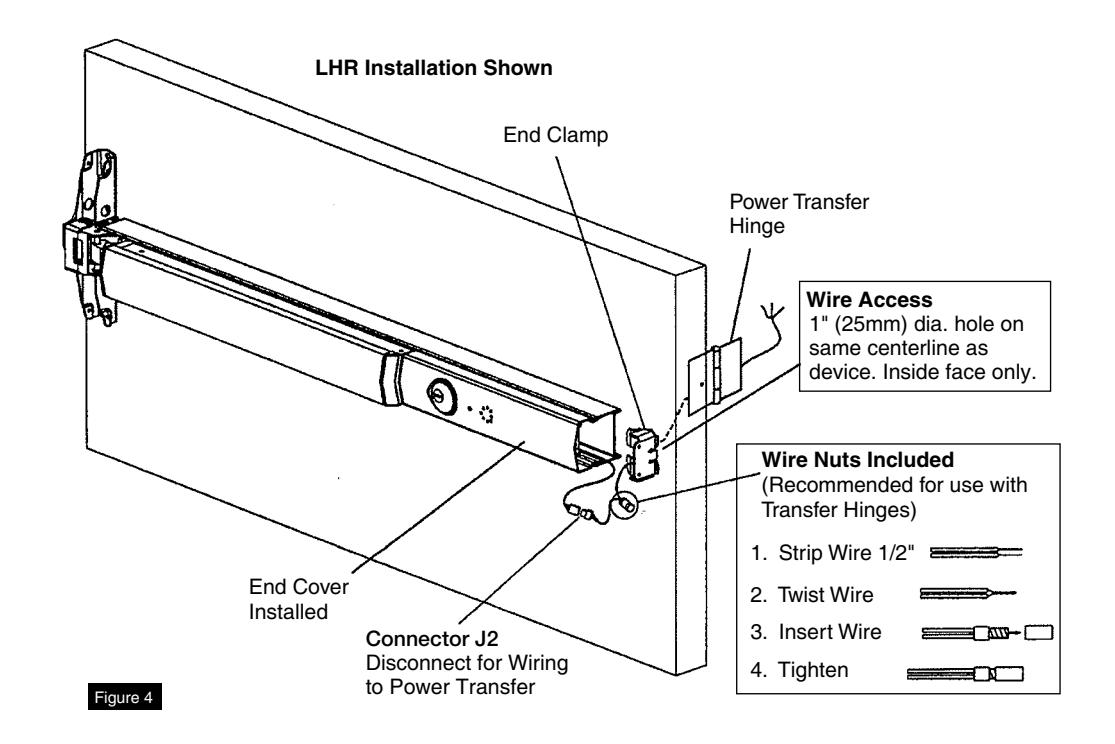
- 1. Refer to installation instructions included with device and trim for complete door and frame preparations. Refer to template #T30890 for wire access hole location.
- 2. Feed wires from power transfer through wire access hole in door. (Figure 4)
- 3. When required, mount outside trim to door (see trim installation instructions).
- 4. Mount device to door (see device installation instructions).
- 5. Do not install end cap until device has been wired and tested for operation (Additional Options, Section 16).
- 6. Check mechanical operation and proceed to wiring diagrams (Sections 10 through14).
NOTE: Wire nuts can be inserted into wire access hole after making connections. Quick disconnect can be used without removing wire nuts.

ASSA ABLOY
5
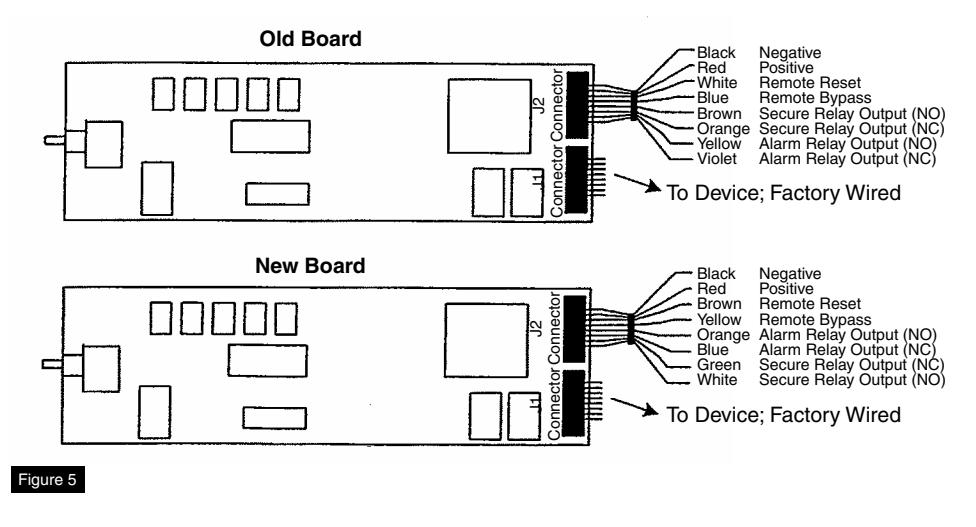
Wiring Layout: Input/Output Wiring Descriptions
|
J2 Connector
(Figure 5) |
ElectroLynx
Connector |
|||
|---|---|---|---|---|
| Pin Number | Input/Output | Wire Color | Description | Pin Number |
| 1 | Input | Black | 24VDC Power Supply (-Circuit Ground) | 1 |
| 2 | Input | Red | 24VDC Power Supply (+Positive) | 2 |
| 3 | Input | Brown | Remote Reset Input - Momentary input from key switch, pushbutton, etc. Will release device for 20 seconds for egress or ingress and also reset device when in bypass or alarmed state. | 7 |
| 4 | Input | Yellow | Remote Bypass Input - Momentary input from key switch, pushbutton, etc. Will maintain device in an unlocked state for normal device operation. Device must be rearmed by resetting from remote reset on device. | 8 |
| 5 | Output | Orange | Alarm Relay Output - Normally open contact that changes to normally closed when device alarm cycle has been activated. | 5 |
| 6 | Output | Blue | Alarm Relay Output - Normally closed contact that changes to normally open when device alarm cycle has been activated. | 6 |
| 7 | Output | Green | Secure Relay Output - Normally closed contact that changes to normally open when device has released. | 4 |
| 8 | Output | White | Secure Relay Output - Normally open contact that changes to normally closed when device has released. | 3 |
NOTE:
- Pins 5-8 are negative (-) outputs. Use with LEDs and audibles (horns, sirens, etc.). See wiring diagrams (Sections 9 through 14) for details.
- Cap all unused wires with enclosed wire nuts.
Exit Device
Installation Instructions

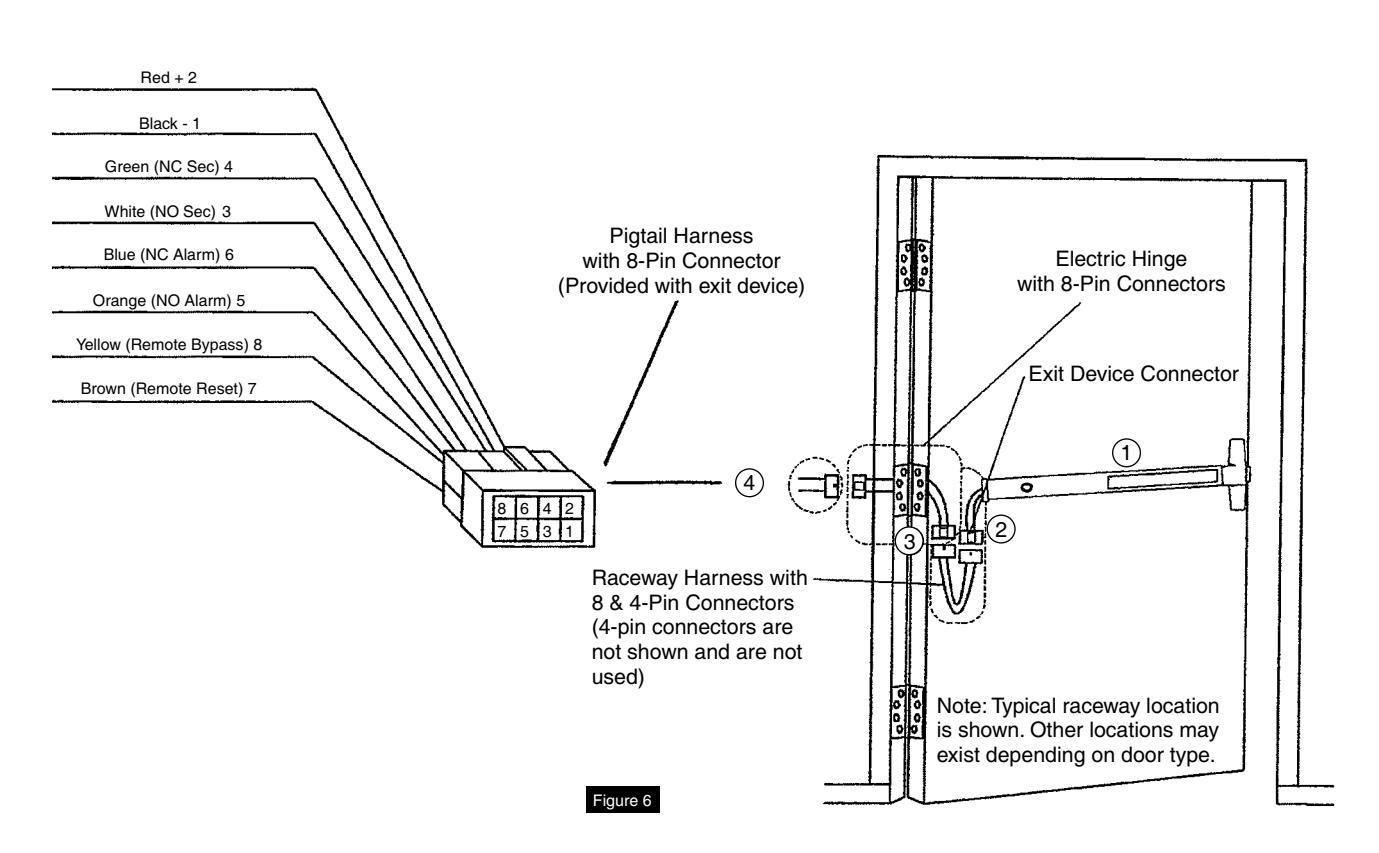
6 ElectroLynx Connector System for All Electrical Installation
- 1. Mount exit device per instruction sheet provided.
- 2. Plug exit device connector into raceway connector in door. Feed through 1" (25mm) hole in door. Install rail mounting end clamp bracket with two (2) screws supplied. Install end cap.
-
3. Plug raceway connector from edge of door into electric hinge connector and feed wires back through door prep. Mount electric hinge to door.
- A. If wiring now, wire frame side wires, to wires on pigtail harness, on hinge as required by using connectors allowed by local code. Plug pigtail harness connector into electric hinge connector. Feed harness through frame prep and mount electric hinge.
- B. If wiring later, plug pigtail harness connector into electric hinge connector. Feed harness through frame prep and mount electric hinge.
Installation Notes:
- 1. Wiring to pigtail harness is per facility wiring requirement.
- 2. For an ElectroLynx system, go to function or monitor page(s) with your device.
- 3. Combinations of certain monitors can be used in each device. These instructions detail installation of each monitor separately.
ElectroLynx Connector System Notes:
System is designed to be installation friendly, with plug connectors from electric hinge through door to device. The only wiring required is loose wires on pigtail harness assembly on frame side of electric hinge (included with QC Hinge). Combinations of certain switches and monitors can be used.
The plug and receptacle connectors are designed to mate and lock together. Plug connectors into each other with locking mechanism aligned. Do NOT force connectors together any other way.

7 Installing Delayed Egress Exit Device
Refer to Figure 6 for delayed egress exit device installation wiring.
NOTE: For ElectroLynx Hinge Connector System: Follow Section 6 wiring instructions.
For non-ElectroLynx door:
Remove connector at end of exit device and connect to incoming wires from power source using wire nuts, butt splices, etc. See Section 9 for hole locations and sizes.


8 M93 Monitor - Trim Actuated Single Pole Double Throw (SPDT) Switch
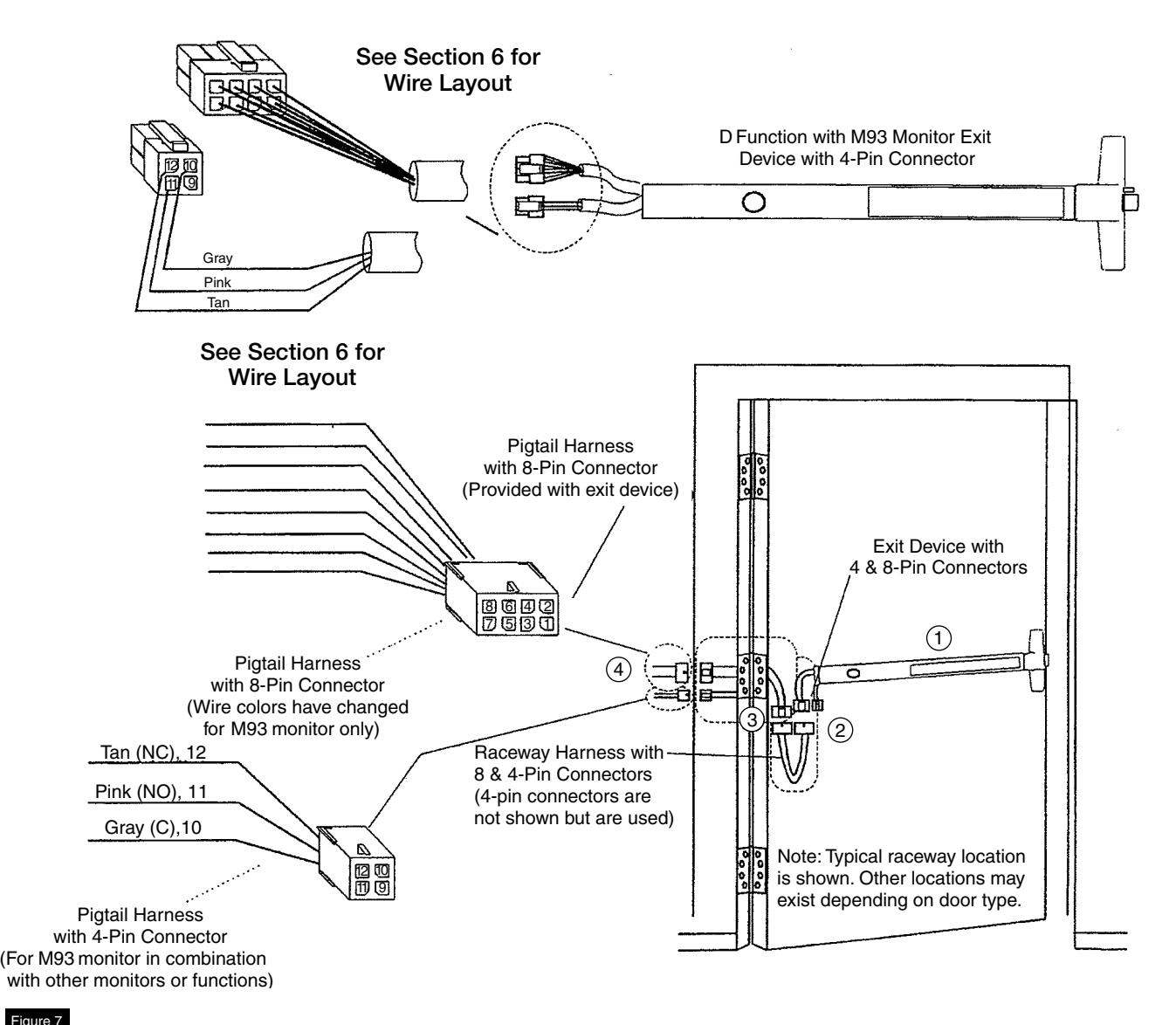
Refer to Figure 7 for M93 Monitor - Trim Actuated SPDT Switch wiring. NOTE:
- Switch contact rating: 5A @28VDC.
- Wire must be protected from abrasion.
- For use with Class II circuits only.
- For ElectroLynx Hinge Connector System: Follow Section 6 wiring instructions.
- For non-ElectroLynx door: Remove connector at end of exit device and connect to incoming wires from power source using wire nuts, butt splices, etc. See Section 8 for hole locations and sizes.

9 Non-ElectroLynx Door Prep
Refer to Figure 8 for non-ElectroLynx Door preparation.
NOTE:
- Do not scale drawing.
- Dimensions are in inches (") and millimeters (mm).
- LHR H.M. opening shown. Details are typical for all opening materials (both hands).
- This preparation is an addition to preparation shown on device template.
- See device template to locate centerline.
- Shields for wiring access recommended for insulated and composite doors.
- Locate and prepare wiring access holes when installing device.
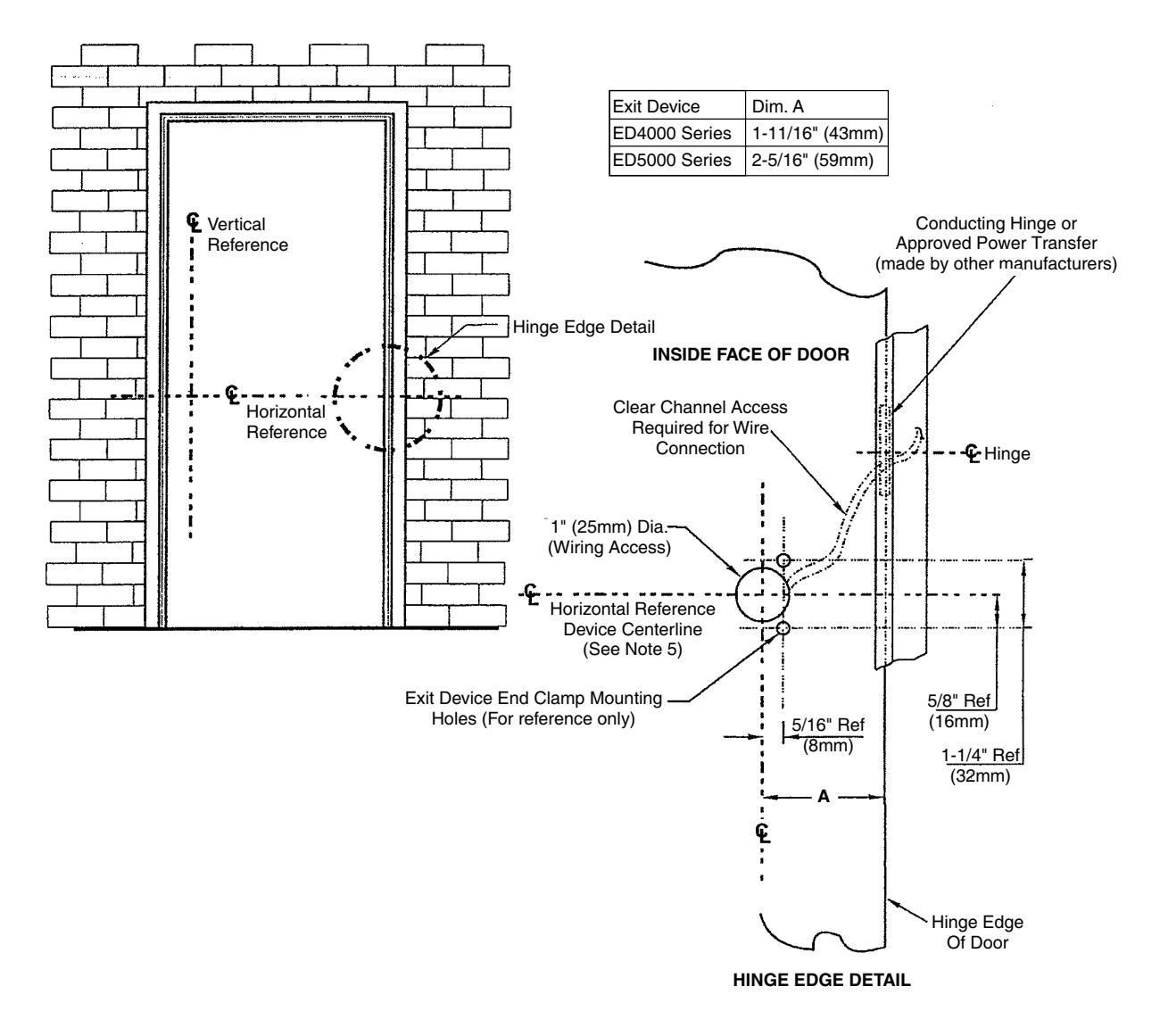
Figure 8
Exit Device
Installation Instructions

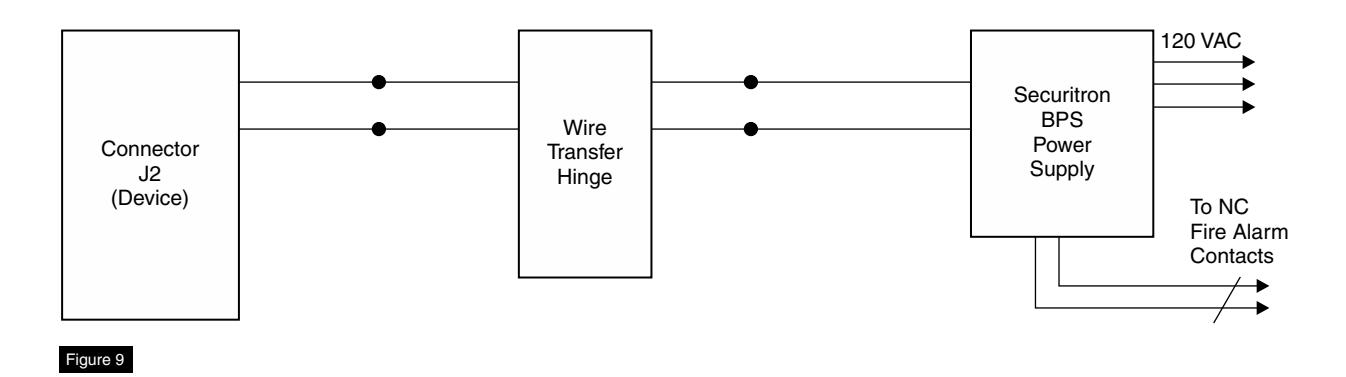
10 Wiring Diagram - Single Door Exit Only
Operation:
Mechanical trim can be added for entry. Trim will not affect alarm if a door position switch is not being used. Refer to DPS wiring if necessary. (Figure 9)

11
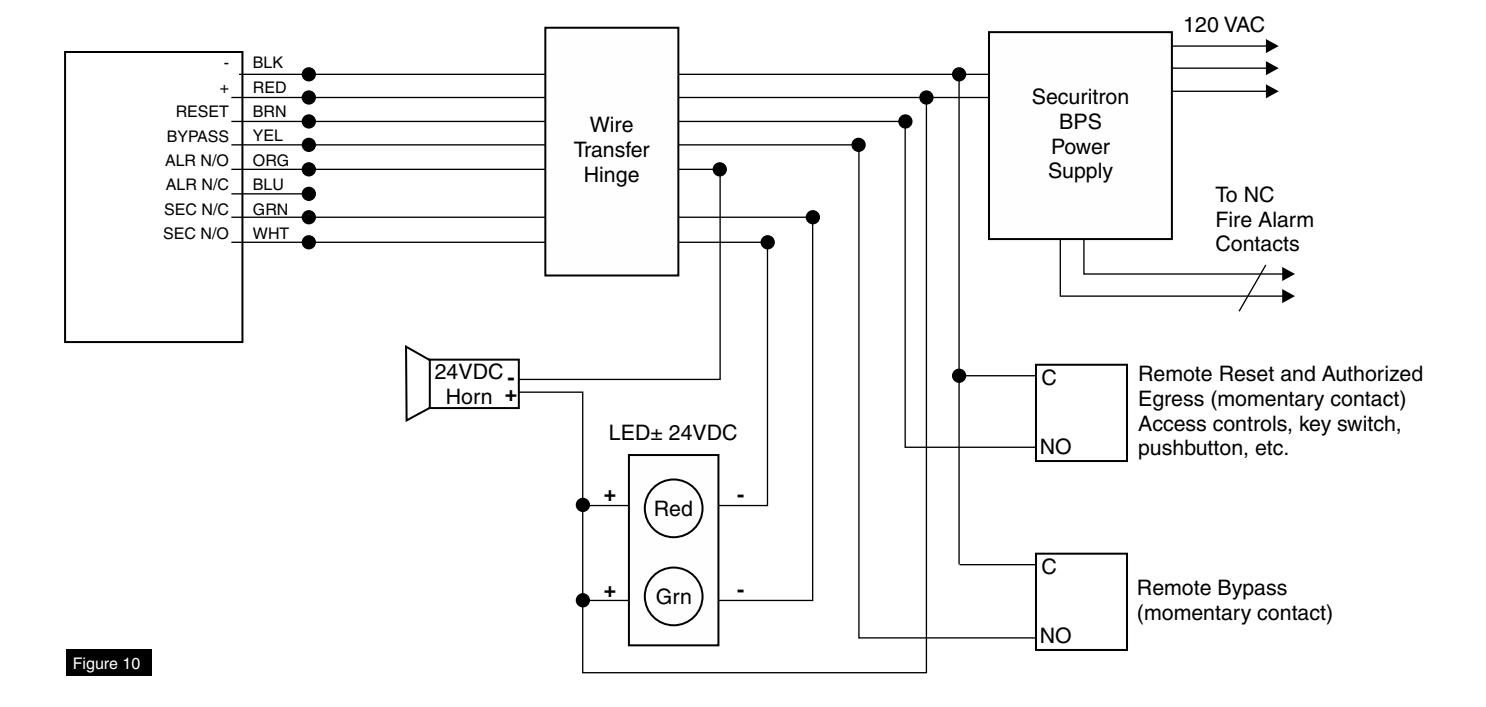
Wiring Diagram - Single Door With Remote Inputs & Monitoring Outputs
Operation:
Monitoring: Red LED indicates device is armed and secure. Activating device will sound alarm. (Figure 10)
Green LED will illuminate after 15 seconds. Device will release for exit (unsecure).
NOTE: If dry contacts are needed for signaling or monitoring, a 24VDC relay is recommended.

12 Wiring Diagram - Single Door Exit Only
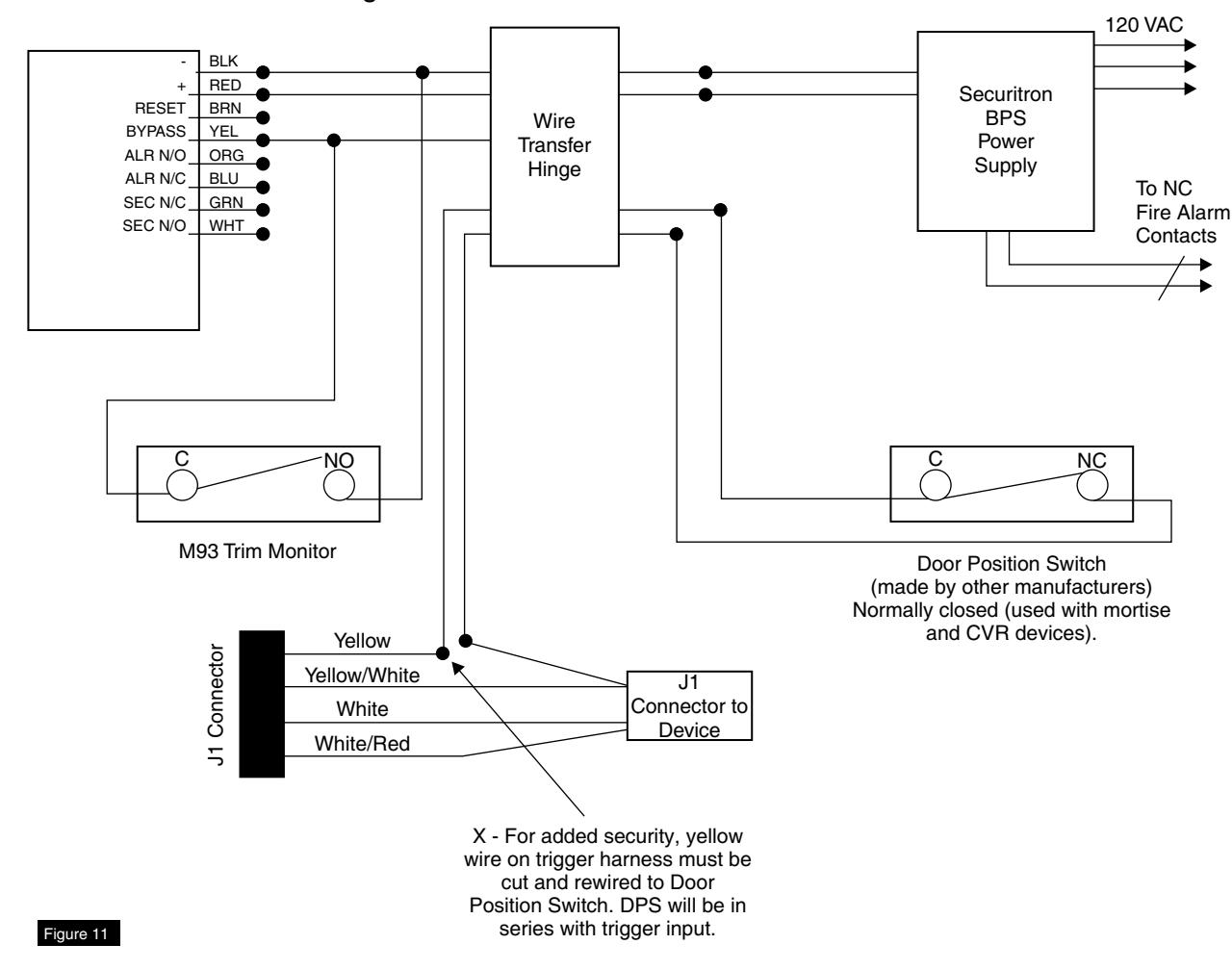
* Door Position Switch (DPS) made by other manufacturers.
Operation:
Door Position Switch (DPS)* is used to activate alarm when door has been forced open. It also prevents device from being armed when door is propped open.
M93 trim monitor switch, when activated, will bypass unit and allow entry. Unit must be manually reset for rearming. (Figure 11)
NOTE: Requires M93 trim monitor switch on device for alarm shunting.

13 Wiring Diagram - Single Door With Remote Inputs & Monitoring Outputs
Operation:
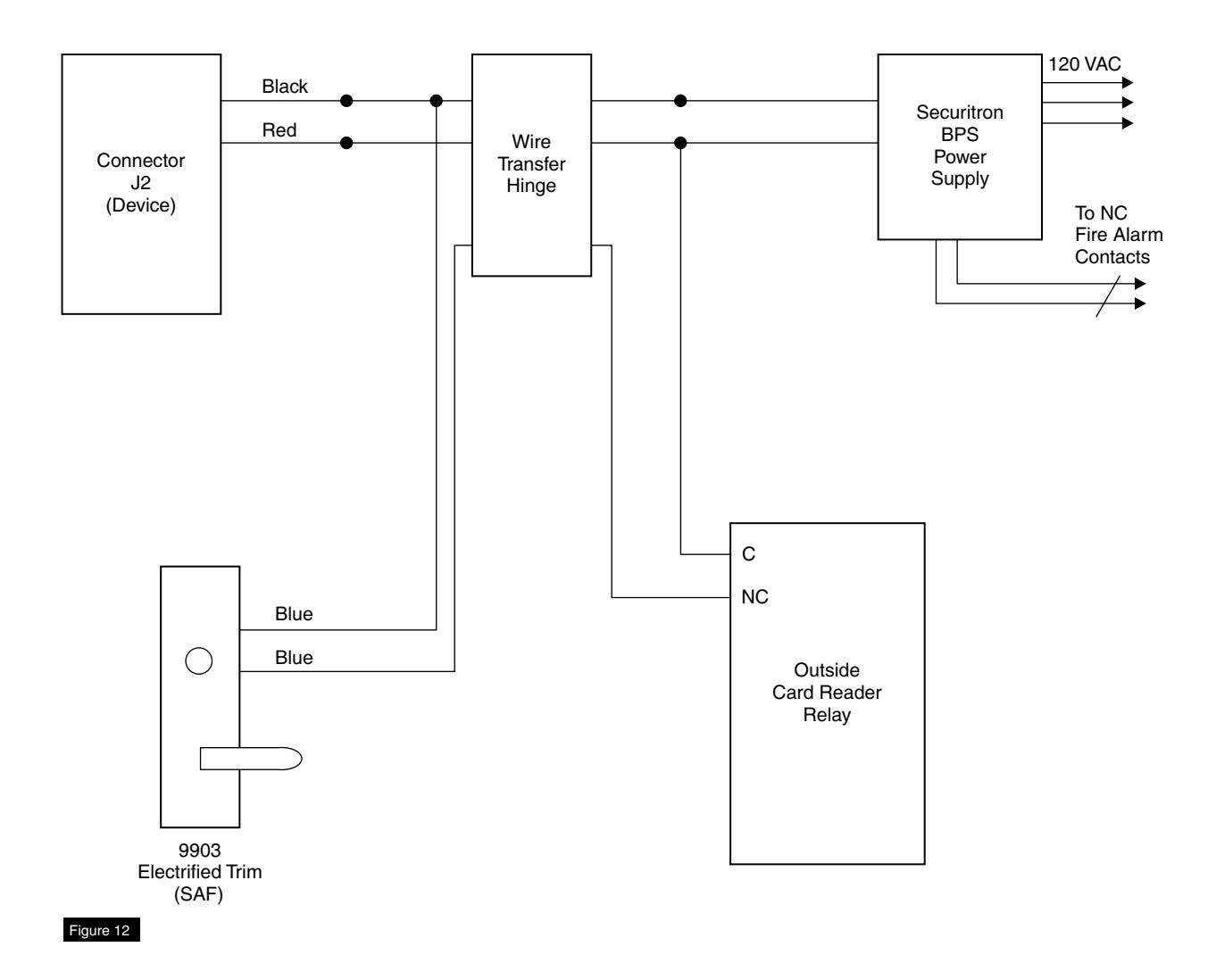
Fail Safe (SAF) Trim allows normal access control for entry and also allows entry during power failure or fire alarm activation.
Electric trim operation will not affect armed device. (Figure 12)
NOTE: When using electric trim with a DPS (made by other manufacturers), M93 Trim Monitor Switch is required to bypass armed device.

14 Wiring Diagram - Mechanical Trim Entry with External Door Position Switch
Operation:
Fail Secure (SEC) Trim allows access control for entry. Outside trim will remain locked during power failure or fire alarm activation. (Figure 13)
Electric trim operation will not affect armed device.
NOTE: When using electric trim with a DPS (made by other manufacturers), M93 Trim Monitor Switch is required to bypass armed device.
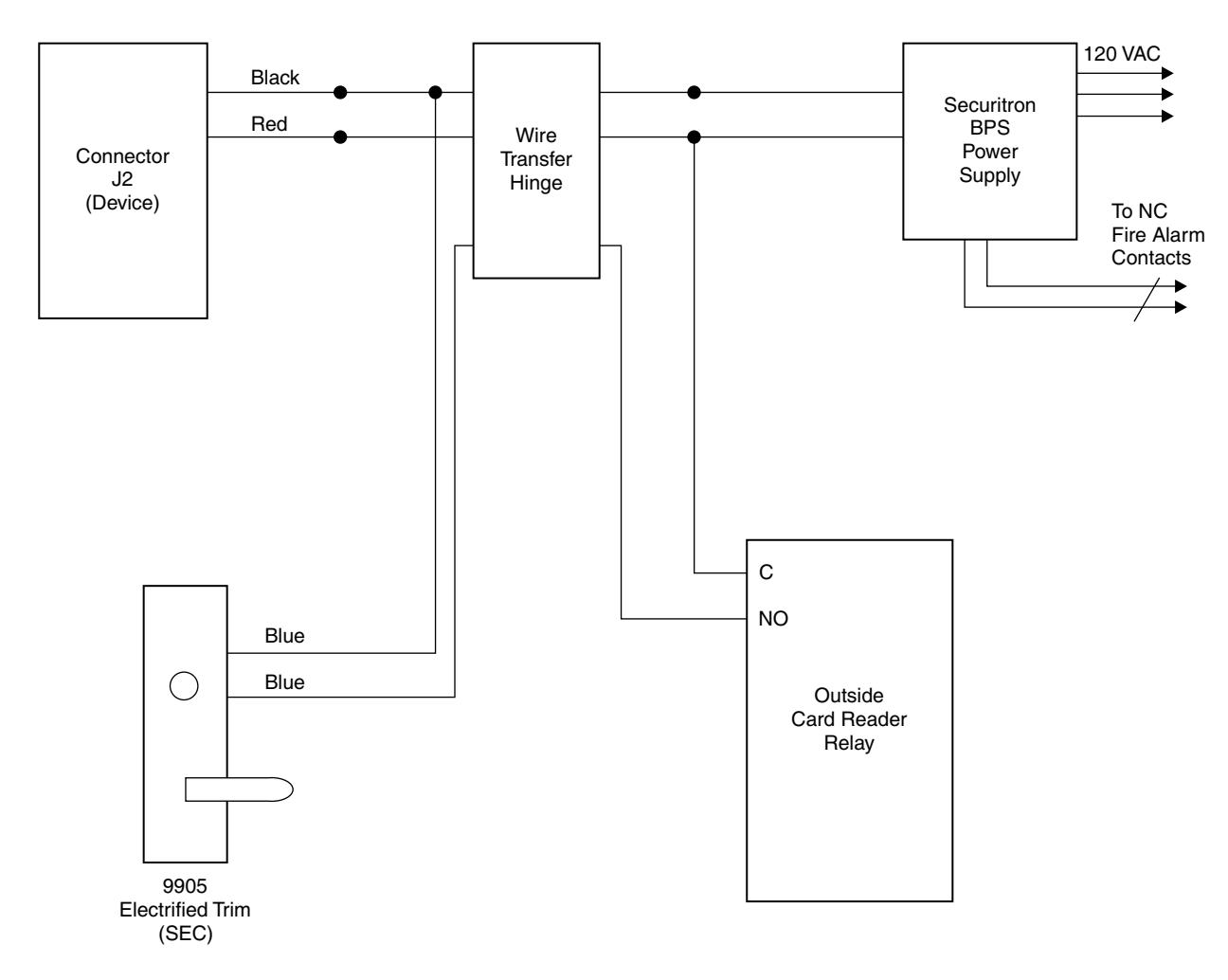
Figure 13

15 Operating Instructions
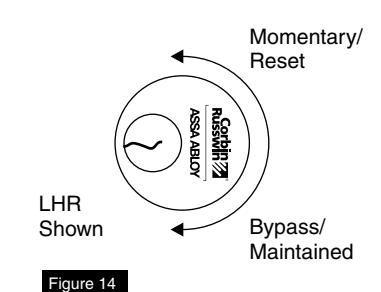
There are three (3) modes of operation (Figure 14):
- Delayed Egress
- Momentary Egress
- Bypass (Maintained) Egress
Delayed Egress Mode
- 1. Apply power to device.
- 2. Solid red LED will illuminate.
- 3. Device is now armed, which will not allow pushpad to retract latchbolt for immediate egress.
- 4. If device is not functioning, refer to Troubleshooting Guide.
Momentary Egress Mode (Figure 14)
- 1. With device armed, rotate key counter clockwise and return to center position (remove key).
- 2. Red LED will flash quickly. Device will release for momentary egress for 10 seconds (factory set). This can be set to 20 seconds by removing J8 jumper.
- 3. After 10 (or 20) seconds has elapsed, device will rearm itself.
- 4. Device will now be back in delayed egress mode.
Bypass (Maintained) Egress Mode (Figure 14)
- 1. Rotate key clockwise, return key to center position and remove.
- 2. Red LED will flash slowly.
- 3. Device is disarmed, acting as a standard exit device which allows free egress.
Resetting device from Bypass Mode to Delayed Egress Mode (Figure 14)
- 1. Rotate key counter clockwise, return to center position and remove.
- 2. Solid red LED will illuminate.
- 3. Device will be in delayed egress mode.
Delayed Egress Operation When Armed
Exit door is normally closed and latched. Delayed Egress device secures door in locked mode with solid red LED indicating locked mode status. Depressing pushpad for three (3) seconds or less will sound device nuisance beep without initiating alarm. Depressing pushpad longer than three (3) seconds will initiate an irreversible local audible beeping tone and a visual amber indicator. After delay time (15 or 30 seconds), device releases, LED changes to green, and siren changes to a steady tone which continues to alarm until reset by keyswitch. Remote monitoring contact outputs can be used to alert security personnel. Person depressing pushpad is denied egress for 15 or 30 seconds (depending upon setup) and security personnel are alerted.
NOTE: 30 seconds may be accepted by local jurisdiction.
Exit Device
Installation Instructions

16 Additional Options
Electrically Controlled Trim (Mortise Device) Safe/Secure
Delayed Egress Exit Device is available with Fail Safe (SAF) or Fail Secure (SEC) outside trim operation. In a fire condition, SAF trim will release for entry. When Access control is used, SEC trim allows entry by means of a remote card reader, keyswitch, pushbutton, etc. (Figure 15)
NOTE: If a Door Position Switch is not used, trim will open door without affecting device in an armed condition (refer to wiring diagrams for wiring).
Outside Trim Monitor Switch (M93) Suffix
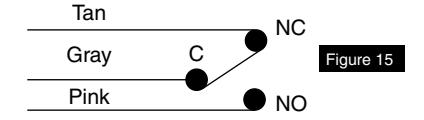
This option is used when outside trim is desired to be used with an external Door Position Switch (made by other manufacturers). This switch will allow bypass (disarm device) when trim is used for ingress. (Figure 16) Device will need to be reset upon entry by means of keyswitch on device or a remote Single Pole Double Throw (SPDT) switch. Refer to wiring diagrams for wiring.
NOTE: If an external DPS is not used, Standard trim and Safe/Secure trim will allow entry without affecting device in an armed mode. Device will only be affected when pushpad is depressed.
Latchbolt Monitor Switch (M91) Suffix
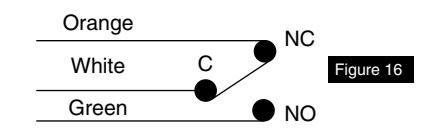
Latchbolt monitor switch is a SPDT switch that monitors security of latchbolt or vertical rods.
BOCA Option (M89 and M90) Suffix
Allows device to release after 15 or 30 seconds whenever a force is applied to pushpad. Device will provide visible and audible indication that delayed egress cycle has been activated. After device has been released, device will automatically re-lock and rearm after door has been re-secured.
NOTE: Requires use of a Door Position Switch (made by other manufacturers).
Exit Device
Installation Instructions

17 Troubleshooting
| Problem | Solution | ||
|---|---|---|---|
|
Power is applied, but unit will not arm
(No red LED). |
•
Check all connections on circuit board and wire harness. • Check for power 24VDC at power inputs (-black) and (+red) and check polarity. • Check wire transfer for any bad connections or broken wires. • Check power output at power supply. • Must be 24VDC regulated. |
||
|
Device alarms continuously when
power is applied. |
•
Check trigger mechanism wire harness on circuit board and all other connections. • Check pushpad activating switch in device. |
||
|
Units with Door Position Switch (made
by other manufacturers). |
•
Make sure DPS is wired (normally closed - with doors closed) into trigger wire harness. Make sure DPS is working properly by using a meter to check continuity when door is opened and closed. |
||
|
Device allows mechanical latchbolt
retraction with power applied and LED shows armed. |
•
Check for correct power, 24VDC regulated. • Check for correct amperage on power supply (must be rated equal or greater than device, 500mA minimum). |
||
|
Exit device latchbolt/rods will not latch
properly. |
•
Refer to standard exit device installation instructions troubleshooting guide. |
||
NOTE: If device is not working properly after troubleshooting, contact your local hardware distributor or local Corbin Russwin representative, or contact Corbin Russwin.

Corbin Russwin 225 Episcopal Road Berlin, CT 06037 Phone: 800-543-3658 Fax: 800-447-6714 corbinrusswin.com