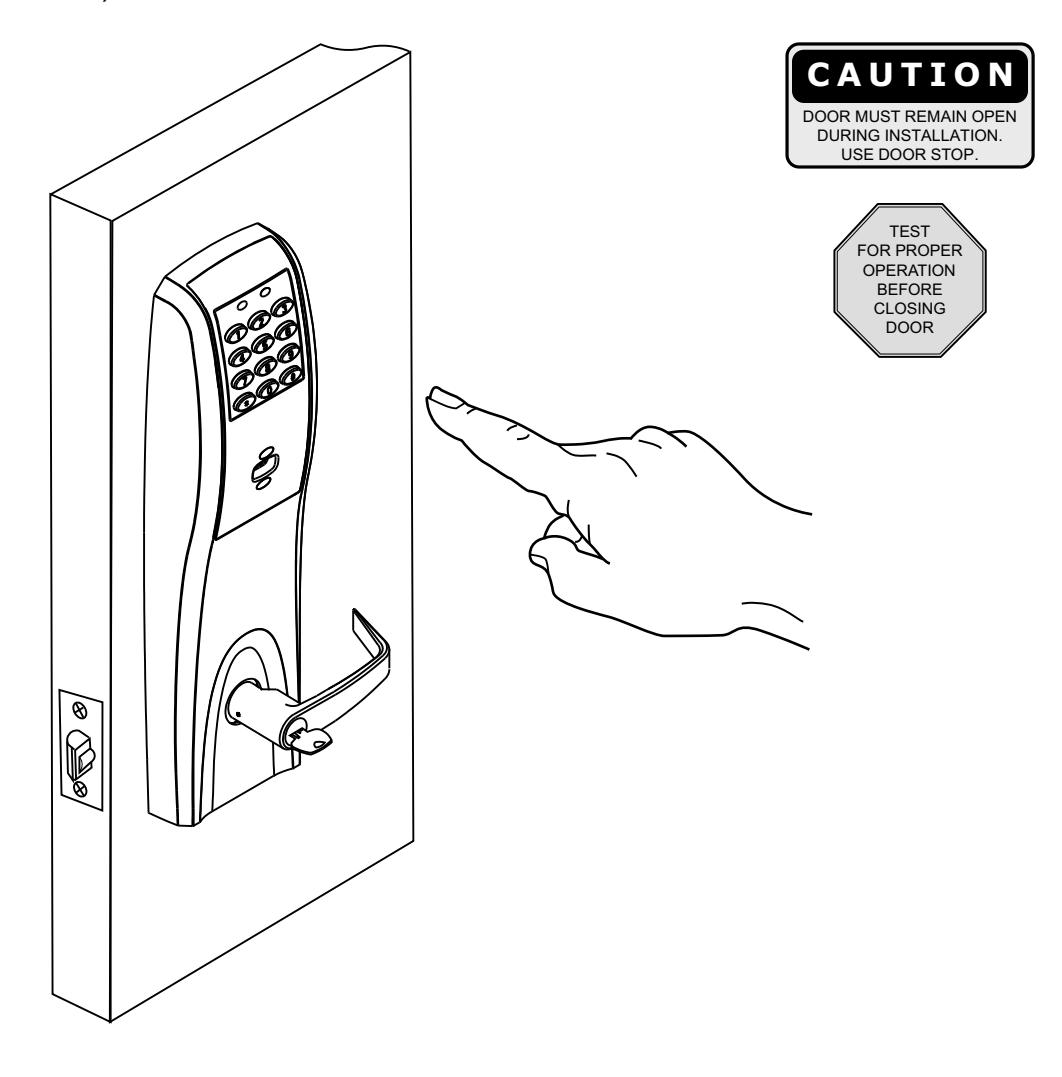
Corbin Russwin Access 800 CL33800 TCWI1 & TCIP1 Series Installation Instructions_FM334
Open the original PDF document
View PDFAccess 800°
Installation Instructions For CL33800 TCWI1 & TCIP1 Series Cylindrical Lockset
FM334 11/18

In U.S.: Corbin Russwin, Inc. 225 Episcopal Road Berlin, CT 06037 USA www.corbinrusswin.com
In Canada: ASSA ABLOY Door Security Solutions Canada 160 Four Valley Drive Vaughan, Ontario, Canada L4K4T9 www.assaabloy.ca
Attention Installer
Please read these instructions carefully to prevent missing important steps.
Please Note: Improper installation may result in damage to the lock and void the factory warranty.
Important: The accuracy of the door preparation is critical for proper functioning and security of this lock.
Misalignment can cause premature wear and a lessening of security.
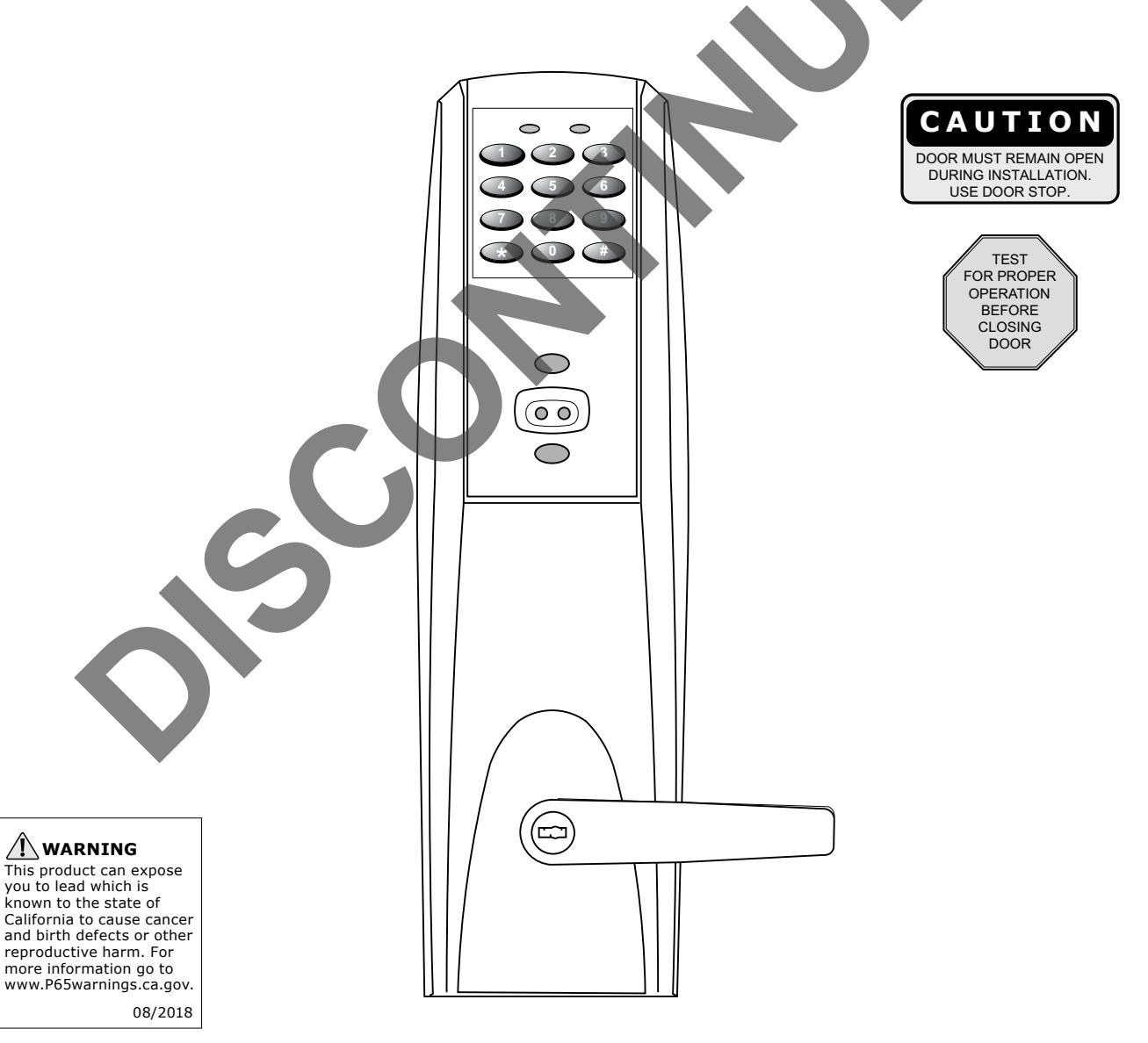
For installation assistance contact Corbin Russwin Inc., at 1-800-810-WIRE (9473)

Table of Contents
|
1) Warning
|
2 |
|---|---|
|
2) General Description/Specifications/Features
3 |
|
| 3) CL33800 TWC1 Series Trim Product Illustration 4 | |
|
4) Installation Instructions
|
5 |
| 5) PIP (PoE) Wiring Options | 11 |
| 6) Hard Wiring Options14 | |
| 7) Operational Check20 |
1) Warning
Changes or modifications to this unit not expressly approved by the party responsible for compliance could void the user's authority to operate the equipment.
This device complies with Part 15 of the FCC Rules. Operation is subject to the following two conditions: (1) this device may not cause harmful interference, and (2) this device must accept any interference received, including interference that may cause undesired operation.
Note: This equipment has been tested and found to comply with the limits for a Class B digital device, pursuant to Part 15 of the FCC Rules. These limits are designed to provide reasonable protection against harmful interference in a residential installation. This equipment generates, uses and can radiate radio frequency energy and if not installed and used in accordance with the instructions, may cause harmful interference to radio communications. However, there is no guarantee that the interference will not occur in a particular installation. If this equipment does cause harmful interference to radio or television reception, which can be determined by turning the equipment off and on, the user is encouraged to try to correct the interference by one or more of the following measures:
- Reorient or relocate the receiving antenna
- Increase the separation between the equipment and receiver
- Connect the equipment into an outlet on a circuit different from that to which the receiver is connected
- Consult the dealer or an experienced TV technician for help
This Class B digital apparatus complies with Canadian ICES-003.
Warning: To comply with "Fire Listed" doors, only alkaline batteries must be used.

2) General Descriptions/ Specifications/ Features
General Description
The Access 800 series lock is available with either Power over Ethernet (PoE) (TCIP1) or WiFi (TCWI1) technology. The TCIP1 version utilizes existing infrastructure and IEEE 802.af Power over Ethernet technology as a proven alternative to traditional access control installations. The TCWI1is able to utilize existing wireless LAN (802.11b/g) in order to communicate with the access control ® ® system. Credential options include either an HID 125 kHz Prox or 13.56 MHz iCLASS technology reader; available with or without a keypad.
The Access 800 cylindrical lock may be used for both indoor and exterior applications. A protective weather kit (provided with the unit) is recommended for exterior applications.
HID and iCLASS are registered trademarks of HID Global Corporation.
Specifications
- Latch –1/2" standard
- Inside lever retracts latch 3/4" throw fire rated double doors
-
Locks furnished for 1-3/4" to 2" doors
- (optional) (M16- prefix)
- U.L. Listed
- Deadlocking latch
- For 2-1/4" doors specify option D214
- Cylinder override
- Outside lever controlled by keypad, or key retracts latch
- TCIP1 (PoE) applications wire from EAC Panel to door must be shielded with a drain (drain terminated at EAC Panel controller)
Features
TCWI1 (WiFi)
- WiFi IEEE 802.11 b/g/n enabled
- 2,400 users per lock
- 10,000 event audit trail
- Centralized lock management
- Real time door status monitoring (Only applies when unit is hard powered)
- Supports HID 125kHz prox or 13.56 MHz iCLASS credentials (26-39 bit); supports CSN reads for other common 13.56 MHz cards, including MiFare, DesFire, and Felica
- TCWI1 Wireless
- DC9V, 1.5A (6 AA alkaline batteries or remote electrical power)
TCIP1 (PoE)
• Class 2 device, as defined by IEEE 802.3af, requires a maximum of 7 watts over structured cabling

3) CL33800 Series Product Illustration
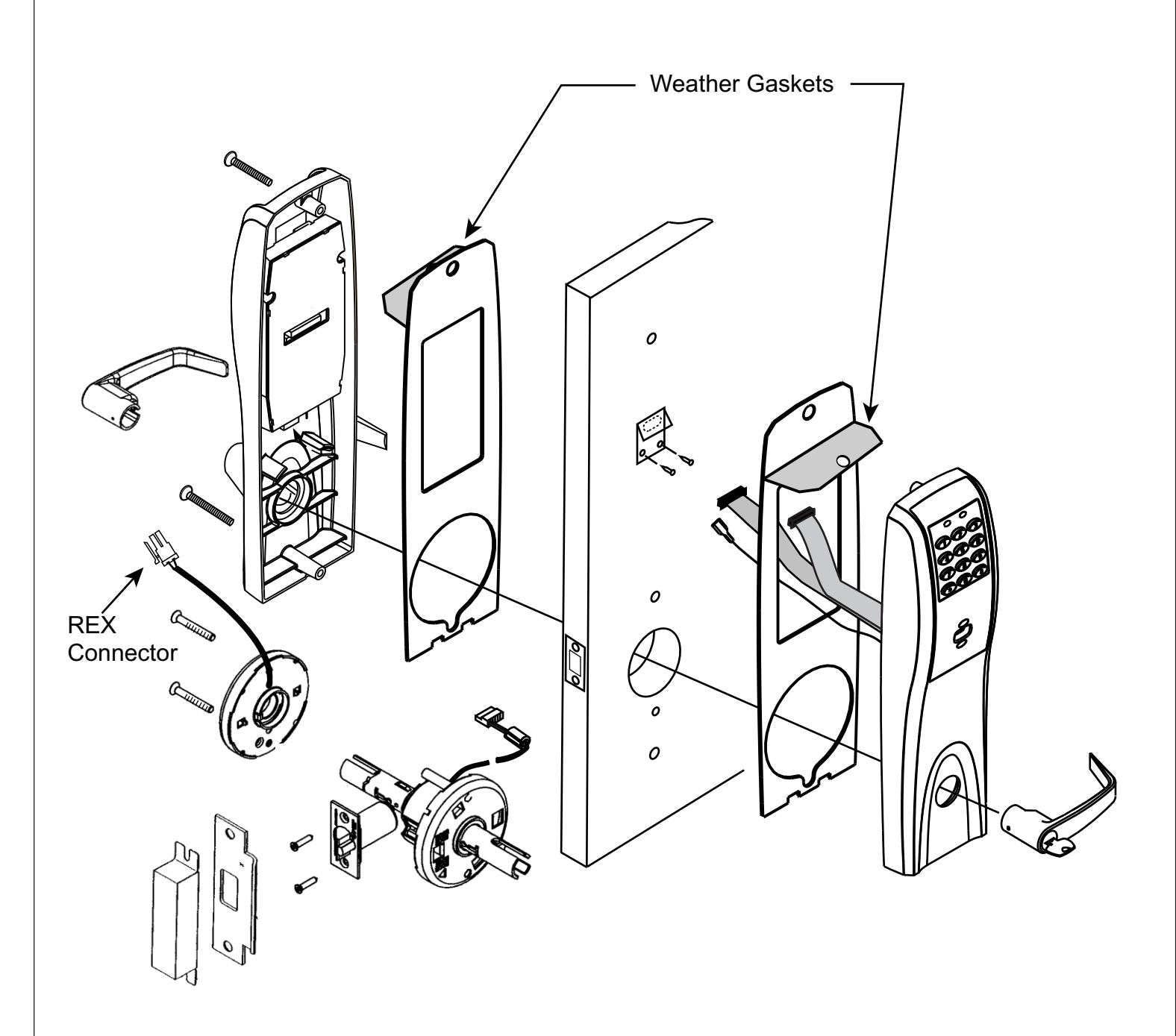

1 Verify hand and bevel of door. Illustrations shown are as viewed from the outside or secure side of opening.
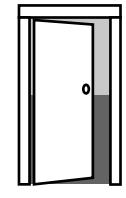
Left Hand Hinges Left. Open Inward. "LH"
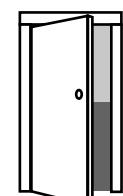
Left Hand Reverse Bevel Hinges Left. Open Outward "LHR"
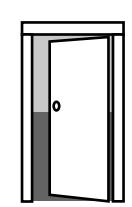
Right Hand Hinges Right. Open Inward. "RH"
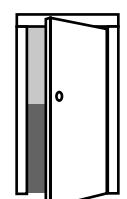
Right Hand Reverse Bevel Hinges Right. Open Outward "RHR"
2 Prep door according to supplied door marker.
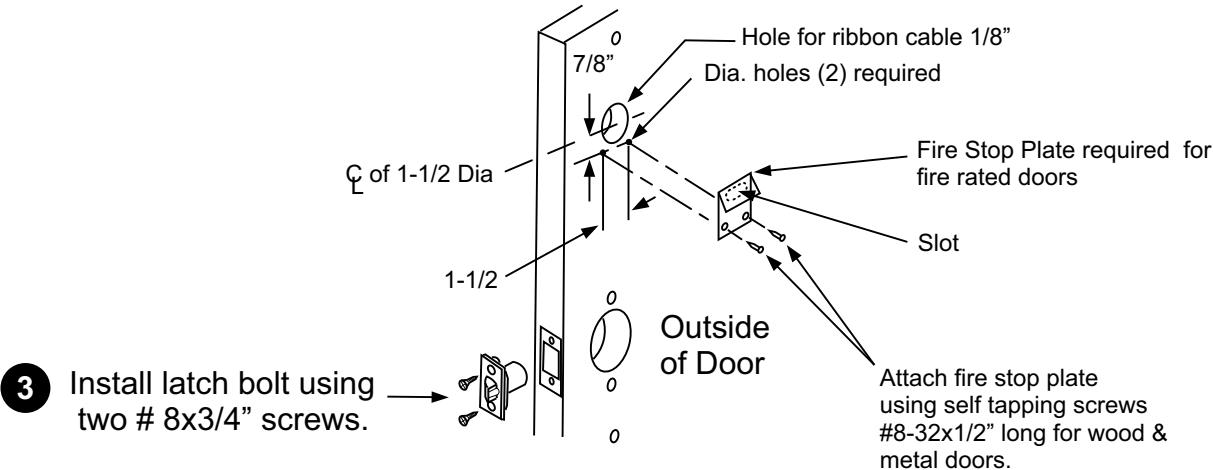
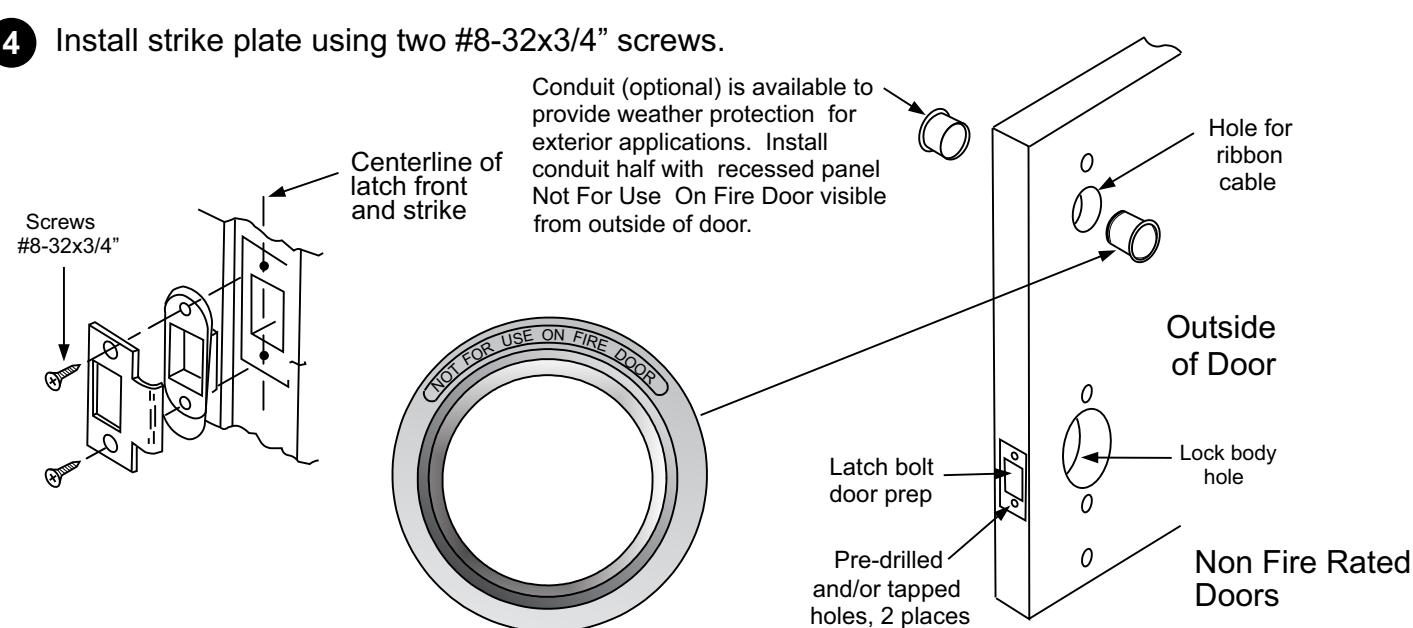

5 Installing chassis to door
Feed lock body wire harness through 2-1/8" diameter lock body hole and then install lock body into door.
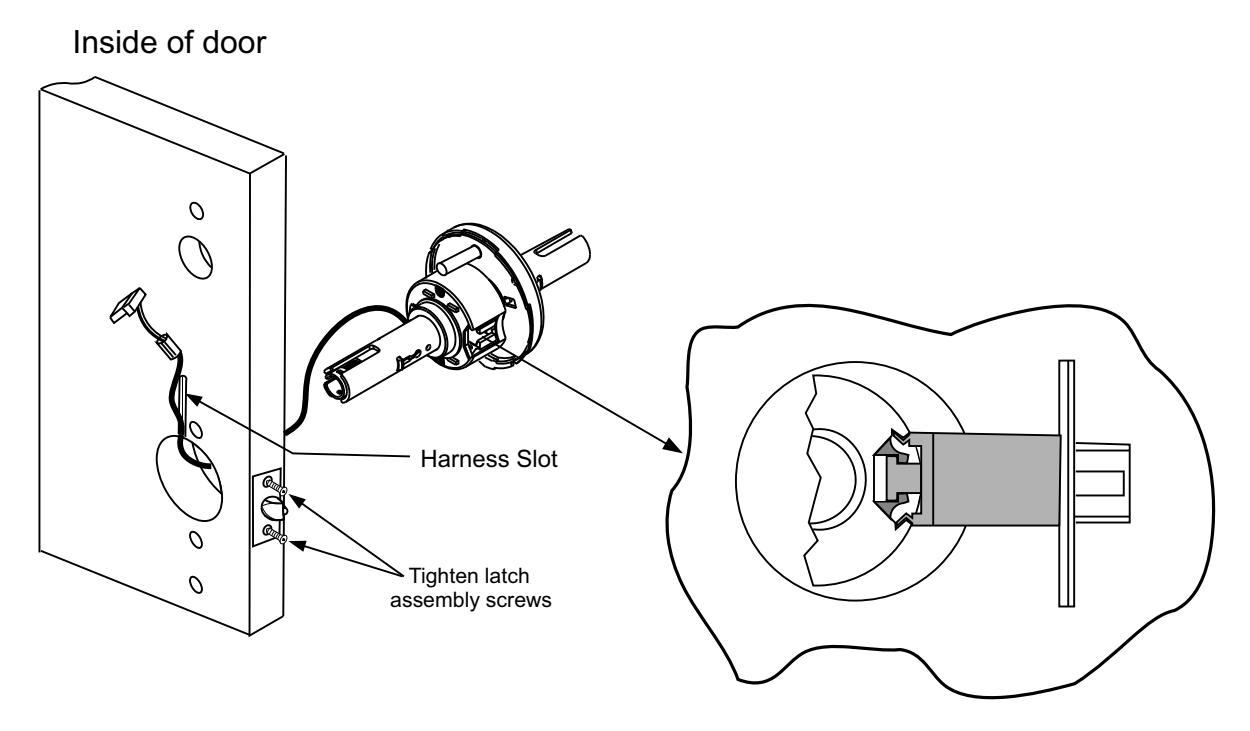
6 Ensure lock body wire harness is positioned in the vertical slot. Attach inside cassette housing and secure with screws.
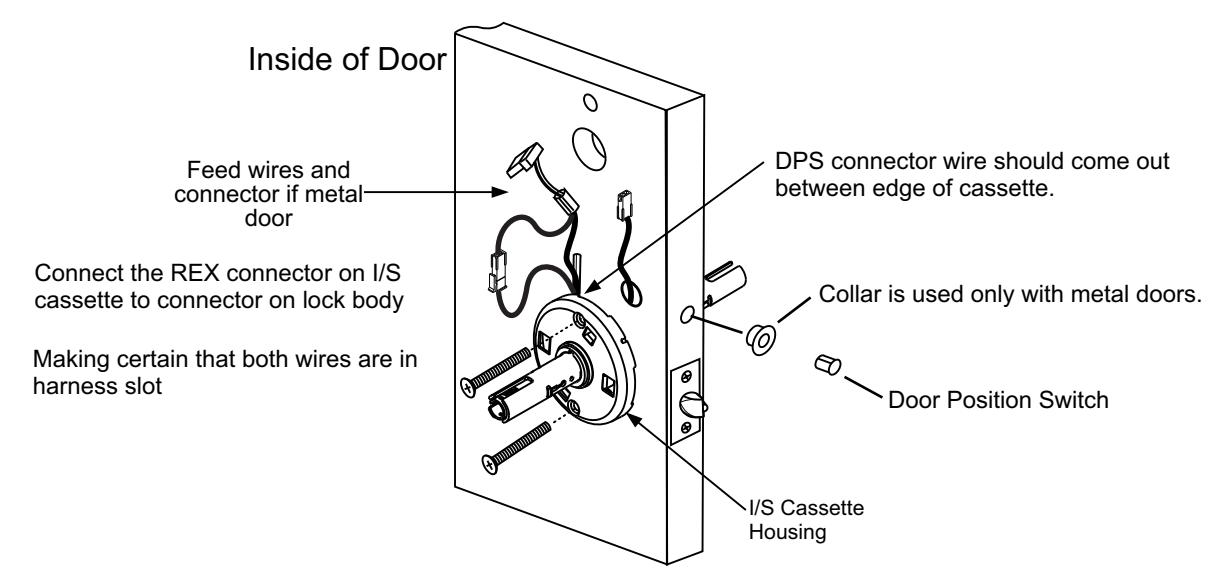
7 Install door position switch into hole on edge of door.

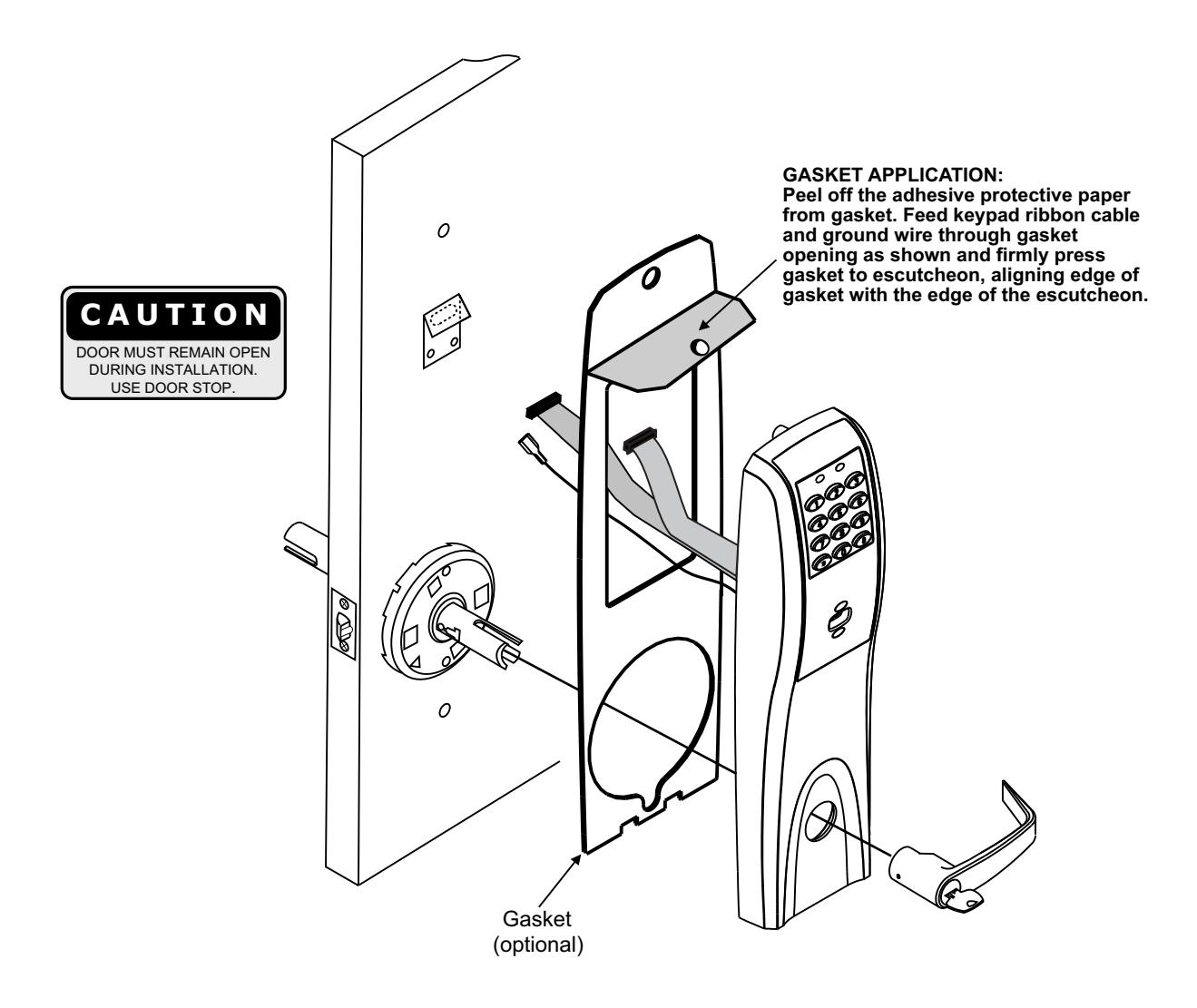
8 Installation of Outside Escutcheon
- 1A. For fire rated doors feed ribbon cable connector and ground wire from outside escutcheon through the fire stop plate.
- 1B. For non-fire rated door applications, optional gaskets may be used as a weather seal between the escutcheon and the door surfaces. An optional conduit is also available for further protection. Feed ribbon cable connector and ground through the conduit (if used).
- 2. Slide the outside escutcheon over the lock and hold the escutcheon to the door surface.

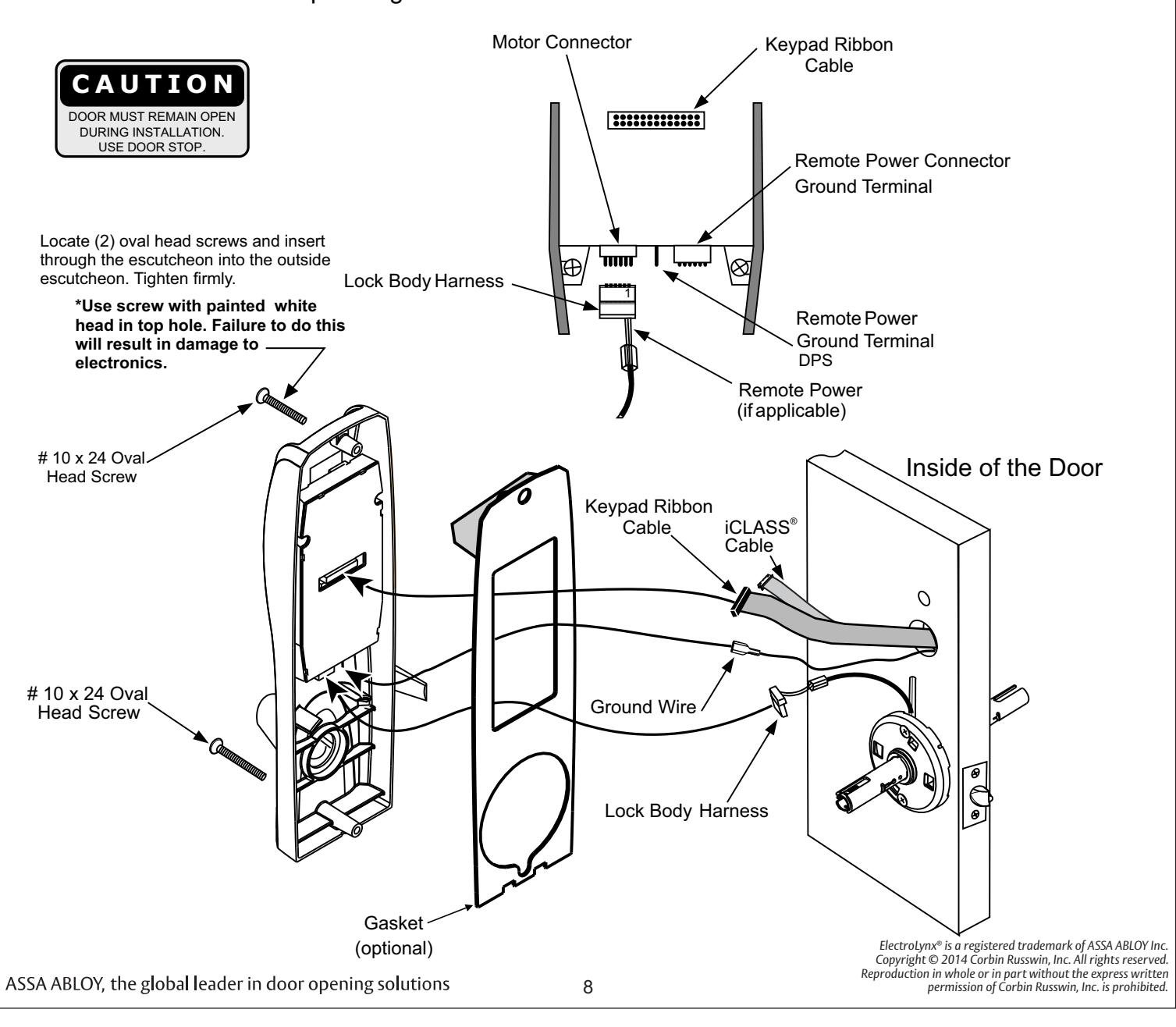
9 Installation of Inside Escutcheon and Electrical Connections
- 1. Remove black battery cover from the escutcheon with high security T20 Torx bit provided.
- 2. Connect ground wire to terminal, connect keypad ribbon cable to controller, connect lock body harness to motor connector, connect DPS, and connect remote power if applicable.
- 3. Feed all excess wire through inside door hole and/into inside escutcheon cavity, being careful not to pinch wires.
NOTE: Connectors go on only one way. Do not offset connectors and be sure they are completely seated.
4. Insert 2 #10 x 24 screws through top and bottom of inside escutcheon (use painted screw on top) and thread into outside escutcheon. Straighten escutcheons and tighten securely, being careful to avoid pinching wires.

10 Installation and removal of Lever and Standard Cylinder
| LEVER STYLE | REMOVAL | INSTALL |
|---|---|---|
| PLAIN LEVER | PUSH RELEASE TOOL | SLIDE LEVER OVER |
| RELEASE HOLE ASSEMBLY RELEASE TOOL |
Push release tool
Into release hole, Remove lever |
Slide lever over
Lever catch Pull on lever. Make sure lever will not pull off |
| CYLINDER LEVER | ROTATE KEY | INSERT KEY AND ROTATE |
| RELEASE HOLE ASSEMBLY RELEASE TOOL | Rotate key 45 clockwise (from shed position), Push in release tool into Release hole, remove lever | Insert key and rotate 45 (from Shed position), slide lever on Make sure lever will not pull off |
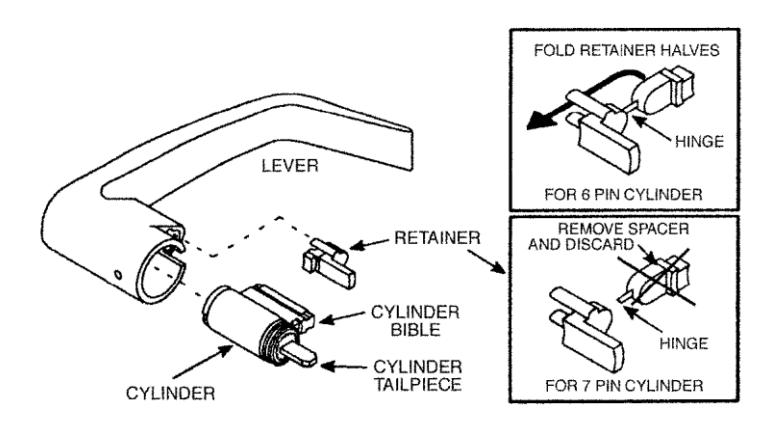
Install Standard Cylinder
Make sure lock is unlocked.
A. Make sure cylinder tailpiece is aligned in same direction as cylinder bible. Slide cylinder all the way into lever.
For 6 pin cylinder: Fold retainer at hinge and press fit retainer halves together as shown. For 7 pin cylinder: Break retainer at hinge and discard spacer section. Also remove black cylinder spacer from inside of chassis rollback for clearance.
Standard Cylinder Tailpieces
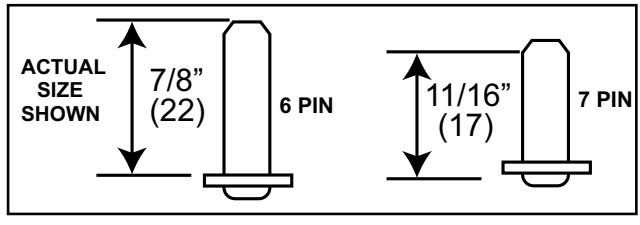
Dimensions are given in inches (mm).
ElectroLynx® is a registered trademark of ASSA ABLOY Inc. Copyright © 2014 Corbin Russwin, Inc. All rights reserved. Reproduction in whole or in part without the express written permission of Corbin Russwin, Inc. is prohibited.

4) Installation Instructions
-
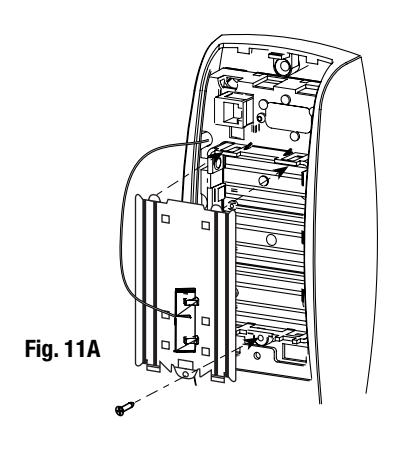
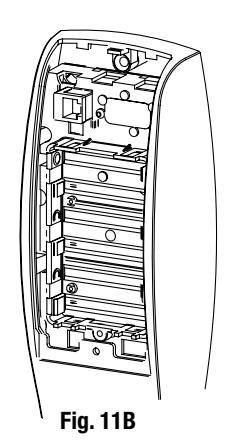
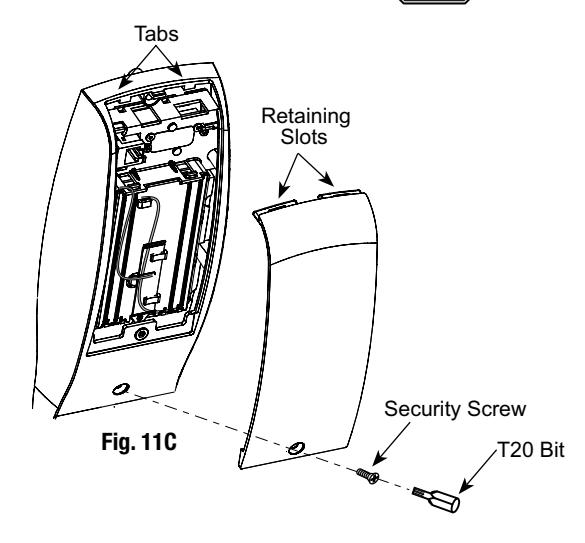
11 Installation (or Replacement) of Batteries, Battery Keeper and Cover
- 1. To install the batteries, first remove the battery cover using the T20 bit provided (Fig. 11C).
- 2. Unscrew the bottom screw of the battery keeper and remove the battery keeper, being careful not to break the tabs at top holding it in place. (Fig 11A)
- 3. Place (6) "AA" batteries in the compartment, being careful to align polarity properly (Fig. 11B)
- 4. Replace battery keeper being careful to engage tabs at top to hold it in place. (Fig 11A)
- 5. Attach battery cover to inside escutcheon making sure to line up tabs with retaining slots in battery cover.
- 6. Secure with the security screw and T20 bit. (Fig 11C)

5) IP1 (PoE) Installation Wiring
-
1. PIP (PoE) Installation Wiring:
-
PoE Frame harness assembly (From McKinney)
- PoE data hinge (U.S. Patent No. 7 ,824,200) (From McKinney)
-
PoE Frame harness assembly (From McKinney)
- PoE Door harness (From McKinney)
- Access 800 IP1 (PoE Lock)
- * Order of installation may vary. Refer to appropriate sections for instructions.
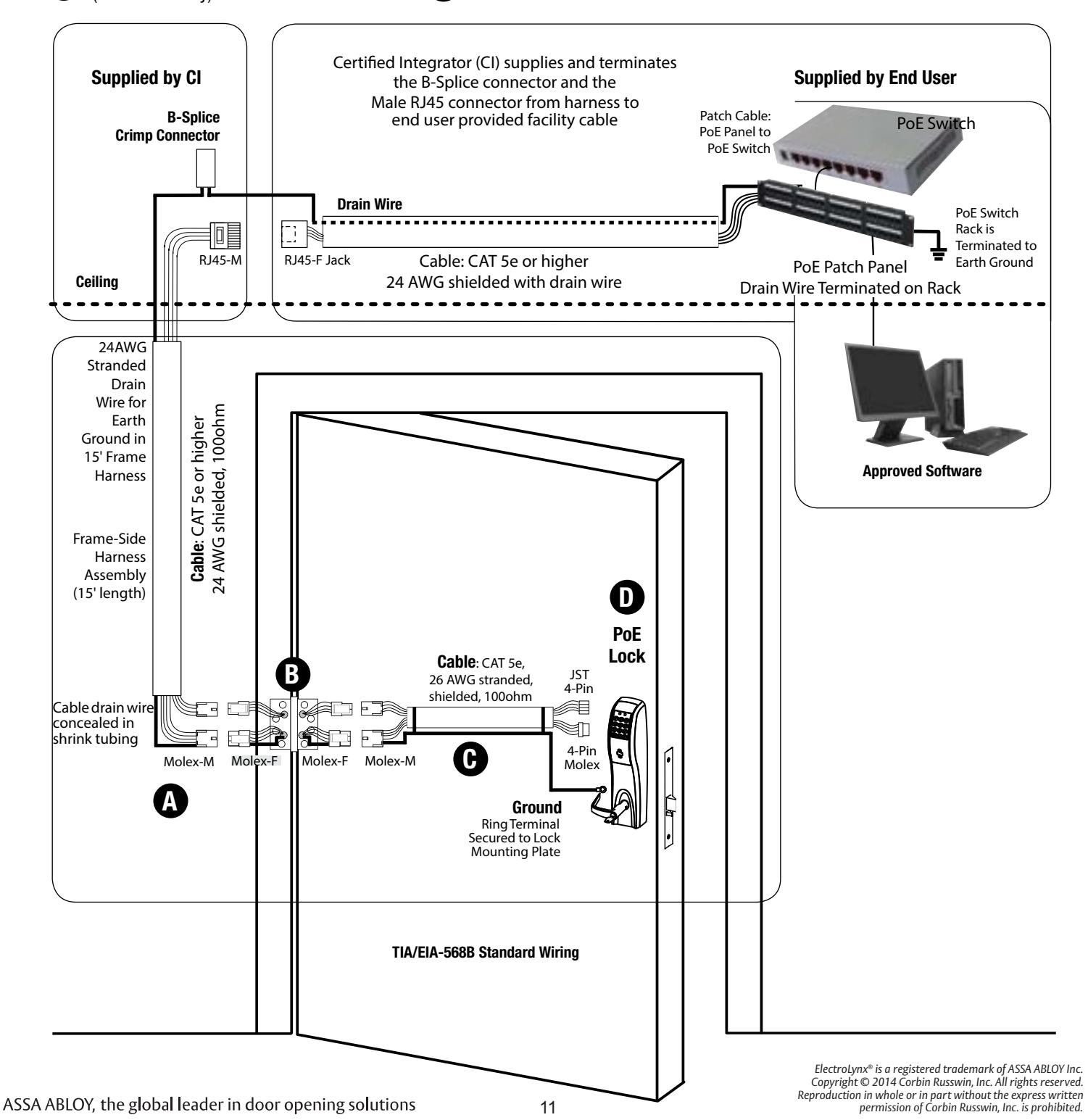

5) IP1 (PoE) Installation Wiring

Ceiling
24AWG Stranded Drain Wire for
Farth
Ground in
15' Frame
Frame-Side Harness Assembly
(15' length)
Cable drain wire concealed in shrink
tubing
Hinge-side harness connectors:4-pin male molex connector
Lock-side harness connectors:
Harness
Supplied by CI
B-Splice Crimp Connector
RJ45-N
Cable : CAT 5e or higher 24 AWG shielded, 1000hm
Components and wire harness supplied by McKinney: Suggested installation.
Cut end / ceiling-side PoE harness:
TIA/EIA-568B Standard Wiring
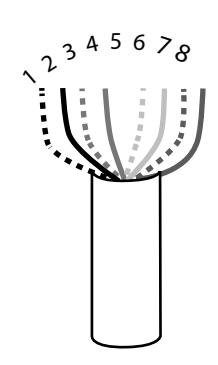
| Paiı | r Number | Wire | PIN |
|---|---|---|---|
| 1 | White/Blue | White/Blue | 5 |
| Blue | 4 | ||
| 2 | White/Orange | White/Orange | 1 |
| Orange | 2 | ||
| White/Creen | White/Green | 3 | |
| 3 | White/Green | Green | 6 |
| 4 | White/Brown | White/Brown | 7 |
| Brown | 8 |
Do not confuse pair numbers with pin numbers. A pair number is used for reference only (eg: 10Base-T Ethernet uses pairs 2 & 3). The pin numbers indicate actual physical locations on the plug and jack.
Hinge side of PoE harness:
- 1. Feed cut end of harness into hole on hinge-side through single access hole.
- 2. Push one of the connectors back through hole and feed into separate access hole.
Each of the hinge-side harness connectors should end up threaded through a different access hole and matched to the same size pin connector from the door harness:
- 4-pin male Molex connector.
- 6-pin male Molex connector with ground wire.
Notes:
- Connectors only go on one way. They cannot be plugged to incorrect position.
- Do not force and do not offset connectors.
- Be sure they are completely seated (flush).
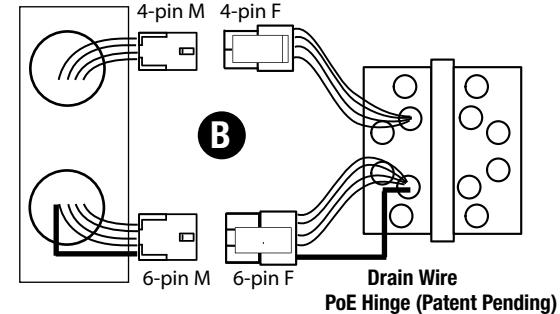
Frame
Ring terminal
• (2) 4-pin connectors
6-pin male molex connector with ground wire

5) IP1 (PoE) Installation Wiring
Hinge Installation C
Order of installation may vary. Refer to appropriate sections for instructions.
Hinge-side harness connectors:
- 4-pin male Molex connector
- 6-pin male Molex connector with ground wire
Lock-side harness connectors:
- Ring terminal
-
(2) 4-pin connectors:
- 4-pin Molex connector
- 4-pin connector
Notes:
- Connectors go on only one way. They cannot be plugged to incorrect position.
- Do not force and do not offset connectors.
- Be sure they are completely seated (flush).
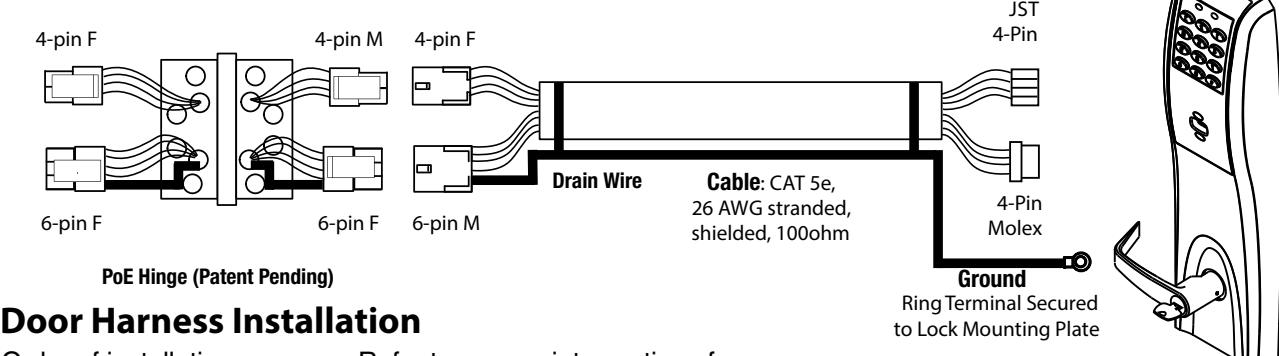
D
Order of installation may vary. Refer to appropriate sections for instructions.
- 1. Prop door open.
- 2. Tape the two lock-side 4-pin connectors to the ring terminal.
- 3. Using the ring terminal, carefully fish the assembly through the door channel to the lock.
-
4. Remove tape from ring terminal and door harness connectors. Hinge-side harness connectors:
- 4-pin male Molex connector
- 6-pin male Molex connector with ground wire
Lock-side harness connectors:
- Ring terminal
-
(2) 4-pin connectors:
- 4-pin Molex connector
- 4-pin connector
Notes:
- Connectors go on only one way. They cannot be plugged to incorrect position.
- Do not force and do not offset connectors.
- Be sure they are completely seated (flush).
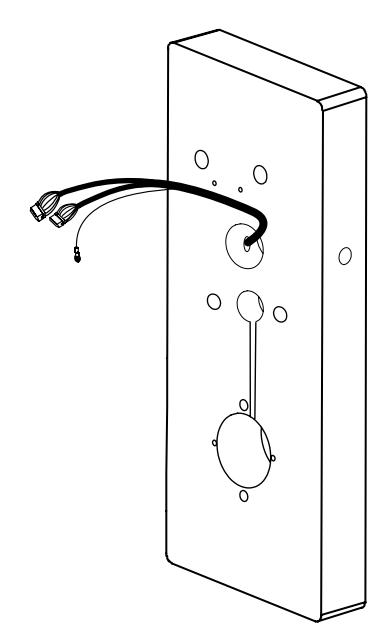
ElectroLynx® is a registered trademark of ASSA ABLOY Inc. Copyright © 2014 Corbin Russwin, Inc. All rights reserved. Reproduction in whole or in part without the express written 13 permission of Corbin Russwin, Inc. is prohibited.

Hardwiring options include one or a combination of the following: M861 Forced Door Propped Door Option, M35 Power/Remote Unlocking Harness
6.1) Important
- 1. Caution: Disconnect all input power before beginning installation to prevent electrical shock and equipment damage.
- 2. Installer must be a trained, experienced service person.
- 3. All wiring must comply with applicable local electrical codes, ordinances and regulations.
6.2) Installation Notes
- ® 1. With new applications, an ElectroLynx door harness with 8 and 4 pin connectors will be preinstalled inside door by ASSA ABLOY door manufacturer when specified during ordering process.
- ® 2. Wiring to pigtail harness is per facility wiring requirement. ElectroLynx connector terminations and wire colors all match.
- ® 3. If door does not have an ElectroLynx type door harness, cut connectors off product and hard wire, or consult factory for appropriate mating harness.
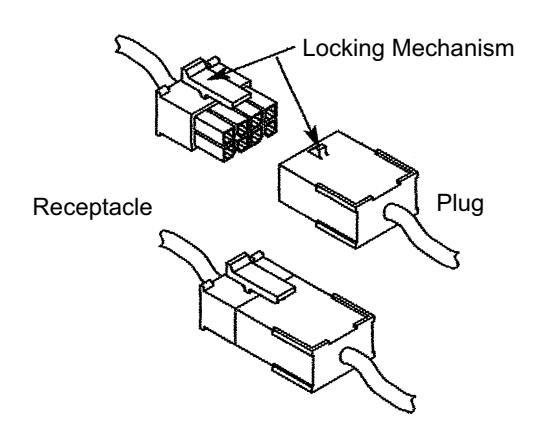
® 6.3) ElectroLynx Connector System Notes:
The system is designed to be installation friendly with pluggable connectors from the electric hinge through the door to the rail. The only wiring required is to the loose wires on the pigtail harness assembly on the frame side of the electric hinge.
IMPORTANT:
The plug and receptacle connectors are designed to mate and lock together as shown in the figure. Plug the connectors into each other with the locking mechanism aligned as indicated. Do NOT Force connectors on any other way.

As part of their promise to provide innovative, fast and effective high security solutions to their customers, certain ASSA ABLOY Group brands offer ® ElectroLynx , a universal quick-connect system that simplifies the electrification of the door opening.

6.4) M861 Quick Code, Forced Door Propped Door Option
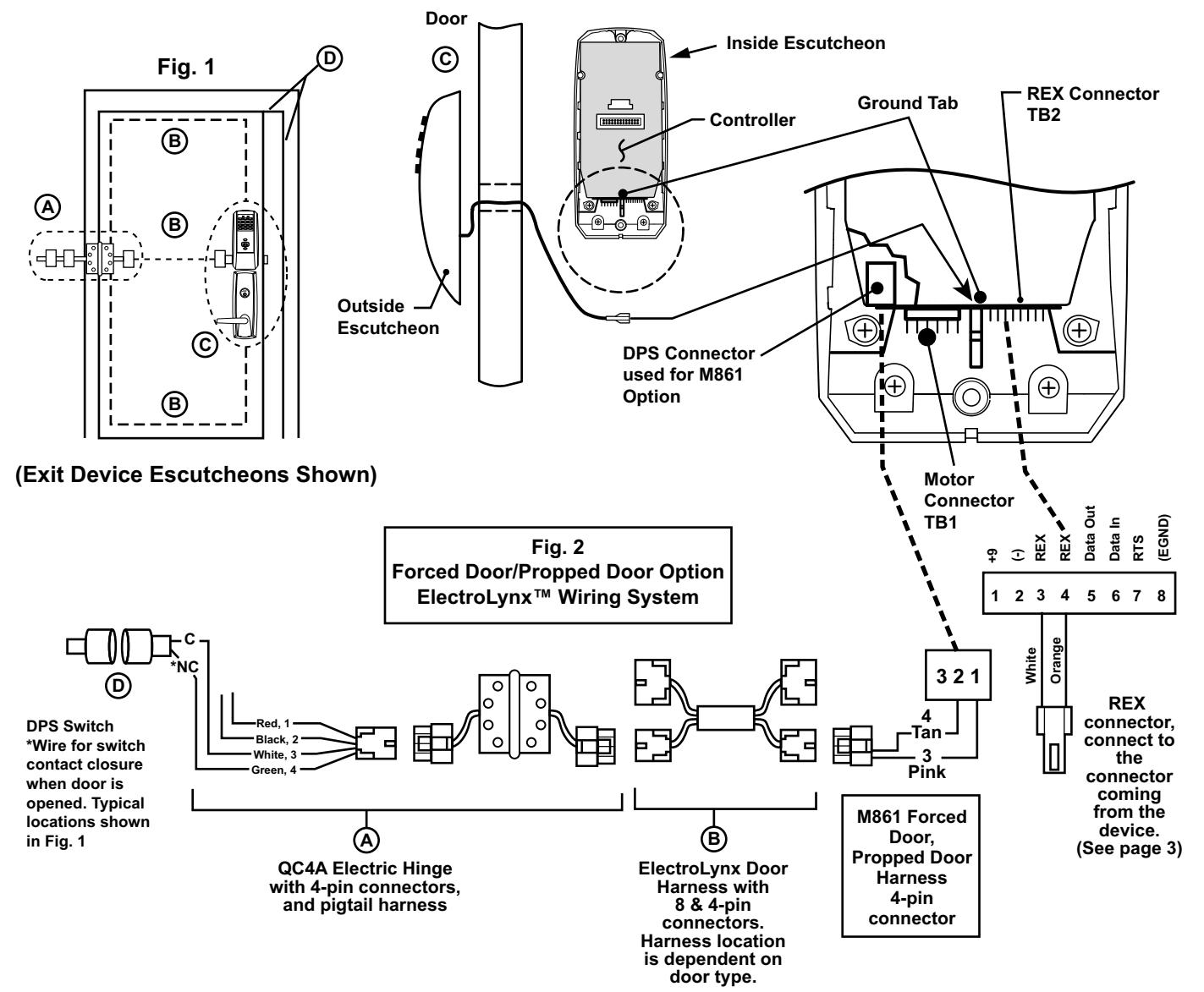
Installation:
-
1. ElectroLynx System Wiring Instructions (refer to Fig. 1 and Fig. 2) ®
- a. Look for the mating part on ASSA ABLOY doors and frames. Then plug in all connectors as shown in Fig. 2 during product installation.
- b. Hard wire DPS switch as shown.
-
2. Non-ElectroLynx System Wiring Instructions (refer to Fig. 1 and Fig. 2) ®
- a. Cut the 4-pin connector off the Forced Door Propped Door harness and hard wire ® to ElectroLynx two conductor door harness.
- b. Hard wire door harness to power transfer device.
- c. Hard wire DPS switch to power transfer device.

6.5) M35 Power/Remote Unlocking Harness
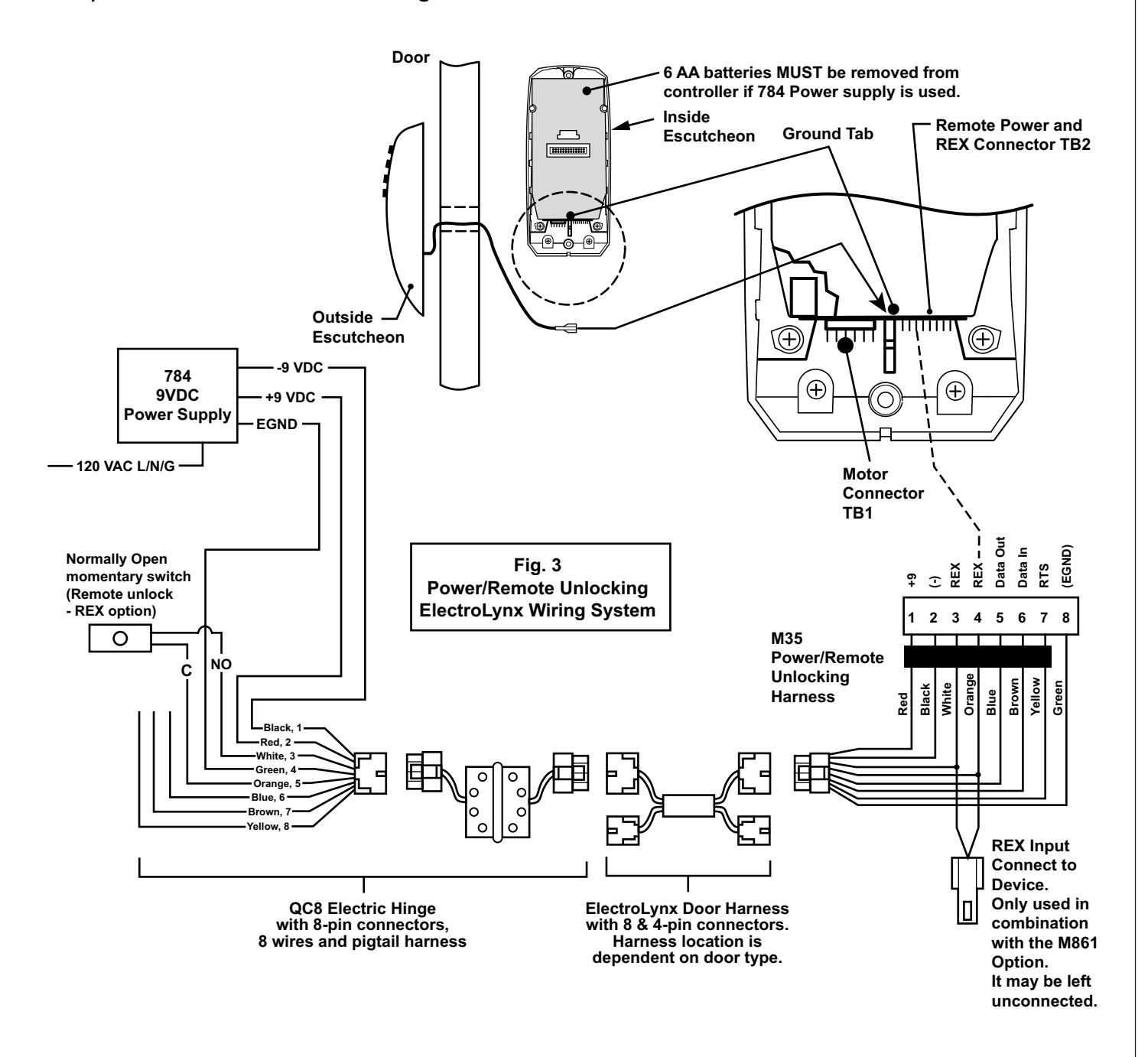

Installation:
-
1.
® ElectroLynx System Wiring Instructions (refer to Fig. 1 and Fig. 3)
- a. Look for the mating part on ASSA ABLOY doors and frames. Then plug in all connectors as shown in Fig. 3 during product installation.
- b. Hard wire 784 power supply as shown.
-
2.
® Non-ElectroLynx System Wiring Instructions (refer to Fig. 1 and Fig. 3)
- a. Cut the 8-pin connector off the Power/Remote Unlocking harness and hard wire ® to non-ElectroLynx door harness. Remote power requires three conductors and remote unlock requires two conductors.
- b. Hard wire door harness to power transfer device.
- c. Hard wire 784 power supply as shown.

6.6) M35 Power/Remote Unlocking with M861 Propped Door, Forced Door.
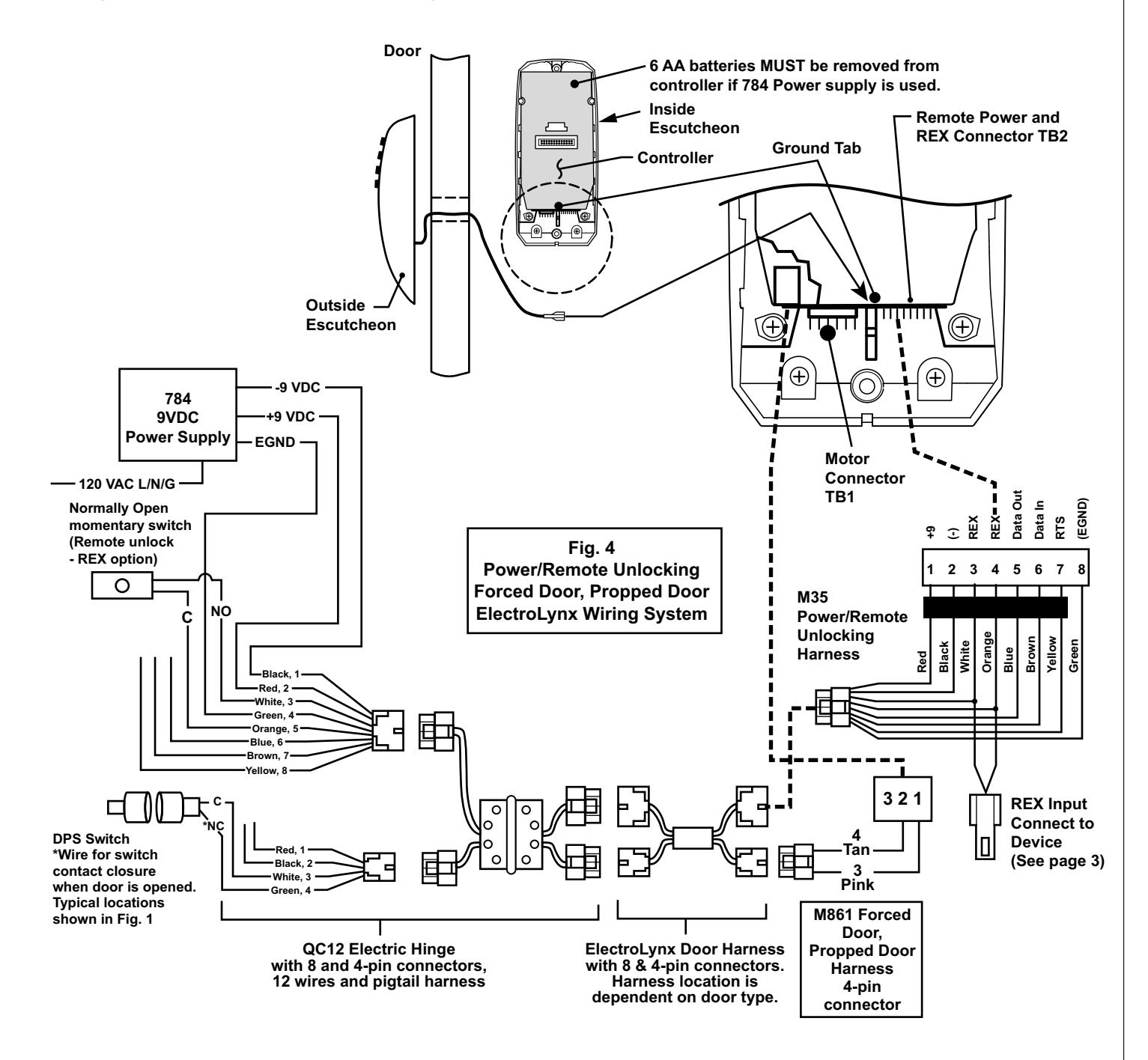

Installation:
-
® 1. ElectroLynx System Wiring Instructions (refer to Fig. 1 and Fig. 4)
- a. Look for the mating part on ASSA ABLOY doors and frames. Then plug in all connectors as shown in Fig. 4 during product installation.
- b. Hard wire forced/propped, hard power and/or remote unlock (REX) as shown.
-
® 2. Non-ElectroLynx System Wiring Instructions (refer to Fig. 1 and Fig. 4)
- a. Cut the 8-pin connector off the Power/Remote Unlock harness and hard wire ® to non-ElectroLynx door harness. Remote power requires three conductors and remote unlock requires two conductors.
- b. Hard wire door harness to power transfer device.
- c. Hard wire forced/propped, hard power and/or remote unlock (REX), as shown.

7) Operational Check
Lock Operational Check For devices with cylinders:
- 1. Insert key into cylinder and rotate.
- 2. The key will retract the latch.
- 3. Inside lever* retracts latch.
- Use proximity card or PIN code set up with lock configuration tool. This should unlock outside lever and allow latch to be retracted. Please see Network & Lock Configuration Tool User Manual (WFMN1) for more information. 4.