Corbin Russwin Access 800 AC2 ML20800 Series Installation Instructions_FM224
Open the original PDF document
View PDFAccess 800°
Installation Instructions For ML20800 TCAC2 Series Mortise Lockset
FM224 10/18

ASSA ABLOY
In U.S.: Corbin Russwin, Inc. 225 Episcopal Road Berlin, CT 06037 USA www.corbinrusswin.com
In Canada: ASSA ABLOY Door Security Solutions Canada 160 Four Valley Drive Vaughan, Ontario, Canada L4K4T9 www.assaablov.ca
Attention Installer
Please read these instructions carefully to prevent missing important steps.
Please Note: Improper installation may result in damage to the lock and void the factory warranty.
Important: The accuracy of the door preparation is critical for proper functioning and security of this lock.
Misalignment can cause premature wear and a lessening of security.
For installation assistance contact Corbin Russwin Inc., at 1-800-810-WIRE (9473)

Table of Contents
| 1) Warning | 2 |
|---|---|
| 2) General Description/Specifications/Features | 3 |
| 3) ML20800 TCAC2 Series Product Illustration | 4 |
| 4) Installation Instructions | 5-12 |
| 5) Installation of RF Technology Lock | 13 |
| 6) Operational Check | 14 |
| 7) ML20800 TCAC2 Hard Wiring Instructions for Mortise | 15 |
| 7.1) Important | 15 |
| 7.2) Installation Notes | 15 |
|
®
7.3) Electrolynx Connector System |
15 |
| 7.4) ML20800 TCAC2 Series Illustration with M861 Harness | 16 |
| 7.5) M861 Forced Door Propped Door Option | 17 |
| 7.6) M35 Power/Remote Unlocking | 18 |
|
7.7) M35 Power/Remote Unlocking with M861 Forced
Door Propped Door Option |
19 |
1) Warning
Changes or modifications to this unit not expressly approved by the party responsible for compliance could void the user's authority to operate the equipment.
This device complies with Part 15 of the FCC Rules. Operation is subject to the following two conditions: (1) this device may not cause harmful interference, and (2) this device must accept any interference received, including interference that may cause undesired operation.
Note: This equipment has been tested and found to comply with the limits for a Class B digital device, pursuant to Part 15 of the FCC Rules. These limits are designed to provide reasonable protection against harmful interference in a residential installation. This equipment generates, uses and can radiate radio frequency energy and if not installed and used in accordance with the instructions, may cause harmful interference to radio communications. However, there is no guarantee that the interference will not occur in a particular installation. If this equipment does cause harmful interference to radio or television reception, which can be determined by turning the equipment off and on, the user is encouraged to try to correct the interference by one or more of the following measures:
- Reorient or relocate the receiving antenna
- Increase the separation between the equipment and receiver
- Connect the equipment into an outlet on a circuit different from that to which the receiver is connected
- Consult the dealer or an experienced TV technician for help
This Class B digital apparatus complies with Canadian ICES-003.
Warning: To comply with "Fire Listed" doors, only alkaline batteries must be used.

2) General Descriptions/ Specifications/ Features
General Description
The Access 800 Mortise Lock is designed for areas which require stand-alone authorized entry. It is a self-contained microprocessor-controlled keypad with non-volatile memory. The keypad will hold a total of 100 (M800) or 2000 (M801, M802, M803, M804, M805, M806) different user codes. User codes "01", "02" and "03" are utilized for Master, Emergency and Supervisory Codes respectively. This product is operated by six (6) "AA" alkaline batteries. Corbin Russwin locks are designed with quality components to provide high security, performance and durability.
Specifications
- Case 12 gauge heavy duty wrought steel Consult factory
- U.L. Listed (3 hr.)
- Latch Stainless steel Locking side controlled by any combination of • Deadbolt - Stainless steel keypad, proximity RF technology or key overide
- Auxiliary Latch Stainless steel, non handed Non-locking side retracts latch and deadbolt
- Handed Easily field reversible without Locks furnished for 1-3/4" doors. Can be disassembling the lock body furnished for other door sizes upon request.
Features
- External remote "request to enter" connector may start with zero.
- Master, Emergency or Supervisory code will Entry of a programmable number of wrong
- Programming done at the keypad (Except programmable number of seconds M802 & M805) or with a PDA using Yellow LED on solid Accessware™ with Access HH application Software.
- M801 M806 allows last 2000 transactions to be output to a PC via a PDA and Accessware™ software
- Low battery alert–4 chirps after standard Operates utilizing any two to six digits per user code entry code. Digits may be repeated and codes
-
unlock door when low battery has expired User Codes disables all codes for a
- M800 allows last 15 transactions to be output to portable printer via infrared link

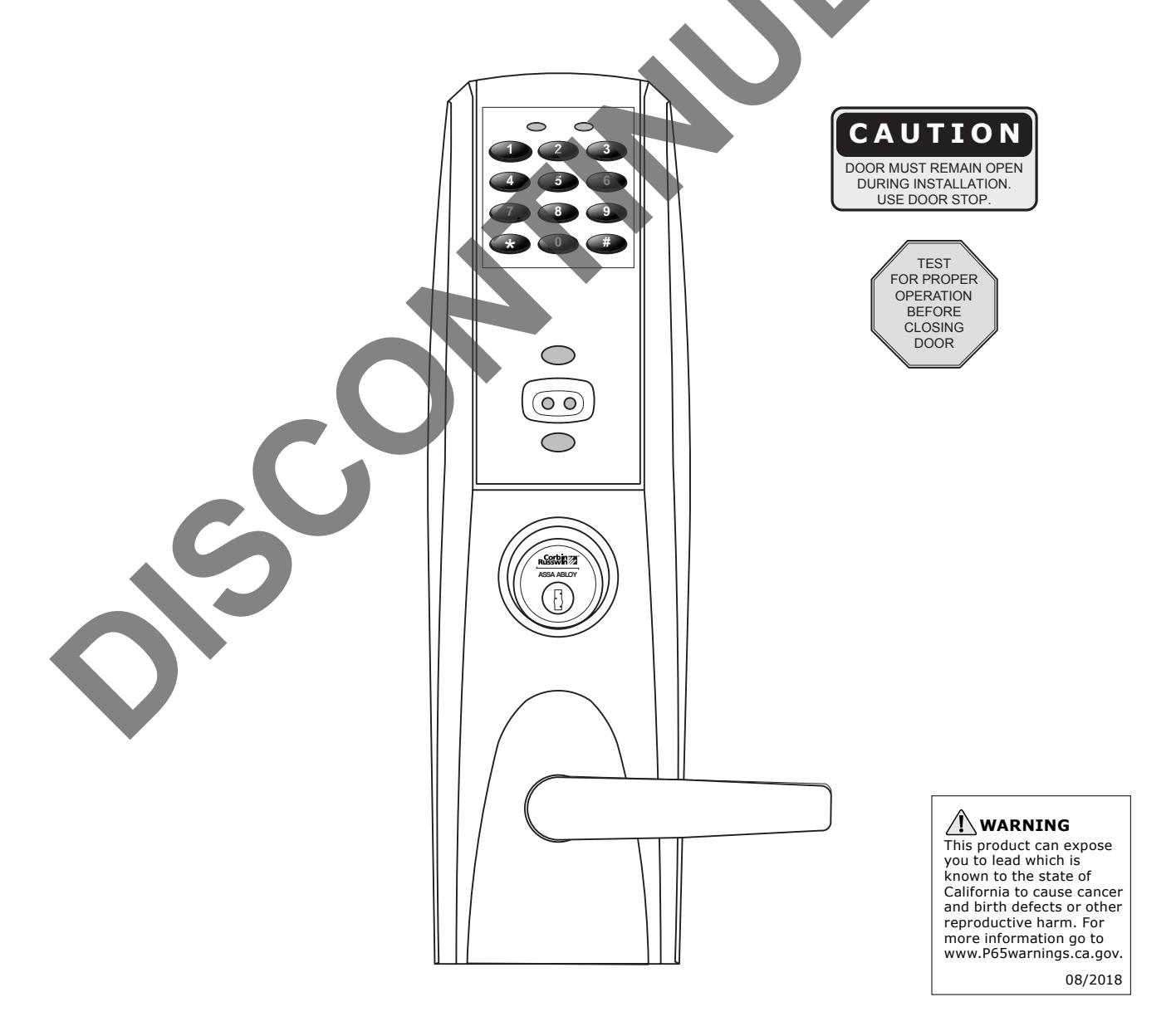
3) ML20800 TCAC2 Series Product Illustration

Verify hand and bevel of door. Illustrations shown are as viewed from the outside or secure side of opening. 1
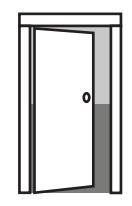
Left Hand Hinges Left. Open Inward. "LH"
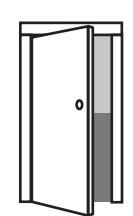
Left Hand Reverse Bevel Hinges Left. Open Outward "LHR"
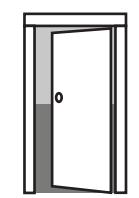
Right Hand Hinges Right. Open Inward. "RH"
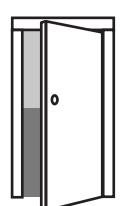
Right Hand Reverse Bevel Hinges Right. Open Outward "RHR"
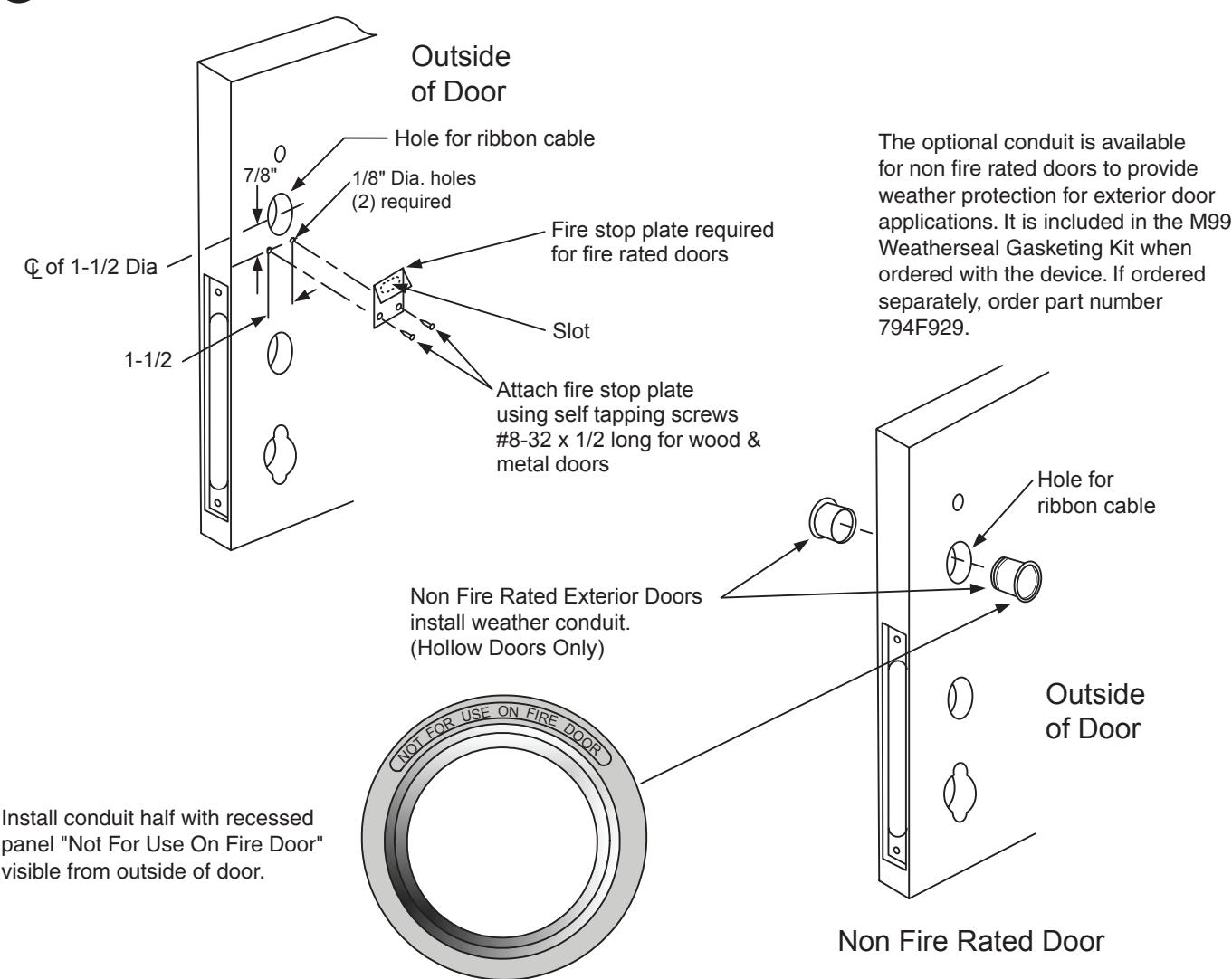
2 Prep door according to supplied door marker.


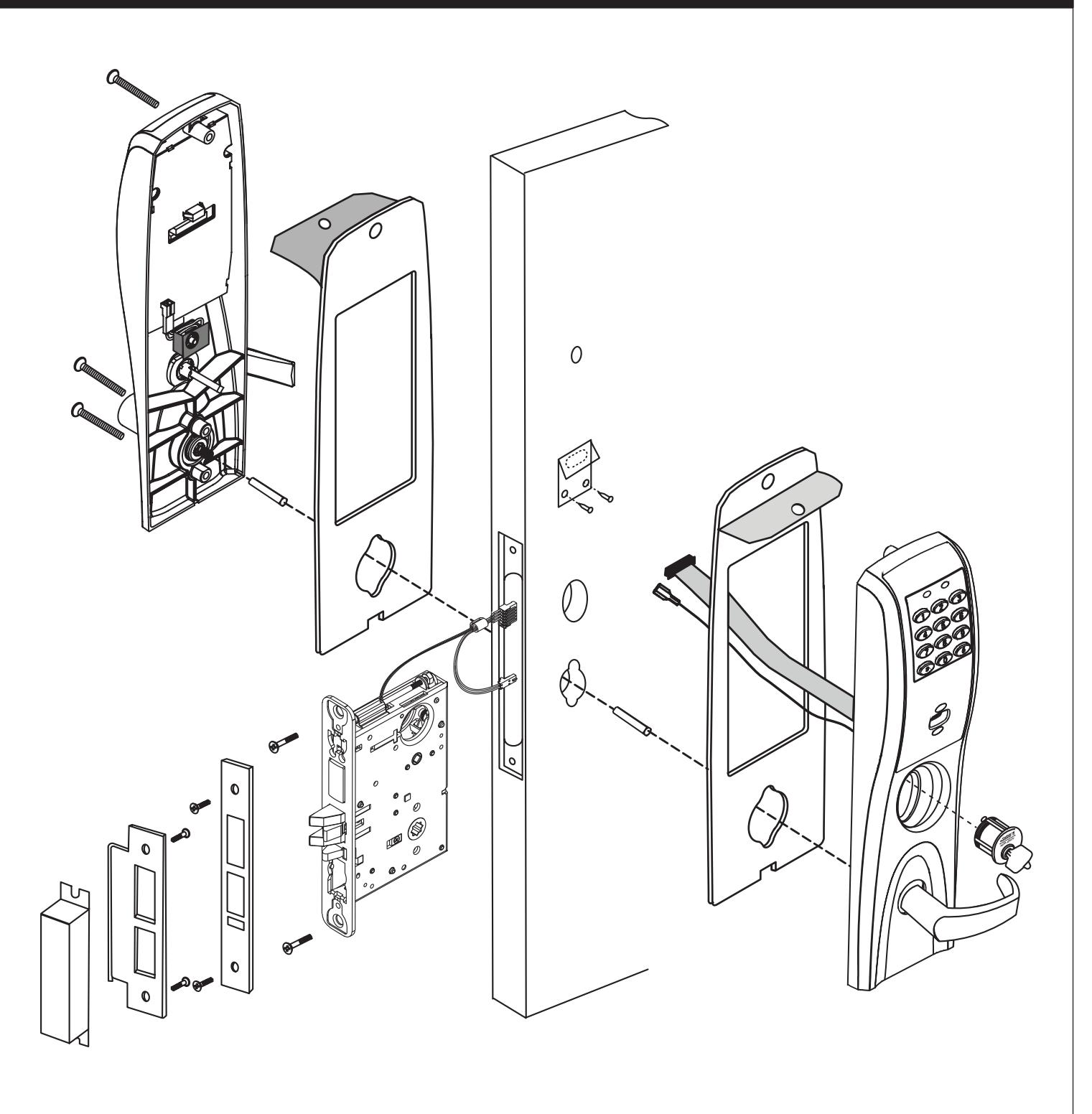
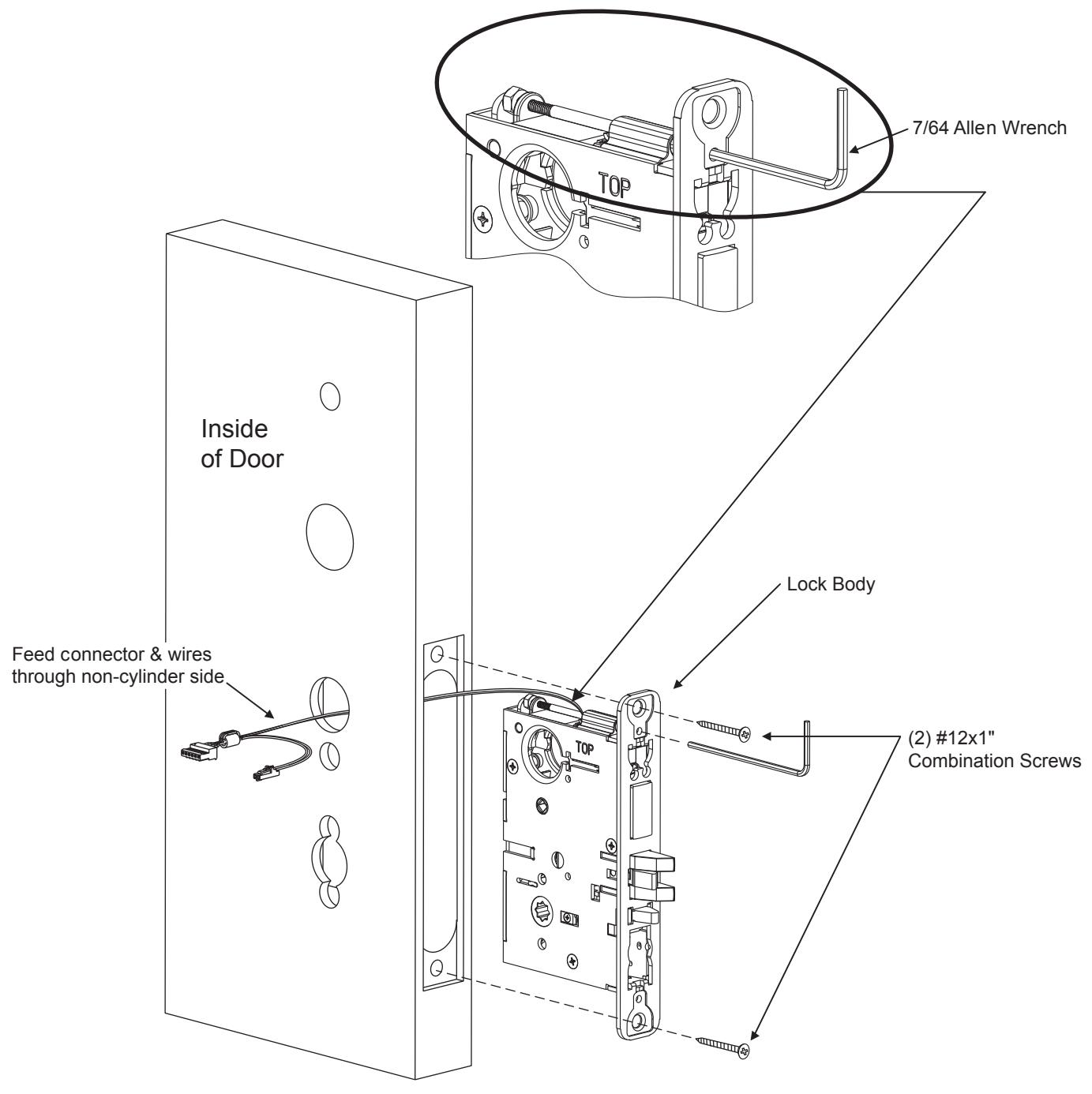
Lock Assembly Instructions 4
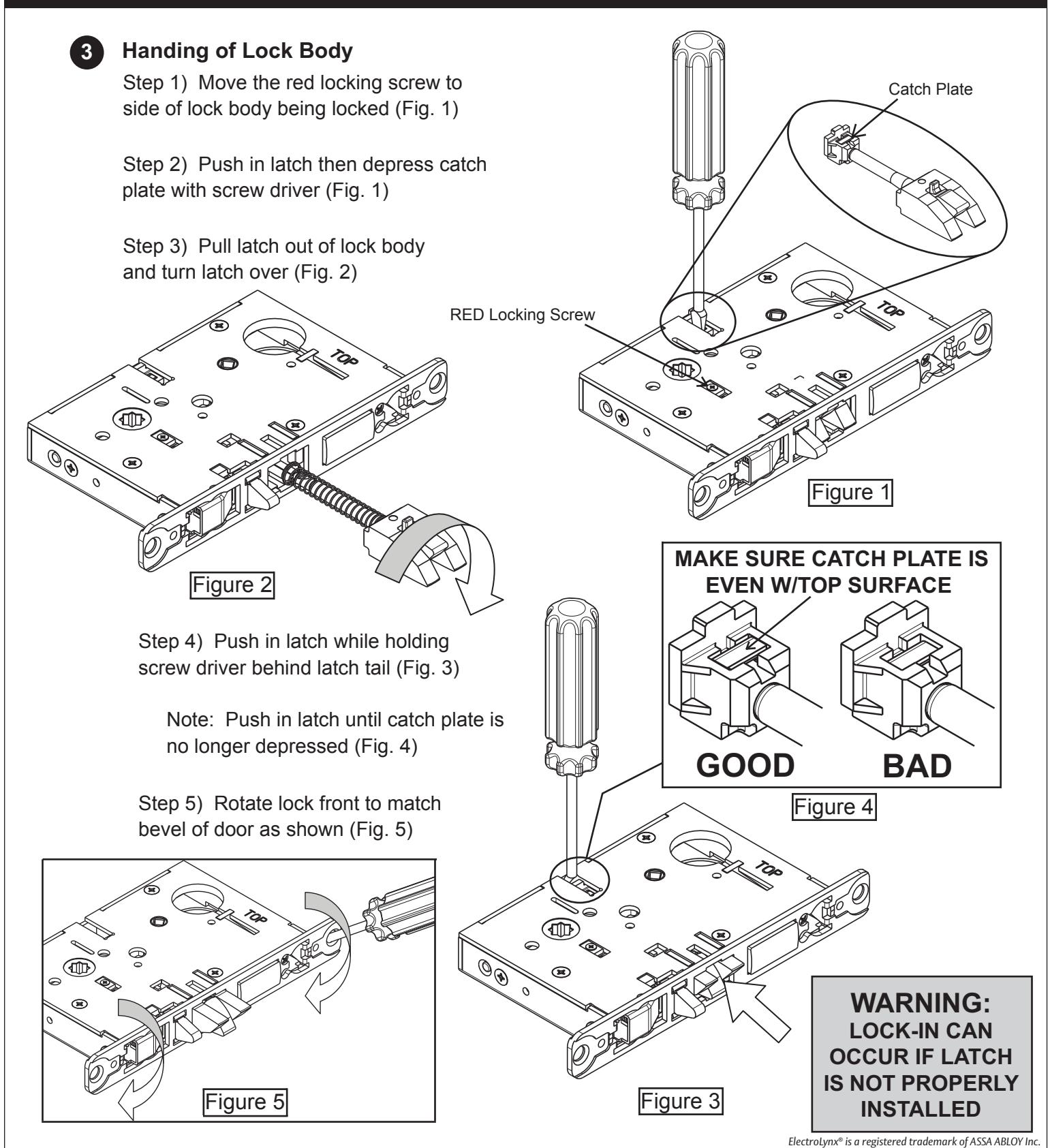
Align bevel accordingly. Engage 7/64 Allen wrench onto cap screw required for Step 5:3 on page 8. Feed connector and wires through non cylinder side of door. Insert lock body into mortise cutout in door and hold loosely in place with (2) #12x1" lock body screws.

5 Installation of Outside Escutcheon
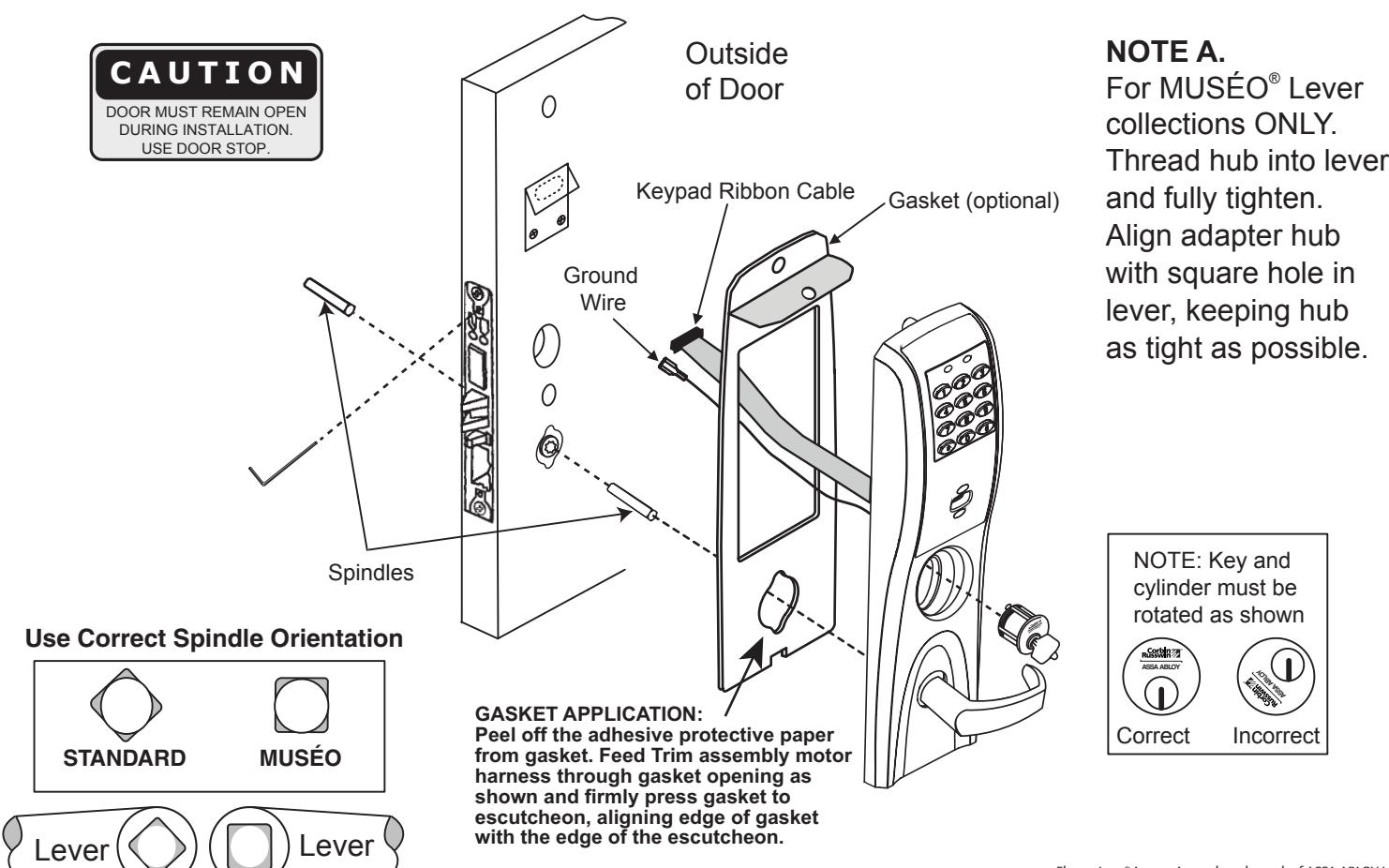
- 1. For exterior applications, an optional M99 Weatherseal Gasketing Kit can be ordered when a device is ordered. This kit includes gaskets and a conduit. When ordering the kit separately, order part number 794F929. The gaskets may be used as a seal between the escutcheon and the door surfaces.
- 2A. For fire rated doors, feed ribbon cable connector and ground wire from outside escutcheon through the fire stop plate.
- 2B. For non-fire rated doors, feed ribbon cable connector and ground wire from outside escutcheon through weather seal gasket (if used), then conduit sleeve in door (not shown).
- 3. With outside lever horizontal, insert mounting posts into the door. Make certain the lever spindle is properly engaged in lock. (see diagram and Note A. below) Screw cylinder into mortise lock, ensuring the cylinder orientation is in the correct position (see diagram below) . Using the 7/64 allen wrench provided, hand tighten (5-10 in. lbs.) the cap screw to prevent unscrewing of the cylinder. Turn the key to make certain that the locking mechanism (latch, deadbolt, key) functions correctly. Tighten (2) #12 x 1" lock body screws. Remove allen wrench.

6 Installation of Inside Escutcheon
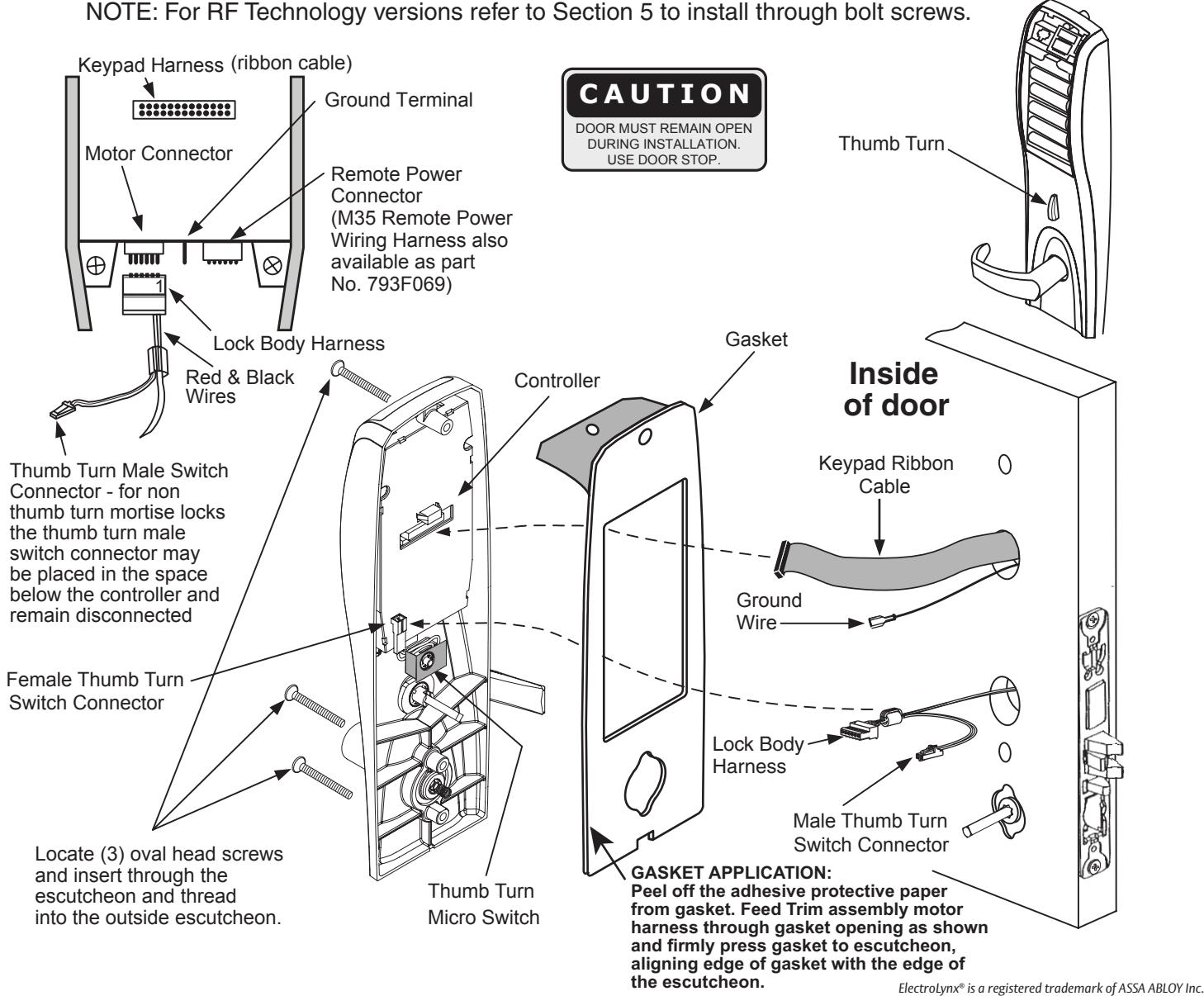
NOTE: Connectors go on only one way. Do not offset connector and be sure they are completely seated. 1. Connect ground wire to ground terminal, keypad ribbon cable connector to controller, and lock body harness to motor connector. If you have a thumb turn, connect the male thumb turn switch connector to the female thumb turn switch connector.
- 2. Align thumb turn to the vertical position.
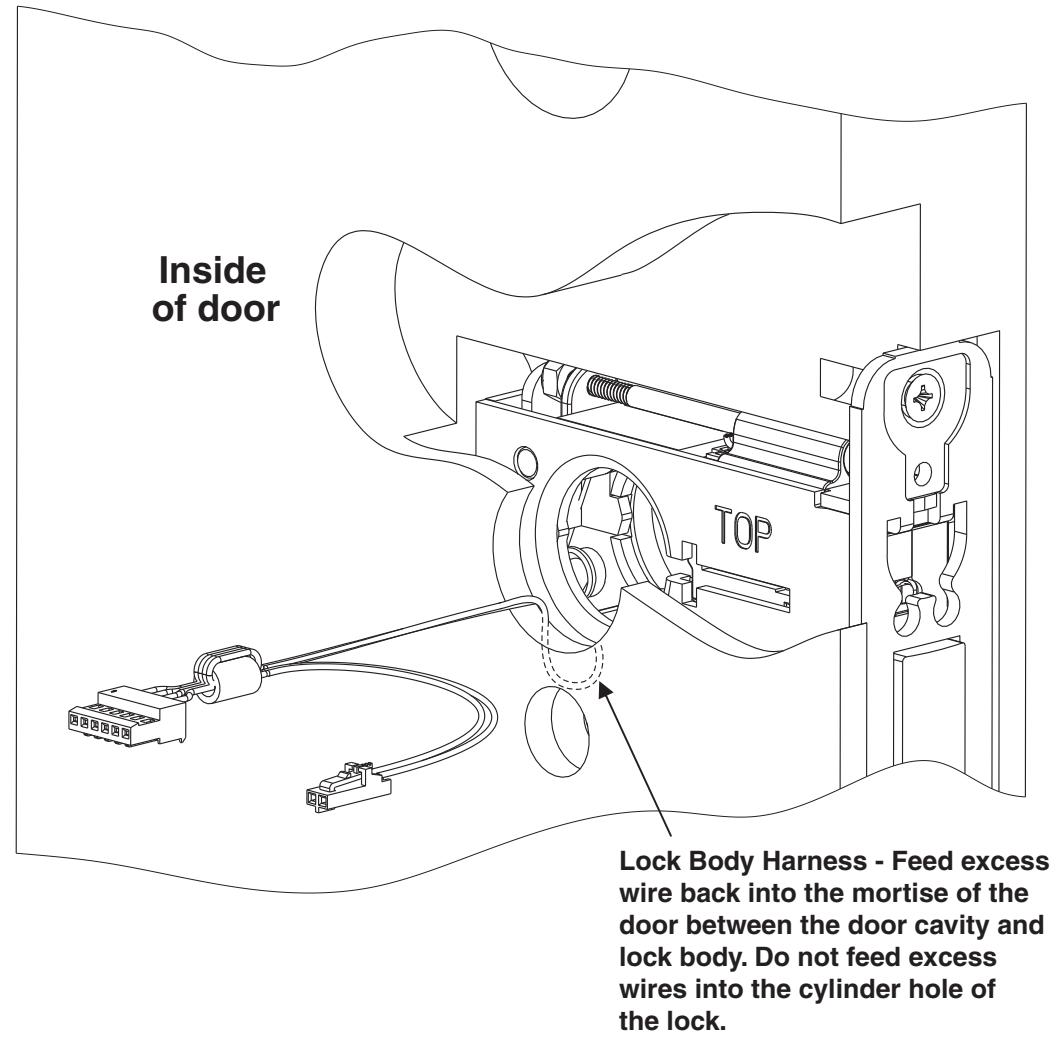
- 3. Feed excess lock body harness wire back into the mortise of the door between the door cavity and lock body, making sure no excess wire enters the cylinder hole of the lock body. (see diagram page 8) Push excess keypad ribbon cable into the ribbon cable hole.

6 Installation of Inside Escutcheon (continued)
CAUTION: Do not allow lock body harness wires to enter cylinder hole in lock body. Wire damage and/or malfunction of the lock may occur.
- 1. Turn inside lever to the horizontal position and rotate the thumb turn to the vertical position. Slide onto spindle halfway. With inside escutcheon resting on spindle, be certain that all keypad ribbon cable will remain inside ribbon cable hole, and that ground wire will not get pinched once escutcheon is mounted. Escutcheon will not fit flush on door otherwise.
- 2. Insert 3 #10-24 screws through inside escutcheon and thread loosely into outside escutcheon. Check operation of both inside and outside levers and make sure the thumb turn and key still operate the latch and deadbolt correctly. If lock function is satisfactory, fully tighten the bottom two screws. Check operation of both levers again. If levers move freely, tighten top screw. If levers do not move freely, loosen bottom screws and realign the escutcheons until proper operation is obtained.

7 Installation of Armored Front Plate
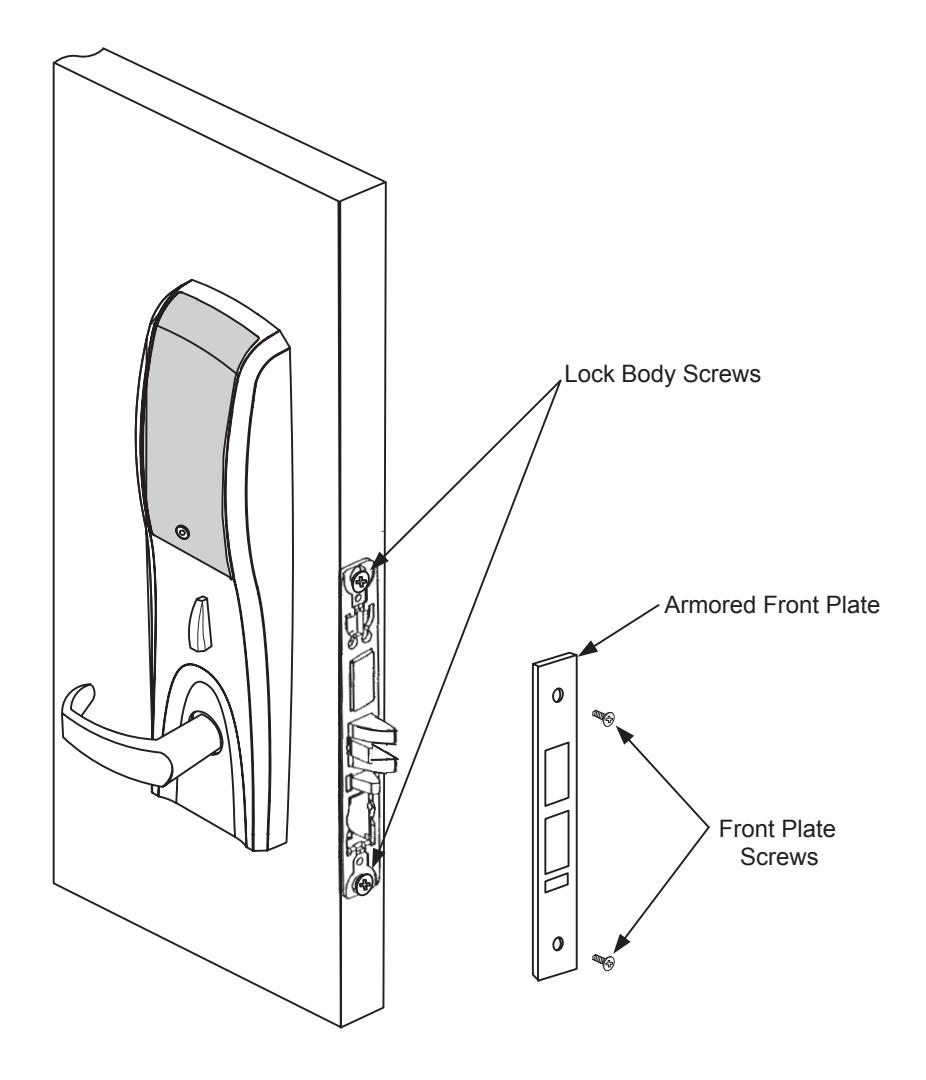
1. Install armored front plate using two #8-32 x 1/4" screws provided.

Battery Installation 8
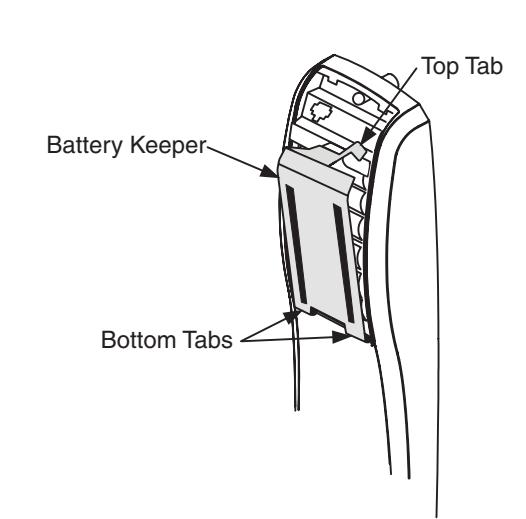
- 1. Remove battery keeper by lifting top tab and pulling away from the unit.
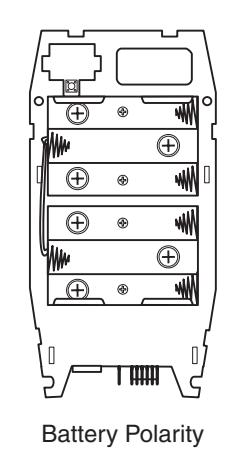
- 2. Install (6) AA Batteries into controller compartment being careful to align +/- polarity properly.
- 3. Install battery keeper by first inserting bottom tabs in bottom slots of controller. Lift the top tab over batteries and snap into position.
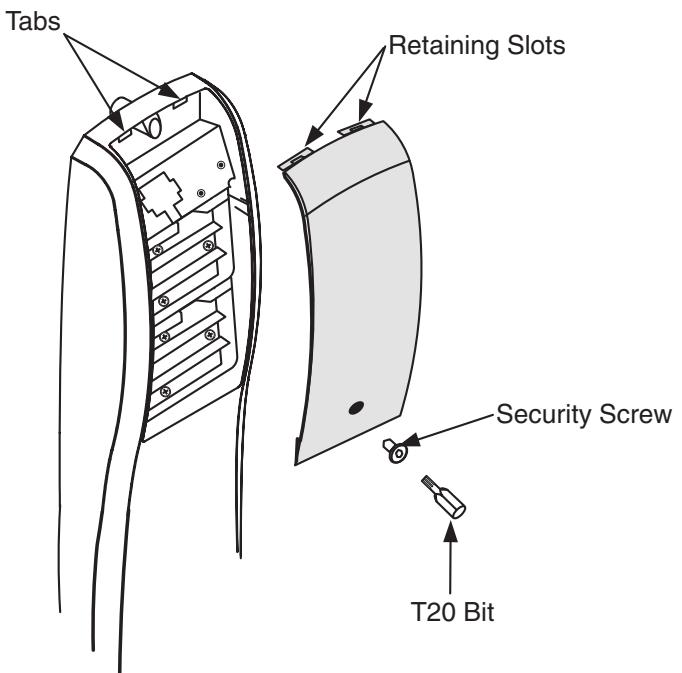
- 4. Attach battery cover to inside controller escutcheon making sure to line up tabs with retaining slots in battery cover. Secure with security screw using security T20 bit.

5) Installation of RF Technology Lock
The RF Technology Lock (M804, M805, M806) is installed as described in section 4 with the following exceptions:
- Installation of the top through-bolt screw
- Removal procedure for the battery keeper
1. Installation of the top through-bolt screw:
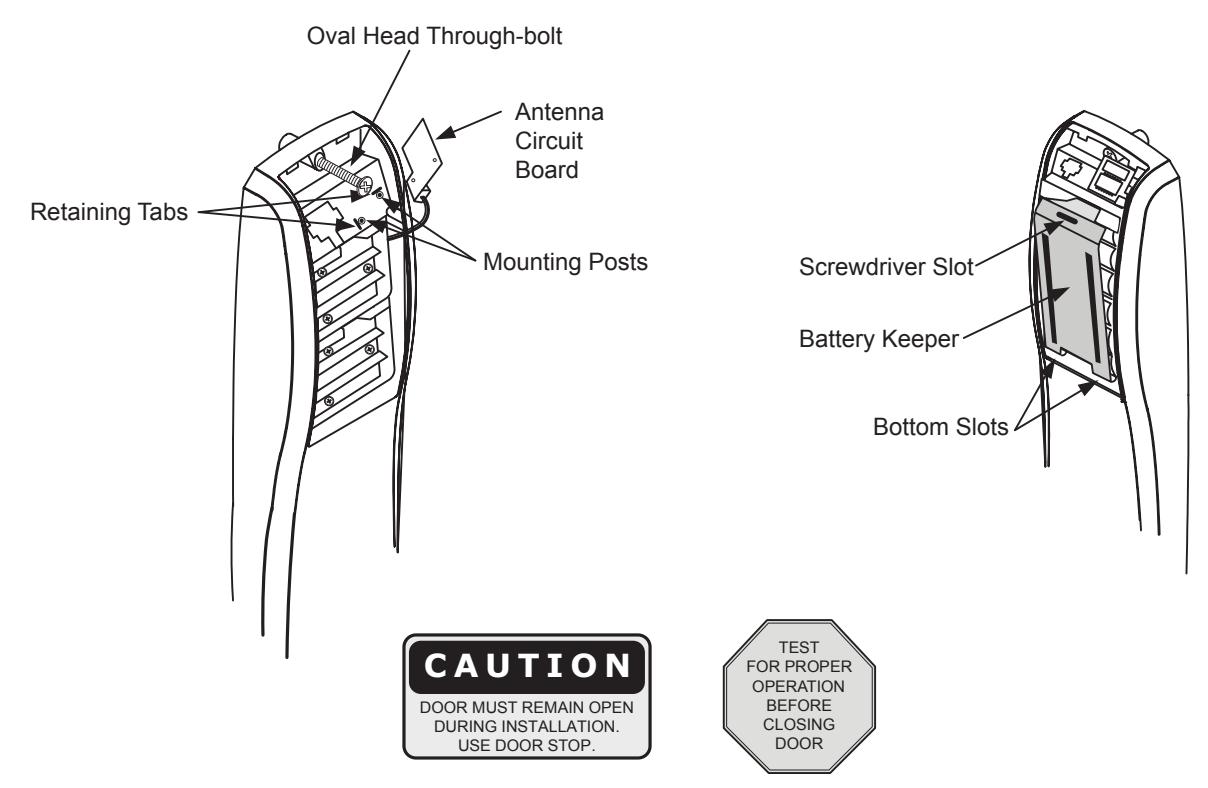
The antenna board must be carefully moved to access the upper through-bolt screw. Care should be taken to prevent damage to the antenna retaining tabs during this process. Press the two tabs away from the antenna board and lift the board off the mounting posts. Insert the oval head though-bolt and secure the escutcheon in place. After tightening the top through-bolt, replace the antenna board by placing it on the mounting posts and pressing into the retaining tabs.
2. Removal and Installation Procedure for Battery Keeper
To remove the battery keeper, a flat blade screwdriver or similar tool must be used. Insert screwdriver into slot at top of battery keeper. Lift up and pull the top of the keeper away from the unit.
To install the battery keeper insert bottom tabs in bottom slots of controller, then press keeper over batteries and snap into position.

6) Operational Check
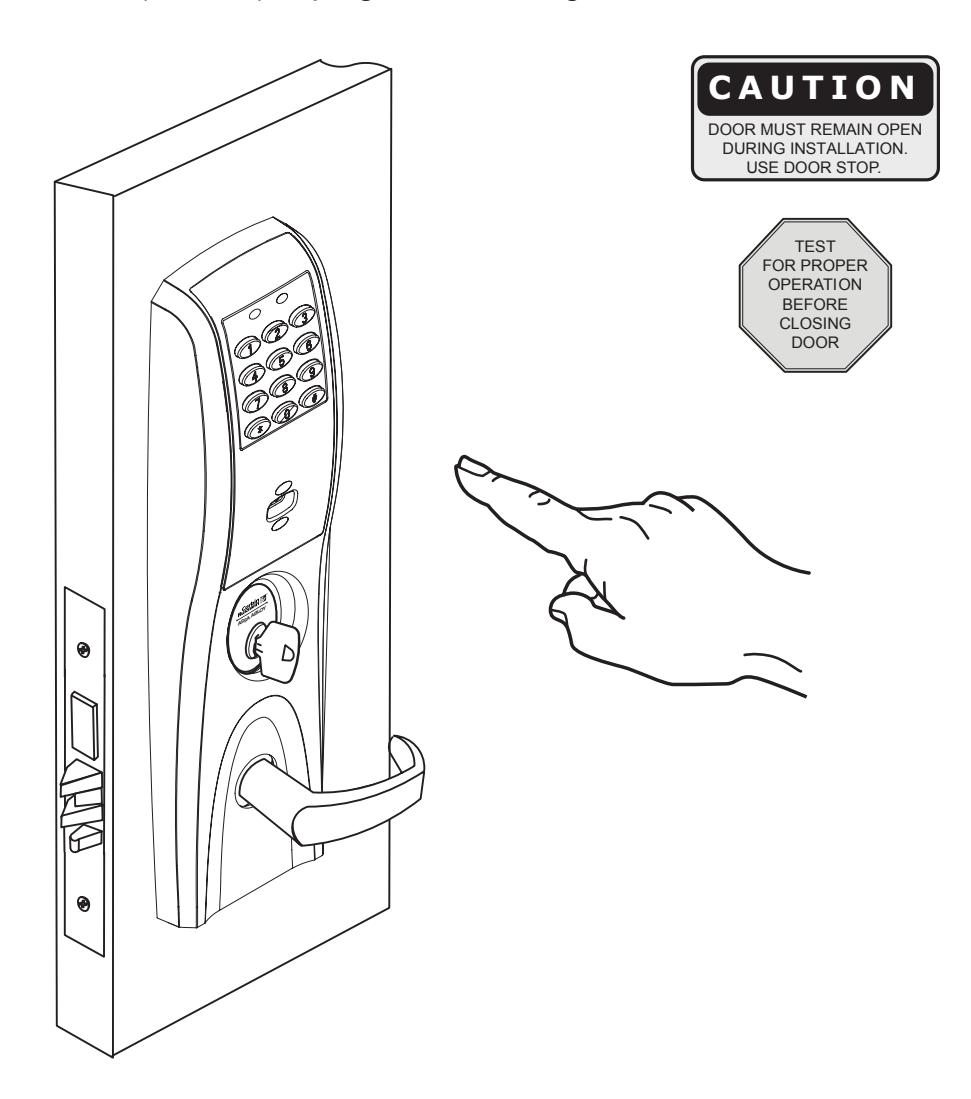
Lock operational check for devices with cylinders:
- 1. Insert key into cylinder and rotate. (There should be no friction against lock case, wire harness or any other obstructions. Refer to Section 4, Step 5 if friction exists.)
- 2. The key will retract the latch, key should rotate freely. If the deadbolt is thrown, the key will first retract the deadbolt and then the latch. Inside lever retracts latch and deadbolt, if provided.
- 3. Enter 1234 to unlock outside lever handle allowing the lever to retract latch and deadbolt, if provided.
- 4. If lock is Prox only (M802) or RF Technology with Prox (M805) refer to keypad programming instructions (FM 224) to program lock using Accessware software.

Hardwiring options include one or a combination of the following: M861 Forced Door Propped Door Option, M35 Power/Remote Unlocking Harness
7.1) Important
- 1. Caution: Disconnect all input power before beginning installation to prevent electrical shock and equipment damage.
- 2. Installer must be a trained, experienced service person.
- 3. All wiring must comply with applicable local electrical codes, ordinances and regulations.
7.2) Installation Notes
- ® 1. With new applications, an ElectroLynx door harness with 8 and 4 pin connectors may be preinstalled inside door by ASSA ABLOY door manufacturer when specified during ordering process.
- ® 2. Wiring to pigtail harness is per facility wiring requirement. ElectroLynx connector terminations and wire colors all match.
- ® 3. If door does not have an ElectroLynx type door harness, cut connectors off product and hard wire, or consult factory for appropriate mating harness.
® 7.3) ElectroLynx Connector System Notes:
The system is designed to be installation friendly with pluggable connectors from the electric hinge through the door to the rail. The only wiring required is to the loose wires on the pigtail harness assembly on the frame side of the electric hinge.
IMPORTANT:
The plug and receptacle connectors are designed to mate and lock together as shown in the figure. Plug the connectors into each other with the locking mechanism aligned as indicated. Do NOT Force connectors on any other way.
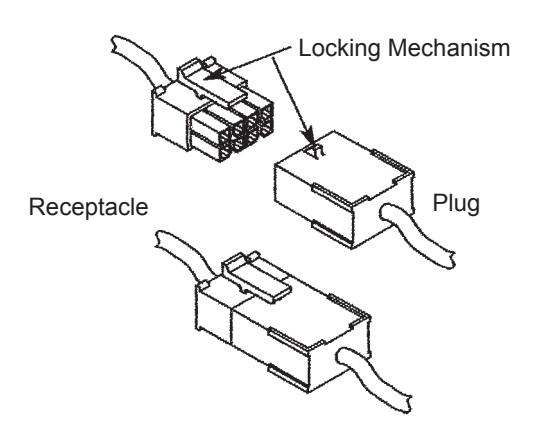

As part of their promise to provide innovative, fast and effective high security solutions to their customers, certain ASSA ABLOY Group brands offer ® ElectroLynx , a universal quick-connect system that simplifies the electrification of the door opening.

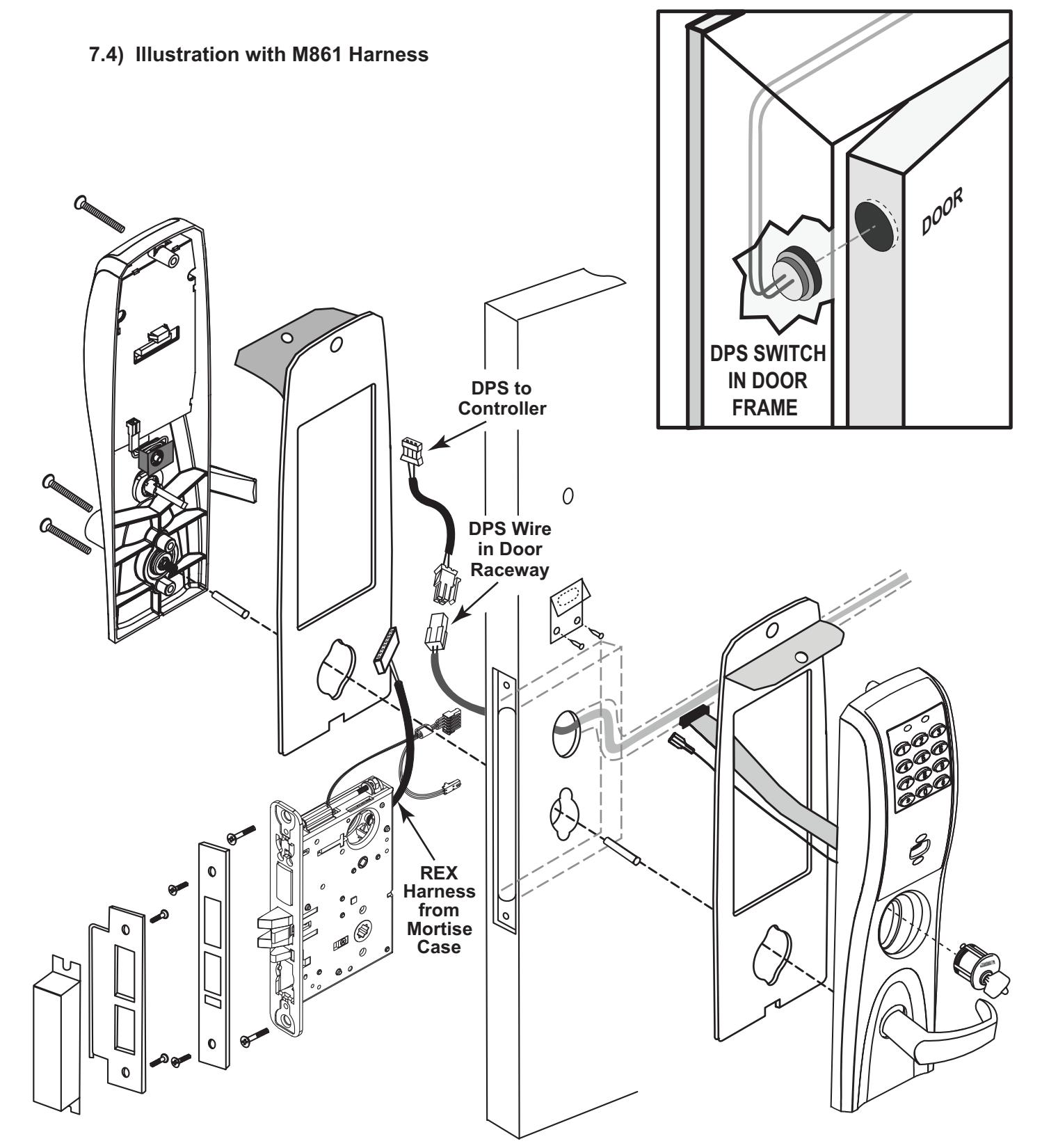

7.5) M861 Quick Code, Forced Door Propped Door Option
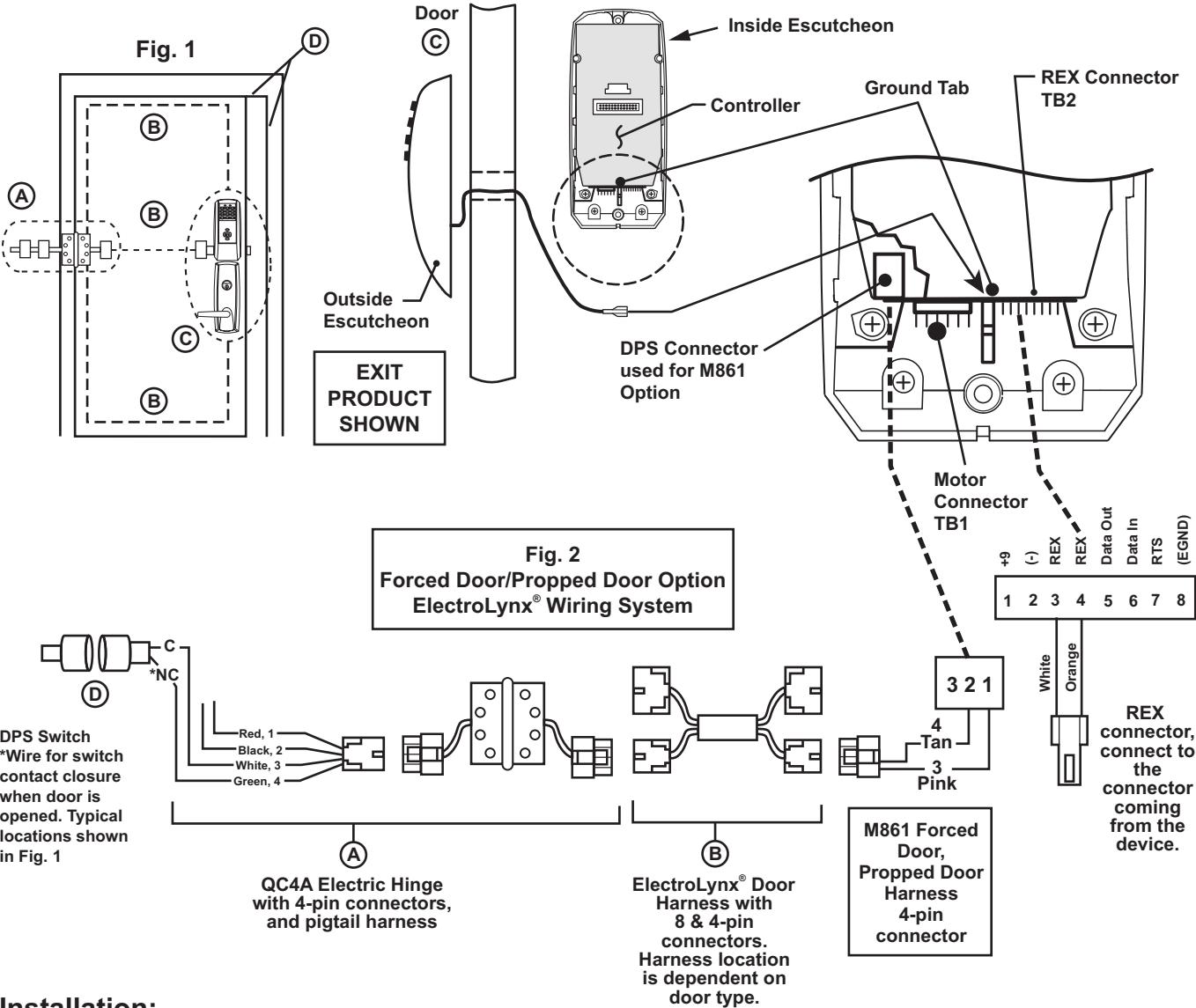
Installation:
- 1. ® ElectroLynx System Wiring Instructions (refer to Fig. 1 and Fig. 2)
- a. Look for the mating part on ASSA ABLOY doors and frames. Then plug in all connectors as shown in Fig. 2 during product installation.
- b . Hard wire DPS switch as shown.
- 2. ® Non-ElectroLynx System Wiring Instructions (refer to Fig. 1 and Fig. 2)
- a . Cut the 4-pin connector off the Forced Door Propped Door harness and hard wire ® to ElectroLynx two conductor door harness.
- b . Hard wire door harness to power transfer device.
- c . Hard wire DPS switch to power transfer device.

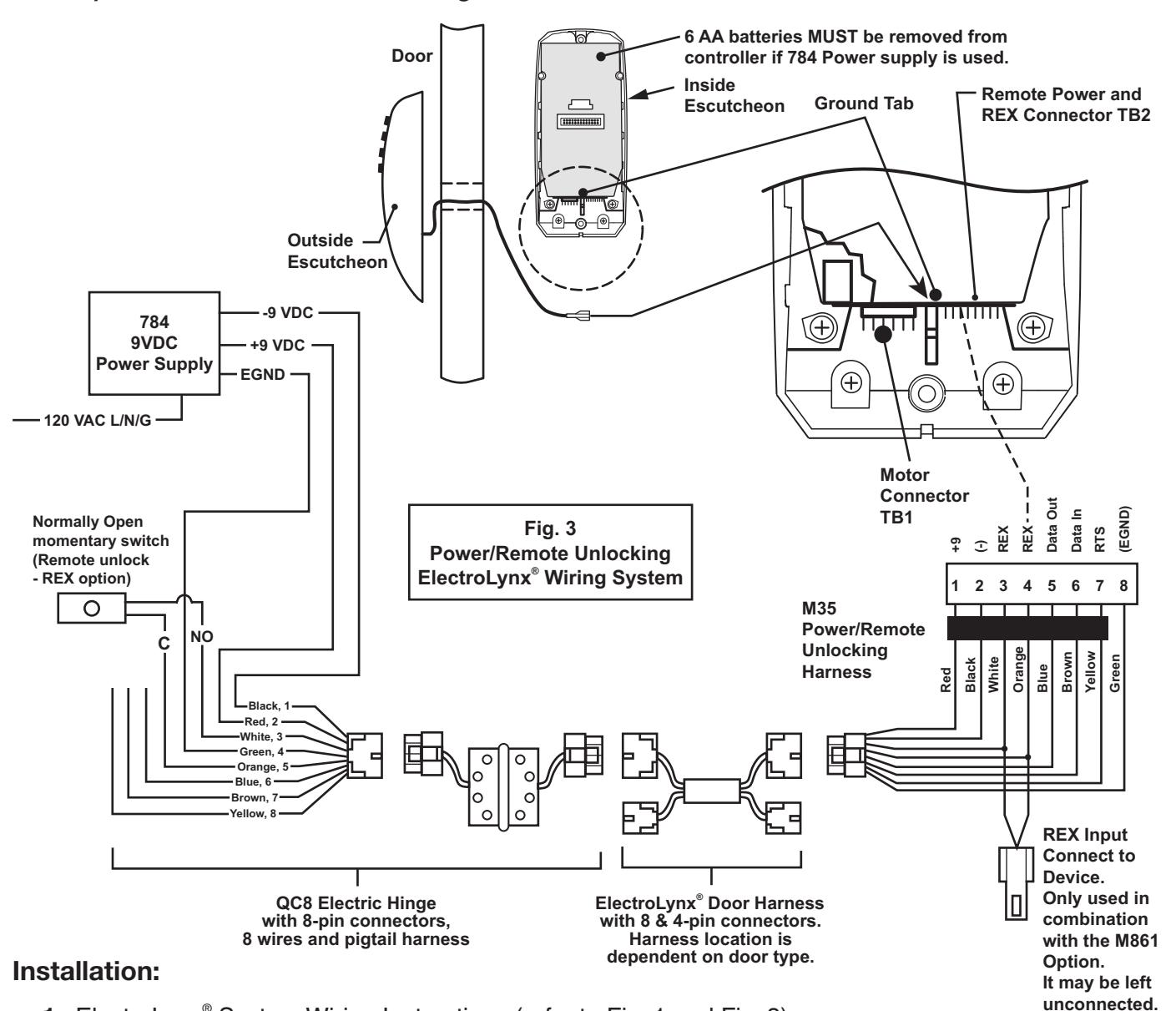
7.6) M35 Power/Remote Unlocking Harness
-
1. ElectroLynx® System Wiring Instructions (refer to Fig. 1 and Fig. 3)
- a. Look for the mating part on ASSA ABLOY doors and frames. Then plug in all connectors as shown in Fig. 3 during product installation.
- b. Hard wire 784 power supply as shown.
-
2. Non-ElectroLynx<sup>®</sup> System Wiring Instructions (refer to Fig. 1 and Fig. 3)
- a. Cut the 8-pin connector off the Power/Remote Unlocking harness and hard wire to non-ElectroLynx® door harness. Remote power requires three conductors and remote unlock requires two conductors.
- b. Hard wire door harness to power transfer device.
- c. Hard wire 784 power supply as shown.

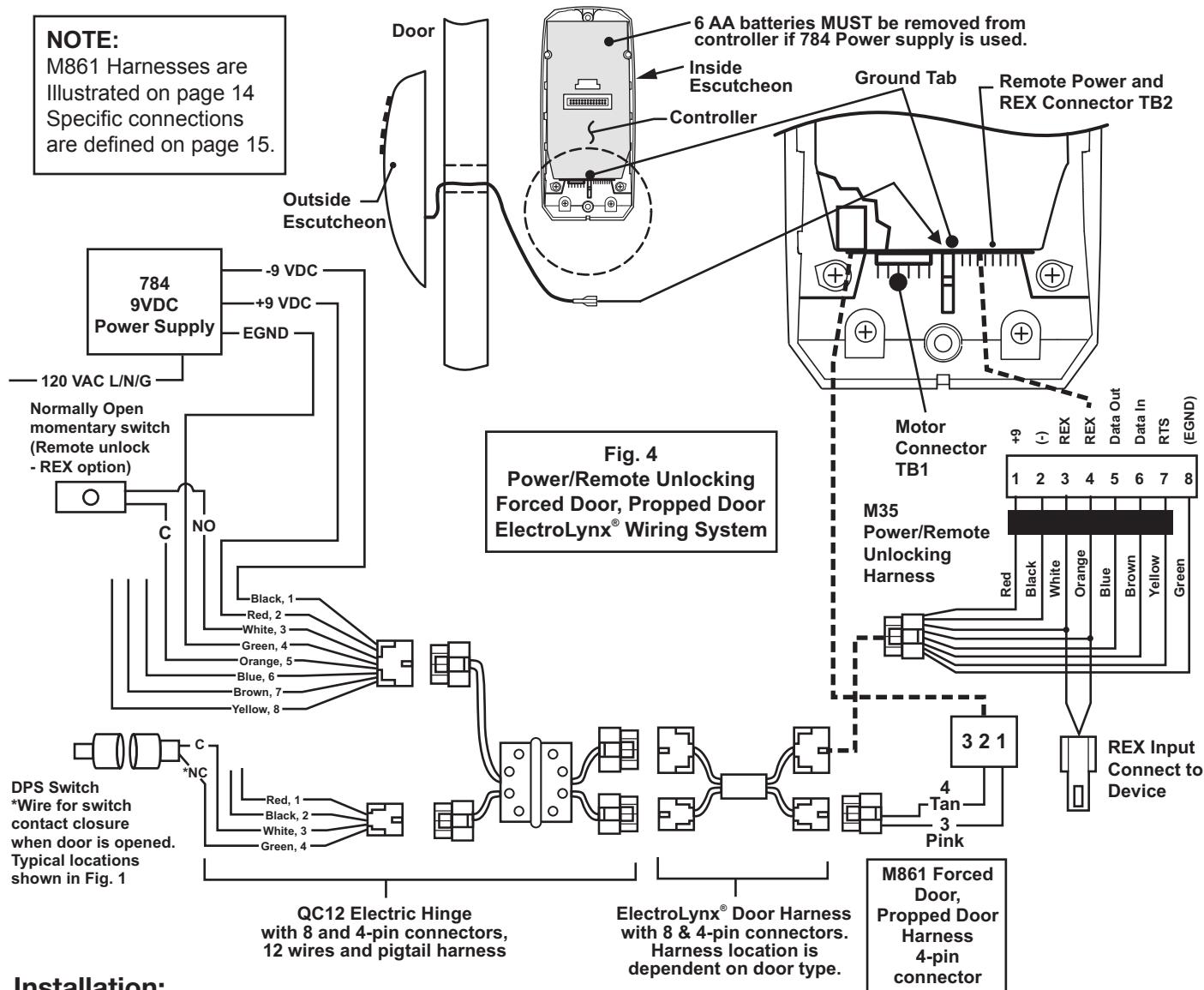
7.7) M35 Power/Remote Unlocking with M861 Propped Door, Forced Door
Installation:
-
1. ElectroLynx<sup>®</sup> System Wiring Instructions (refer to Fig. 1 and Fig. 4)
- a. Look for the mating part on ASSA ABLOY doors and frames. Then plug in all connectors as shown in Fig. 4 during product installation.
- b. Hard wire forced/propped, hard power and/or remote unlock (REX) as shown.
-
2. Non-ElectroLynx<sup>®</sup> System Wiring Instructions (refer to Fig. 1 and Fig. 4)
- a. Cut the 8-pin connector off the Power/Remote Unlock harness and hard wire to non-ElectroLynx® door harness. Remote power requires three conductors and remote unlock requires two conductors.
- b. Hard wire door harness to power transfer device.
- c. Hard wire forced/propped, hard power and/or remote unlock (REX), as shown.
END OF INSTALLATION INSTRUCTIONS