Corbin Russwin Access 600 RNE1 iCLASS SE Reader Option Exit Device Install Instructions_FM314
Open the original PDF document
View PDF

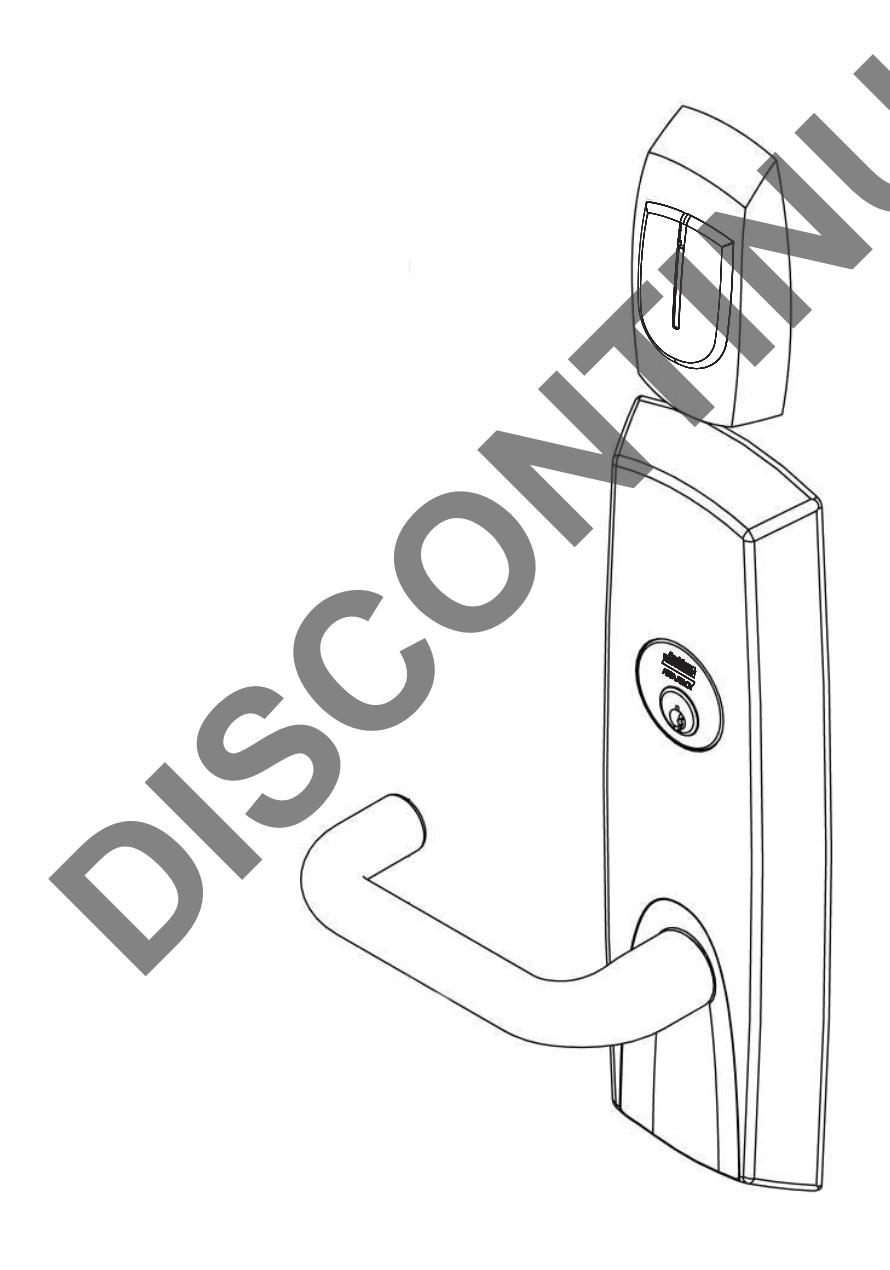
Installation Instructions ED5200N Series Exit Devices For 9600 TCRNE1 Series Trims M812 - iCLASS SE® Reader Option
Corbin Russwin ASSA ABLOY
FM314 03/18
(Includes: Rim and SecureBolt™)
Attention Installer
Please read these instructions carefully to prevent missing important steps.
Please Note: Improper installations may result in damage to the lock and void the factory warranty.
Important: The accuracy of the door preparation is critical for proper functioning and security of this lock.
Misalignment can cause premature wear and a lessening of security.
For Technical Assistance call Corbin Russwin at 1-800-810-WIRE (9473)


Table of Contents
| 1) Warning | 2 |
|---|---|
| 2) General Description | 3 |
|
3) Features
|
3 |
| 4) Regulatory Specifications | 3 |
| 5) Wiring Diagrams | 4 |
| 6) Product Illustrations | 6 |
| 7) Installation Instructions | 7 |
|
8) Surface Vertical Rod Installation Instructions
|
14 |
| 9) Operational Check | 18 |
1) Warning
Warning: Changes or modifications to this unit not expressly approved by the party responsible for compliance could void the user's authority to operate the equipment.
This device complies with Part 15 of the FCC Rules. Operation is subject to the following two conditions: (1) this device may not cause harmful interference, and (2) this device must accept any interference received, including interference that may cause undesired operation.
Note: This equipment has been tested and found to comply with the limits for a Class B digital device, pursuant to Part 15 of the FCC Rules. These limits are designed to provide reasonable protection against harmful interference in a residential installation.
This equipment generates, uses and can radiate radio frequency energy and if not installed and used in accordance with the instructions, may cause harmful interference to radio communications. However, there is no guarantee that the interference will not occur in a particular installation. If this equipment does cause harmful interference to radio or television reception, which can be determined by turning the equipment off and on, the user is encouraged to try to correct the interference by one or more of the following measures:
- Reorient or relocate the receiving antenna
- Increase the separation between the equipment and receiver
- Connect the equipment into an outlet on a circuit different from that to which the receiver is connected
- Consult the dealer or an experienced technician for help
Contains FCC ID: U4A-SCSEHF
Contains IC: 6982A-SCSEHF
The term "IC:" before the radio certification number only signifies that Industry Canada technical specifications were met. This Class B digital apparatus meets all requirements of the Canadian Interference Causing Equipment Regulations. Operation is subject to the following two conditions: (1) this device may not cause harmful interference, and (2) this device must accept any interference received, including interference that may cause undesired operation.
Cet appareillage numérique de la classe B répond à toutes les exigences de l'interférence canadienne causant des règlements d'équipement. L'opération est sujette aux deux conditions suivantes: (1) ce dispositif peut ne pas causer l'interférence nocive, et (2) ce dispositif doit accepter n'importe quelle interférence reçue, y compris l'interférence qui peut causer l'opération peu désirée.

To avoid possible damage from electrostatic discharge (ESD), some basic precautions should be used when handling electronic components: • Minimize build-up of static by touching and/or maintaining contact with unpainted metal surfaces such as door hinges, latches and mounting

plates especially when mounting electronic components such as readers and controllers onto the door.

• Do not touch pins, leads or solder connections on the circuit boards
*Any retrofit or other field modification to a fire rated opening can potentially impact the fire rating of the opening, and Corbin Russwin, Inc. makes no representations or warranties concerning what such impact may be in any specific situation. When retrofitting any portion of an existing fire rated opening, or specifying and installing a new fire-rated opening, please consult with a code specialist or local code official (Authority Having Jurisdiction) to ensure compliance with all applicable codes and ratings.


2) General Description
The Corbin Russwin Access 600 TCRNE1 Series exit device is designed to interface with existing Wiegand Electrical Access Control (EAC) panels. The reader requires 12 or 24VDC for power and is compatible with HID iCLASS SE® 13.56 MHz technology. The Access 600 technology is designed around Corbin Russwin's Grade 1 hardware. The exit device comes with touch bar monitoring (REX) and is provided with an external Door Position Switch (DPS). Featuring EcoFlex™ technology, the lock is field-configurable to fail-safe or fail-secure and operates from 12-24VDC. Weatherseal gaskets are also included for outdoor applications. The Access 600 iCLASS SE reader provides visual (LED) and audible indication of lock state (locked/unlocked).
3) Features
- Door Thickness 1-3/4" Standard; Can be furnished for other door thicknesses upon request. Consult factory.
- Outside lever controlled by reader or key allows lever to retract latch
- Inside push bar produces REX (request to exit) signal and retracts latch
- Fail Safe or Fail Secure Operation (must specify).
- UL fire listed available
- Wires directly to EAC panels
- Wire from EAC Panel to door must be shielded with a drain. Drain terminated at EAC Panel controller
- McKinney QC12 Hinge with ElectroLynx® plug and play
-
Supported credentials:
- iCLASS®
- iCLASS SE® (SIO-enabled)
- iCLASS® Seos®
- HID SIO on MIFARE® Classic
- HID SIO on MIFARE DESFire® EV1
- NFC-enabled mobile phones
4) Regulatory Specifications
- Reader Draw = 150mA @12VDC / 24VDC
- Actuator Draw = 400mA inrush / 15mA continuous @12VDC / 24VDC
- Total System Draw = 550mA @12VDC / 24VDC
- UL 294 Access Control Performance Ratings:
| Destructive Attack | Level I |
| Line Security | Level I |
| Endurance | Level IV |
| Standby Power | Level I |
- UL294 6th Edition (Access Control System Units)
- This product meets the requirements of CAN/ULC-S319-05 Equipment Class I
- ANSI/BHMA A156.25 Listed Grade 1 Compliant ANSI/BHMA A156.25 Listed Grade 1 Compliant
Wiring methods shall be in accordance with the National Electrical Code (ANSI/NFPA70), CSA 22.1, Canadian Electrical Code (CEC), Part I, Safety Standard for Electrical Installations, local codes, and the authorities having jurisdiction.


5) Wiring Diagrams
| Product | 8 PIN CONNECTOR | 4 PIN CONNECTOR | ||||||||||
|---|---|---|---|---|---|---|---|---|---|---|---|---|
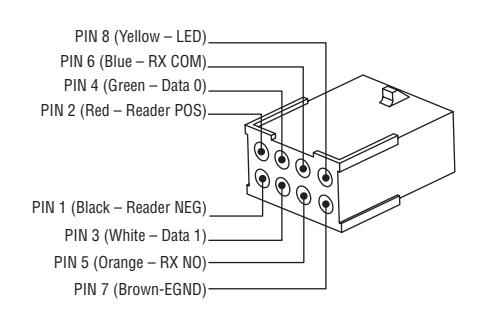
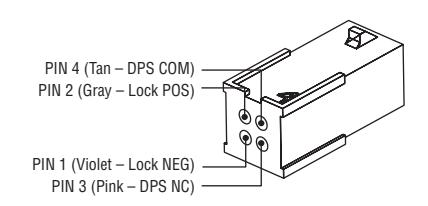
| 1-Black | 2-Red | 3-White | 4-Green | 5-Orange | 6-Blue | 7-Brown | 8-Yellow | 1-Violet | 2-Gray | 3-Pink | 4-Tan | |
| ACCESS CONTROL DEVICES: Access 600 Mortise, ElectroLynx wire Color / Function assignments | ||||||||||||
|
Corbin Russwin
Mortise Lock |
12/24VDC
(Reader) |
WIE
GAND |
WIE
GAND |
RX | RX | EGND | LED |
12/24 VDC
(LOCK RELAY) |
DPS
(NC) |
DPS
(COM) |
||
| NEG | POS | DATA_1 | DATA_0 | NO | COM |
REF.
*DIA- GRAMS |
REF.
*DIA- GRAMS |
NEG | POS | DPS | DPS | |
| Cylindrical/Exits | NEG | POS | DATA_1 | DATA_0 | NO | COM | NEG | POS | - | - | ||
* Diagram on following page
Reader LED Configuration
The Harmony Series reader can be configured for (3) modes of LED operation. Call 1-800-810-WIRE for details.
Mode 1:
- Red LED 'ON' when powered.
- Presenting a valid credential causes LED to 'FLICKER' green and return to red state.
Mode 2:
- Green LED "ON" when powered.
- No Flicker after presenting valid valid credential.
Note: LED wire must be connected to circuit GROUND of the system's power supply.
Mode 3:
• EAC Panel controls LED operation.
Note: Control of LED is a function of the EAC panel equipment (i.e. relay) to toggle between green and red.
Note: When LED wire is tied directly into EAC panel relay, no AC signals should be applied on wire or door reader performance will be impacted.
Wire from EAC panel to door must be shielded with drain terminated at EAC panel controller
Wire Gauge Charts
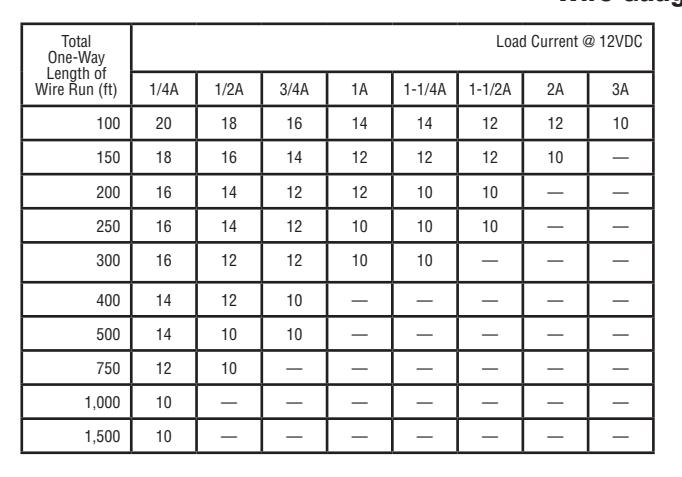
|
Total
One-Way |
Load Current @ 24VDC | |||||||
|---|---|---|---|---|---|---|---|---|
|
Length of
Wire Run (ft) |
1/4A | 1/2A | 3/4A | 1A | 1-1/4A | 1-1/2A | 2A | 3A |
| 100 | 24 | 20 | 18 | 18 | 16 | 16 | 14 | 12 |
| 150 | 22 | 18 | 16 | 16 | 14 | 14 | 12 | 10 |
| 200 | 20 | 18 | 16 | 14 | 14 | 12 | 12 | 10 |
| 250 | 18 | 16 | 14 | 14 | 12 | 12 | 12 | 10 |
| 300 | 18 | 16 | 14 | 12 | 12 | 12 | 10 | — |
| 400 | 18 | 14 | 12 | 12 | 10 | 10 | — | — |
| 500 | 16 | 14 | 12 | 10 | 10 | — | — | — |
| 750 | 14 | 12 | 10 | 10 | — | — | — | — |
| 1,000 | 14 | 10 | 10 | — | — | — | — | — |
| 1,500 | 12 | 10 | — | — | — | — | — | — |

5) Wiring Diagrams (Continued)
Typical ED5200N M812 Series Lock Application Diagram
MODE 1: LED WIRE NOT USED = RED LED 'ON' WHEN POWERED
Standard Application Shown - For Alternative Applications Contact 1-800-810-WIRE (9473)
Reader Electronics Require 12 or 24VDC UL294 Listed, Power Limited Power Supply (or UL603)
12/24VDC System
- Reader Draw = 150mA @12VDC / 24VDC
- Actuator Draw = 400mA inrush / 15mA continuous @12VDC / 24VDC
- Total System Draw = 550mA @12VDC / 24VDC
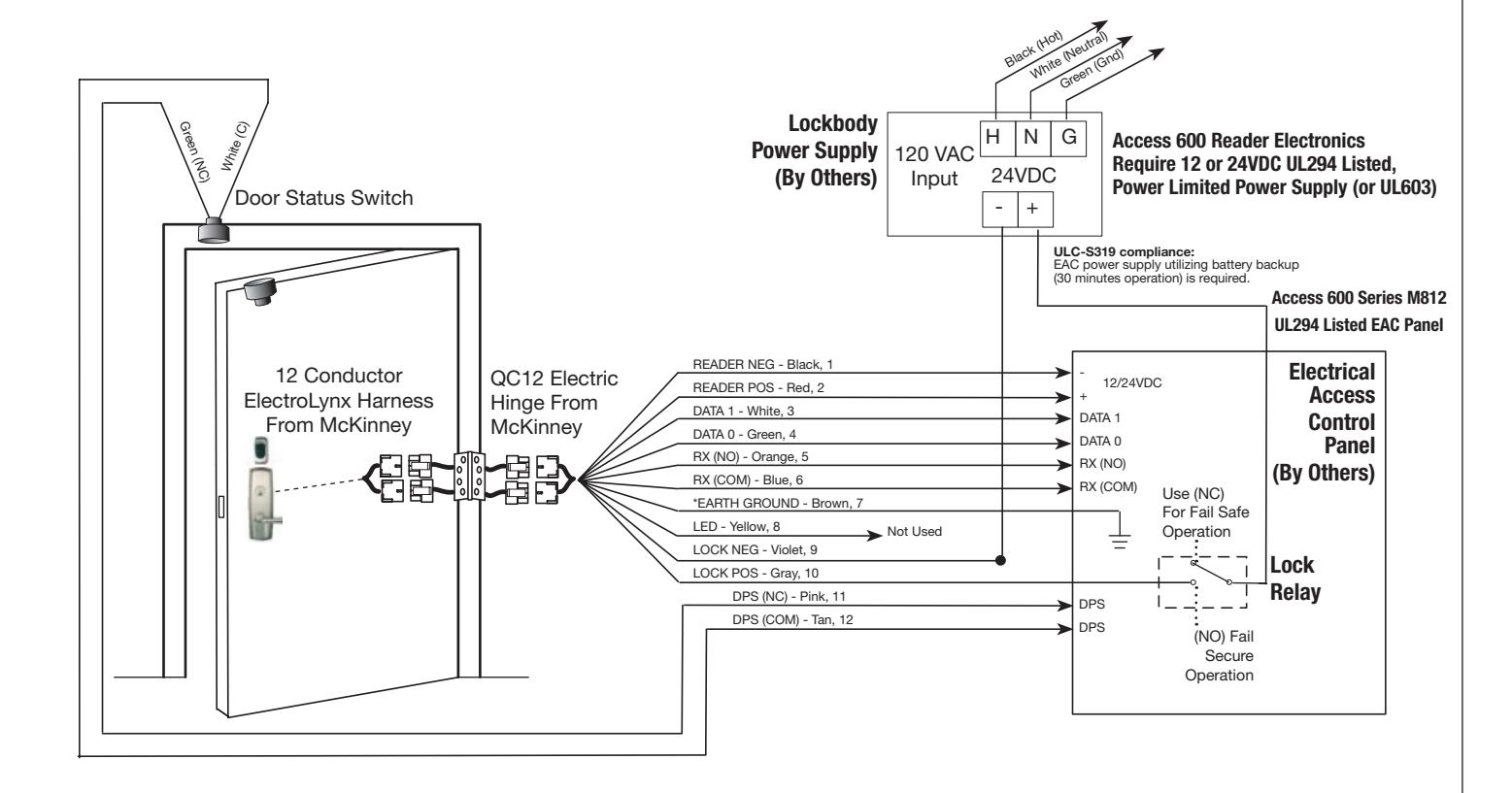

*IMPORTANT: Pin 7 must be tied to earth ground in the access control panel.
Failure to follow proper ESD safe grounding procedures could lead to equipment failure.


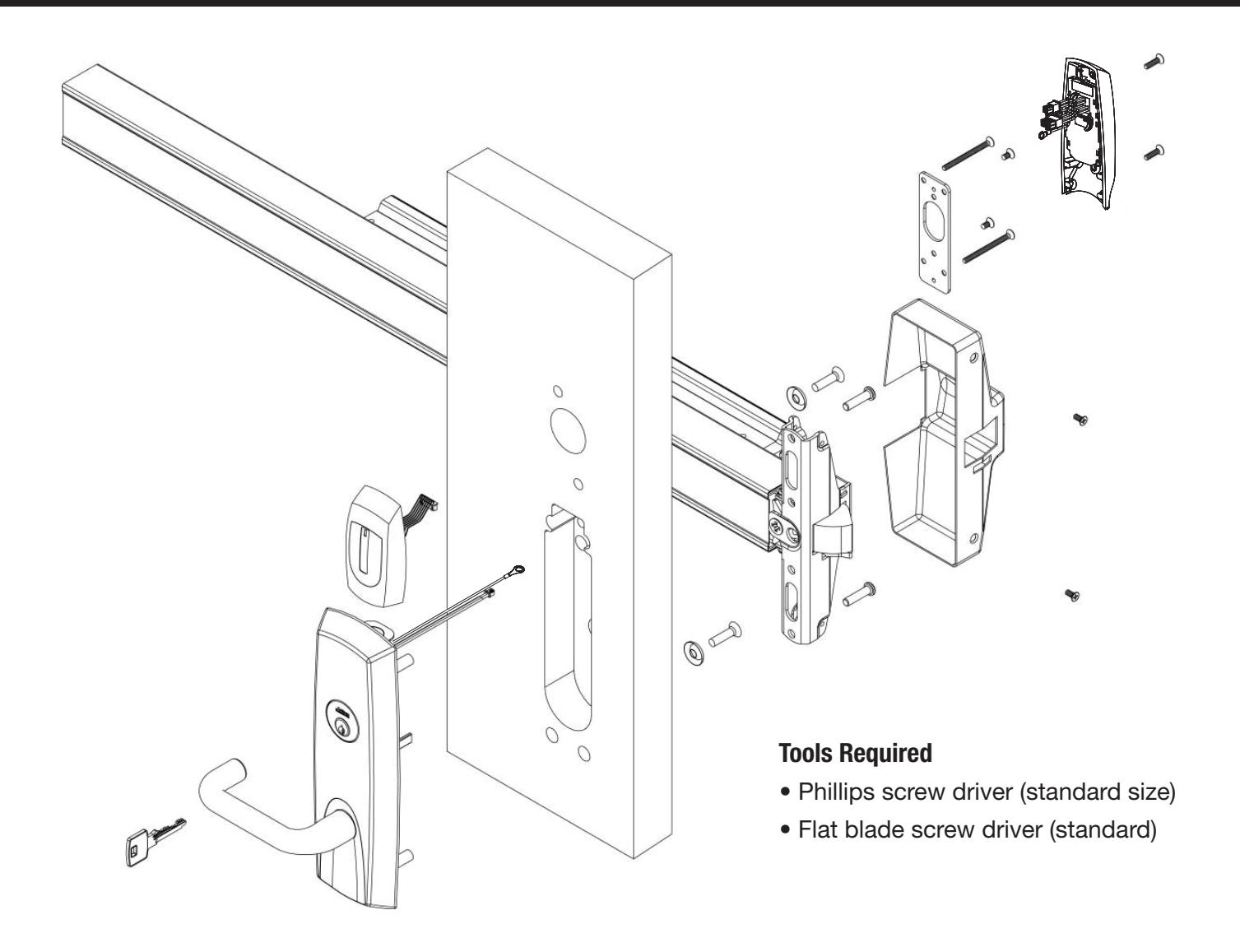
6) Product Illustration
| Item | Part Number | Description | Req. |
|---|---|---|---|
| 1 | 743F362 FIN | Esc SA, M812 - Exits Rim/ CVR Functions (*9603, *9605) | 1 |
| 744F802 FIN | Esc SA, M812 - Exits SVR (LHR) Functions (*9S603, *9S605) | ||
| 744F812 FIN | Esc SA, M812 - Exits SVR (RHR) Functions (*9S603, *9S605) | ||
| 2 | 744F859 | Controller (M812) | |
| 3 | Exit Trim | Refer to Access 600 Catalog to Configure Trim Order String | 1 |
| Refer to Access 600 Catalog to Configure Rail Order String |


7) Installation Instructions
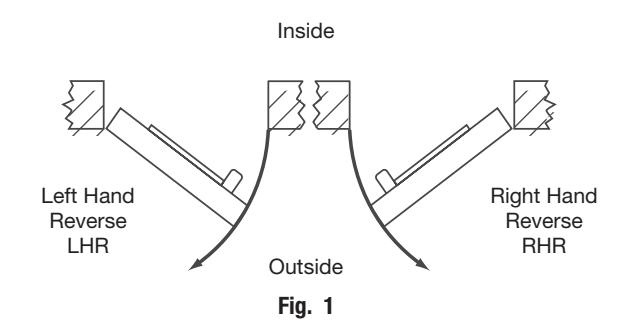
1. Verify Hand and Bevel of door.
Door should be fitted and hung. Verify box label for size of exit device, function and hand. Left Hand
2. Trim Assembly Instructions:
-
a. Check cylinder components:
- Cylinders longer than 1-1/8" (29mm) require collars. Refer to Cylinder Collar Chart (Fig. 2a).
- b. If required, modify by cutting cylinder tailpeice: Correct length is 1/16" to 3/16" (2 to 5mm) beyond cylinder housing cam.
-
c. Assemble cylinder:
- 1. Insert cylinder housing prongs into matching notches of escutcheon.
- 2. Pass cylinder tailpeice through cylinder collar (if required) and slot in cylinder cam.
- 3. Fasten cylinder in escutcheon recess or collar using 2 mounting screws.
Do not overtighten screws.
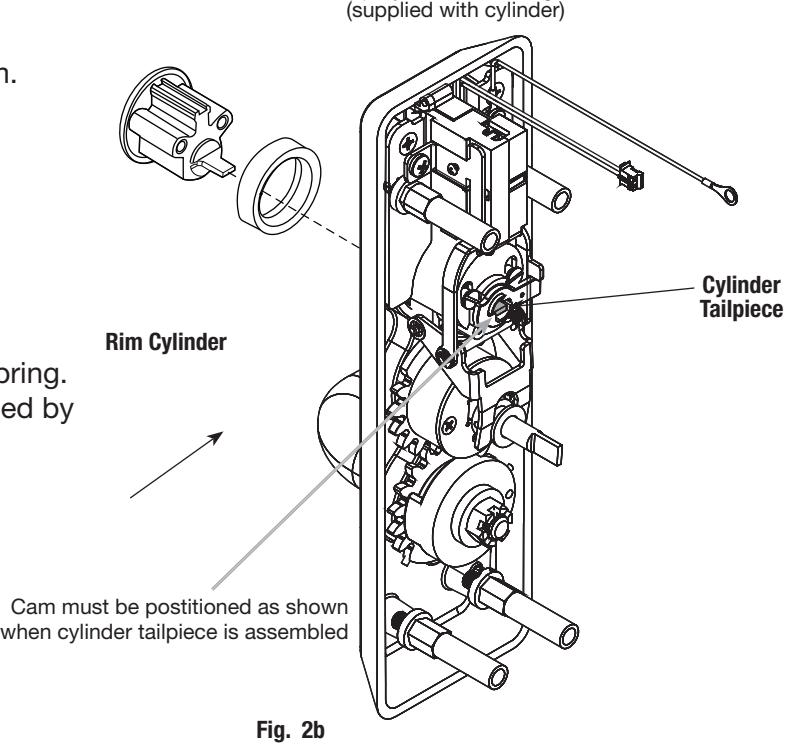
d. **Escutcheon Assembly (Fig. 2b):
The lever is handed (LHR shown).
Note: Lever Return Spring is handed. Hand cannot be changed without correct spring. Lever Return Spring handing can be identified by the color of the spring:
- LHR: Part Number 651F618 (Red)
- RHR: Part Number 651F628 (Blue)
| Cylinder Collar Chart | ||||||||
|---|---|---|---|---|---|---|---|---|
|
Cylinder Length
Collar |
||||||||
| Inches | ||||||||
| 1-1/8" | 29mm | None | ||||||
| 1-1/4" | 32mm | 422F88* | ||||||
| 1-1/2" | 38mm | 686F98* | ||||||
* Specify Finish Fig. 2a
(2) Cylinder Mounting Screws


7) Installation Instructions (Continued)
3. Install Outside Trim
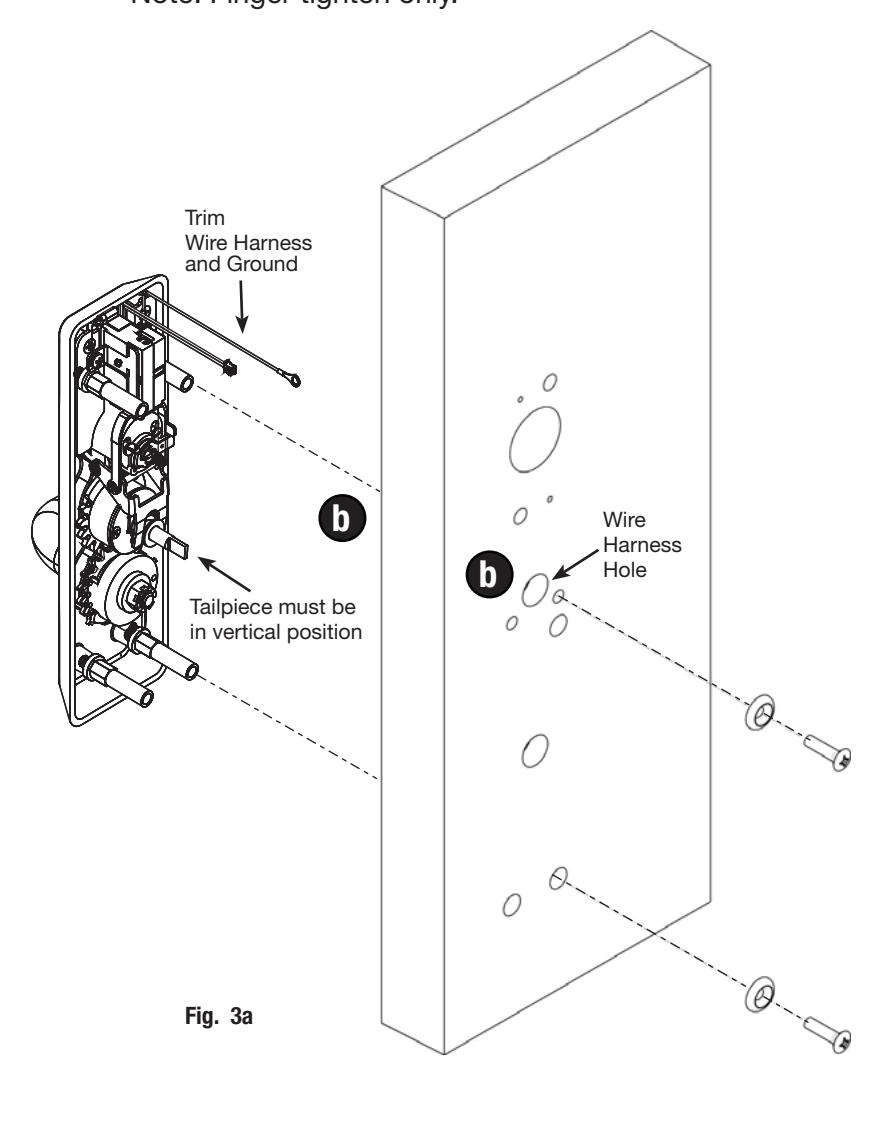
- a. Make sure tailpiece is oriented vertically.
- b. Feed trim wire harness through wire harness hole (Fig. 3a).
-
c. Mount trim assembly to door pulling slack wire towards device side of door.
- Note: Be careful not to pinch wire harness.
-
d. When mounting trim, lift tailpiece to pass through hole on device side.
- Note: Make sure tailpiece is still oriented vertically.
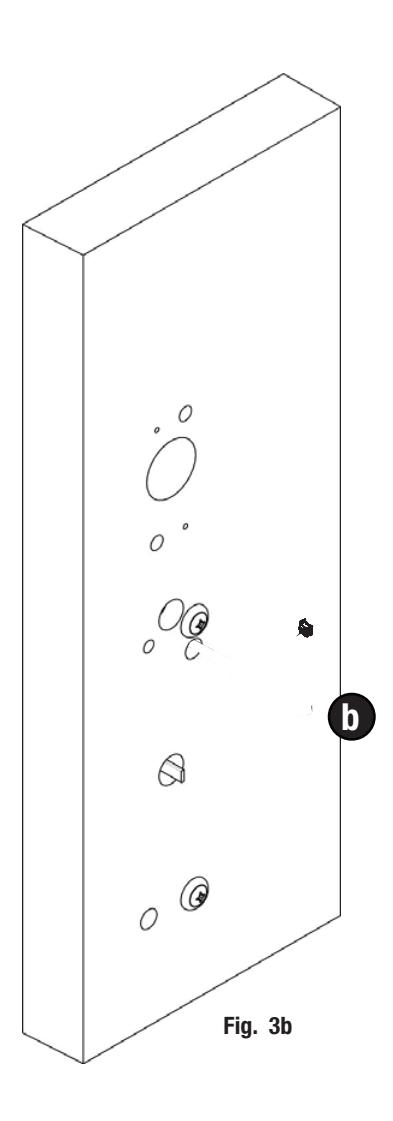
- e. Fasten trim assembly to door using (2) 1/4-20 oval head screws and (2) finish washers (Fig. 3b). Note: Finger tighten only.


7) Installation Instructions (Continued)
4. Install Exit Device:
- a. Seat device against door being careful to align vertical trim tailpiece to engage with cross hole of device cam.
- b. Fasten device to trim assembly using (2) 1/4-20 pan head screws.
- c. Follow instructions packed with device to secure device to door.
- d. Tighten all 4 screws.
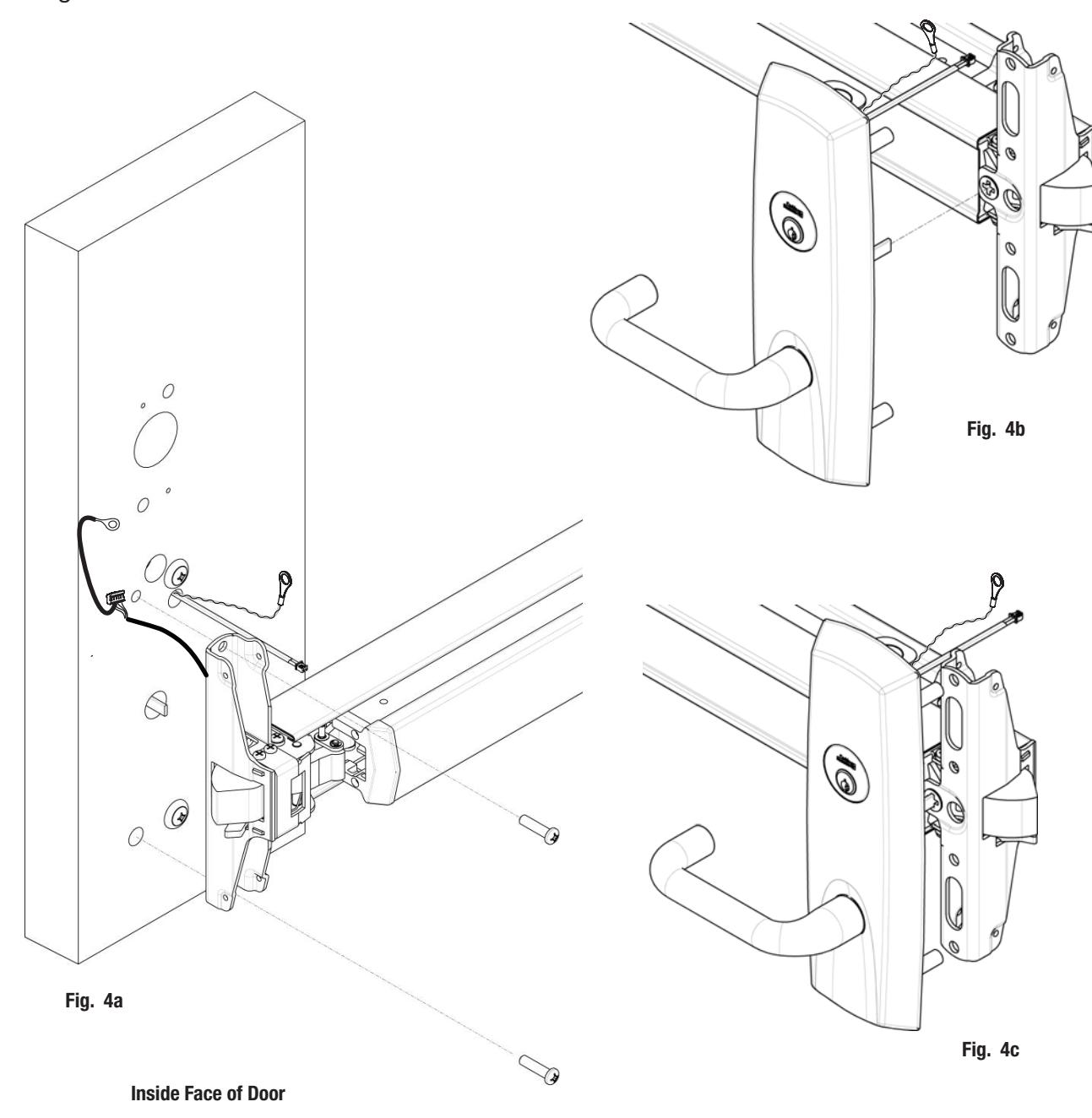
Fig. 3c


7) Installation Instructions (Continued)
5. Install Head Cover:
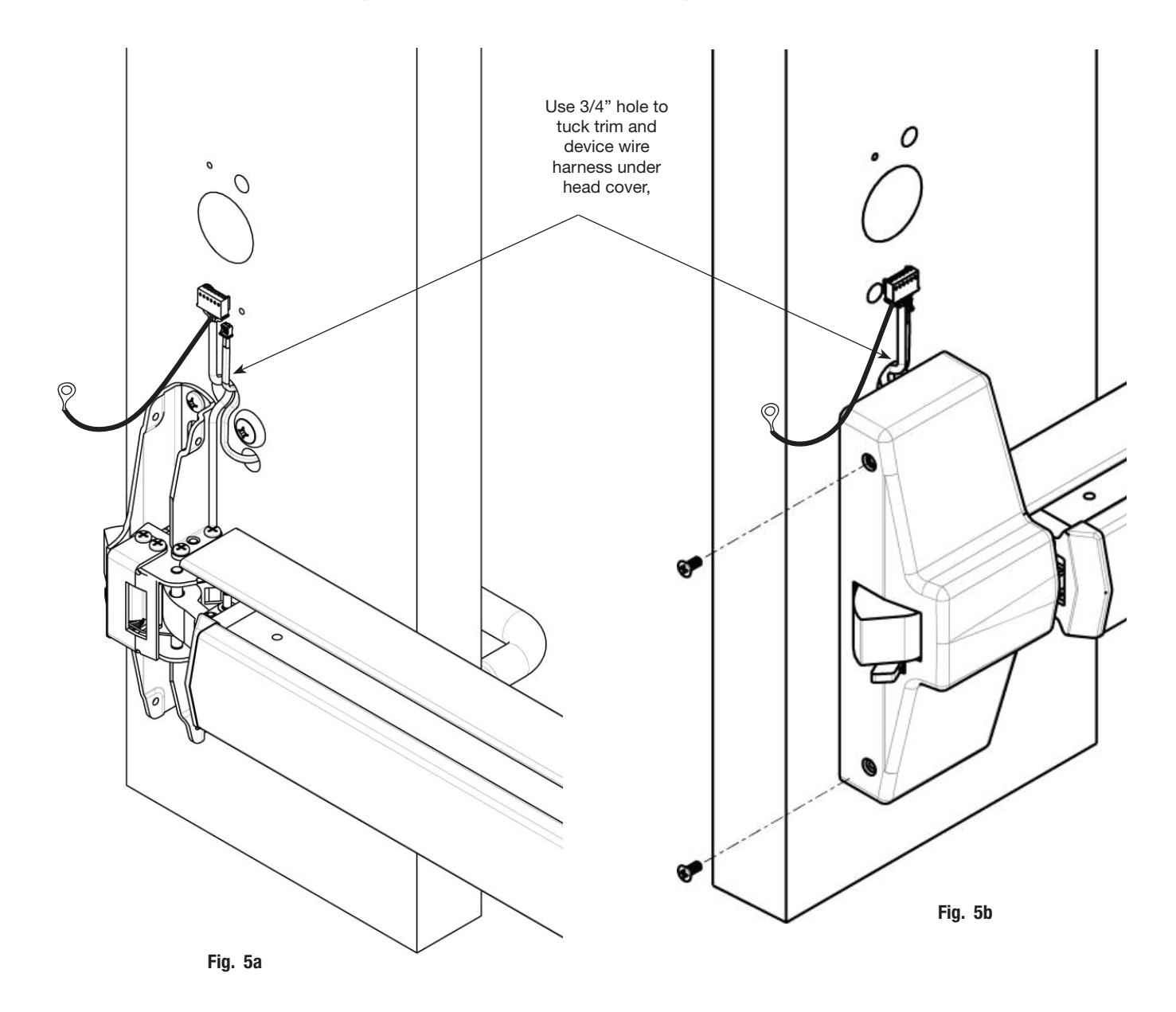
- a. Lay wire harnesses (trim harness and device harness) across ¾" hole (Fig. 5a).
- b. Tuck wires into hole when installing cover so that wires are not pinched between head cover and door.
- c. Attach head cover using (2) #8-32 flat head screws (Fig. 5b).


7) Installation Instructions (Continued)
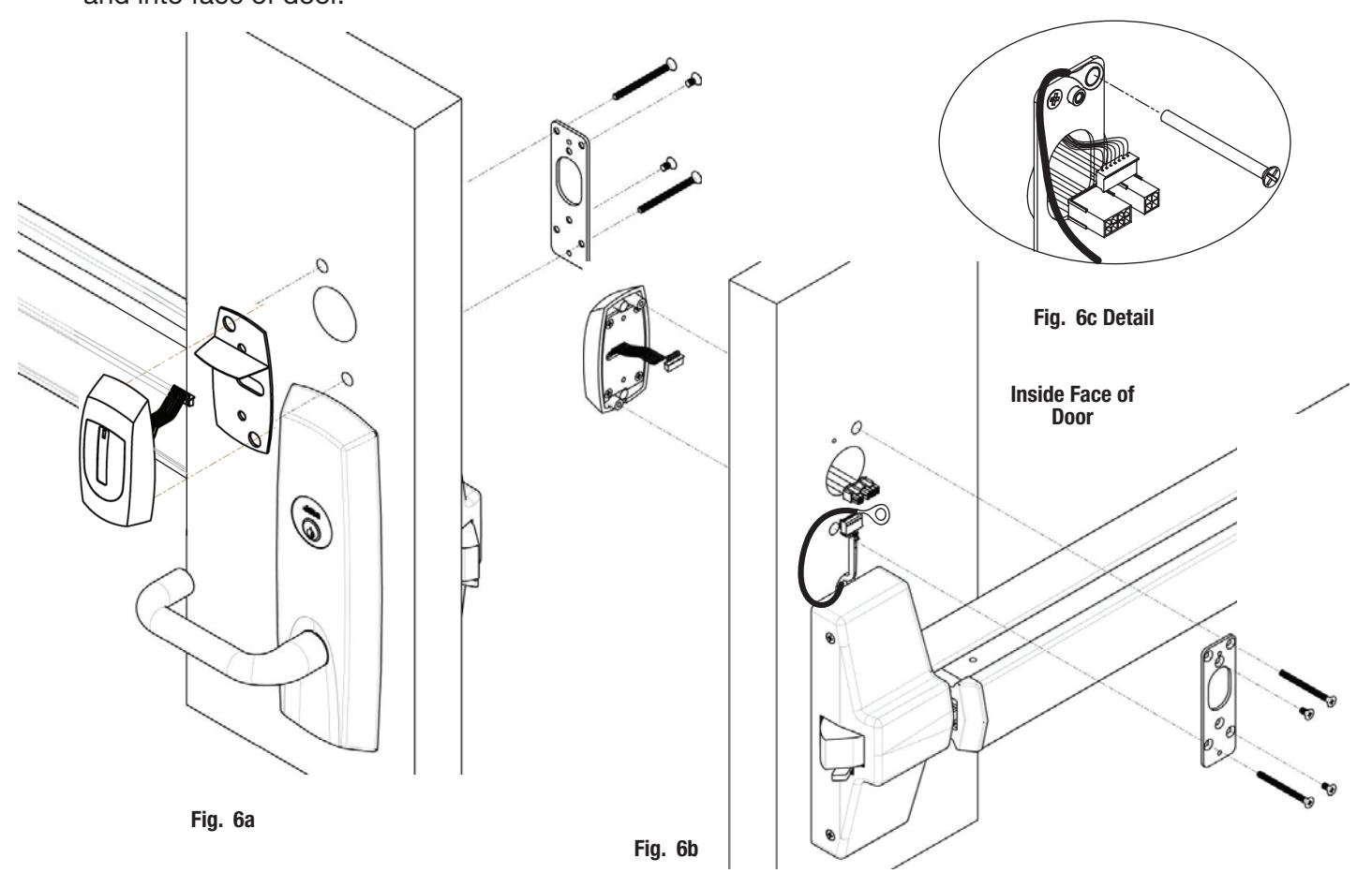
6. Install Outside Reader and Inside Mounting Plate:
If this installation involves a surface vertical rod, go to the Surface Vertical Rod sectoin on page 12.
- a. Feed Reader wire harness through door and through hole in mounting plate (Fig. 6a).
- b. Insert two #8 x 1-3/4" flat head through mounting plate and into escutcheon (Fig. 6a and 6b).
- c. Connnect pin 5 green/yellow ground wire ring terminal to top right screw (Fig. 6b and 6c). Note: Be careful not to pinch wires under mounting plate.
- d. Check that Reader is straight on door then tighten screws.
- e. Drill two 1/8" diameter holes and install (2) #8 x ¾" combination screws through plate and into face of door.
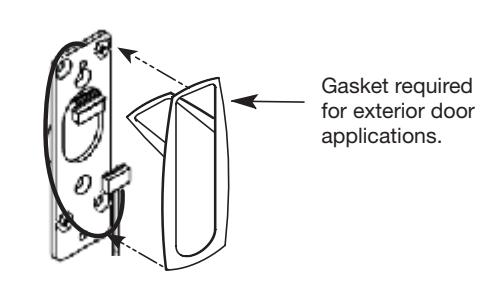
7. Install Gasket:
Add Gasket (if necessary):
Remember the inside gasket must be used when installing in an outdoor application.
Remove backing and place gasket on door (Fig. 7).


7) Installation Instructions (Continued)
8. Installing Controller
Please follow these steps prior to installing inside escutcheon to prevent any damage caused by pinching wires:
a. Feed controller harness earth ground into and around behind rim of large upper hole of the mounting plate (Fig. 8a, b).
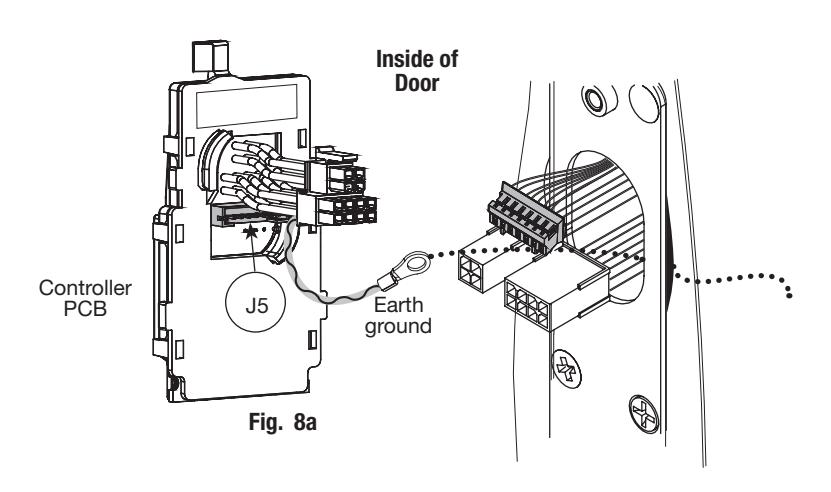
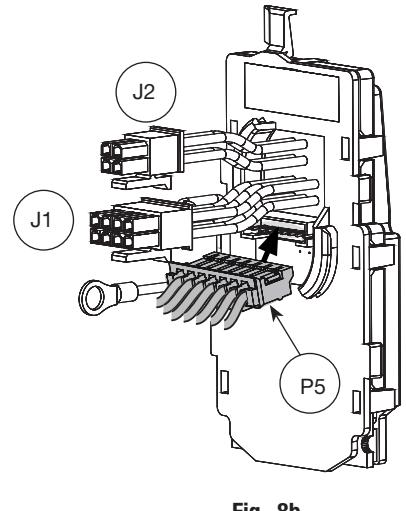
Fig. 8b
9. Connect ElectroLynx®
- a. Connect P5 (7 Pin Connector) from reader board to J5 on interior escutcheon PCB assembly (Fig. 8b).
- b. Connect ElectroLynx harness (4 and 8-pin) from door harness to ElectroLynx harness on interior PCB assembly (Fig. 9).
NOTES: Neatly fold the wires into the remaining space to prevent pinching wires when mounting escutcheon.
Connectors go on only one way.
Do not offset connector and be sure they are completely seated.
Fig. 9
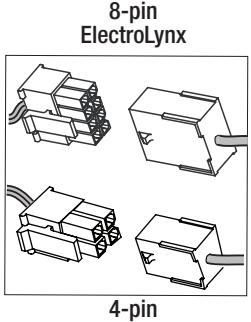
ElectroLynx
| PCB Layout - Wire Assignments - ElectroLynx Assembly (Molex) | ||||||
|---|---|---|---|---|---|---|
| J2 | J1 | |||||
| 1-Violet Lock Neg | 3-Pink | 1- Black | 3-White | 5-Orange | 7-Brown | |
| (Solenoid, neg) | DPS (NC) | PWR NEG | DATA 1 | RX (NO) | EGND | |
| 2-Gray Lock Pos | 4-Tan | 2-Red | 4-Green | 6-Blue | 8-Yellow | |
| (Solenoid, pos) | DPS (COM) | PWR POS | DATA 0 | RX (COM) | LED | |


7) Installation Instructions (Continued)
10. Install Controller (for Access 600 x M812)
Once wires are arranged, position controller at a rotated angle against the door, under earth ground wire.
- a. Press piece against door while turning clockwise (Fig. 10a).
- b. Twist into place, perpendicular with door (Fig. 10b).
- c. Position green/yellow ground wire ring terminal (from lock body) over hole for top left screw (Fig. 10b, c).
- d. Position green/yellow reader harness earth ground on top of ground ring and thread both with (1) 8-32 x 3/8" Phillips flat head undercut combo screw (Fig. 10c).
IMPORTANT: Note orientation of ground ring terminals in Fig. 10b, c.
e. Tighten securely.
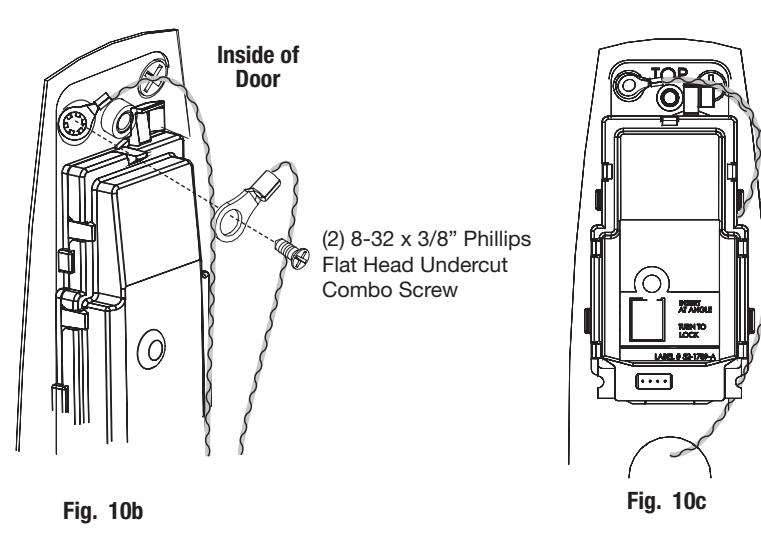
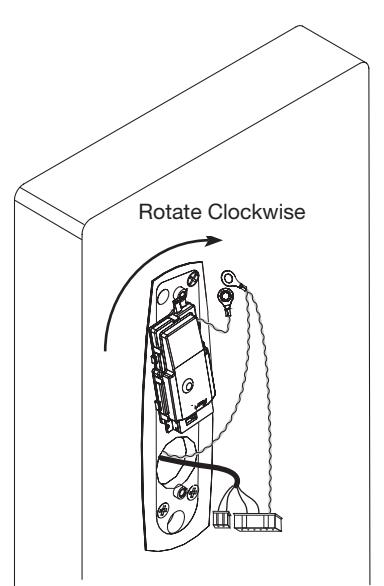
Fig. 10a
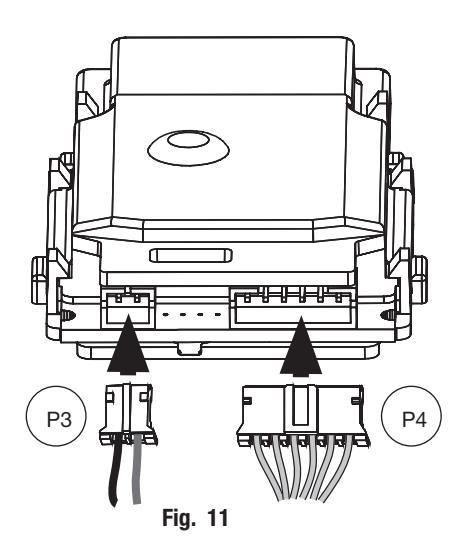
11. Connector Attachment (Exterior PCB Assembly)
- a. Connect P3 (2-pin connector) from lock body to J3 on module (Fig. 11).
- b. Connect P4 (6-pin connector) from lock body to J4 on module (Fig. 11).


8) Surface Vertical Rod Installation Instructions
If this is a Surface Vertical Rod installation, follow the installation instructions on pages 6 - 10 before continuing:
-
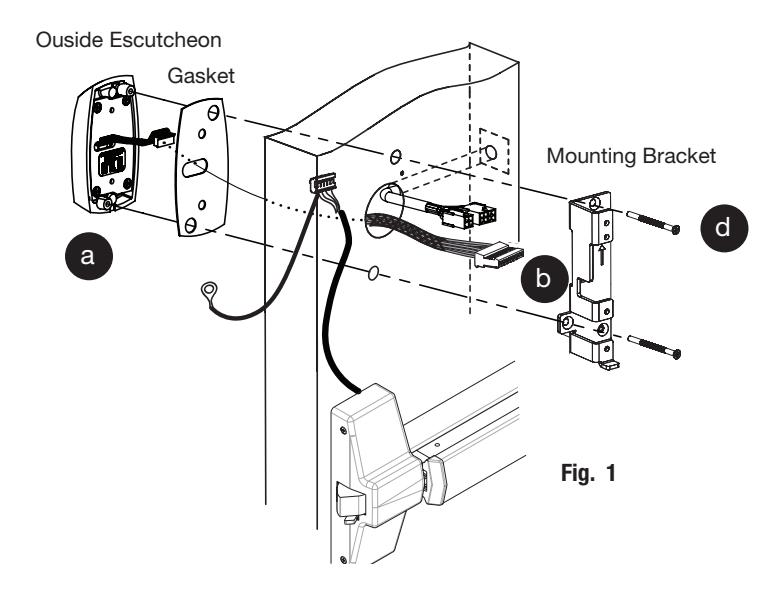
1. Install Inside Mounting Bracket with Outside Escutcheon:
- a. Position outside escutcheon against door (Fig. 1-a). Insert gasket, if necessary.
- b. Route antenna cable through door.
- c. Route wires along the outside (not through) the mounting bracket (Fig. 1-b).
- d. Secure with mounting bracket screws. Be careful not to damage wires.
CAUTION:
When attaching the mounting plate (and controller) to the mounting bracket, keep in mind the following to prevent damage caused by pinching wires:
- Make sure ElectroLynx connectors plug together between the mounting plate and the side of the mounting bracket.
- Test proper functioning of unit before securing the mounting plate and installing the escutcheon.
- The wires run THROUGH the hole in the mouting plate and out through the gap in the side (Fig. 2).
- The wires run ALONG SIDE the mounting bracket and into the door.
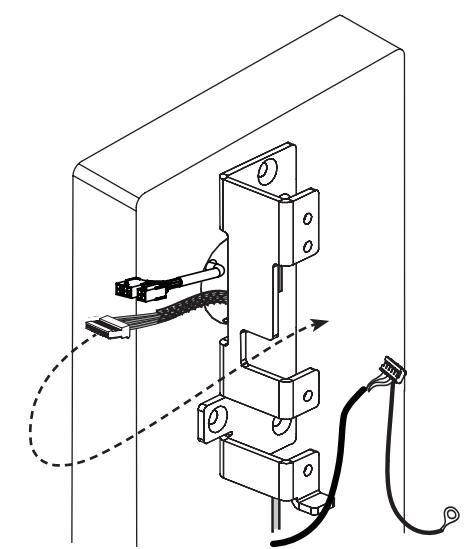
Fig. 2


8) Surface Vertical Rod Installation Instructions (Continued)
6 Install Mounting Plate and Controller
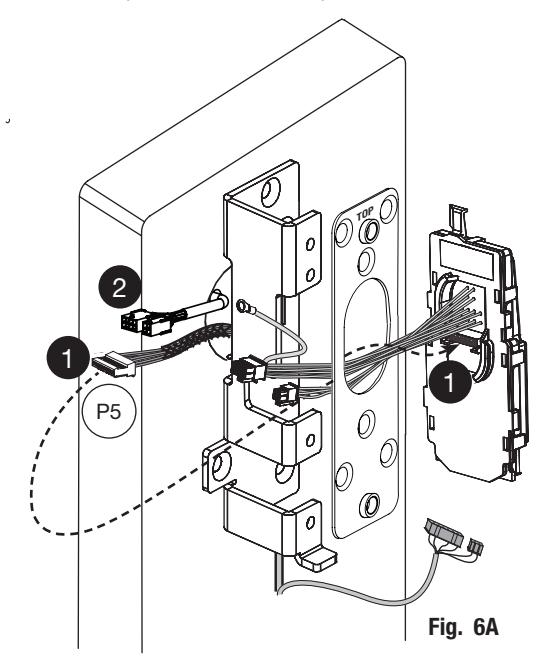
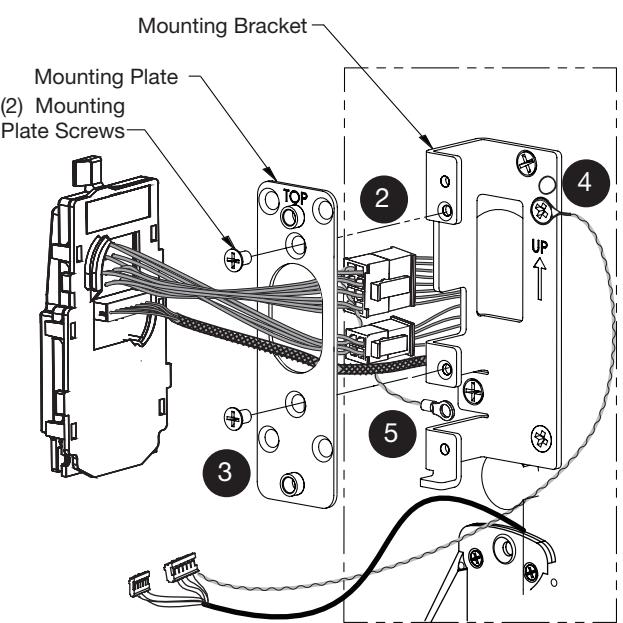
Pass the ElectroLynx harness through center hole of mounting plate (Fig. 6A) to make the following connections:
Important : Connections are made along side, not behind center hole of bracket.
a. Connect P5 (7 Pin Connector) from reader board to J5 on interior escutcheon PCB assembly (Fig. 6A).
-
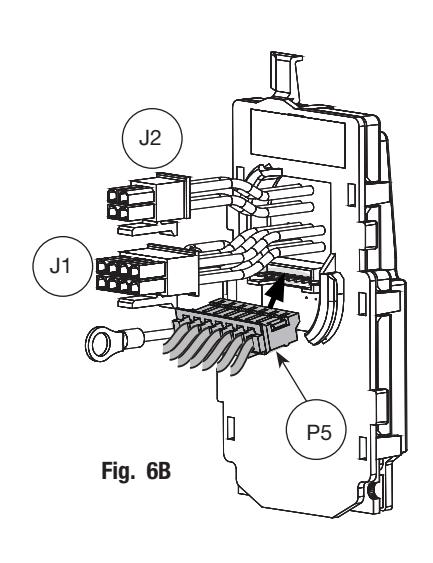
b. Connect ElectroLynx harness (4 and 8-pin) from door harness to ElectroLynx harness on interior PCB assembly (Fig. 6B).
- Connectors go on only one way do not offset connector and be sure they are completely seated.
- Do not tuck excess wires back inside the lock body cylinder hole.
- Neatly fold the wires into the remaining space to prevent pinching wires when mounting escutcheon.
- c. Attach the mounting plate to the mounting bracket using (2) mounting plate screws (Fig 6B).
- c. Secure (pin 5) green/yellow ground wire ring terminal to screw immediately above the 'UP' arrow.
- e. Secure (pin 7) ground wire (from reader) to lower left screw of mounting bracket


8) Surface Vertical Rod Installation Instructions (Continued)
6 Install Mounting Plate and Controller (Continued)
- a. Make sure wires are routed along-side, not through, the mounting bracket (Fig. 9C).
- b. Once wires are arranged, position controller assembly at a rotated angle against the mounting bracket (Fig. 6C).
- c. Press piece against mounting bracket while turning clockwise.
- d. Twist into place, perpendicular with mounting bracket and door (Fig. 6D).
- e. ElectroLynx cables connect on the side of the bracket to avoid interference with the rod.
- f. Fasten mounting plate to mounting bracket with two (2) mounting plate screws.
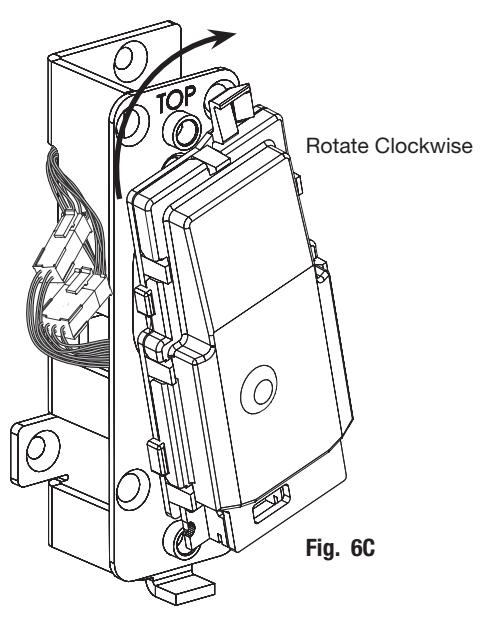
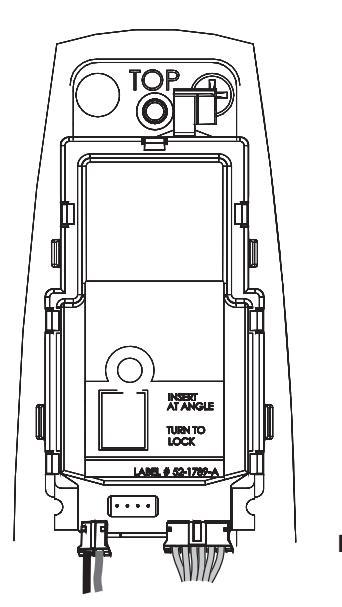
Fig. 6D
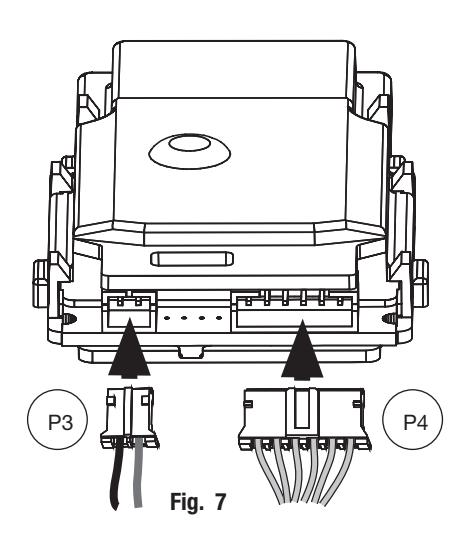
7 Connector Attachment (Exterior PCB Assembly)
- a. Connect P3 (2-pin connector) from lock body to J3 on module (Fig. 7).
- b. Connect P4 (6-pin connector) from lock body to J4 on module (Fig. 7).


8) Surface Vertical Rod Installation Instructions (Continued)
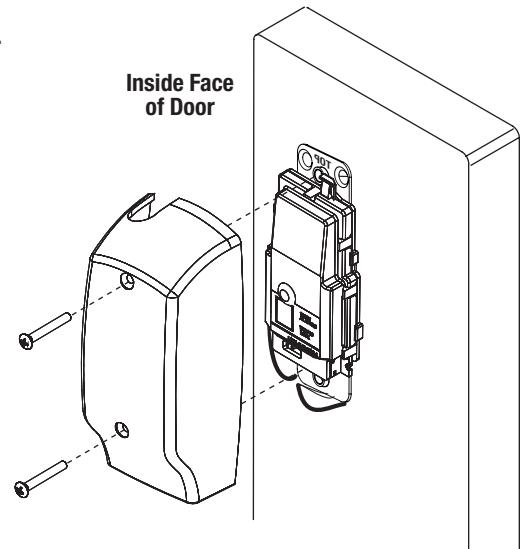
Install Inside Escutcheon:
The inside escutcheon installs the same for installations with and without the surface vertical rod.
- a. Feed excess ElectroLynx® wire harness back into door.
- b. Feed excess trim and exit device under head cover.
- c. Install inside escutcheon using (2) #8-32 x 5/8" oval head screws. Note: Be careful not to pinch wires between escutcheon and door surface.
Notes:
- Insert the 8- and 4-pin ElectroLynx connectors and establish their position inside the door prep.
- Neatly fold the wires onto themselves and into the remaining space to prevent pinching wires when mounting escutcheon.
7) Normal Installation Instructions (Continued)
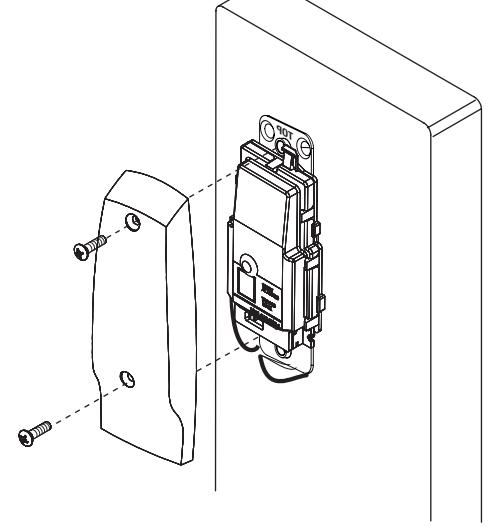
Install Inside Escutcheon:
The inside escutcheon installs the same for installations with and without the surface vertical rod.
- a. Feed excess ElectroLynx® wire harness back into door.
- b. Feed excess trim and exit device under head cover.
- c. Install inside escutcheon using (2) #8-32 x 5/8" oval head screws.
Note: Be careful not to pinch wires between escutcheon and door surface.
Notes:
- Insert the 8- and 4-pin ElectroLynx connectors and establish their position inside the door prep.
- Neatly fold the wires onto themselves and into the remaining space to prevent pinching wires when mounting escutcheon.
9) Operational Check
- a. Insert key into cylinder and rotate.
- b. With key rotated turn lever and check that latch retracts.
- c. Check that push bar fully retracts the latch.
- d. Close door: Ensure latch fully extends into strike and does not bind.
Note: For fail safe trim, cylinder will have to be tested after wiring is complete and power is turned on.
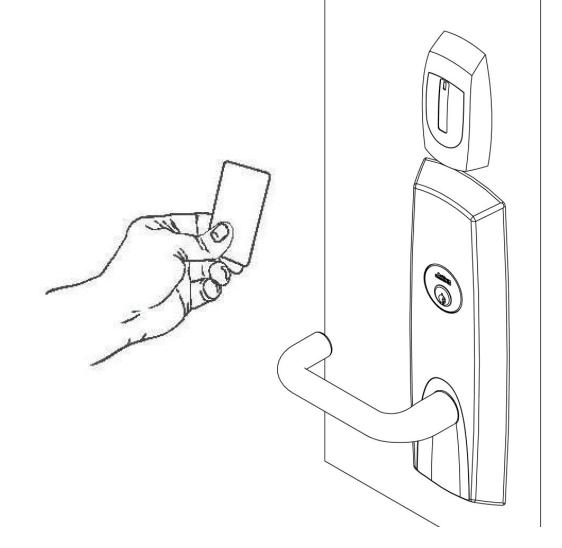
Once electrical wiring has been successfully completed according to proper application, perform the following steps:
- a. Turn power ON.
- b. Verify LED located on reader is ON (Red or Green depending on reader configuration (See reader LED Configuration).
- c. Present proximity credential and verify LED and sounder activity.
- d. Verify valid card read at EAC Panel.
- e. Verify system operation functions; i.e., when prox credential is presented to reader that the door unlocks.
Wiegand Test Unit
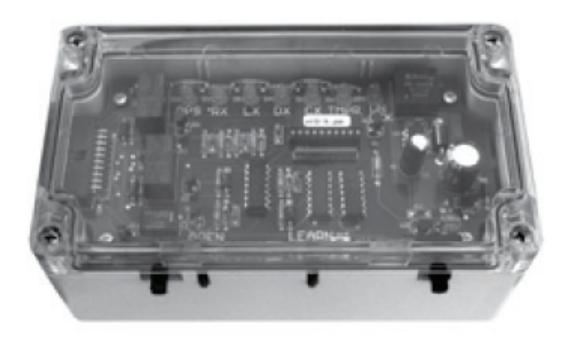
The ASSA ABLOY Wiegand Test Unit verifies your installation in the field. The test unit checks for proper wiring, card reader data integrity, lock functionality including lock/unlock, door position status, and request-to-exit (REX) status.
In addition, this tool provides product demonstration abilities to highlight the product's features and capabilities.
| Feature | WT1 | WT2 |
|---|---|---|
|
12 or 24VDC solenoid
lock voltage adjustable |
X | X |
|
Operates as Fail Safe or
Fail Secure |
X | X |
|
"Learn" mode allows
testing of specific cards without programming at the panel level |
X | X |
|
Card reader data inte
grity is validated at test unit |
X | X |
| Works with SE LP10 | X | X |
|
Displays detailed
Wiegand data, including hexadecimal string and total bits received |
X | |
|
Displays measured end
of-line resistor values (if applicable) |
X |

Corbin Russwin 225 Episcopal Road Berlin, CT 06037 Phone: 800-543-3658 Fax: 800-447-6714 corbinrusswin.com