Cencon Generataion 2 Attention Sheet
Open the original PDF document
View PDF

ATTENTION: GEN2 CENCON LOCK
Cencon Generation II (Gen2) locks and replacement back covers are being released to the market on a limited basis starting in December 2009 with full market release scheduled for April 2010. The enhanced product duplicates the basic functions of past Cencon locks while adding new customer-requested features.
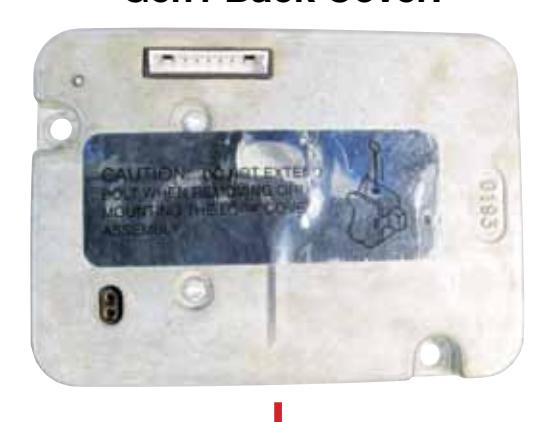
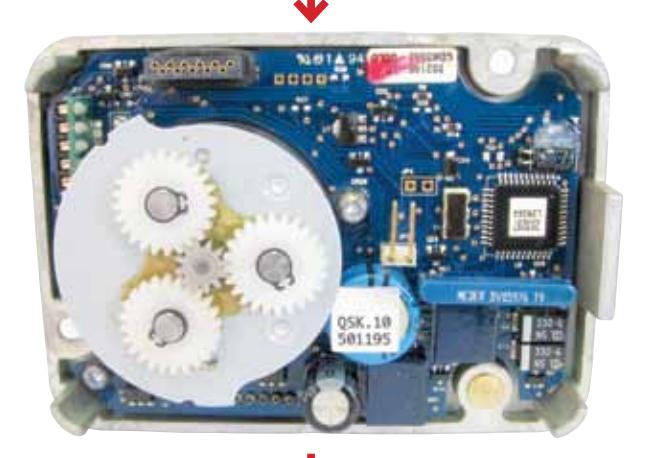
Gen1 Back Cover:


Gen2 Back Cover:
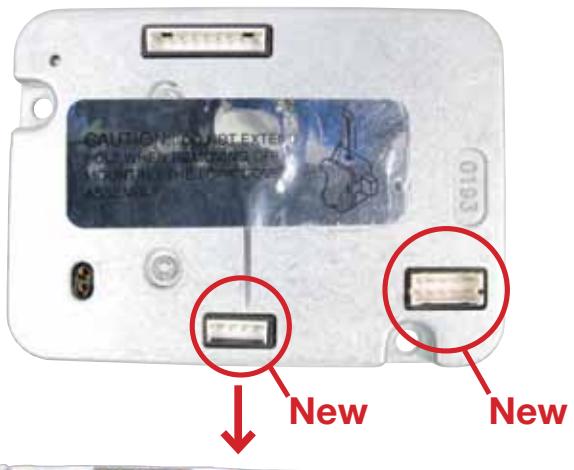
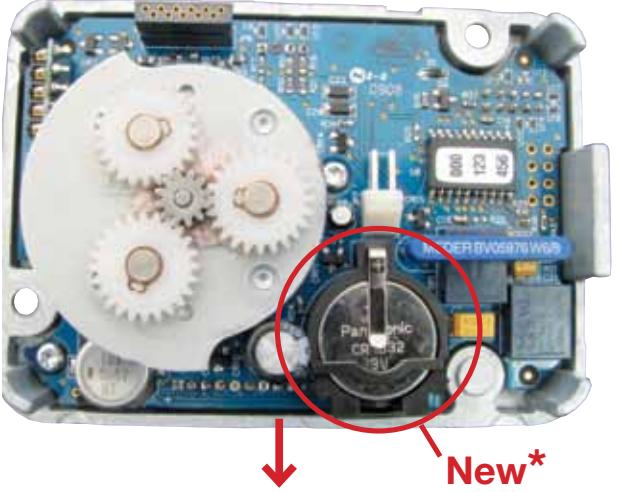

For field back cover replacement:
The recommended procedure when installing a Gen2 back cover onto a new lock or a replacement lock is to ensure that a new silver dial decal that displays the numeral "II" under the word Kaba is placed on the dial. The new dial decal will help visually identify from the front of the ATM that a lock is using the Gen2 back cover.
- If back cover has only 2 connectors, use the standard black "KABA" decal.
- If back cover has 4 connectors, use the new silver decal marked "KABA II".
*WARNING: Do not remove clock battery or black retainer. Doing so resets the clock to 1-1-2000 and requires a programmed key.
Cencon Generation 2 Lock Differences
All previous Cencon S2000 locks with gold/silver-colored mottled lock cases (solenoid) that were in production from 1998 to early 2010 can be referred to as "Gen1" Cencon. All Gen1 and Gen2 back covers and lock cases are interchangeable, but are not totally equal in function.
Important Note: All Cencon locks which use stepper motors (manufactured prior to 1998 and signified by the black lock case) can be referred to as Gen0, and are not compatible with Gen2 back covers.
Visual Differences:
The Dial Decal
New silver dial decal that displays the numeral "II" under the word "KABA".
Power Up
When dialing left to power up to an " EC " prompt, " G 2 " will be displayed before " EC ".
Serial Number Display
The Gen2 lock's Serial Number is a 9-digit number. To display the Lock Serial Number, press "#" and then "2" when "EC" is displayed.
The Gen2 Cencon lock will display the serial number by showing "Sn-" followed by a series of two or three sets of 3-digit numbers. If all of the first 3 digits of the 9-digit serial number are zero, the lock will only display 6 digits. Otherwise, all 9 digits will be displayed. For example, Serial Number "000023456" will be displayed as "Sn-" followed by a series of two sets of 3-digit numbers: "023" "456" . Serial Number "001348729" will be displayed as "Sn-" followed by a series of three sets of 3-digit numbers: "001" "348" "729" .
Note: The Gen1 lock only displays a 6-digit serial number, flashing a series of three sets of 2-digit numbers. Ex. Serial Number "785332" is displayed as "Sn-" followed by a series of three 2-digit numbers: "78" "53" "32"
Important Note: If the Gen2 serial number is displayed as only a 6-digit number, you can use this Gen2 serial number in versions of Cencon and CenBank software released before 2009. If the Gen2 lock serial number displays as a 9-digit number, you must use Cencon version 4.0 or higher, and a USB key box, to activate the lock.
The Electronics System Card
Gen2 system card now includes a coin cell battery for the internal clock. The Gen1 has no coin cell battery. Also the Gen2 card S/N label shows a 9-digit serial number while the Gen1 card S/N label shows only a 6-digit serial number.
The Back of the Lock Case
Gen2 has 4 connectors on the back (a change key connector, a 9-pin alarm output, a new 4-pin signal input, and a new 10-pin future interface port). Gen1 only has two connectors (the change key connector and the 9-pin alarm output connector.)
Note: For more information regarding the new 4-pin connector, please refer to the Door Contact Switch & Remote Disable Cable sheet included with the associated cable.
New Feature Highlights:
• Real Time Clock added to the system card to standardize audit times no matter what key types are used and to provide time-stamp audits of openings in factory mode.
Note: The Gen2 lock is programmed from the factory with the current GMT (UTC) date and time set. This clock setting will be utilized for all audit activity until an authorized key from the Cencon software (Version 4.0 or above) is taken to the lock with updated settings.
-
Clock Battery Alert
added to alert the user and/or dispatch center that the clock battery is low or dead (estimated battery life of 8 years), or that the clock needs to be re-set if a battery has completely lost power or was replaced.
- Lock Keypad Commands added for Lock/Key Identification and Time Management.
Please refer to the Cencon Reference Manual for more details and instructions.