Camden CV-800SEN Serial to Wiegand Converter Installation Instructions
Open the original PDF document
View PDF


CV-800SEN Serial to Wiegand Converter
Installation Instructions
Section 1:
General Description
The CV-800SEN is a Serial to Wiegand Converter for the Sentex Infinity Series Telephone Entry Systems. It captures the Dial code a visitor enters into the lobby Panel, Converts it to 26bit Wiegand Format, then sends it to an Access Control System when the Resident Grants the visitor Access.
The CV800SEN also has provision for the postal Lock Switch. When the normally open postal Lock switch is activated, the CV800 will send "9999" in 26bit Wiegand format to the Access Control system.
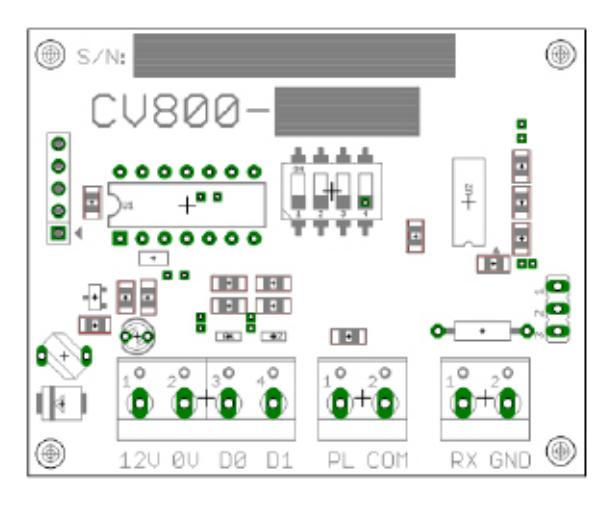
The following must be programmed in the Sentex Infinity Series Entry Panels (refer to Sentex Manual).
- a) The Baud rate must be set to 4800 (default)
- b) Communications parameters must be set to 8bits, 1stopbit, no parity (8,N,1)(default)
- c) Dial Codes must be set to 4 Digits. (factor default is 3. must be changed).
- d) Entry Codes (PIN Codes) must be set to 4 Digits (default).
- e) Enable the Printer option (Program Code #81) on all Lobby Panels
- f) Make sure Program code #83 is set to BOTH, on all lobby Panels.
Section 2:
Installation
To Install the CV-800SEN
- a) Connect the RX terminal of the CV800 to the OUT terminal on TB3.
-
b) Connect the Gnd terminal of the CV800 to the Gnd terminal on TB3.
- c) Connect the 12V terminal of the CV800 to the Access Control Reader +12V Input.
- d) Connect the 0V terminal of the CV800 to the Access Control Reader 0V Input.
- e) Connect the D1 terminal of the CV800 to the Access Control Reader D1 Input.
- f) Connect the D0 terminal of the CV800 to the Access Control Reader D0 Input.
- g) Set the Dip Switch on the CV800 Module to the Address of the Lobby Panel (see table below)
- f) Program the Access Control System with the Dial Codes as card Numbers.
Dip Switch Settings
| Address | 1 | 2 | 3 | 4 |
|---|---|---|---|---|
| 1 | OFF | OFF | OFF | OFF |
| 2 | ON | OFF | OFF | OFF |
| 3 | OFF | ON | OFF | OFF |
| 4 | ON | ON | OFF | OFF |
| 5 | OFF | OFF | ON | OFF |
| 6 | ON | OFF | ON | OFF |
| 7 | OFF | ON | ON | OFF |
| 8 | ON | ON | ON | OFF |
| 9 | OFF | OFF | OFF | ON |
| 10 | ON | OFF | OFF | ON |
| 11 | OFF | ON | OFF | ON |
| 12 | ON | ON | OFF | ON |
| 13 | OFF | OFF | ON | ON |
| 14 | ON | OFF | ON | ON |
| 15 | OFF | ON | ON | ON |
| 16 | ON | ON | ON | ON |
CV-800SEN Serial to Wiegand Converter
Note: When two or more Lobby panels are installed on a Project, the address of each lobby Panel is automatically set by the Sentex Firmware. (Address is = to wired position of the panel in the multi link loop. (see Sentex manual)
If Multiple CV800 –SEN's are used. They connect to Port 2 of the last Sentex Lobby Panel in the Multi.
Link Loop. The CV800 –SEN Modules Serial connections can be paralled (see Drawing).
Section 3:
Specifications
| Output Format | 26 bit Wiegand | ||
|---|---|---|---|
| Facility Code | 0 (zero) | ||
| Power Supply |
9 to 14VDC
(Linear Power Supply Recommended) |
||
|
Maximun Current
Requirements |
Average 7ma, Peak 10ma. | ||
| Cable Distance | 300 Feet (90 Metres) (Reader Input ) | ||
| Warranty |
3 Year Warranty against defects in
Materials and Workmanship |
||
Push Buttons Keypads Strikes Magnetic Locks Key Switches Relays & Timers Access Control
5502 Timberlea Blvd.,
Mississauga, ON Canada L4W 2T7
www.camdencontrols.com Toll Free: 1.877.226.3369
File: CV-800SEN Installation Instructions R2.innd
Revision: 29/01/2015 Part No.: 40-82B102

