Camden CV-7400 & CV-7820 Installation Instructions
Open the original PDF document
View PDF

Mississauga, Ontario L4W 2T7 905-366-3377 Toll Free: 877-226-3369 www.camdencontrols.com
CV-7400 & CV-7820 Instructions 5502 Timberlea Blvd.
Cable Requirements
7 or 9 conductors, stranded with overall shield. (Not twisted pairs). IMPORTANT! The proper wire gauge to use must be determined by the current draw requirements of the reader, the length of the cable run, and the voltage applied to the reader.
If the reader is to be operated at 5 VDC, 5 VDC must be available at the reader (long cable runs have a voltage drop due to the resistance in the cable). A larger gauge of wire (having less resistance) or a separate power supply near the reader may be required to ensure 5 VDC is available at the reader.
Maximum Cable Lengths Output Formats
22 gauge 250 feet (75 meters) Wiegand (industry standard 26-bit Wiegand and custom formats)
18 gauge 500 feet (150 meters) Grounding
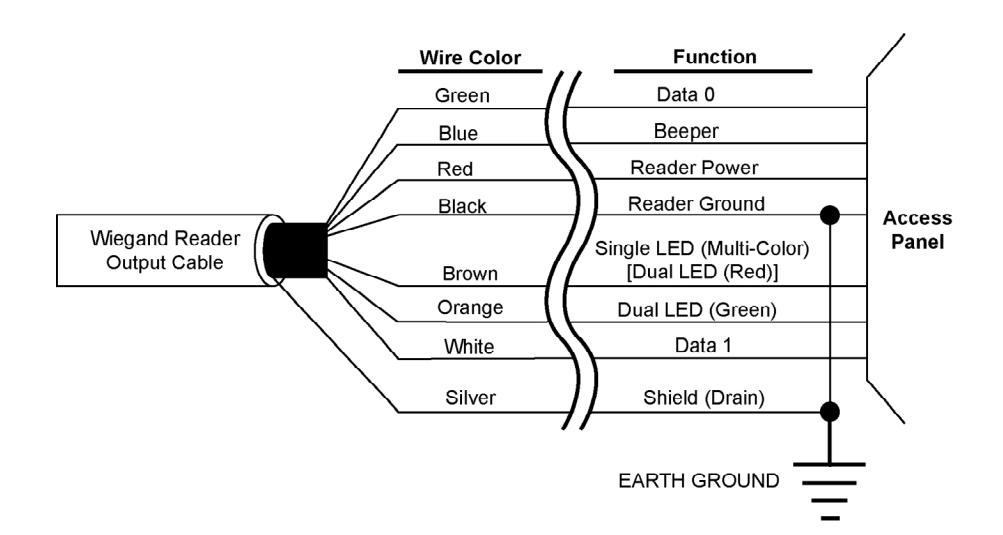
Shield (drain) continuity must run from the reader to the access panel. Shield (drain) and reader ground must be tied together at the access panel and connect to an earth ground at one point.
Trouble Shooting
| Problem: The reader has a short read range | |
|---|---|
| Possible Cause: | Check: |
|
The reader/access panel is not
properly grounded. |
Ensure there is a proper earth ground connection made to the
access panel. Refer to the access panel documentation for information regarding the earth ground connection. |
|
The reader cable's shield wire
has opened/broken somewhere between the reader and the access panel. |
Inspect the shield line from the access panel to the reader.
Ensure that it is a connected, continuous line. Refer to the access panel documentation to verify the shield line is correctly connected to the access panel. |
|
The reader is mounted too close
to a device that radiates electromagnetic interference. |
Devices such as computer monitors radiate electromagnetic
interferences that affect the read range. When possible, relocate either the reader or device to provide greater separation between them. |
|
The power supply is generating
electromagnetic interference. |
The power supply on the access panel must be a regulated,
linear supply. Do not use switching supplies. They are often sources of electromagnetic interference. |
File: CM-7400 Revised: January 18, 2008 Part No:40-82B078
| Problem: The reader does not recognize a card/fob credential (no beep, no LED flash) | |
|---|---|
| Possible Cause: | Check: |
|
One or more of the reader's
wiring connections are incorrect. |
Power down the reader/access panel and verify the wiring
connections are correct for the reader/access panel combination. |
|
The
reader is not receiving proper power. |
Verify the voltage supplied to the reader is between 5 and 14
VDC. |
|
The reader is mounted too close
to a device that radiates electromagnetic interference. |
Devices such as computer monitors radiate electromagnetic
interferences that affect the read range. When possible, relocate either the reader or device to provide greater separation between them. |
|
You are using an incorrect type
of card credential. |
Make sure you are using an access credential that is
compatible with the reader/access control. |