Camden CM-RX90V2 Kinetic Lazerpoint Wireless Receiver Installation Instructions
Open the original PDF document
View PDF

Door Activation Devices
Lazerpoint™ RF RX-90v2 Advanced Single Relay Receiver
INSTALLATION INSTRUCTIONS
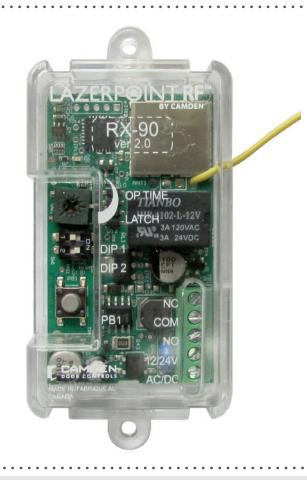
THIS PACKAGE INCLUDES:
1-
1. DESCRIPTION
CM-RX-90v2 receivers can be paired with Lazerpoint™ or Kinetic™ transmitters, switch selectable.
Kinetic™ by Camden is an advanced 900 MHz 'power harvesting' wireless system that uses the energy created by the operation of the switch to power the wireless transmitter.
This Kinetic™ transmitter is available with the following push plate switches: CM-45K and CM-46K.
Camden Lazerpoint™ Radio Controls comprise the following models:
- CM-TX-9 Wall switch ready transmitter
- CM-TX-99 Plug-in transmitter
- CM-TXLF 1, 2 & 4 button fob transmitters
- CM-RX-90v2 Advanced single relay receiver
- CM-RX-91 Basic single relay receiver
- CM-RX-92 Full function (dual relay) receiver
Camden Lazerpoint™ RF is the first system designed to address the specific needs of the Automatic Door industry. Unlike typical "garage door" RF, Camden's Lazerpoint™ operates at 915 MHz frequency to "cut through" the noise and clutter, and penetrate typical building materials to ensure a reliable installation every time.
Three receiver models are offered – the basic single relay RX-91, the full function RX-92 and the advanced single relay RX-90v2. The RX-90v2 offers 3 operating modes including delayed, no delay and latched.
Camden CM-RX-90v2 supports both Lazerpoint™ RF and Kinetic™ by Camden transmitters.
Camden CM-RX-90v2 features a convenient terminal block, visual relay status, and 40 code memory with push and learn technology.
2. FEATURES
-
3 Modes of Operation:
- Delayed (1 15 Seconds)
- No Delay (1 30 Seconds)
- Latching
- Adjustable Range: -3' 300'
- 40 Transmitter capacity, either Lazerpoint™ or Kinetic™ either delayed, non-delayed or both
- Form 'C' Relay Output
- 12/24V AC/DC operation
- 915 MHz Lazerpoint™ or Kinetic™ Technology
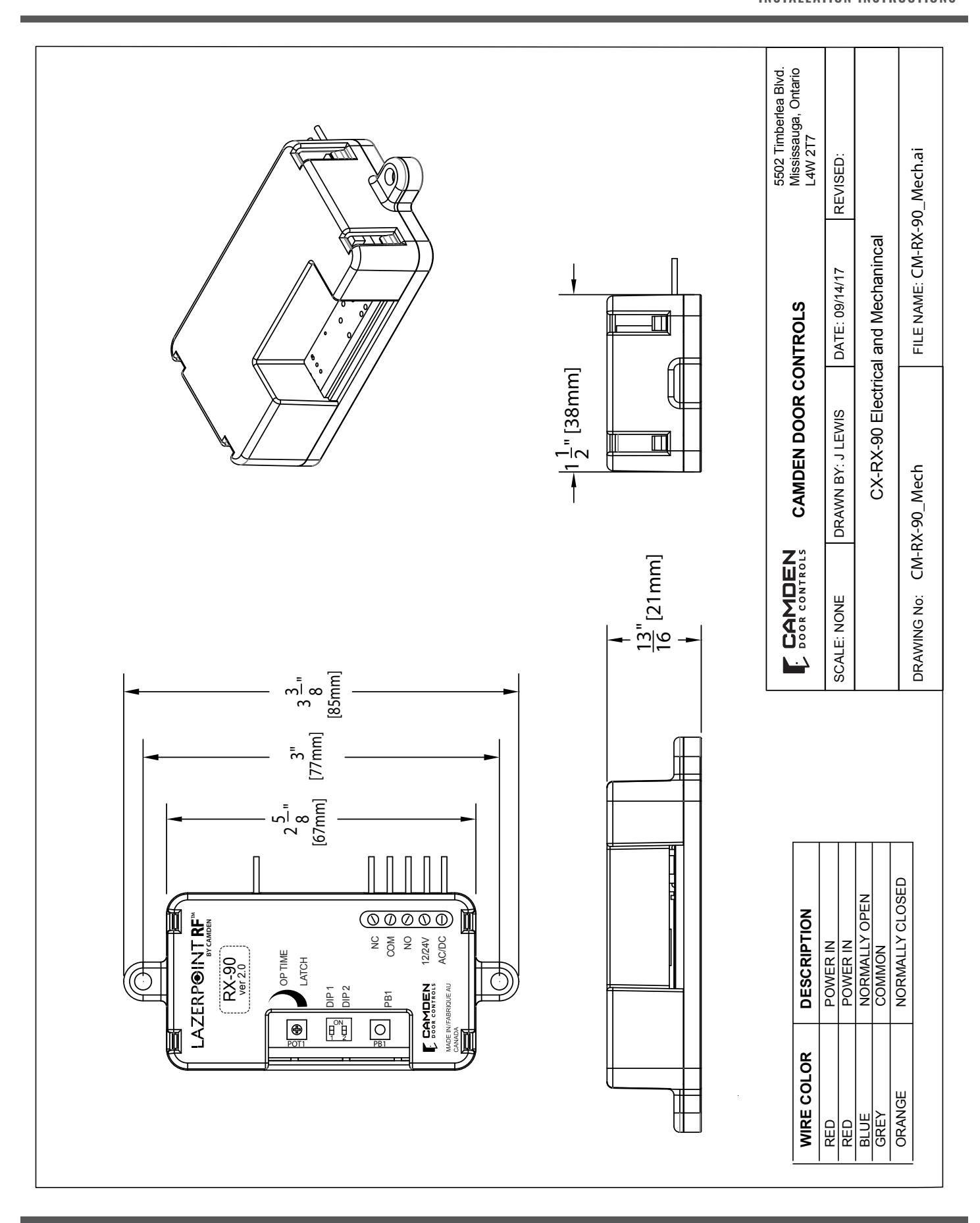
- Small Size: 2 5/8"H x 1 1/2"W x 13/16"D (67mm x 38mm x 21mm)
3. SPECIFICATIONS
| Operating Voltage | 12/24V AC/DC |
|---|---|
| Current Draw |
23 mA nominal @ 24 VAC
43 mA maximum @ 24 VAC |
| Response Time | 30 – 200 ms |
|
Memory Delay &
No Delay |
40 transmitters total |
| LED's |
Indicate: relay status; learn mode;
erase mode & potentiometer position |
| Output | 1 x SPDT Relay contact |
| Rating | 3 amps @ 30 VDC |
| Operating Time | 1 – 30 seconds |
| Delay Time | 1-15 seconds |
| Frequency | 915 Mhz. |
| Mounting |
2 # 4 screws at 3" centers,
or Velcro (supplied) |
| Enclosure | Clear plastic case |
| Dimension |
2 5/8"H x 1 1/2"W x 13/16"D
(67mm x 38mm x 21mm) |
4. INSTALLATION
MOUNTING
The RX-90v2 receiver is designed to mount inside the automatic door header. Screw holes are located at each end of the receiver case, or the included velcro may also be used to hold it securely.
For dimensional information refer to RX-90v2 electrical and mechanical Drawing on Page 4.
WIRING
Note: Do not use the Kinetic/Lazerpoint RF system as a Safety device!!. If safety devices are used, always wire them directly to the operator control box.
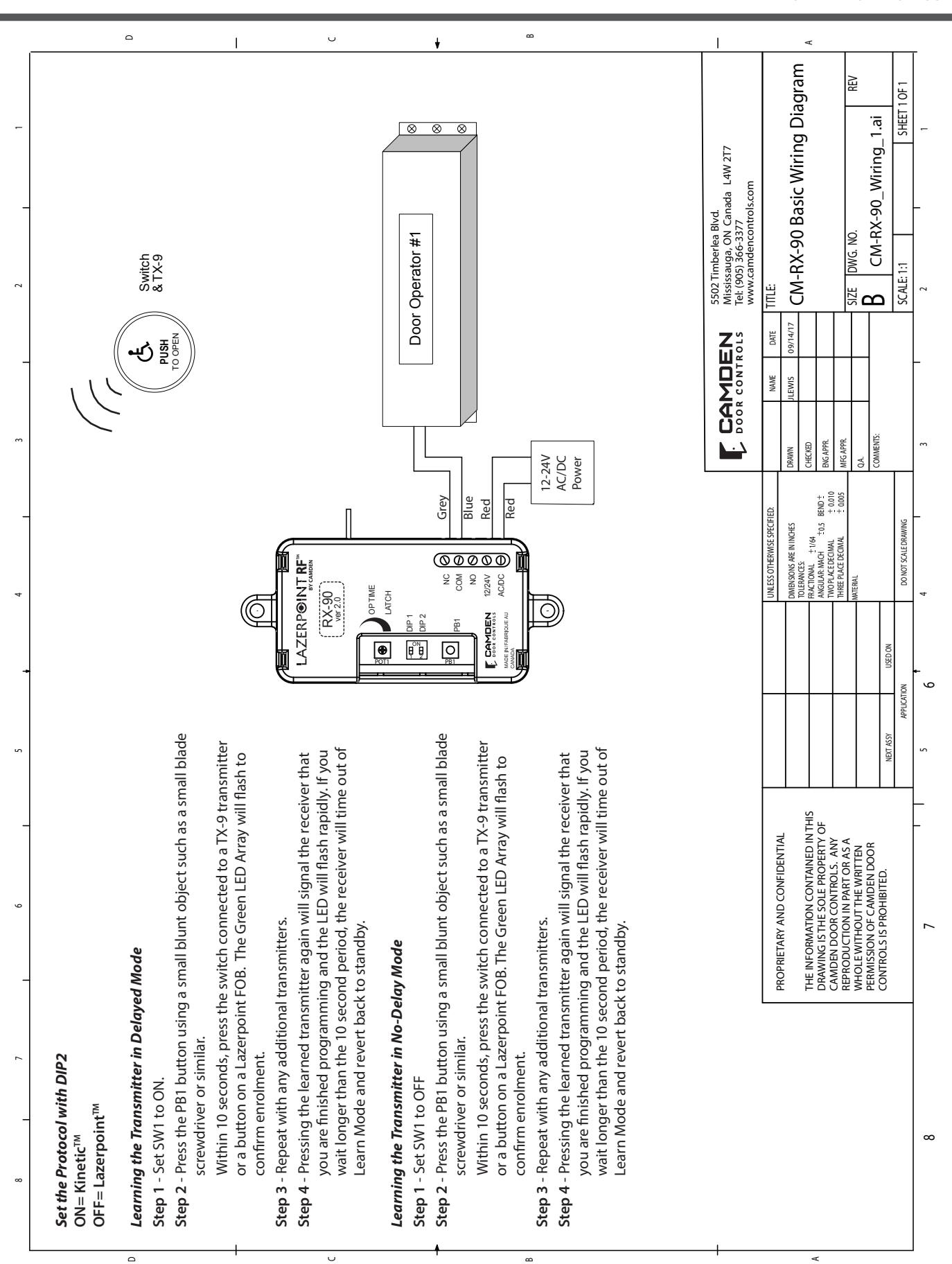
Refer to the RX-90v2 Wiring Diagram on Page 5, and wire the receiver as follows:
Wire the device (electric lock / operator) to the Relay output - terminal 3 is N.O. 4 is Common , and 5 is N.C.
Connect 12 or 24 Volt AC or DC to terminals 1 & 2 on the receiver. (The terminals are not polarity sensitive)
| Terminal | Description |
|---|---|
| 1 | Power in |
| 2 | Power in |
| 3 | Normally Open |
| 4 | Common |
| 5 | Normally Closed |
5. SET-UP INSTRUCTIONS
STEP 1
Learning the Transmitter(s) to the Receiver
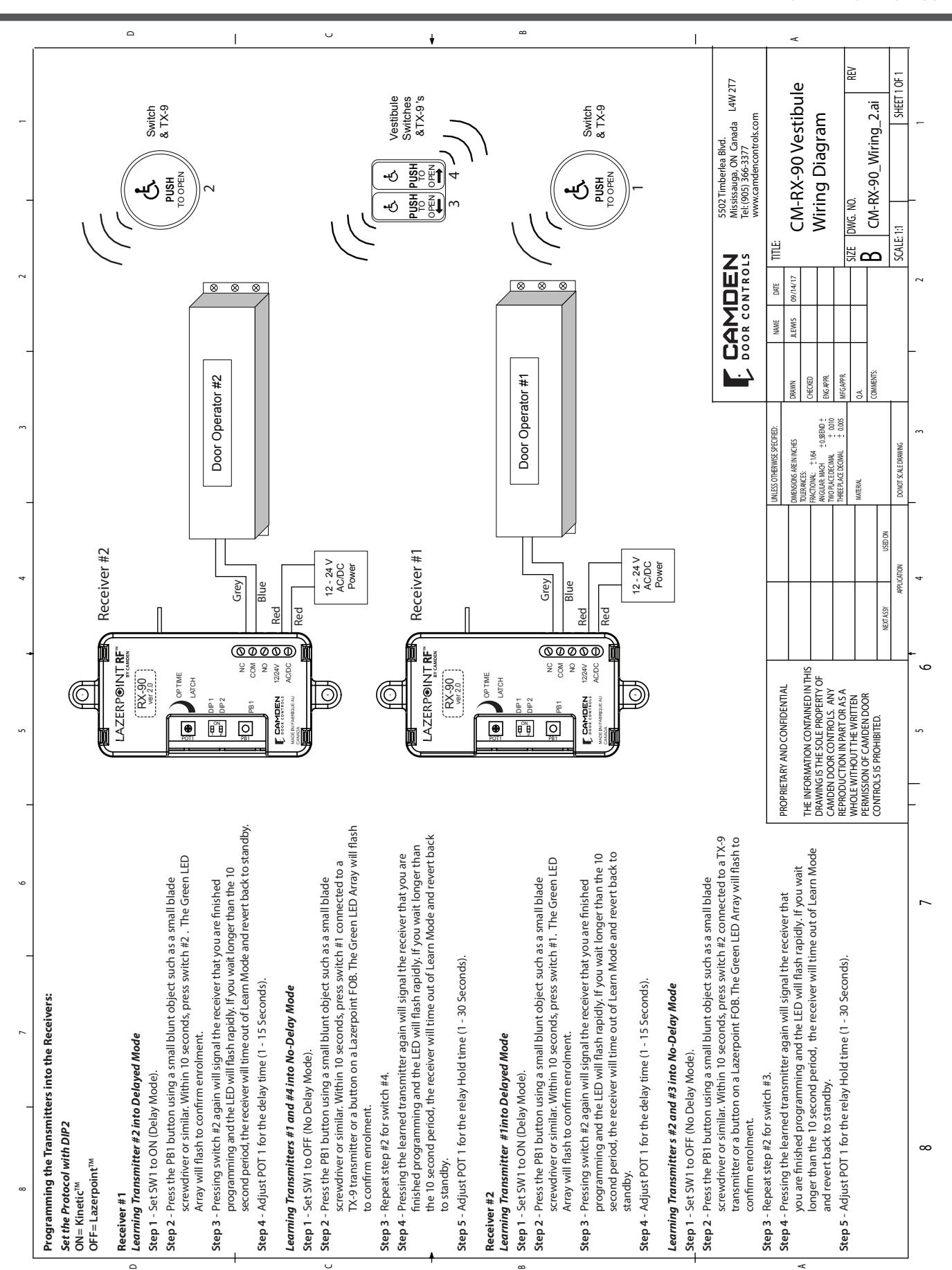
A receiver can have up to 40 transmitters paired with it. The transmitter can be paired as Kinetic™/ Lazerpoint™ delayed, non-delayed or a combination of both, making RX-90v2 ideal for bi-directional door sequencing.
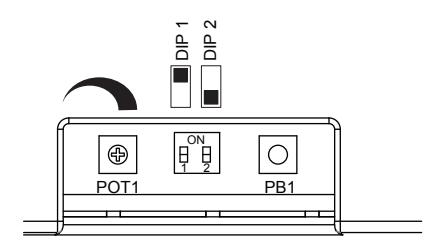
Set the RF Transmitter Type
Set DIP2 to ON Kinetic™, DIP2 to OFF Lazerpoint™
Learning the Transmitter in Delayed Mode
Set DIP1 to ON.
Press the PB1 button using a small blunt object such as a small
blade screwdriver or similar. Within 10 seconds, press the switch connected to a TX-9 transmitter or a button on a Lazerpoint™ FOB or Kinetic™ switch. The Green LED Array will flash to confirm enrolment. Repeat with any additional transmitters. Pressing the learned transmitter again will signal the receiver that you are finished programming and the LED will flash rapidly.
Pressing the transmitter a third time will activate the relay and the LED, and also the device connected to the relay contacts after the delay time set by POT1.
If you wait longer than the 10 second period, the receiver will time out of Learn Mode and revert back to standby.
Learning the Transmitter in No-Delay Mode
Set DIP1 to OFF
Press the PB1 button using a small blunt object such as a small blade screwdriver or similar. Within 10 seconds, press the switch connected to a TX-9 transmitter or a button on a Lazerpoint™ FOB or Kinetic™ switch. The Green LED Array will flash to confirm enrolment. Repeat with any additional transmitters. Pressing the learned transmitter again will signal the receiver that you are finished programming and the LED will flash rapidly.
Pressing the transmitter a third time will activate the relay and the LED, and also the device connected to the relay contacts.
If you wait longer than the 10 second period, the receiver will time out of Learn Mode and revert back to standby.
STEP 2
Adjustments
The delay before operate and the relay On-Time are controlled by POT1.
Delayed Mode
The RX-90v2 has a delay before operate timer.
Set DIP1 to ON.
Adjust POT1 clockwise to increase the delay timer from 0 to 15 seconds. The LED will light and become brighter as the delay time is increased and become dim as the delay time is decreased. The LED starts to flash once the maximum delay time has been reached. Back off the delay time until the LED is solid again for maximum delay time.
No-Delay Mode
The RX-90v2 can be adjusted to activate the output relay without a delay. The relay On-Time is adjustable from 1 to 30 seconds.
Set DIP1 to OFF.
Adjust POT1 Clockwise/counterclockwise to adjust the relay On-Time (1 to 30 Seconds). To increase the time, turn the pot clockwise, or for minimum time, turn the pot counterclockwise.
The LED will light and become brighter as the Relay On-Time is increased. The LED starts to flash once the maximum On-Time
has been reached. Back off the POT until the LED is solid again for maximum On-Time.
Latching Mode
The RX-90v2 has a latching mode. Activating the transmitter will latch the output relay ON. Activating the transmitter a second time will latch the Relay OFF.
DIP1 can be set to either ON/OFF.
Adjust POT1 clockwise until the LED starts to flash. The RX-90v2 is in latching mode at this point. To remove latching mode, turn POT 1 counter clockwise until the LED is solid again.
Note: Latching mode disables delayed mode. Transmitter programmed as delayed mode will work as latching mode transmitter.
Signal Strength Adjustment
For the most reliable, consistent operation, leave the signal strength at full power. Camden RX-90v2 receiver has an adjustment RF range. The range can be adjusted from a few feet to full range (300 ft. LOS)
To adjust the RF range:
- 1. Press PB1 to enter pairing mode.
- 2. Press PB1 again until the LED flickers 3 times. This places the receiver in RF range adjust mode.
- 3. Adjust POT1 to adust the RF range. CW to increase the range, CCW to decrease the range.
- 4. Press a paired transmitter to test the range as it is being adjusted.
- 5. Once the desired range is set, Press and hold PB1 until the LED flickers 3 times. The transmitter is now back in pairing mode. Either wait for the receiver to time out or press a paired transmitter to exit pairing mode.
After adjusting the range you MUST adjust POT 1 for relay timing at this point based on the mode (delay or no-delay).
STEP 3
DELETING TRANSMITTERS
Delay Mode Transmitters
Set DIP1 to ON.
Pressing and holding PB1 for 8 seconds will delete all transmitters delay mode. The LED will flash rapidly for 4 seconds to indicate erasure of the codes.
No Delay Mode Transmitters
Set DIP1 to OFF.
Pressing and holding PB1 for 8 seconds will delete all transmitters no delay mode. The LED will flash rapidly for 4 seconds to indicate erasure of the codes.
Note that individual removal of specific codes is not possible.
6. WARRANTY
Camden Door Controls guarantees the Lazerpoint™ RF to be free from manufacturing defects for 3 years from date of sale. If during the first 3 years a Lazerpoint™ RF component fails to perform correctly, it may be returned to our factory where it will be repaired or replaced (at our discretion) without charge. Except as stated herein, Camden extends no warranties expressed or implied regarding function, performance or service.
NOTE: Batteries are exempt from this warranty!
Visit: www.camdencontrols.com
Page 3 of 7
LAZERPOINT™ RF RX-90v2 ADVANCED SINGLE RELAY RECEIVER
INSTALLATION INSTRUCTIONS
IC & FCC INFORMATION FOR USERS
This device complies with Industry Canada's licence-exempt RSSs. Operation is subject to the following two conditions:
- (1) This device may not cause interference; and
- (2) This device must accept any interference, including interference that may cause undesired operation of the device.
Le présent appareil est conforme aux CNR d'Industrie Canada applicables aux appareils radio exempts de licence. L'exploitation est autorisée aux deux conditions suivantes :
- 1) l'appareil ne doit pas produire de brouillage;
- 2) l'utilisateur de l'appareil doit accepter tout brouillage radioélectrique subi, même si le brouillage est susceptible d'en compromettre le fonctionnement.
This radio receiver has been approved by Industry Canada to operate with the antenna types listed below with the maximum permissible gain indicated. Antenna types not included in this list, having a gain greater than the maximum gain indicated for that type, are strictly prohibited for use with this device.
Le présent receveur radio a été approuvé par Industrie Canada pour fonctionner avec les types d'antenne énumérés ci dessous et ayant un gain admissible maximal. Les types d'antenne non inclus dans cette liste, et dont le gain est supérieur au gain maximal indiqué, sont strictement interdits pour l'exploitation de l'émetteur.
Antenna Specification
Model: Camden Lazerpoint Proprietary PCB Antenna
Center Frequency: 915MHz
Recom. Freq. Range: 903-928MHz
Wavelength: ¼ Wave Peak Gain: 0dBi Impedance: 50-ohms Connector: 2-pin Header
Oper. Temp. Range: -40° to +85°C
This device complies with part 15 of the FCC Rules. Operation is subject to the following two conditions: (1) This device may not cause harmful interference, and (2) this device must accept any interference received, including interference that may cause undesired operation.
This equipment has been tested and found to comply with the limits for a Class B digital device, pursuant to part 15 of the FCC Rules. These limits are designed to provide reasonable protection against harmful interference in a residential installation. This equipment generates, uses and can radiate radio frequency energy and, if not installed and used in accordance with the instructions, may cause harmful interference to radio communications. However, there is no guarantee that interference will not occur in a particular installation. If this equipment does cause harmful interference to radio or television reception, which can be determined by turning the equipment off and on, the user is encouraged to try to correct the interference by one or more of the following measures:
- —Reorient or relocate the receiving antenna.
- —Increase the separation between the equipment and receiver.
- —Connect the equipment into an outlet on a circuit different from that to which the receiver is connected.
- —Consult the dealer or an experienced radio/TV technician for help.
Changes or modifications made to this equipment not expressly approved by Camden Door Control could void the user's authority to operate the equipment.