Camden CM-75 Column Switch Installation Instructions
Open the original PDF document
View PDF

Door Activation Devices
CM-75 Series Column Switch
INSTALLATION INSTRUCTIONS
1. GENERAL DESCRIPTION
Camden CM-75 Series Column™ switches offer a rugged and attractive ADA compliant switch design that is easy to activate from any angle, and will provide years of trouble free operation.
The CM-7536 utilizes 2 fully redundant 15 amp Form-C contact switches, and molded impact and flame resistant end caps which provide easy snap-in installation of the Lazerpoint TX-9 transmitter.
The Column switch may be mounted to any flat wall surface, or to our Model CM-42 or CM-48 anodized aluminum bollards. We provide necessary mounting hardware for all options.
2. SPECIFICATIONS
| Models | CX-7536 and CM-7509 |
|---|---|
| Dimensions |
CM-7536:
37 ½" H x 5 7/8" W X 1½ " D (overall) CM-7509: 10 5/8" H x 5 7/8" W x1 1/2" D (overall) |
| Construction |
Heavy duty extruded
aluminum |
| Finish | Anodized clear or dark bronze |
| Mounting |
4 x #14 wood screws or
¼" - 20 S/S machine screws, with anchors |
| Contacts |
CM-7536 – 2 x SPDT
momentary. contact switch (Form C), UL listed CM-7509 – 1 x SPDT momen tary. Contact switch (Form C), UL listed. |
| Contact Rating | 5 amps @ 30 VDC |
3. INSTALLATION
Code Requirements: If installed according to these instructions the CM-7536 Column switch will meet the requirements of the California Building Code (Section 1117B.6, Date: 2009), and Section 3.8.3.3.17(b) of the Ontario Building Code.
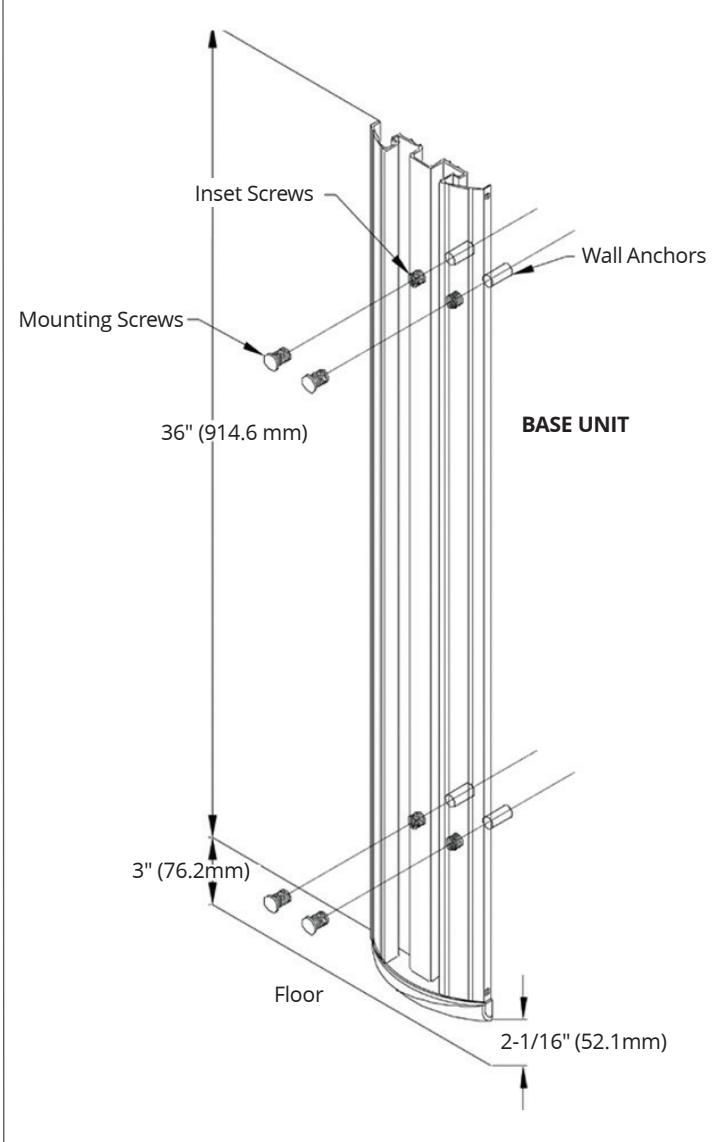
- 1. First, remove the assembled unit from the packaging. The unit must be disassemble to be installed. To do this, remove the two small Phillips screws holding the top cap in place. Remove the cap. Then, grasping the center (metal) actuation bar, pull vertically until the entire actuation bar is removed from the base unit. Set the actuation bar aside and protect from surface damage.
- 2. Determine the optimum height from the finished floor. See illustration (above) for common height. If utilizing an in-wall electrical box, center the backplate over the box, while lining up the top edge with your mark.
- 3. Using a level, ensure the base unit is plumb and level, and mark the 4 mounting locations through the adjustable nylon inset screws onto the wall surface. (If on drywall use a pencil, and if on concrete a narrow Sharpie or similar)
- 4. a. Drill the wall at the 4 marked locations, and tap in the appropriate wall plugs. We supply both drywall and concrete anchors for the included #14 screws.
- 4. b. If you are mounting the Column Switch to an aluminum post or framing section, drill and tap 4 holes for ¼"-20 Stainless Steel Machine screws (also provided). Note: Camden CM-42 and CM-48 series posts are available with pre-drilled and tapped holes preparation for Column™ switches.
- 5. a. If hardwiring: Use the supplied wirenuts, make your wire connections. Push any excess wire into the back box and ensure that the cable is not exposed to the moving parts of the switch, or pinched between the back of the base unit and the surface of the wall.
The 4 nylon inset screws may be turned in or out to help plumb up the Column switch and adjust for wall irregularities. Check with a level, and when satisfied, install the 4 mounting screws and tighten.
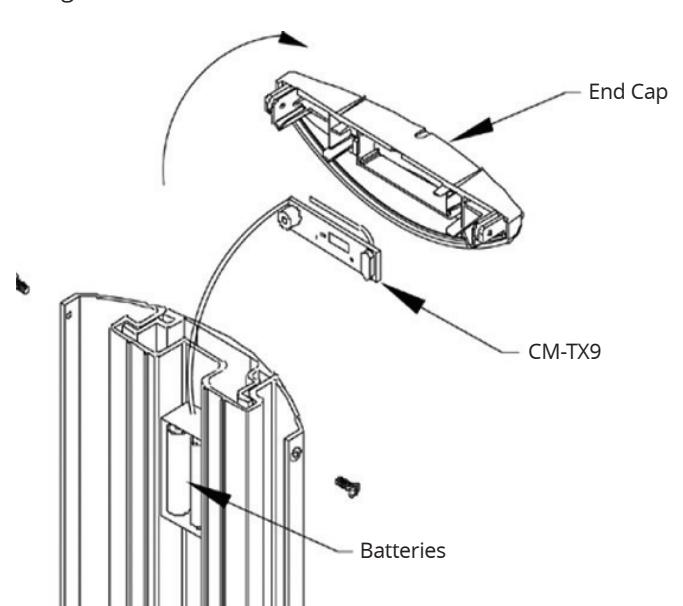
5. b. If using Lazerpoint RF: The cap includes a snap-in compartment for our TX-9 transmitter. Place the transmitter in the cap, with the wires hanging down and to the front of the cap. Using the supplied wirenuts, connect the two activating wires to the Column switch lead wires. Then slide the battery and the extra wiring into the center (rear) channel that is provided. Do not slide all of the wire into the channel, so that the cap can hang off to one side while you perform the next step. Using the supplied wirenuts, connect the two activating wires to the Column switch lead wires. Then slide the
battery and the extra wiring into the center (rear) channel that is provided. Do not slide all of the wire into the channel, so that the cap can hang off to one side while you perform the next step.
- 5. c. If using other RF: Using the supplied wirenuts, make your wire connections to the RF transmitter and tuck the transmitter and excess wire into the back box (or wall cavity). Ensure that the cable is not exposed to the moving parts of the switch, or pinched between the back of the base unit and the surface of the wall.
- 6. Reassemble the (center) actuation bar into the base unit. This is done by first holding the hanger (located at the top center) vertically 'up' – then carefully sliding the actuation bar down the length of the base unit, being careful not to bend or break the springs or internal switches. When the bottom edge of the actuation bar reaches the height of the springs, use your free hand to tuck in the spring and switches under the actuation bar as it slides over them. When activation bar is approx 2" from bottom, position the hanger so that it will fall into the slots provided at the top of the base unit. Slide actuation bar down until it rests on the hanger. The actuation bar should now move freely within the base unit. Test the operation of the switch before mounting the cap.
- 7. When satisfied with the switch operation, place the cap back on the top, and screw in the two small self-tapping Phillips screws.
3. SYSTEM INSPECTION
After the Installation and operational check of the system:
- 1. Place any applicable labels on the door (as per ANSI A156.10 or A156.19 guidelines).
- 2. Instruct the owner on door system operation and how to test it. This should be checked on a daily basis.
- 3. Strongly recommend to the owner that the complete entry be inspected twice a year as part of the service agreement.
5. WARRANTY
Camden Door Controls guarantees the CX-75 series to be free from manufacturing defects for 3 years from date of sale. If during the first 3 years the Column™ switch fails to perform correctly, it may be returned to our factory where it will be repaired or replaced (at our discretion) without charge. Except as stated herein, Camden extends no warranties expressed or implied regarding function, performance or service.