Camden CM-333 Battery Operated with Relay Output Active Infra-red Hands-Free Switches Installation Instructions
Open the original PDF document
View PDF

Door Activation Devices
CM-333 Series Battery Operated with Relay Output Active Infra-red "Hands-Free" Switches
INSTALLATION INSTRUCTIONS
1. GENERAL DESCRIPTION
Sure-Wave™ Hands-Free Switch are active infra-red devices utilizing micro burst sensor technology, designed for use in ADA compliant automatic door control applications. The switches eliminate the spread of germs by avoiding physical contact and offer building occupants greater convenience when moving through the premises. Sure-Wave™ switches are available with either stainless steel or impact resistant polycarbonate faceplates, in narrow (jamb), single gang or double gang configurations. All models are ROHS compliant with lead-free construction.
2. SPECIFICATIONS
| Descriptions | CM-333 | |
|---|---|---|
| No. of IR Sensors | 1 | |
| Batteries (Supplied) |
'AA' Alkaline Batteries
(Supplied) |
|
| Estimated Battery Life |
2 Years
(Based on 100 Operations/Day) |
|
|
Standard Operating
Range |
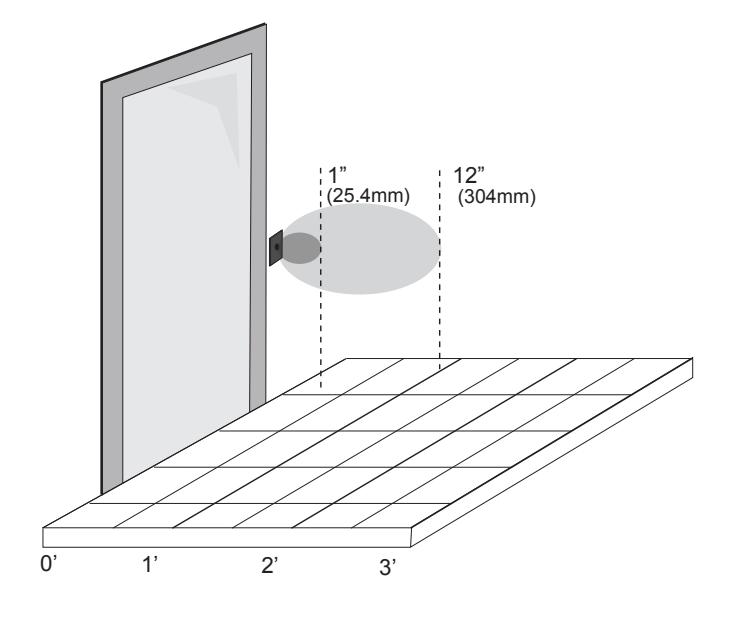
1"- 12" (25.4mm - 304mm)
Factory Set to 6" (152 mm) |
|
| Operating Mode |
Momentary
Momentary with Alarm |
|
| Inputs |
Request to Exit' External
(Door Contact) Input |
|
| Wireless Output |
TX-99 Plug-in 915Mhz. Spread
Spectrum Wireless Transmitter |
|
| Relay Output | (1) Form 'C' (SPDT) | |
| Relay Contact Rating | 2 Amps @ 30 VDC | |
| Output Type | Fail-secure | |
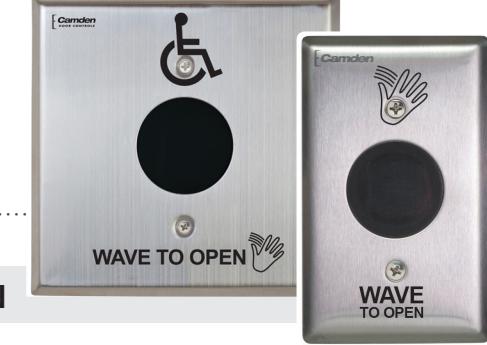
3. APPLICATION
Sure-Wave™ battery powered hands-free switches are American Disability Act (ADA) compliant, and provide barrier free access and egress to buildings and washroom facilities. The rugged construction makes them ideal for use on low-energy automatic doors, drive-up windows, and interior and exterior doors in virtually any commercial (office, retail), institutional (school, hospital or clinic), or industrial (manufacturing) facility.
Three standard face plate widths are available:
CM-333: 2 ¾" x 4 ½" polycarbonate or stainless steel, fits on single gang electrical boxes.
CM-333/N: 1 ¾" x 4 ½" polycarbonate or stainless steel, fits 1 ¾" door frames or our CM-23D Jamb box.
CM-333/W: 4 ½" x 4 ½" polycarbonate or stainless steel, fits on single gang, double gang or 4 x 4 electrical boxes. All faceplates may be ordered up with a plain face, with the waving hand symbol (/40), with the waving hand symbol and words: WAVE TO OPEN (/41) or with the waving hand icon, wheelchair and words: WAVE TO OPEN (/42).
4. INSTALLATION
Mounting
Sure-Wave™ may be mounted in door jambs, single or double gang electrical boxes, and 4 x 4 boxes.
NOTE: The sealing gasket (included) is recommended for outdoor or wet locations. If using with Automatic doors install in accordance with ANSI A156.10 / A156.19. Select from one of the following three mounting subsections:
SINGLE GANG ELECTRICAL BOX: CM-333
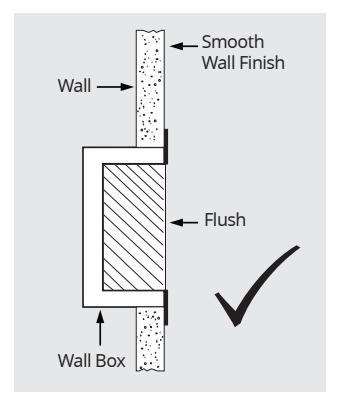
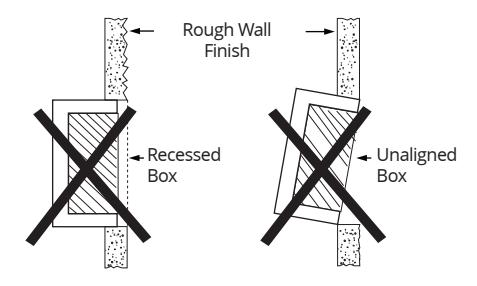
- 1. a) If using an in-wall box ensure the box is plumb and square, and flush with the wall surface. (See Diagram 1) b) If using a surface box, ensure it is secure & plumb.
- 2. Bring your 2-conductor wire through the back or side of the enclosure and leave approximately 6" tail for wiring connection.
- 3. Make the electrical connections to the device according to the wiring section (following).
- 4. Using the dip switch located on the end of the unit, set the operating mode. (See Section 6)
WITH RELAY OUTPUT ACTIVE INFRA-RED "HANDS-FREE" SWITCHES
INSTALLATION INSTRUCTIONS
- 5. Attach the unit to the enclosure using the two #6-32 screws provided.
- 6. Attach the unit to the enclosure using the two #6-32 screws provided. #6-32 x 3/8 machine screws or tamperproof screws.
Do not overtighten!!
DIAGRAM 1 PROPER BOX INSTALLATION
2 GANG (or 4x4) ELECTRICAL BOX: CM-333W
- 1. a) If using an in-wall box ensure the box is plumb and square, and flush with the wall surface. (See Diagram 1)
- 1. b) If using a surface box, ensure it is secure & plumb.
- 1. c) If using a 4 x 4 box, ensure the box is plumb and square, and flush with the wall surface, then attach the metal adaptor plate (included in the CM-333W package) to the box using appropriate fasteners.
- 2. Bring your 2-conductor wire through the back or side of the enclosure and leave approximately 6" tail for wiring connection.
- 3. Make the electrical connections to the device according to the wiring section (following).
- 4. Using the dip switch located on the end of the unit, set the operating mode. (See Section 6)
- 5. Attach the unit to the enclosure using the two #6-32 screws provided.
- 6. Attach the faceplate to the unit using the two black #6-32 x 3/8 machine screws or tamperproof screws.
Do not overtighten!!
DOOR FRAME: CM-324N
- 1. a) If mounting directly in a 1¾" wide aluminum jamb, make a cutout in the door frame at the intended location as per Diagram 3. (See Diagram). Drill and tap two mounting holes as shown.
- 1. b) If mounting the unit in our CM-23D deep jamb box, first mount the jamb box according to the instructions packaged with the enclosure. Using the CM-23D as a guide, drill a wire access hole through the jamb to fish the wiring through.
- 2. Bring your 2-conductor wire through the back or side of the enclosure and leave approximately 6" tail for wiring connection.
- 3. Make the electrical connections to the device according to the wiring section (following).
- 4. Using the dip switch located on the end of the unit, set the operating mode. (See Section 6)
- 5. Attach the unit to the enclosure or jamb using the two #6-32 screws provided.
- 6. Attach the faceplate to the unit using the two black #6-32 x 3/8 machine screws or tamperproof screws.
Do not overtighten!!
Wiring
CAUTION: Do not apply power to the unit until all secondary wiring is complete, and dip-switches have been set.
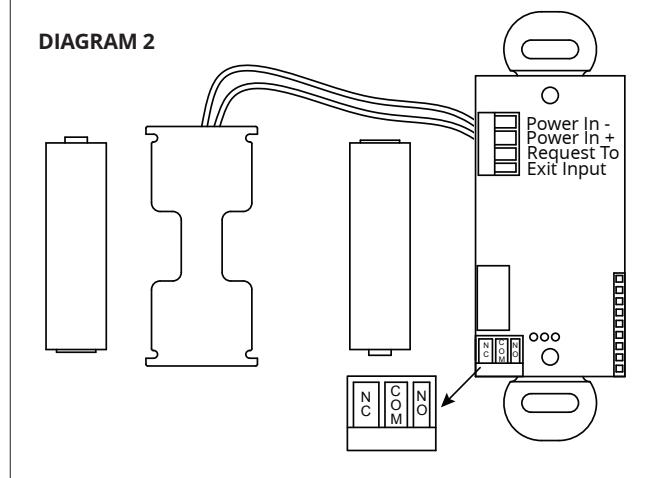
The CM-333 is powered from 2 AA batteries (supplied). The battery holder has been pre-installed. Insert the batteries into the battery holder. Please be careful that the polarity of the batteries is correct.
The CM-333 output is a form 'C' relay. Selecting the correct output is also dependent on the operating mode chosen. Most applications will utilize the N.O. and Common terminals.
5. APPLICATIONS & SET-UP APPLICATIONS
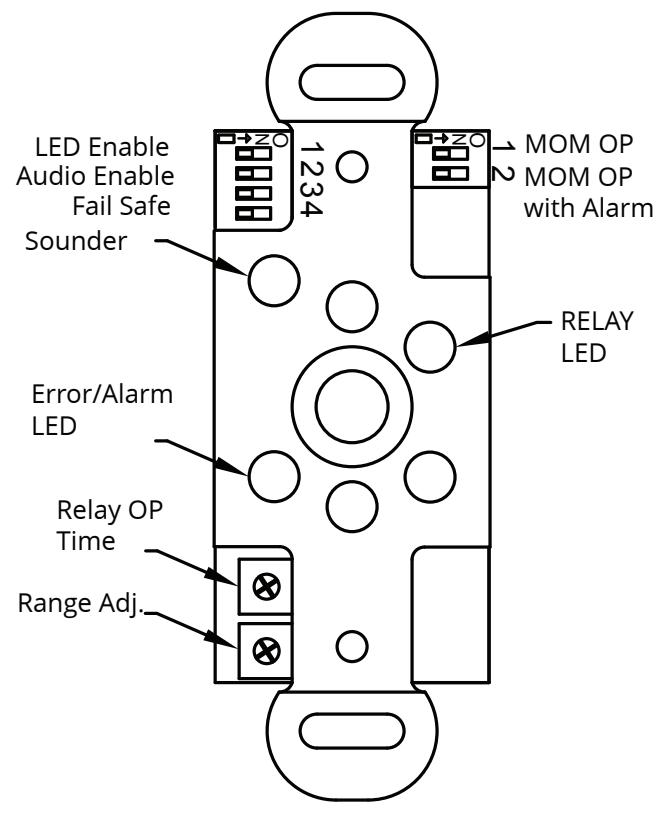
See Diagram 3 for the location of the Dip switches.
Dip Switch Settings
Dip Switch 1
| CM-333 | Description | ||
|---|---|---|---|
| 1 | LED Enable | Green LED flashes while the output is activated | |
| 2 | Audio Enable | Piezo buzzer sounds when the output is activated | |
| 3 | Fail Safe |
Changes the output relay logic.
N/O becomes N/C and N/C becomes N/O |
|
| 4 | Toggle | Relay Toggles on each activation | |
Switch 1 - LED On/LED Off
This switch disables the LED, should this feature be desired. Factory setting is OFF. This feature will decrease the battery life if set to ON.
Switch 2 - Audio Enable
Set this switch ON to enable an audible beep every time the switch is activated. Factory default is OFF. Enabling this feature will use additional power and decrease the life of the battery.
Switch 3- Normal Mode/Fail-Safe Mode
Choose Normal Mode if you wish the N.O. contact to remain open if the power were to fail. This is the factory setting.
Choose Fail-safe Mode if you wish the contacts to close upon power fail. Move the Dip switch to OFF position, and wire your device to the Common and N.C. wires.
Switch 4 - Toggle
The relay will activate and stay activated until the object is removed and then presented again.
Dip Switch 2
| Function | SW1 | SW2 | Description |
|---|---|---|---|
| Momentary | OFF | OFF | The output operates once and only re-engages after the object is removed |
|
Momentary
with alarm |
ON | OFF | The output operates once, and only re-engages after the object is removed. If an object remains in the detectable area, an alarm will generate after approximately 30 seconds. |
|
Continuous
Operation |
OFF | ON | The output remains activated until the object is removed. |
DIAGRAM 3
Battery Strength Meter
To check the battery strength, place an object in front of the Surewave<sup>™</sup> for approximately 5 seconds. The Surewave<sup>™</sup> will beep up to 5 times indicating the battery charge level. 5 beeps being fully charged. 1-3 beeps indicates you should change the batteries
Adjustments
Once the Dip switches have been set, and the unit is installed in the frame or enclosure, apply power to the unit and observe operation.
Set both potentiometers to minimum setting initially (fully counter-clockwise).
Adjust the range potentiometer by turning the pot in a clockwise manner, and passing your hand in front of the unit. Rotate the pot until the desired range is obtained. See Diagram 3 for locations.
Next, adjust the time delay potentiometer by turning clockwise until the desired time delay is obtained. It is sometimes beneficial to leave this adjustment set to minimum and utilize the time delay on the door operator, if present.
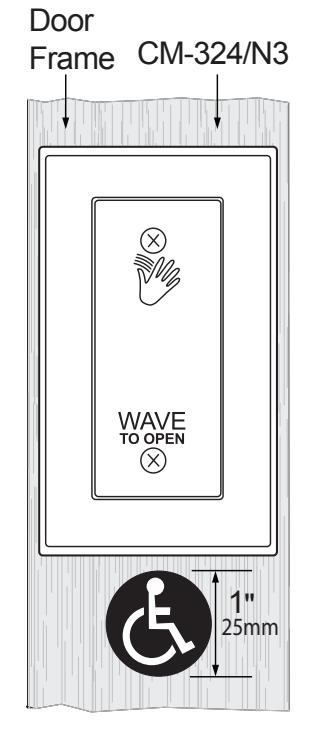
DIAGRAM 4 WHEELCHAIR STICKER PLACEMENT
IAMB CUTOUT DIMENSIONS
DIAGRAM 5
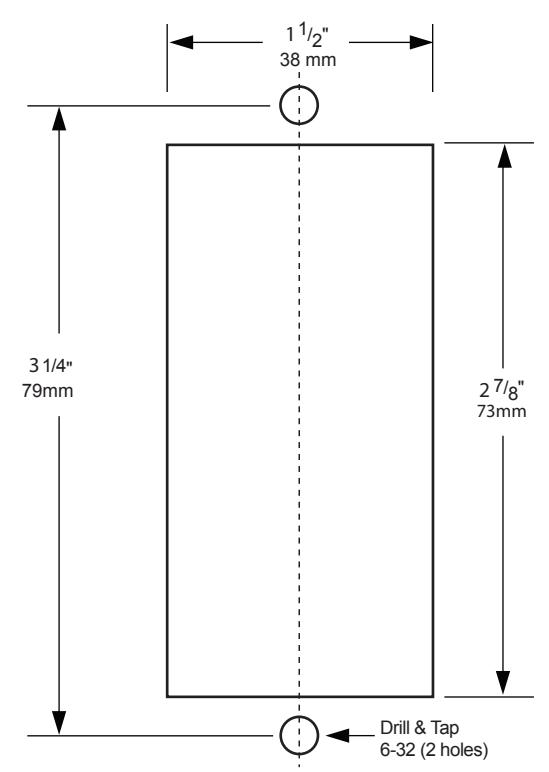
DIAGRAM 6 ADJUSTABLE RANGE SETTINGS
6. SYSTEM INSPECTION INSTRUCTIONS
After the Installation and operational check of the system:
- 1. Place warning label on the door (as per ANSI A156.10 or A156.19 guidelines). This will advise the person entering the swing side zone that the door will move.
- 2. Instruct the owner on door system operation and how to test it. This should be checked on a daily basis.
- 3. Instruct the owner on what to do if the door or any of its components become damaged.
- 4. Strongly recommend to the owner that the complete entry be inspected twice a year as part of the service agreement.