CM-54i Manual
Open the original PDF document
View PDF

Door Activation Devices
Aura™ CM-54i
Surface Mount Illuminated Enclosure
INSTALLATION INSTRUCTIONS
THIS PACKAGE INCLUDES:
1 - CM-54i 1 - Red / Green / Blue Aura PCB 2 - #6 x 3/8 Screws
1. GENERAL DESCRIPTION
Camden Aura™, Model CM-54i provides the Industry's 1st "Changing State" illuminated switch enclosures.
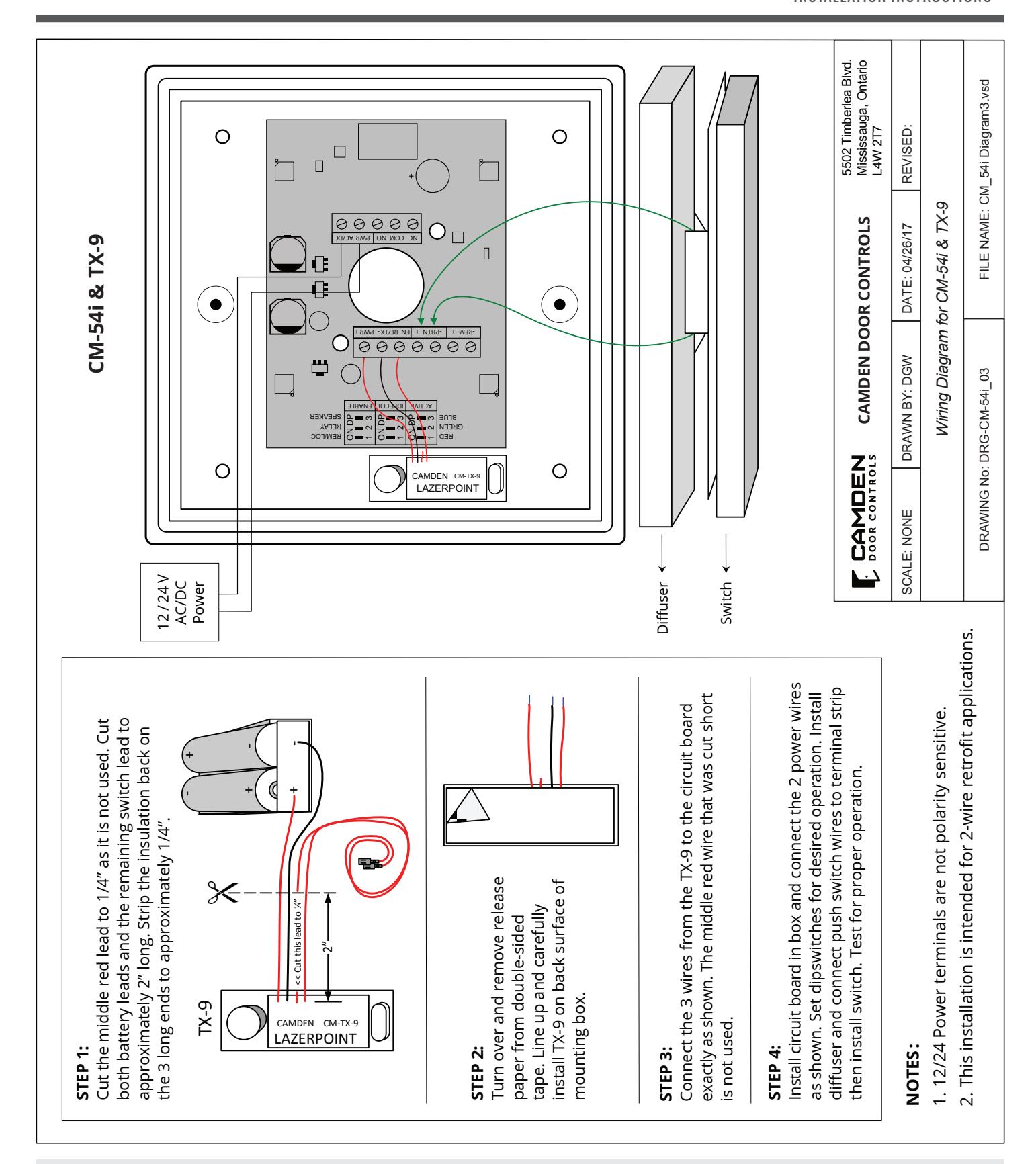
It offers field selectable red/green/blue illumination, activated directly by the switch or remotely by a relay* such as our CX-33 or EMF-2, a time-clock or access control system. User selectable features include a 3 Amp Form 'C' relay, and piezo speaker for audible annunciation, as well as control over the idle and active LED colors. Another exclusive is the ability to plug in a TX-9 RF transmitter, thereby requiring only 2 conductors be run for power (no batteries required).
The box is made of impact and flame resistant black ABS, and compatible with any Camden CM-41, CM-45, or CM-46 series switch. The illumination is provided by an array of super-bright and energy efficient LED's, which can be powered by 12 or 24 volts AC/DC.
2. SPECIFICATIONS
| Input Voltage | 12 or 24V AC/DC |
|---|---|
| Output Voltage | 3 Volts DC for TX-9 (only) |
| Current draw | 250 mA @ 12 VDC / 110 mA @ 24VDC |
| Contact Rating | 3A @ 30 VDC |
| Lumina Red | 14.8 lumens, 1600 mW |
| Lumina Green | 3.8 lumens, 330 mW |
| Sounder | 3200 ± 300 Hz @ 85 dB |
| Relay Contact | 1 x Form C |
| Mounting | 4 x #12 wood screws with anchors |
| Construction |
Flame-resistant black ABS
(Insert–translucent ABS) |
| Finish | Attractive pebble finish |
| Dimensions |
6-1/2" H x 6-1/2" W x 2" D
(165mm x 165mm x 51mm) |
3. SETUP
Switch SW1 contains a bank of 3 dipswitches.
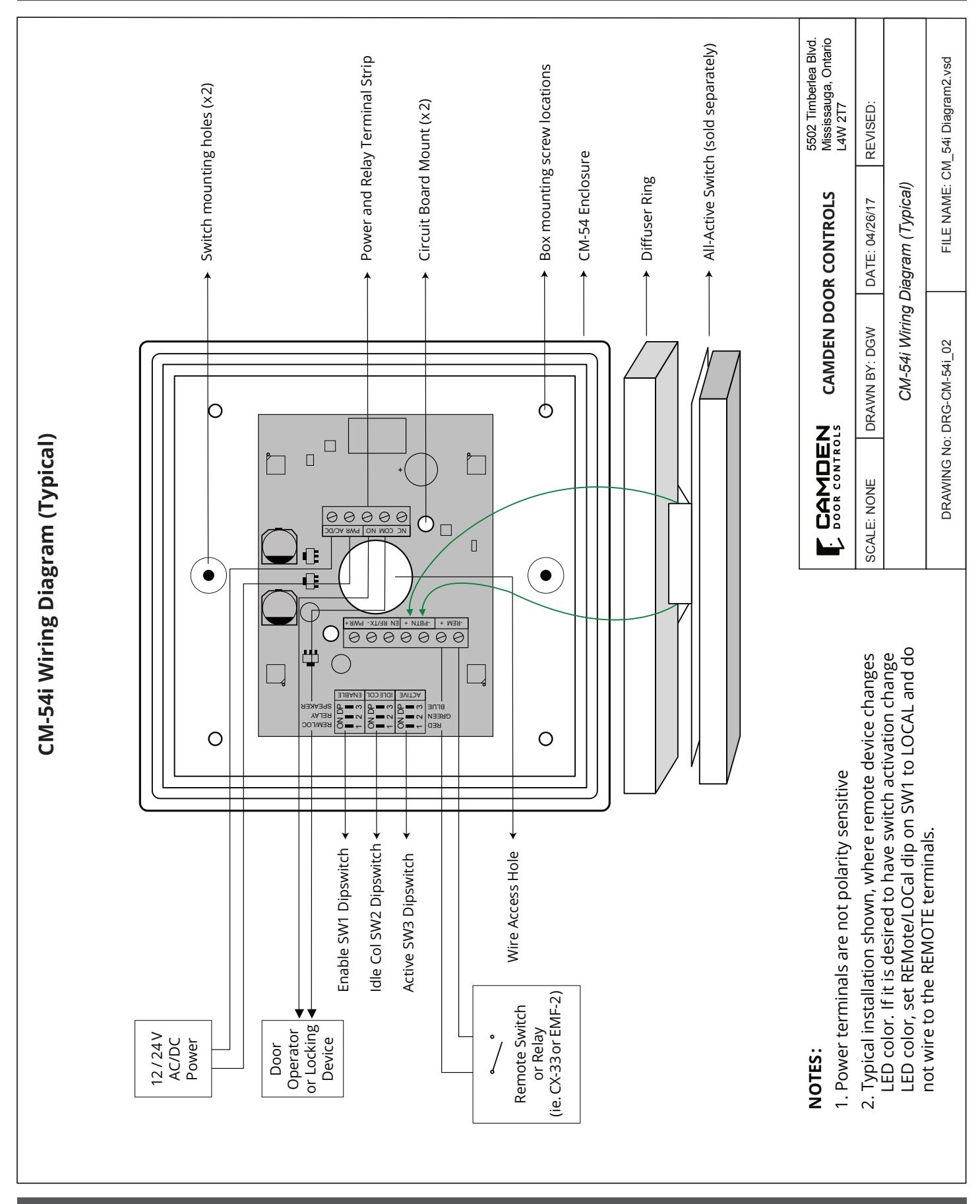
Dipswitch # 3 turns the speaker on or off. Dipswitch # 2 toggles operation of the relay, and # 1 allows you to choose whether the color will be changed locally via the push switch or remotely.
* NOTE: The CX-12 Plus Multi-Function Relay may be used with the Aura™, however an isolating relay must be wired in parallel with the lock, and the relay's dry contact output wired into the CM-54i.
| Switch | Position | Description |
|---|---|---|
| 1 |
REMOTE / LOCAL On to enable
LED color change from idle to Active with press of the push button. |
|
| SW1 | 2 |
RELAY On to enable operation of the
relay with activation of the push button. |
| 3 |
SPEAKER On to enable operation of
the speaker with activation of the push button. |
Color selection is made with Switches SW2 and SW3. SW2 determines the Active color and SW3 determines the Idle color.
Setting the IDLE Color (SW2)
| Switch | Position | Description |
|---|---|---|
| 1 | ON = Red LED when IDLE | |
| SW2 | 2 | ON = Green LED when IDLE |
| 3 | ON = Blue LED when IDLE |
Setting the Active Color (SW3)
| Switch | Position | Description |
|---|---|---|
| 1 | ON = Red LED when Active | |
| SW3 | 2 | ON = Green LED when Active |
| 3 | ON = Blue LED when Active |
NOTE: If all DIP switches are in the OFF position, there will be no color illuminated. This allows for no Idle color or no Active color.
Once all DIP switches are set, proceed to Section 4 – Installation.
4. INSTALLATION
NOTE: If you will be including the optional Aura™ signage, follow that product's installation instructions before installing Aura™
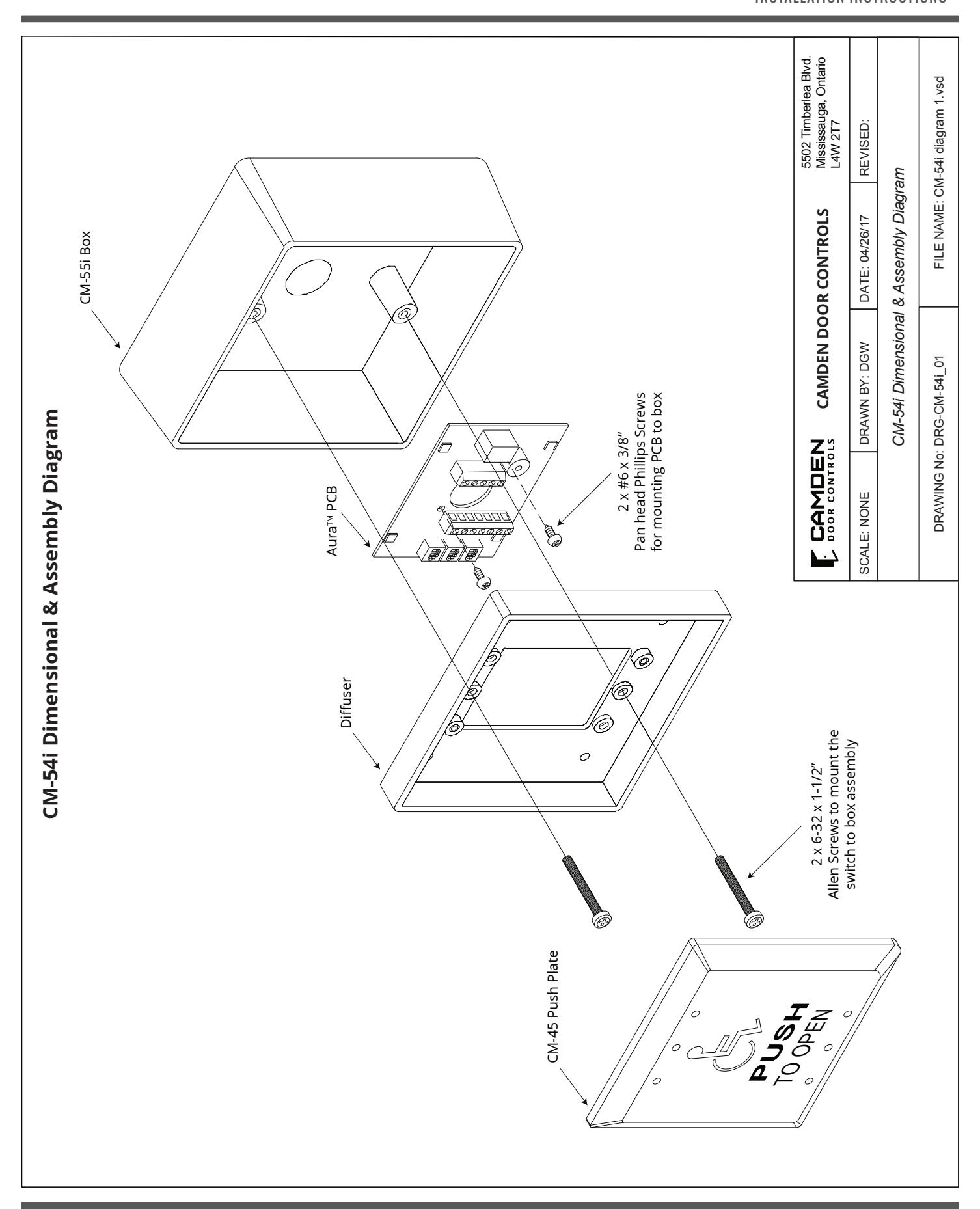
- 1. Determine the wire access location and drill hole of sufficient size, or use center knock-out plug. Drill the four required mounting holes. (11/64" min.) There are four indents provided on 3" centers for your convenience. (See Diagram 1)
- 2. Pull wiring through access hole, and mount the box to wall using 4 screws.
- 3. Remove circuit board from package and locate into the box. Pull the wire through the hole in centre of circuit board, and then secure with the two small self-tapping screws (provided).
- 4a. Wire as per diagram 2 (typical installation). Route the switch wiring through opaque diffuser panel, and install diffuser panel into box. It should fit snuggly.
- 4b. If using a TX-9 transmitter to send the signal to an RX-91 or RX-92 Receiver, attach the transmitter and wire it before installing circuit board into the enclosure and fitting diffuser. See Diagram 3.
- 5. Screw in two #6-32 Allen-head screws (provided with switch) into the threaded center inserts, then attach wires to switch and install switch over screws. Using the Allen key (provided), locate the screws and tighten (by hand only).
- 6. Connect power and test for proper operation.
5. WARRANTY
Camden Door Controls guarantees the Aura™ (CM-54i series) to be free from manufacturing defects for 3 years from date of sale.
If, during the first 3 years, the Aura™ fails to perform correctly, it may be returned to our factory where it will be repaired or replaced (at our discretion) without charge. Except as stated herein, Camden extends no warranties expressed or implied regarding function, performance or service.