CM-120 Manual
Open the original PDF document
View PDF

Door Activation Devices
CM-120i/CM-120wV2 Ver. 3 Digital Keypads
INSTALLATION INSTRUCTIONS
THIS PACKAGE INCLUDES
- (1) Keypad and faceplate assembly
- (1) Foam gasket (CM-120W only)
- (1) Lock Varistor (MOV)
- (2) #6-32 x 1" S/S Phillips screws
- (2) #6-32 x 1" Tamperproof screws
- (1) Tamperproof screwdriver
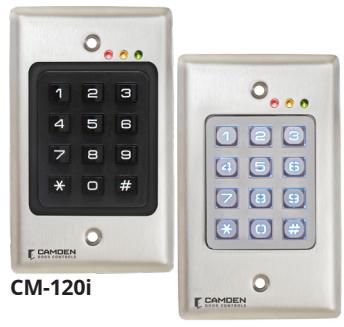
CM-120wV2
1. SPECIFICATIONS
| Models | CM-120i / CM-120W | ||
|---|---|---|---|
| Illumination | No/Yes | ||
| Mounting | 2 x #6-32 machine screws | ||
| Temperature |
-40° - +185°F
(-40° - +85°C) |
||
| Operating Voltage | 12 / 24 Volts, AC / DC | ||
| Current Draw |
30 mA standby,
90 mA max. |
||
| Capacity | 999 User codes | ||
| Length |
Up to 8 digits
(10 million possible codes) |
||
| Response Time | 0.3 seconds | ||
| Inputs |
1 x REX input
1 x Door Contact input |
||
| Relay Output | 2 x Form C (SPDT) | ||
| Relay Contact Rating | 3 amps @ 24 VDC/120 VAC | ||
| Wiegand Output | 26 bit raw (opt. Facility code) | ||
| RF Output | 2-channel w/ optional TX-99 | ||
| Time Delay | 1 to 255 seconds, or Latched | ||
| Dimensions (Body) |
CX-ED1079L:
2 3/4" W x 4 1/2" W x 3/4" D (114.30 x 69.85 x 19.05mm) |
||
2. INSTALLATION
Mounting
The CM-120 has been designed to fit into a standard single gang electrical box. The terminal strips are carefully positioned so all wiring exits is out the back, so it won't interfere with, or short out on, the sides of the box.
Wiring
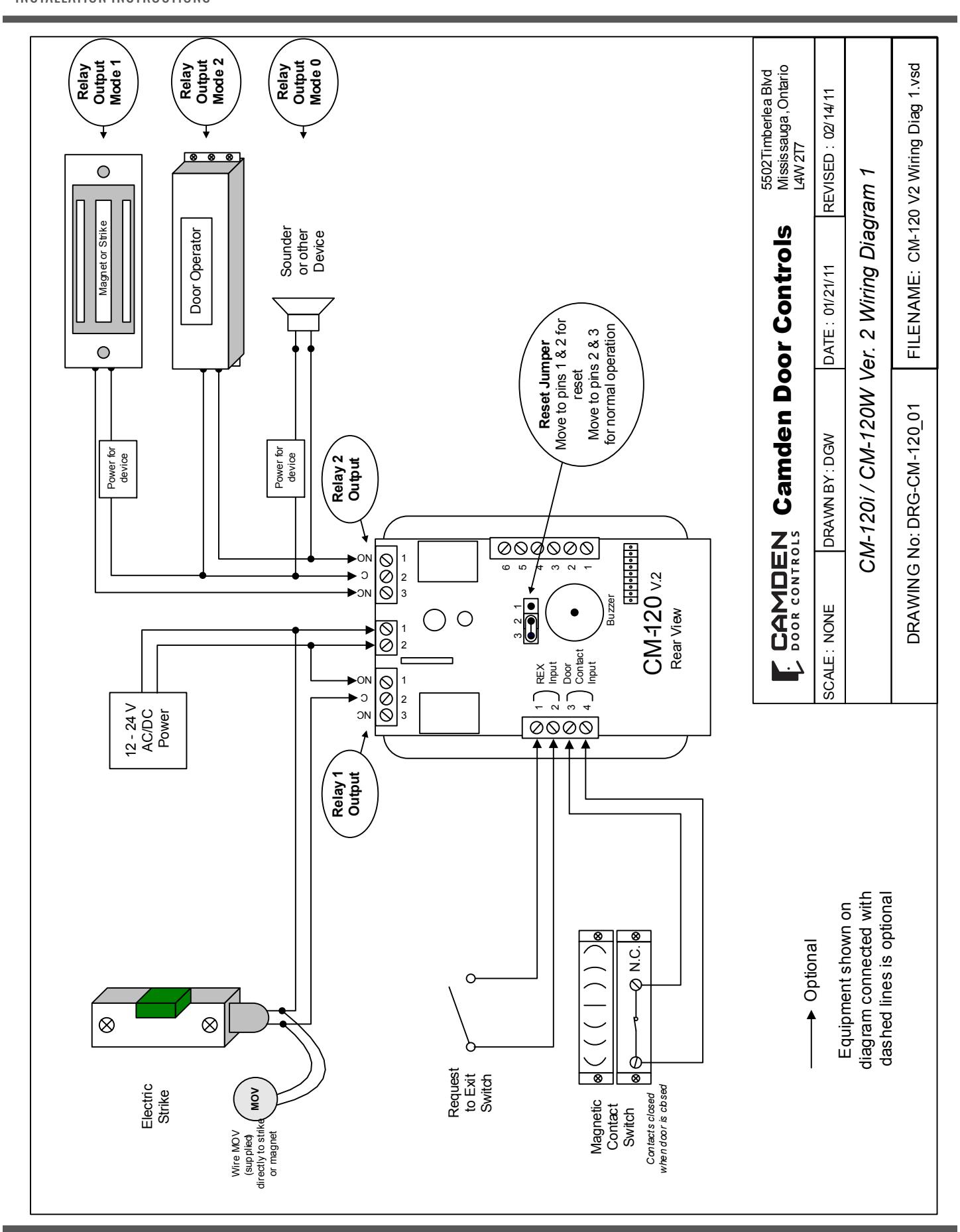
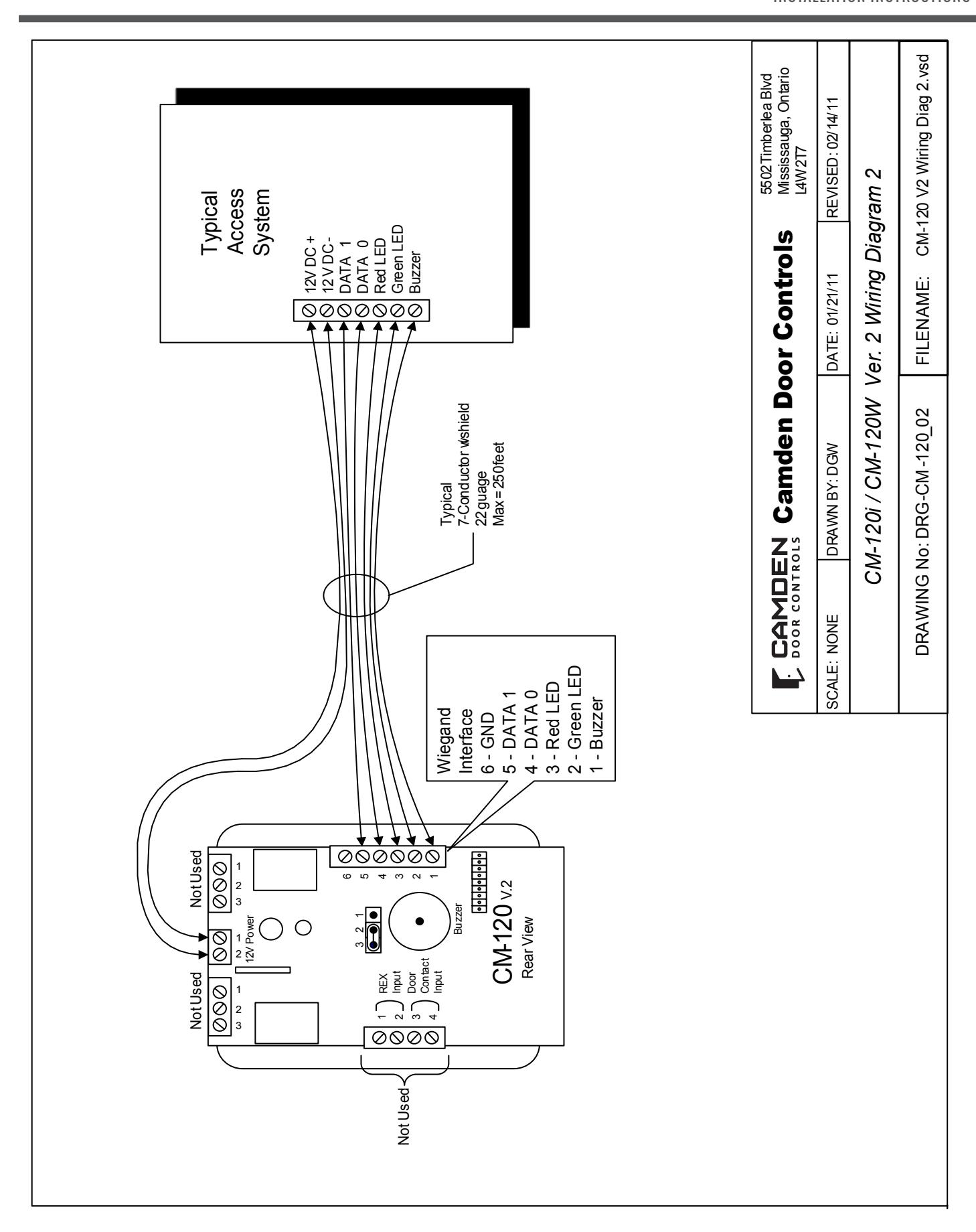
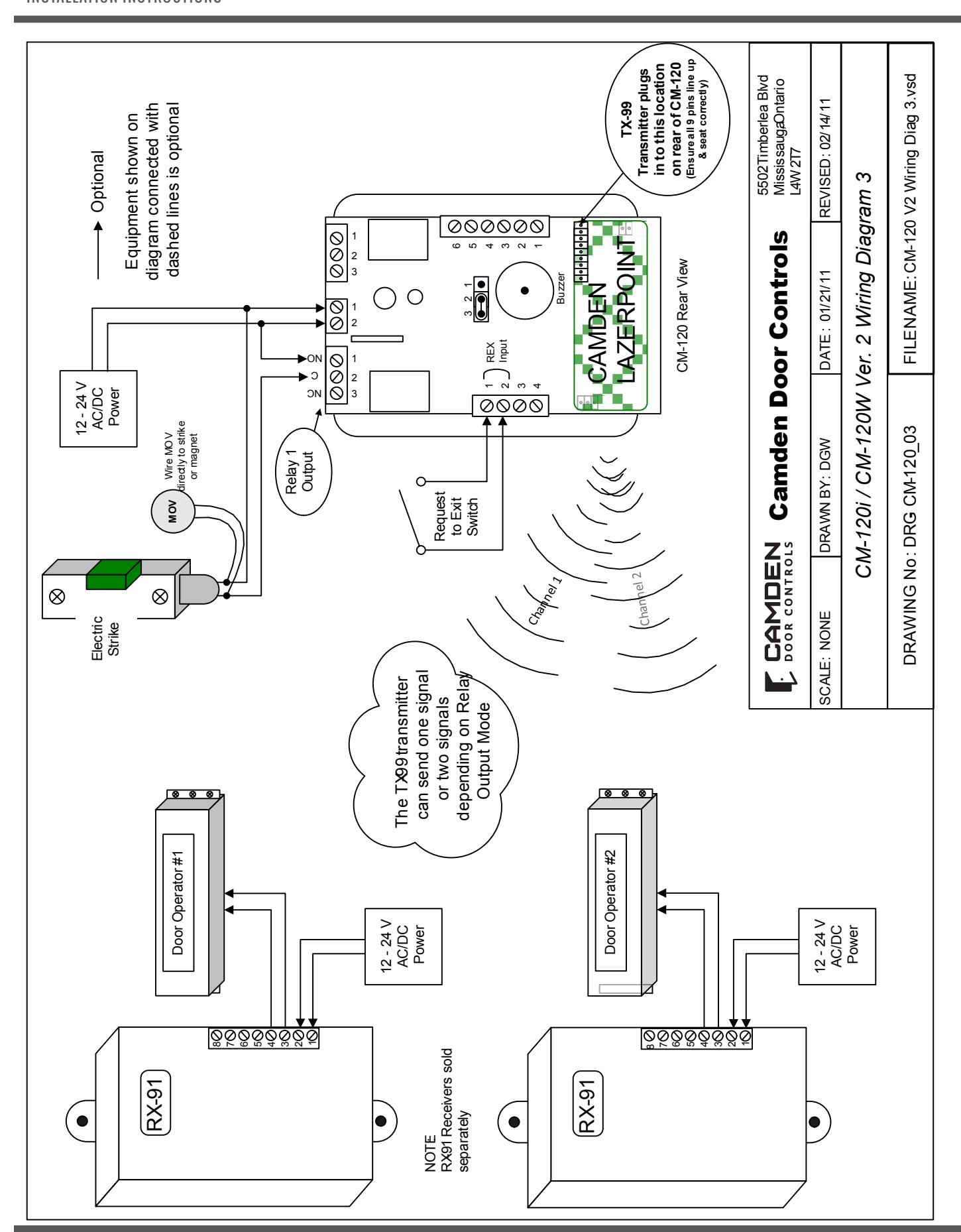
Wiring of this unit is per Wiring Diagrams 1-3, on pages 9-11. Included with the keypad is an MOV to be used when an electric strike or magnetic lock is connected directly. See diagrams for correct wiring procedure.
Once wiring is complete, fasten the keypad to the enclosure using the two #6-32 screws provided and turn on power. Proceed to next section for programming instructions.
3. HOW TO PROGRAM KEYPAD
Using this Manual
Brackets and spaces are not part of the codes. They are used here to clarify the operations and group like functions. Square brackets [ ] are used to indicate that the keys inside the brackets are to be pressed at the same time. (Requiring two keys to be pressed simultaneously reduces the chance that someone will accidentally get into programming mode.)
When entering a code in brackets, first press the star key and, while holding down the star key, press the second key. Release them both together.
Using the Keypad
Each user on the system is assigned two different numbers. The first is the User Number, which he/she does not use directly. This number, from 1 to 999, is used to keep track of who is assigned to the system.
All leading zeroes are ignored. The second is the User Code, a 1
INSTALLATION INSTRUCTIONS
to 8 digit programmable code that the user will enter into the keypad to activate certain functions. This code can have leading zeroes as part of the code. This information should be recorded and stored in a safe place for future reference. The keypad can support a total of 999 users, from 1 to 999 (See chart on page 10).
User number one belongs to the Master User and has a default user code of 1234. Note that the master user code is used for administration ONLY, and will not (normally) operate relays, wiegand, or wireless functions. When a global disable is engaged (all users locked out), the master code will still operate relay one.
User number two will toggle the global enable/disable
function when prefixed by two or more pound ('#') keys. This allows lockout of all other codes (user two
will still be able to operate the keypad normally, even
when the global lockout is engaged). Therefore, user number two should be reserved for use by a manager. When entered without the prefixed '#'s, the code of user number 2 operates the keypad in the same way as the other users do.
When using the keypad with variable-length user codes, it is necessary for the user to press the star (*) key after the User Code has been entered. This indicates the end of the code, and causes the keypad to attempt to validate the entered code. If the number entered is valid, the keypad will perform the programmed function (e.g., activate the relay).
For example, to operate the keypad using the user code 1234 (which must be entered as a user code in programming mode first), enter 1234*. While the door is unlocked, or whatever job your unit is to perform, the green LED will blink at a slow rate. Note that the star key can be substituted with another digit of your choice. (See 0# Set Enter Key at right)
Understanding the LEDs
The three Light Emitting Diodes (LED's) above the keypad provide information on the status of the unit.
NOTE: A 'slow' flash is once every two seconds and a 'fast' flash is once every second.
• GREEN LED:
'ON' Solid: No errors, output is active. 'FAST FLASHING': Keypad is in programming mode.
• RED LED:
'ON' Solid: Error condition. See chart at end of this manual.
• YELLOW LED:
For ADA requirements, both a visual and audible keypress indicator (blinks on each key-press). This can be enabled or disabled during programming. See the [*6] 0 # programming option for more details.
Using with TX-99 Transmitter
Another unique feature of our CM-120 keypad is the ability to plug in our TX-99 transmitter to send the signal wirelessly to our
RX-91 or RX-92 receiver (the keypad still requires 12 or 24V AC/ DC power to operate however). The RF transmit function even works in "Split Output Mode". See wiring diagram #3 Page 11 for the RF mounting location.
Set-up Instructions:
Note:
- 1. Keep careful track of User Codes and to whom they are assigned, assigned outputs, etc. as you program them, and keep the list in a safe place.
- 2. Press the buttons firmly.
- 3. Whenever the * and any other character are included in brackets [*x], press the * first and, while holding the * down, press the other key. Release both keys together.
[*1] Enter Program Mode (First Step)
Press * and 1 at the same time. Enter the Master Code (1234 is the factory default), then *. The green LED should now be rapidly flashing.
The keypad will remain in program mode until no key is pressed for approximately 30 seconds. To exit programming mode quickly, press the special sequence – "* # *".
For example, [*1] 1 2 3 4 * will put the keypad in program mode.
[*1] Administration Functions
1# Set Code Length
Default: 0 (variable code length)
When set to zero, user codes can vary from one to eight characters, but must be terminated by pressing the "enter key", which by default is '*'. When set non-zero, all user codes must use the programmed length, but will not require termination by the programmed "enter key".
(User codes shorter than the maximum are still allowed, but the user must terminate it with the current "enter" key).
For example, [*1] 1 # 4 * will set all user codes to a fixed 4-digit length.
0# Set Enter Key
Default: '*'
If the code length has been left at 0 (see above), then use this feature to select the "enter" key used to terminate user code entry. The default setting is '*', but it can be changed to any key on the keypad (select carefully).
For example, [*1] 0 # # * will change the user code enter key to '#'.
2# Incorrect Code Count Alarm
Default: 0 (disabled)
When set to zero, the keypad will not alarm on entry of invalid codes. When set to a value between 1 and 20, the keypad will generate an alarm after the specified number of invalid codes
have been entered, within two minutes.
For example, [*1] 2 # 6 * will set the keypad to generate an alarm when 6 invalid user codes have been entered.
NOTE: This setting also requires the "Incorrect code alarm Lockout" feature enabled. See 5# on page 5.
3# Force Unique User Codes
Default: 1 (Enabled)
When set to zero, the keypad will accept any user code for each user. When set to one, during programming of new user codes, the keypad will check the desired code against all currently programmed users, and only accept the user code if it is unique. Attempting to program a code that is not unique will cause an error alarm, and the programming procedure must be restarted and a different code selected.
NOTE: when enabling this mode (when previously disabled), it is recommended the administrator erase all settings back to factory defaults first, to ensure all user codes are unique. Failure to perform this step may leave duplicate user codes among those already learned, and result in unexpected operation.
0 = disabled
1 = enabled
For example, [*1] 3 # 0 * will disable "Force Unique User Codes".
4# Anti-tailgating Enable / Disable
Default: 1 (Enabled)
Enable or disable the Anti-Tailgating feature. When enabled, the keypad will release relay 1 immediately after sensing the door has opened (via the door contacts). This ensures the lock re-engages immediately when the door closes, reducing the risk of tail-gate entry.
0 = disabled
1 = enabled
To disable the anti-tailgating feature:
First, enter program mode. Then enter [*1], then 4 #, then 0 to disable, or 1 to enable, then *.
For example, [*1] 4 # 0* will disable the anti-tailgating feature.
5# Backlight Control Enable/ Disable
(applies to CM-120W only)
Default: 0 (disabled)
Enable or disable backlight control on keypress.
When enabled, the backlight will be OFF until the first keypress. It will remain on for 5 seconds after the last keypress. When disabled, the backlight will remain ON continuously.
0 = disabled
1 = enabled
To enable/disable Backlight Control mode:
First, enter program mode. Then enter [*1], then 5#, then 0 to disable, or 1 to enable, then *.
For example, [*1] 5 # 1 * will make backlight turn off until the first keypress.
6# User Two "Global Lockout"
Default: 1 (Enabled)
When enabled, user #2 (a manager, for instance) can lockout all other users by prefixing his code by two (or more) "#" keys. When a global lockout is engaged, no user code will activate the outputs, except user #1 & #2. Programming functions, and request to exit (REX) are not disabled. This can be used (for instance) to immediately control all access while changing selected user codes in case of a security problem, or for lockout over a weekend.
To disable user two "global lockout" feature:
First, enter program mode. Then enter [*1], then 6#, then 0 to disable, or 1 to enable, then *.
0 = disabled
1 = enabled
For example [*1] 6 # 0 * will disable user #2's ability to engage a global lockout.
Note: When user number #2's key code is prefixed with two or more '#'s, the "Global User Enable/ Disable" flag will be toggled.
7# Relay Output Mode
Default: 0 (Relay 1 Only)
This control allows the installer to select the relay output mode. Chosing the default (0) means that a valid code activates Relay 1 only, and Relay 2 is available for the various alarm conditions.
Setting the Relay Output Mode to "1" will allocate the first 499 user numbers (memory addresses) to Relay 1, and the remaining 500 user numbers to Relay 2.
Setting the Relay Output Mode to "2" will sequence Relay 1 & 2 with an adjustable delay between the two outputs. Each relay will also have its own adjustable delay-on-release time.
To choose the Relay Output mode:
First, enter program mode. Then enter [*1], then 7#, then 0 for Relay 1 only, 1 for split output, or 2 for both relays sequenced, then *.
0 = Relay 1
1 = 1 - 499 = Relay 1, 500 – 999 = Relay 2
2 = Sequence Relay 1, then Relay 2
For example [*1] 7 # 1 * will allocate any user number from 1 – 499 = relay 1, and any user number from 500 – 999 to relay 2.
INSTALLATION INSTRUCTIONS
NOTE: If mode 1 or 2 are chosen, then relay 2 will be unavailable for any/all alarm conditions.
[*2] Add/Change/Delete Users
To add or change a user:
First, enter program mode (see First Step above), then enter [*2], then the user number you wish to add or change (from 1 to 999 inclusive) followed by #. Finally, enter the new User Code (up to 8 digits), followed by *, then the new User Code again (for verification), followed by *. User Codes may only contain digits 0 through 9 (* and # may not be used as part of the code, except when programmed as the "enter" key).
Example: [*2] 44 # 2125 * 2125 * will assign a user number of 44 and a user code of 2125.
To delete a user code:
First, enter program mode. Then enter [*2], then the user number you wish to delete (from 2 to 999, inclusive), then press #, then *, then *.
For example, [*2] 75 # * * will delete the user code and all assignments for user number 75.
NOTE: The Master Code cannot be deleted but it may be changed.
Example: [*2] 1 # 38714 * 38714 * will change the Master Code to 38714. If you change it, don't forget it.
[*3] Time Delay/Duration Functions
0# Relay 1 Operate Duration
Default: 8 seconds. (0-255 seconds allowed)
This controls the duration for relay 1 to engage on entry of a valid user code. If this feature is programmed to zero, the relay operates in toggled mode, or latch mode (enter a valid user code to engage the relay on, and enter a valid code to toggle the relay back off). This is a global setting. It is also possible to set for individual users - See command [*0] further along in this section.
To program relay 1 operate time:
First, enter program mode. Then enter [*3], then 0#, then the active time in seconds (0=toggled), then *.
For example, [*3] 0 # 30 * will set relay 1 operate time to 30 seconds.
2# Door Prop Open Alarm Delay
Default: Disabled
Sets the delay (1 to 255 seconds) before open door contacts are considered an alarm condition.
(NOTE: Door contacts are required for this feature.)
To program the door open alarm delay:
First, enter program mode. Then enter [*3], then 2#, then the
delay time in seconds (0=disabled), then *.
For example, [*3] 2 # 30 * will set the door open alarm delay to 30 seconds.
NOTE: To turn this feature on/off, see section [*4] 3# Door Prop Open Alarm on the next page.
3# Relay 2 Operate Duration (Split & Sequence Modes only)
Default: 8 seconds. (0-255 seconds allowed)
This controls the duration for relay 2 to engage on entry of a valid user code. If this feature is programmed to zero, the relay operates in toggled mode, or latch mode (enter a valid user code to engage the relay on, and enter a valid code to toggle the relay back off).
To program relay 2 operate time:
First, enter program mode. Then enter [*3], then 3#, then the active time in seconds (0=toggled), then *.
For example, [*3] 3 # 30 * will set relay 2 operate time to 30 seconds.
4# Relay 2 Delay on Operate (Sequence Mode only)
Default: 4 seconds. (1-255 seconds allowed)
This controls the time delay before relay 2 engages on entry of a valid user code.
To program the delay-on-operate time:
First, enter program mode. Then enter [*3], then 4#, then the active time in seconds, then *.
For example, [*3] 4 # 10 * will set the delay-on-operate time to 10 seconds.
NOTE: For Sequence Mode only - Setting either of the relay times to 0, or latch mode, will automatically set both relays into latch mode.
[*0] Set "Latching Mode" for a User
Default: 0 (Disabled)
When enabled, the specified user keycode becomes a "latching" code. Entering a "latching code will toggle the state of relay 1.
0 = Disabled
1 = Enabled
NOTE: When the keypad is operating with "force unique user codes" disabled (the default), users may have identical codes. If individual control of "latching mode" is required, consider enabling the "force unique user codes" option.
To set a users access to "latching mode":
First, enter program mode. Then enter [*0], then the user number, then '#', then (0 to disable latching mode or 1 to enable it), then *.
For example, [*0] 1 2 # 1 * will set user number 12 to "latching mode" access.
NOTE: If the the Relay Output mode has been set to Split, then this latch mode affects only the relay associated with that user number (memory location)
If the Relay Output Mode has been set to Sequence, then the user Latching mode affects both relays. (So both relays toggle on & off simultaneously).
[*4] Alarm Control Functions
0# Incorrect code alarm
Default: 0 (Disabled)
Use to control how the "Incorrect code alarm" is annunciated.
0 = disabled
1 = buzzer
2 = relay 2
3 = both buzzer and relay 2
If the "Incorrect code alarm" is enabled, and triggered, a valid code is required to reset.
To program how the "incorrect code alarm" condition is annunciated:
First, enter program mode. Then enter [*4], then 0#, then the annunciation code, then *.
For example, [*4] 0 # 1 * will configure the keypad indicate entry of the programmed count of invalid codes on the buzzer only.
2# Stuck key alarm
Default: 0 (Disabled)
Enable or disable the "Stuck key alarm".
0 = disabled
1 = enable
The "Stuck key" alarm will activate the buzzer after 15 seconds (factory set delay) of the key being held continuously, and reset as soon as the key is released (or after 10 seconds, whichever occurs first)
To enable the "stuck key alarm":
First, enter program mode. Then enter [*4], then 2#, then (0 or 1), then *.
For example, [*4] 2 # 1 * will configure the keypad to activate the stuck key buzzer.
3# Door Prop open Alarm
Default: 0 (Disabled)
Use to control how the "Door prop open alarm" is annunciated.
0 = disabled
1 = buzzer
2 = relay 2
3 = both buzzer and relay 2
To program how the "Door Prop open alarm" condition is annunciated:
First, enter program mode. Then enter [*4], then 3#, then the annunciation code, then *.
For example, [*4] 3 # 3 * will annunciate by both the buzzer and by activating relay 2.
NOTE 1: The alarm will sound continuously until reset. To reset, enter valid code.
NOTE 2: To set Delay Time, see [*3] 2# on Page 4.
5# Incorrect code alarm lockout
Default: 0 (Disabled)
Use to configure the incorrect code alarm lockout.
0 = disabled
1 = enabled
To program:
First, enter program mode. Then enter [*4], then 5#, then the enable/disable code, then *.
For example, [*4] 5 # 1 * will configure the keypad to lockout for 2 minutes (factory set lockout duration), after the incorrect code count alarm limit is reached. During the lockout period, all keypad entry (including correct codes) is ignored.
There is an automatic reset after 2 minutes.
(See 2# on Page 3 of manual for setting code count)
6# Door Forced open Alarm
Default: 0 (Disabled)
Use to control how the "Door forced open alarm" is annunciated.
0 = disabled
1 = buzzer
2 = relay 2
3 = both buzzer and relay 2
To program how the "Door forced open alarm" condition is annunciated:
First, enter program mode. Then enter [*4], then 6#, then the annunciation code, then *.
For example, [*4] 6 # 3 * will configure the keypad to sound an alarm at both the buzzer and relay 2 if the door is forced open (without entering a valid code).
NOTE 1: this feature requires the use of the door contact input.
NOTE 2: The alarm will sound continuously until reset. To reset, enter valid code.
[*5] Wiegand Control Functions
0# Wiegand Protocol selection
Default: 0 (Disabled)
Use to control and select the wiegand protocol.
0 = disabled
1 = 26b raw
2 = 26b raw plus facility code
To enable and select the wiegand output function:
First, enter program mode. Then enter [*5], then 0#, then the protocol code, then *.
For example, [*5] 0 # 1 * will configure the keypad to output 26 bit wiegand.
NOTE 1: If wiegand output is chosen, then both relays, and RF outputs are automatically disabled. The REX input is also disabled.
See Diagram 2, Page 10 for wiring instruction.
NOTE 2: If protocol 2 is chosen, then the 2-digit facility code must be selected in the next step.
1# Wiegand Facility Code
Default: 34 (Camden) (0 – 255 allowed)
Use to select the facility code if wiegand output with facility code is desired.
To chose the wiegand facility code function:
First, enter program mode. Then enter [*5], then 1#, then your 1 – 3 digit code (0 – 255), then *.
For example, [*5] 1 # 66 * will configure the keypad to output a 26 bit wiegand protocol with a facility code of 66.
[*6] Annunciation Control Functions
0# Yellow LED Enable
Default: 1 (Enabled)
Enable or disable the yellow LED. When enabled, the yellow LED illuminates when any
key is pressed.
0 = disabled
1 = enabled
To disable the yellow LED:
First, enter program mode. Then enter [*6], then 0 #, then 0 to disable, or 1 to enable, then *.
For example, [*6] 0 # 0 * will disable yellow LED illumination. 1# Buzzer Enable / Disable
Default: 1 (Enabled)
Enable or disable the buzzer. When disabled, the buzzer will not
sound for any condition
0 = disabled
1 = enabled
To disable the buzzer:
First, enter program mode. Then enter [*6], then 1#, then 0 to disable, or 1 to enable, then *.
For example, [*6] 1 # 0 * will disable the buzzer for all conditions.
2# Correct Code Audio Tone
Default: 0 (Disabled)
Enable or disable the audio tone annunciating correct code entry. When enabled, a single 2 tone beep will sound when a correct code has been entered. In the case of toggled mode, the audio tone will last for 8 seconds (hard-coded) when a correct code toggles relay one ON; the audio tone will be a single two-tone beep, "do-ray", when a correct code toggles relay one OFF.
0 = disabled
1 = enabled
To enable the audio tone on correct code entry:
First, enter program mode. Then enter [*6], then 2#, then (0 to disable, or 1 to enable), then *.
For example, [*6] 2 # 1 * will enable the audio tone on correct code entry.
3# Incorrect Code Audio Tone
Default: 1 (Enabled)
Enable or disable the audio tone annunciating correct code entry. When enabled, an audio tone will sound when any incorrect code has been entered, for the duration that the red LED is illuminated.
0 = disabled
1 = enabled
To disable the audio tone on incorrect code entry: First, enter program mode. Then enter [*6], then 3#, then 0 to disable, or 1 to enable, then *.
For example, [*6] 3 # 0 * will disable the audio tone on incorrect code entry.
5# Request to Exit Audio Enable/Disable
Default: 0 (Disabled)
Enable or disable audio annunciation for Relay #1 when a Request to Exit signal is input. When enabled, if Relay 1 is triggered by REX input, a looped tone (do-ray) will be annunciated for the duration that Relay #1 is energized. In the case of Toggled mode, the annunciation will last for 8 seconds (hard-coded). In the case of entering into Unlocked Mode (REX input held for more than 15 seconds), 4 beeps will sound after
the looped two-tone annunciation. A single ("Ray-Do") tone will sound when exiting Unlock Mode.
0 = disabled
1 = enabled
To enable/disable REX Audio Annunciation:
First, enter program mode. Then enter [*6], then 5#, then 0 to disable, or 1 to enable, then *.
For example, [*6] 5 # 1 * will enable the audio annunciation for REX input.
6# Secure LED Annunciator Enable/Disable
Enable or disable the Red LED annunciating the secured status of the locked device. When enabled, the red LED will light when the keypad is secured. Once a valid code is entered into the keypad, the red LED will turn off and the green LED will illuminate to indicate the locked device is unlocked. The green LED will remain lit for the duration set by the Relay 1/Relay2 ontime duration setting or until the locked device closes (requires a magnetic door contact).
0 = disabled (default)
1 = enabled
To use this feature:
First enter program mode. Then enter [*6], 6#, 0 to disable or 1 to enable, then *.
For example, [*6] 6 # 1 * will enable the red LED to annunciate the status of the locked device.
Factory Default Settings
If the settings have not been changed after shipment, or if they have been reset, they are as follows:
- Master User # 1 Code is 1234.
- Main Relay = 8 sec
- Secondary Relay = programmable.
- Yellow LED enabled.
Reset Jumper
To reset the Master User Code to factory default:
There is a three pin header located on the back of the keypad. Move the jumper from pins 2 & 3 to pins 1 & 2 for at least three seconds, then back to pins 2 & 3 again.
During the reset, the LED's will blink four times, and an audio tone will sound. This will reset the Master code ONLY back to factory default (1234). While the default jumper is located on pins 1 & 2, the keypad is in the "LOCKED" state (no user input is accepted), so be sure to move the jumper back to pins 2 & 3.
[*9] Erase Keypad Memory/Reset ALL to Factory
Force factory default settings (use with caution)
This is used when most or all of the programming has to be changed, as when a keypad has been moved to a new location. To reset to factory defaults.
First, enter program mode. Then enter [*9], then re-enter the master keycode, then *.
For example, [*9] 1 2 3 4 * will immediately and permanently clear the entire memory (assuming the master keycode has not been changed from the factory default. Once this function has been executed, there is NO WAY to restore the previous state.
5: WARRANTY
Camden Door Controls guarantees the CM-120i or CM120W to be free from manufacturing defects for 3 years from date of sale. If during the first 3 years the CM120i or CM120W fails to perform correctly, it may be returned to our factory where it will be repaired or replaced (at our discretion) without charge. Except as stated herein, Camden extends no warranties expressed or implied regarding function, performance or service.
Troubleshooting Tips
- oIf you make an input error (e.g. if you enter a non-existent User Code) and press the star key, the red LED will light. Simply start over.
- If you make an input error and have not yet entered *, just wait 5 seconds, and the command memory will be cleared automatically. Start again. You will not increment the error count.
- The "Lockout-on-#-errors" feature is disabled by default. This will prevent the keypad from hanging up if anyone plays with the keypad in certain applications.
- Do not make the mistake of thinking you have to 'clear' the red light if you make an error. Just re-enter the correct number. The red LED will clear automatically with the first key you press.
- Be sure you are pressing the buttons firmly. The yellow LED should come on and an audio tone should sound with each key pressed, unless these features have been disabled.
- When using the optional TX-99 plug-in transmitter, follow the 'learn-in' procedure documented in the
- RX-91 or RX-92 Receiver installation manual. The Keypad counts as one device to the receiver regardless of how many pin codes learned into the keypad.
Visit: www.camdencontrols.com
Revision: 11/09/2018 Part No.: 4082B144
| NAME | MEMORY ADDRESS | USER CODE | NAME | MEMORY ADDRESS | USER CODE |
|---|---|---|---|---|---|
| Master User | 1234 | 1 | 45 | ||
| Manager | 2 | 46 | |||
| User #1 | 3 | 47 | |||
| User #2 | 4 | 48 | |||
| Etc. | 5 | 49 | |||
| 6 | 50 | ||||
| 7 | 51 | ||||
| 8 | 52 | ||||
| 9 | 53 | ||||
| 10 | 54 | ||||
| 11 | 55 | ||||
| 12 | 56 | ||||
| 13 | 57 | ||||
| 14 | 58 | ||||
| 15 | 59 | ||||
| 16 | 60 | ||||
| 17 | 61 | ||||
| 18 | 62 | ||||
| 19 | 63 | ||||
| 20 | 64 | ||||
| 21 | 65 | ||||
| 22 | 66 | ||||
| 23 | 67 | ||||
| 24 | 68 | ||||
| 25 | 69 | ||||
| 26 | 70 | ||||
| 27 | 71 | ||||
| 28 | 72 | ||||
| 29 | 73 | ||||
| 30 | 74 | ||||
| 31 | 75 | ||||
| 32 | 76 | ||||
| 33 | 77 | ||||
| 34 | 78 | ||||
| 35 | 79 | ||||
|
36
37 |
80
81 |
||||
| 38 | 82 | ||||
| 39 | 83 | ||||
| 40 | 84 | ||||
| 41 | 85 | ||||
| 42 | 86 | ||||
| 43 | 87 | ||||
| 44 | 88 |