BHD Trim for 8200 Mortise Locks
Open the original PDF document
View PDFASSA ABLOY
BHD Trim for 8200 Mortise Locks
| TOC | Table of Contents | |
|---|---|---|
| 1 | Mortise Lock Handing Instructions | .2 |
| 2 | Mortise Lock Function Changing Instructions | .3 |
| 3 | Mortise Lock Door Preparation & Installation | . 4 |
| 4 | BHD Trim Installation | . 6 |
| 5 | Turn-Piece Installation | . 8 |
| 6 | Coin-Turn Installation | . 8 |
QR Codes
To view the QR Code video clips within this document, download a free mobile app and scan the QR Code with your mobile device. The complete video for Changing Lock Handing can be viewed on YouTube: https://youtu.be/3alaDIEST1k The complete video for Changing Lock Functions can be viewed on YouTube: https://youtu.be/M_B9fDqlvQY
BHD Trim
8200 Mortise Lock
Installation Instructions

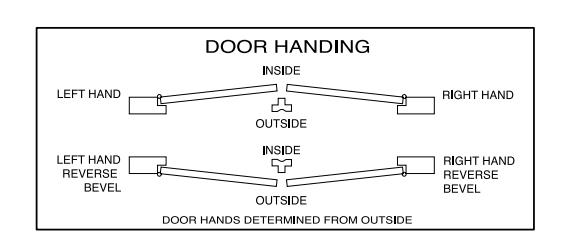
1 Mortise Lock Handing Instructions

NOTE:
RED SURFACE OF LOCKING PIECE MUST FACE SECURE SIDE OF DOOR.
To rotate locking piece:
- 1. Position lockbody with red surface of locking piece visible.
- 2. Insert blade type screwdriver into locking piece slot to rotate locking piece.
- 3. Push locking piece toward back of lockbody and rotate 180° until RED surface shows on opposite side.
For 04, 06, 13 and 31 Functions:
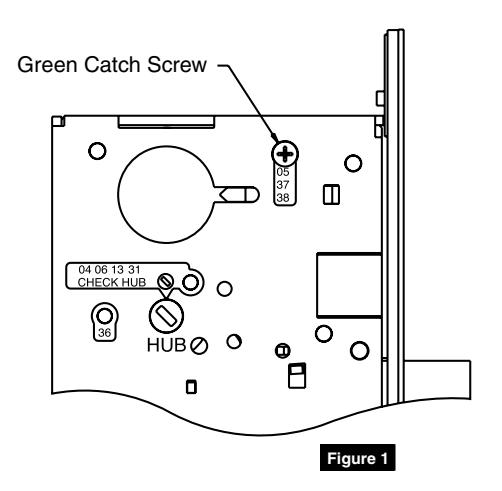
- (a) Remove green catch screw.
- (b) Rotate hub to 45° position.
- (c) Rotate locking piece for required hand.
- (d) Face red surface to locked side of door.
- (e) Rotate hub to original 45° position (as shown on lockcase).
- (f) Reinstall green catch screw.
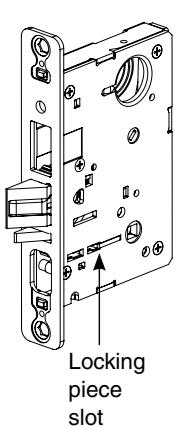
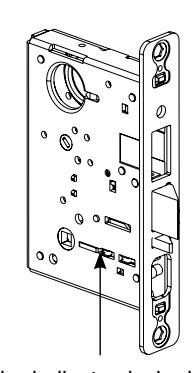
Red color indicates locked side of door or hold back side (91 and 92 Functions)
NOTE:
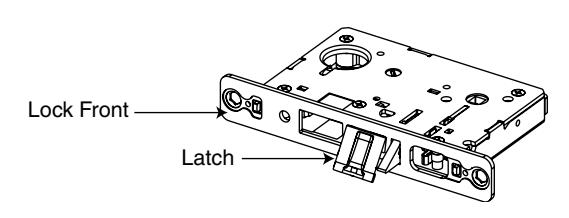
BEVELED SURFACE OF LATCH MUST FACE STRIKE. DEADLATCH IS SELF ADJUSTING.
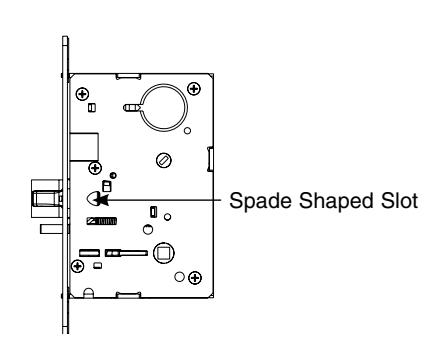
To change hand of latch:
- 1. Insert screwdriver blade into the spade shaped slot.
- 2. Rotate screwdriver 90° to push latch out until back of latch clears lock front. Rotate latch 180°. Latch will re-enter lockbody.
NOTE:
LATCH CANNOT BE UNSCREWED.
BHD Trim
8200 Mortise Lock
Installation Instructions

A8233A 11/17
2 Mortise Lock Function Changing Instructions

How to change function of lock:
Green catch screw must be located in following three (3) locations as designated on lock case to create desired function:
- 1. 05, 37 & 38 functions
- 2. 04, 06, 13 & 31 functions
- 3. 36 function
NOTE:
WHEN MOVING GREEN CATCH SCREW TO 04, 06, 13 & 31 FUNCTIONS, HUB POSITION MUST BE AT 45° AS SHOWN ON LOCKCASE (FIGURE 1).
Items needed to create each of the following functions:
| Function |
Outside
Lever |
Inside
Lever |
Trim One
Side Kit |
Outside
Cylinder |
Inside
Cylinder |
Thumb
Turn |
|---|---|---|---|---|---|---|
| 04 (F07) | X | X | X | |||
| 05 (F04) | X | X | X | X*** | ||
| 06 | X | X | X | |||
| 13 (F31) | X | X | ||||
| 31 | X | X | X | |||
| 36 | X | X | X | |||
| 37 (F05) | X | X | X | |||
| 38 (F32) | X | X | X | X |
#41 Cylinder is standard for both single & double cylinder functions for 1-3/4" thick door
NOTE:Trim-one-side functions always require an inside trim assembly which can be used on the inside or outside of the door (to order Trim one-side kit (for all trim except PT or FE) order part # 82-4611.
*** 130 KB thumb turn is used with rose trim only. Escutcheon trims requiring thumb turns must be preassembled at factory.

3 Mortise Lock Door Preparation & Installation
Important: Be sure to hand the lockbody before installing. See Section 1.
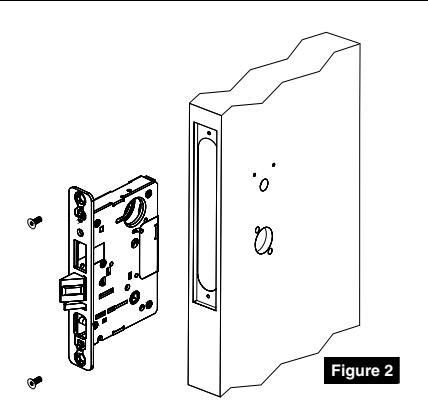
1. Insert mortise lock into door and fully tighten 1" lock mounting combination screws. (Figure 2)

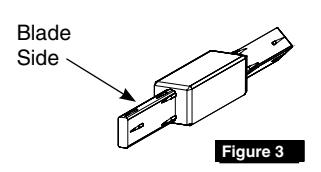
Insert turn-piece door marker spindle into lockbody on inside of door.
NOTE:
USE BLADE SIDE OF DOOR MARKER SPINDLE. (FIGURE 3)
3. TURN-PIECE FUNCTIONS ONLY:
Slide turn-piece door marker over spindle.
4. TURN-PIECE FUNCTIONS ONLY:
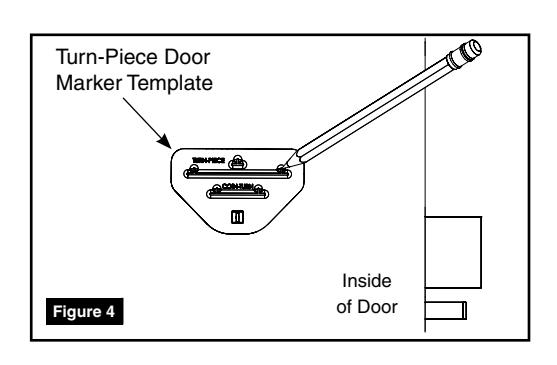
Mark three holes for turn-piece. (Figure 4)
5. COIN-TURN FUNCTIONS ONLY:
Insert turn-piece marker spindle into lockbody on outside of door.
NOTE:
USE BLADE SIDE OF DOOR MARKER SPINDLE. (FIGURE 3)
6. COIN-TURN FUNCTIONS ONLY:
Slide turn-piece door marker template over spindle.
7. COIN-TURN FUNCTIONS ONLY:
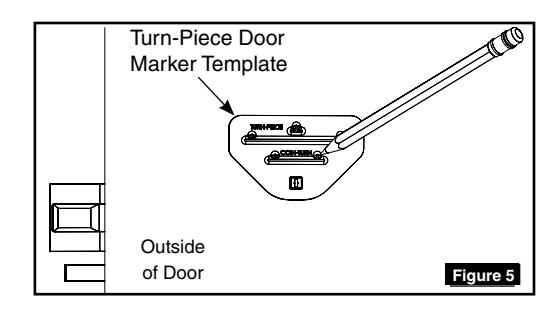
Mark two holes for coin-turn. (Figure 5)

3 Mortise Lock Door Preparation & Installation
8. Remove lockbody from door.
9. TURN-PIECE FUNCTIONS ONLY:
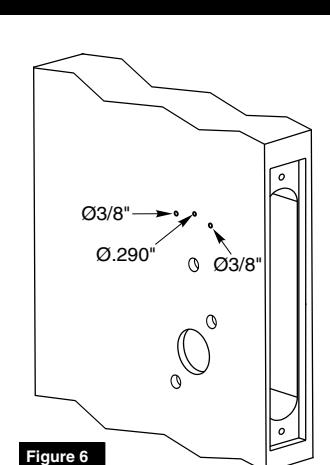
Drill one middle hole (.290") and two outer holes (3/8") halfway through door. (Figure 6)
10. COIN-TURN FUNCTIONS ONLY:
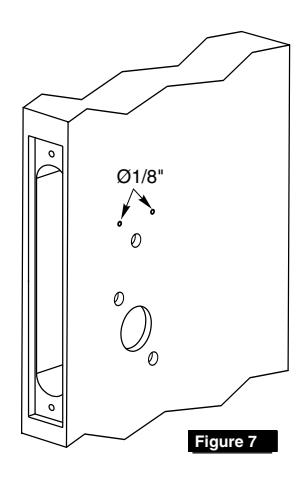
Drill two holes (1/8") halfway through door. (Figure 7)

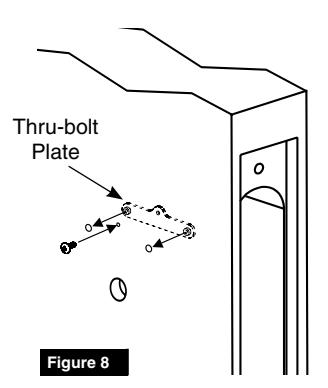
Install turn-piece thru-bolt plate using truss head screw. (Leave screw slightly loose.) (Figure 8)
NOTE:
THE THRU-BOLT PLATE IS INSTALLED INSIDE THE DOOR POCKET.
12. Insert mortise lockbody into door and loosely tighten 1" lock mounting combination screws.

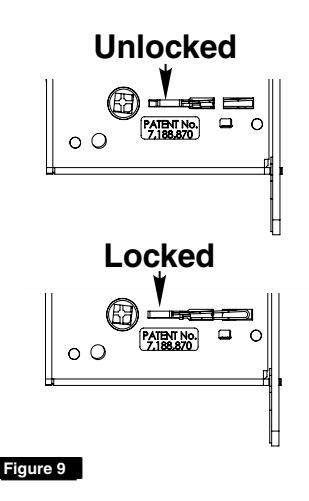
MAKE SURE LOCK IS UNLOCKED. (FIGURE 9)
5
BHD Trim
8200 Mortise Lock
Installation Instructions

4 BHD Trim Installation
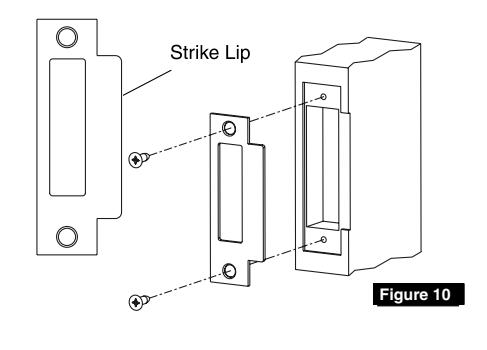
1. Install strike using 3/4" strike mounting screws.
NOTE:
STRIKE MUST BE ORIENTED WITH STRIKE LIP TOWARDS PULL SIDE OF DOOR. (FIGURE 10)
2. CYLINDER FUNCTIONS ONLY:
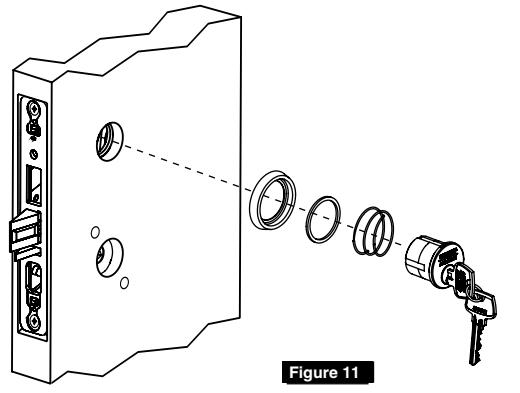
Slide cylinder(s) through spring, spacer and collar, threading into lockbody until cylinder face is flush with collar. (Figure 11)
NOTE:
PULL KEY SLIGHTLY OUT OF CYLINDER TO HELP THREAD INTO LOCKBODY.
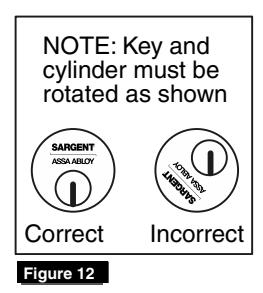
NOTE:
CYLINDER MUST BE ORIENTED CORRECTLY. (FIGURE 12)
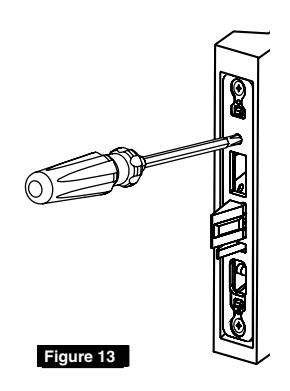
3. CYLINDER FUNCTIONS ONLY:
Tighten cylinder set screw. (Figure 13)
- 4. Fully tighten lock mounting screws.
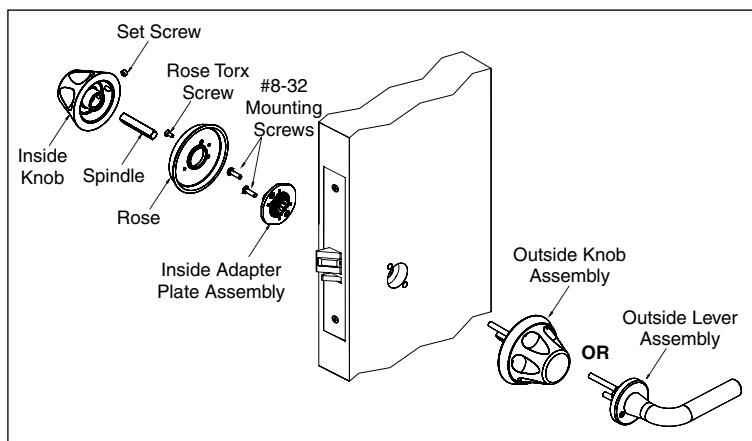
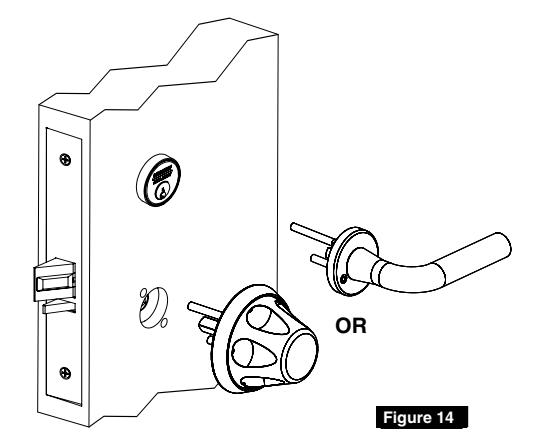
- 5. Slide outside knob assembly (or lever & rose assembly) onto door and lockbody. (Figure 14)
NOTE:
KEEP DOOR OPEN WHILE INSTALLING LOCK.
NOTE:
IF INSTALLING TRIM ON ONE SIDE, SEE SEPARATE INSTRUCTION SHEET.
4 BHD Trim Installation
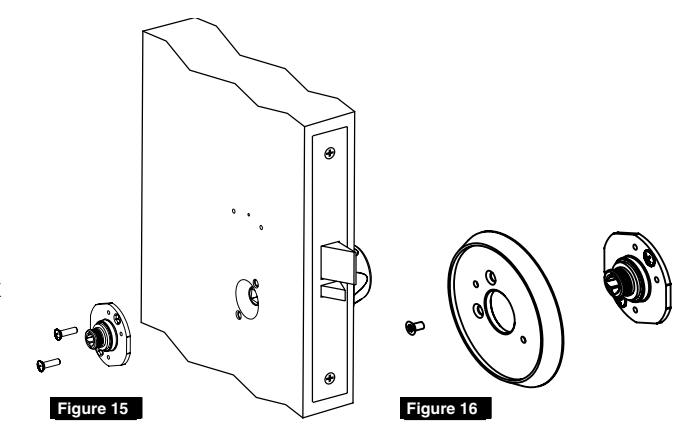
- 6. Align inside adapter plate assembly with outside assembly posts and secure with two (2) #8-32 screws. (Figure 15)
- 7. Tighten rose firmly onto adapter plate assembly by turning clockwise on plate threads. Align holes and install rose torx screw to plate assembly with security torx screwdriver. (Figure 16)
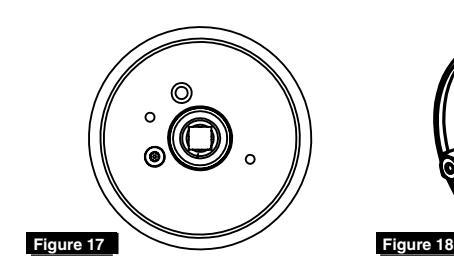
- 8. Align spindle hole to be square and perpendicular to door edge by hand turning. (Figure 17)
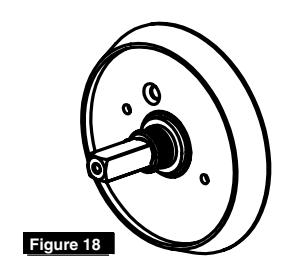
- 9. Insert spindle into inside trim of lockbody hub. (Figure 18)
10. Attach inside knob by placing tightly against rose and securing set screw with socket head screwdriver. Make sure knob screw hole is oriented toward hinge edge of door. Verify lock is operating correctly prior to closing door. (Figure 19)

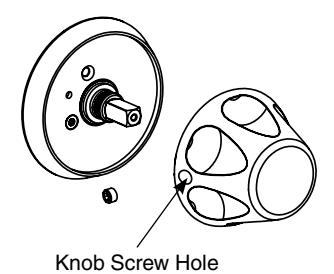
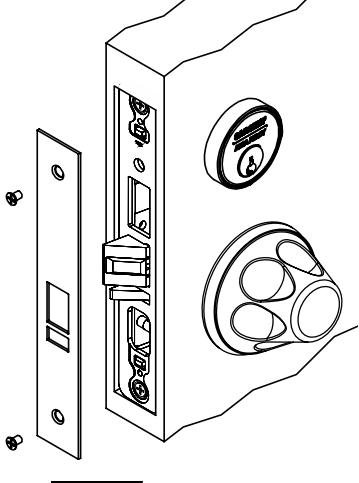
Figure 20

5 Turn-Piece Installation
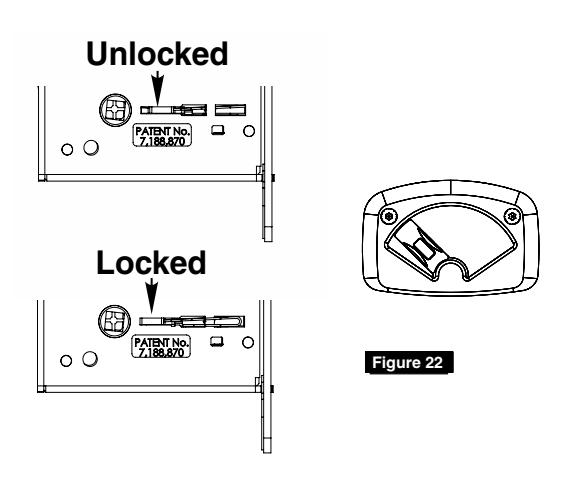
1. Install turn-piece loosely using two (2) turnpiece mounting screws. (Figure 21)
NOTE:
MAKE SURE LOCK IS UNLOCKED AND TURN-PIECE IS ROTATED AWAY FROM LATCH. (FIGURE 22)
2. Adjust location of turn-piece on door until turn-piece rotates easily, then fully tighten mounting screws.
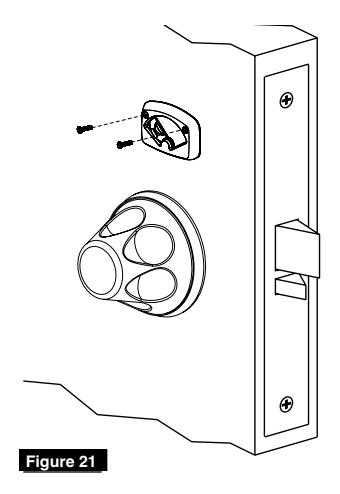
6 Coin-Turn Installation
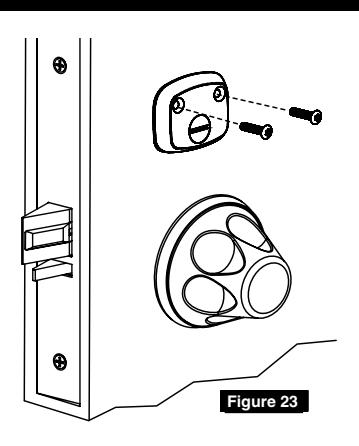
1. Install coin-turn using two (2) surface mount screws. (Figure 23)
SARGENT Manufacturing Company 100 Sargent Drive New Haven, CT 06511 USA 800-727-5477 www.sargentlock.com
Founded in the early 1800s, SARGENT® is a market leader in locksets, cylinders, door closers, exit devices, electro-mechanical products and access control systems for new construction, renovation, and replacement applications. The company's customer base includes commercial construction, institutional, and industrial markets.
Copyright © 2017, Sargent Manufacturing Company, an ASSA ABLOY Group company. All rights reserved. Reproduction in whole or in part without the express written permission of Sargent Manufacturing Company is prohibited.