Auditcon 2 Series – Vertical Housing Swing Bolt Installation Instructions
Open the original PDF document
View PDFAUDITCON® 2 SERIES LOCKS
MODELS 52, T52, 252, 552 - VERTICAL HOUSING SWING BOLT
INSTALLATION INSTRUCTIONS
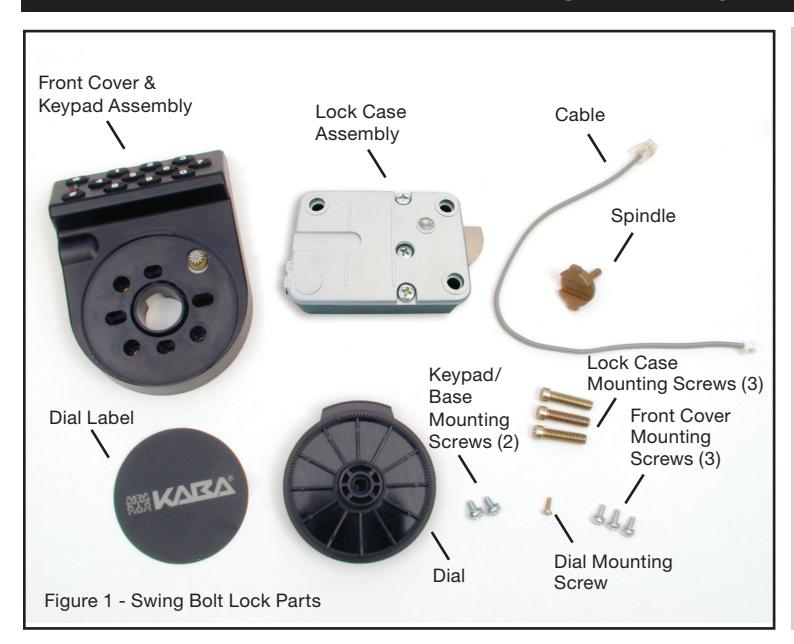
Basic Tools and Materials Needed
- Medium Phillips head screwdriver (#2) (recommend magnetized tip)
- ESD wrist band
Recommended, but not required:
- Torque screwdriver (30 inch-pounds/3.4 newton-meters capacity)
- Small vise grip
- Needle-nosed pliers
- Loctite® 262 (Red) for use on lock case mounting screws
WARNING: dormakaba locks are protected from 25,000 V Electrostatic Discharge (ESD) damage when correctly installed. Follow these precautions to avoid ESD damage when installing the lock:
- Handle the keypad assembly by the outer edge only.
- Use an ESD wrist band grounded to the lock or container during installation.
The installation instructions are the basis for Security Agency Approvals. The lock installation must be done in accordance to these instructions in order to maintain the labeled approval level.
In order to maintain VdS Class 2/EN 1300 Class B lock approval levels in a container where multiple locks are required, special considerations must be observed. The Auditcon 2 Series lock must be the first one secured by the boltworks. Check the locked status of the container with the handle of the boltworks.
Design Parameters for Auditcon 2 Series Locks
- 1. Bolt dimensions (nominal): .313 inches x .900 inches/7.95 x 22.8mm
- 2. Bolt movement (nominal) .475 inches/12.07mm
- 3. Bolt extension: .475 inches/12.07mm
- 4. Maximum load movable by the bolt: None
NOTE: Auditcon 2 swing bolt locks must be installed in such a way that no side or counter acting load affects the bolt and the bolt can move freely.
- 5. Maximum load against bolt when thrown (all directions): 224.8 lbs.(1kN)
- 6. The lock can be fitted to safes or vault doors of any material.
NOTE: As is the case with all mechanical and electronic locking devices, the container and boltworks must be designed to protect the lock.
Prepare for New Installation of the Lock (If Required)
1. Using the lock parts along with the installation template provided, establish the exact location location (relative to the cable/spindle hole) for the drilled and tapped holes for the lock and dial assembly.
CAUTION: The lock case must be mounted exactly according to the template if mounted over the cable routing hole. Otherwise, the lock case must be mounted so that no part of the case covers the cable routing hole.
- 2. The cable hole diameter can be a minimum of .406" (10.3mm) to a maximum of .438" (11.1mm). The .406" (10.3mm) diameter is recommended. The cable hole must be deburred.
- 3. The keypad/base assembly mounting screws require drilled and tapped holes to 3/8" (9.5mm) depth if possible (minimum 1/4" or 6.4mm depth required.) Drill either the two horizontal mounting holes or the two vertical holes.
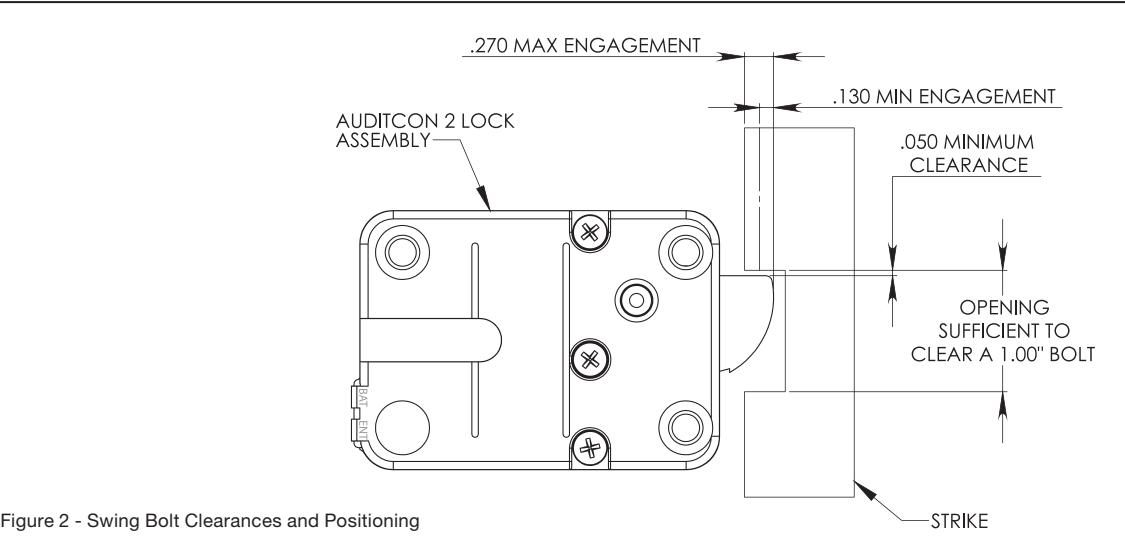
- 4.When mounting the lock unit (i.e., integrating it in a boltwork), make sure that the lock bolt has clearance to freely move to its end positions and that the shifting force works only in the axial direction (direction of movement). Lateral forces should not be exerted on the lock. A minimum clearance of 1/20" (1.27mm) is required between the flat edge of the bolt and the inside contact edge of the strike. Refer to Figure 2.
Part I: Install Front Housing Assembly
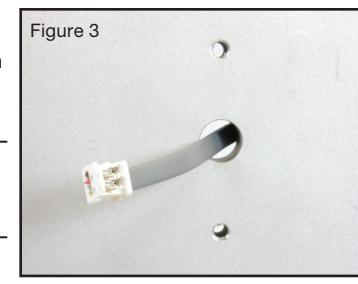
- 1. Route the end of the lock cable with the Picoflex connector from the back of the container door through the cable routing hole. (Figure 3)
- 2. Remove the front cover from the keypad/base assembly.
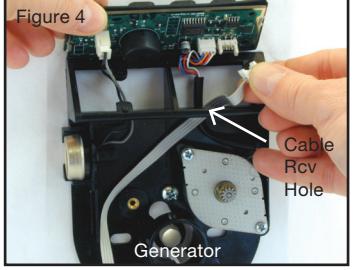
- 3. Hold the keypad/base assembly in the upright position (i.e., the keypad is positioned at the top) and hold the keypad in place. Guide the cable through the cable receiving hole from the back of the keypad/base assembly. (Figure 4)
- 4. Route the lock cable toward the keypad so that the cable will not be pinched by the generator. Gently lift the keypad board assembly and guide the cable up through the cable receiving hole in the keypad/base assembly. (Figure 4)
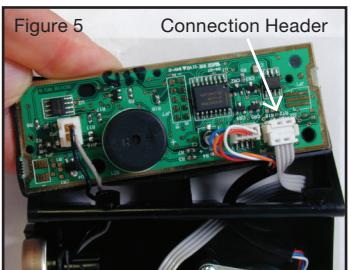
- 5. Insert the Picoflex connector on the end of the ribbon cable into the header on the keypad with proper orientation. (Figure 5)
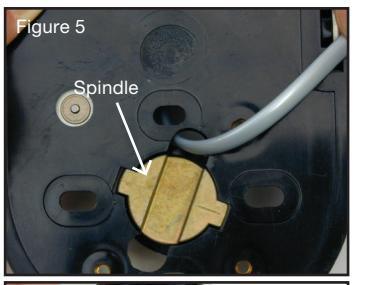
- 6. Insert the spindle from the back of the keypad/base assembly. (Figure 6)
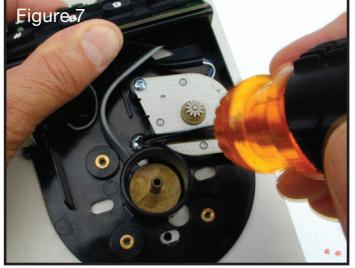
- 7. Position the keypad/base assembly firmly against the container door and attach it to the container door using the two #8-32 (or M4-0.7) keypad/base assembly mounting screws. (Figure 7) Do not fully tighten screws.
- 8. Position the cable and the keypad so that they will not be pinched when the front cover is snapped into place.
- 9. Pull excess cable through to the inside of the container.
- 10. Tighten the keypad/base assembly mounting screws. (Torque 17-20 lbs., 1.9-2.25 N-M) (Figure 7)
- 11. Center the front cover over the keypad/base assembly and gently snap into place.
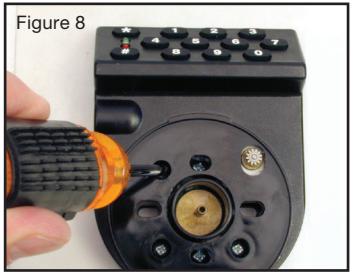
- 12. Mount the front cover to the keypad/base assembly using the round mounting holes on the cover and the three #6-32 mounting screws. (Torque 14-16 lbs., 1.6-1.8 N-M) (Figure 8)
- 13. Place the nylon dial spacer over the spindle.
- 14. Place the dial onto the spindle and seat into the dial bushing. Push gently on the dial so that the gear on the generator seats properly into the gear teeth on the dial.
- 15. Plug the RJ11 end of the cable into the lock case in order to test the lock.
-
16. Test the operation of the lock before completing the installation of the front cover by verifying the following:
- Ensure that the dial turns freely without scraping.
- Power the lock by turning the dial briskly in any direction until simultaneous green and red flashes display and two beeps sound to indicate the lock is powered. Key in the Factory Combination. (For a Model 52 or T52, enter "502550". For a Model 252 or 552, enter a twodigit number in the range from 01-20, followed by "502550".) If the combination is entered successfully, continuous green flashes display to indicate that the lock is ready to open. Rotate the container handle to unlock. Then rotate the handle back to the locked position.
NOTE: After correctly entering a valid combination, you must retract the bolt within 4-6 seconds.
- 17. If the lock operation tested successfully, unplug the RJ11 end of the cable from the lock case and lay the case aside.
- 18. Remove the dial.
- 19. Apply a small amount of lubricant to the gear on the generator, the bearing surface of the dial (the portion that fits into the dial bushing of the base assembly), and the teeth around the edge of the dial.
- 20. Place the dial onto the spindle and seat into the dial bushing. Push gently on the dial so that the gear on the generator seats properly into the gear teeth on the dial.
21. Insert the #4-40 dial mounting screw through the metal dial mounting washer. Then insert the dial mounting screw/washer assembly into the spindle and tighten the dial mounting screw.
CAUTION: To meet the requirements of certain approval agencies, a tamper evident dial label may have been included with your lock. It is important that the next step of the installation be completed very carefully, allowing the dial label to be applied correctly on the first attempt. If the tamper evident dial label is removed after initial application, a part of the label will stay on the dial. A new label would then be required for reapplication.
22. Orient the lip of the dial to the upright position and apply the dial label to the dial. The Kaba logo should be aligned horizontally (Figure 9).
Lip of dial
Figure 9
Part II: Install Lock Case Assembly
WARNING: Do not take the lock case assembly apart. The lock will not operate if the back cover has been removed. There are no field serviceable parts inside the lock case. This action will void the lock warranty.
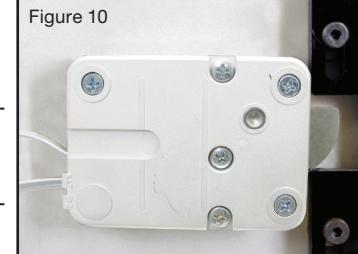
1. Ensure that the cable lays in the cable channel as you mount the lock case assembly to the inside of the container door using the three 1/4-20 (or M6-1) screws (Torque 25-30 lbs., 2.8- 3.4 N-M), allowing 1/20" (1.27mm) clearance between the flat edge of the swing bolt and the inside contact edge of the strike. (See Figure 2 for proper clearances and positioning when installing a swing bolt.)
NOTE: The lock case assembly can be mounted in bolt up position (Figure 10) or bolt down position for all mounting locations. The movement of the boltworks must however contact the bolt on the flat edge, not on the rounded side of the bolt. It is recommended that you use Loctite® 262 (Red) on the lock case mounting screws.
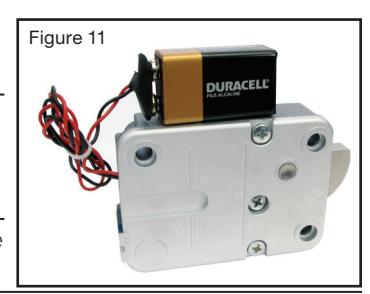
2.If your lock includes the Battery Assist option, you should now mount the battery clip inside the door near the lock and install a fresh 9 Volt Alkaline battery.
NOTE: To remove any excess cable or if you choose not to use the Battery Assist option, wrap and tie the battery assist cable (Figure 11).
Document Number 3119.0210 Rev. C

www.dormakaba.us
© 2010-2018 dormakaba USA Inc. All rights reserved. Product warranty information can be found at: www.dormakaba.us
NOTICE: The information in this instruction sheet is subject to change without notice and does not represent a commitment on the part of dormakaba. dormakaba shall not be liable for technical or editorial errors or omissions contained herein; nor for incidental or consequential damages resulting from the furnishing, performance or use of this material.
dormakaba USA Inc. 749 W. Short Street, Lexington, KY 40508 USA Phone: (859) 253-4744 FAX: (859) 255-2655 Technical Support: (800) 950-4744