Arrow Lock & Door Hardware Door Opreators Old Motor Inverter Instruction
Open the original PDF document
View PDF

Installation Instructions for replacing Motor Inverter on 7800 Door Operator
Inverter Removal:
- 1. Remove (6) cover screws with phillips head screw driver; remove unit cover and set aside.
- ! 2. WARNING:120VAC potential. Set red lighted circuit breaker switch to OFF position before proceeding.
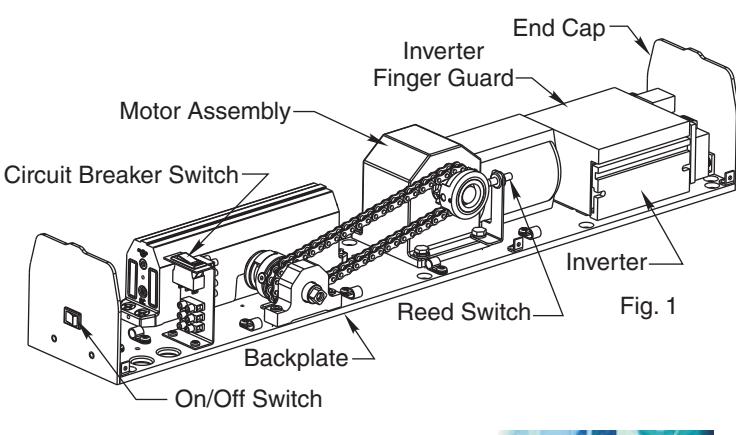
- 3. Remove End Cap, shown in Fig.1, by removing (2) phillips head screws . and set aside
- 4. Carefully remove Inverter Finger Guard to expose wiring hookups and inverter mounting screws. Note how existing wiring is routed under the finger guard and through slit in end of finger guard.
- 5. Disconnect wire leads from (2) Blue wire terminals located on end of inverter using small 1/8"flat blade screw driver.
- 6. Using a pair of needle nose pliers, disconnect the (5) 1/4" terminal connectors from the Motor and AC Line inputs located on the circuit board.
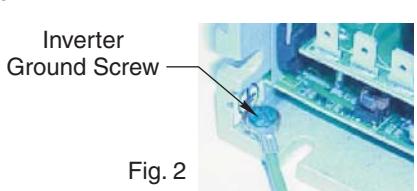
- 7. Using a 1/4" flat blade screw driver, remove ground screw from base of inverter.See Fig.2.
- 8. Using phillips head screw driver, remove the (2) #10-32 x 3/8" truss head screws located at the base of the inverter closest to the end cap position. Then loosen the (2) #10-32 x 3/8" truss head screws located at the base of the inverter closest to the motor. The inverter should side off the base plate in the direction away from the motor.
Inverter Installation:
- 9. Remove new inverter from packaging and carefully remove finger guard from inverter.
- 10. Slide inverter on backplate and secure in place with (4) #10-32 x 3/8" truss head screws.
- 11. Using 1/4" flat blade screw driver, install green ground wire to inverter's base. See Fig.2.
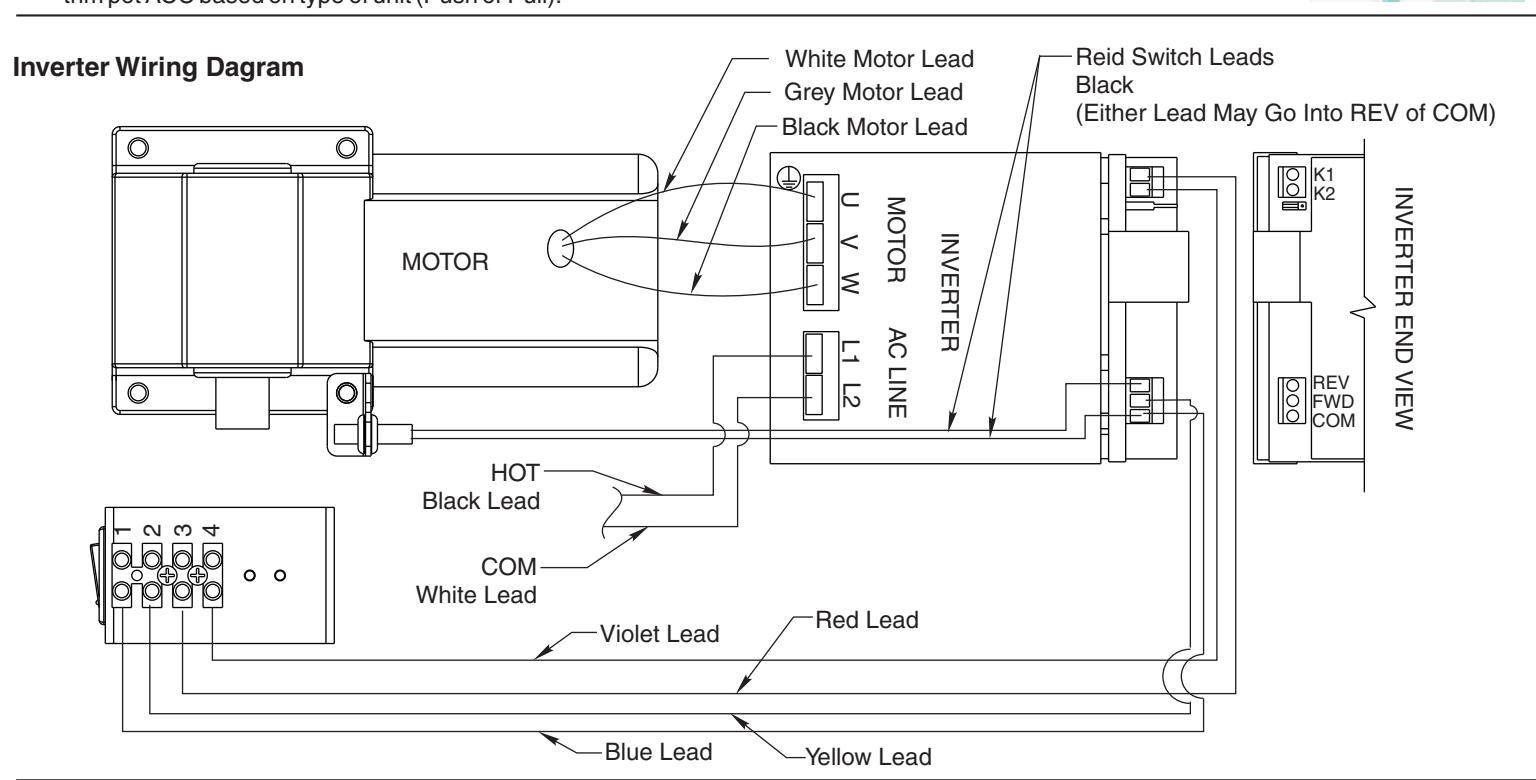
- 12. Refer to wiring diagram below to connect wiring to new inverter.
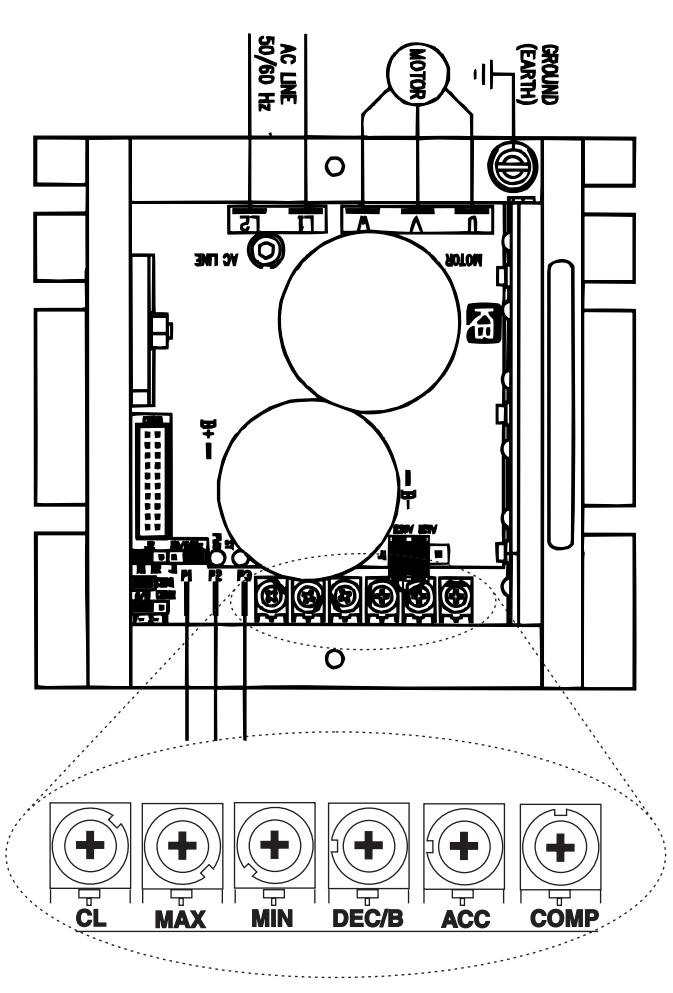
- 13. AdjustTrim Pot ACC using plastic adjustment tool provided: Refer to Trim Pot Settings on page 2 of this instruction for proper setting of trim pot ACC based on type of unit (Push or Pull).
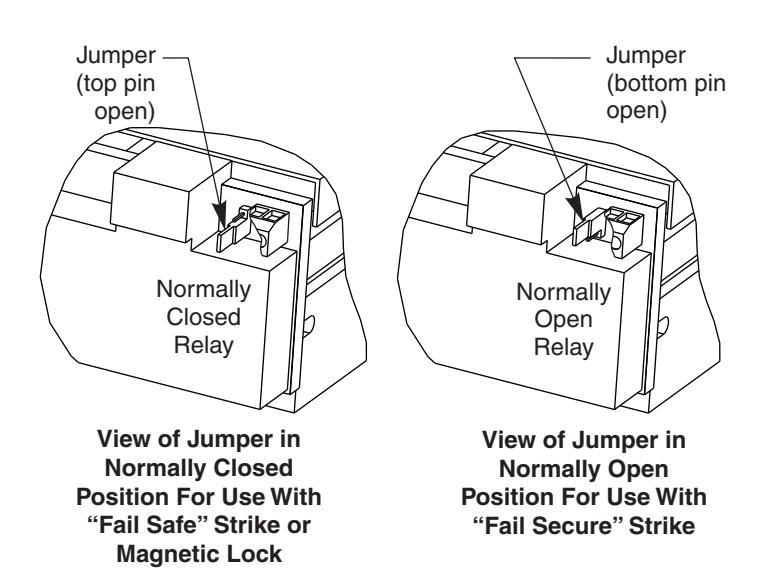
- 13. If unit is interfacing with Strike, Magnetic Lock, etc., confirm Relay Jumper is in proper location for normally open (NO) relay or normally closed (NC) relay. See Page 2 of this instruction sheet.
- 14. Re-install End Plate removed in step 3.
- 15. Switch on power to Unit. Set Circuit Breaker switch to "RESET" position. Circuit breaker should light to indicate 120VAC is present. Confirm that On/Off switch in End Plate is in the"On"position.
- 16. Activate unit and note if Hold Open time is sufficient. If not, adjust Hold Open time with trim pot labeled DEC/B using plastic adjustment tool provided. See Trim Pot Setting on page 2 of this instruction.
- 17. Re-install unit cover using (6) cover screws removed in set 1.
| POT | DESCRIPTION | FUNCTION |
|---|---|---|
| CL | Obstruction Detection on Open |
CW - Increase
CCW - Decrease |
| MAX | Door Open Speed |
CW - Increase
CCW - Decrease |
| MIN | Motor Reversing Speed |
CW - Increase
CCW - Decrease |
| DEC/B | Hold Open Time (5 - 30 Seconds) |
CW - Increase
CCW - Decrease |
| ACC | Door Mounting (Push or Pull) |
Full CW - Push
Full CCW - Pull |
| COMP |
Motor Torque at Hold Open
Position |
CW - Increase
CCW - Decrease |
Inverter Adjustments:
- -Based on function adjustment desired, use table above to determine which POT is to be adjusted.
- -Using Trimpot Adjuster, shown below and supplied with screw pack, adjust the appropriate POT using illustration on the left.

Note: Trimpot may be adjusted through slot in finger guard.
Inverter Relay Jumper Settings
Arrow Lock & Door Hardware
P.O. Box 3075 Salem, VA 24153 Phone USA: 800-839-3157 Fax 800-421-6615