Arrow Lock & Door Hardware Door Opreators 7814S 7836S Push Side Instruction Sheet
Open the original PDF document
View PDF

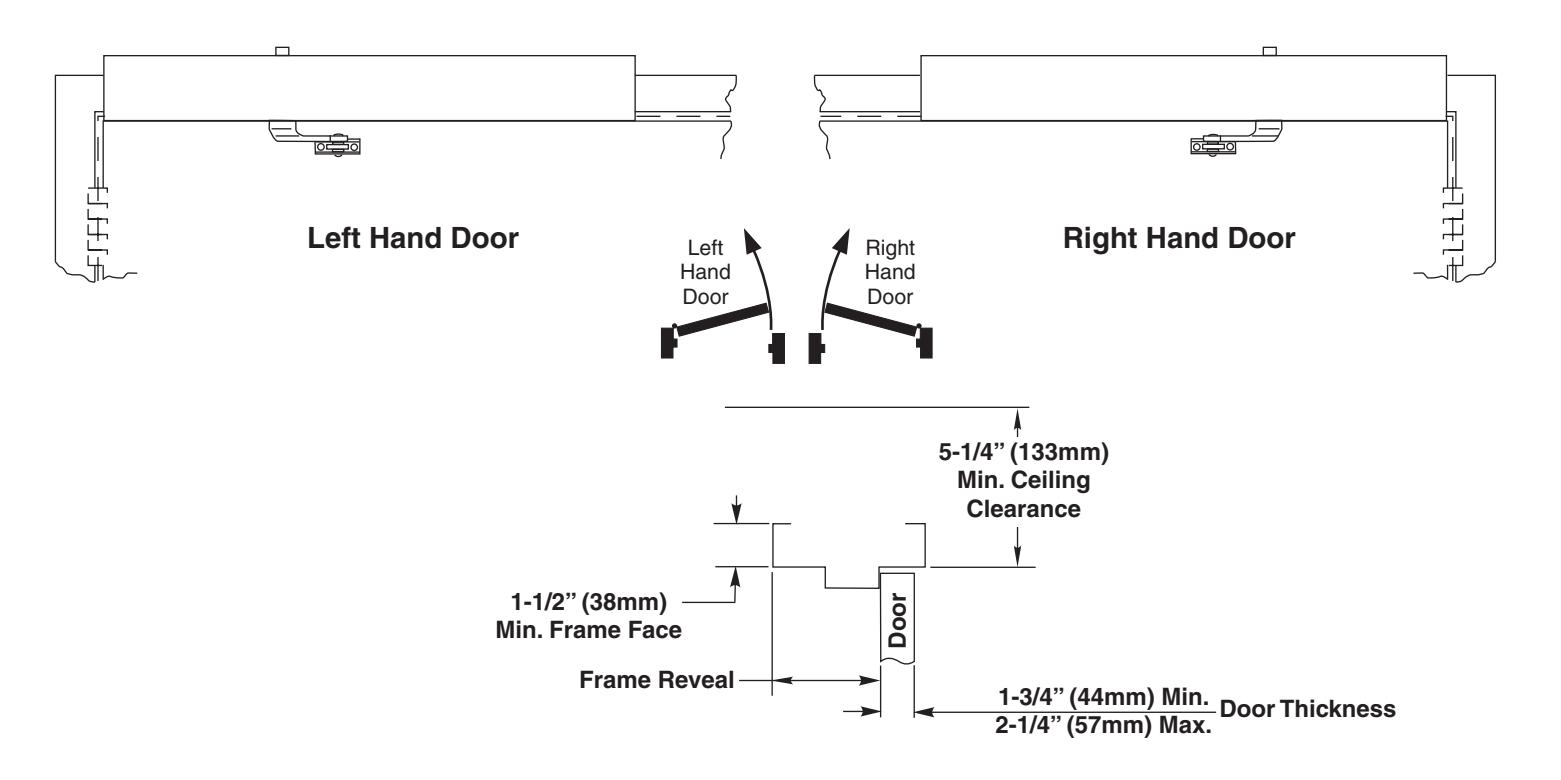
Series –Door Openings 85° to 110° or 111° to 170° Double Lever Arm Application for Frame Reveals 3" (76) to 7" (178mm) Stop (Push) Side of Door Installation 7814S/7836S
Requirements
- U.L. labeled fire or smoke barrier door assemblies require that the 120VAC (60Hz) power input to the 7800 door operator be supplied through normally closed alarm contacts of the alarm system/alarm panel.
- Power input to 7800 door operator must be 120 VAC (60Hz) to terminals HOT and COM at terminal strip T1. Earthground (GND) to green screw on Backplate.
- All wiring must conform to standard wiring practice in accordance with national and local wiring codes.
- Note: Unless otherwise noted, all dimensions are given in inches (millimeters).
- Minimum suggested and required material thickness for hollow metal frames (skin plus reinforcement) is charted on Page 2.
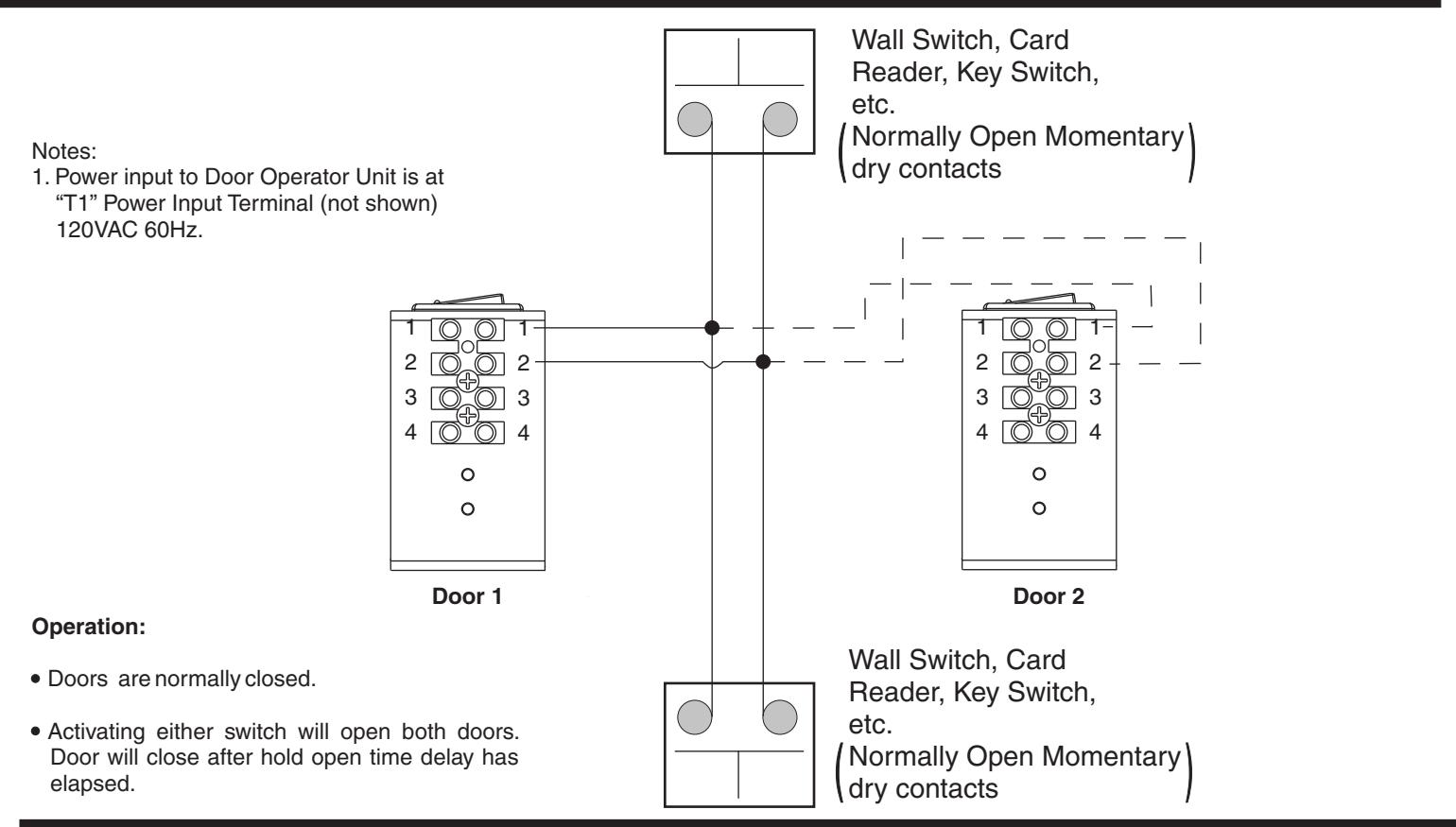
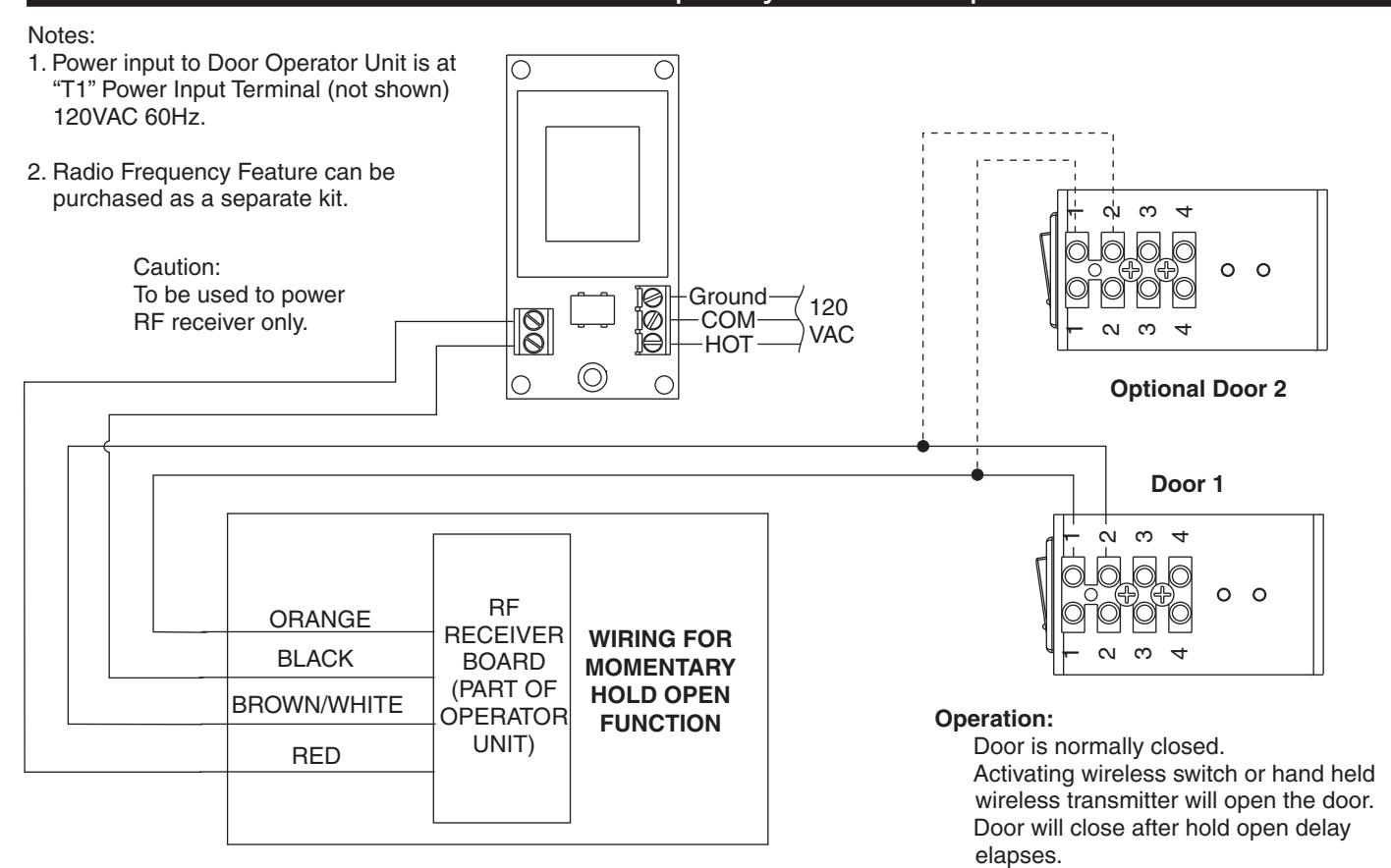
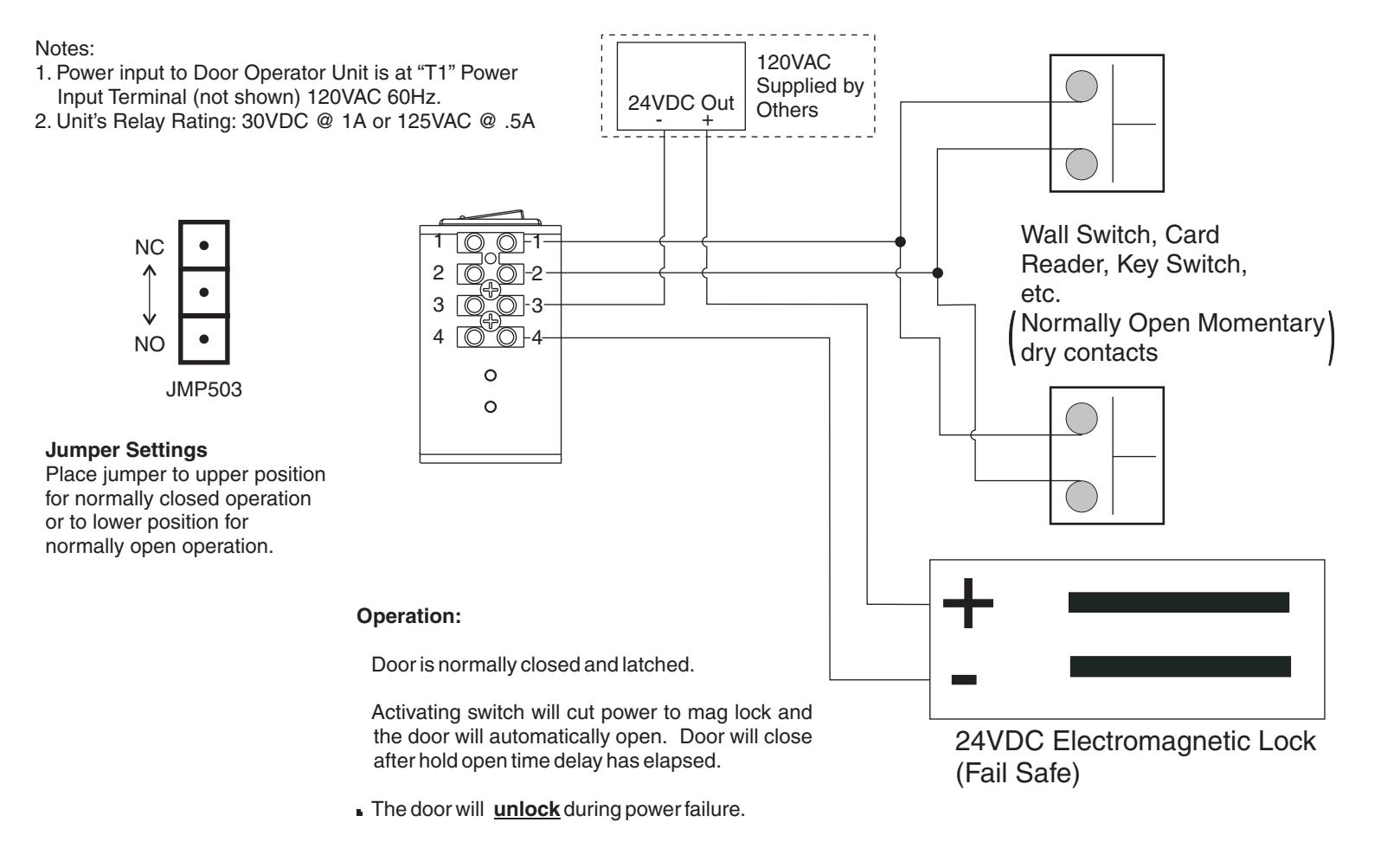
- For wiring refer to Wiring Instructions on Pages 5 thru 8.
- Unit is Non-Handed.
- Door must be hung on butt hinges [5" (127mm) max. width] or 3/4" (19mm) offset pivots. A special preparation template will be supplied for other conditions.
- Door must swing freely through the entire opening and closing cycle before beginning the installation.
- Use of an auxiliary door stop is required.
-
120 VOLT POTENTIAL PRESENT. MAKE SURE POWER IS TURNED OFF DURING INSTALLATION PROCEDURE.
An incorrectly installed or improperly adjusted door operator can cause property damage or personal injury. These instructions should be followed to avoid the possibility of misapplication or CAUTION misadjustment. CAUTION
| Requirements | 1 | Input Power Configuration | 5 |
|---|---|---|---|
| General Templating Information | 2 | Inverter Details | 6 |
| Installation Template | 2 | Wiring Diagram - Standard Function with Switches | 6 |
| Component Layout | 3 | Wiring Diagram - Optional Radio Frequency Function | 7 |
| Installation Sequence | 3 | Wiring Diagram - Fail Safe / Fail Secure Electric Strike | 7 |
| Installation Sequence Continued | 4 | Wiring Diagram - Fail Safe Electromagnetic Lock | 8 |
| General Electrical Data | 5 | A.D.A / UL Information | 8 |
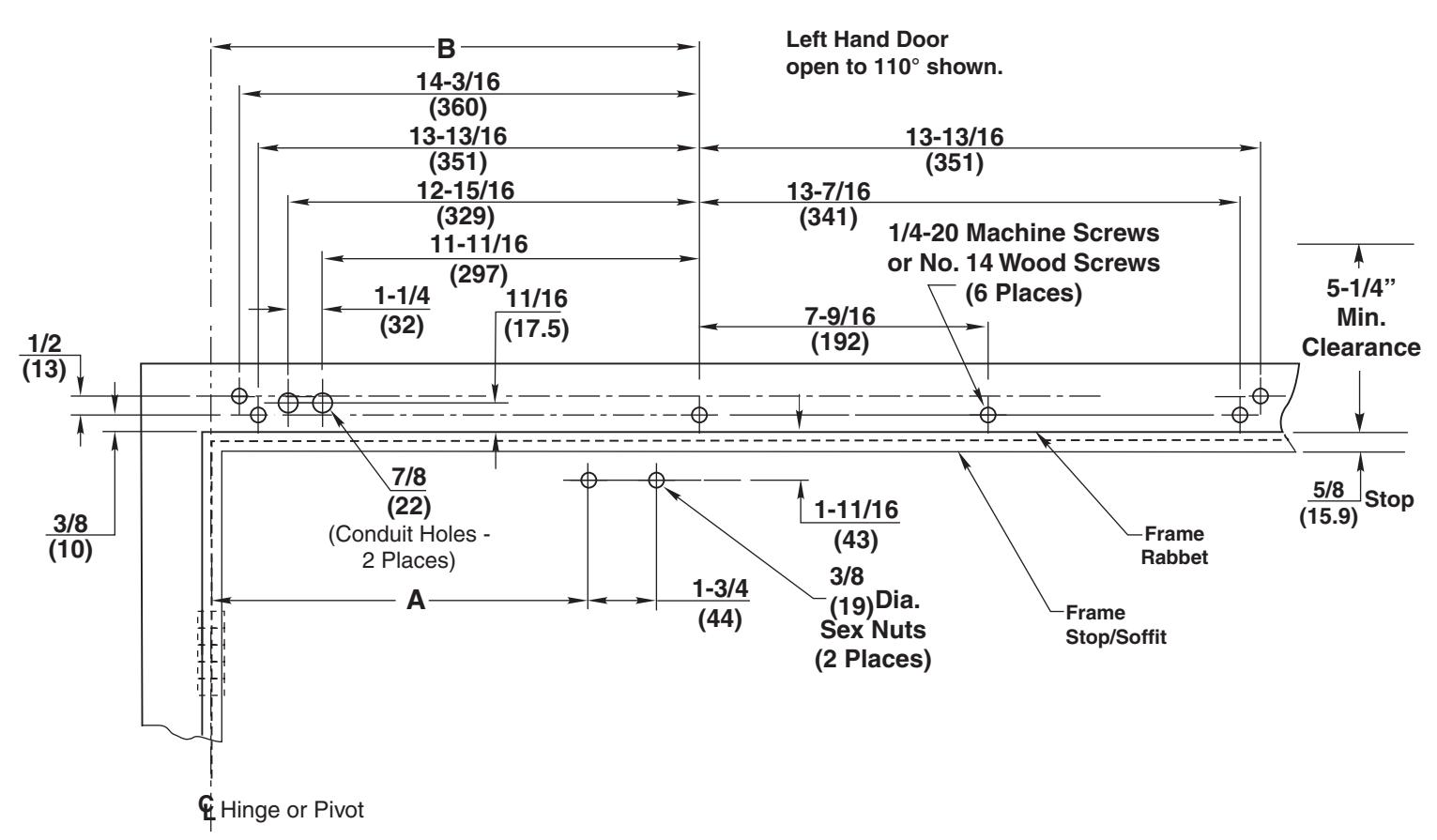
General Templating Information
WARNING: Make sure that (120V, 60Hz) input power is turned off at facility's main circuit breaker before proceeding with installation.
General Templating Information
- Before beginning the installation, verify that the door frame is properly reinforced and is well anchored in the wall.
- Unreinforced hollow metal frames and aluminum frames should be prepared and fitted with 1/4-20 blind rivet nuts, furnished by others.
- Concealed electrical conduit and concealed switch or sensor wires should be pulled to the frame before proceeding.
Fasteners for Frame
- 1/4-20 Machine screws for hollow metal and aluminum.
- No. 14x2-3/4" (70mm) screws for wood.
Fasteners for Door
- 1/4-20 Machine screws.
- 3/8" diameter x 1-5/8" (41mm) long sex nut.
Template
| Hollow Metal Door Frame Reinforcing | ||||
|---|---|---|---|---|
| Frame | Reinforcing | |||
| Material | Recommended | Min. Required | ||
| 12 Ga. | 12 Ga. | 18 Ga. | ||
| . 1046 | . 1046 | . 0478 | ||
| (2.66) | (2.66) | (1.21) | ||
| 14 Ga. | 10 Ga. | 12 Ga. | ||
| . 0747 | . 1343 | . 1046 | ||
| (1.90) | (3.41) | (2.66) | ||
| 16 Ga. | 10 Ga. | 12 Ga. | ||
| . 0598 | . 1343 | . 1046 | ||
| (1.52) | (3.41) | (2.66) | ||
| 18 Ga. | 8 Ga. | 10 Ga. | ||
| . 0478 | . 1644 | . 1343 | ||
| (1.21) | (4.18) | (3.41) | ||
|
Door Opening
Angle |
Dim "A" | Dim "B" |
|---|---|---|
| Up to 110° | 12 (305) | 15-3/4 (400) |
| 111° to 170° | 9-1/2 (241) | 13-1/4 (337) |
Notes:
- All dimensions are given in inches (mm).
- Thickness recommended for reinforcements in hollow metal doors and frames is charted at the left of this page.
- Do not scale drawing.
- Left hand door shown.
- This template information based upon use of 5" (127mm) maximum width butt hinges or 3/4" (19mm) offset pivots. A separate template will be supplied for other conditions.
- Maximum frame reveal is 7" (178mm) for this application.
- Conduit hole nearest to hinge is suggested for 120 VAC power input.
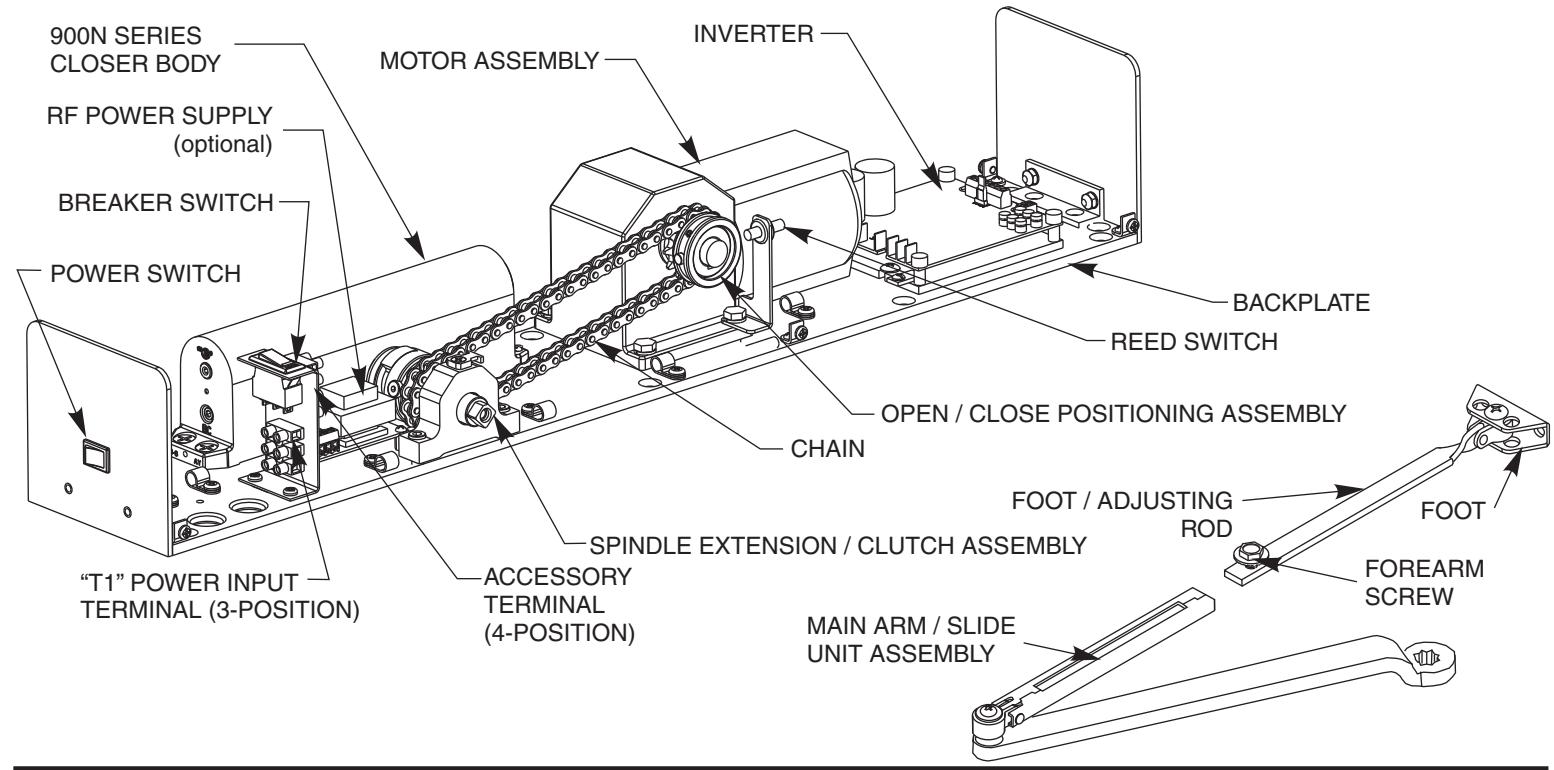
Component Layout
Installation Sequence
- Step 1: Determine hand of door from illustration on Page 1.
- Step 2: Using template, (Page 2), locate and prepare holes in the frame & door:
Frame
- A. Prepare holes for 1/4-20 machine screws or No. 14 x 2-3/4" (70mm) wood screws. Blind rivet nuts (by others) are suggested for unreinforced hollow metal frames or for aluminum frames. six (6)
- ConcealedWired Units Only: Two (2) NOTE: B. 7/8" (22mm) diameter holes for conduit, for power input and for switch/sensor wires. On new construction these holes will generally be drilled by the frame supplier at their shop or at the time the frame is installed in the wall.
Door
- two (2) C. Prepare holes for 3/8" diameter sex nuts. Standard units are supplied with sex nuts and screws for 1-3/4" (44mm) thick door. Sex nuts and screws for other door thicknesses are available to order.
- Step 3: Remove cover from the unit and set cover & cover screws aside.
-
Step 4:
Mount unit to door frame.Select A or B below.
- Concealed Wired Units Only: A. Connect conduit to frame side of backplate. Fasten unit to door frame (six screws).
- Surface Wired Units Only: B. Fasten unit to door frame (six screws). Mount conduit bracket (found in screw pack) to uni't backplate with two screws provided. Connect wiring conduit to bracket.
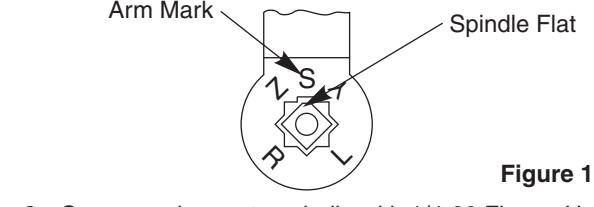
- Step 5: Install main arm onto spindle shaft of unit at a 90° angle to the door frame. Align arm mark "S" with the flat corner of the spindle shaft square. (See Fig.1, upper right.)
- Step 6: Secure main arm to spindle with 1/4-20 Flange Head Screw provided. Tighten screw with 7/16" wrench or socket.
- Step 7: Mount arm foot to door using 2 1/4-20 screws & sex nuts provided with screw pack.
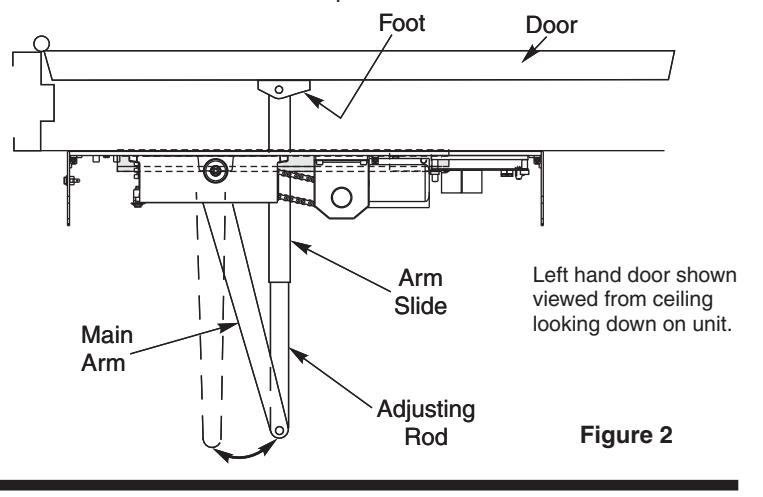
- Step 8: PRELOAD ARM (See Fig. 2, below): Remove 1/4-20 hex head screw on adjusting rod and insert adjusting rod into arm slide. Reinstall 1/4-20 screw and leave loose. Rotate main arm in direction away from the hinge edge until the adjusting rod and arm slide are perpendicular (at a 90° angle) to the door frame. Tighten the 1/4-20 hex head screw on the adjusting rod to secure arm in this new position.
Installation Sequence Continued
Step 9: Adjust closing power of unit (See Fig. 3) - Using a 1/8" allen wrench, turn the power adjustment shaft clockwise to increase door closing power. Door control is shipped set at midpoint of power setting. Maximum closing power can be achieved with 8 (360°) clockwise turns of the power adjustment screw.
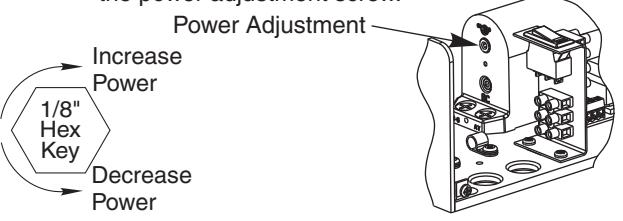
Figure 3
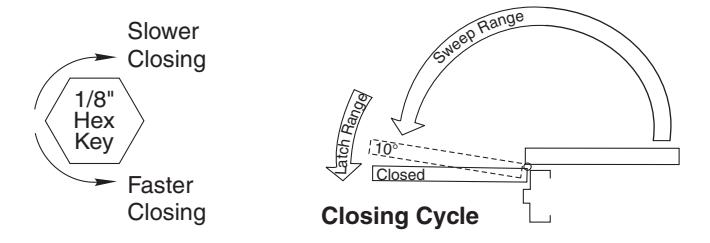
Step 10: Adjust Hydraulic valves using a 1/8" hex wrench to obtain proper door closing speeds. See following illustrations. (Adjustments continued top of Page 4.)
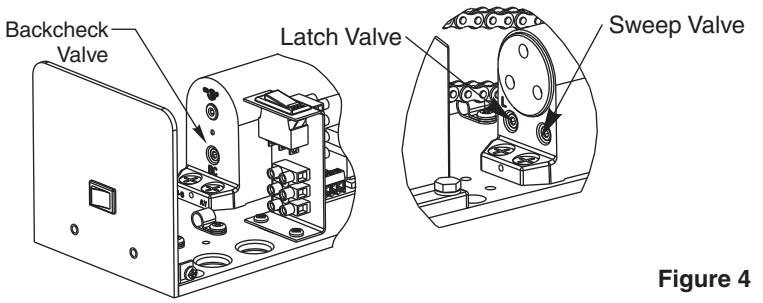
Closing Cycle – Make adjustments, as necessary, to the Sweep Speed "S" valve and Latch Speed "L" valve. See Fig. 4 below for location of valves. Turn valves clockwise to reduce speed, counter clockwise to increase speed.
Opening Cycle – Adjust Backcheck, "B" valve, as necessary, for hydraulic resistance to door opening in the backcheck range. See illustration at bottom of this page for location of valve.
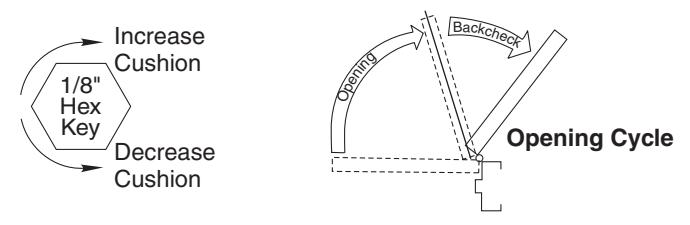
NOTE: Too much Backcheck, "B" valve, can affect the operation of the units pump, preventing units from fully opening the door. This valve may require fine tuning after all other adjustments have been made.
Note: A.D.A. requires that from an open position of 70°, the door will take at least 3 seconds to move to a point 3" (75mm) from the latched position, measured at the leading edge of the door.
Step 11: Make wiring connections using Wiring Instructions on Page 5.
Step 12: Turn on facility's main circuit breaker.
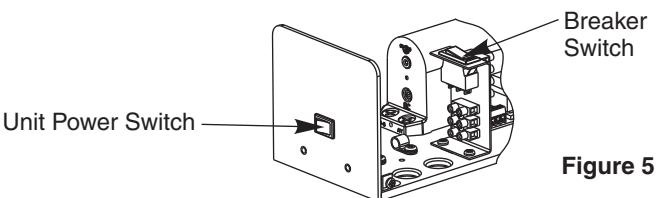
Step 13: Turn power to unit on at the Unit Power Switch and turn the Breaker Switch to "RESET".
Step 14: Using a short jumper cable, momentary jump terminals 1 and 2, see Fig. 6 below, to activate unit. When door reaches 20°, switch Breaker Switch to "OFF" position cutting power to the unit. Allow door to fully close (door may be manually
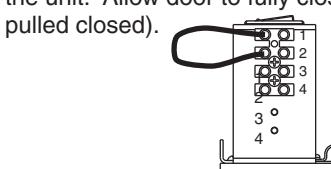
Figure 6
Step 15: Adjust Closing Position Magnet (See Fig. 7) - With door in the closed position, use finger to slide Closed Position Magnet so it aligns directly with the Reed Switch.
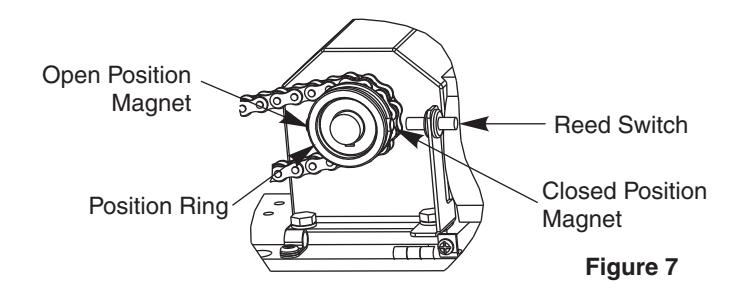
- Step 16: Adjust Open Position Magnet Use fingers to slide Open Position Magnet 180° from Open Position Magnet.
- Step 17: Flip Breaker Switch to "RESET" to turn power on. Jump terminals 1 and 2 (as shown in Fig. 6) to activate door. Note open position of the door. Allow door to close.
- Step 18: Use finger to readjust the Open Position Magnet to desired door open position.
- Step 19: Repeat Step 17 to verify door open position.
- Step 20: Make all connections necessary for any accessories to the 4-position Accessory Terminal (see Pages 6 8).
- Step 21: Make necessary adjustments to inverter (see Page 6). Replace cover and cover screws.
General Electrical Data
- Maximum current draw of unit is 0.6 amps.
- Breaker Switch protects the motor assembly and inverter; and has a 5 amp rating.
-
Maximum wire size is:
- 12AWG at terminals HOT and COM (120VAC; 60 Hz) on "T1" Power Input Terminal.
- 14AWG at terminals 1 thru 4 on Accessory Terminal.
- 18AWG at terminals 22 thru 25 on "T1" Power Input Terminal.
Input Power Configurations
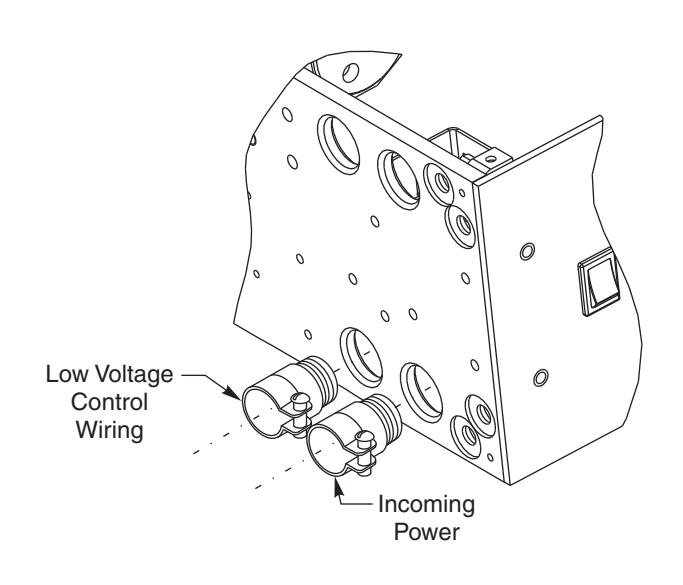
CONCEALED WIRING
Thread conduit fitting(s) into backplate as shown. A second conduit fitting is required for low voltage control wiring. CHECK LOCAL CODES. Pull conduit out of header and attach to conduit fittings before mounting Operator to door frame. Attach incoming ground wire to backplate with ground screw as illustrated in "Surface Wiring" illustration to the Right.
SURFACE WIRING
An optional bracket is provided for use with surface wiring. Remove the two cable clamps screws and slip the bracket under the cable clamps. Push the cable clamp screw through the bracket holes and tighten. ½" conduit fittings can now be installed on the bracket. Attach incoming ground wire to backplate with ground screws as illustrated below.
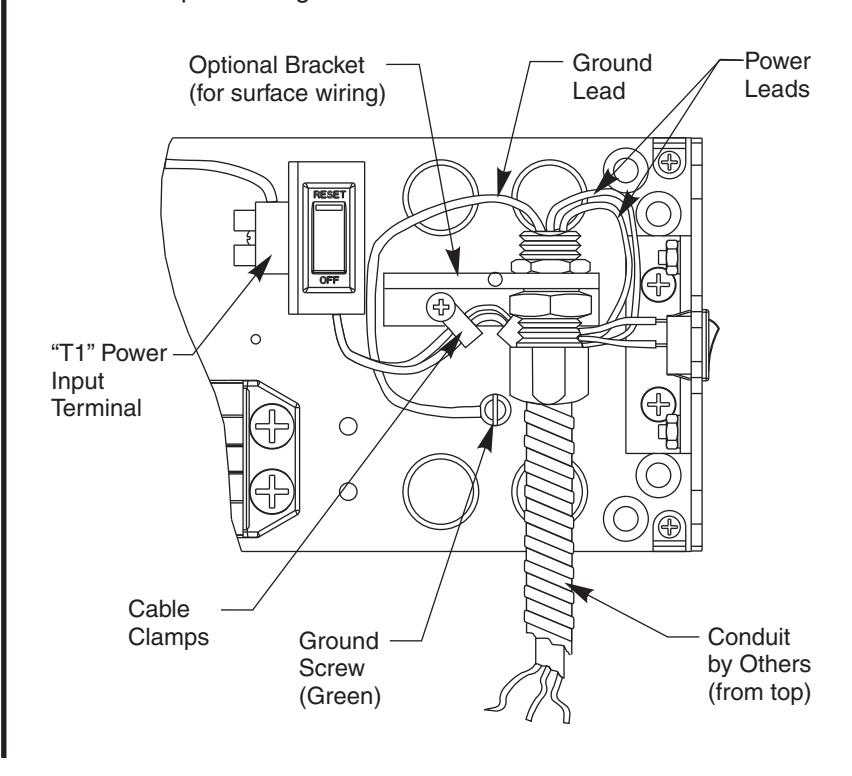
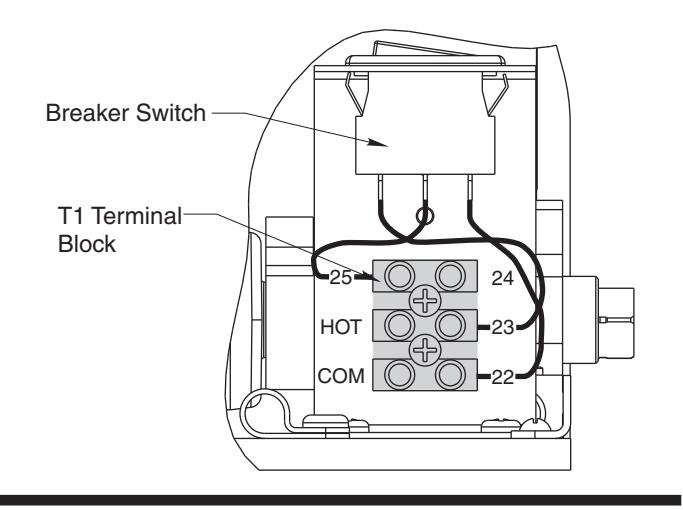
Ground Wire Connection – Ground wire must be secured to backplate under head of (green) ground screw nearest to "T1" Power Input Terminal. Screw labeled "GND".
| Terminal | Description |
|---|---|
| COM | Common power lead |
| HOT | Hot power lead |
| 25 | Circuit Breaker |
| 24 | Switch |
| 23 | Circuit Breaker |
| 22 | Common connection to Circuit Breaker / Inverter |
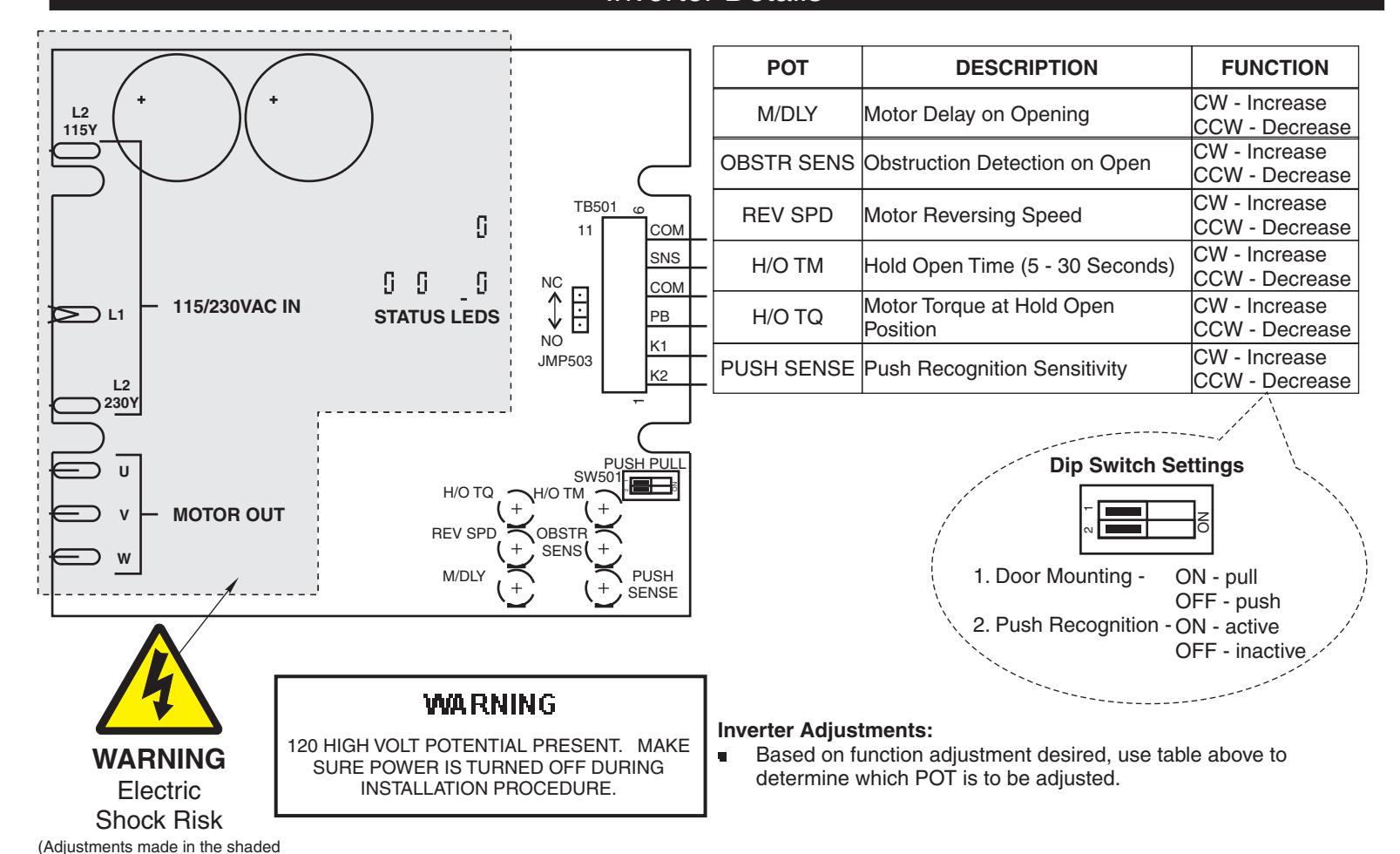
Inverter Details
Standard Function with Switches
area should be performed by Authorized Factory Personnel.)
Radio Frequency Function Option
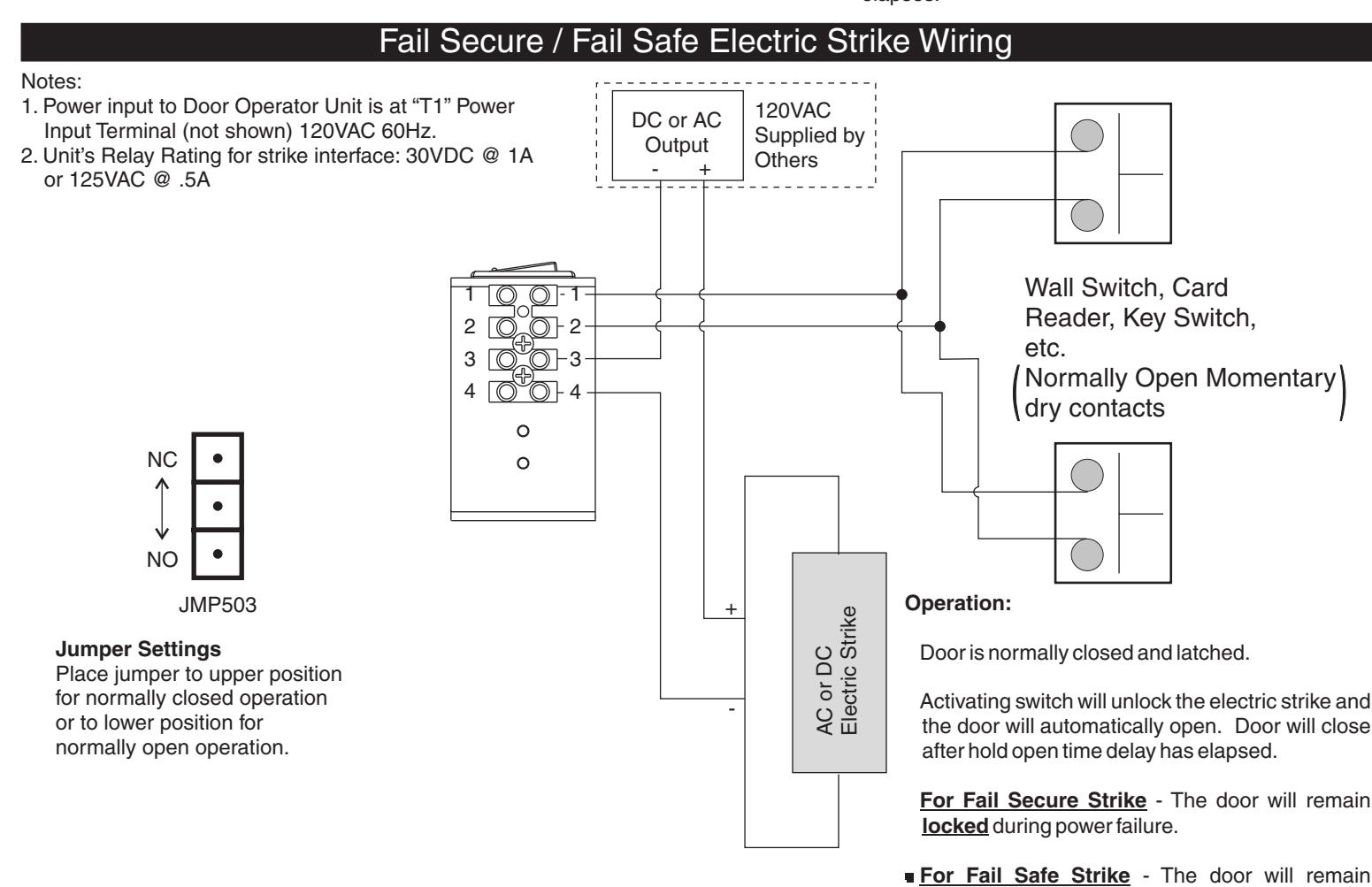
during power failure.
unlocked
Fail Safe Electromagnetic Lock 24VDC Wiring
A.D.A / UL
AmericansWith Disabilities Act (A.D.A.)
These door operators can be installed and adjusted to conform with A.D.A.regulations.
ANSI Standards
ANSI A117.1 providing accessibility and usability for physically handicapped people" – These door operators permit door assemblies to conform to the requirements of this specification "for buildings and facilities – .
• ANSI A156.19 "for power assist and low energy power operated doors" – These products are designed to conform to this specification .
U.L.Listing

Underwriters Laboratories, Inc. listed for use on fire and smoke barrier doors - - - - - - -
Arrow Lock & Door Hardware
P.O. Box 3075 Salem, VA 24153
Phone USA: 800-839-3157 • Fax 800-421-6615
Arrow Lock is a registered trademark of ASSA ABLOY. Copyright © 2008 Arrow Lock, Inc., an ASSA ABLOY Group company. All rights reserved. Reproduction in whole or in part without the express written permission of Arrow Lock is prohibited.