Alarm Lock Wireless Trilogy Networx PL6600 & ETPLNRX Programming Instructions
Open the original PDF document
View PDF
345 Bayview Avenue Amityville, New York 11701 For Sales and Repairs 1-800-ALA-LOCK
For Technical Service 1-800-645-9440 or visit us at http://tech.napcosecurity.com/ (Note: Technical Service is for security professionals only) Publicly traded on NASDAQ Symbol: NSSC © ALARM LOCK 2013
Wireless Trilogy Networx™ PL6600 & ETPLNRX Programming Instructions
© ALARM LOCK 2013 WI2059 03/13
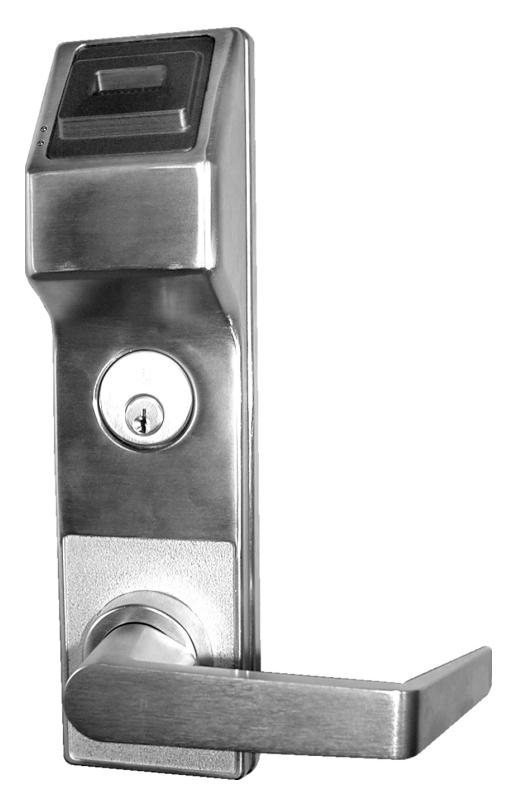
PL6600 & ETPLNRX
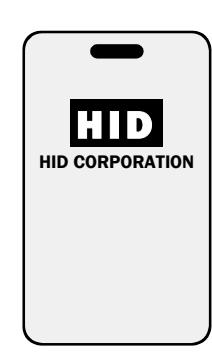
PROXCARD®
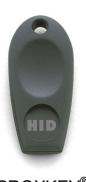
PROXKEY® KEYFOB
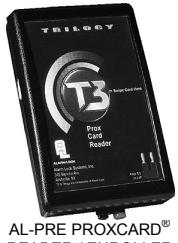
READER / ENROLLER
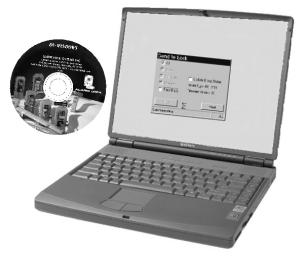
DL-WINDOWS PROGRAMMING SOFTWARE
PL Wireless Trilogy Series Network Access Control System with ProxCard® Access
PL6600 & ETPLNRX WIRELESS LOCKS
THE ALARM LOCK WIRELESS TRILOGY PL-SERIES STAND-ALONE ACCESS CONTROL SYSTEM IS A STATE-OF-THE-ART MICROPROCESSOR-BASED COMPUTER NETWORK PROGRAMMABLE PROXIMITY SECURITY LOCK.
PL6600 & ETPLNRX
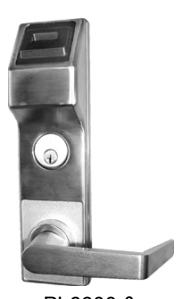
PL6600 & ETPLNRX
The PL6600 and ETPLNRX security locks are designed to allow all features to be programmed through its radio link from a DL-Windows-equipped computer. In addition, Audit Log Data may be transmitted through the radio link back to the DL-Windows computer.
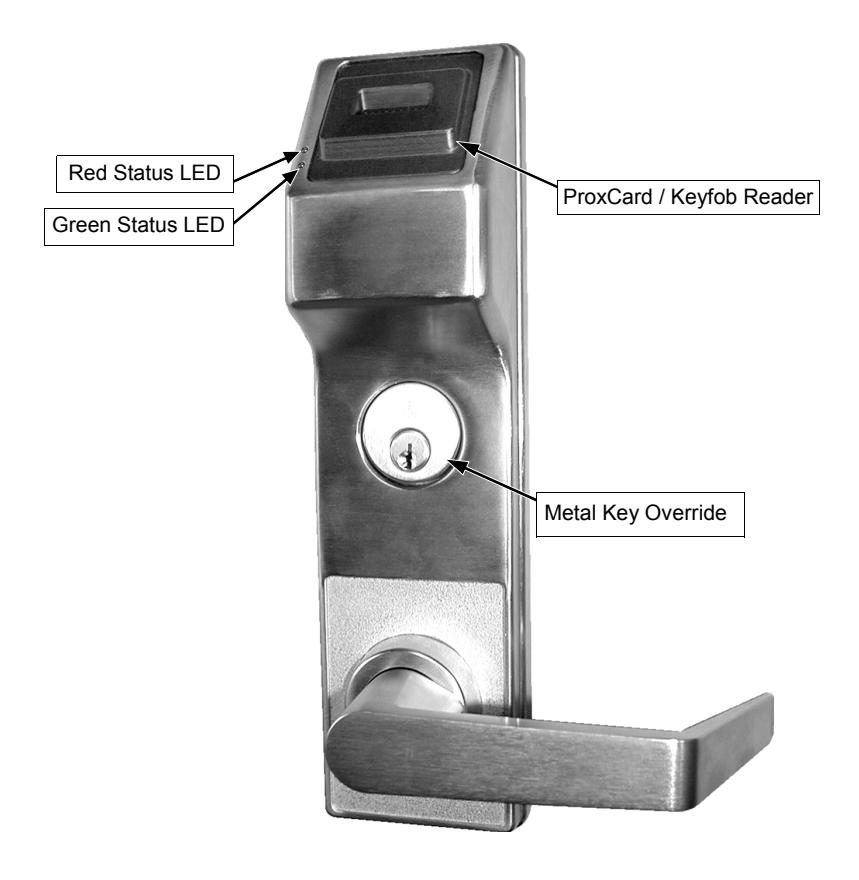
To increase security, PL Series locks do not include keypads; instead these models feature an HID compatible ProxCard® reader.
In addition, data can be retrieved from the lock to your PC with DL-Windows software. Its realtime clock/calendar automatically adjusts for Daylight Saving Time and allows for automated programming of events.
The PL6600 and ETPLNRX security locks include two white "Remote Input" wires located inside the rear housing. These two white wires can be programmed as either a " Remote Release " or for " Door Monitoring ":
- For " Remote Release ", a momentary short of these two white wires force the PL6600 / ETPLNRX to unlock.
- For " Door Monitoring " these two white wires are connected to a magnetic Door Contact to allow the state of the door (open or closed) to be monitored. Monitoring the door can, in turn, allow other features to be programmed, including the lock sounder to be triggered upon a "Door Ajar" event, door "kick-in" detection, and activation of the internal relay upon these events.
Note: ProxCard® and ProxKey® are trademarks of the HID© Corporation.
Table of Contents
| Wireless PL Series Lock Features3 | |
| Supported Products4 | |
| Lock Design Overview5 | |
| Terminology Used in this Manual | 6-7 |
| Wiring8 | |
| First Time Power Up8 | |
| Battery Replacement8 | |
| Erase All Programming9 | |
| Power UpRetain Existing Programming9 | |
| Testing the Cards Entered9 | |
| LED and Sounder Indicators9 | |
| DL-Windows Programmable Features Screen | 10-12 |
| User Card Record Sheet13 | |
| Glossary14 | |
| Limited Warranty16 |
Wireless PL Series Lock Features
Audit Trail
- 40,000 Event Capacity
- Entries Logged with Time and Date
- Critical Programming Events Logged
- Uploadable using Alarm Lock's DL-Windows software
Lock Features
- Metal Key Override for all cylindrical locks
- Non-Volatile (Fixed) Memory
- Real-Time Clock, with automatic Daylight Saving Time adjust (see page 10)
- Programmable Relay (via DL-Windows only) (see pages 8 and 11)
- Visual and Audible Feedback (see page 9)
- Battery Status Monitor (see pages 8 and 9)
- Lock can respond to Emergency Commands, allowing for Emergency Lockdown or Emergency Passage via DL-Windows (see OI352)
- Door Status Monitoring (see page 10)
- Forced Door Detection (see page 10)
- Relay Activation upon a Door Ajar and/or upon a Forced Door (see page 11)
Scheduling (Using DL-Windows)
- 500 Scheduled Events (see page 11)
- Automated Unlock/Lock (see pages 10 and 11)
- Enable/Disable Users (see page 6 for definition of "User")
- Enable/Disable Groups (see page 7 for definition of "Group")
- Real-time clock and calendar
User Access Methods
• ProxCard® and ProxKey® Keyfob
Note: ProxCards® and ProxKey® Keyfobs function identically
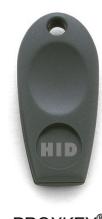
PROXKEY® KEYFOB
PROXCARD®
User Features
- 5000 Users
- Service Card ("One-Time-Only" access; see page 7 for definition)
- Guard Tour code (see page 7 for "Guard Tour" definition)
- Users Assignable to 4 Groups (see page 7 for definition of "Group")
- Guard Tour Card (see page 7)
Computer Programming
• Full programming allowed from a PC using Alarm Lock's DL-Windows Software. For a description of all features, see the DL-Windows User's Guide, OI237 or the Wireless Network Setup & DL-Windows Configuration Instructions, OI352.


Supported Products
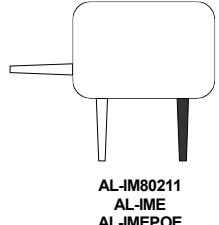
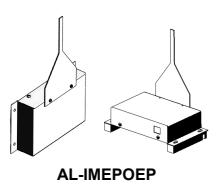
AL-IM SERIES WI-FI Gateway Module
The PL6600 and ETPLNRX each contains a radio that transmits and receives data--via a private wireless signal--to an intermediate device called a Gateway module. In turn, this Interface Module is connected (either wirelessly or wired) to a computer network such as a LAN or corporate Intranet. A Windows PC connected to this network can control and program all PL6600 / ETPLNRX locks by the use of the DL-Window software (see OI237 and OI352). With access rights to the software, one computer--or several- can control the software and consequently can control the devices in the system. Several Gateway device models are available:
- "Wireless/Wired" AL-IM80211 Hardwired/Wireless Gateway Interface Module. Supplied with its own class 2 transformer to supply power and supports connection to a network either using 802.11 or a standard Ethernet cable. This "Wireless/Wired" Gateway module has two antennas, one for the proprietary radio connection to the PL6600 / ETPLNRX and the other for 802.11 network transmissions. Ensure adequate 802.11 coverage in the area where the "Wireless/Wired" Gateway is mounted. Supports up to 63 Networx Locks. Ceiling- or wall-mountable.
- "Wired" AL-IME Hardwired Gateway Interface Module, supports up to 63 Networx Locks, connects directly to a network using a standard RJ-45 Ethernet cable. This model has one antenna used to transmit to the PL6600 / ETPLNRX via an Alarm Lock proprietary radio connection.. Ceiling- or wallmountable. Powered with Class 2, 6VAC transformer (supplied).
- "Power over Ethernet" AL-IMEPOE Hardwired Gateway Interface Module + POE (Power Over Ethernet), supports up to 63 Networx Locks, connects directly to a network using a standard RJ-45 Ethernet cable and POE. This model has one antenna used to transmit to the PL6600 / ETPLNRX via an Alarm Lock proprietary radio connection. Ceiling- or wall-mountable.
- Gateway "Plenum Rated POE" AL-IMEPOEP Same as above " AL-IMEPOE ", with added enclosure protections and installation hardware for mounting above "drop-ceiling" tiles or other locations subject to air pressure changes (HVAC air-filled spaces, etc.).
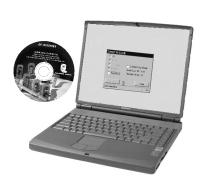
DL-Windows Software Application
Alarm Lock Trilogy Microsoft Windows-based software application, v5.0.0 or higher, supports Trilogy Networx and Trilogy Standalone Locks, with single database. Free of charge and downloadable online at www.alarmlock.com. DL-Windows software is the basis for the wireless lock programming interface. For those unfamiliar with using DL-Windows software, stop here and review the DL-Windows User Guide (OI237) and the Wireless Network Setup & DL-Windows Configuration Instructions, (OI352).
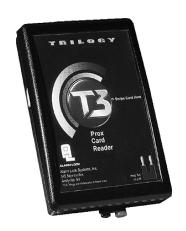
Proximity Card Reader/Enroller (AL-PRE)
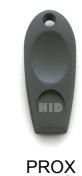
An AL-PRE is used to quickly enroll multiple ProxCards ® and ProxKey ® keyfobs into DL-Windows. Use the supplied 9-pin DB9 to DB9 serial cable to connect the AL-PRE to your computer's serial COM port. Compatible with most HID ProxCards ® and ProxKey ® keyfobs (37 bits or less). For PDL and PL series locks only.
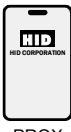
PROX-CARD®
KEY®
ProxCard® / ProxKey® Keyfob
Compatible with most HID ProxCards ® and ProxKey ® keyfobs (37 bits or less).
Note: ProxCard® and ProxKey® are trademarks of the HID© Corporation.
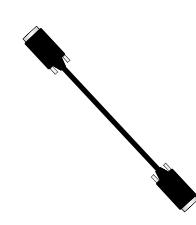
DB9 to DB9 Serial Cable
Enroll ProxCards into the AL-PRE, then transfer this ProxCard® data from the AL-PRE to the computer via this 9-pin DB9 to DB9 serial cable.
Lock Design Overview
Why Use Proximity Cards and Fobs?
With ordinary door locks, the need to make physical copies of metal keys and distributing them can be a huge organizational and financial task -- and what will you do if someone causes a security breach by losing their key?
The answer lies in the advantage of "firmware". Firmware exists inside your Alarm Lock™ series lock, and can be changed ("programmed") to suit your changing requirements. No more metal keys to distribute...instead, distribute a proximity card or fob (for example ProxCards ® or ProxKey ® keyfobs). Lost cards or fobs can quickly and easily be deleted from the lock firmware. (Proximity cards and fobs are the firmware equivalent of metal keys; just present a valid card to the reader to unlock the PL6600 / ETPLNRX). Furthermore, proximity cards and fobs differ from metal keys in that they are not duplicates ---each card is "unique" to the lock, and therefore can easily be deleted from the lock firmware without needing to be "in hand". One additional advantage is that proximity cards and fobs cannot be duplicated, unlike ordinary metal keys.
Preparing to Program your Lock
As the PL6600 / ETPLNRX does not feature keypad buttons on its housing, programming your PL6600 / ETPLNRX (for example adding or deleting proximity cards) is allowed only using a PC that is running the computer software application DL-Windows. The PC must be connected to a computer network to allow the Gateway module to wirelessly communicate with the lock's internal radio (see the Wireless Network Setup & DL-Windows Configuration Instructions, OI352 for more information about Gateway modules). DL-Windows can always be used as a back-up, restoring the information to your PL6600 / ETPLNRX lock should the future need arise.
Once you unpack your PL6600 / ETPLNRX from the box, there is a specific procedure that must be followed for proper operation (detailed in " First Time Power Up " on page 8). Turn the page and learn about the special terminology used with your lock. Once that is clear, use the " First Time Power Up " procedure on page 8 to help you get up and running.
Terminology Used in this Manual
Before reading this section, you may wish to first read the " Lock Design Overview " on page 5 for the basics. For a description of all features, see the DL-Windows User's Guide, OI237 or the Wireless Network Setup & DL-Windows Configuration Instructions, OI352.
What is a Lock Program ?
A Lock Program (called a "Lock Profile" in DL-Windows) contains the instructions that a lock uses to perform its various functions. Use DL-Windows (defined below) to create a Lock Program on your computer, and then transfer and store the Lock Program in the circuitry (firmware) contained inside the lock itself. The Lock Program is essentially a computer database file that maintains feature settings, proximity card data, schedules, audit trails, etc. Using DL-Windows, Lock Programs can be created with default information, edited on your PC, and then sent to (or received from) locks.
The Lock Program consists of 4 areas: Prox Card Entries , Features , Time Zones , and Schedules , all defined below:
What are Prox Card Entries ?
Because this lock does not have a keypad, proximity cards and/or fobs can be added to the Lock Program to allow entry (to allow the PL6600 / ETPLNRX to unlock). The proximity card entries are a part of the Lock Program, and the Lock Program is stored in the lock circuitry (firmware) awaiting the Users to present their programmed proximity cards.
What are Features ?
Your lock is designed to support many options and functions. Using DL-Windows software (the Programmable Features window), you can select the features you wish to activate, such as if the lock will automatically adjust for Daylight Saving Time in the spring and autumn, or if the lock sounder should be disabled or enabled. Note: Features may only be added via DL-Windows
What are Schedules and TimeZones?
You can use DL-Windows to add simple "Schedules" to your lock. Schedules are events (recorded lock activities) that are assigned to occur automatically at specific times. For example, you can program the lock to allow certain Users access ONLY on Wednesdays.
DL-Windows multiplies your flexibility, allowing the creation of many different combinations of Scheduled events to suit the needs of your various installations. For example, you can program the lock to allow Group 1 Users
access ONLY during specific business hours (unlock at 9AM, lock at noon for lunch, unlock at 1PM, and lock again at 5PM--every weekday).
In addition, DL-Windows makes Schedule creation much easier. In DL-Windows, use the " Schedule - TimeZone " screen to first create an individual block of time called a "TimeZone" (for example, "9AM to noon weekdays"). A TimeZone is then linked to an event to make a Schedule (for example, "unlock between 9AM and noon weekdays"). To make Scheduling easier, DL-Windows allows TimeZones to be created, named and saved for the future, to be easily assigned to different events and added to multiple locks as needed. For more details, see the DL-Windows User's Guide, OI237 or the Wireless Network Setup & DL-Windows Configuration Instructions, OI352.
What is a User ?
A User is a person who is authorized to operate or make certain programming changes to the lock. This User can be anyone--from a one-time visitor in possession of a temporary proximity card (who will almost certainly have no authority to make changes) to the owner of the building in which the lock is installed (who will almost certainly wish to have authority to make programming changes). The PL Series locks can hold up to 5000 "basic" Users in its programming memory, that means you can have up to 5000 Users each in possession of a proximity card or fob.
What is a Programming Level ?
With other Trilogy locks that possess keypads (such as the PDL3000, ETPDL, etc.), the Programming Level defines the range of programming tasks a User is allowed to perform using the keypad. However, the PL6600/ ETPLNRX lock does not include a keypad, and changes to the PL6600 / ETPLNRX Lock Program are initiated only with DL-Windows. Therefore, access to the DL-Windows computer program, with a valid password, is the sole means for determining who can make changes to the Lock Program. The DL-Windows program and its access passwords must be safeguarded, as it is essential to the security of the lock.
What is a User Number ?
( User Number = Location Number = User Location = "Slot" in Lock )
User Numbers are used primarily with DL-Windows, and are significant within each individual lock only. PL Series locks can hold up to 5000 proximity cards in its programming memory, and these cards can be thought of as sim-
Terminology Used in this Manual (cont'd)
ply a numbered list from 1 through 5000. Each entry in the list is represented by a User Number, and proximity card data is assigned to ("programmed into") each "location" or "slot" in this list. When a proximity card is assigned to a location, the card information is stored within the Lock Program (firmware). Because Users are physically given proximity cards, it is convenient to think of each "location" as a "User", although technically the User Number is only a location within the Lock Program. In other words, it is easier to say "User 519" rather than " The User in possession of the proximity card that is assigned to the User Location number 519 ".
Note: Where a User is located in this list--their User Location --is a commonly used description of their User Number. Because of their similarities, a User Number , User Location and Location Number can be used interchangeably. In some DL-Windows screens, the word "Slot" is also used. All of these terms are meant to convey the same concept.
With other Trilogy locks that possess keypads, the User Number defines the Programming Level for that User. Because the PL6600 / ETPLNRX does not contain a keypad, all User Numbers are "Basic Users", meaning each User is in possession of a proximity card, and that card is either enabled (allowing entry) or disabled (denying entry).
What is a Group ?
With many lock applications, it is convenient for large numbers of similar Users to be grouped together. All of these Users might share some common attribute--for example, they may all work in the same department of a facility, or may all work the same office hours. Placing Users into Groups (by assigning them to a specific range of User Numbers) allows large numbers of Users to be controlled all at once rather than individually--saving time and effort. A typical example involves enabling or disabling a Group at a certain time (assigning them to a Schedule; for example, to allow Group "1" Users access ONLY on Wednesdays).
Who are Users 297-300 ?
Proximity cards assigned to User Numbers 297, 298, 299 and 300 have special abilities, as follows:
User 297: Quick Enable User 300
The proximity card assigned to User Number 297 possesses the unique ability to enable the proximity card assigned to User Number 300. When proximity card 297 is presented to the lock, proximity card 300 is enabled for one time use, allowing passage for one time
only. Once used, User 300's proximity card becomes disabled.
For example, you wish to allow one-time access to a temporary worker. Simply present proximity card 297 to the lock and give proximity card 300 to the temporary worker. Later, when the temporary worker presents proximity card 300 to the lock, the PL6600/ ETPLNRX unlocks and allows access for one time only. If later the temporary worker re-presents his proximity card 300 to the lock, access will be denied. Later, if you wish to grant the temporary worker access again, simply re-present proximity card 297 to the lock and proximity card 300 will be re-enabled (again for one time only).
User 298 and User 299: Guard Tour
A Guard Tour card is used to log the movement of a security guard as he or she makes rounds from one assigned guard tour station to the next. Presenting the User 299 proximity card provides precise verification and accountability of a guard's movement by logging the location with a time and date stamp in the Event Log ("Audit Trail").
Note: Proximity cards assigned to User 298 and User 299 are not access cards (meaning these proximity cards do NOT allow the security guard to pass through the door).
User 300: One-Time-Only Service Card
This is the One-Time Only Service User Card enabled by the proximity card assigned to User 297. See User 297: Quick Enable User 300 above.
What is DL-Windows ?
DL-Windows is a Microsoft Windows-based computer software program that allows you to program your PL6600 / ETPLNRX security lock. You MUST use DL-Windows to program your lock. With DL-Windows, you can quickly create Lock Programs (called "Lock Profiles" in DL-Windows) that allow you to add multiple Prox-Cards® and ProxKey® keyfobs, retrieve event logs, create Schedules and program many other features.
The benefit of DL-Windows is that it allows you to set up all lock programming in advance (on your computer), and then later send the information to the locks at your convenience. For more information about DL-Windows, see OI237 and OI352.
Wiring
See the installation instructions for additional information.
Batteries:
Use only four 1.5 volt Alkaline size-C batteries or an Alarm Lock pre-wired sealed battery pack.
External Power:
Red / Black wires - External 7.5 VDC Power Source must be used for operation without batteries.
Remote Input:
White / White wires - These two white "Remote Input" wires can be programmed as a "Remote Release" or for "Door Monitoring" (programming is performed after lock is installed on the door): For "Remote Release", wire a normally open contact to wires (white and white) and momentarily close to allow PL6600 / ETPLNRX lock to unlock. When "Door Monitoring" is desired, connect these two white wires to the supplied Door Contact wires (when the door is closed the contacts are also "closed"). NOTE: These two white "Remote Input" wires are enabled from the factory .
Relay:
COM-Orange; N/O-Green; N/C-Yellow
First Time Power Up
When powered for the first time (or the "Erase All Programming" procedure performed) but before it is programmed by the wireless network Gateway, the PL6600 / ETPLNRX will remain unlocked, and will not lock until the first valid proximity card is presented to the lock.
- 1. Unpack the lock from its factory packaging.
- 2. For models with a replaceable battery pack, install fresh batteries with attention to the correct polarity as indicated inside the plastic battery pack housing. Do not connect the batteries yet.
- 3. With battery power disconnected, short the two white wires ( Remote Input wires) together for 10 seconds to ensure discharge of all capacitors. After 10 seconds, remove the short.
- 4. Connect the battery pack. The lock will immediately sound 3 short beeps (if these 3 beeps are not heard, then begin this procedure again at step 3). Within 3 seconds, press and hold down the outside door handle until the lock sounds more slow beeps (1 beep for every second it takes to clear the memory). The outside door handle may be released when these beeps are first heard.
- 5. After 2 rapid beeps are heard and 2 green LED flashes are seen, the lock is ready for programming.
Battery Replacement
When a valid proximity card is presented to the lock and the batteries are weak, the lock will beep for the duration of the "Pass Time" programmed ("Pass Time" is the duration the lock remains unlocked after access is granted). For models with a replacable battery pack, use four (4) C-size 1.5 volt alkaline batteries. For models with a sealed battery pack, contact your Alarm Lock dealer for a replacement battery pack. Always replace weak batteries as soon as possible.
- 1. At the back of the lock, remove the lock housing screw and remove the cover.
- 2. Pull out the battery pack and quickly replace all 4 batteries within 1 minute. For models with the sealed battery pack, simply unplug the old battery pack and plug in the new battery pack.
- 3. If you do not hear the 3 beeps when power is re-applied, all programming and settings have been retained, and the lock is ready for use. Go to step 5.
- 4. If you do hear 3 beeps when power is re-applied, wait 15 seconds for the LED to flash red 7 times and 7 beeps will sound. Re-set the clock using DL-Windows.
- 5. Replace the back cover and tighten the screw.
Erase All Programming
Restore the "out of box" factory condition.
- 1. At the back of the lock, remove the screw at the bottom of the lock housing and remove the cover.
- 2. Disconnect the battery pack connector.
- 3. With battery power disconnected, short the two white wires ( Remote Input wires) together for 10 seconds to ensure discharge of all capacitors. After 10 seconds, remove the short.
- 4. Re-connect the battery pack. The lock will immediately sound 3 short beeps (if these 3 beeps are not heard, then restart at step 3). Within 3 seconds, hold down the outside handle.
- 5. The lock will then sound more slow beeps, 1 beep for every second it takes to clear the memory. Release the handle.
- 6. Lock is ready for programming after 2 rapid beeps are heard and 2 green LED flashes are seen.
Power Up--Retain Existing Programming
Use when re-applying power to a lock already in use (you wish to retain the Lock Program), such as when moving an existing lock to a new door. The lock must be dismantled and powered down for an extended period.
- 1. Disconnect battery pack connector.
- 2. With battery power disconnected, short the two white wires ( Remote Input wires) together for 10 seconds to ensure discharge of all capacitors.
- 3. Without touching or turning the handle , re-connect the battery pack (lock will sound 3 short beeps). If these 3 beeps are not heard, then restart at step 1. The lock will perform several self tests; when complete, 7 beeps and LED flashes will sound. The lock is now ready for use.
Testing the Cards Entered
Verifying Proximity Card and Keyfob Access
Test by simply presenting a valid proximity card or fob to the reader in front of the lock.
VALID CARD - Green LED flashes, the sounder beeps several times and the PL6600/ETPLNRX unlocks.
INVALID CARD - Red LED flashes several times and the sounder beeps several times.
LED and Sounder Indicators
With a fully charged battery, the LED and sounder provide visual and audible feedback as follows:
| ACTIVITY | LED | SOUNDER | COMMENTS | |
|---|---|---|---|---|
|
Access Granted or
Remote Release |
2 green flashes | 2 Beeps | ||
| Invalid Card / Fob | 7 red flashes | 7 Beeps | An invalid proximity card / fob does not exist in the Lock Program memory. | |
|
Valid but Disabled
Card / Fob |
1 green, 4 red flashes | 1 Long, 5 Short Beeps | A proximity card / fob exists in the firmware, but is disabled. | |
| Emergency Commands are in effect | 1 red flash every two seconds | |||
| Door Ajar | 1 red flash once every second (continues for xx seconds) | |||
| Forced Door Detection (door "kick-in") | Steady tone for xx seconds | |||
| Low Battery | Red LED and Sounder turn on steady for the duration of the "Pass Time". | See page 8 ("Battery Replacement) before changing batteries. ("Pass Time" is the duration the lock remains unlocked after access is granted). | ||
DL-Windows Programmable Functions "Features" Screen - Options tab
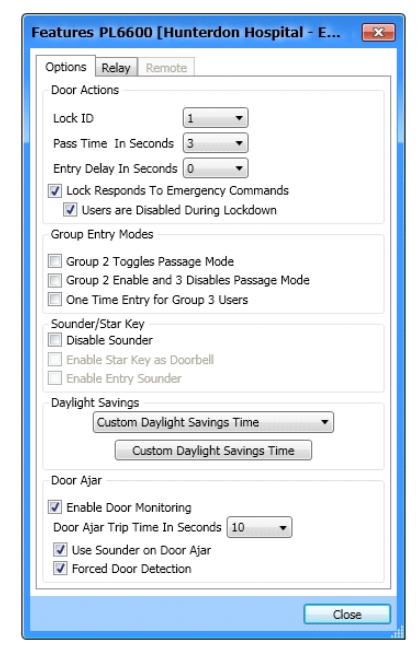
You can program the PL6600 / ETPLNRX to perform certain functions when various events occur.
For a description of all features, see the DL-Windows User's Guide, OI237 or the Wireless Network Setup & DL-Windows Configuration Instructions, OI352; the most common are listed below.
One Time Entry for Group 3 Users
a security breach!
If checked, allows Group 3 Users to unlock the PL6600/ ETPLNRX one time only, then their proximity card is disabled.
quences of accidentally selecting this option can cause
Disable Sounder
Disable the Sounder to allow for silent operation.
Daylight Savings
The lock will adjust for Daylight Saving Time. See the DL-Windows User's Guide, OI237 for details.
Enable Door Monitoring
If this feature is checked and the Door Contacts remain open past the time set in Door Ajar Trip Time In Seconds , a "Door Ajar" event will be logged. Note: The Aux Relay can also be programmed for a Door Ajar event (see next page " Features " screen, Relay tab, " Activate Relay on Door Ajar "). See "Door Ajar" in glossary. This feature is disabled by default.
Door Ajar Trip Time In Seconds
Program the number of seconds the Door Contacts may remain open without logging a "Door Ajar" event. Default time is 20 seconds; allowed values are between 2 and 250 seconds. Check the feature Enable Door Monitoring to allow the time to be set.
Use Sounder on Door Ajar
If this feature is checked, the lock sounder will sound when the " Door Ajar Trip Time In Seconds " time expires. Feature " Enable Door Monitoring " must be checked for Sounder to operate. This feature is disabled by default.
Forced Door Detection
If this feature is checked and a "forced entry" is detected, i.e the Door Contacts detect the door was opened without a prior valid credential to unlock the unit, or the door was opened without the inside lever first being turned (to activate the Lever Monitor Switch), a "Forced Entry Event" will be logged, the alert Sounder will turn on for 3 seconds, and the red LED will light. Note: The Aux Relay can also be programmed for a "forced entry" event (see next page " Features " screen, Relay tab, " Activate Relay on Forced Door "). See "Forced Entry" in glossary. This feature is disabled by default.
Lock ID
Door Number must be between 1– 2000. If the lock is a new lock without a designated LockID, the ID number specified in this field will be assigned to the programmed lock.
Pass Time In Seconds
The duration in seconds that the PL6600 / ETPLNRX will remain unlocked after a valid proximity card has been presented (valid entries are 3, 10 & 15 seconds).
Entry Delay in Seconds
Delays door entry after valid proximity card has been presented.
Lock Responds to Emergency Commands
See the Wireless Network Setup & DL-Windows Configuration Instructions, OI352.
Users are disabled during Lockdown
See the Wireless Network Setup & DL-Windows Configuration Instructions, OI352.
Group 2 Toggles Passage Mode
A Group 2 User will toggle passage mode (lock is unlocked). Caution! The consequences of accidentally selecting this option can cause a security breach!
Group 2 Enables and 3 Disables Passage Mode
A Group 2 User will put the PL6600 / ETPLNRX into passage mode (lock is unlocked). A Group 3 User will take the PL6600 / ETPLNRX out of passage. Caution! The conse-
DL-Windows Programmable Functions "Features" Screen - Relay tab
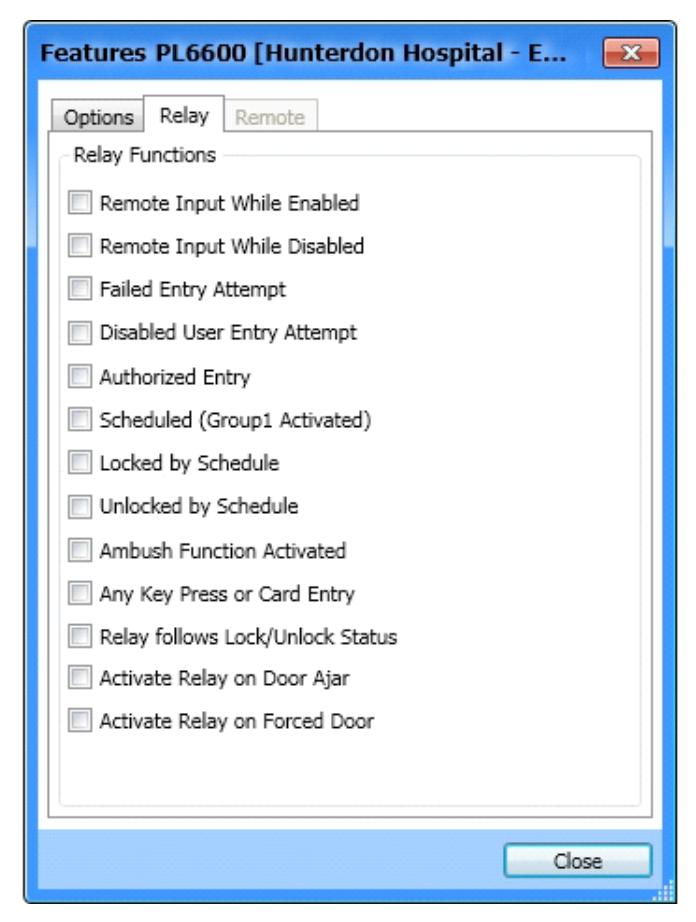
Select any of the relay functions below to activate the integral relay output (more than one may be selected).
Remote Input While Enabled
Activates relay when the Remote Input (two white wires inside the rear housing) are momentarily shorted. Provides an alert that access has been granted via the Remote Input.
Remote Input While Disabled
Activates relay when the Remote Input wires (two white wires inside the rear housing) are momentarily shorted when the Remote Input is disabled. Provides an alert that an unsuccessful access has been attempted via the Remote Input.
Failed Entry Attempt
Activates relay if any unsuccessful proximity card entry attempt occurs. Provides an alert that an unauthorized proximity card entry attempt has been detected.
Disabled User Entry Attempt
Activates relay if a User presents their proximity card
while that proximity card is disabled. Provides an alert that a disabled proximity card entry attempt has been detected.
Authorized Entry
Activates relay anytime a User presents a valid proximity card and is granted access.
Scheduled (Group 1 Activated)
Activates relay if the PL6600 / ETPLNRX has been programmed for "Scheduled Relay Activation (Group 1 Initiated)" and a member of Group 1 has presented their proximity card within the required window.
Locked by Schedule
Activates relay if the PL6600 / ETPLNRX has been locked by a programmed schedule.
Unlocked by Schedule
Activates relay if the PL6600 / ETPLNRX has been unlocked by a programmed schedule.
Any Key Press or Card Entry
Activates relay any time a proximity card is presented.
Relay follows Lock/Unlock Status
Activates relay when the PL6600 / ETPLNRX is unlocked. Relay power must be provided from an external power supply. If this option is selected, the relay remains activated as long as the PL6600 / ETPLNRX is unlocked. This feature supersedes all other relay options except Activate Relay on Door Ajar and Activate Relay on Forced Door .
Activate Relay on Door Ajar
If the door is held open (Door Contacts also open) for longer then the allowed Door Ajar Trip Time In Seconds (programmed in the Options tab detailed on previous page) the Aux Relay will engage for 2 seconds. See "Door Ajar" in glossary.
Activate Relay on Forced Door
If the Door Contacts detect the door was opened without a prior valid credential to unlock the unit, or the door was opened without the inside lever first being turned (to activate the Lever Monitor Switch), the Aux Relay will engage for 2 seconds. See "Forced Entry" in glossary.
DL-Windows Programmable Functions "Features" Screen - Remote tab
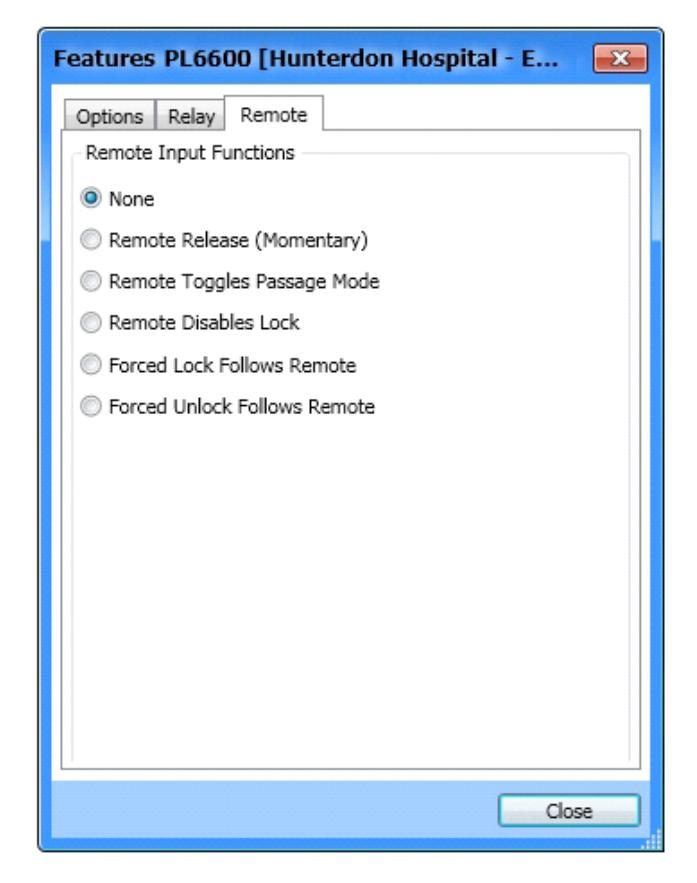
The "Remote Input" wires are two white wires located inside the rear housing. These two white wires can be programmed as either a " Remote Release " or for " Door Monitoring ":
- For " Remote Release ", wire a normally open contact to wires (white and white) and momentarily close to allow PL6600 / ETPLNRX lock to unlock.
- When " Door Monitoring " is desired, connect these two white wires to the supplied Door Contact wires (when the door is closed the contacts are also "closed").
These Remote Input wires are enabled at the factory and are ready for use. Note: "Door Monitoring" cannot be enabled in conjunction with these Remote Input functions.
Program Remote Input Functions as follows:
Remote Release (Momentary)
Check to enable the Remote Input feature in the selected PL6600 / ETPLNRX lock. Will cause the PL6600 / ETPLNRX to unlock when the two white Remote Input wires are momentarily shorted.
Remote Toggles Passage Mode
When enabled, momentarily shorting the two white Remote Input wires will toggle Passage Mode ("Passage Mode" allows passage through the door without the need for a valid proximity card to be presented).
Remote Disables Lock
Regardless of the current state of the lock, that state will remain unchanged (and the lock will be disabled) while the Remote Input wires are shorted.
Important: The Remote Input wires may remain shorted indefinitely; therefore if this feature is enabled, power to the lock MUST be provided from an external power supply, or battery life will be drastically reduced.
Forced Lock Follows Remote
Regardless of the current state of the lock, the PL6600 / ETPLNRX will lock while the Remote Input wires are shorted.
Important: The Remote Input wires may remain shorted indefinitely; therefore if this feature is enabled, power to the lock MUST be provided from an external power supply, or battery life will be drastically reduced.
Forced Unlock Follows Remote
Regardless of the current state of the lock, the PL6600 / ETPLNRX will unlock while the Remote Input wires are shorted.
Important: The Remote Input wires may remain shorted indefinitely; therefore if this feature is enabled, power to the lock MUST be provided from an external power supply, or battery life will be drastically reduced.
User Card Record Sheet
| Page # |
|---|
|
NAME OF DOOR:
DEPARTMENT: |
||||||
|---|---|---|---|---|---|---|
|
EMBOSSED NUMBER ON CARD
USER NAME (LAST, FIRST) DATE ACTIVATED COMMENTS |
||||||
Glossary
ACCESS = Entry into a restricted area.
AUDIT TRAIL = A date/time stamped log of previous lock events.
BURGLARY CONTROL PANEL = Provides local alarm and remote communication to request security for burglary/ break-in.
CLOCK
- REAL TIME CLOCK = An accurate built-in clock that allows date/time stamping of events. The clock can be slowed or speeded up to fine tune long term accuracy to within three minutes per year. Programmed only through DL-Windows.
- CLOCK SETTINGS = Printout includes date, time, weekday, and clock speed.
- DATE = Month, Day and Year entered as MMDDYY. Programmed only through DL-Windows.
- DAY OF WEEK = Sunday through Saturday (where 1 = Sunday and 7 = Saturday). Programmed only through DL-Windows.
- DEFAULT = The original settings that were set at the factory; in other words, it is the lock's original factory condition when the lock was first taken out of its box. The default settings are permanently encoded within the lock's fixed memory, and when the lock is first started, or when power is removed and re-applied (see pages 8-9), the original factory default settings are re-loaded and take effect.
- DOOR AJAR = The controlled door was unlocked and was held open for a certain duration. If the duration is longer than the allowed Door Ajar Trip Time In Seconds (see Features screen, Options tab), first a log entry is recorded, then, if programmed, the Aux Relay engages for 2 seconds and/or the alert Sounder (enable " Use Sounder on Door Ajar ") is triggered. Note: The programmed Door Ajar Trip Time In Seconds begins after the programmed Pass Time ends (see " Pass Time ").
DISABLE = Turn off.
DOWNLOAD = Send data to lock.
ENABLE = Turn on.
EVENTS = Recorded lock activity.
FORCED ENTRY = The Door Contacts detect the door was opened without a prior valid credential to unlock the PL6600 / ETPLNRX, or the door was opened without the inside lever first being turned (to activate the Lever Monitor Switch).
GROUP
- USER GROUP = Defining a User to specific Groups, allows User entry when the Group is allowed entry. Programmed only through DL-Windows.
- GROUP 1 DISARMS BURGLAR CONTROL = A proximity card (previously assigned to Group 1) presented to the lock can disarm an alarm control panel during a predefined scheduled time (if the proximity card is used outside of the scheduled time, the alarm control panel will not disarm). The alarm control panel must be armed through other means, must be programmed to disarm from an armed state only, and the zone input must be programmed for input disarming. Programmed only through DL-Windows.
- GROUP 1 ENABLES GROUP 4 USERS = A proximity card (previously assigned to Group 1) presented to the lock during a predefined schedule allows access to Group 4 Users. Programmed only through DL-Windows.
- GROUP 1 PUTS UNIT IN PASSAGE = A proximity card (previously assigned to Group 1) presented to the lock during a pre-defined schedule unlocks the lock. Programmed only through DL-Windows.
- ONE TIME ONLY FOR GROUP 3 USERS = If selected in DL-Windows, allows Group 3 proximity cards to unlock the door one time only (thereafter their proximity card becomes disabled). See OI237.
- GUARD TOUR = Associated with User 298 and User 299. A Guard Tour card is used to log the movement of a security guard as he or she makes rounds from one assigned guard tour station to the next. Presenting the User 299 proximity card provides precise verification and accountability of a guard's movement by logging the location with a time and date stamp in the Event Log ("Audit Trail"). Note: Proximity cards assigned to User 298 and User 299 are not access cards (meaning these proximity cards do NOT allow the security guard to pass through the door).
- INTERNAL RELAY FUNCTIONS = The PL6600/ETPLNRX internal relay can be programmed (via DL-Windows only) for one or more functions. See page 10 for more information.
LOG = See... AUDIT TRAIL.
PASS TIME = The duration in seconds that the PL6600 / ETPLNRX will remain unlocked after a valid proximity card has been presented.
PASSAGE = Allow anyone to pass through the door without proximity cards or fob ("door is unlocked").
RELAY = Switched output allowing remote control of other devices.
- REMOTE INPUT = Allows entry into a restricted area by pressing a button connected to the two REMOTE INPUT wires (two internal white wires) by someone on the protected side of the door.
- SCHEDULE = A programmed operation (enable/disable, lock/unlock, etc.) on a specific day (Sunday through Saturday) and time. Programmed only through DL-Windows.
- SCHEDULES, QUICK = Any one of four most common types of schedules can be programmed. Programmed only through DL-Windows.
- TIME = Hours and Minutes in the HHMM format. Programmed only through DL-Windows.
- TIME / DATE STAMP = A recorded date and time that an event occurred.
- TIMEOUT = Allowing or restricting operation for a specified number of hours.
UPLOAD = Receive data from the lock.
USER = A person who has been provided with a proximity USER CARD for access through the door.
USER LOCKOUT, TOTAL = All Users to be locked out (denied access). Proximity User Cards will not unlock the PL6600 / ETPLNRX.
| NOTES |
|---|
ALARM LOCK LIMITED WARRANTY
ALARM LOCK SYSTEMS, INC. (ALARM LOCK) warrants its products to be free from manufacturing defects in materials and workmanship for 24 months following the date of manufacture. ALARM LOCK will, within said period, at its option, repair or replace any product failing to operate correctly without charge to the original purchaser or user.
This warranty shall not apply to any equipment, or any part thereof, which has been repaired by others, improperly installed, improperly used, abused, altered, damaged, subjected to acts of God, or on which any serial numbers have been altered, defaced or removed. Seller will not be responsible for any dismantling or reinstallation charges.
THERE ARE NO WARRANTIES, EXPRESS OR IMPLIED, WHICH EXTEND BEYOND THE DESCRIPTION ON THE FACE HEREOF. THERE IS NO EXPRESS OR IMPLIED WARRANTY OF MERCHANTABILITY OR A WAR-RANTY OF FITNESS FOR A PARTICULAR PURPOSE. ADDITIONALLY, THIS WARRANTY IS IN LIEU OF ALL OTHER OBLIGATIONS OR LIABILITIES ON THE PART OF ALARM LOCK.
Any action for breach of warranty, including but not limited to any implied warranty of merchantability, must be brought within the six months following the end of the warranty period. IN NO CASE SHALL ALARM LOCK BE LI-ABLE TO ANYONE FOR ANY CONSEQUENTIAL OR INCIDENTAL DAMAGES FOR BREACH OF THIS OR ANY OTHER WARRANTY, EXPRESS OR IMPLIED, EVEN IF THE LOSS OR DAMAGE IS CAUSED BY THE SELLER'S OWN NEGLIGENCE OR FAULT.
In case of defect, contact the security professional who installed and maintains your security system. In order to exercise the warranty, the product must be returned by the security professional, shipping costs prepaid and insured to ALARM LOCK. After repair or replacement, ALARM LOCK assumes the cost of returning products under warranty. ALARM LOCK shall have no obligation under this warranty, or otherwise, if the product has been repaired by others, improperly installed, improperly used, abused, altered, damaged, subjected to accident, nuisance, flood, fire or acts of God, or on which any serial numbers have been altered, defaced or removed. ALARM LOCK will not be responsible for any dismantling, reassembly or reinstallation charges.
This warranty contains the entire warranty. It is the sole warranty and any prior agreements or representations, whether oral or written, are either merged herein or are expressly canceled. ALARM LOCK neither assumes, nor authorizes any other person purporting to act on its behalf to modify, to change, or to assume for it, any other warranty or liability concerning its products.
In no event shall ALARM LOCK be liable for an amount in excess of ALARM LOCK's original selling price of the product, for any loss or damage, whether direct, indirect, incidental, consequential, or otherwise arising out of any failure of the product. Seller's warranty, as hereinabove set forth, shall not be enlarged, diminished or affected by and no obligation or liability shall arise or grow out of Seller's rendering of technical advice or service in connection with Buyer's order of the goods furnished hereunder.
ALARM LOCK RECOMMENDS THAT THE ENTIRE SYSTEM BE COMPLETELY TESTED WEEKLY.
Warning: Despite frequent testing, and due to, but not limited to, any or all of the following; criminal tampering, electrical or communications disruption, it is possible for the system to fail to perform as expected. ALARM LOCK does not represent that the product/system may not be compromised or circumvented; or that the product or system will prevent any personal injury or property loss by burglary, robbery, fire or otherwise; nor that the product or system will in all cases provide adequate warning or protection. A properly installed and maintained alarm may only reduce risk of burglary, robbery, fire or otherwise but it is not insurance or a guarantee that these events will not occur. CONSE-QUENTLY, SELLER SHALL HAVE NO LIABILITY FOR ANY PERSONAL INJURY, PROPERTY DAMAGE, OR OTHER LOSS BASED ON A CLAIM THE PRODUCT FAILED TO GIVE WARNING. Therefore, the installer should in turn advise the consumer to take any and all precautions for his or her safety including, but not limited to, fleeing the premises and allege police or fire department, in order to mitigate the possibilities of harm and/or damage.
ALARM LOCK is not an insurer of either the property or safety of the user's family or employees, and limits its liability for any loss or damage including incidental or consequential damages to ALARM LOCK's original selling price of the product regardless of the cause of such loss or damage.
Some states do not allow limitations on how long an implied warranty lasts or do not allow the exclusion or limitation of incidental or consequential damages, or differentiate in their treatment of limitations of liability for ordinary or gross negligence, so the above limitations or exclusions may not apply to you. This Warranty gives you specific legal rights and you may also have other rights which vary from state to state.