Alarm Lock DL-Windows Event Log Viewer Still Locked – No Override Event (Tech Tip)
Open the original PDF document
View PDF
ALARM LOCK
345 Bayview Avenue, Amityville, New York, U.S.A. 11701 For Sales and Repairs 1-800-ALA-LOCK • For Technical Service 1-800-645-9440
Fax: 631-789-3383 • info@alarmlock.com Note: Technical Service is for security professionals only
ALARM LOCK Tech Support


Date: Thursday, November 10, 2011
Subject: T3 Lock Event Log Viewer: "Still Locked – No Override" Event
Models: All T3 Locksets, DL and PDL Series
When viewing the Event Log Viewer (audit trail), you may see a " Still Locked – No Override " event (see example highlighted in the image below).
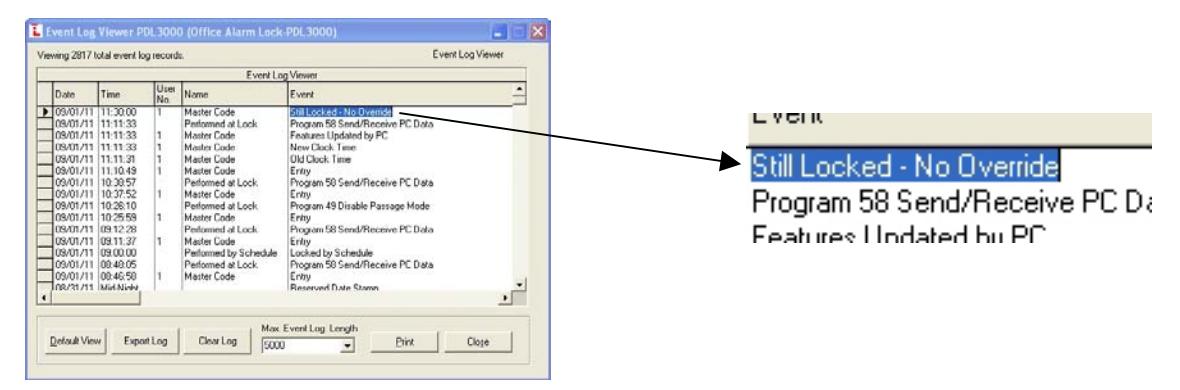
The above Log entry is the result of an unsuccessful attempt to enable the start-time or stop-time of a TimeZone (a programmed scheduled event). In this example, a previously scheduled TimeZone unsuccessfully attempted to override the subsequent programming of Function 49 "Disable Permanent Passage Mode" (Function 49 does NOT permit a schedule to override). Therefore, a manually entered Function 49 permanently forced a locked state, rendering the unlock attempt by the scheduled TimeZone ineffective (thus a " Still Locked – No Override " entry).
Some keypad Functions are "temporary", allowing TimeZones to override them, and other Functions are "permanent", ignoring TimeZones. For example, Passage Mode can be enabled and disabled with Functions 45 and 46 "temporarily" --or-- with Functions 48 and 49 "permanently". Furthermore, in the case of Functions 48 and 49, Passage Mode remains permanently enabled or disabled unless undone either by programming Function 50 ("Return Lock to Normal Passage Mode Schedule") or by programming the temporary Functions 45 or 46.
If programmed schedules are not working as intended, and a " Still Locked – No Override " event appears in the Event Log, entering a "temporary" Function--such as Passage Mode Function 45 or 46--will return the schedule to its normal operation.