Alarm Lock AL-PRE2 Proximity Credential Reader Enroller User’s Guide
Open the original PDF document
View PDF
345 Bayview Avenue, Amityville, New York 11701 For Sales and Repairs 1-800-ALA-LOCK For Technical Service 1-800-645-9440 or visit us at http://tech.napcosecurity.com/ (Note: Technical Service is for security professionals only) Publicly traded on NASDAQ Symbol: NSSC
© ALARM LOCK 2016
Proximity Credential Reader Enroller AL-PRE2 USER'S GUIDE
OI393 11/16
Overview
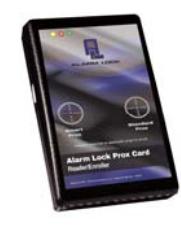
The AL-PRE2 connects to a PC running DL-Windows. Proximity credentials are enrolled by simply being presented to its applicable target area (" Smart Prox " or " Standard Prox ") on the face of the unit.
The AL-PRE2 requires DL-Windows V5.4.2 or higher. Refer to DL-Windows Version 5 User's Guide (OI382) for more information.
Specifications
Input Power: ..................... Supplied by the PC or laptop
using the USB A to B cable
(supplied)
Operating Temperature ... -10 - 60ºC (14 - 140ºF)
Dimensions (H x W x D) ...... 5.5" x 3.5" x 1.25" (14 x 8.9 x 3.2cm)
Getting Started
Driver Installation
Upon connecting the AL-PRE2 to your PC using the supplied USB A to B cable, in most cases the driver will be automatically located and installed if your PC is connected to the Internet. If your PC is not connected to the Internet or if Plug and Play is disabled, proceed as follows.
- 1. Insert the " AL-PRE2 Drivers " CD into the CD drive of your PC.
-
2. The CD should AutoRun; if not, explore the files on the CD. Open the folder named "
CP210x_Windows
".
- For 32-bit operating systems, run the file " CP210xVCPInstaller_x86.exe " by doubleclicking it.
- For 64-bit operating systems, run the file " CP210xVCPInstaller_x64.exe ".
- 3. In the window that appears, click Next , click the radio button to accept the License Agreement and click Next again. The appropriate drivers for your operating system will install.
- 4. When the message indicates that the drivers are successfully installed on your PC, click Finish to exit (remove the CD from the drive).
Alternatively, the AL-PRE2 drivers can be installed directly from a DL-Windows 5 CD (V5.4.2 or higher) by manually exploring the DL-Windows 5.2 installation CD. Use Windows Explorer to open the USB Driver folder, select
either the 32-bit or 64-bit folder, then run the Setup.exe file to install the correct driver for your PC or laptop.
COM Port Setup (Required)
After the drivers have been successfully installed but before enrolling proximity credentials, you must pass a "loopback test" (communication to and from the AL-PRE2 is verified through a valid USB COM port). The following Loopback Test assumes you have already completed the AL-PCI driver installation procedure.
- 1. Connect AL-PRE2 to your PC or laptop using your supplied USB A to B cable.
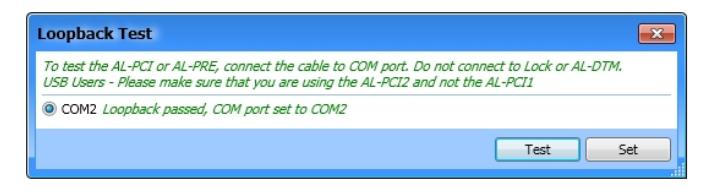
- 2. In the DL-Windows "Main Screen", click Tools > COM Port Setup and Test . The Loopback Test dialog opens listing all communication ports detected.
- 3. Click Test to initiate communication port Loopback Test. All detected communication ports will be tested.
- 4. Select the "COM port" that "passed" the Loopback test (see the image below). Click Set and the dialog box will close. Your AL-PRE2 will now be ready to enroll proximity credentials.
Adding Proximity Credentials
The following section refers to using the Global Users screen in DL-Windows. For more information about using the Global Users screen or information about some of the terminology below (such as "Facility Code") see OI382.
- 1. In the Global Users screen, click the desired User or the empty slot, and click the Add Cards button. The Card Enrolling dialog opens.
- 2. Select the proximity credential type from the Card Type pull-down menu: 125kHz or 13.56MHz or Unknown .
Note: The attributes of an unknown proximity card, although collected and used by the system, will NOT be displayed in the Card Data field of the Global Users screen (the Card Format Name will appear as " Unknown ").
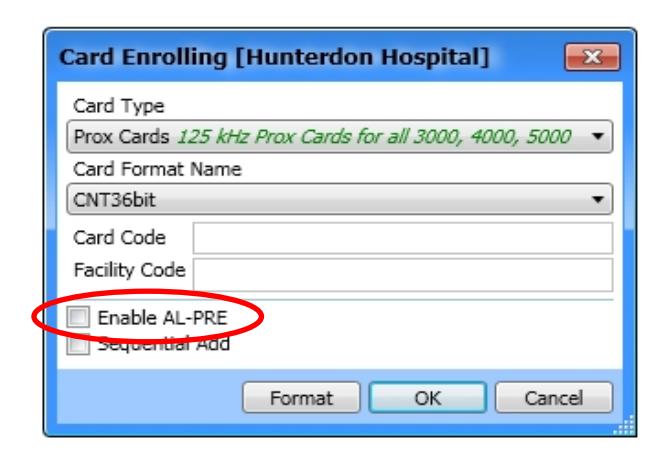
3. Select the proximity credential Card Format Name .
HELPFUL TIP: If the Card Format Name is unidentified, in theory you can select any Card Format Name and DL-Windows will display the detected Card Format Name . This can be very helpful when you possess a proximity credential but are unsure of its design.
- 4. In the Card Enrolling dialog (shown at left), check the Enable AL-PRE checkbox (the unit may beep when this occurs). Note: For " Unknown " card type, this checkbox will be checked (enabled) automatically.
- 5. Present the proximity credential to the desired AL-PRE2 target area ( Smart or Standard ). A "Valid Read" message will appear at the bottom of the DL-Windows "Main Screen". The Card Enrolling dialog closes and the Card Data fields in the Global Users screen will populate accordingly.
LED and Sounder Indicators
The AL-PRE2 provides visual and audible feedback. See the table below:
| ACTION | LED | SOUNDER | COMMENTS |
|---|---|---|---|
| Power Up Sequence | Red steady, blue (left / right) alternating | 3 beeps followed by 7 quick beeps | |
| Normal Operation / Standby | Red steady | LED on with power applied | |
| Valid "Smart" Read | Two blue flashes (left) | 2 beeps | ("Smart" = 13.56MHz Credentials) |
| Valid "Standard" Read | One blue flash (right) | 1 beep | ("Standard" = 125kHz Credentials) |
| Invalid Read | Blue (left / right) alternating | 7 beeps | Example: Partial data read |
ALARM LOCK LIMITED WARRANTY
ALARM LOCK SYSTEMS, INC. (ALARM LOCK) warrants its products to be free from manufacturing defects in materials and workmanship for twenty four months following the date of manufacture. ALARM LOCK will, within said period, at its option, repair or replace any product failing to operate correctly without charge to the original purchaser or user.
This warranty shall not apply to any equipment, or any part thereof, which has been repaired by others, improperly installed, improperly used, abused, altered, damaged, subjected to acts of God, or on which any serial numbers have been altered, defaced or removed. Seller will not be responsible for any dismantling or reinstallation charges, environmental wear and tear, normal maintenance expenses, or shipping and freight expenses required to return products to ALARM LOCK. Additionally, this warranty shall not cover scratches, abrasions or deterioration due to the use of paints, solvents or other chemicals.
THERE ARE NO WARRANTIES, EXPRESS OR IMPLIED, WHICH EXTEND BEYOND THE DESCRIPTION ON THE FACE HEREOF. THERE IS NO EXPRESS OR IMPLIED WARRANTY OF MERCHANTABILITY OR A WARRANTY OF FITNESS FOR A PARTICULAR PURPOSE. ADDITIONALLY, THIS WARRANTY IS IN LIEU OF ALL OTHER OBLIGATIONS OR LIABILITIES ON THE PART OF ALARM LOCK.
Any action for breach of warranty, including but not limited to any implied warranty of merchantability, must be brought within the six months following the end of the warranty period.
IN NO CASE SHALL ALARM LOCK BE LIABLE TO ANYONE FOR ANY CONSEQUENTIAL OR INCIDENTAL DAMAGES FOR BREACH OF THIS OR ANY OTHER WARRANTY, EXPRESS OR IMPLIED, EVEN IF THE LOSS OR DAMAGE IS CAUSED BY THE SELLER'S OWN NEGLI-GENCE OR FAULT.
In case of defect, contact the security professional who installed and maintains your security system. In order to exercise the warranty, the product must be returned by the security professional, shipping costs prepaid and insured to ALARM LOCK. After repair or replacement, ALARM LOCK assumes the cost of returning products under warranty. ALARM LOCK shall have no obligation under this warranty, or otherwise, if the product has been repaired by others, improperly installed, improperly used, abused, altered, damaged, subjected to accident, nuisance, flood, fire or acts of God, or on which any serial numbers have been altered, defaced or removed. ALARM LOCK will not be responsible for any dismantling, reassembly or reinstallation charges, environmental wear and tear, normal maintenance expenses, or shipping and freight expenses required to return products to ALARM LOCK. Additionally, this warranty shall not cover scratches, abrasions or deterioration due to the use of paints, solvents or other chemicals.
This warranty contains the entire warranty. It is the sole warranty and any prior agreements or representations, whether oral or written, are either merged herein or are expressly cancelled. ALARM LOCK neither assumes, nor authorizes any other person purporting to act on its behalf to modify, to change, or to assume for it, any other warranty or liability concerning its products.
In no event shall ALARM LOCK be liable for an amount in excess of ALARM LOCK's original selling price of the product, for any loss or damage, whether direct, indirect, incidental, consequential, or otherwise arising out of any failure of the product. Seller's warranty, as hereinabove set forth, shall not be enlarged, diminished or affected by and no obligation or liability shall arise or grow out of Seller's rendering of technical advice or service in connection with Buyer's order of the goods furnished hereunder.
ALARM LOCK RECOMMENDS THAT THE ENTIRE SYSTEM BE COMPLETELY TESTED WEEKLY.
Warning: Despite frequent testing, and due to, but not limited to, any or all of the following; criminal tampering, electrical or communications disruption, it is possible for the system to fail to perform as expected. ALARM LOCK does not represent that the product/system may not be compromised or circumvented; or that the product or system will prevent any personal injury or property loss by burglary, robbery, fire or otherwise; nor that the product or system will in all cases provide adequate warning or protection. A properly installed and maintained alarm may only reduce risk of burglary, robbery, fire or otherwise but it is not insurance or a guarantee that these events will not occur. CONSEQUENTLY, SELLER SHALL HAVE NO LIABILITY FOR ANY PERSONAL INJURY, PROPERTY DAMAGE, OR OTHER LOSS BASED ON A CLAIM THE PRODUCT FAILED TO GIVE WARNING. Therefore, the installer should in turn advise the consumer to take any and all precautions for his or her safety including, but not limited to, fleeing the premises and calling police or fire department, in order to mitigate the possibilities of harm and/or damage.
ALARM LOCK is not an insurer of either the property or safety of the user's family or employees, and limits its liability for any loss or damage including incidental or consequential damages to ALARM LOCK's original selling price of the product regardless of the cause of such loss or damage.
Some states do not allow limitations on how long an implied warranty lasts or do not allow the exclusion or limitation of incidental or consequential damages, or differentiate in their treatment of limitations of liability for ordinary or gross negligence, so the above limitations or exclusions may not apply to you. This Warranty gives you specific legal rights and you may also have other rights which vary from state to state.