Alarm Lock AL-IME2-EXP-POE Power Over Ethernet Expander Installation Instructions
Open the original PDF document
View PDF

345 Bayview Avenue, Amityville, New York 11701 For Sales and Repairs 1-800-ALA-LOCK For Technical Service 1-800-645-9440 or visit us at http://tech.napcosecurity.com/ (Note: Technical Service is for security professionals only) Publicly traded on NASDAQ Symbol: NSSC
AL-IME2-EXP-POE
"Power Over Ethernet" Expander Installation Instructions
© ALARM LOCK 2017 WI2268LF 10/17
OVERVIEW
The Trilogy Networx™ AL-IME2-EXP-POE "Power Over Ethernet" Expander extends the coverage area of version 2 series Gateways, allowing control of up to its rated maximum of 63 Networx locks per Gateway.
Installation is simple, with the AL-IME2-EXP-POE only requiring access to one RJ-45 Ethernet network cable. AL-IME2-EXP-POE Expanders are cost-effective, and feature a simplified 'Plug and Play' setup where the Networx system automatically identifies all newly powered Expanders and quickly determines the best wireless signal pathways. Up to 7 Expanders can be added to one version 2 series Gateway.
Why use AL-IME2-EXP-POE Expanders?
- Less costly, Expanders can be used in place of additional Gateways
- Extends wireless lock signal coverage
- Reach otherwise troublesome locks in areas of insufficient signal strength
- Allows for easier (flexible) positioning of version 2 Gateways
Note: Expanders are available in 3 different designs, all identical in operation: The AL-IME2-EXP Expander , the AL -IME2-EXP-POE "Power Over Ethernet" Expander and the compact AL-IME2-PIE Plug-In Expander (plugs directly into a standard 120VAC wall outlet).
Version 2
The AL-IME2-EXP-POE "version 2" Expanders (notice the " 2 " in the model name) are the next generation of Networx wireless devices. Because AL-IME2-EXP-POE Expanders only work with version 2 Gateways, a version 2 Gateway must be installed and operational in your system for AL-IME2-EXP-POE Expanders to function ( AL-IME2- EXP-POE Expanders cannot communicate with older "non-version 2" Gateways).
Note: Although the version 2 Gateways and AL-IME2- EXP-POE Expanders CAN be mixed into an existing system that includes older "non-version 2" Gateways, at least one new version 2 Gateway must be up and running before an AL-IME2-EXP-POE Expander can be used .
IMPORTANT: DL-Windows version 5.4.2 or later is required to support version 2 Gateways and Expanders.
The AL-IME2-EXP-POE Expander is compatible with Alarm Lock and Continental Access products. Refer to the documentation supplied with your software for integration details.
AL-IME2-EXP-POE SPECIFICATIONS NETWORK RANGE
Gateway/Expander to Locks: Clear field range 500'. Typical indoor range: Networx 75-175'; ArchiTech Networx: 50-125'. Note: Actual range varies with building construction.
Gateway/Expander to Expander: Clear field range 500'. Typical indoor range, 75- 175'. Note: Actual range varies with building construction.
AL RADIO LINK
900 MHz GFSK 50 Channels 10mW power output
POWER
POE Voltage: 48VDC Nominal Class 2
ENVIRONMENTAL
Operating Temperature: -20˚ to 60˚C (-4˚ to 140˚F) Storage Temperature: -40˚ to 85˚C (-40˚ to 185˚F)
PHYSICAL
Enclosure Size: 4.5"H x 6.0"W x 1.94"D
Weight: 0.5lbs.
EXPANDER LOCATION GUIDELINES
Once your version 2 Gateway location has been selected, the next step is to determine where to mount the Expander. However, the following must be taken into consideration:
- Generally, the Expanders should be within approximately 75 feet (radially) from the Gateway or another Expander
-
Expanders should be located within 100 feet (radially) from the intended wireless lock locations
- Open areas will increase range while concrete building construction, walls, ceilings and narrow corridors will decrease range
- ArchiTech series locks generally have shorter range to/ from an Expander
- Select a location that allows access to one RJ-45 Ethernet network cable
-
Expanders should be mounted in elevated areas; however mounting in a drop ceiling can adversely affect signal strength
- Preferred mounting position = 6 to 12" below ceiling
- Expanders must be mounted vertically; horizontal "flat" mounting of the Expander should be specifically avoided
- Although wood and wallboard construction can have little effect upon signal strength, concrete or brick can reduce signal strength by up to 35%. Steel-reinforced concrete or metal lath and plaster can reduce signal strength as much as 90%!
- Do NOT mount close to electrical wiring or other metal obstructions such as pipes or conduits
- Installing in computer closets or server rooms can negatively impact signal strength
Helpful Tips
The AL-NSM Networx Signal Meter and the AL-NSG Networx Signal Generator can assist with identifying opti-
mal Gateway locations relative to Expanders and locks. See WI2092 for complete information.
- The "SIGNAL LEVEL" graph displayed on the front label of the AL-NSM Networx Signal Meter indicates the signal strength as measured in "DL-Windows units"; the AL-IME2-EXP-POE will allow itself to be connected to the Gateway (or another Expander) if the signal is determined to be 37 or greater. Therefore, the AL-NSM should have a signal strength of 37 or above at the intended Expander installation location
- We recommend obtaining or creating a layout of your intended system identifying all proposed installation locations, also noting building construction materials
IMPORTANT: Be sure to read the " EXPANDER GROUP" DIALS section on page 3 before powering your Expanders.
The above guidelines and tips should be followed for each additional Expander added to the system. See next section for Expander installation configurations.
INSTALLATION CONFIGURATIONS
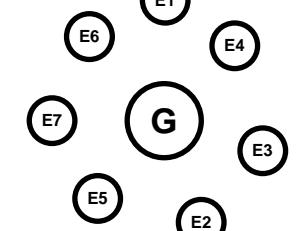
AL-IME2-EXP-POE Expanders can be added in any configuration. Provided the above instructions from EXPAND-ER LOCATION GUIDELINES are followed, Gateways / Expanders will automatically determine the optimal routing pathways between one another, ensuring optimal signal levels. The following are examples of Expander configurations: E1
" Star Pattern ": This configuration could be used to cover an entire building with a single version 2 Gateway located in the center, surrounded by up to 7 Expanders (maximum).
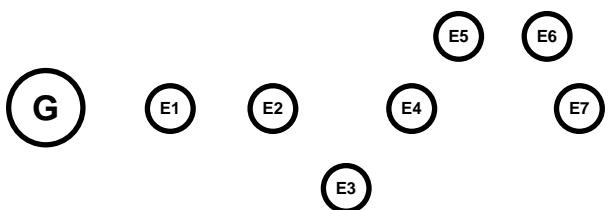
" Daisy-Chain ": For covering long distances, such as a long hallway, a "daisy-chain" configuration connects several Expanders in series with a 100 foot maximum distance between the Gateway and the first (and between each subsequent) Expander. In this example, the signal is easily extended over 700 feet in one direction, and provides coverage for door locks located along this range:

If a wireless lock along the above daisy-chain is unreachable, Expanders can be moved as required (in the example below, Expanders E3 , E5 and E6 were relocated to allow the wireless signal to reach previously inaccessible locks).
The above are just 3 possible scenarios; in theory, endless installation configurations are possible.
Blue and White ID Cards
We recommend that when installing any model Gateway, a blue-colored " Gateway ID Card " (OI357) be completed, and when installing the AL-IME2-EXP-POE Expander, a white-colored " Expander ID Card " (OI388) be completed. Gateway and Expander physical locations may easily be forgotten. These ID cards may prove to be very useful when replacing Gateways or Expanders, when using DL-Windows to select a particular Gateway or Expander to discover locks, or whenever an installed Gateway or Expander needs to be physically located.
MOUNTING INSTRUCTIONS
The AL-IME2-EXP-POE rear housing must be mounted "up" as shown on the page 4 template; i.e. when the front housing is attached, its engraved Networx logo must be located at the lower right with the front housing positioned "up" in a conventional manner. (The unit contains internal antennas that must be positioned vertically). Horizontal "flat" mounting of the enclosure is to be specifically avoided. As stated previously, the AL-IME2-EXP-POE Expander only requires connection to one RJ-45 Ethernet network cable.
Mount as follows:
1. Insert a small flat-head screwdriver into the slots at the bottom and twist while applying inward pressure (see Fig. 1; insert the screwdriver closer to the edges of the unit, as shown in the Fig. 1 "inset" image).
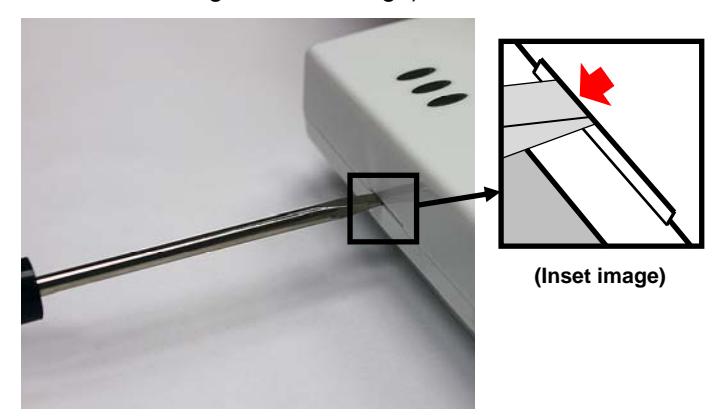
Fig. 1: To separate rear housing from cover (Inset: Insert flat-head screwdriver closer to the edges of the unit)
2. Using the rear housing as a mounting template, secure
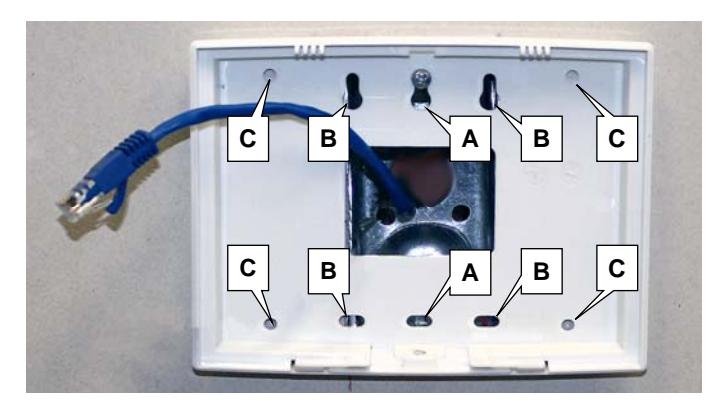
Fig. 2: Rear housing mounting holes for single-gang (A) and double-gang (B) electrical boxes, and four all-purpose holes (C)
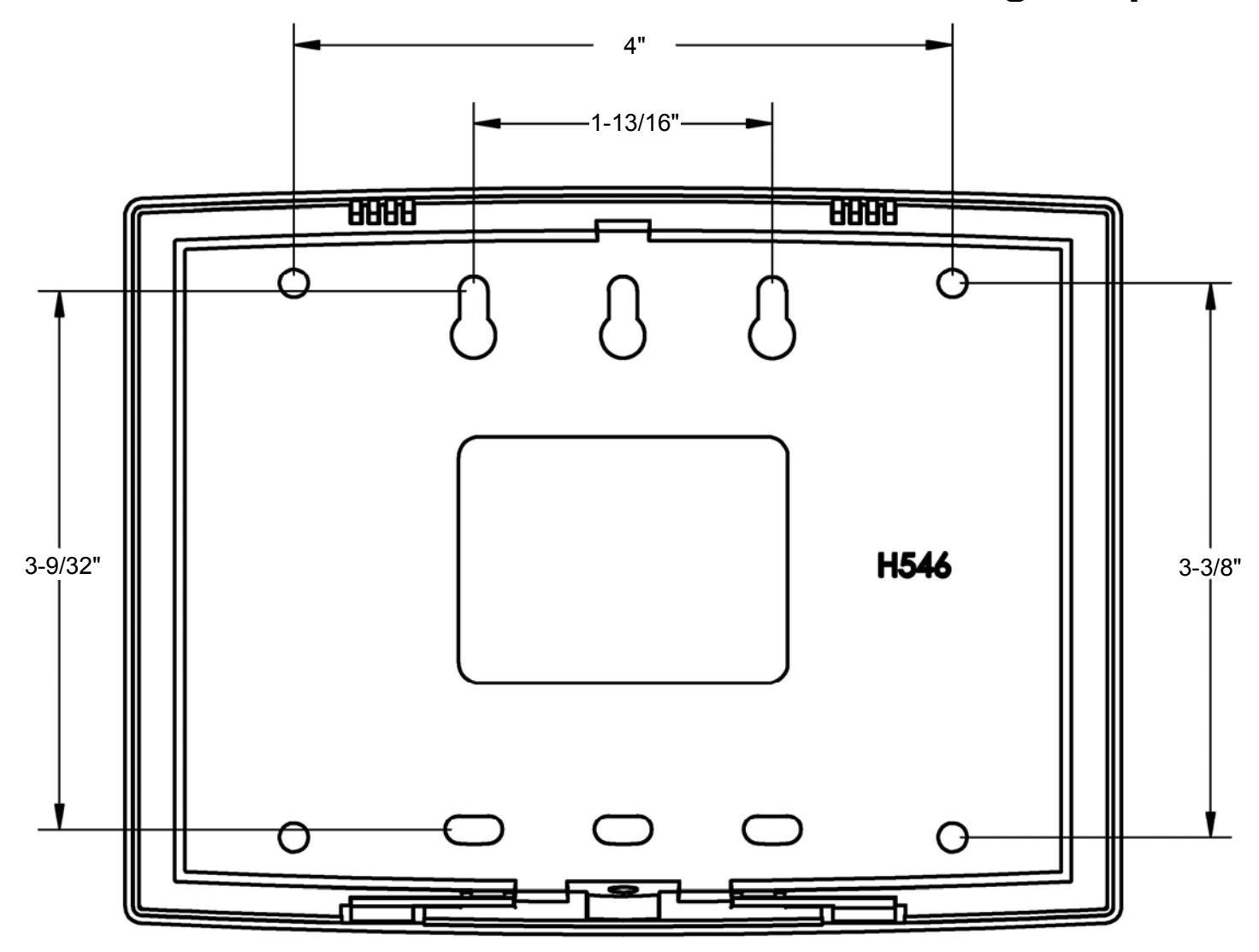
the unit to a wall or other flat surface using the hardware provided (see page 4 for printed template).
As shown in Fig. 2, the rear housing includes two mounting holes for single-gang ( A ) and four mounting holes for double-gang ( B ) electrical utility boxes, as well as four all-purpose holes ( C ) for mounting to drywall or other surfaces.
"EXPANDER GROUP" DIALS
Inside the Expander are 2 rotary dials (see Fig. 3). These dials are used to set the "Expander Group". All version 2 Gateways include an identical set of dials. Therefore, the dial values set on your Gateway MUST then match the dial values set on your AL-IME2-EXP-POE Expanders. IMPORTANT: Each Gateway in your system MUST be set to a different "Expander Group" value along with its associated Expanders. The "Expander Group" dial setting determines which Expanders are associated with which Gateway, thus preventing Gateways from discovering unintended Expanders.
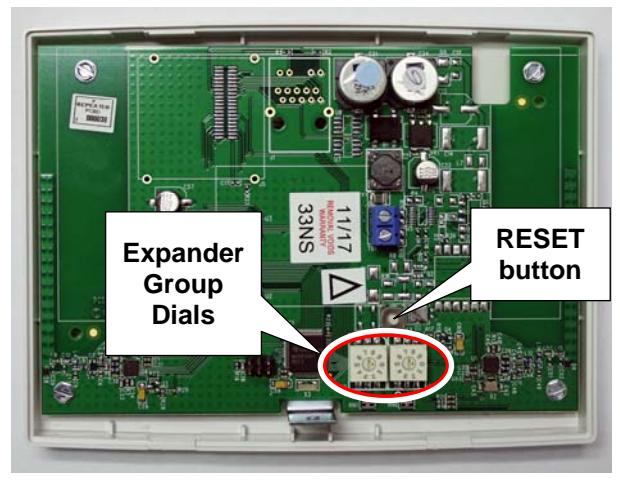
Fig. 3: "RESET" button and two "Expander Group dials" Be sure to orient the Expander with the RESET button ABOVE the dials as shown above to ensure proper Group setting!
Expander Group values of "00" through "99" are valid selections.
IMPORTANT: The small "selection arrow" on each dial must be pointing directly to the desired Group value. In Fig. 4 (below), the Group value is set to "50". Use a small flathead screwdriver to turn the dials and make the selections. Be sure to orient the Expander as shown above with the RE-SET button ABOVE the dials to ensure proper Group setting!
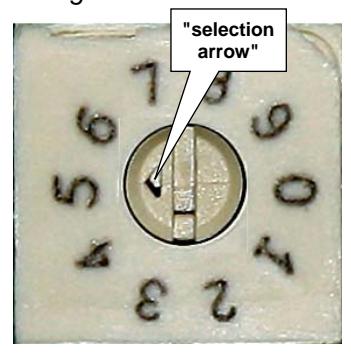
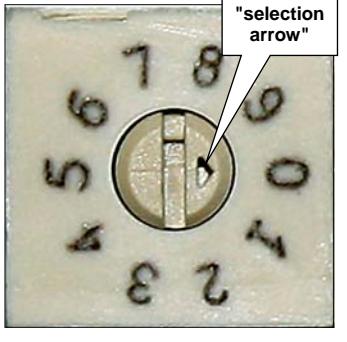
Fig. 4. Example: The above Expander Group dials are set to "50"
POWER UP
Connect the Ethernet Cable. Upon power up:
- Red LED solid (momentarily)
- Yellow LED blinks (counting out "Expander Group" dial setting).
Note: Zero = No blink
Yellow LED solid + green LED flickering rapidly
Next, reset the Expander as follows:
Reset the Expander
IMPORTANT: Before securing the Expander housing cover, <u>ALWAYS</u> reset the Expander memory, even if the Expander is new "out of the box" and/or has never been used previously.
After initial power up, press and hold the "RESET" button (see below for location); continue to hold the button until the red light turns on solid. Now, release the button and the green light will flicker rapidly.
This "resetting" of the Expander clears all memory and ensures that any previous data is cleared from the unit.
Note: Resetting the Expander also re-writes the "Expander Group" dial setting into the Expander memory.
EXPANDER LED INDICATIONS
| Yellow | On Power up, displays "Expander Group" dial setting (in two sequences) |
|---|---|
| Receiver On (normal operation) | |
| Red | Transmitter on |
| Green | (Expander Status) |
| Not configured - Rapid blinking / flickering | |
| Idle / configured - 1 blink per second | |
| Lock Communication Fail - 2 blinks (continuously) | |
| Expander Communication Fail - 4 blinks (continuously) |
CLOSE HOUSING COVER
Close the housing cover by first engaging the hooks at the top, then snapping the bottom together. Secure the cover with the Bottom Screw provided as shown in Fig. 5.
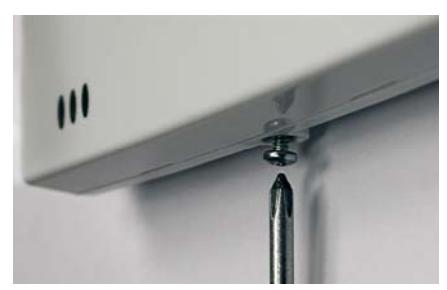
Fig. 5: Bottom Screw
Congratulations! You're finished! Now go to the DL-WINDOWS™ for Networx™ V5 USER'S GUIDE (OI383) for instructions about discovering your Expanders from DL-Windows.
AL-IME2-POE and AL-IME2-EXP-POE Mounting Template
ALARM LOCK LIMITED WARRANTY
ALARM LOCK SYSTEMS, INC. (ALARM LOCK) warrants its products to be free from manufacturing defects in materials and workmanship for twenty four months following the date of manufacture. ALARM LOCK will, within said period, at its option, repair or replace any product failing to operate correctly without charge to the original purchaser or user.
This warranty shall not apply to any equipment, or any part thereof, which has been repaired by others, improperly installed, improperly used, abused, altered, damaged, subjected to acts of God, or on which any serial numbers have been altered, defaced or removed. Seller will not be responsible for any dismantling or reinstallation charges, environmental wear and tear, normal maintenance expenses, or shipping and freight expenses required to return products to ALARM LOCK. Additionally, this warranty shall not cover scratches, abrasions or deterioration due to the use of paints, solvents or other chemicals.
THERE ARE NO WARRANTIES, EXPRESS OR IMPLIED, WHICH EXTEND BEYOND THE DESCRIP-TION ON THE FACE HEREOF. THERE IS NO EXPRESS OR IMPLIED WARRANTY OF MERCHANT-ABILITY OR A WARRANTY OF FITNESS FOR A PARTICULAR PURPOSE. ADDITIONALLY, THIS WARRANTY IS IN LIEU OF ALL OTHER OBLIGATIONS OR LIABILITIES ON THE PART OF ALARM LOCK.
Any action for breach of warranty, including but not limited to any implied warranty of merchantability, must be brought within the six months following the end of the warranty period.
IN NO CASE SHALL ALARM LOCK BE LIABLE TO ANYONE FOR ANY CONSEQUENTIAL OR INCIDENTAL DAMAGES FOR BREACH OF THIS OR ANY OTHER WARRANTY, EXPRESS OR IMPLIED, EVEN IF THE LOSS OR DAMAGE IS CAUSED BY THE SELLER'S OWN NEGLIGENCE OR FAULT.
In case of defect, contact the security professional who installed and maintains your security system. In order to exercise the warranty, the product must be returned by the security professional, shipping costs prepaid and insured to ALARM LOCK. After repair or replacement, ALARM LOCK assumes the cost of returning products under warranty. ALARM LOCK shall have no obligation under this warranty, or otherwise, if the product has been repaired by others, improperly installed, improperly used, abused, altered, damaged, subjected to accident, nuisance, flood, fire or acts of God, or on which any serial numbers have been altered, defaced or removed. ALARM LOCK will not be responsible for any dismantling, reassembly or reinstallation charges, environmental wear and tear, normal maintenance expenses, or shipping and freight expenses required to return products to ALARM LOCK. Additionally, this warranty shall not cover
4
scratches, abrasions or deterioration due to the use of paints, solvents or other chemicals.
This warranty contains the entire warranty. It is the sole warranty and any prior agreements or representations, whether oral or written, are either merged herein or are expressly cancelled. ALARM LOCK neither assumes, nor authorizes any other person purporting to act on its behalf to modify, to change, or to assume for it, any other warranty or liability concerning its products.
In no event shall ALARM LOCK be liable for an amount in excess of ALARM LOCK's original selling price of the product, for any loss or damage, whether direct, indirect, incidental, consequential, or otherwise arising out of any failure of the product. Seller's warranty, as hereinabove set forth, shall not be enlarged, diminished or affected by and no obligation or liability shall arise or grow out of Seller's rendering of technical advice or service in connection with Buyer's order of the goods furnished hereunder.
ALARM LOCK RECOMMENDS THAT THE ENTIRE SYSTEM BE COMPLETELY TESTED WEEKLY.
Warning: Despite frequent testing, and due to, but not limited to, any or all of the following; criminal tampering, electrical or communications disruption, it is possible for the system to fail to perform as expected. ALARM LOCK does not represent that the product/system may not be compromised or circumvented; or that the product or system will prevent any personal injury or property loss by burglary, robbery, fire or otherwise; nor that the product or system will in all cases provide adequate warning or protection. A properly installed and maintained alarm may only reduce risk of burglary, robbery, fire or otherwise but it is not insurance or a guarantee that these events will not occur. CONSEQUENTLY, SELLER SHALL HAVE NO LIABILITY FOR ANY PERSONAL INJURY, PROPERTY DAMAGE, OR OTHER LOSS BASED ON A CLAIM THE PRODUCT FAILED TO GIVE WARNING. Therefore, the installer should in turn advise the consumer to take any and all precautions for his or her safety including, but not limited to, fleeing the premises and calling police or fire department, in order to mitigate the possibilities of harm and/ or damage.
ALARM LOCK is not an insurer of either the property or safety of the user's family or employees, and limits its liability for any loss or damage including incidental or consequential damages to ALARM LOCK's original selling price of the product regardless of the cause of such loss or damage.
Some states do not allow limitations on how long an implied warranty lasts or do not allow the exclusion or limitation of incidental or consequential damages, or differentiate in their treatment of limitations of liability for ordinary or gross negligence, so the above limitations or exclusions may not apply to you. This Warranty gives you specific legal rights and you may also have other rights which vary from state to state.