Aiphone Paging Adaptor PD-1 Installation Instructions
Open the original PDF document
View PDF

PAGING ADAPTOR
MODEL:
PD-1
Paging adaptor, 1 zone for TD-H & TD-Z systems
INSTRUCTIONS
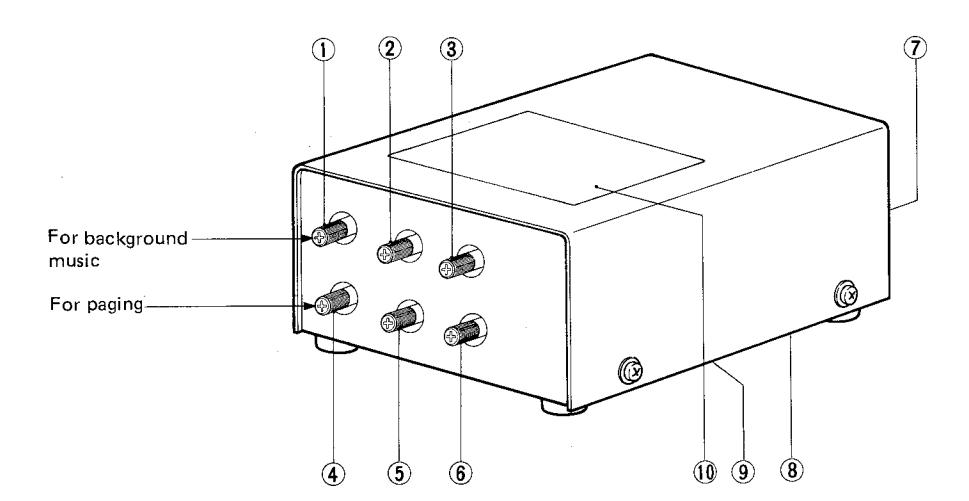

NAMES AND FUNCTIONS
- 1 Volume control
- 2 Bass control
- (3) Treble control
- 4 Volume control
- Bass control
- 6 Treble control
for background music
for paging
- 7 Terminal block
- (8) Pre-tone volume control (bottom)
- Connection diagram label
- (10) Control identification label

FEATURES
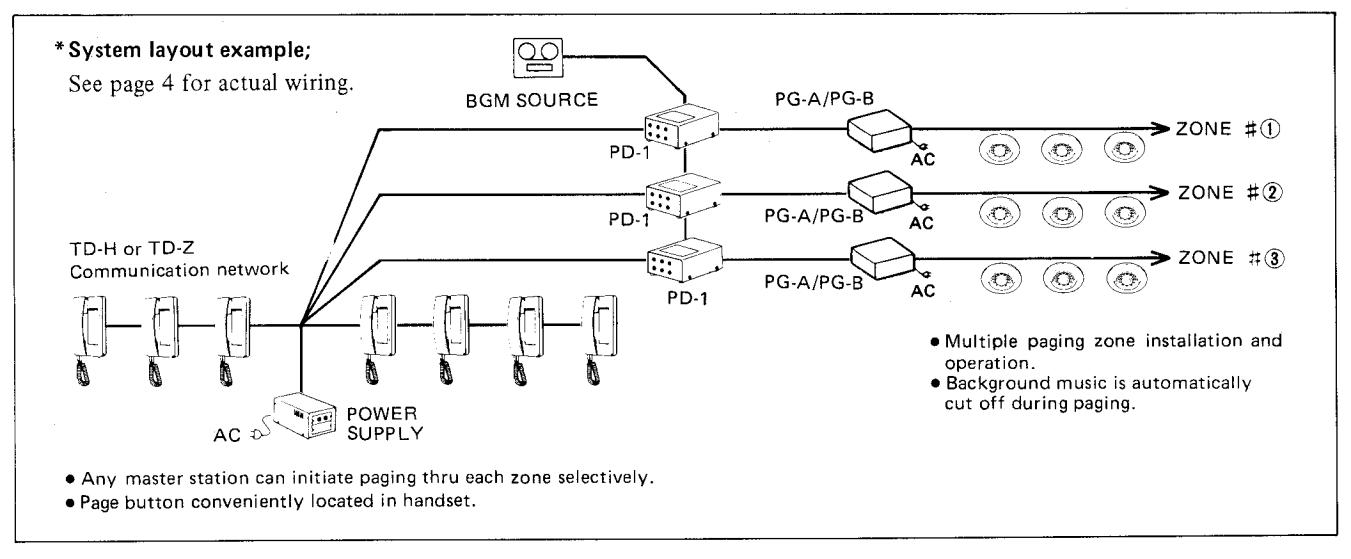
- * Provides a zone page for Aiphone's TD-H and TD-Z systems.
- * Multiple paging zones may be established. A station number must be designated for each paging zone.
- * Individual volume and tone controls for background music and paging.
- * Pre-tone prior to paging announcement to draw people's attention.
*Installation;
- 1. Do not attempt to install your PD-1 adaptor until you have read and thoroughly understand the installation procedure. Requirements indicated under SPECIFICATIONS on Page 6 of this manual MUST BE MET. Aiphone's warranty for the adaptor and the system is void if adaptor is installed in a manner other than described in this manual.
- 2. DO NOT CONNECT ANY TERMINAL ON ANY UNIT TO AC POWER LINES.
- 3. Select the installation locations that would not be exposed to temperature/humidity extremes, water, oil, dust, iron dust, inflammable & chemical products, etc.
- 4. Be sure not to plug power supply into AC receptacle until you complete wiring connections, and unplug before opening the unit.
5. General notes on paging equipment installation;
-
(2) Wiring on output terminals (on PG-A/PG-B amplifier);
- (1) Use either 70V or 100V (or 25V in North America) constant voltage output of amplifier for speaker line and connect paging speakers in parallel.
- (2) Keep speaker line at least 50 cm (20") away from communication line and also from amplifier input line & BGM source output line. If speaker line runs closely with the above lines, use a shielded single pair wires.
- (3) It is recommended that AUX or PHONO terminal of amplifier be used for paging input. If PHONO terminals are used, the tone quality of both paging and BGM would deteriorate due to the RIAA equalizing circuits included, etc. In case PHONO terminal must be used, make tone adjustment on PD-1 adaptor, taking the above into account.
- (a) It is suggested that PD-1 adaptor should be installed near the center of the system, along with power supply PS-12A (or PS-12C). However, PD-1 must be kept more than 20 cm (8") away from PS-12A (or PS-12C) to avoid inductive noise.
*Unit selection;
- 1. Installation of a paging zone requires dedication of a station number in TD-H or TD-Z systems.
- 2. If talkback is required, select a PD-2 talkback paging adaptor in lieu of PD-1.
*Operation;
- 1. On TD-H station, do not depress more than one number buttons each assigned for paging zone.
- 2. Do not depress number buttons for paging zone and communication simultaneously. It may cause an incomplete paging announcement to be and high-pitched tone to come out from the speakers.
(1) ACTUAL TERMINAL LOCATION
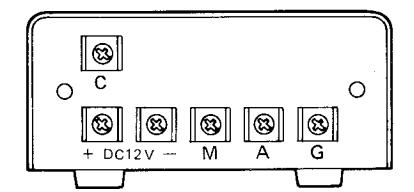
c : for paging input and zone selection.
M, G: for connecting to music output.
A, G: for connecting to the amplifier input.
+ , -: for power supply.
(2) WALL-MOUNTING INSTALLATION;
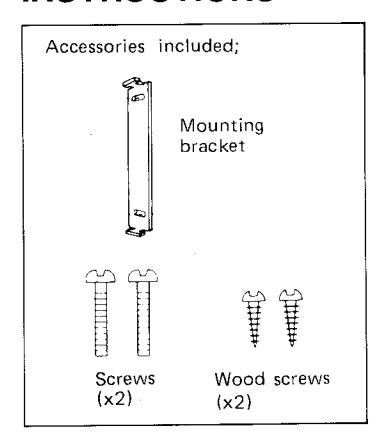
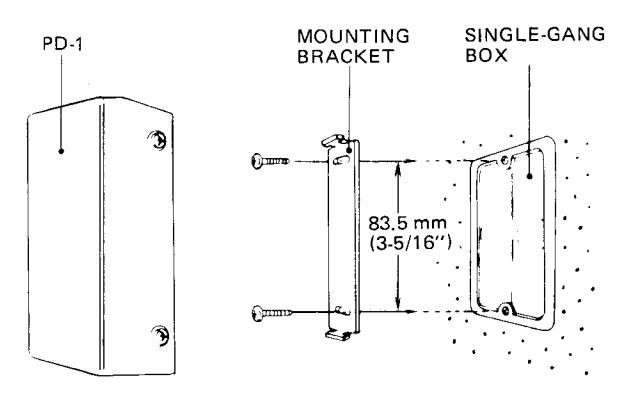
PD-1 is shipped with the mounting bracket. Attach the mounting bracket to single-gang box or to wall/rack, with the supplied screws. Insert the prongs of the bracket into the holes on back of the adaptor and pull the body downward.
(3) PAGING SPEAKERS IMPEDANCE - MATCHING
*Determine the number of speakers and output power for each so that the total of required power for the speakers will be equal or less than the rated output power of the amplifier.
| *Impedance | matching | table | (Examn | le) |
|---|---|---|---|---|
| Model Rated in | D. d. d. immed | I | speaker input | Towningle | ||
|---|---|---|---|---|---|---|
| Rated input | Impedance | 100 V line | 70 V line | Terminals | ||
| SP – 3NA 3 W | 10 K ohm | 1 W | 0.5 W | 0 – 3 | ||
| 5 K ohm | 2 W | 1 W | 0 – 2 | |||
| 3.3 K ohm | 3 W | 1.5 W | 0 – 1 | |||
(4) ADJUSTING CONTROLS
Upon completing all the wiring connections, proceed with the following steps before turning the system on.
- 1. Set PD-1 adaptor, VOLUME, TREBLE & BASS controls (and of paging amplifier and BGM source, if included) at MIDPOINT.
- 2. Turn on power supply PS-12A (or PS-12C) of TD-H or TD-Z system, paging amplifier & BGM source.
- 3. Initiate paging or talkback operations (prior to BGM control adjustment).
- 4. Adjust paging VOLUME control on PD-1 to achieve desired level. Fine tune paging TREBLE & BASS controls on PD-1. In places where a TD-H/TD-Z station is located near the paging speakers, feedback might take place, if the paging volume is too high.
- Adjust PD-1 background music VOLUME control to achieve desired background music level. Fine tune background music TREBLE & BASS, while listening to the background music. Adjust background music VOLUME, TREBLE & BASS controls on BGM source, if included.
[2
Ě
Ø
田田
(2)
10
Œ
0
Ħ
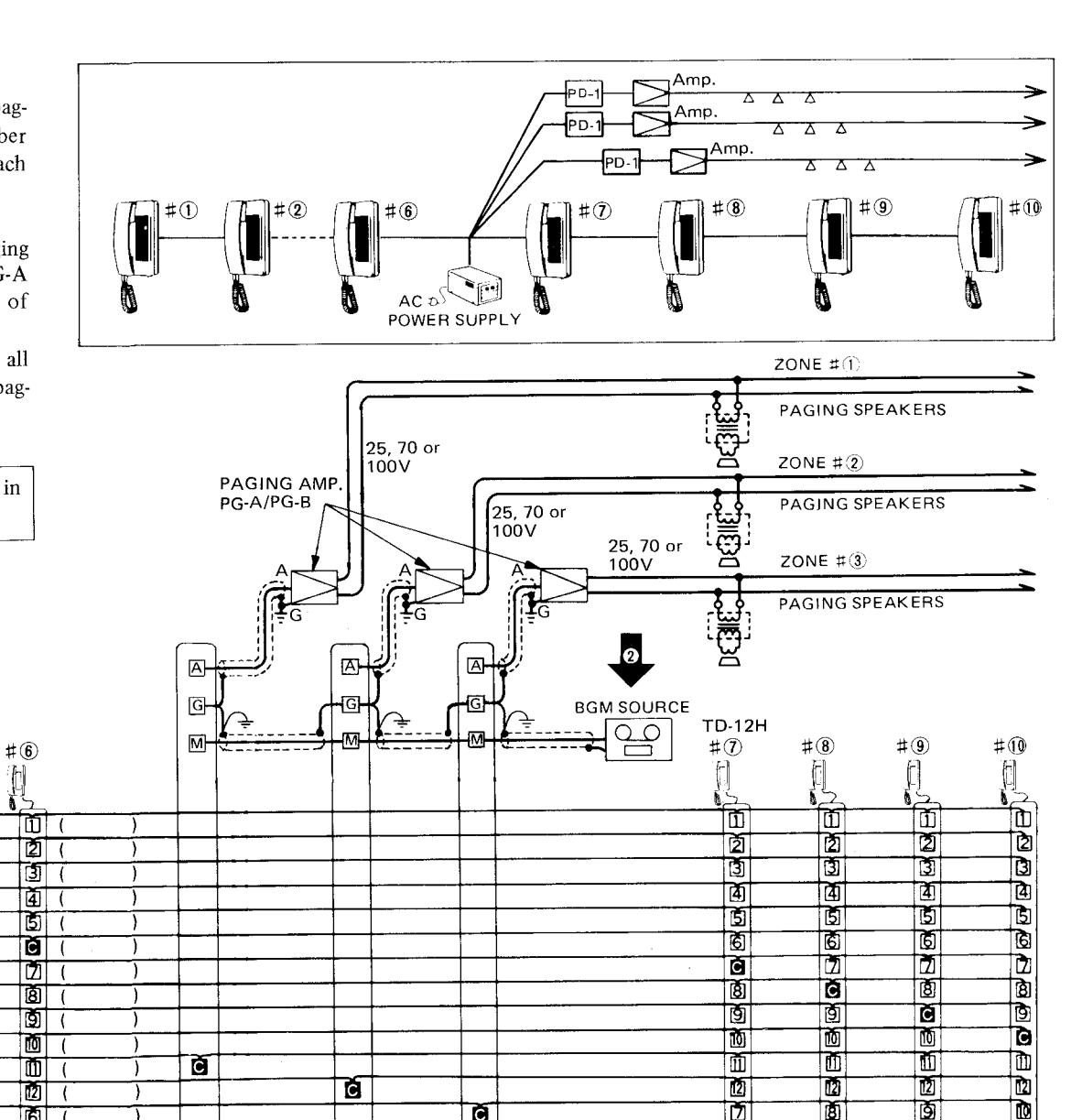
(1) TD-12H SYSTEM WITH 3 PAGING ZONES
This diagram shows TD-12H all-master system with 3 paging zones. Any station can page by selecting a number button 11 for zone # 1, 12 for zone # 2 and each own station number zone #3.
Each straight paging zone requires a paging adaptor PD-1 paging amplifier PG-B (or PG-A in North America) and a required number of paging speakers.
BGM source can be used in common for all zones. Backgfound music is cut off during paging operation.
#4
2
3
Ò
6
8
9
[2]
4
D
#3
2
3
41
a
6
Ž
8
9
ĪŪ.
D
Œ
6
D
Œ
AC PD-1
PS-12A (or PS-12C)
TD-Z system with paging zones can be wired in exactly the same manner as TD-H system.
#3
Ġ
4
6
(7)
(8)
9
[0]
TD-12H
#1
#2
Ċ
(3)
<u> </u>
5
6
ð
9
10
ũ
12
2
D
Ð
Ò
Ě
Œ
PD-1
Ø
Ť
Ď
PD-1
(2) TD-12Z HOME-RUN WIRED SYSTEM WITH 2 PAGING ZONES
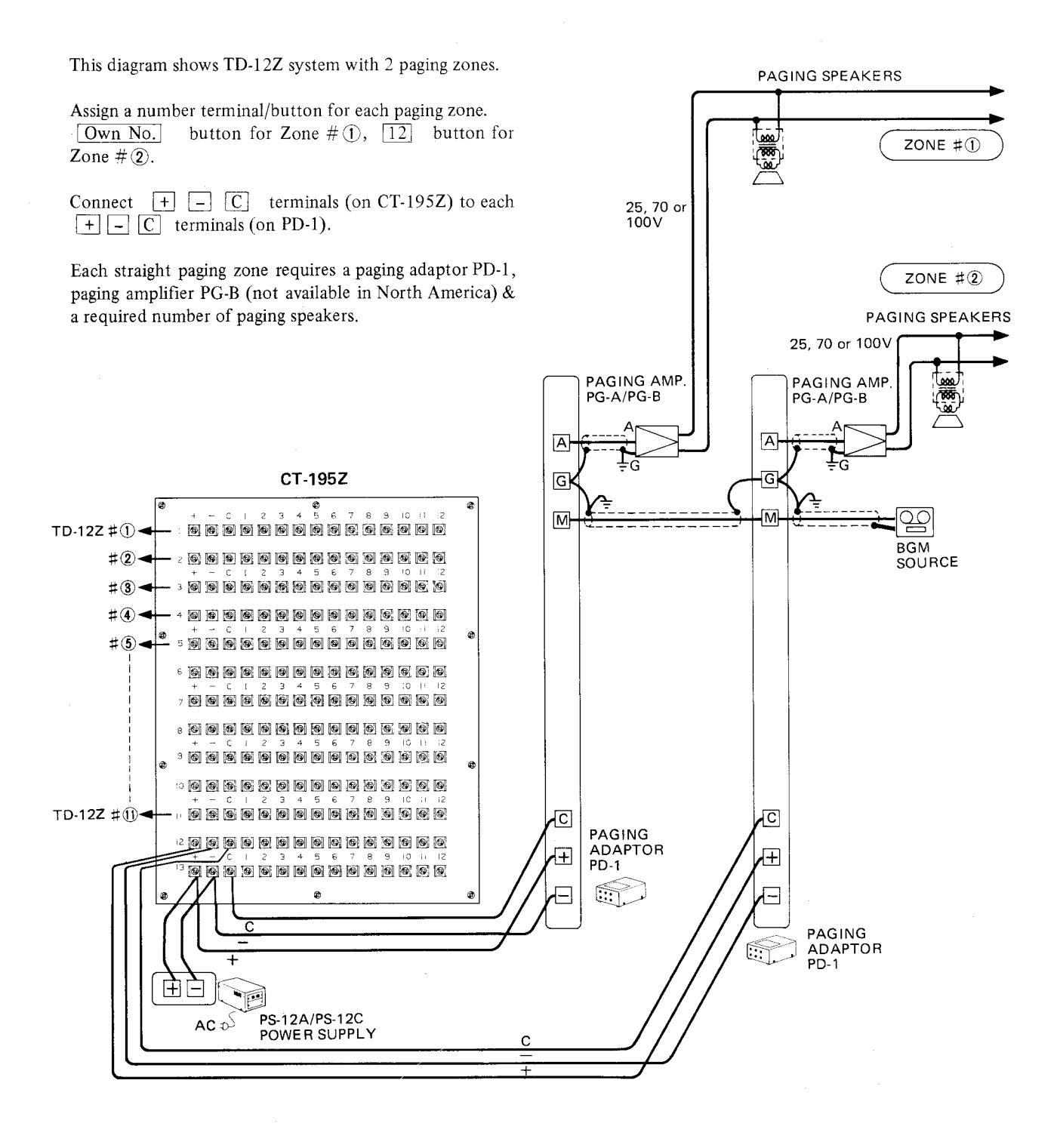
Installation of paging zone (with or without talkback) reduces one station capacity of TD-Z system.
PS-12A (or PS-12C) power supply can be connected to [+], [-] terminals of any row on CT-195Z central terminal board.
Background music source can be used in common for all zones.

TD-H PAGING OPERATION

Pick up handset, and depress a number button for desired paging zone. Push PAGE button in handset to make announce-
NOTE; When a number button A1 A12 is assigned for a paging zone (on TD-24H/24HW), select a corresponding number button and then momentarily depress [CALL A] botton before pushing [PAGE] button.
TD-7 PAGING OPERATION

Pick up handset, depress a number button assigned for desired paging zone, and momentarily CALL button. Push PAGE button in handset to make announcement.
Background music is automatically cut off during paging operation, and returns when handset is hung up.

SPECIFICATIONS
PD-1
DC 12V. PD-1 adaptor must be connected directly to PS-12A (or PS-12C in North America) *Power source:
power supply.
*Current consumption:
30 m A maximum. 5K ohm; Max. 1.5V.
*Output:
Treble: at 10 KHz., 12 dB.
Bass: at 100 Hz., 12 dB.
*Tone controls for paging:
*Tone controls for music:
Treble: at 10 KHz., 12 dB.
Bass: at 100 Hz., 12 dB.
*Music input:
17K ohm, 0.3V, 1 KHz. for full output.
AMPLIFIER REQUIREMENTS
*Input:
Connect to either AUX or PHONO terminal 100K-500K ohm, 0.12~0.5V.
TUNER OUTPUT REQUIREMENTS
RANGE; 100mV~1.2V, 10K ohm or less.
TAPE OUTPUT REQUIREMENTS
*Use low level output:
*Use audio output:
RANGE: 100 mV~1.2V, 600 ohm.
Dimensions: Height: 51.5 mm (2-1/32") x Width: 90 mm (3-9/16") x Depth: 138 mm (5-7/16")
Weight: Approximately 360 g (0.8 lbs.).
WARRANTY
Aiphone warrants its products to be free from defects of material and workmanship under normal use and service for a period of one year after delivery to the ultimate user and will repair free of charge or replace at no charge, should it become defective upon which examination shall disclose to be defective and under warranty. Aiphone reserves unto itself the sole right to make the final decision whether there is a defect in materials and/or workmanship; and whether or not the product is within the warranty.
This warranty shall not apply to any Aiphone product which has been subject to misuse, neglect, accident, or to use in violation of instructions furnished, nor extended to units which have been repaired or altered outside of the factory.
This warranty does not cover batteries or damage caused by batteries used in connection with the product.
This warranty covers bench repairs only, and any repairs must be made at the shop or place designated in writing by Aiphone. Aiphone will not be responsible for any costs incurred involving on site service calls.
Aiphone Co., Ltd., Nagoya, Japan Aiphone Corporation, Bellevue, Washington