Aiphone NIM System Installation Instructions Manual
Open the original PDF document
View PDFNIM system
INSTALLATION MANUAL
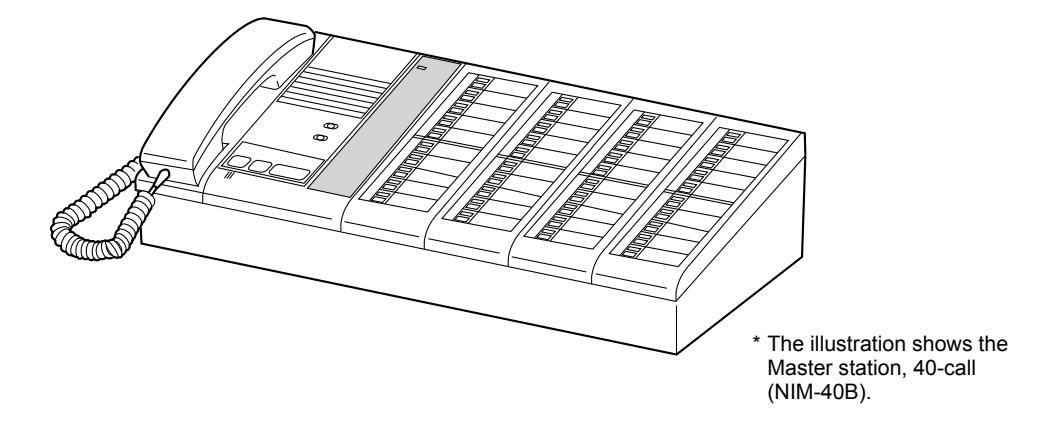
Thank you for selecting Aiphone for your communication needs. Please read this manual carefully before installation, and keep it in a safe place for future reference.
Please note that images and illustrations depicted in this manual may differ from the actual product.
Contents
|
Introduction
3 |
|---|
|
Precautions
3 |
|
WARNING
3 |
|
CAUTION
3 |
|
GENERAL PRECAUTIONS
3 |
|
NOTICES
4 |
|
System requirements for PC
5 |
|
GETTING STARTED
6 |
|
System confi guration
6 |
| Package contents and |
|
dimensions
8 |
|
Master station
8 |
|
Sub station, call button, wall jack
8 |
|
Ceiling speaker,
ceiling microphone11 |
| Corridor light, reset button11 |
|
Software
13 |
|
MOUNTING
14 |
|
CONNECTION
18 |
| Connection wiring diagram |
|
(outline)
18 |
|
Handling cables
20 |
|
Notes about handling cables
20 |
| Connection wiring diagram |
|
(details)
21 |
|
Connecting to the master station
21 |
|
Multiple-user room examples of
using the ceiling speaker (NI-LB) |
| and the ceiling microphone |
|
(NI-SB)
22 |
|
Multiple-user room examples of
using the ceiling speaker (NI-LB) and not using the ceiling microphone (NI-SB) 23 |
|---|
|
Multiple-user room examples of
using the bedside handheld sub stations (NI-RC) etc 24 |
|
Examples of using the bathroom
call buttons (NIR-7W or NIR-7HW) 26 |
|
Single room examples of using
the surface mount sub station (NI-BA) 27 |
|
Examples of using the fl ush
mount sub station (NI-JA) 28 |
|
Notes about connecting to
a corridor light with nameplate (NIR-31, NIR-32, NIR-34) 29 |
|
SETUP AFTER INSTALLATION
30 |
|
Adjusting volume and
ringtone settings 30 |
|
APPENDIX
31 |
|
Troubleshooting
31 |
|
Warranty
Back cover |
Introduction
- The NIM system is a communication system designed for applications in facilities such as hospitals, offi ce buildings, factories, schools, and prisons. Various types of equipment enable you to confi gure a system that meets your needs for not only general purpose internal communications, but also for calling and communication in health care or various commercial applications. This system also allows you to check the call history by connecting a PC installed with the specifi ed application software.
- The NIM system is telecommunication equipment, not to be used as Medical Equipment.
Precautions
Prohibited Do not dismantle unit Keep unit away from water Be sure to follow the instruction
WARNING
Negligence could result in death or serious injury.
- 1. Do not dismantle or alter the unit. Fire or electric shock could result.
- 2. Keep the unit away from water or any other liquid. Fire or electric shock could result.
- 3. High voltage is present internally. Do not open the case. Electric shock could result.
- 4. For power supply, use Aiphone power supply model specifi ed for use with system. If non-specifi ed product is used, fi re or malfunction could result.
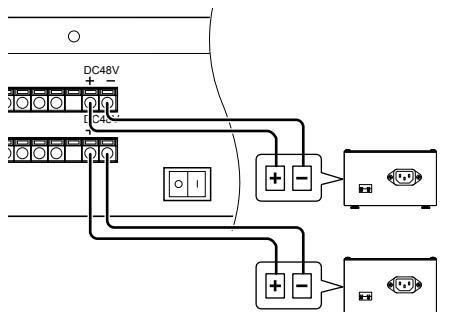
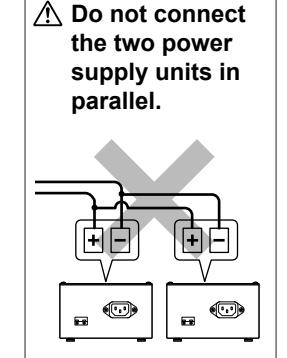
- 5. Do not connect any non-specifi ed power source to the +, terminals. Also, do not install two power supplies in parallel to a single input. Fire or damage to the unit could result.
- 6. Do not connect any terminal on the unit to an AC power line. Fire or electric shock could result.
- 7. Keep AC cord from being marred or crushed. If the AC cord is damaged, fi re or electric shock could result.
- 8. Do not plug or unplug unit with wet hands. Electric shock could result.
- 9. Insert AC plug completely and securely into AC outlet. Otherwise, fi re or electric shock could result.
- 10. Periodically check for and remove dust on the power plug. If dust is left, it could cause the power plug to heat up, resulting in fi re.
- 11. Do not put any metal or fl ammable material into the unit through the openings. Fire, electric shock, or unit trouble could result.
CAUTION
Negligence could result in injury to people or damage to property.
- 1. Do not install or make any wire terminations while power supply is plugged in. It can cause electrical shock or damage to the unit.
- 2. When mounting the unit on a wall, install the unit in a convenient location, but not where it could be jarred or bumped. Injury could result.
- 3. Before turning on power, make sure wires are not crossed or shorted. If not, fi re or electric shock could result.
- 4. Do not place or install the unit in the locations subject to frequent vibration or impact. If the unit falls, injury to people or damage to the unit could result.
- 5. Do not put anything on the unit or cover the unit with cloth, etc. Fire or unit trouble could result.
-
6. Do not install the unit in any of the following locations. Fire, electric shock, or unit trouble could result.
- * Places under direct sunlight or near heating equipment that varies in temperature.
- * Places subject to dust, oil, chemicals, hydrogen sulfi de (hot spring).
- * Places subject to moisture and humidity extremes, such as bathrooms, cellars, greenhouses, etc.
- * Places where the temperature is quite low, such as inside a refrigerated area or in front of an air conditioner.
- * Places subject to steam or smoke (near heating or cooking surfaces).
- * Where noise generating devices such as dimmer switches or inverter electrical appliances are closeby.
- * Locations subject to frequent vibration or impact.
- * Locations subject to extremely powerful electric fi elds.
- 7. Be sure to perform a call test or check the chime volume with the handset on the hook. If you operate the hook switch with the handset on your ear, a sudden call etc. may cause damage to your ear.
- 8. The unit must be installed and wired by a qualifi ed technician.
GENERAL PRECAUTIONS
- 1. Keep the unit more than 1 m (3.3') away from radio or TV sets.
- 2. Keep the intercom wires more than 30cm (12'') away from AC 100-240V wiring. AC induced noise and/or unit malfunction could result.
- 3. Comply with all third party manufacturing specifi cations that will be used with this system.
- 4. If it is used close to a cellular phone, the unit may malfunction.
- 5. The unit can be damaged if dropped. Handle with care.
- 6. The unit will not work during power failure.
- 7. In areas where broadcasting station antennas are close by, the intercom system may be affected by radio frequency interference.
- 8. All the units, except for Sub station, fl ush mount (NI-JA), are designed for indoor use only. Do not use at outdoor locations.
- 9. Environmental sound around the unit may hinder clear communication, but this is not a malfunction.
- 10. Using a mobile phone or professional-use radio equipment such as walkie-talkie close to the system may cause a malfunction.
NOTICES
- We will under no conditions be liable for damage that occurs due to the inability to communicate due to malfunctions, problems, or operational errors in this product.
- We will under no conditions be liable for any damages or losses resulting from this product's contents or specifi cations.
- This manual was created by Aiphone Co., Ltd., all rights reserved. Copying a part of or this entire manual without prior permission from Aiphone Co., Ltd. is strictly forbidden.
- Please note that images and illustrations depicted in this manual may differ from the actual ones.
- Please note that product specifi cations may be changed for the sake of improvement without prior notice.
- This system is not intended for life support or crime prevention. It is just a supplementary means of conveying information. Aiphone will under no conditions be liable for loss of life or property which occurs while the system is being operated.
System requirements for PC
Your PC must meet the following system requirements to use the NI-SOFT. Also refer to the instruction manual supplied with your PC.
|
OS
(English ver. only) |
Windows 7 Home Premium/Professional/Ultimate (Service Pack 1, 32/64bit)
Windows 8.1/Pro (32/64bit) |
|---|---|
| Processor | 2.7 GHz or higher |
|
System memory
(RAM) |
2 GB RAM or higher |
| Hard disk | Total 100 MB or higher (*1) |
| Run-time | Microsoft® .NET Framework 4.5 (*2) |
| Display | 1024 (W) x 768 (H) or higher, 16-bit or more |
| Serial port | RS-232C, D-sub 9-pin |
| Fonts | Arial |
(*1): If the software is to be installed onto a drive other than C: drive, both the C: drive and the installation drive each require 50 MB or more of memory.
(*2): If the specifi ed Run-time is not installed on the PC, it will be installed automatically when installing the NI-SOFT.

- The NI-SOFT may not run, or may not operate correctly (such as freezes occurring) on a PC with specifi cations below the necessary requirements.
- We recommend using a PC and CD-ROM/DVD-ROM drive that exceed the basic system requirements.
- The PC should be operable 24 hours a day.
- Refer to the NI-SOFT operation manual included in the CD-ROM of the NI-SOFT for the setting method of the NI-SOFT.
Microsoft and Windows are either registered trademarks or trademarks of Microsoft Corporation in the United States and/or other countries.
System configuration
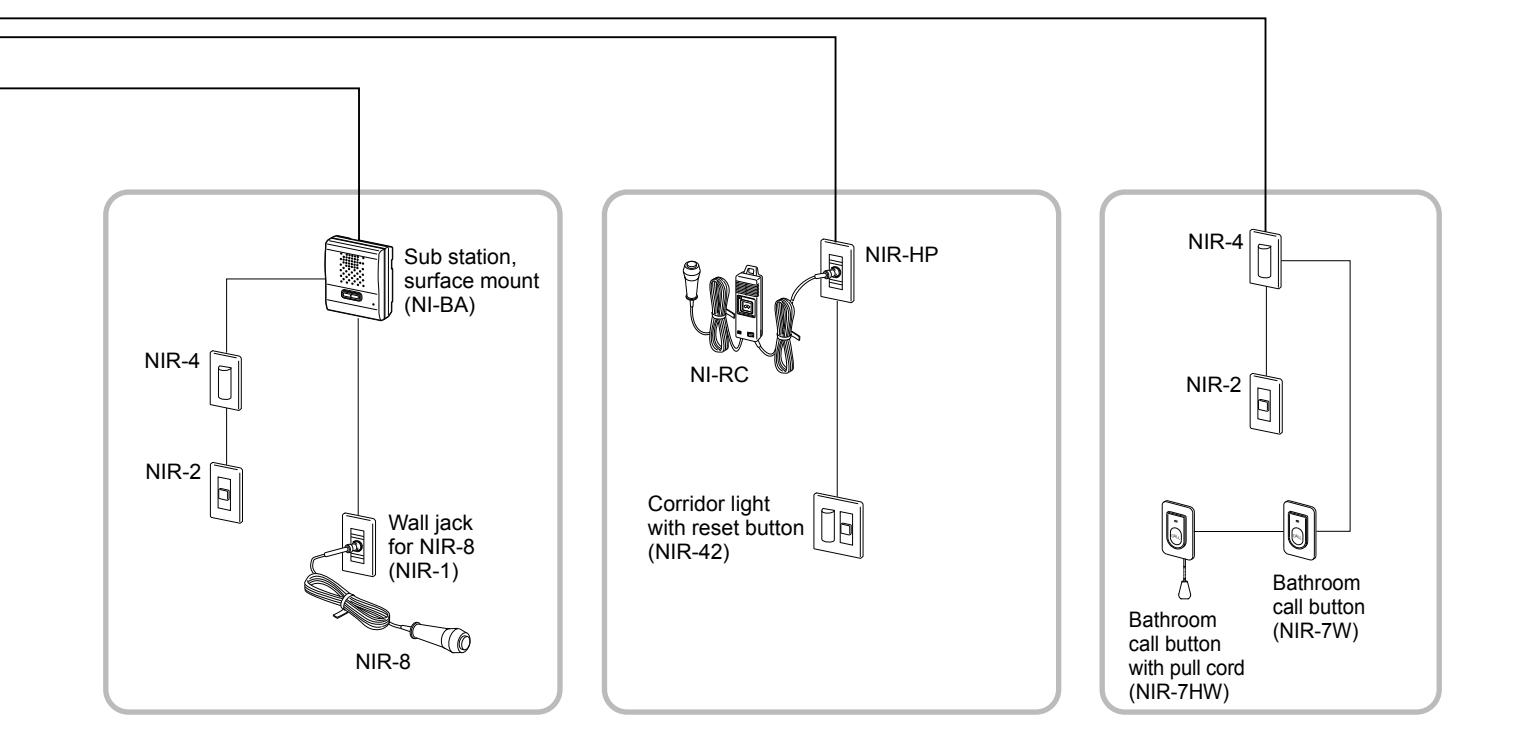
The following is <u>a system configuration example</u>. You can select needed equipment to configure a system to meet your application needs.
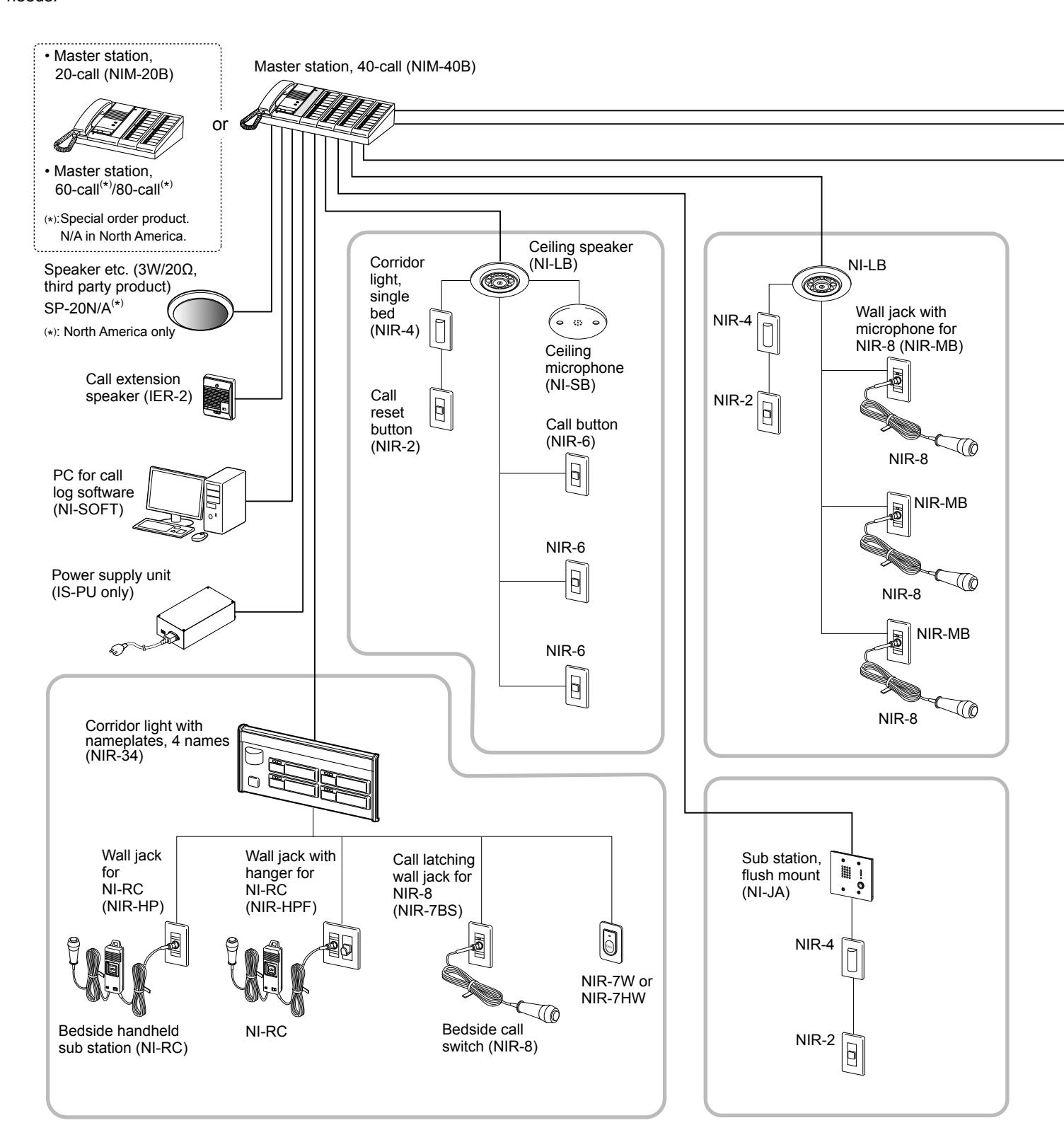
NOTE: The above example may differ from actual product.
■ Maximum number of stations in a single system
The maximum number of sub stations differs depending on the master station model.
| Master station | Sub station (Oty) | Bereand computer (Ots) | ||
|---|---|---|---|---|
| Model | Qty | Sub station (Qty) | Personal computer (Qty) | |
| NIM-20B | 1 | 20 | 1 | |
| NIM-40B | 1 | 40 | 1 | |
| Master station, 60-call (*) | 1 | 60 | 1 | |
| Master station, 80-call (*) | 1 | 80 | 1 | |
(*): Special order product.
N/A in North America.
■ Communication methods
The following two methods are available on the master station.
| Method | Communication style | Description |
|---|---|---|
| Using handset | Voice-actuated communication | The communication mode is VOX, half duplex. When speaking into the handset, voice is transmitted to the other station. When listening, the voice from the remote station is heard through the handset. |
| Hands-free | Push-to-talk | To speak, press and hold the TALK button. To listen, release the TALK button. |
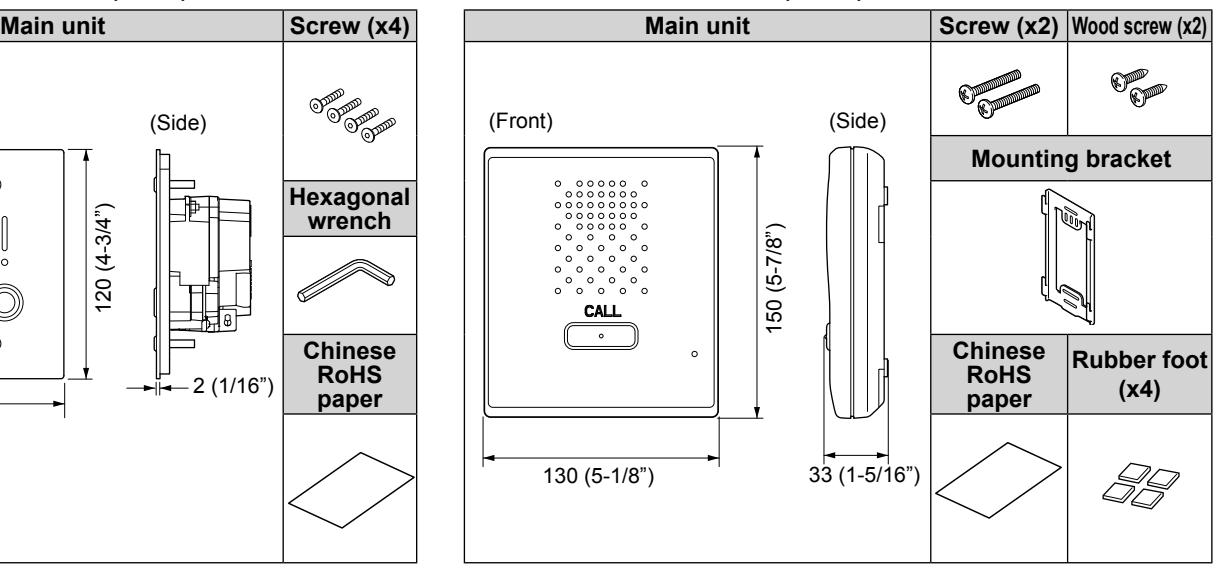
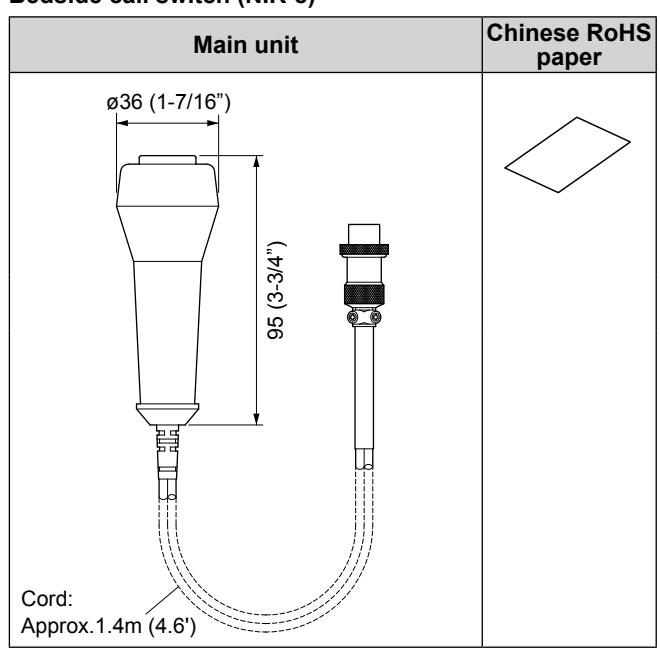
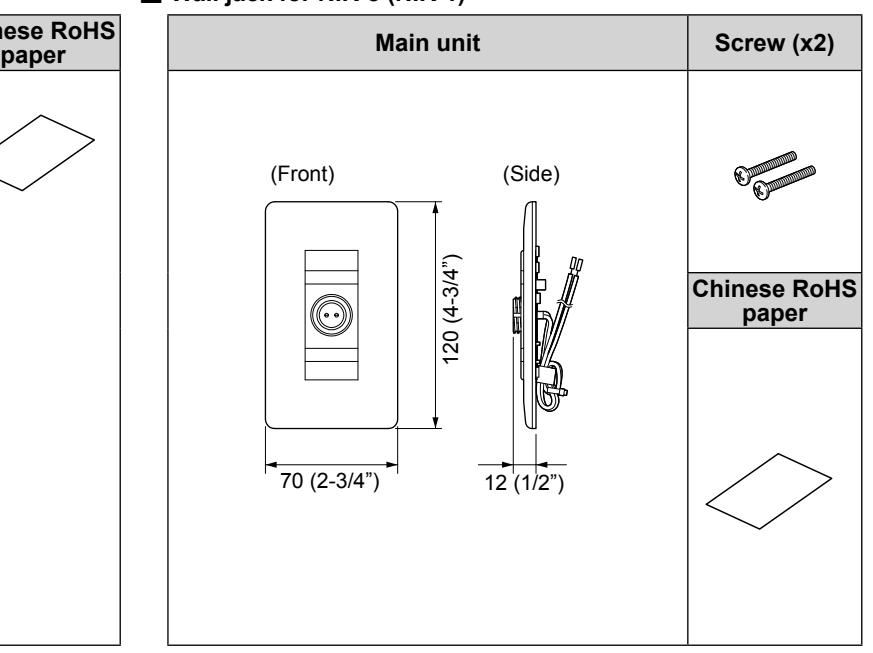
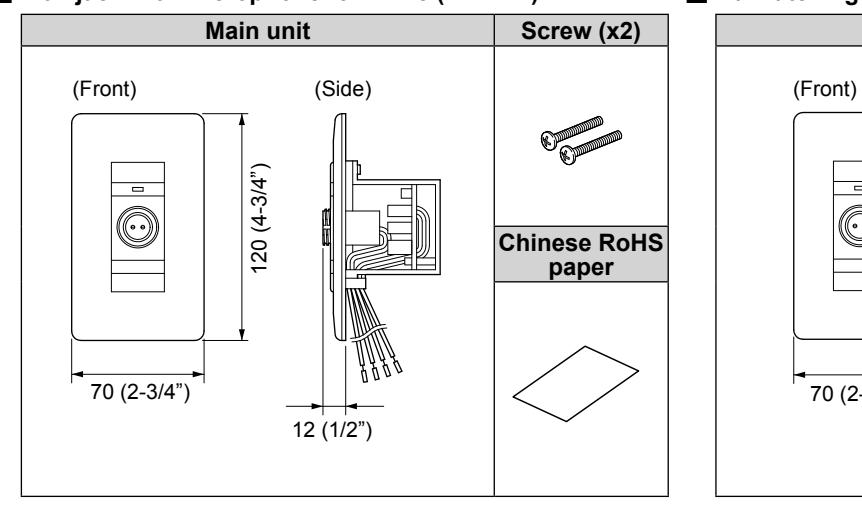
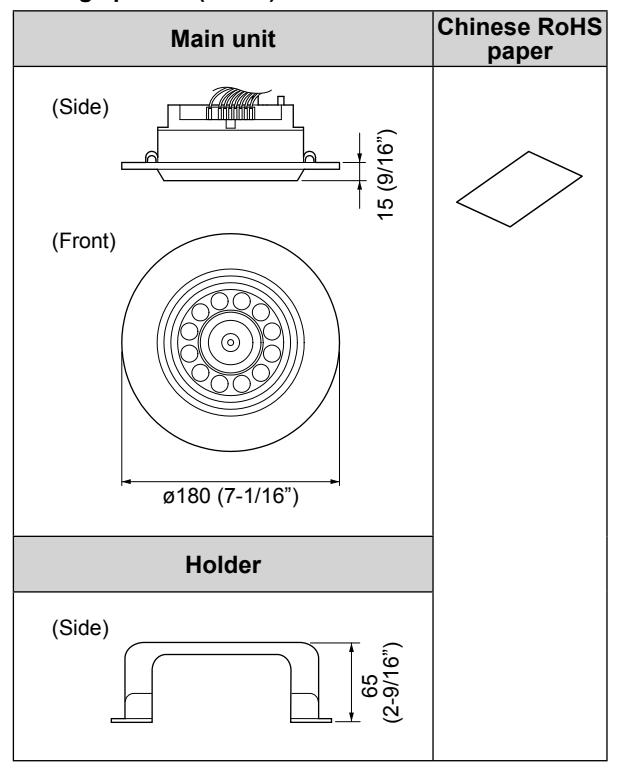
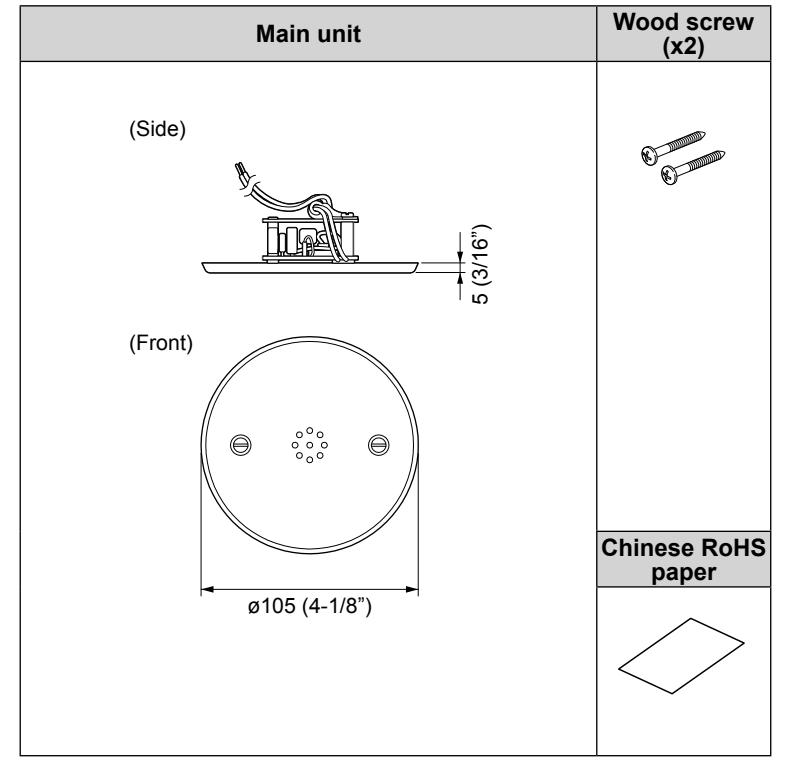
Package contents and dimensions
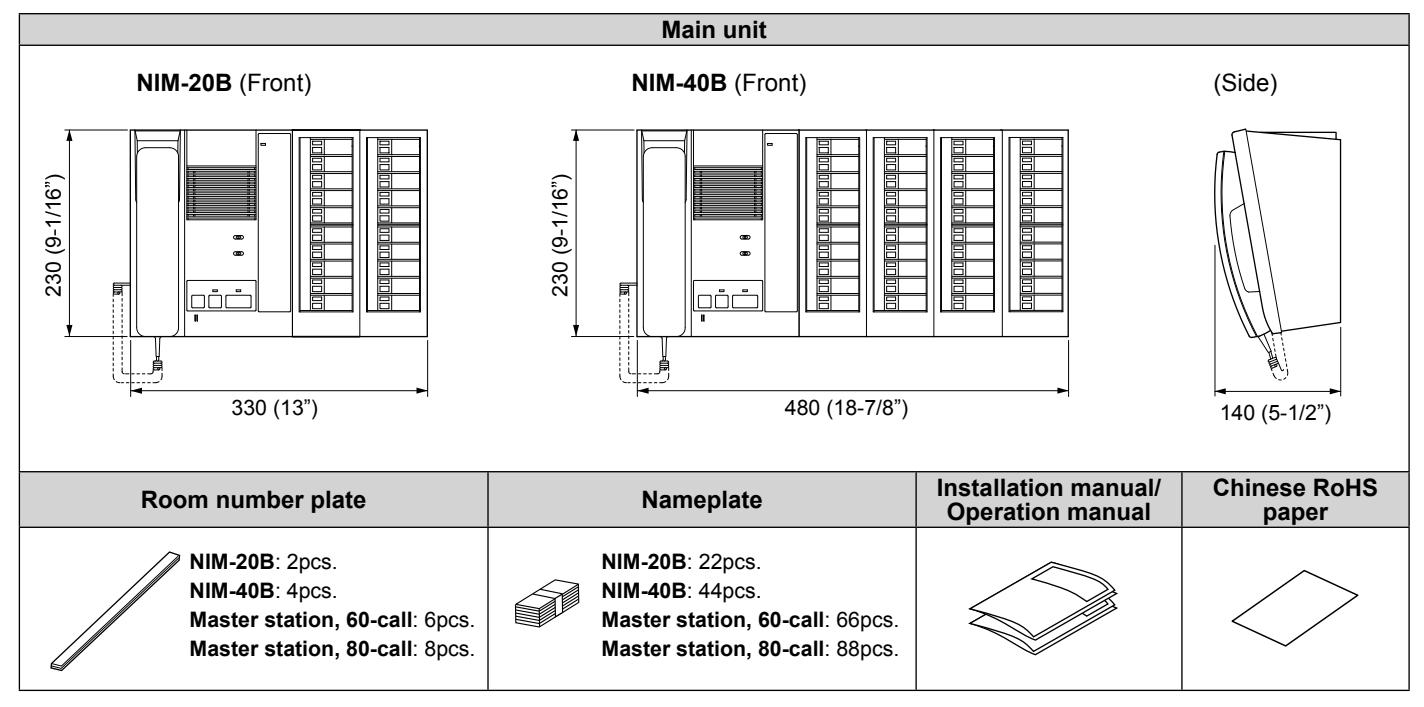
Verify that the following parts are included for each product package.
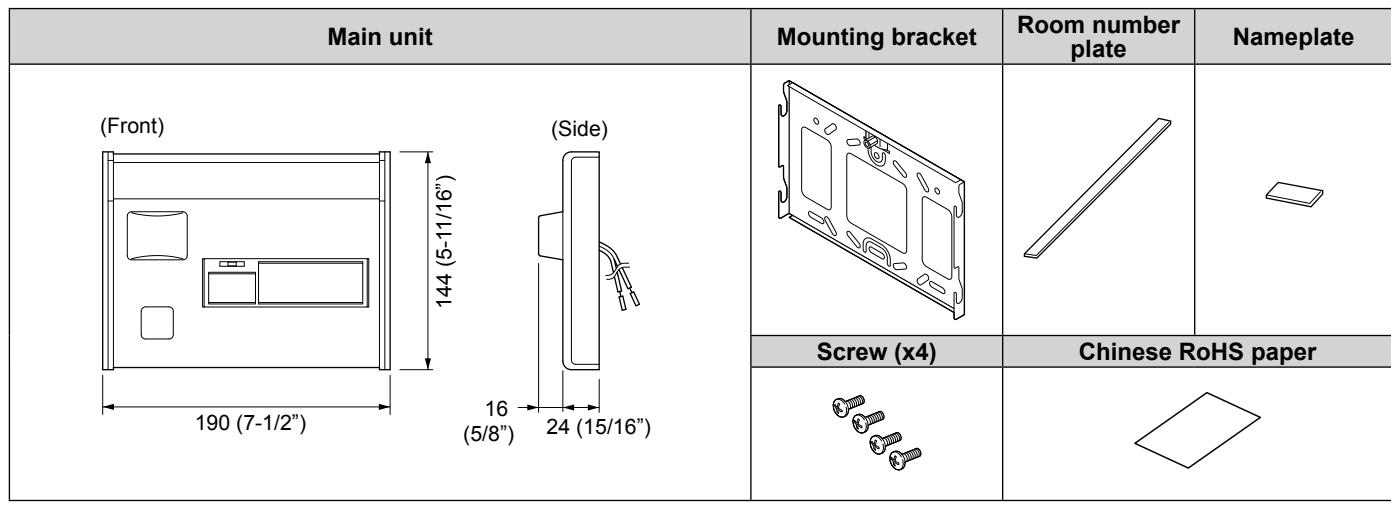
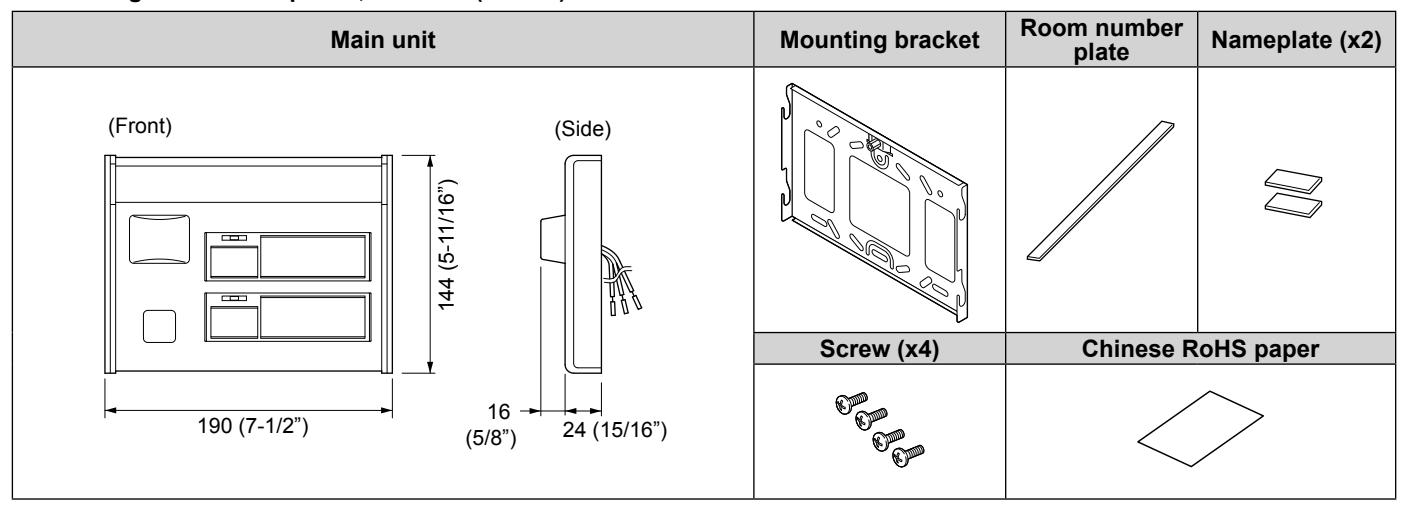
* Dimensions are shown in millimeters (inches).
Master station
- Master station, 20-call (NIM-20B)
- Master station, 40-call (NIM-40B)
- * Master station, 60-call ( *) or Master station, 80-call ( *) is also available.
( *): Special order product. N/A in North America.
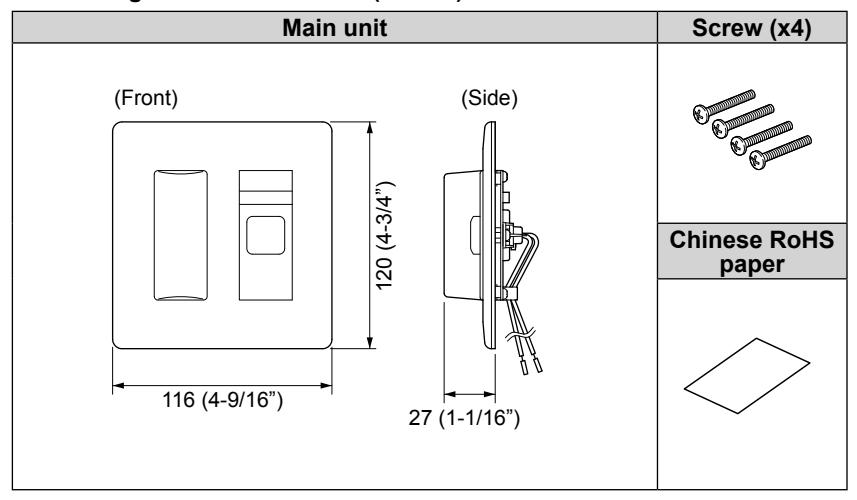
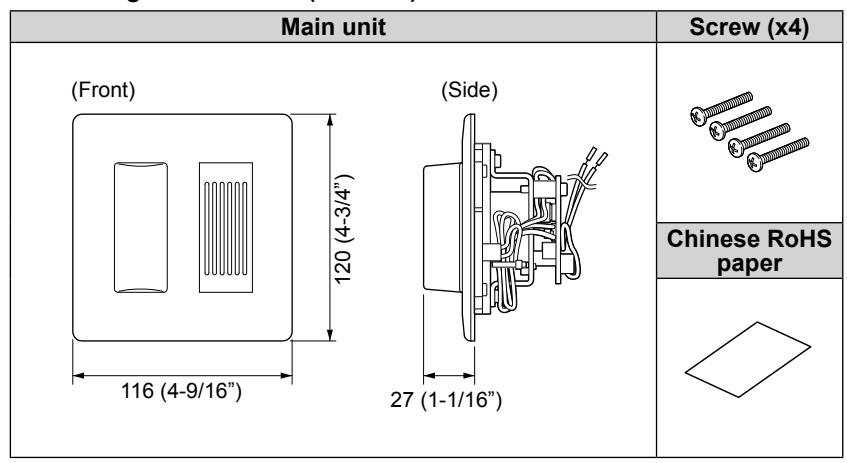
Sub station, call button, wall jack
■ Bedside handheld sub station (NI-RC)
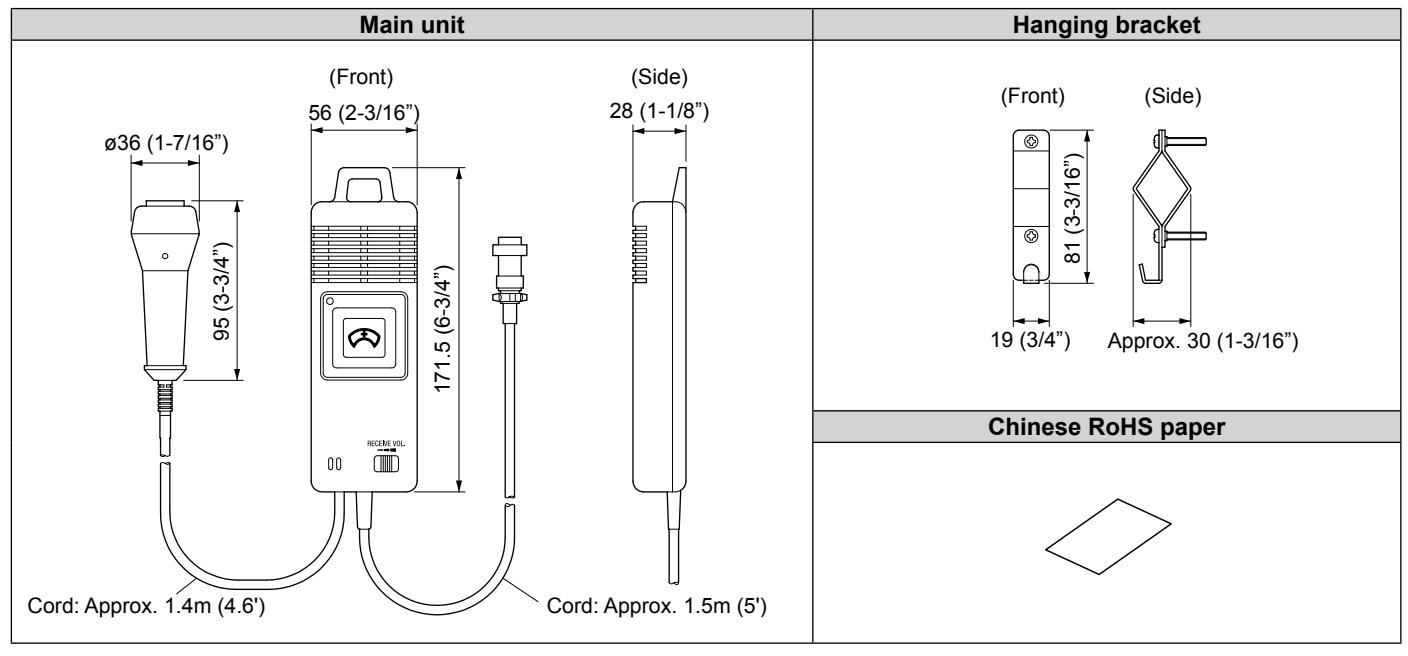
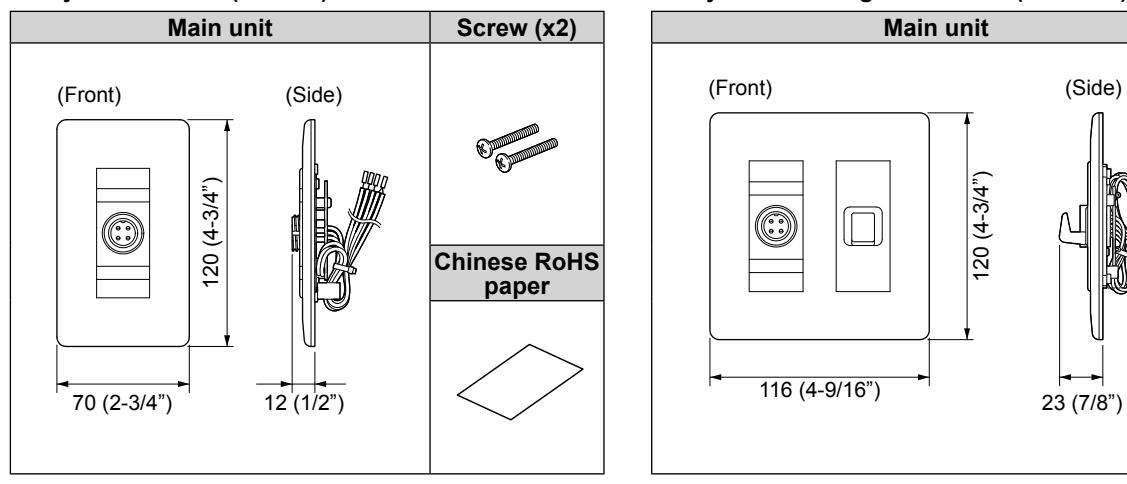
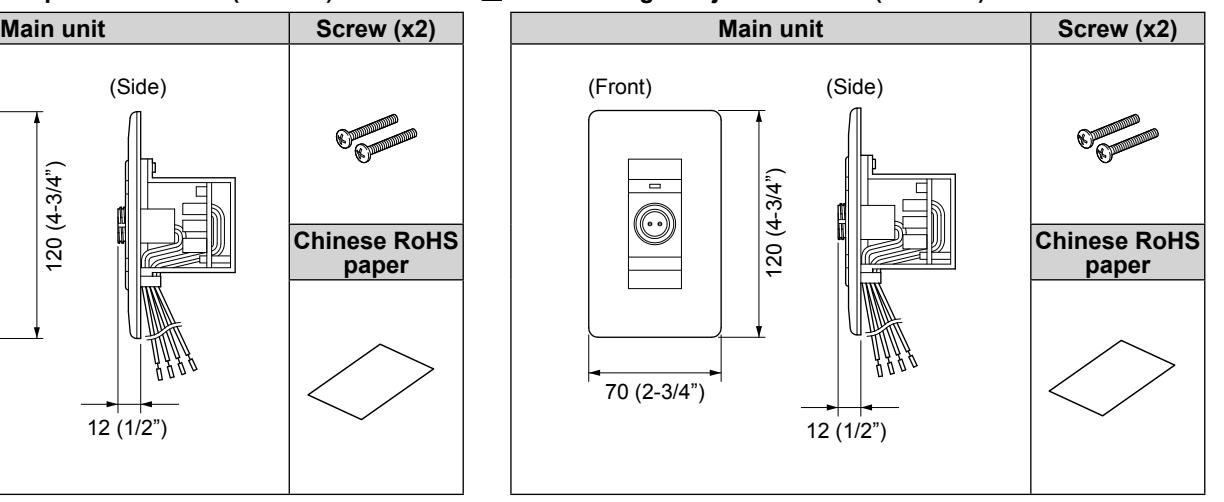
■ Wall jack for NI-RC (NIR-HP) ■ Wall jack with hanger for NI-RC (NIR-HPF)
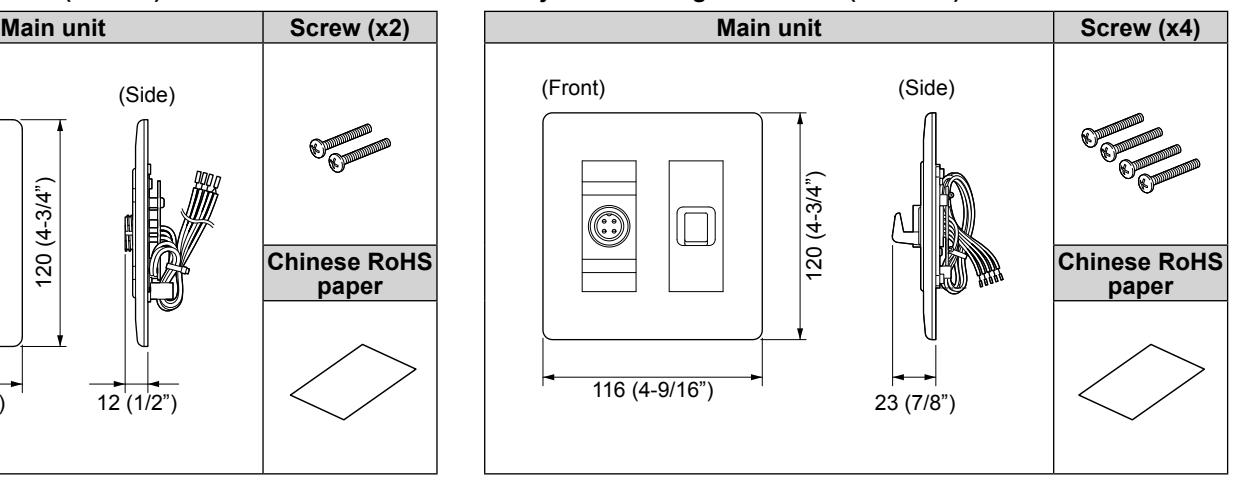
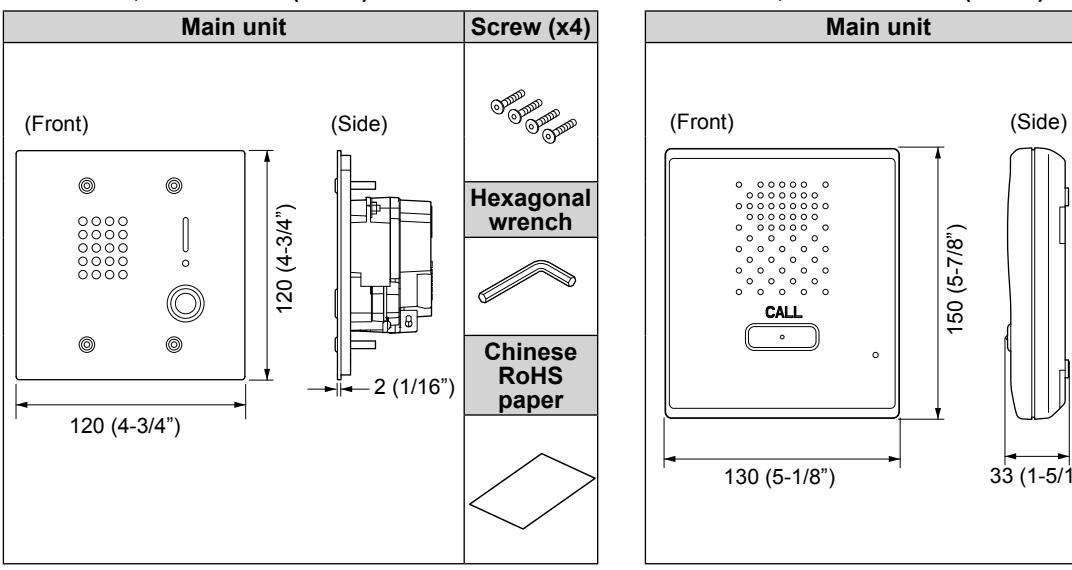
■ Sub station, fl ush mount (NI-JA) ■ Sub station, surface mount (NI-BA)
■ Bedside call switch (NIR-8) ■ Wall jack for NIR-8 (NIR-1)
■ Wall jack with microphone for NIR-8 (NIR-MB) ■ Call latching wall jack for NIR-8 (NIR-7BS)
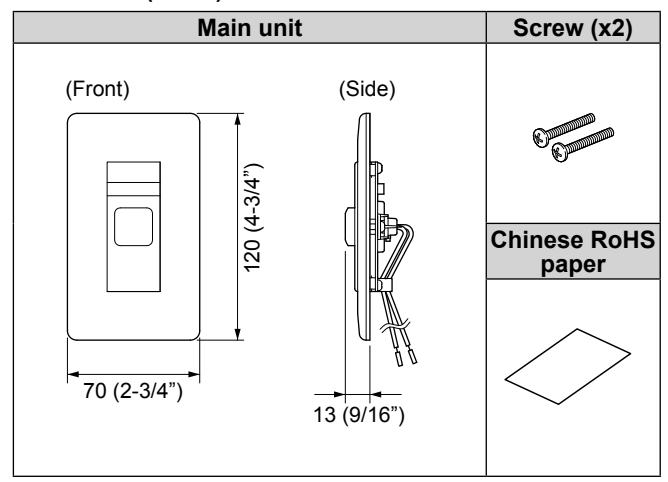
■ Call button (NIR-6)
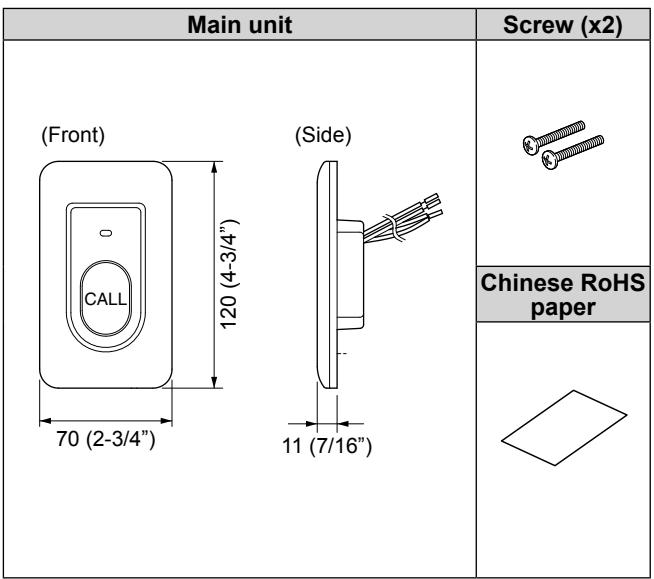
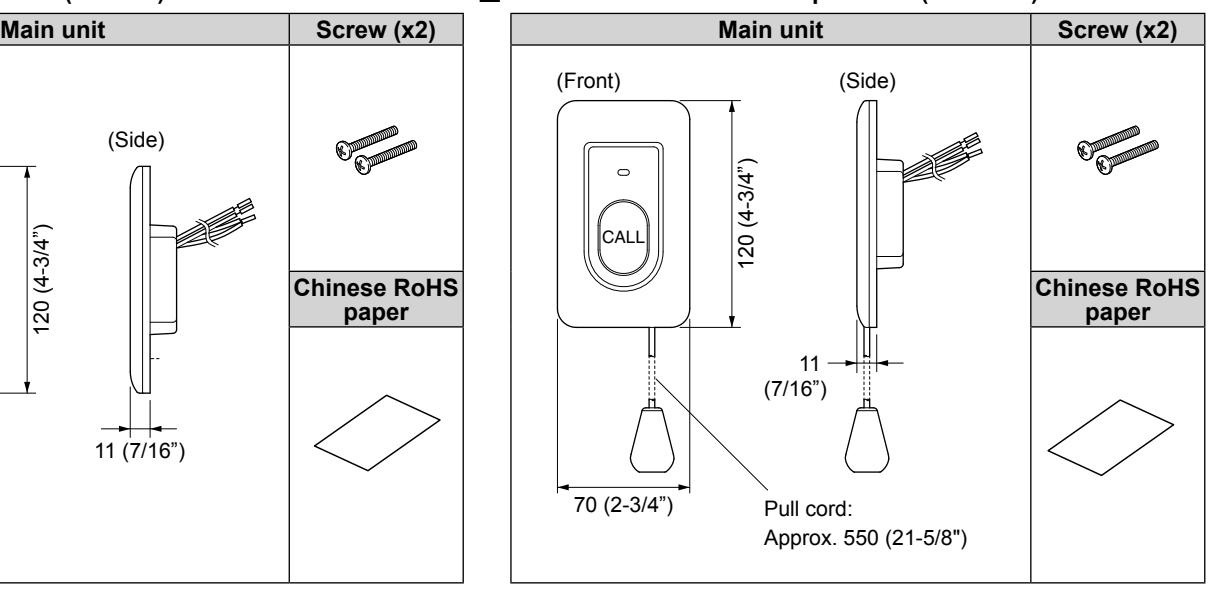
■ Bathroom call button (NIR-7W) ■ Bathroom call button with pull cord (NIR-7HW)
Ceiling speaker, ceiling microphone
■ Ceiling speaker (NI-LB)
■ Ceiling microphone (NI-SB)
Corridor light, reset button
- Corridor light, single bed (NIR-4)
- Corridor light, multiple beds (NIR-4S)
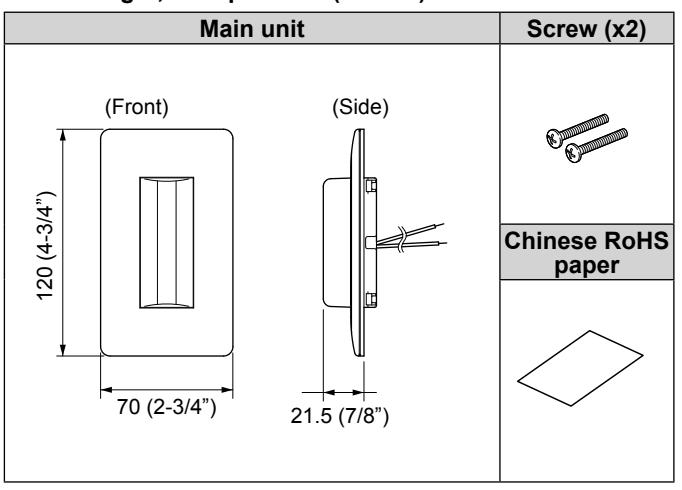
■ Call reset button (NIR-2)
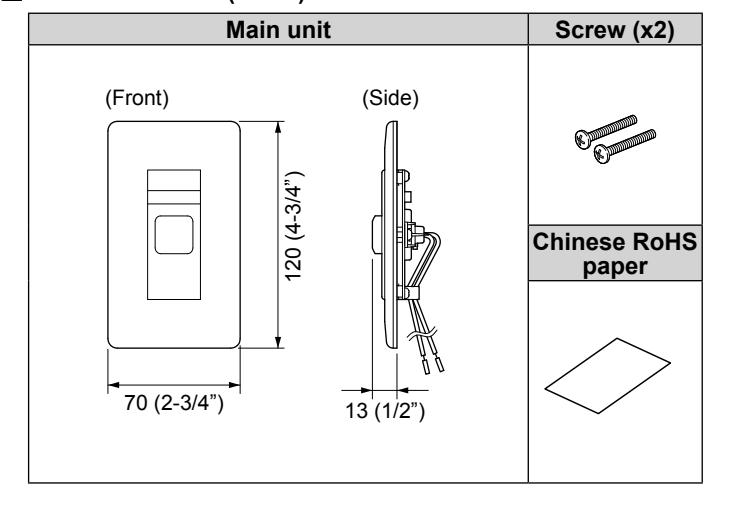
■ Corridor light with reset button (NIR-42)
■ Corridor light with buzzer (NIR-4BZ)
■ Corridor light with nameplate, 1 name (NIR-31)
■ Corridor light with nameplates, 2 names (NIR-32)
■ Corridor light with nameplates, 4 names (NIR-34)
| Main unit | Mounting bracket |
Room number
plate |
Nameplate (x4) |
|---|---|---|---|
|
(Side)
(Front) 144 (5-11/16") |
|||
| 16 | Screw (x4) | Chinese RoHS paper | |
|
306 (12-1/16")
24 (15/16") (5/8") |
Software
■ Call log software (NI-SOFT)
| CD-ROM | RS232C cable |
Product Key code paper/
Chinese RoHS paper |
|---|---|---|
MOUNTING
This section illustrates the mounting procedures for wall- and ceiling-mount equipment.
■ Ceiling speaker (NI-LB)
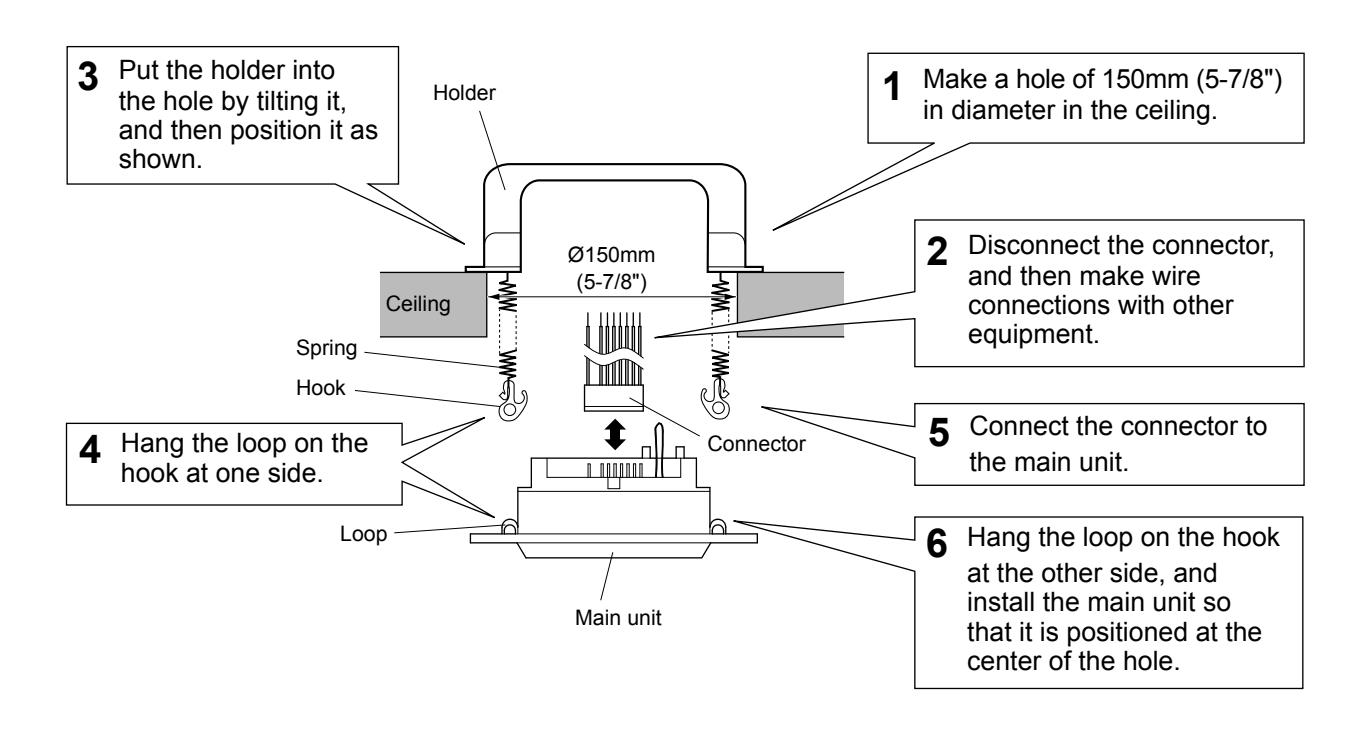
■ Ceiling microphone (NI-SB) 66.7mm (2-11/16") Main unit Ceiling Wood screw x 2 (included) Central part Cut 1 the ceiling so that the central part of the unit fi ts in. Make wire 2 connections with the other equipment. Fasten the unit to the 3 wall with the wood screws. W: 47mm (1-7/8") Opening dimensions H: 38mm (1-1/2") D: 40mm (1-9/16")
NOTE:
• Make sure to mount the ceiling microphone 50 cm (20") apart from the ceiling speaker to prevent audio feedback.
ø105mm (4-3/16")
- Pay attention to the depth of the unit.
- Use board anchors or concrete plugs as needed on a concrete wall.
■ Wall jack (NIR-HP, NIR-1, NIR-MB, NIR-7BS) Call button (NIR-6) Corridor light (NIR-4, NIR-4S) Call reset button (NIR-2)
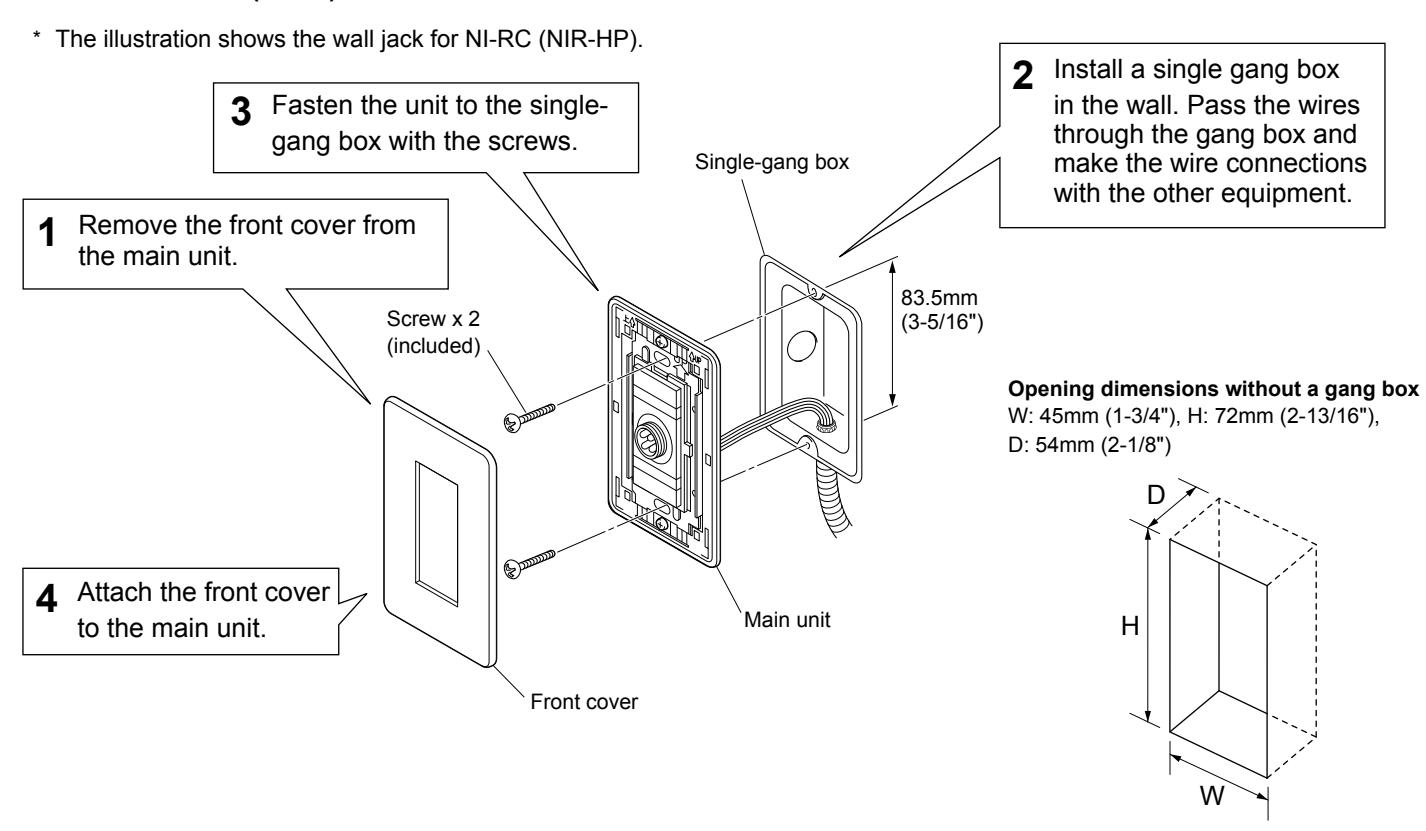
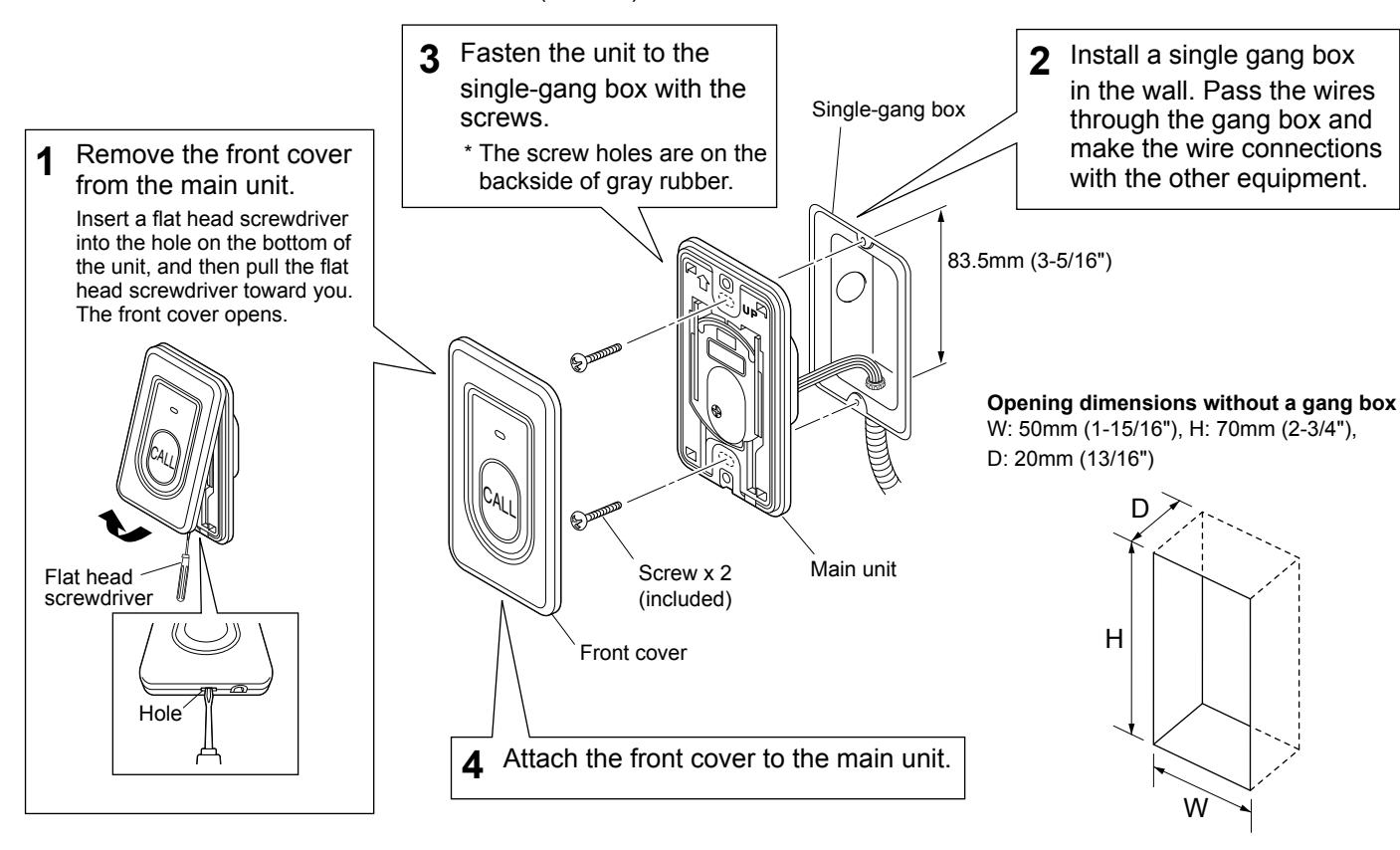
Bathroom call button (NIR-7W, NIR-7HW)
* The illustration shows the bathroom call button (NIR-7W).
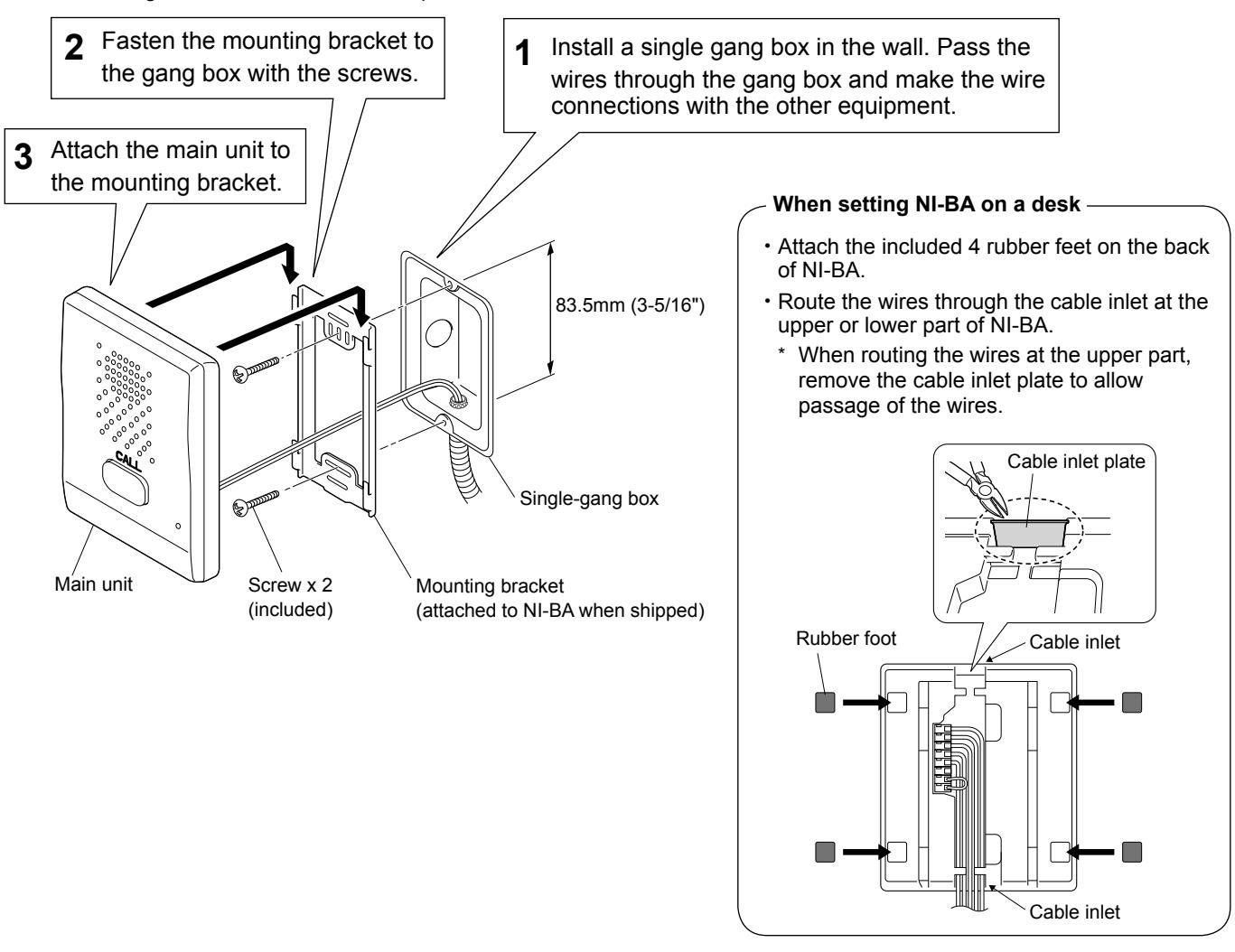
■ Sub station, surface mount (NI-BA)
* When mounting NI-BA on a wall, follow the procedure shown below.
■ Sub station, flush mount (NI-JA)
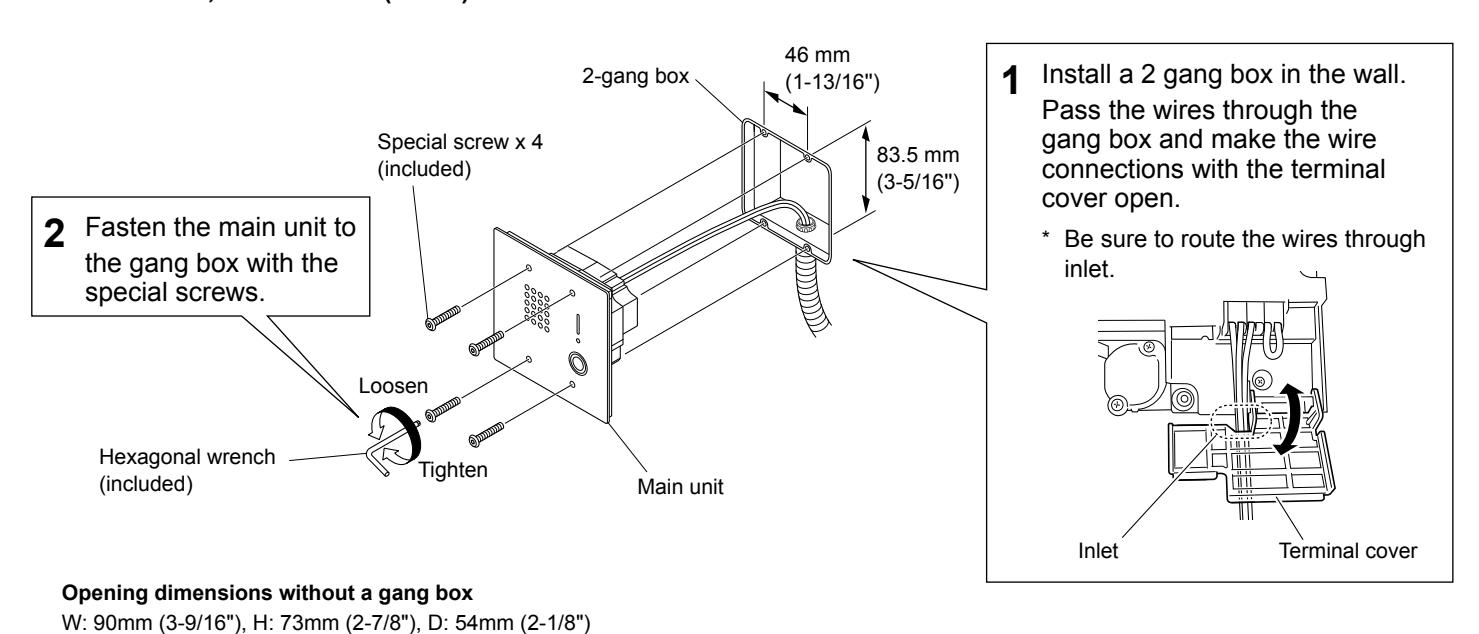
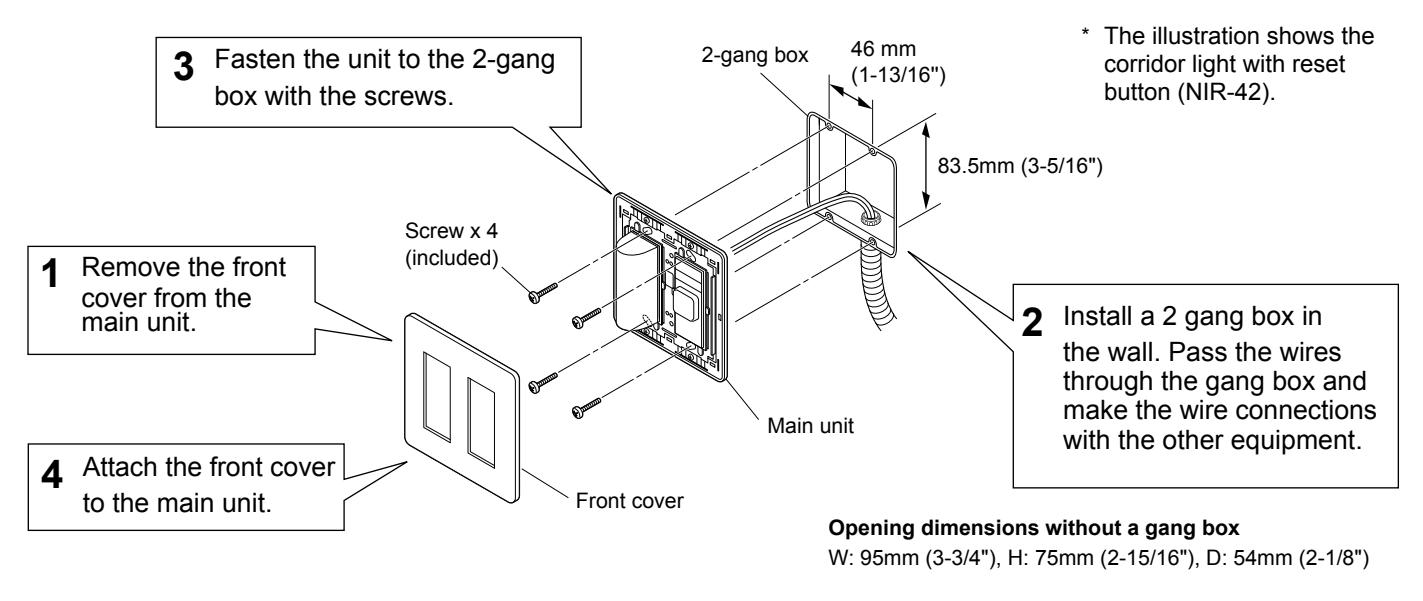
■ Wall jack (NIR-HPF) Corridor light (NIR-42, NIR-4BZ)
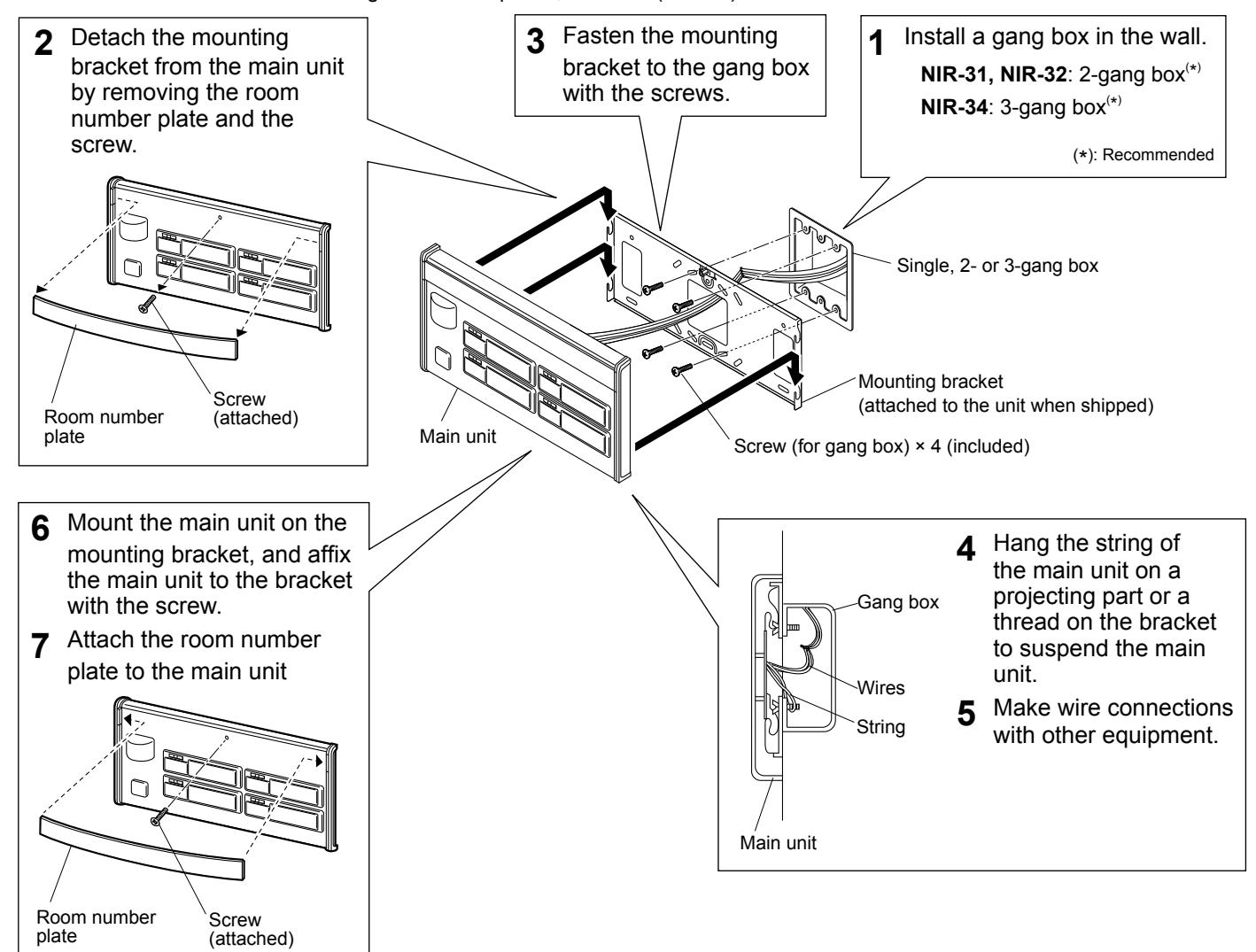
■ Corridor light with nameplate (NIR-31, NIR-32, NIR-34)
* The illustration shows the corridor light with nameplates, 4 names (NIR-34).
Connection wiring diagram (outline)
The following is an example of basic wiring diagram.
* The wiring methods differ depending on the equipment used. Refer to page 20 to 29 for details about various wiring methods.
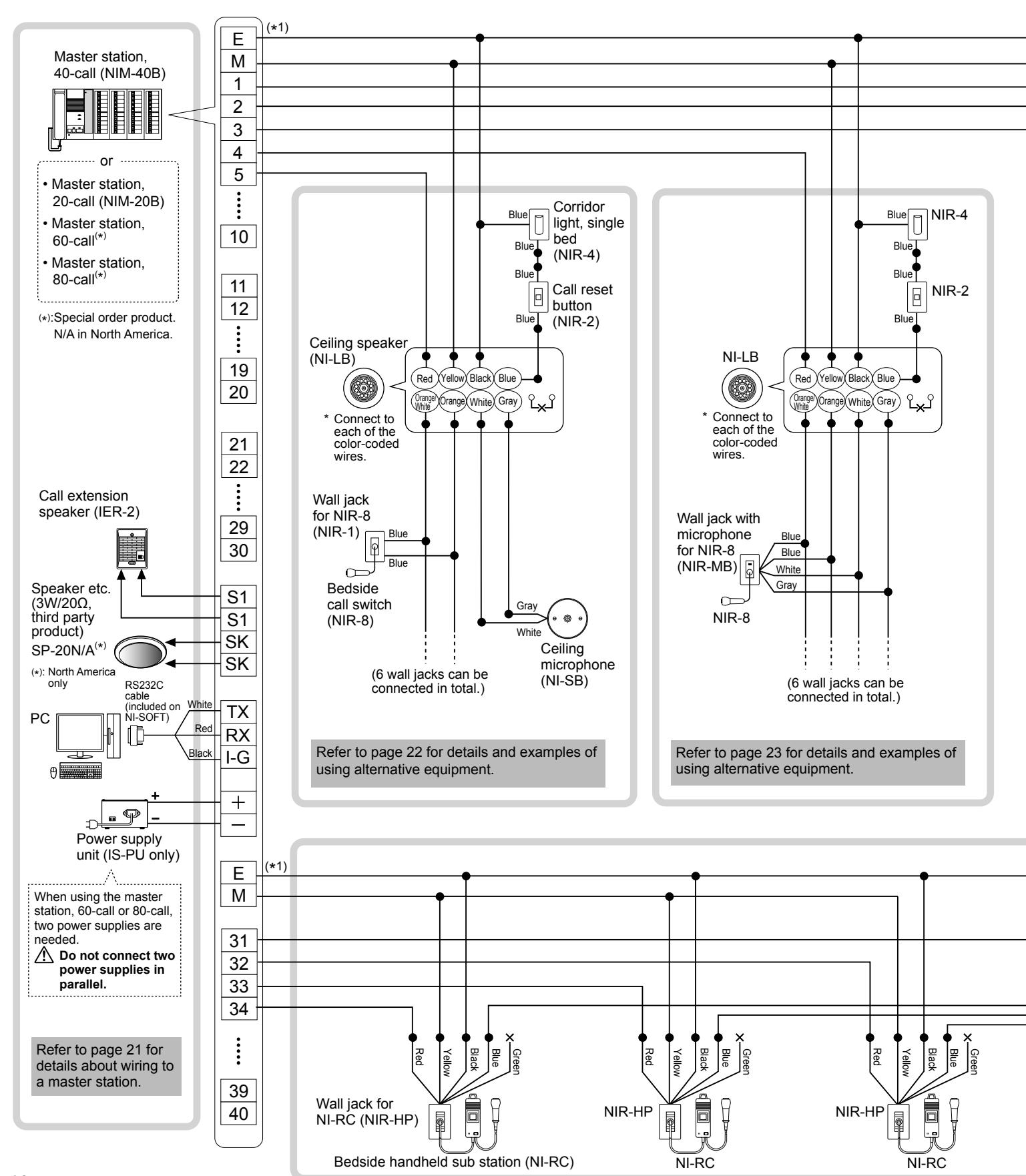
-
( *1): • The common line E and individual channel lines should be in the same sheath wiring.
- The remainder wires in the same sheath wiring should be connected to the common line E of the master station for noise prevention.
■ Wiring distance
| Wire diameter | Maximum distance | |
|---|---|---|
| Master station - sub station |
Ø0.65mm (22 AWG)
Ø0.9mm (18 AWG) |
130m (425')
200m (650') |
| Master station - power supply unit | Ø0.9mm (18 AWG) | 10m (33') |
|
Master station - call extension
speaker (IER-2), speaker etc. |
Ø0.9mm (18 AWG) | 50m (165') |
■ Master station terminal marking
- E : Common line (for earth ground)
- M : Common line (for microphone)
- 1 ... 10 , 11 ... : Individual channel line
■ Meanings of symbols
- : Wire-to-wire connection
- : The wire should be cut and insulated.
Handling cables
Notes about handling cables
* Cables and connectors are not included with the products.
■ Notes on cables
• Use PE (polyethylene)-insulated PVC jacketed cable. Parallel or jacketed conductors, mid-capacitance, non-shielded cable is recommended.
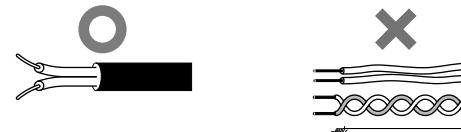
• Never use twisted pair cable or coaxial cable.
■ How to connect or disconnect stranded wires.
• To ensure that the wire won't bend, press the release button while inserting into terminal.
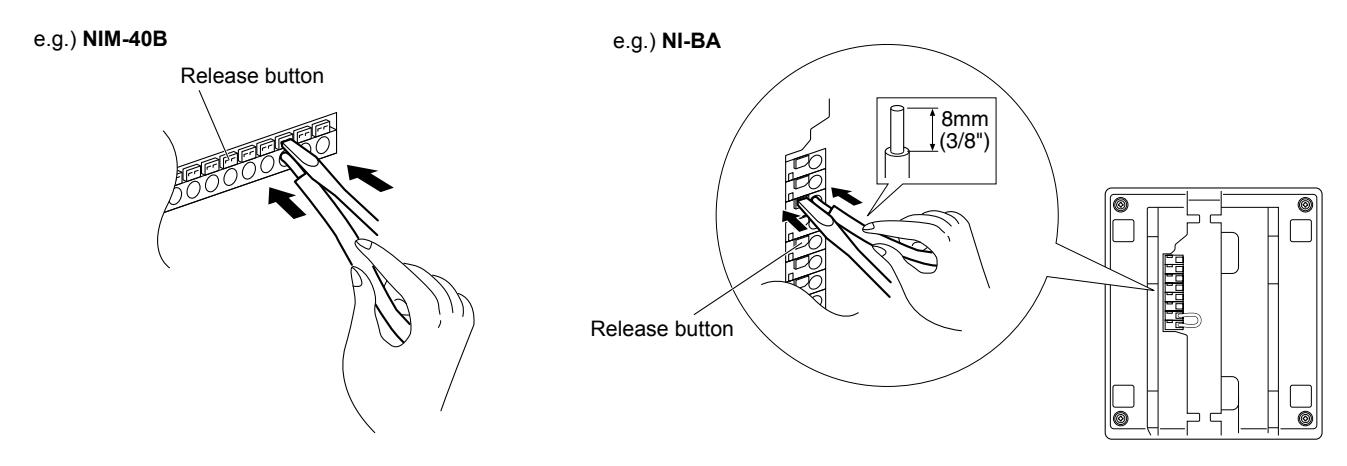
■ Note about wire-to-wire connection.
Make wire-to-wire connections securely as shown below.
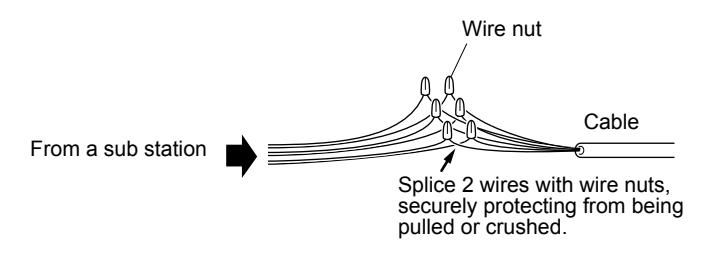
Connection wiring diagram (details)
Connecting to the master station
Procedure
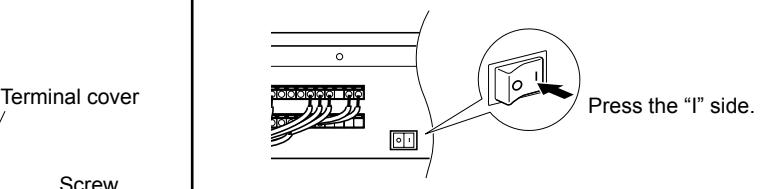
Detach the terminal cover by removing the two 1 screws.
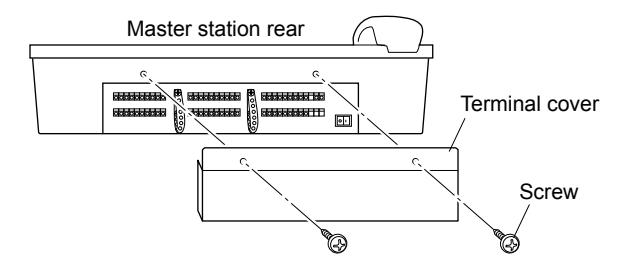
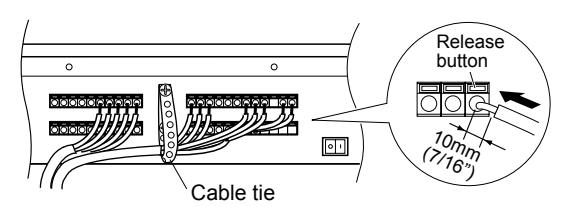
Connect the wiring from the sub stations and power 2 supply to the master station by inserting lead wires to the corresponding terminals.
Using the cable tie is recommended for secure installation.
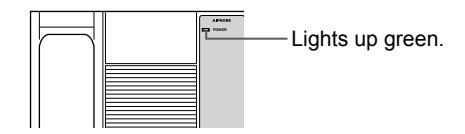
After the connections for the whole system have 3 been completed, turn on the power switch.
The power indicator on the operation panel lights up.
Attach the terminal cover with the two screws. 4
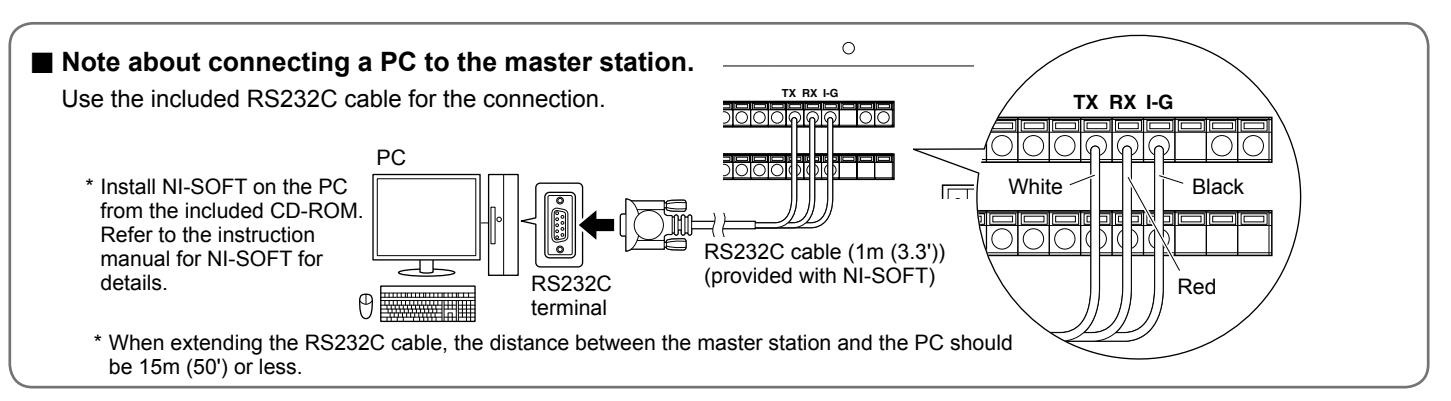
CAUTION
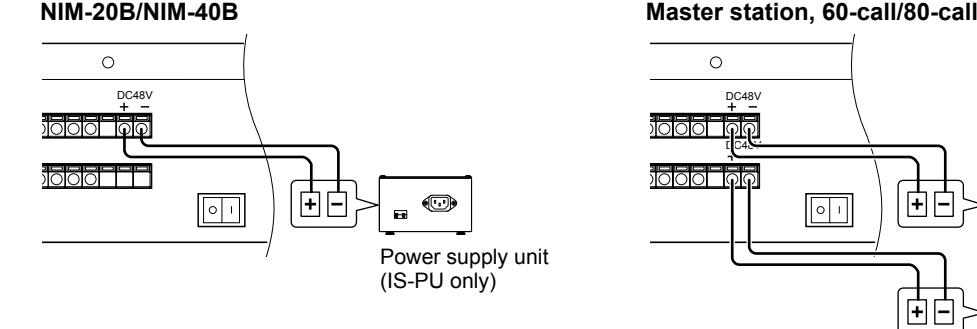
■ Note about connecting the power supply unit(s) to the master station.
* When using the master station, 60-call or 80-call , two power supply units are needed.
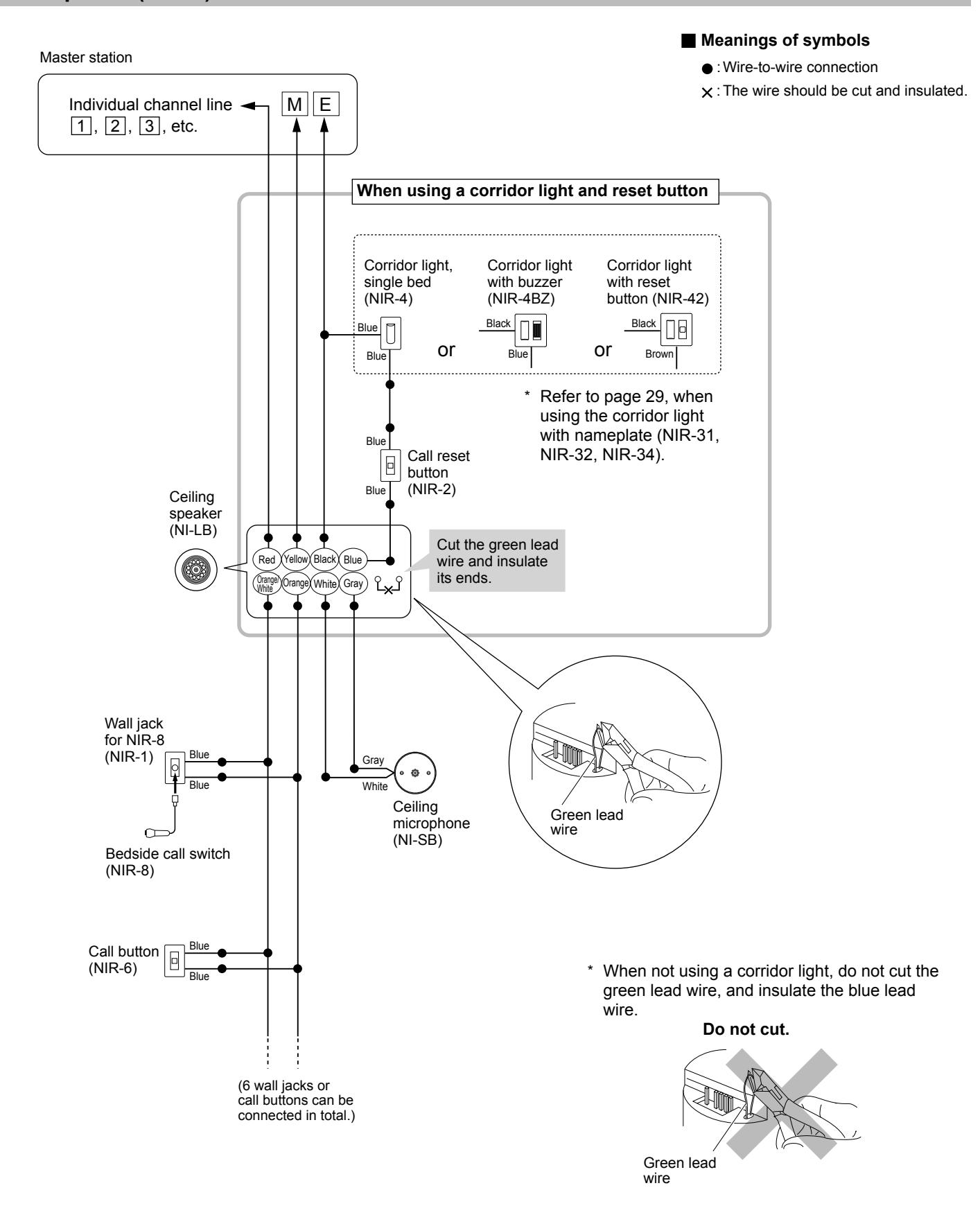
Multiple-user room examples of using the ceiling speaker (NI-LB) and the ceiling microphone (NI-SB)
Multiple-user room examples of using the ceiling speaker (NI-LB) and not using the ceiling microphone (NI-SB)
Master station
■ Meanings of symbols
- : Wire-to-wire connection
- : The wire should be cut and insulated.
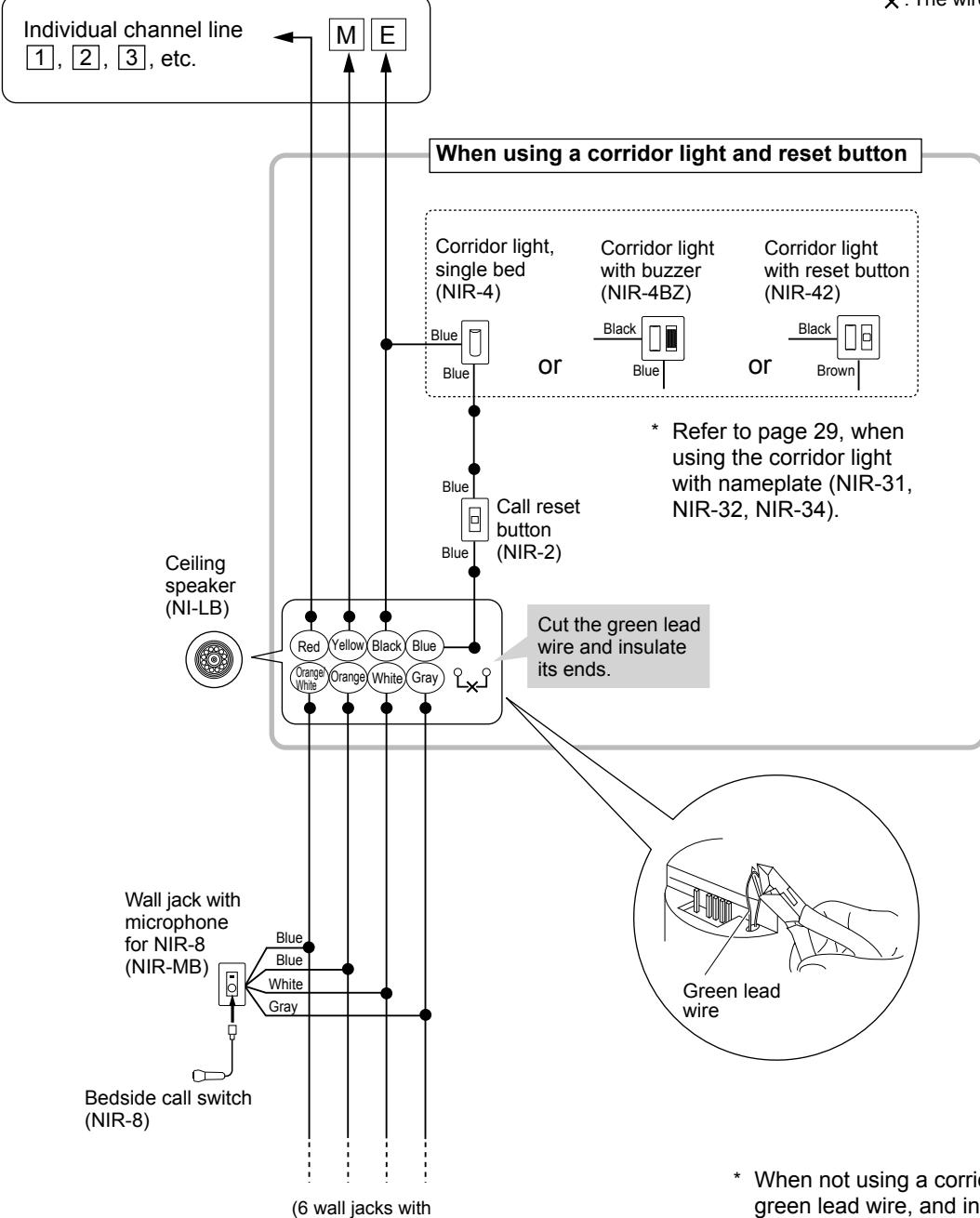
microphone can be connected in total.)
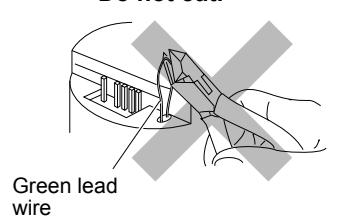
* When not using a corridor light, do not cut the green lead wire, and insulate the blue lead wire.

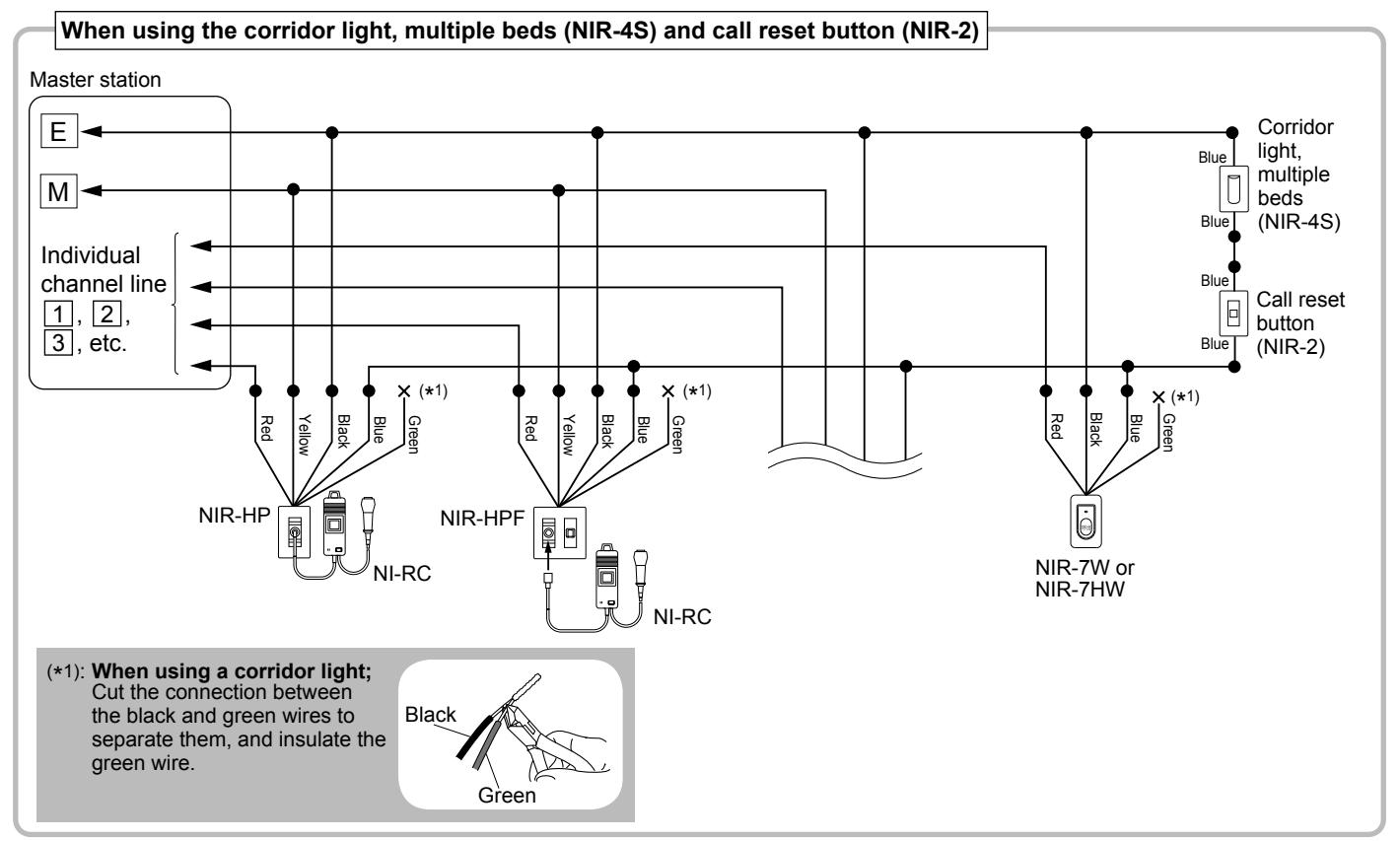
Multiple-user room examples of using the bedside handheld sub stations (NI-RC) etc.
E M Brown Black Orange Red Yellow * 1) CALL Red Black Blue Green * 1) Red Yellow Black Blue Red Yellow Black Blue Green * 1) Green NI-RC Individual channel line 1 , 2 , 3 , etc. Wall jack for NI-RC (NIR-HP) Wall jack with hanger for NI-RC (NIR-HPF) Bathroom call button (NIR-7W or NIR-7HW) Bedside handheld sub station (NI-RC) Corridor light with nameplates, 4 names (NIR-34) * Refer to page 29 for the detailed connection method for the corridor light with nameplate (NIR-34, NIR-32 and NIR-31). *1): When using a corridor light; Cut the connection between the black and green wires to separate them, and insulate the green wire. Master station Green Black ■ Meanings of symbols : Wire-to-wire connection : The wire should be cut and insulated.
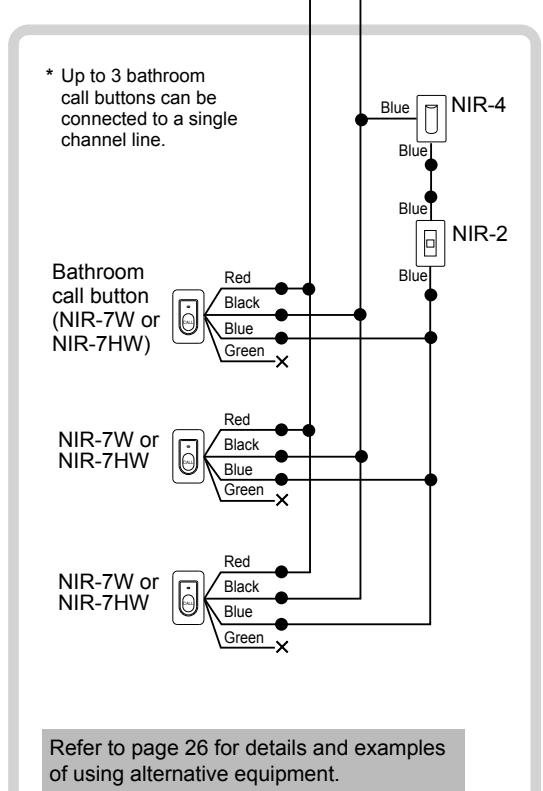
Examples of using the bathroom call buttons (NIR-7W or NIR-7HW)
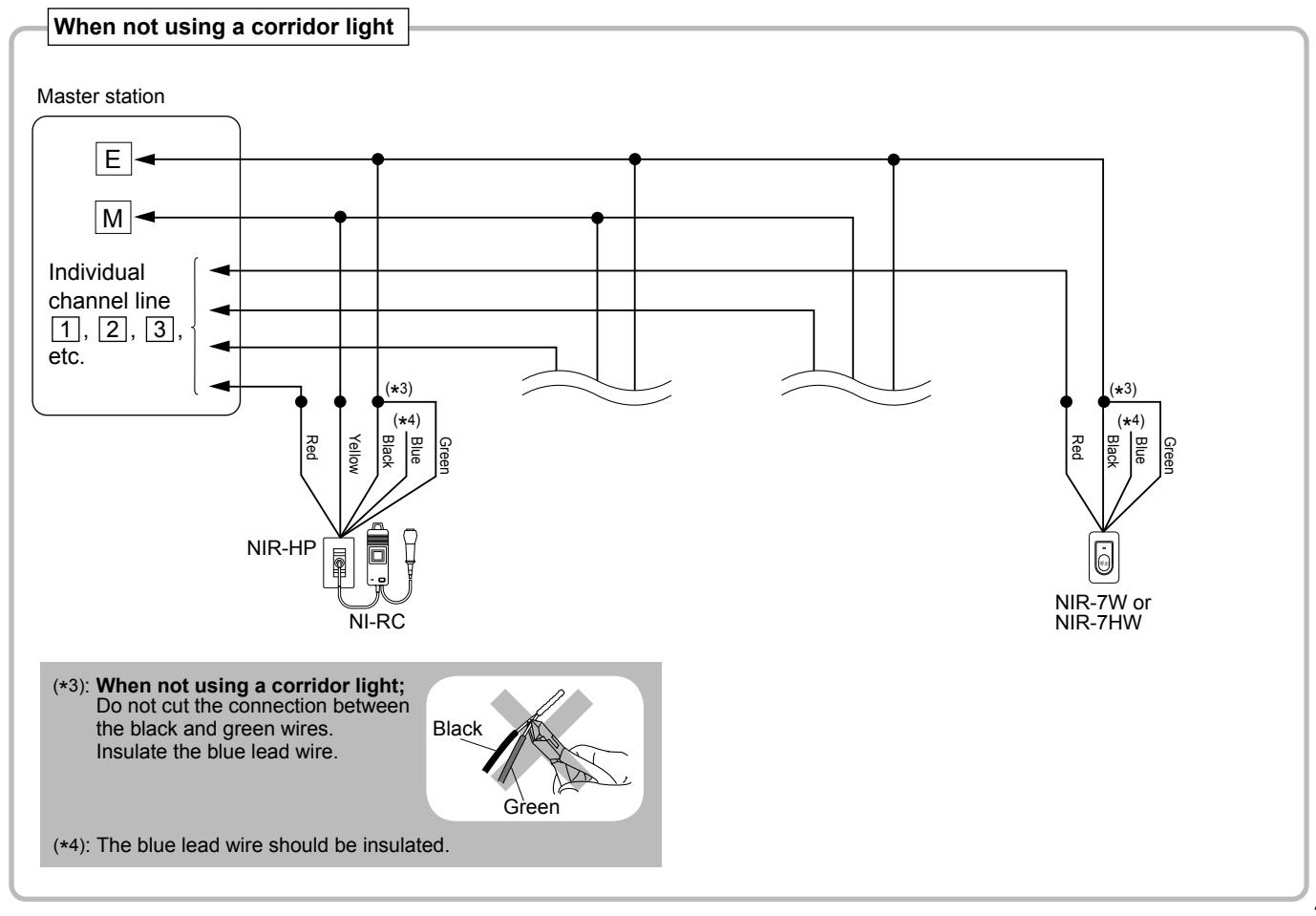
When using a corridor light and reset button ■ Meanings of symbols • : Wire-to-wire connection Master station x: The wire should be cut and insulated. Ε Individual channel line 1, 2, 3, etc. Corridor light, Corridor light Corridor light single bed with buzzer with reset button (NIR-42) (NIR-4) (NIR-4BZ) Refer to page 29, when Blue using the corridor light with nameplate (NIR-31, NIR-32, or or Blue NIR-34). Bathroom Call reset button call button Bathroom (NIR-2) with pull call button cord (NIR-7HW) (NIR-7W) When not using a corridor light Master station NIR-7HW NIR-7W Individual channel line 1, 2, 3, Ε etc. NIR-7W NIR-7W NIR-7HW × (*1) (*2): When not using a corridor light; NIR-7W (*1): When using a corridor light; Do not cut the , Black connection between the black Cut the connection Black between the black and and green wires. green wires to separate Insulate the blue them, and insulate the lead wire. green wire. NIR-7W Black Black Blue
(*3): The blue lead wire should be insulated.
* Up to 3 bathroom call buttons can be connected to a single channel line.
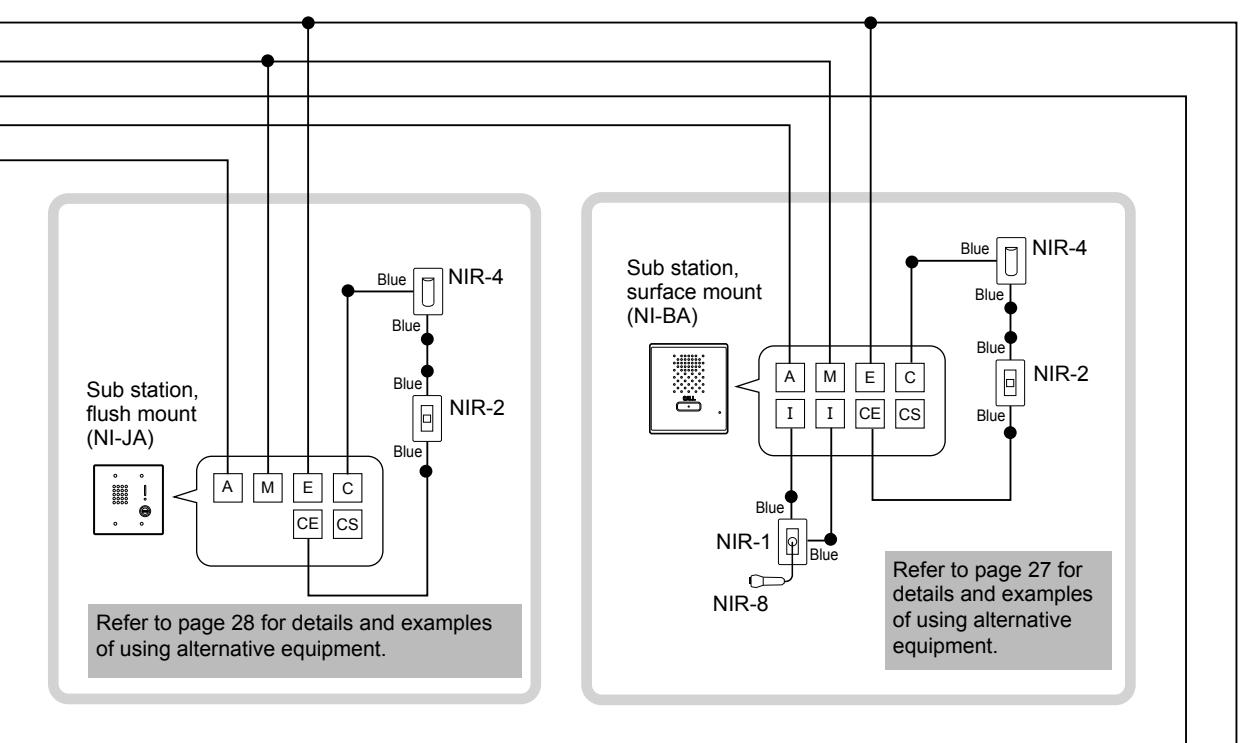
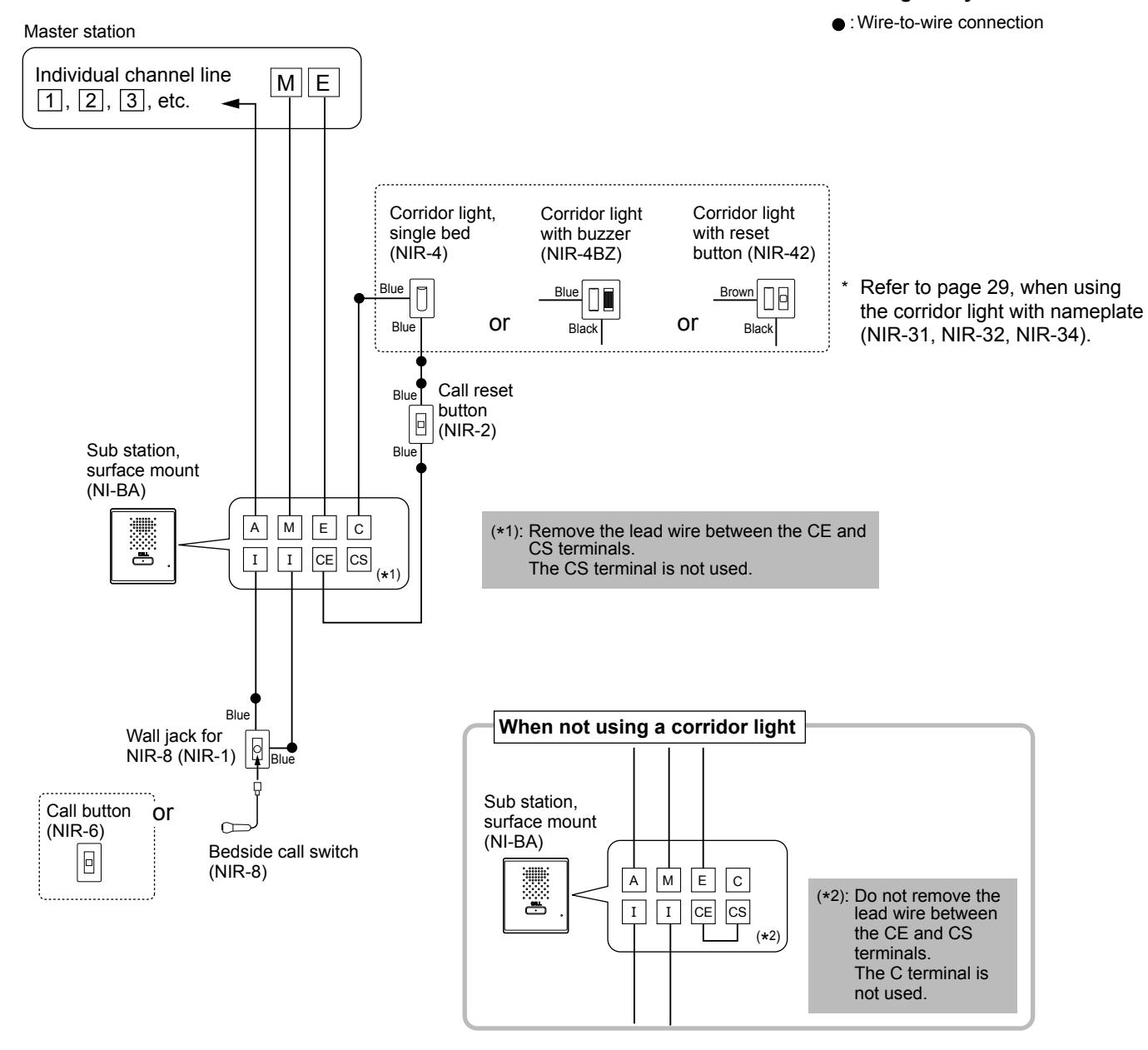
Single room examples of using the surface mount sub station (NI-BA)
When using a corridor light and reset button

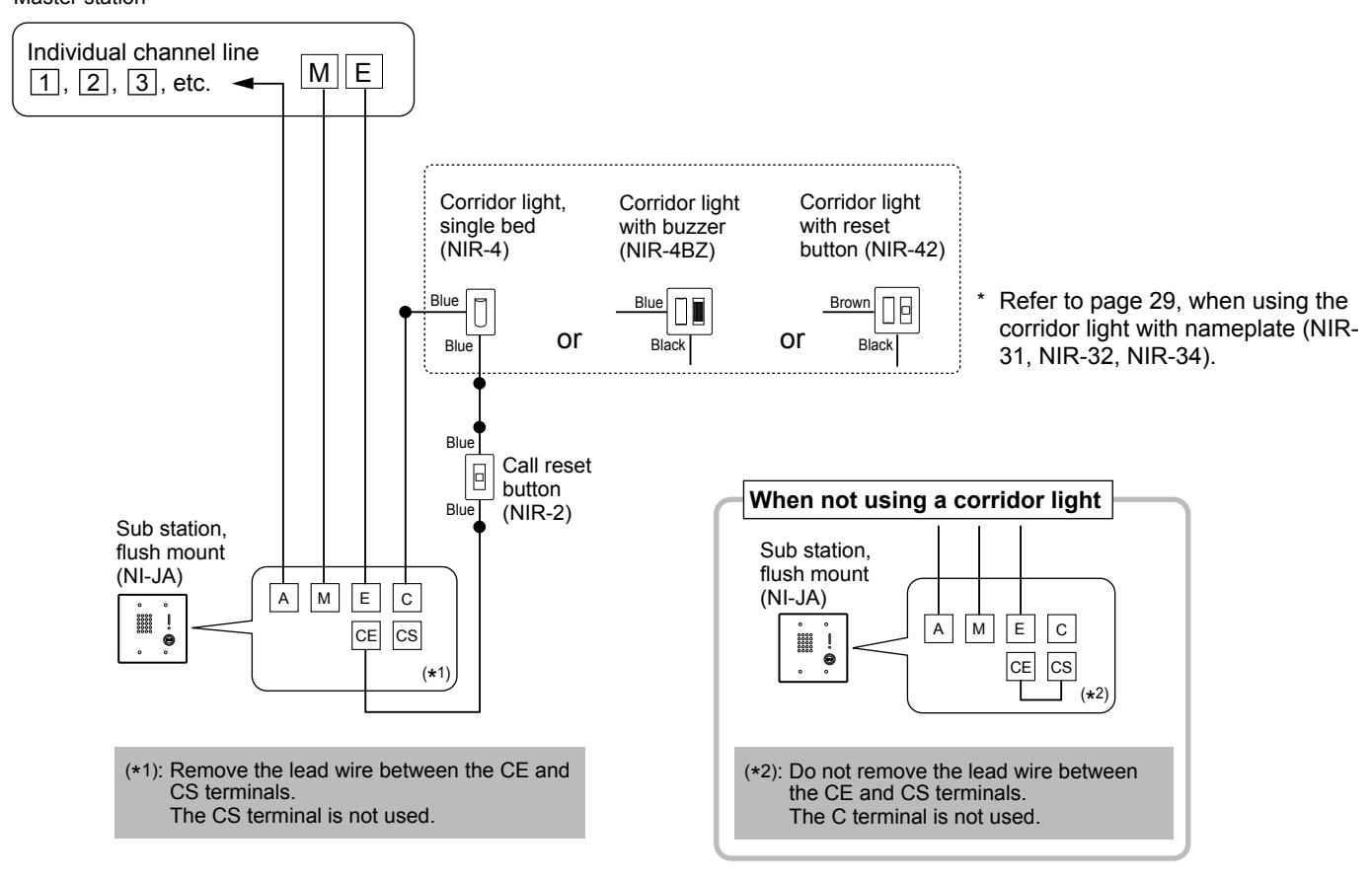
Examples of using the fl ush mount sub station (NI-JA)
When using a corridor light and reset button
■ Meanings of symbols
: Wire-to-wire connection
Master station
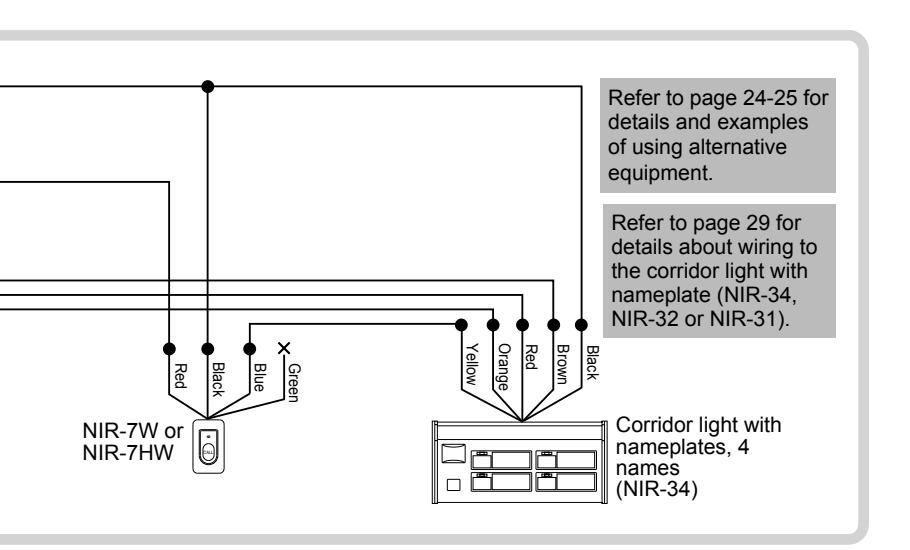
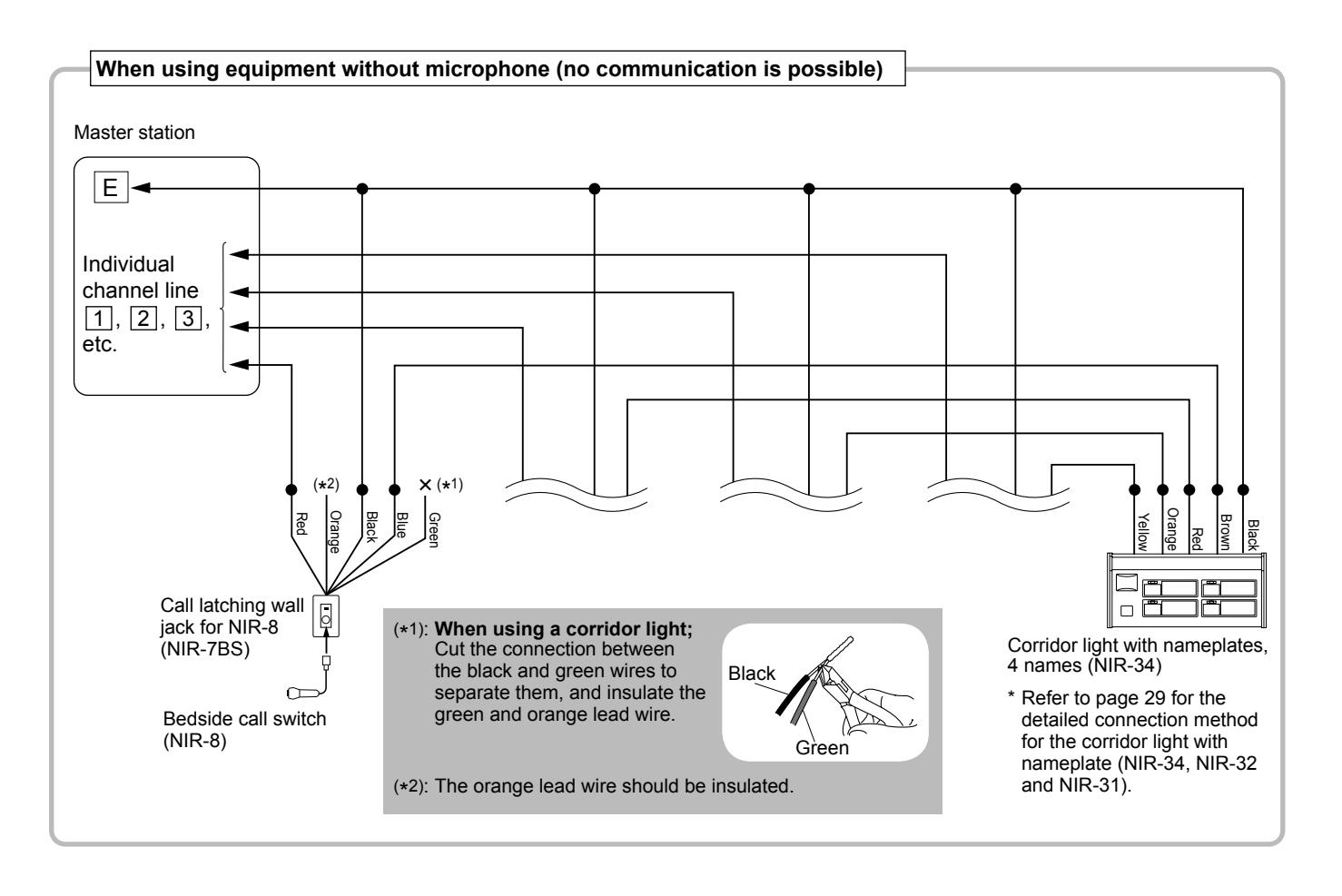
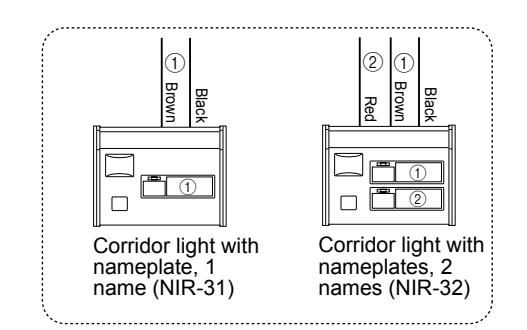
Notes about connecting to a corridor light with nameplate (NIR-31, NIR-32, NIR-34)
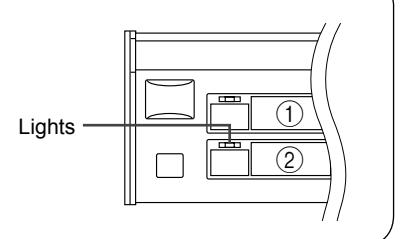
The individual user displays and the corresponding lead wire colors are as follows.
When the call button of a sub station connected to one of the color-coded lead wires of the corridor light is pressed, the corresponding number of the call indicator lights.
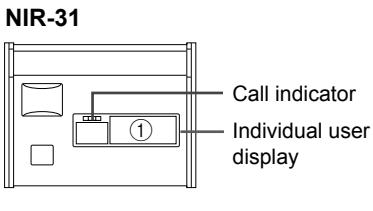
|
Individual
user display |
Color of lead wire |
|---|---|
| 1 | Brown |
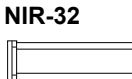
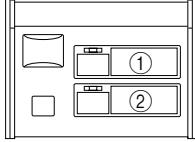
| Individual user display | Color of lead wire |
|---|---|
| 1 | Brown |
| 2 | Red |

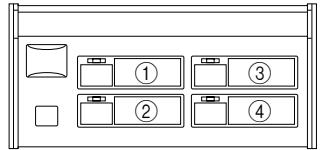
| Individual user display | Color of lead wire |
|---|---|
| 1 | Brown |
| 2 | Red |
| 3 | Orange |
| 4 | Yellow |
e.g.
When the call button of the sub station connected to the red lead wire is pressed, the call indicator of display ② lights.
Wiring example
Master station
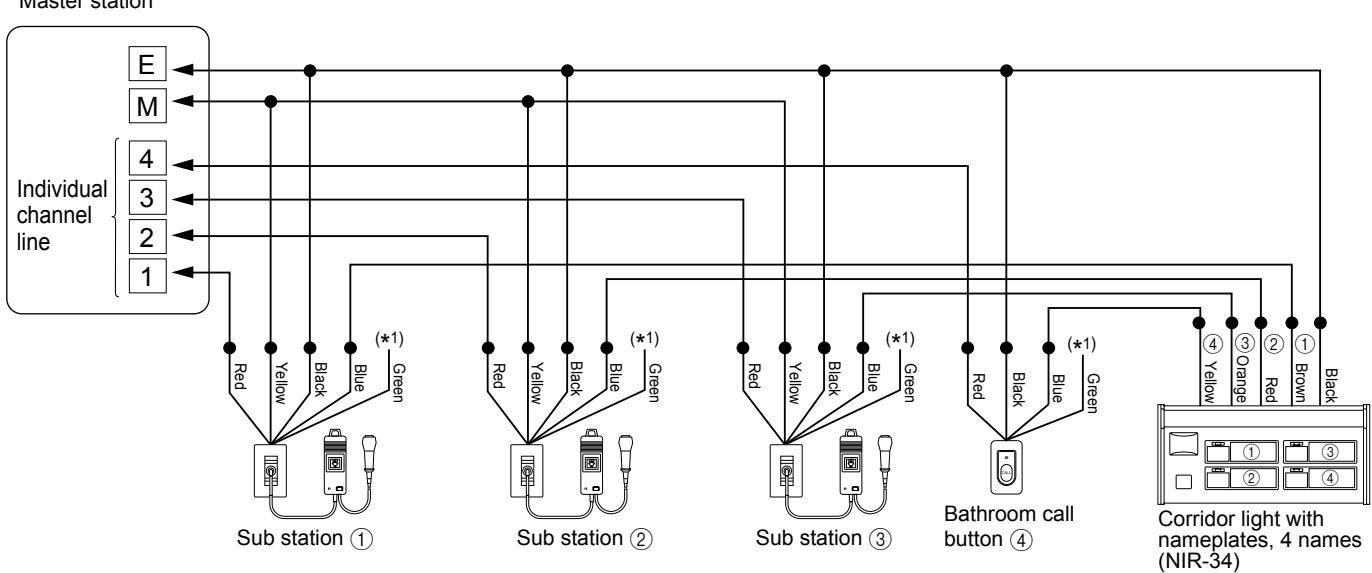
■ Meanings of symbols
• : Wire-to-wire connection
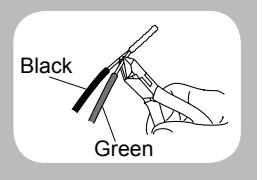
(*1): When using a corridor light; Cut the connection between the black and green wires to separate them, and insulate the green wire.
Adjusting volume and ringtone settings
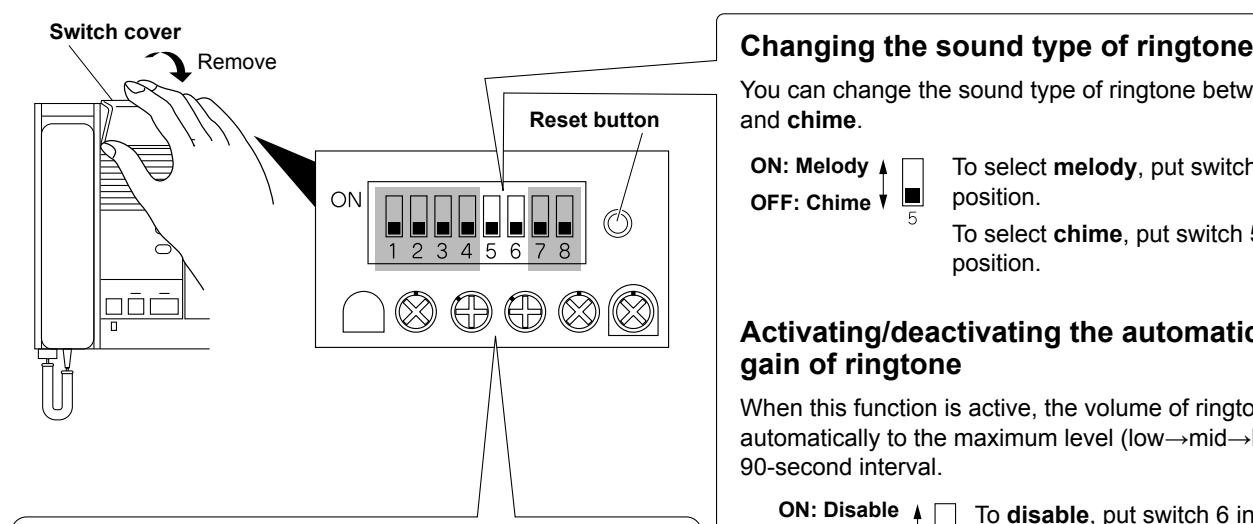
For these changes, use the switches and control knobs under the switch cover by removing the cover.
Adjusting volume
To adjust:
Turn the control knob clockwise to increase and counterclockwise to decrease the volume.

You can change the sound type of ringtone between melody and chime .
OFF: Chime ON: Melody
To select melody , put switch 5 in UP position.
To select chime , put switch 5 in DOWN position.
Activating/deactivating the automatic volume gain of ringtone
When this function is active, the volume of ringtone increases automatically to the maximum level (low→mid→high) in a 90-second interval.
OFF: Enable ON: Disable
To disable , put switch 6 in UP position. To enable , put switch 6 in DOWN position.
* : Do not change these switches. They have been preset in the optimum positions.
NOTE: After modifying the settings, press the reset button to apply new settings.
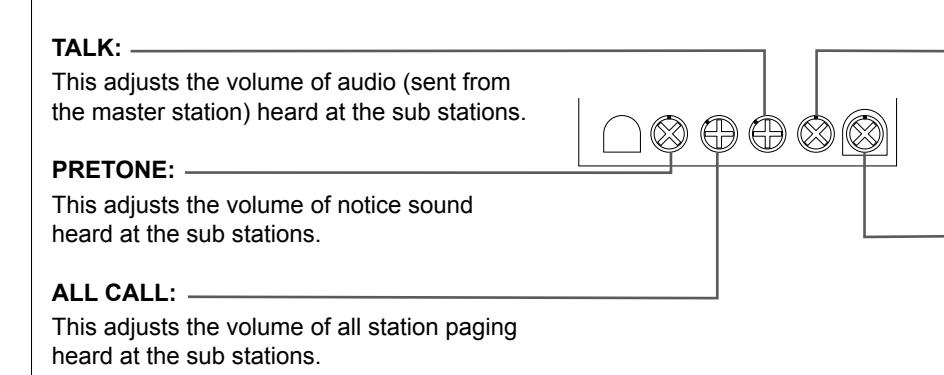
RECEIVE:
This adjusts the master receive volume. As the basis of this level, you can adjust the receiving volume with the RECEIVE VOL. tab on the master station operation panel.
RING TONE:
This adjusts the master volume of ringtone. As the basis of this level, you can adjust the ringtone volume with the RING TONE VOL. tab on the master station operation panel.
Troubleshooting
If the system fails to operate normally, check the following points to determine whether the fault can be corrected by the simple measures suggested. If it cannot be corrected, or if the fault is not listed in the "Symptom" column, disconnect the power cord and contact the system supplier or service center for help.
| Symptom | Cause | Solution |
|---|---|---|
| The master station will not operate. | The power switch on the back of the | Turn on the power switch. (→ page 21) |
| The power of all the equipment is off. | master station is in the OFF position. | |
| No ringtone | ||
| No communication with sub station. | Improper wiring connection |
Verify the wiring # to # , M to M , and E
to E between master and sub stations. |
| No communication to sub station. | Improper wiring connection |
Verify the wiring # to # , M to M , and E
to E between master and sub stations. |
|
An improper device is used for sub
station. |
Verify a sub station compatible with the NIM
system is used. |
|
| Call is not held. | Improper wiring connection | Verify connection of lead wires. |
| One way audio |
An improper device is used for sub
station. |
Verify a sub station compatible with the NIM
system is used. |
- # : Individual channel line (#: number)
- M : Common line (for microphone)
- E : Common line (for earth ground)
Warranty
Aiphone warrants its products to be free from defects of material and workmanship under normal use and service for a period of one year after delivery to the ultimate user and will repair free of charge or replace at no charge, should it become defective upon which examination shall disclose to be defective and under warranty. Aiphone reserves unto itself the sole right to make the fi nal decision whether there is a defect in materials and/or workmanship; and whether or not the product is within the warranty. This warranty shall not apply to any Aiphone product which has been subject to misuse, neglect, accident, power surge, or to use in violation of instructions furnished, nor extended to units which have been repaired or altered outside of the factory. This warranty does not cover batteries or damage caused by batteries used in connection with the unit. This warranty covers bench repairs only, and any repairs must be made at the shop or place designated in writing by Aiphone. This warranty is limited to the standard specifi cations listed in the operation manual. This warranty does not cover any supplementary function of a third party product that is added by users or suppliers. Please note that any damage or other issues caused by failure of function or interconnection with Aiphone products is also not covered by this warranty. Aiphone will not be responsible for any costs incurred involving on site service calls. Aiphone will not provide compensation for any loss or damage incurred by the breakdown or malfunction of its products during use, or for any consequent inconvenience or losses that may result.
The object area of is the EU.
FCC
This device complies with part 15 of the FCC Rules. Operation is subject to the following two conditions: (1) This device may not cause harmful interference, and (2) this device must accept any interference received, including interference that may cause undesired operation.
NOTE: This equipment has been tested and found to comply with the limits for a Class B digital device, pursuant to part 15 of the FCC Rules. These limits are designed to provide reasonable protection against harmful interference in a residential installation. This equipment generates, uses and can radiate radio frequency energy and, if not installed and used in accordance with the instructions, may cause harmful interference to radio communications. However, there is no guarantee that interference will not occur in a particular installation. If this equipment does cause harmful interference to radio or television reception, which can be determined by turning the equipment off and on, the user is encouraged to try to correct the interference by one or more of the following measures:
- Reorient or relocate the receiving antenna.
- Increase the separation between the equipment and receiver.
- Connect the equipment into an outlet on a circuit different from that to which the receiver is connected.
- Consult the dealer or an experienced radio/TV technician for help.
IC CAN ICES-3 (B)/NMB-3(B)
AIPHONE CO., LTD., NAGOYA, JAPAN Issue Date: Feb. 2016
FK2242 A P0216 SZ 57291