Aiphone KMB-45 Installation Instructions
Open the original PDF document
View PDF

45° ANGLE MULLION MOUNTING BRACKET
- INSTALLATION INSTRUCTIONS - DESCRIPTION 45° Angle Bracket Installation Manual Package Contents
The KMB-45 is a 45° angle Mullion Mounting Bracket for installing Aiphone 1-gang audio and video door stations onto a mullion style door frame. The KMB-45 can be installed on either side of the door.
Compatible door stations: JK-DA, JF-DA, JO-DA, KB-DAR, IF-DA, LE-D
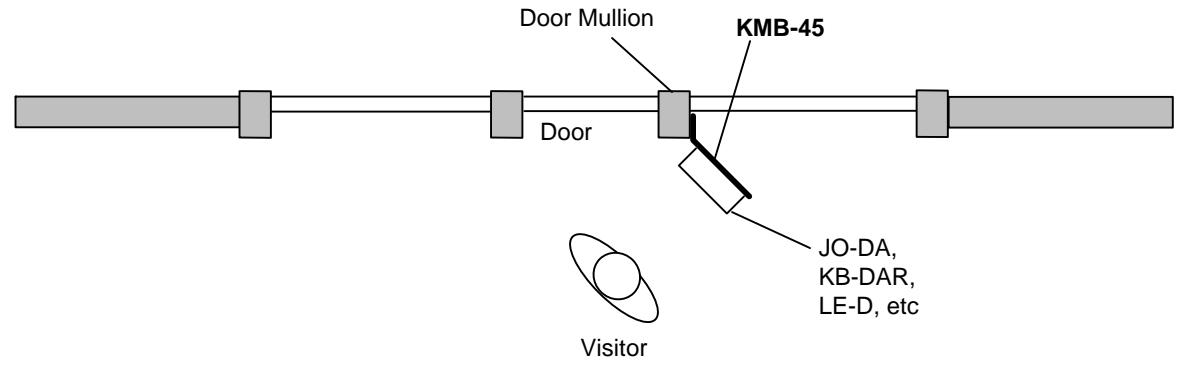
MOUNTING
- 1. Run wires through door mullion and out to where door station will be installed.
- 2. Run wires to inside of KMB-45 and mount bracket to the door frame. (Bracket mounting screws not supplied by Aiphone.)
- 3. Mount the back frame of the door station (if applicable) to the KMB-45. (Screws included with door station.)
- 4. Connect wires to the door station and secure it onto the back frame.
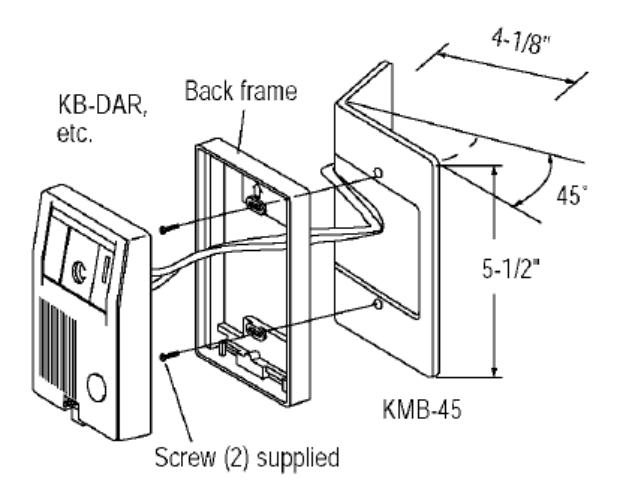
Mount KMB-45 to mullion. Connect wires and mount door station to face of bracket.

Do not make wiring connections while the system is powered.