Aiphone KB-DAR-M Installation Instructions
Open the original PDF document
View PDF

KB-DAR Modified for Motion Detector Interface
- INSTRUCTIONS -
The KB-DAR-M allows any standard motion detector or activation device with a normally open contact to be interfaced with the KB-3MRD Video System. When the motion detector is tripped, the camera will turn on and a chime will be heard at the inside monitor station(s), indicating that there is some activity near the door station location.
WIRING DIAGRAM:
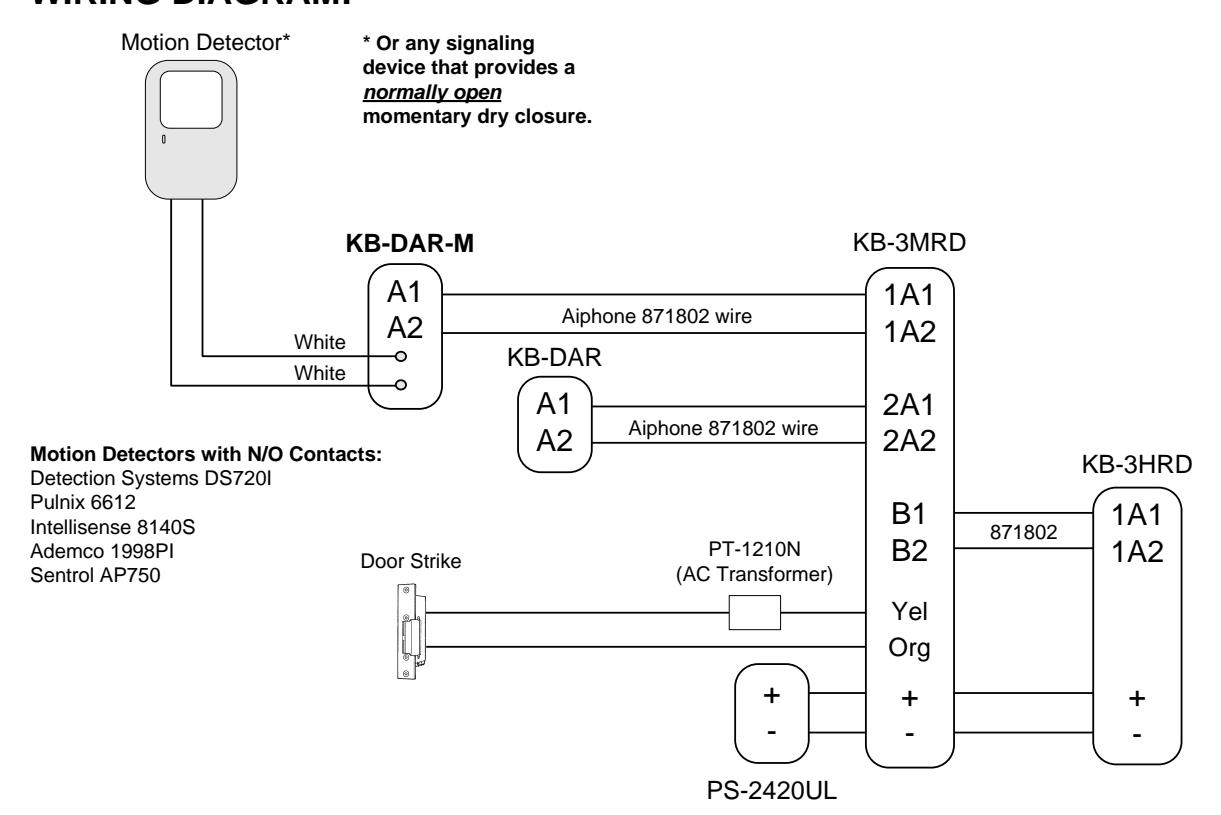
Installation Guidelines:
- 1. The motion detector must provide a normally open momentary contact. A Photelectric beam, pressure pad, or remote call button can also be used to activate the video door station.
- 2. The KB-DAR-M works with the KB system only. Standard KB-DAR's can be used in the same system if they are not interfaced with a remote activation device.
Note:
Only information concerning the use of the KB-DAR-M is shown here.
For complete system installation, please refer to the instruction manuals included with the video system.
Aiphone Communication Systems 1700 130th Ave. N.E. Bellevue, WA 98005 (425) 455-0510 FAX (425) 455-0071