Aiphone K Series Stainless Steel Housing KADGR-PANEL Installation Instructions
Open the original PDF document
View PDF

K-Series STAINLESS STEEL HOUSING
Model: KA-DGR PANEL for KB-DAR, KC-DAR
INSTALLATION MANUAL
PACKAGE CONTENTS
- KA-DGR PANEL
- Screws pack (3 pcs)
- Screwdriver
- Camera frame
MOUNTING
(See illustration below)
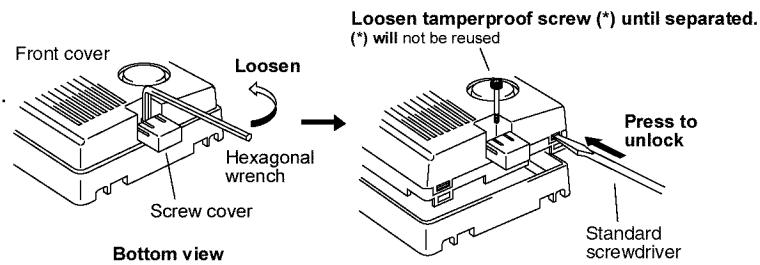
- 1. Pull out and down on screw cover at the bottom of K(B,C)-DAR.
- 2. Loosen tamperproof screw with hexagonal wrench.
- 3. Separate door station from back frame.
KA-DGR PANEL is a surface mount box made of stainless steel
for KB-DAR and KC-DAR color video door stations.
- 4. On bottom of unit, press two tabs with a screwdriver to unlock front cover panel.
- 5. Loosen tamperproof screw further, and remove it and the entire front panel. (See "REMOVE FRONT COVER PANEL" at the bottom of this page for further clarification.)
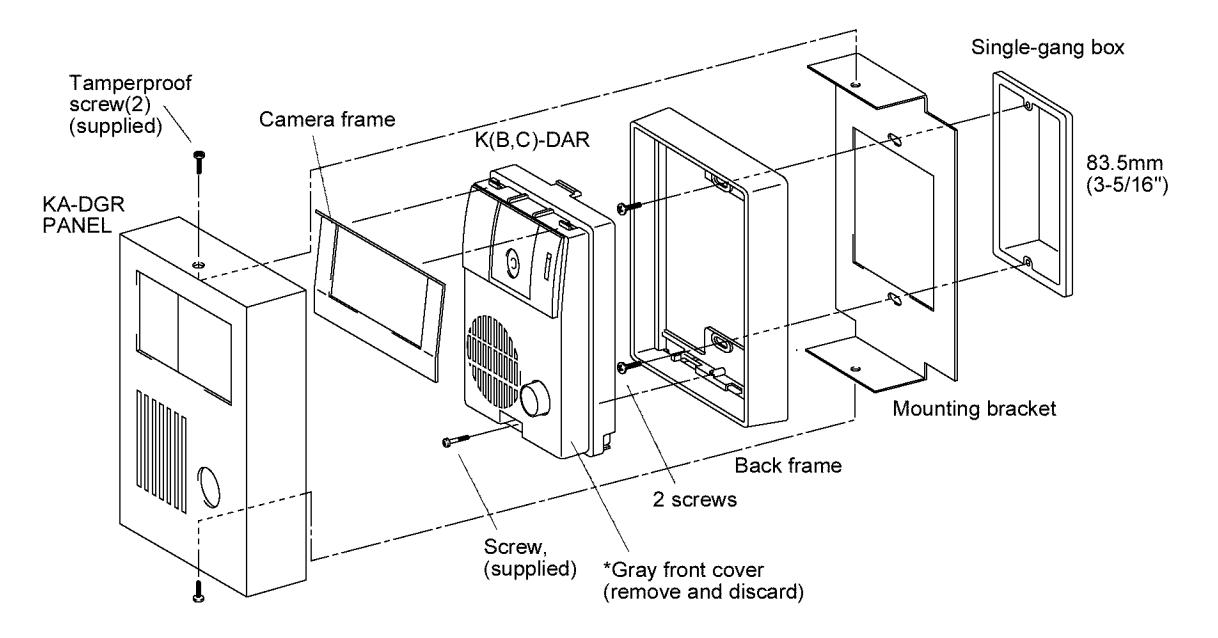
- 6. Mount the back frame to a single gang box, placing stainless steel mounting bracket between the gang box and mounting frame.
- 7. Mount door station to the back frame with supplied screw.
- 8. Place supplied stainless steel camera frame onto camera section.
- 9. Attach stainless steel cover with tamperproof screws (supplied).
REMOVE FRONT COVER PANEL(*)
- (*) Entire gray front panel must be removed.
- Loosen tamperproof screw with supplied wrench.
- Press tabs on the bottom of the K(B,C)-DAR with screwdriver to unlock gray front panel.
- Loosen the tamperproof screw further until it can be removed.
- Remove and discard the gray front panel and the tamperproof screw of the K(B,C)-DAR.