Aiphone IXW-MA Series Setting Manual Opreation Guide
Open the original PDF document
View PDFIX Series
Multi-purpose Adaptor IXW-MA
Setting Manual (for general users)
Software version 2.00 or later
Important
- Read this "Operation Manual" prior to use to ensure safe and correct operation. Keep this in a safe place for future reference.
- The illustrations used in this manual may differ from the actual ones.
Literature information
The important information concerning correct operation and what you should observe is marked with the following symbols.
| Warning |
This symbol means that operating the station incorrectly, or ignoring these precautions may
cause severe injury or death. |
|---|---|
| Caution |
This symbol means that operating the station incorrectly, or ignoring these precautions may
cause severe injury or property damage. |
| Important | This symbol is intended to alert the user to important instruction. |
| Note | Indicates tips and additional information for operation. |
- Terms and button names displayed on the station and PC screens are indicated as [XXXX] .
- Page reference are shown as "Title (→ page XX)", (→ page XX), or page XX.
- The illustrations and images used in this manual may differ from the actual items.
- VoIP Phones and IX system stations are referred to collectively as "Stations."
Precautions

Warning Negligence could result in death or serious injury.

Do not disassemble or modify the station.


Keep the station away from liquid.
This may result in fire or electrical shock.

Keep the station away from flammable materials.
If this happens, remove the LAN cable from the station. This may result in fire or electrical shock.

If there is smoke, abnormal odor, abnormal sound, or if the station is damaged, immediately disconnect the LAN cable from the station.
This may result in fire or electrical shock.

Do not, under any circumstances, open the station.
Voltage within some internal components may cause electrical shock.

Caution Negligence could result in injury to people or damage to property.

Do not attempt to cover, insulate, or coat the station in any way.
This may result in fire or malfunction.
Precautions on operation
Requests
- Keep the unit more than 1m (3.3') away from radio or TV set.
- Keep the station at least 20 cm (7-7/8") away from wireless devices such as wireless routers, or cordless telephones. These devices may cause the image or sound distortion.
- As to other 3rd party devices (such as sensor, detectors, door releases) used with this system, comply with the Specifications and Warranty conditions that the manufacturers or venders present.
- Be sure to receive and store the setting file from the person who configured the system. If the setting file is lost, recovery may not be possible and creating a new setting file may be required.
Notices
- Aiphone is not to be held responsible for any and all damages resulting from content or specifications of this product.
- Aiphone is not to be held responsible for any and all damages resulting from malfunctions, defects, or misuse of this product.
- This station cannot be used during power outages.
- If the station is used in areas where there are business-use wireless devices such as a transceiver or mobile phones, it may cause malfunction.
- This station is designed for indoor use only. Do not use at outdoor locations.
- This station is for installations on walls and vertical surfaces only.
- Station maybe unoperatable while updating the system settings.
- Aiphone assume no responsibility for damages as a result of delayed or unusable services, which were due to failures in network equipment, communication services by Internet and cellular phone companies, line interruptions, communication failures, or inaccuracies or omissions in transmission unit.
- Aiphone is not to be held responsible for any damages resulting from customer PINs or other transmitted information being leaked due to interception, unauthorized access, or other reasons along the communication path through the Internet.
- Available functions and services are limited according to the specifications of the installed system.
- The illustrations used in this manual may differ from the actual ones.
- This station is not meant to protect lives or property. Aiphone is not to be held responsible for any and all resulting serious accidents, disaster accidents, or physical damage.
- It is the customer's responsibility to ensure that their computer is secure. Aiphone is not liable for security failures.
- If there is no power for 30 minutes or more, the date and time return to default.
Table of contents
| 7 | Precautions | |
|---|---|---|
| Literature informationLiterature information | ||
| Precautions | . 3 | |
| Precautions | ||
| Precautions on operation | . 4 | |
| 2 | Before Using | |
| Part Names | . 6 | |
| Part Names | . 6 | |
| Status Indicators | ||
| Status Indicators | . 7 | |
| 3 | How to use | |
| Other functions | . 8 | |
| Sending an email | . 8 | |
| 4 | Settings and Adjustments | |
| Station programming | ||
| Station ProgrammingList of settings | ||
| Station Information | ||
| Network Settings | 17 | |
| Option Input / Relay Output Settings | ||
| Function Settings | ||
| Maintenance | 22 | |
| 5 | Other | |
| 23 | ||
| Specifications | ||
| Maintenance | ||
| 5 5 | 24 | |
| 3 3 | ||
| FOR PROPER USE OF THE STATIONREGULATIONS | ||
| WARRANTY | ||
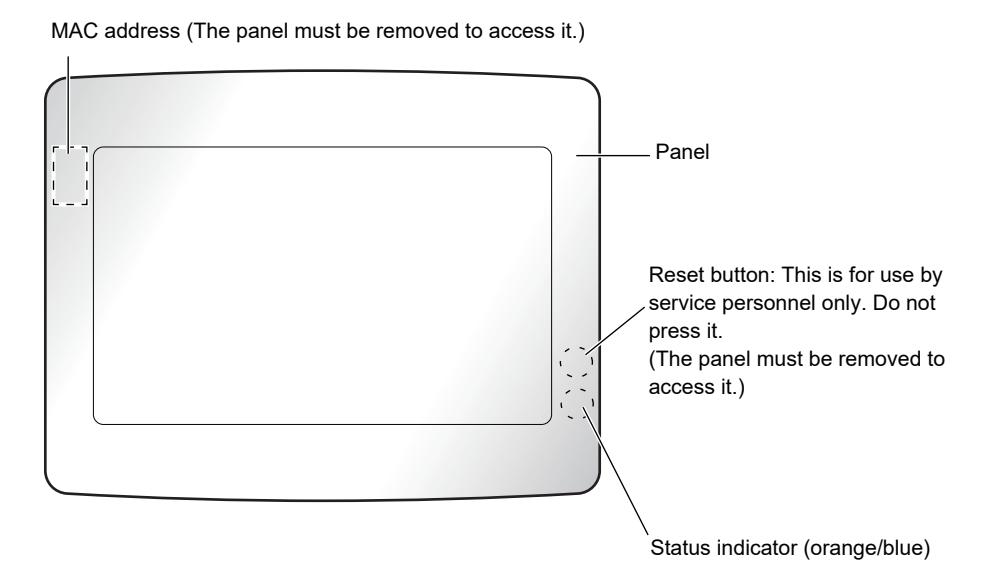
Part Names
Multi-purpose adaptor IXW-MA
Status Indicators
IXW-MA
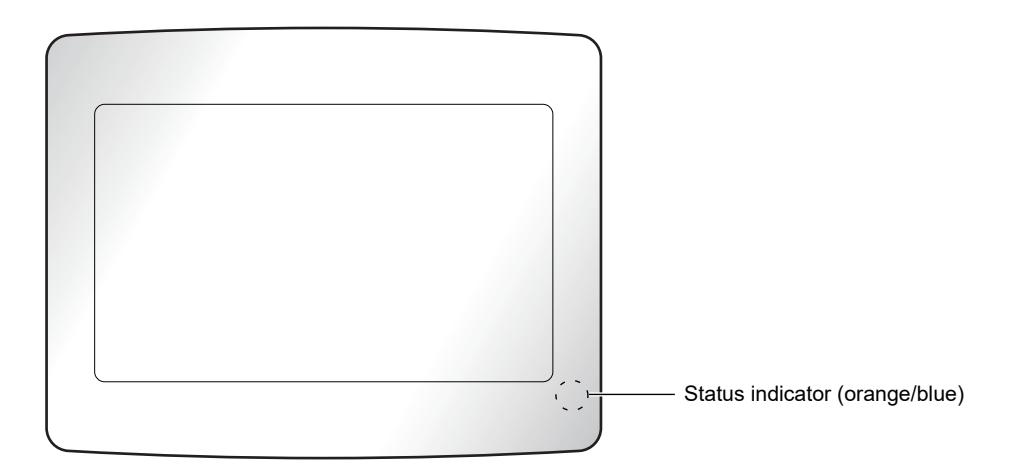
: On, : Off
| Name | Status (Pattern) | Description | |
|---|---|---|---|
|
Status
indicator |
Orange
flashing |
0.75 sec
0.75 sec |
Booting |
|
0.25 sec
0.25 sec |
Device error,
startup error |
||
|
0.5 sec
4 sec |
Communication
failure |
||
|
1
0.25 0.25 0.25 0.25 0.25 sec sec sec sec sec sec |
Firmware version
updating |
||
|
1
0.25 0.25 0.25 sec sec sec sec |
Initializing | ||
| Blue light | Standby |
Sending an email
An email can be sent to pre-registered email addresses using Email Event Trigger.
For how to configure email settings, refer to "Email (→page 19)" .

Example of sending email:
When restarting this adaptor (Station Number: 003, Station Name: Multi-purpose Adaptor 3, Location: Rest room)
| Source | △△△△@△△△△△.com |
|---|---|
| Date and time | 11/20/2018 7:22 |
|
Recipient
CC |
xxxx@xxxxx.com |
| Subject Text | 003 Multi-purpose Adapter 3 device restart |
| Description | Device restarted at [20181120 07:21:40]. |
| Restarted Station Number: [003] | |
| Restarted Station Name: [Multi-purpose Adaptor 3] | |
| Restarted Station Location: [Rest room] |
Note
• "UTF-8" is used to encode text. Characters may display incorrectly depending on the email client. To avoid this, set the encoding method to "UTF-8."
Station Programming
Connect to the same network as the Door Station and manage the settings from PC web browser.
System requirements
The programming PC must meet the following requirements to proceed.
| Network | Ethernet (10BASE-T, 100BASE-TX) | |
|---|---|---|
| Web browser |
Microsoft Edge / Internet Explorer 10.0 or 11.0 / Mozilla Firefox 59 or 60 (TLS1.0, 1.1, or 1.2
enabled) |
|
Connecting to a PC
Using a Cat5e/6 "Straight-Through" cable, connect the station and PC to the same PoE switch or injector.

Login to this station
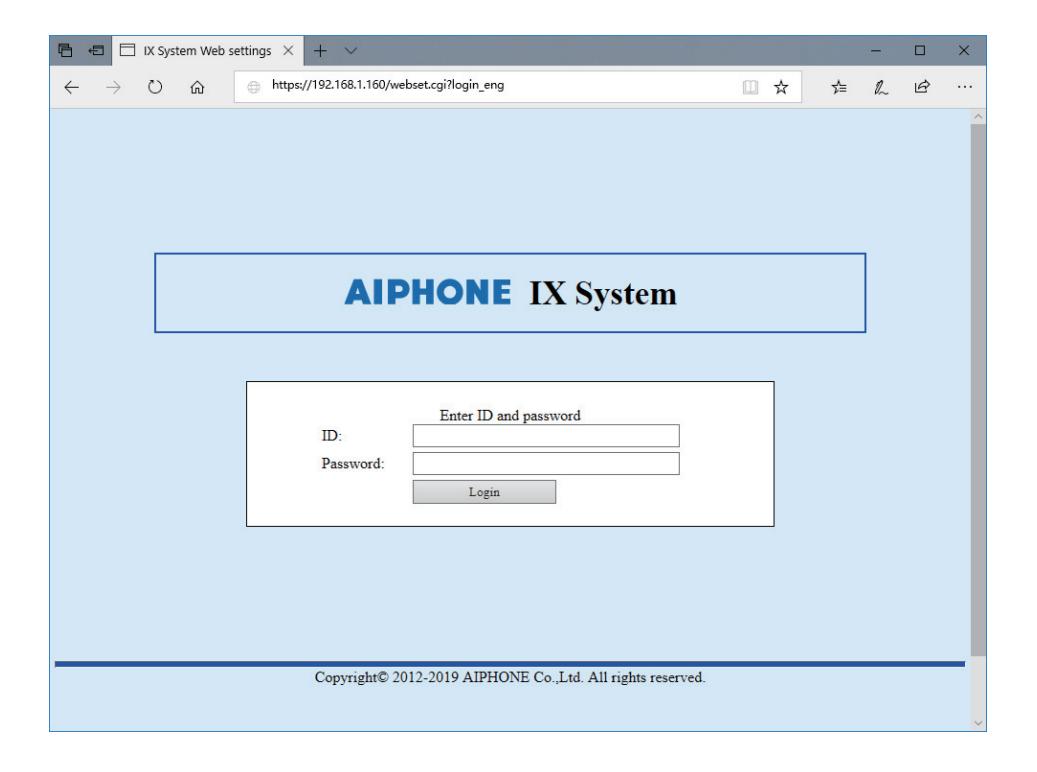
- 1. Start the PC and open one of the before mentioned web browsers.
-
2.
Enter the address below into the web browser address bar. IPv4 example - https://IP address of this device/webset.cgi?login IPv6 example - https://[IP address of this device]/webset.cgi?login
- If a certificate error window is displayed, click [Go on to the webpage] . To prevent it from appearing, the administrator will need to disable it. Contact your system administrator.
- Language selection window will be displayed.
3. Select a language
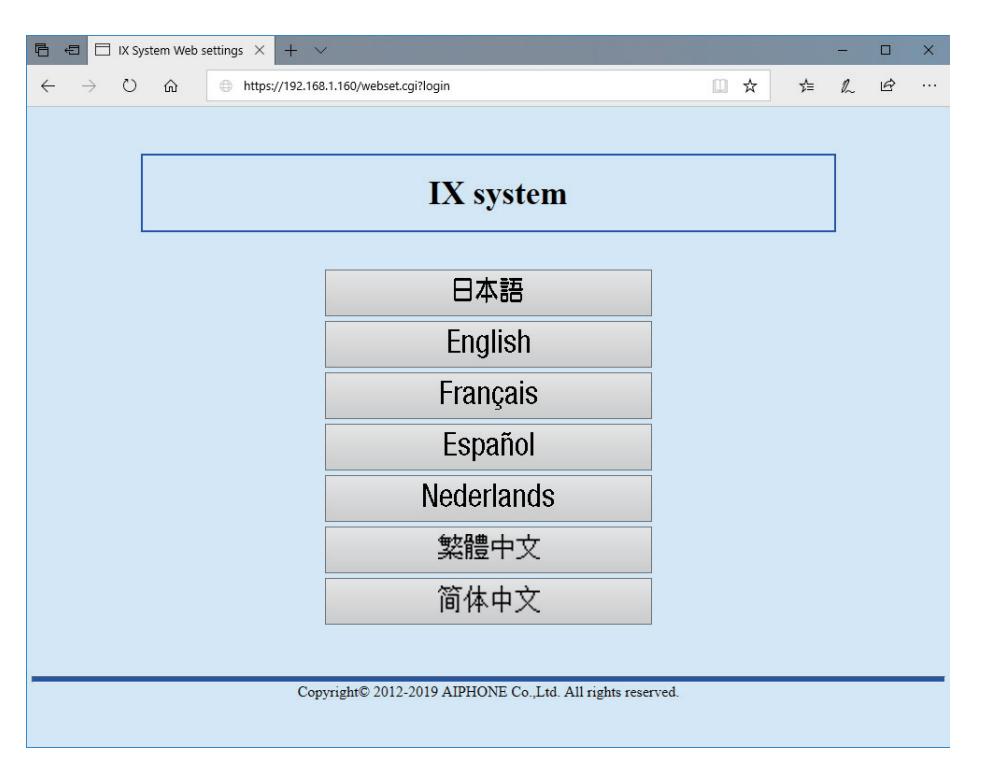
4. Enter the ID and password, and click [Login]
-
Default values
- ID: user
- Password: user
4 Settings and Adjustments Station programming

Note
- Do not login multiple times using multiple browsers at one time on the same PC.
- The default IP address and Subnet mask values are:
– IP Address: 192.168.1.160 – Subnet Mask: 255.255.255.0
• Contact the system administrator if the IP address or subnet mask for the device is not known.
Setting window
When accessing the web server of the station, the following setting window will appear. The station can be configured in this window.
- Depending on PC and OS being used, the window may be slightly different.
- After configuring the station, confirm its operation by referring to the "Operation Manual (this document)."
- <Setting window example>
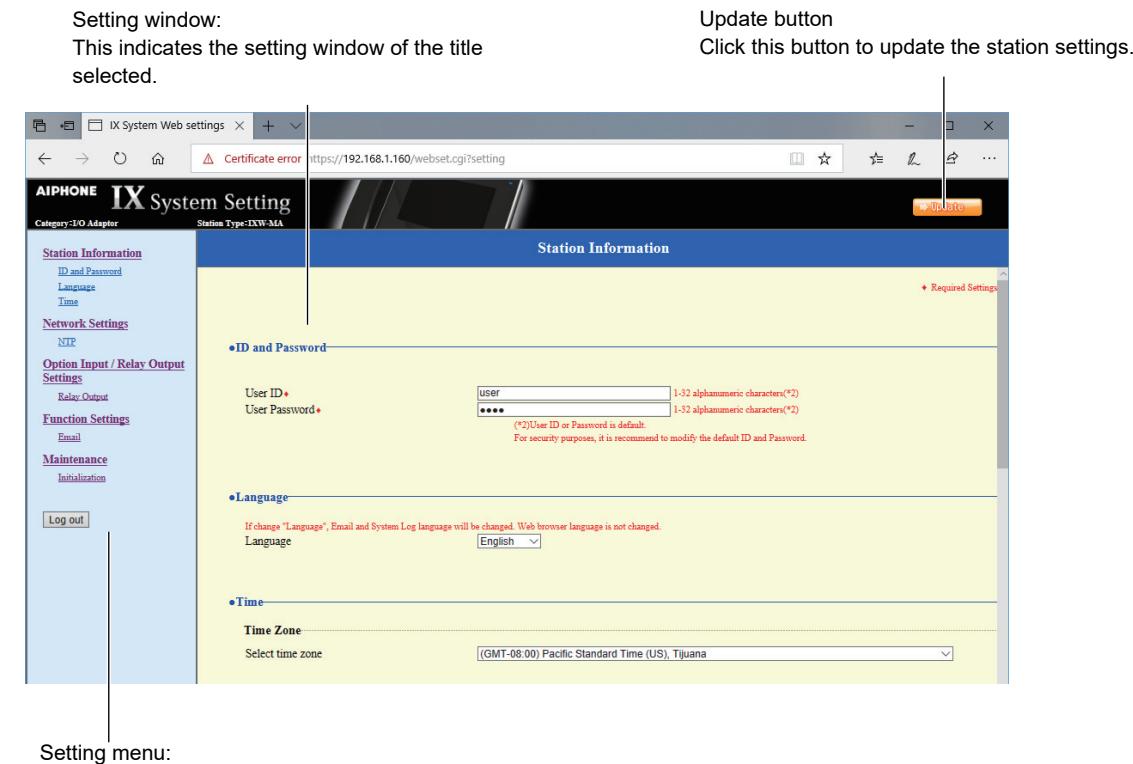
Shows all items that can be configured. Click the title to be configured and the appropriate setting window will display.
4 Settings and Adjustments Station programming
How to configure
-
1.
Click the title to configure in the setting menu
- The setting window for that particular title will be shown.
- 2. Configure each setting item
-
3.
When you are done making changes, click
[Update]
to update the settings
- When the settings are updated, [Settings updated.] will be shown at the top left corner in the window. If an update fails, an error message will be shown.
- To cancel any changes, click another title in the setting menu.
- Do not remove power to the station while updating.
-
4.
Repeat the steps 1 to 3 for other settings
- To log out of the station, click [Log out] in the settings menu.

Note
- To exit the station's web setting, click [Log out] and do not close the browser window by clicking [X] . If [Log out] is not used, it will be unable to login for approximately 1 hour.
- If the setting window switch to another without clicking [Update] , the settings will not be saved.
- When no activity is detected for one hour, the connection will be automatically terminated.
List of settings
|
Reference
page |
|||
|---|---|---|---|
| Station Information | |||
| ID and Password | |||
| User ID | page 14 | ||
| User Password | page 14 | ||
| Language | |||
| Language | page 14 | ||
| Time | |||
| Time Zone | |||
| Select time zone | page 15 | ||
| Daylight Savings Time | |||
|
Enable automatic daylight savings
time |
page 15 | ||
| Date and Time | |||
| Set date and time | page 16 | ||
| Network Settings | |||
| NTP | |||
| Enable NTP | page 17 | ||
| Option Input / Relay Output Settings | |||
| Relay Output | |||
|
Option Relay Control Authentication
Key |
page 18 | ||
| Function Settings | |||
| Email Addresses | |||
| Destination 1 - Destination 3 | page 19 | ||
| Email Event Trigger | |||
| Error | page 19 | ||
| Station Restarted | page 19 | ||
| Subject | page 19 | ||
| Periodic Log Transmission | |||
| Periodic Log Transmission | page 20 | ||
| Periodic Log Transmit Time | page 20 | ||
| Periodic Log Transmit Interval | page 20 | ||
| Periodic Log Transmission Subject | page 20 | ||
| Send Test Email | page 21 | ||
| Maintenance | |||
| Initialization | page 22 | ||
Station Information
ID and Password

| Entry | Description | Settings | Default values |
|---|---|---|---|
| User ID*1 |
Set the ID for logging in to the Web System
Setting Server. |
1 - 32 alphanumeric
characters |
user |
| User Password*1 |
Set the password for logging in to the Web
System Setting Server. |
1 - 32 alphanumeric
characters |
user |
*1 Indicates a required field. Use the default values, unless a change is necessary.

Note
- "The Administrator ID(administrator setting)" and "User ID" cannot have the same setting.
- The "User Password" is displayed as "●●●●●" on the screen.
Language
| Entry | Description | Settings | Default values |
|---|---|---|---|
| Language |
Select the language for email and system
log language. • Language used for various settings (including the station name) • Language used for email and system log |
• Japanese
• English • French • Spanish • Dutch • Traditional Chinese • Simplified Chinese |
English |

Note
• When logging in to web configuration with the station in its default state at the first time, the language will be set to the same language that was selected when logging in.
Time
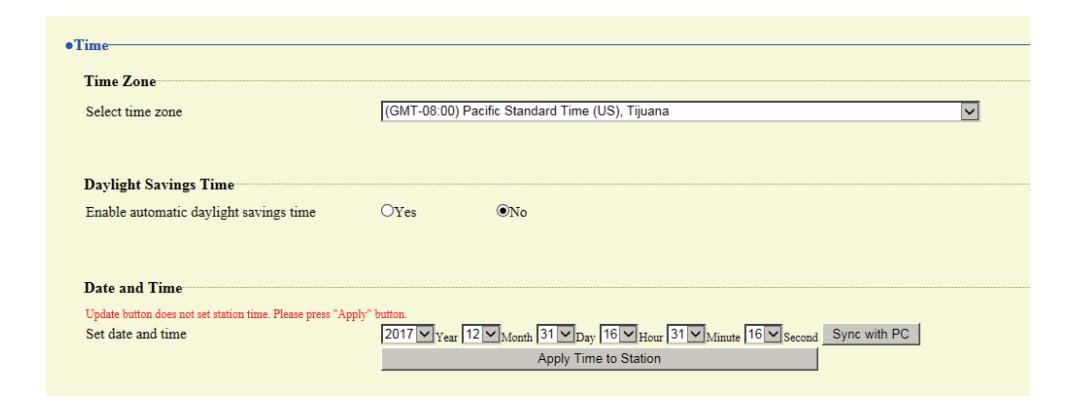
Important
• If the power is turned off for at least 30 minutes, the time and date will revert back to the default setting. If this happens, set the time and date again.
■Time Zone
| Entry | Description | Settings | Default values |
|---|---|---|---|
| Select time zone | Set the Time Zone. | Select from 99 regions |
(GMT-08:00) Pacific
Standard Time (US), Tijuana |
Note
-
When logging in to web configuration with the station in its default state at the first time, this will be set as follows depending on the language selected when logging in.
- Japanese: (GMT+09:00) Osaka, Sapporo, Tokyo
- English: (GMT-08:00) Pacific Standard Time (US), Tijuana
- French: (GMT+01:00) Brussels, Madrid, Copenhagen, Paris
- Spanish: (GMT+01:00) Brussels, Madrid, Copenhagen, Paris
- Dutch: (GMT+01:00) Amsterdam, Berlin, Bern, Rome, Stockholm
- Traditional Chinese: (GMT+08:00) Taipei
- Simplified Chinese: (GMT+08:00) Beijing, Chongqing, Hong Kong, Urumqi
■Daylight Savings Time
| Entry | Description | Settings | Default values |
|---|---|---|---|
|
Enable automatic
daylight savings time |
The daylight saving time is set automatically
according by region selected in "Select time zone". |
• Yes
• No |
No |
4 Settings and Adjustments Station programming
■Date and Time
Clicking [Update] will not update the date and time settings on this station. Press [Apply Time to Station] to update.
| Entry | Description | Settings | Default values |
|---|---|---|---|
| Set date and time |
Set the current time for the station. This is a
required setting. |
2017/1/1/00:00:00 - 2037/12/
31/23:59:59 [Sync with PC]: Synchronized with the current time setting of the PC. |
The time from 2018/1/
1/ 00:00:00 with the time difference set in "Select time zone" applied |
Network Settings
NTP

■Enable NTP
| Entry | Description | Settings | Default values |
|---|---|---|---|
| Enable NTP |
Enable NTP server to retrieve the time.
Configuring NTP server is required separately if using an NTP server. Contact your system administrator. |
• Yes
• No Use |
No Use |
Option Input / Relay Output Settings
Relay Output

■Option Relay Control Authentication Key
| Entry | Description | Settings | Default values |
|---|---|---|---|
|
Option Relay Control
Authentication Key |
If "Option Relay Control (administrator
setting)" is set to "Enable," and "Speed Dials / Favorites" - "TLS" is set to "Enable" on the requesting station, configure the key used to decrypt encrypted communication. If this matches the "Option Relay Control Key" of the station that performs the operation, the output terminal may be controlled. |
1 - 20 digits | - |

Note
- Only one Option Relay Control Authentication Key can be set for each station. It will be shared by multiple output stations.
- "Option Relay Control Authentication Key" is shown on the screen as "●●●●●."
Function Settings
Configure the email function (function that sends information on station operation to the set email address).

• If an SMTP server is not configured, email will not be sent even if email is configured. If email is not sent, contact the system administrator.

■Email Addresses
| Entry | Description | Settings | Default values |
|---|---|---|---|
| Destination 1 - | Set the destination email address. Define up | 1 - 64 alphanumeric | - |
| Destination 3 | to three addresses. | characters |
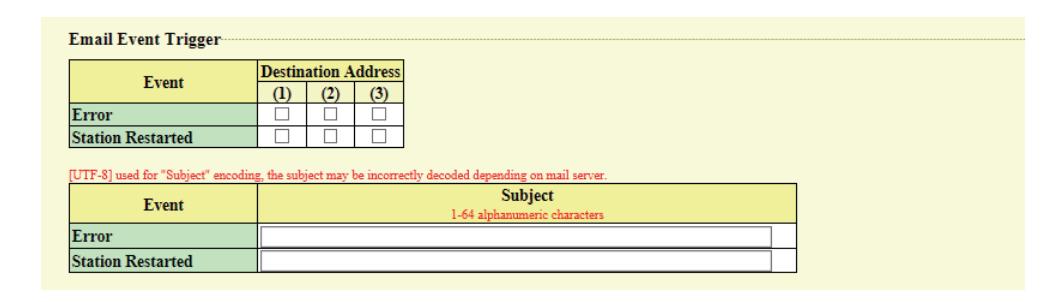
■Email Event Trigger
Set up which event triggers will send an email message for each address.
| Entry | Description | Settings | Default values | |
|---|---|---|---|---|
| Error |
Send email when a communication error
has occurred. |
• Checked: Send
• Unchecked: Do not send |
Unchecked: Do not
send |
|
| Station Restarted | Send email when the station has reset. |
• Checked: Send
• Unchecked: Do not send |
Unchecked: Do not
send |
|
| Subject |
Set the Subject of email per Event Trigger.
This will be used for all recipient addresses. |
1 - 64 alphanumeric
characters |
- | |

• "UTF-8" encoding is used for "Subject." Depending on the email client, the characters may appear incorrectly. To avoid this, set the encoding method to "UTF-8."
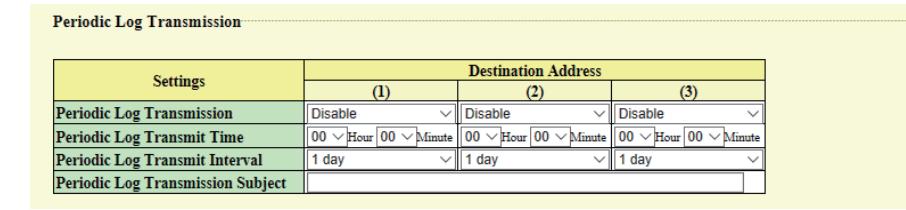
■Periodic Log Transmission
| Entry | Description | Default values | ||
|---|---|---|---|---|
|
Periodic Log
Transmission |
Select Enable / Disable for send station log
periodically. |
• Enable
• Disable |
Disable | |
|
Periodic Log Transmit
Time |
Set the time to send the periodic log. | 00:00 - 23:59 | 00:00 | |
|
Periodic Log Transmit
Interval |
Select the interval to send the periodic log. | Every 1-7 days | 1 day | |
|
Periodic Log
Transmission Subject |
Set the email subject for Periodic Log
Transmission. This is used for all destination addresses. |
1 - 64 alphanumeric
characters |
- | |
Important
• "UTF-8" encoding is used for "Periodic Log Transmission Subject." Depending on the email client, the characters may appear incorrectly. To avoid this, set the encoding method to "UTF-8."
4 Settings and Adjustments Station programming
■Send Test Email
Send a test email to the address specified in "Email Addresses (→page 19)".

How to send a test email
- 1. Click [Send] .
- 2. The following message will be sent to the configured address.
Example of sending an email message:
When sending a test email from this adaptor (Station Number: 002, Station Name: Multi-purpose Adaptor 2).
| Source | △△△△@△△△△.com |
|---|---|
| Date and time | 11/20/2018 15:22 |
|
To
CC |
xxxx@xxxxx.com |
| Subject | 002 Multi-purpose Adaptor 2 Test Email |
| Description | Test Email sent at "20181120 15:22:46." |
|
Station Number: [002]
Station Name: [Multi-purpose Adaptor 2] |

• "UTF-8" encoding is used for "Subject." Depending on the email client, the characters may appear incorrectly. To avoid this, set the encoding method to "UTF-8."
Maintenance
Initialization
Initialization puts all the settings in "List of settings (→page 13)" back to the default.

How to initialize the station
- 1. Click [Initialize User Settings] .
-
2.
Click
[OK]
.
- Click [Cancel] to cancel the initialization process.

• If the initialization process fails, a message [Error: Station initialization failed.] ) will be displayed. Re-initialize if this happens.
Specifications
| Power | PoE (IEEE802.3af Class 0 standard) | ||
|---|---|---|---|
| Current Consumption | Standby: 43 mA; Maximum: 135 mA | ||
| LAN | Ethernet (10BASE-T, 100BASE-TX), Auto MDI/MDI-X-compatible | ||
| Protocol | IPv4, IPv6, TCP, UDP, SIP, HTTP, HTTPS, SMTP, SFTP, DHCP, NTP, DNS | ||
| Encryption system | TLS1.0, TLS1.1, TLS1.2 | ||
| Operating temperature | -10 - +50℃ | ||
| Mounting | Wall-mounting | ||
| Materials | Fire-retardant resin | ||
| Color | White | ||
| Dimensions |
245 mm (9-5/8") (W) x 190 mm (7-1/2") (H) x 21 mm (13/16") (D)
(excluding the embedding area) |
||
| Weight | 630 g (approx.) (1.39 lbs) | ||
Maintenance
• Clean the station gently with a soft, dry cloth. For difficult stains, dip a soft cloth in neutral detergent diluted with water, wring it out well, and then clean unit.

• Do not use chemicals such as benzene or paint thinner. You may damage the surface of the station, or cause discoloration.
Notice regarding the software
Use of the software installed on this product has received direct or indirect authorization from third parties.
(1) Apache License 2.0
This software includes Google Protocol Buffers.
You may obtain a copy of the License at " http://www.apache.org/licenses/LICENSE-2.0 ".
Please be noted that a portion of this software is made by changing or modifying original source files.
(2) bzip2 and libbzip2 License
This file is a part of bzip2 and/or libbzip2, a program and library for lossless, block-sorting data compression.
Copyright (C) 1996-2002 Julian R Seward. All rights reserved.
Redistribution and use in source and binary forms, with or without modification, are permitted provided that the following conditions are met:
- 1. Redistributions of source code must retain the above copyright notice, this list of conditions and the following disclaimer.
- 2. The origin of this software must not be misrepresented; you must not claim that you wrote the original software. If you use this software in a product, an acknowledgment in the product documentation would be appreciated but is not required.
- 3. Altered source versions must be plainly marked as such, and must not be misrepresented as being the original software.
- 4. The name of the author may not be used to endorse or promote products derived from this software without specific prior written permission.
THIS SOFTWARE IS PROVIDED BY THE AUTHOR "AS IS" AND ANY EXPRESS OR IMPLIED WARRANTIES, INCLUDING, BUT NOT LIMITED TO, THE IMPLIED WARRANTIES OF MERCHANTABILITY AND FITNESS FOR A PARTICULAR PURPOSE ARE DISCLAIMED.
IN NO EVENT SHALL THE AUTHOR BE LIABLE FOR ANY DIRECT, INDIRECT, INCIDENTAL, SPECIAL, EXEMPLARY, OR CONSEQUENTIAL DAMAGES (INCLUDING, BUT NOT LIMITED TO, PROCUREMENT OF SUBSTITUTE GOODS OR SERVICES; LOSS OF USE, DATA, OR PROFITS; OR BUSINESS INTERRUPTION) HOWEVER CAUSED AND ON ANY THEORY OF LIABILITY, WHETHER IN CONTRACT, STRICT LIABILITY, OR TORT (INCLUDING NEGLIGENCE OR OTHERWISE) ARISING IN ANY WAY OUT OF THE USE OF THIS SOFTWARE, EVEN IF ADVISED OF THE POSSIBILITY OF SUCH DAMAGE.
(3) GPL/LGPL
This product includes software components subject to the GPL/LGPL.
Details can be found at the following links.
http://www.gnu.org/licenses/gpl.html
http://www.gnu.org/licenses/lgpl.html
Customers can obtain, modify, and re-distribute the source code of the software components according to the GPL/LGPL.
Please see the website below for how to obtain sequence GPL/LGPL of this source code.
http://www.aiphone.co.jp/data/software/source/gpl/download/ix/
* Be sure to read the following before downloading.
<<Please confirm>>
- According to GPL/LGPL, the source code of the software components is not guaranteed, including warranty on "merchantability" or "suitability for a particular purpose."
- The source code of the software components is provided "as is" and based on the GPL/LGPL.
- Please note that we cannot answer questions regarding the content of the source code of the software components.
- (4) ISC License
Copyright (c) 2004-2011 by Internet Systems Consortium, Inc. ("ISC")
Copyright (c) 1995-2003 by Internet Software Consortium Permission to use, copy, modify, and/or distribute this software for any purpose with or without fee is hereby granted, provided that the above copyright notice and this permission notice appear in all copies.
THE SOFTWARE IS PROVIDED "AS IS" AND ISC DISCLAIMS ALL WARRANTIES WITH REGARD TO THIS SOFTWARE INCLUDING ALL IMPLIED WARRANTIES OF MERCHANTABILITY AND FITNESS.
IN NO EVENT SHALL ISC BE LIABLE FOR ANY SPECIAL, DIRECT, INDIRECT, OR CONSEQUENTIAL DAMAGES OR ANY DAMAGES WHATSOEVER RESULTING FROM LOSS OF USE, DATA OR PROFITS, WHETHER IN AN ACTION OF CONTRACT, NEGLIGENCE OR OTHER TORTIOUS ACTION, ARISING OUT OF OR IN CONNECTION WITH THE USE OR PERFORMANCE OF THIS SOFTWARE.
(5) MIT License
Copyright (c) 2018 Aiphone co.,Ltd.
Released under the MIT license.
Permission is hereby granted, free of charge, to any person obtaining a copy of this software and associated documentation files (the "Software"), to deal in the Software without restriction, including without limitation the rights to use, copy, modify, merge, publish, distribute, sublicense, and/or sell copies of the Software, and to permit persons to whom the Software is furnished to do so, subject to the following conditions:
The above copyright notice and this permission notice shall be included in all copies or substantial portions of the Software.
THE SOFTWARE IS PROVIDED "AS IS", WITHOUT WARRANTY OF ANY KIND, EXPRESS OR IMPLIED, INCLUDING BUT NOT LIMITED TO THE WARRANTIES OF MERCHANTABILITY, FITNESS FOR A PARTICULAR PURPOSE AND NONINFRINGEMENT.
IN NO EVENT SHALL THE AUTHORS OR COPYRIGHT HOLDERS BE LIABLE FOR ANY CLAIM, DAMAGES OR OTHER LIABILITY, WHETHER IN AN ACTION OF CONTRACT, TORT OR OTHERWISE, ARISING FROM, OUT OF OR IN CONNECTION WITH THE SOFTWARE OR THE USE OR OTHER DEALINGS IN THE SOFTWARE.
(6) NTP License
Copyright (c) University of Delaware 1992-2011
Permission to use, copy, modify, and distribute this software and its documentation for any purpose with or without fee is hereby granted, provided that the above copyright notice appears in all copies and that both the copyright notice and this permission notice appear in supporting documentation, and that the name University of Delaware not be used in advertising or publicity pertaining to distribution of the software without specific, written prior permission.
The University of Delaware makes no representations about the suitability this software for any purpose. It is provided "as is" without express or implied warranty.
(7) OpenSSL License
Copyright (c) 1998-2011 The OpenSSL Project. All rights reserved.
Redistribution and use in source and binary forms, with or without modification, are permitted provided that the following conditions are met:
- (a) Redistributions of source code must retain the above copyright notice, this list of conditions and the following disclaimer.
- (b) Redistributions in binary form must reproduce the above copyright notice, this list of conditions and the following disclaimer in the documentation and/or other materials provided with the distribution.
-
(c) All advertising materials mentioning features or use of this software must display the following acknowledgment:
- "This product includes software developed by the OpenSSL Project for use in the OpenSSL Toolkit. ( http:// www.openssl.org/) "
- (d) The names "OpenSSL Toolkit" and "OpenSSL Project" must not be used to endorse or promote products derived from this software without prior written permission. For written permission, please contact opensslcore@openssl.org.
- (e) Products derived from this software may not be called "OpenSSL" nor may "OpenSSL" appear in their names without prior written permission of the OpenSSL Project.
- (f) Redistributions of any form whatsoever must retain the following acknowledgment: "This product includes software developed by the OpenSSL Project for use in the OpenSSL Toolkit ( http:// www.openssl.org/) "
THIS SOFTWARE IS PROVIDED BY THE OpenSSL PROJECT "AS IS'' AND ANY EXPRESSED OR IMPLIED WARRANTIES, INCLUDING, BUT NOT LIMITED TO, THE IMPLIED WARRANTIES OF MERCHANTABILITY AND FITNESS FOR A PARTICULAR PURPOSE ARE DISCLAIMED.
IN NO EVENT SHALL THE OpenSSL PROJECT OR ITS CONTRIBUTORS BE LIABLE FOR ANY DIRECT, INDIRECT, INCIDENTAL, SPECIAL, EXEMPLARY, OR CONSEQUENTIAL DAMAGES (INCLUDING, BUT NOT LIMITED TO, PROCUREMENT OF SUBSTITUTE GOODS OR SERVICES;
LOSS OF USE, DATA, OR PROFITS; OR BUSINESS INTERRUPTION) HOWEVER CAUSED AND ON ANY THEORY OF LIABILITY, WHETHER IN CONTRACT, STRICT LIABILITY, OR TORT (INCLUDING NEGLIGENCE OR OTHERWISE) ARISING IN ANY WAY OUT OF THE USE OF THIS SOFTWARE, EVEN IF ADVISED OF THE POSSIBILITY OF SUCH DAMAGE.
(8) Original SSLeay License
Redistribution and use in source and binary forms, with or without modification, are permitted provided that the following conditions are met:
- (a) Redistributions of source code must retain the copyright notice, this list of conditions and the following disclaimer.
- (b) Redistributions in binary form must reproduce the above copyright notice, this list of conditions and the following disclaimer in the documentation and/or other materials provided with the distribution.
-
(c) All advertising materials mentioning features or use of this software must display the following acknowledgment:
- "This product includes cryptographic software written by Eric Young (eay@cryptsoft.com)" The word 'cryptographic' can be left out if the routines from the library being used are not cryptographic related :-).
- (d) If you include any Windows specific code (or a derivative thereof) from the apps directory (application code) you must include an acknowledgment:
"This product includes software written by Tim Hudson (tjh@cryptsoft.com)"
THIS SOFTWARE IS PROVIDED BY ERIC YOUNG "AS IS'' AND ANY EXPRESS OR IMPLIED WARRANTIES, INCLUDING, BUT NOT LIMITED TO, THE IMPLIED WARRANTIES OF MERCHANTABILITY AND FITNESS FOR A PARTICULAR PURPOSE ARE DISCLAIMED. IN NO EVENT SHALL THE AUTHOR OR CONTRIBUTORS BE LIABLE FOR ANY DIRECT, INDIRECT, INCIDENTAL, SPECIAL, EXEMPLARY, OR CONSEQUENTIAL DAMAGES (INCLUDING, BUT NOT LIMITED TO, PROCUREMENT OF SUBSTITUTE GOODS OR SERVICES; LOSS OF USE, DATA, OR PROFITS; OR BUSINESS INTERRUPTION) HOWEVER CAUSED AND ON ANY THEORY OF LIABILITY, WHETHER IN CONTRACT, STRICT LIABILITY, OR TORT (INCLUDING NEGLIGENCE OR OTHERWISE) ARISING IN ANY WAY OUT OF THE USE OF THIS SOFTWARE, EVEN IF ADVISED OF THE POSSIBILITY OF SUCH DAMAGE.
(9) RSA Message-Digest License
Copyright (C) 1990, RSA Data Security, Inc. All rights reserved.
License to copy and use this software is granted provided that it is identified as the "RSA Data Security, Inc. MD5 Message-Digest Algorithm" in all material mentioning or referencing this software or this function.
License is also granted to make and use derivative works provided that such works are identified as "derived from the RSA Data Security, Inc. MD5 Message-Digest Algorithm" in all material mentioning or referencing the derived work.
RSA Data Security, Inc. makes no representations concerning either the merchantability of this software or the suitability of this software for any particular purpose.
It is provided "as is" without express or implied warranty of any kind.
These notices must be retained in any copies of any part of this documentation and/or software.
Please be noted that this software is derived from the RSA Data Security, Inc. MD5 Message-Digest Algorithm. (10) zlib License
(C) 1995-2010 Jean-loup Gailly and Mark Adler
See the following website for source code including changes for software that has been authorized under the above licenses.
http://www.aiphone.co.jp/data/software/source/gpl/download/ix/
* Be sure to read the following before downloading.
<<Please confirm>>
– Please note that we cannot answer questions regarding the content of the source code of the software components.
REGULATIONS
FCC
This device complies with part 15 of the FCC Rules. Operation is subject to the following two conditions: (1) This device may not cause harmful interference, and (2) this device must accept any interference received, including interference that may cause undesired operation.
NOTE: This equipment has been tested and found to comply with the limits for a Class B digital device, pursuant to part 15 of the FCC Rules. These limits are designed to provide reasonable protection against harmful interference in a residential installation.
This equipment generates, uses and can radiate radio frequency energy and, if not installed and used in accordance with the instructions, may cause harmful interference to radio communications. However, there is no guarantee that interference will not occur in a particular installation. If this equipment does cause harmful interference to radio or television reception, which can be determined by turning the equipment off and on, the user is encouraged to try to correct the interference by one or more of the following measures:
- Reorient or relocate the receiving antenna.
- Increase the separation between the equipment and receiver.
- Connect the equipment into an outlet on a circuit different from that to which the receiver is connected.
- Consult the dealer or an experienced radio/TV technician for help.
INDUSTRY CANADA CAN ICES-3 (B)/NMB-3(B)
WEEE
The object area of is the EU.
WARRANTY
Aiphone warrants its products to be free from defects of material and workmanship under normal use and service for a period of 2 years after delivery to the ultimate user and will repair free of charge or replace at no charge, should it become defective upon which examination shall disclose to be defective and under warranty. Aiphone reserves unto itself the sole right to make the final decision whether there is a defect in materials and/or workmanship; and whether or not the product is within the warranty. This warranty shall not apply to any Aiphone product which has been subject to misuse, neglect, accident, power surge, or to use in violation of instructions furnished, nor extended to units which have been repaired or altered outside of the factory. This warranty does not cover batteries or damage caused by batteries used in connection with the unit. This warranty covers bench repairs only, and any repairs must be made at the shop or place designated in writing by Aiphone. This warranty is limited to the standard specifications listed in the operation manual. This warranty does not cover any supplementary function of a third party product that is added by users or suppliers. Please note that any damage or other issues caused by failure of function or interconnection with Aiphone products is also not covered by this warranty. Aiphone will not be responsible for any costs incurred involving on site service calls. Aiphone will not provide compensation for any loss or damage incurred by the breakdown or malfunction of its products during use, or for any consequent inconvenience or losses that may result.
| MEMO | |||
|---|---|---|---|

https://www.aiphone.net/
Issue Date: Feb.2019 Ⓑ P0219 MQ 61331 AIPHONE CO., LTD., NAGOYA, JAPAN