Aiphone IX-MV Series Operation Guide
Open the original PDF document
View PDFThis operation guide describes the basic functions of your IX Series Master Station
For a complete operation manual (5 MB), scan QR code or use link to download it from the manufacturer's website: www.aiphone.com/ix-mv_op-man
AIPHONE® IX-MV Master Station
Operation Buttons

Push and hold the PRIVACY button to mute the microphone when AUTO ANSWER is off (the caller can still be heard through the speaker). When AUTO ANSWER is on, privacy will mute the microphone until the TALK button is pushed or the handset is lifted.

Push the TRANSFER button to manually send an answered call to another master station within the address book (an orange LED on the button blinks when transferring).
To automatically send incoming calls to another master station within the address book (ABSENT TRANSFER), use the SETTING button to program a transfer destination. Once programmed, push the TRANSFER button to toggle this feature on or off (an orange LED on the button remains lit when the feature is activated).

Push the LIST button to view stations and groups within the address book. Use the cursor control and enter buttons to make selections.

Push the SETTING button to view all setting options for your specific master station. Use the cursor control and enter buttons to make selections. A status icon appears on screen when a function is in operation (see chart below).
| Icon | Status |
|---|---|
| 7 7 7 | Communication in progress (G=Normal Y=Priority R=Urgent) |
| A A | Incoming/Outgoing call in progress (G=Normal Y=Priority R=Urgent) |
| Receiving calls in queue (002 = 2 stations calling) | |
| . . | Incoming/Outgoing page in progress (G=Normal R=Urgent) |
| 1 | Microphone on (PRIVACY mode off) |
| Ø | Microphone off (PRIVACY mode on) |
| •~• | On-hold, call transferring |
| 1 | Monitoring in progress |
| Door release activated (unlocking) | |
| ΙΥ | Settings screen is displayed |
| * 😢 | Screen adjustment in progress |
| TI I | Search in progress |
| An error has occurred | |
| Processing selected function |
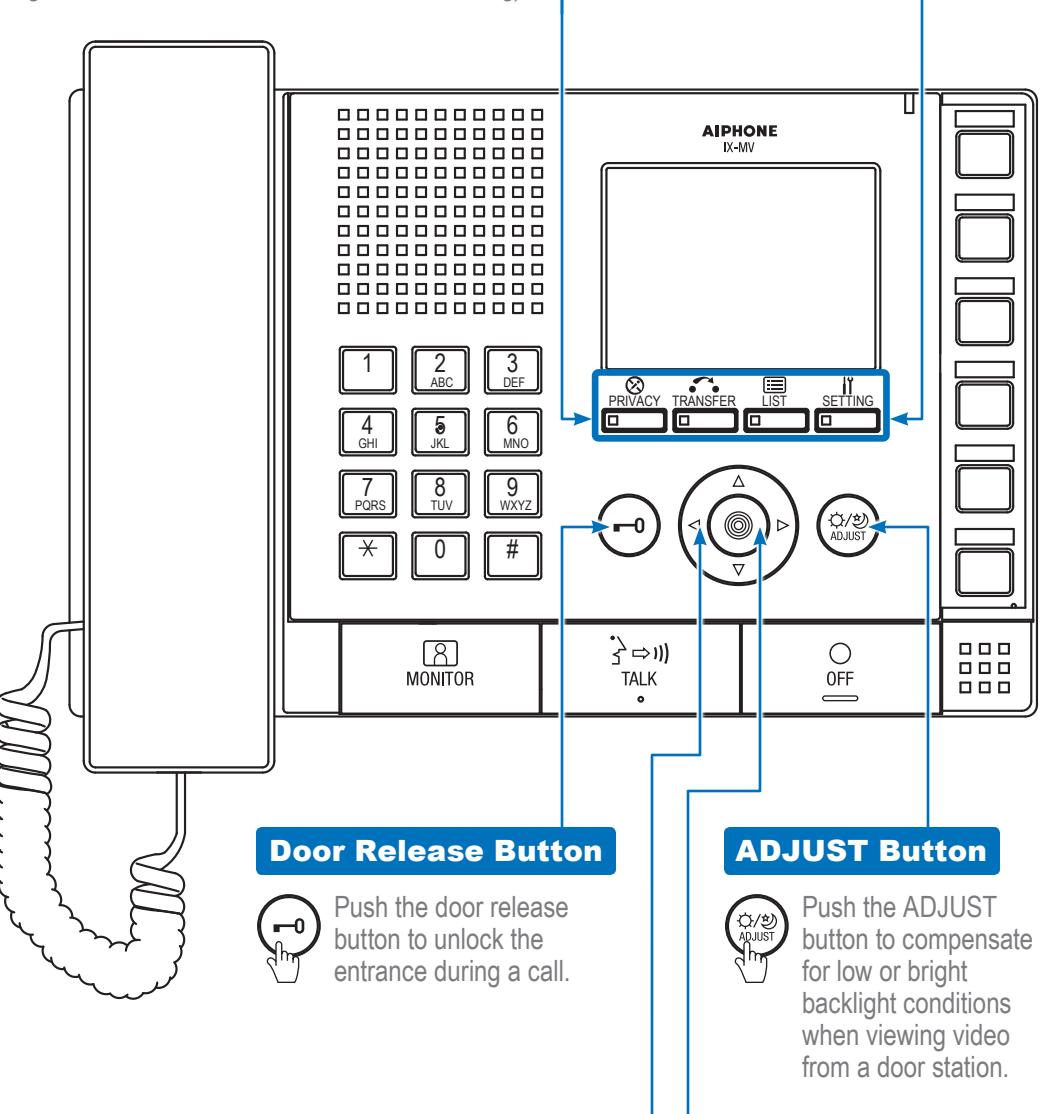
Cursor Control Button
Push , , , or to control the cursor when
making menu selections.
Push the enter
button to make a
menu selection.
Enter Button
This operation guide describes the basic functions of your IX Series Master Station
For a complete operation manual (5 MB), scan QR code or use link to download it from the manufacturer's website: www.aiphone.com/ix-mv_op-man
AIPHONE® IX-MV Master Station
Cursor Control and Enter Buttons

respond to an incoming
search for the station
page* Hang up the handset
or group using the keypad
buttons or the LIST button.
Once selected, pick up the
handset to establish the call.
to end a call. To make a call,
See "IX-MV Operation Guide | 1 of 2" to read how the cursor control and enter buttons operate.

Push a speed dial button to call or page the station or group programmed for each corresponding button. To program speed dial options and their priority levels, use the SETTING button.
Name Card and Cover
When a station or group is programmed for a speed dial function, fill out the name card with the corresponding name or number and place it under the transparent cover for quick reference.
Microphone
OFF Button
Push the OFF button to end a call (this does not turn off the
station). If in MONITOR mode, push the OFF button to stop monitoring. If receiving a page, push the OFF button to stop the page from going to your specific master station.
TALK Button
Push the TALK button to answer an incoming call or respond to an
incoming page* Once answered, the conversation becomes hands-free. To make a call, search for the station or group using the keypad buttons or the LIST button. Once selected, push the TALK button to establish the call.
Speaker LCD Screen Status LED 0000000000 AIPHONE IX-MV 0000000000 00000000000 00000000000 00000000000 _____ 00000000000 00000000000 00000000000 00000000000 3 DEF 6 MNO 4 9 wxyz X 0 # MONITOR . } ⇒1)) OFF TAI K MONITOR Button Keypad Buttons 8 MONITOR 3 DEF Վհու Push the LIST button and 6 VINC use the cursor control and enter buttons to select Handset a desired station. Once selected, push the Pick up the handset to MONITOR button to begin answer an incoming call or
Use the keypad buttons to search
for a station or group by number.
To search by name, push the LIST
button and use the cursor control
and enter buttons to select a
search option. Once selected.
use the keypad buttons to type
the name of the station or group.
*Lifting the handset or pushing the TALK button during a paging announcement will cancel/stop the page throughout the system. This includes any emergency paging notifications or alerts.
monitoring activity where
the station is located.